When you're developing games or editing videos, there are moments when you think, "I just need a quick sound effect." Free asset libraries are an option, but finding something that matches your exact vision can take more time than expected.
"Wouldn't it be great if I could just make sound effects myself, quickly and easily?" That thought led me to build a browser-based tool for generating sound effects on the fly.
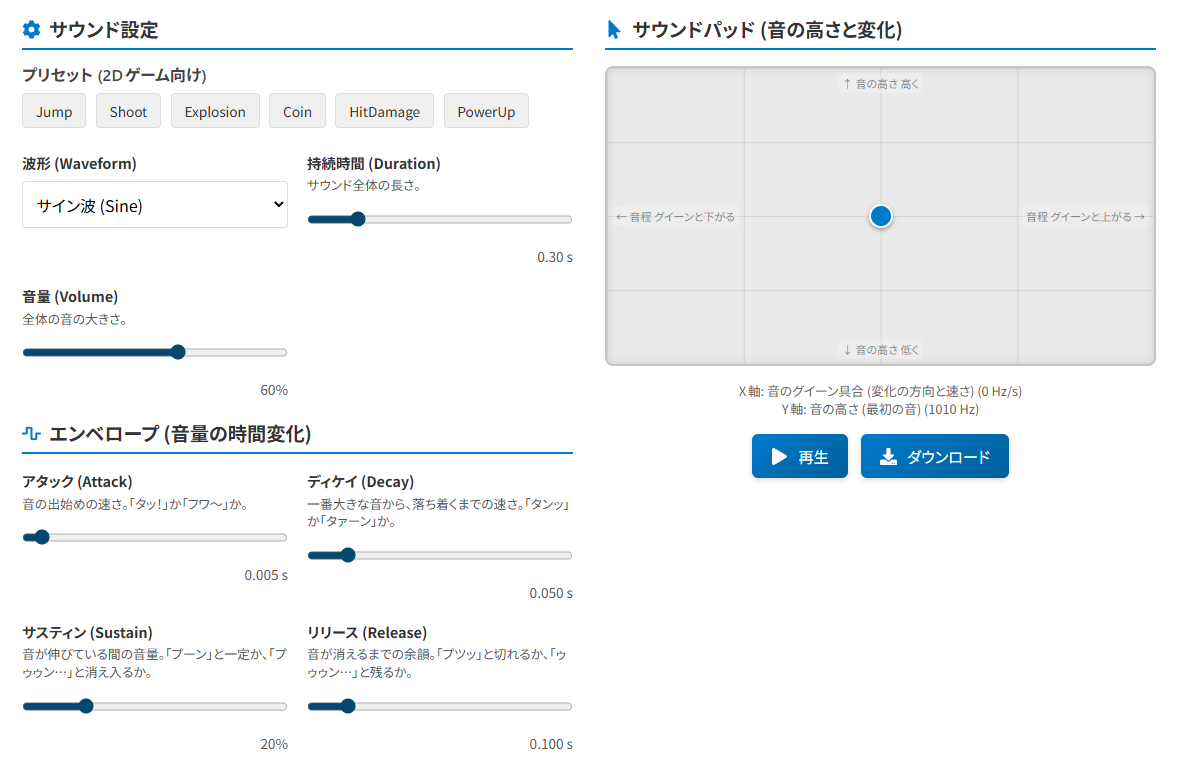
Just drag on the XY pad with your mouse to intuitively adjust pitch and sound variation. Created sounds can be downloaded as WAV files, and commercial use is allowed.
Why I Needed Sound Effects
When prototyping a game, you inevitably need little sound effects like "jump sounds" or "item pickup sounds." Free asset sites are fine, but finding the right match for what you have in mind can eat up valuable time.
"It would be so convenient if I could just whip them up myself" -- and with that, I built a browser-based sound effect generator.
What Is This Tool?

It's a browser-based sound effect creation tool. Just drag on the XY pad with your mouse to intuitively adjust pitch and sound variation.
Beyond basic waveform, duration, and volume controls, you can also fine-tune the envelope (how volume changes over time) and pitch slide (how pitch changes), enabling a wide variety of sounds.
Presets for common retro 2D game sound effects are included, so you can start creating sounds immediately -- no sound design expertise needed.
Features
- Real-time pitch and pitch variation adjustment via XY pad (mouse or touch)
- Freely customizable waveform selection (sine, square, etc.), duration, volume, and ADSR envelope
- Built-in 2D game sound effect presets: Jump, Shoot, Explosion, and more
- Save created sounds as WAV files
- Free for both personal and commercial use
- Runs entirely in the browser -- no software installation required
How to Use It
The basic workflow is 3 steps:
- Create the basic sound
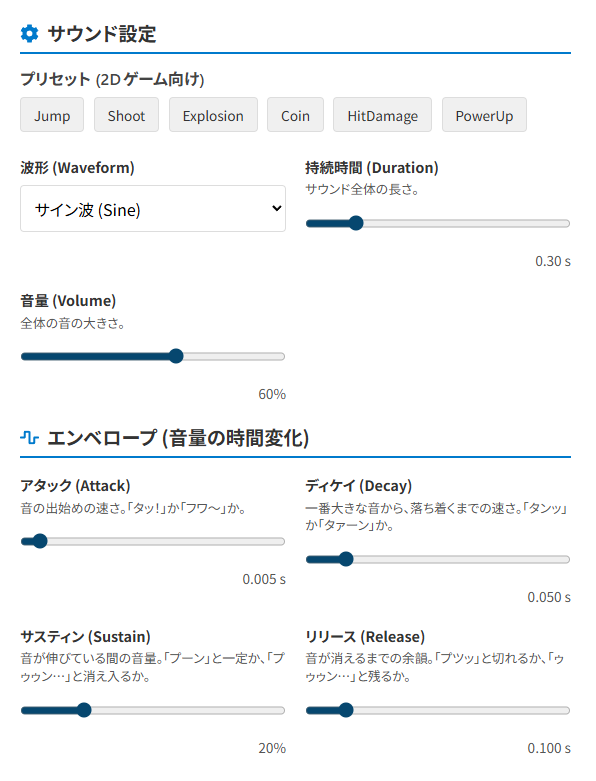
Use the "Sound Settings" and "Envelope" controls on the left to define the foundation of your sound. Choose a waveform, set the duration and volume. Then adjust the Attack (how quickly the sound starts), Decay (transition from peak to sustained volume), Sustain (the sustained volume level), and Release (the fadeout after the sound ends).
Tip: Setting each envelope time shorter than the overall sound duration will help you get the sound you're going for.
- Adjust the sound with the Sound Pad

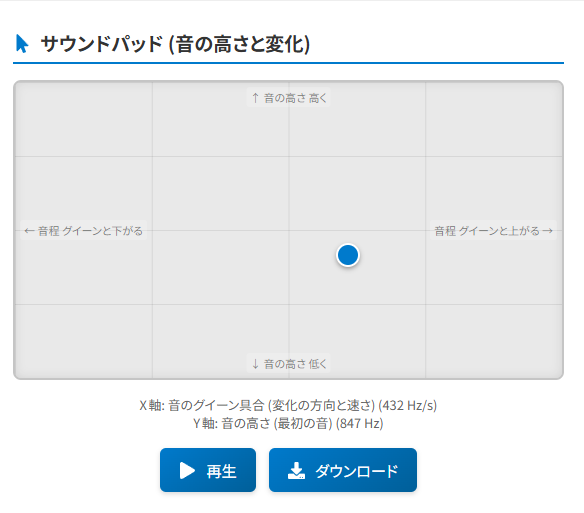
Use the "Sound Pad" on the right to adjust pitch and variation. Drag your mouse or finger across the pad -- the cursor's vertical position (Y-axis) controls pitch, while horizontal position (X-axis) controls pitch change. Experiment to discover interesting sounds.
- Play & Download
Click "Play" to preview your creation. Once you're satisfied, click "Download" to save it as a WAV file.
Starting from a preset and fine-tuning the parameters is also a great approach.
Tips for Sound Adjustment
Here are some tips for creating the sound effects you have in mind:
- Using the XY Pad:
- Y-axis (vertical): Controls the base pitch. Higher position = higher pitch, lower position = lower pitch.
- X-axis (horizontal): Controls pitch change while the sound plays. Moving left lowers the pitch from the starting note; moving right raises it. Near the center, pitch change is minimal.
- Shaping the sound with Envelope (ADSR):
- Attack: Short = crisp, punchy sound; Long = soft, gradual onset.
- Decay & Sustain: Short decay with low sustain = quick, decaying sound; Long decay with high sustain = sustained, ringing sound.
- Release: Short = abrupt cutoff; Long = lingering fadeout.
- Waveform Types:
- Sine: Smooth, soft tone. Great for whistles and "pew" sounds.
- Square: Chiptune-style sound. Perfect for retro game sound effects.
- Sawtooth: Harsh, overtone-rich buzzing sound. Good as the core of explosion effects.
- Triangle: Slightly harder than sine but softer than square -- a nice middle ground.
Mix and match parameters to discover your own original sounds.
Runs Entirely in the Browser
This tool is designed so that all processing happens entirely in the browser. No special software installation is needed.
Sound generation uses the Web Audio API built into your browser. Real-time sound manipulation and WAV file export are all performed within the browser.