Thick textbooks, long online courses -- we've all started learning something new only to struggle to see it through to the end. When you can't see your daily progress, it's hard to stay motivated.
That's where an analog "progress checksheet" can be surprisingly effective. By printing it on paper and physically checking off items with a pen, you get that tangible feeling of "I worked hard today!" and "Almost there!"
So I built the "Progress Checksheet Maker" -- a browser tool that lets you create and print checksheets with ease.
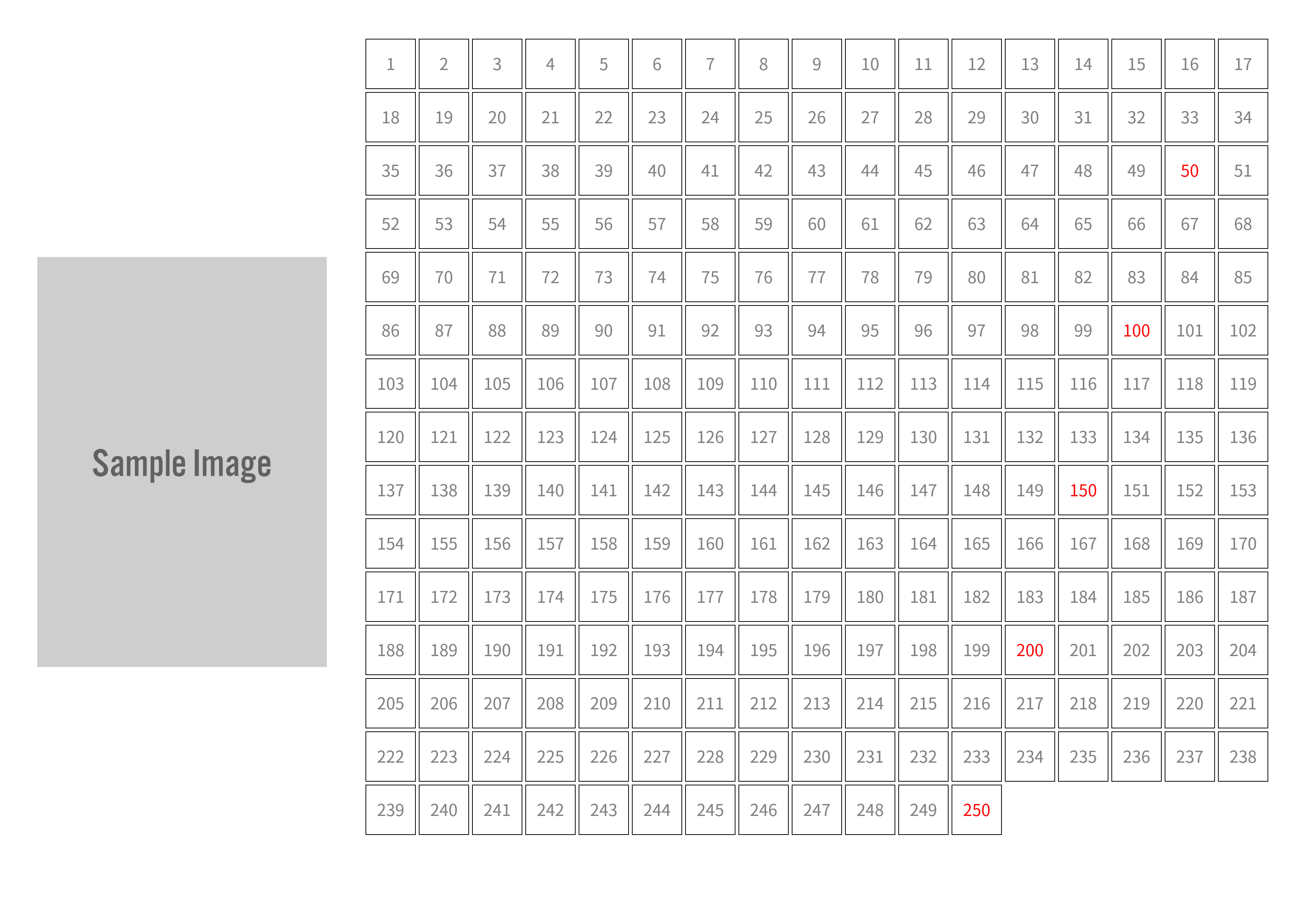
It's useful for all kinds of goals -- studying for certification exams, tracking reading progress, managing online course completion, and more.
The Struggle to Stay Motivated

When working through textbooks, workbooks, or online courses, it's tough to stay motivated when you can't see your progress over time.
There are digital tools for tracking progress, but the analog act of "printing it on paper and checking things off with a pen" can surprisingly boost your sense of accomplishment and motivation to keep learning.
That's why I created this tool -- just enter a cover image and start/end page numbers to automatically generate an A4 landscape checksheet.
Features
- Create checksheets easily with just an image and page numbers
- Set any image as the cover -- a textbook cover, course thumbnail, etc. (or go without an image)
- Specify start and end pages to create a checksheet for just the range you need
- Optimized for A4 landscape printing (3508x2480 pixels)
- Drag & drop to set the cover image easily
- All image processing happens in the browser -- no data is sent to a server
- Checkbox grid size and count are automatically optimized based on total page count
- Download the generated checksheet as a PNG image instantly
- Physically checking off items helps you feel your progress and stay motivated
How to Use
The basic flow is three steps:
- Select a cover image (optional)
Drag & drop an image file (like a textbook cover) or click the area to select one. It's fine to skip this step.
- Enter page numbers
Enter the "Start page" and "End page." For example, to track pages 10 through 150, enter "10" for the start and "150" for the end. The preview updates automatically.
- Download the image
Just click the "Download Image" button. A PNG image will be downloaded, ready to print.
Ideas for Use
Printing the checksheet and checking off items with a pen has several benefits:
- Checking off items one by one gives you a visible sense of progress and accomplishment
- Knowing "I've come this far" or "just a little more to go" provides concrete motivation to keep learning
- Posting the sheet on a wall or keeping it in a planner keeps your learning goals visible, helping build habits
- Use task counts instead of page numbers to create checksheets for 30-day challenges and similar goals
- Recording progress with pen and paper can help improve focus and reduce digital fatigue
It works for all kinds of things -- managing children's workbook progress, tracking hobby projects like knitting or crafts, logging long TV series, and more.
Runs Entirely in Your Browser
This tool runs entirely in your browser. No special software installation is required.
Cover image processing and checksheet rendering all happen within the browser. Your selected image data is never sent to any external server, so you can use it with peace of mind.