Creating color variations for characters is surprisingly tedious. When you think "what would this character look like with different hair color?", you have to duplicate layers, swap colors part by part, and repeat the whole process over and over.
You could apply a global hue/saturation adjustment, but that changes skin tones and linework too, so it doesn't work for purely comparing color schemes. It's hard to meet that specific need of "keep the skin and linework as-is, just change the clothes and hair."
That's why I built a tool that lets you load an image in your browser, lock the colors you want to keep, and generate new color patterns with a single click.

The Hassle of Creating Color Patterns

After finishing an illustration, it's common to wonder "what would it look like in different colors?" But duplicating layers and swapping colors part by part is honestly a chore.
Applying a global color adjustment is another option, but it changes skin tones and linework too, defeating the purpose of a pure color comparison. Even when you just want to change the clothes and hair while keeping skin and linework intact, doing it manually is time-consuming.
To solve this problem, I built this tool. It generates color patterns with a single click, and sometimes you'll stumble upon unexpectedly interesting color combinations.
What Is This Tool?
It's a browser-based tool that lets you upload an illustration and generate color patterns with a single click. Its standout feature is the ability to lock colors you don't want to change (skin, linework, etc.) and exclude colors you don't need (background, etc.).
This means you can keep the character's skin and hair colors untouched while only changing the clothing and accessory colors. You can try patterns based on color theory or discover unexpected combinations through random generation.
Features
- Analyzes illustrations using a perceptually uniform color space (CIELAB) to extract key colors
- Automatic linework detection for easily locking outline colors
- Click on the image to lock colors you want to keep and exclude colors you don't need
- Multiple palette generation modes including random exploration, color theory, pastel, and more
- Real-time preview of generated color schemes
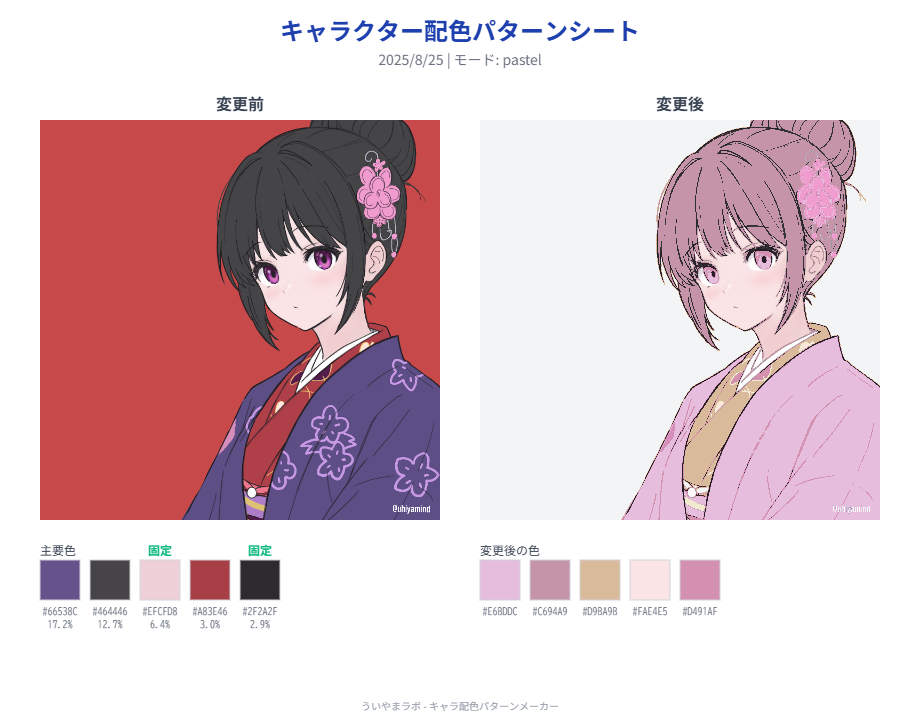
- Download color pattern sheets as PNG images showing before-and-after illustrations with key color codes
- All processing happens within the browser - illustration data is never sent externally
- Simple drag-and-drop interface
How to Use

The basic workflow is 3 steps.
1. Upload Your Image

Drag and drop the illustration you want to recolor onto the left side of the screen, or click to select a file. Character illustrations with transparent backgrounds work best.
2. Lock and Exclude Colors
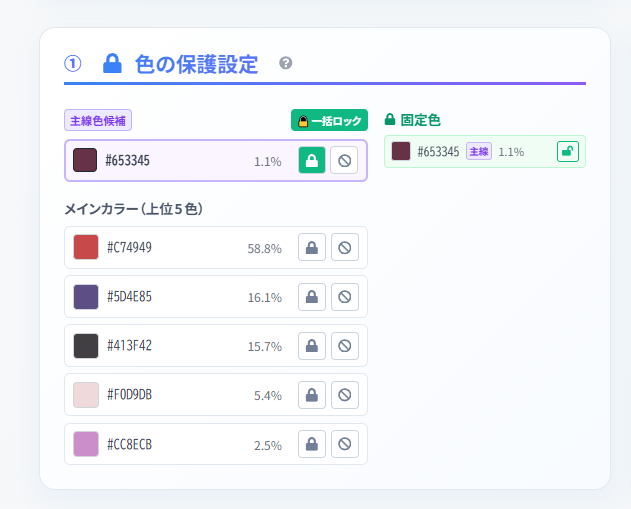
Once the image is analyzed, set which colors you want to keep unchanged. The most intuitive approach is to click directly on the original image to "lock" specific colors.
Start by clicking on skin and hair colors in the preview to lock them. Then exclude background colors. Finally, locking the auto-detected linework color will improve accuracy.
3. Generate and Download Color Patterns
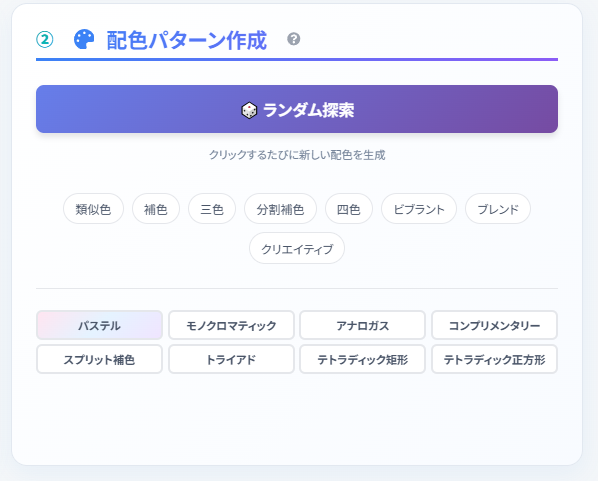
Click "Random Exploration" or any color pattern button to transform all colors except the locked and excluded ones into a new scheme. Clicking the same button repeatedly generates different patterns each time. When you find a color scheme you like, save it with the "Download Color Sheet" button.
Palette Generation Modes
Multiple modes are available so you can try a wide variety of color patterns.
- Random Exploration: Each click suggests an entirely new color combination. You might discover something unexpected.
- Color Theory Mode: Generates palettes based on color theory principles like analogous and complementary colors. Results feel cohesive yet fresh.
- Pastel: Transforms the entire palette into soft, gentle tones. Great for achieving a dreamy, cute aesthetic.
- Vibrant: Boosts saturation and brightness for vivid, lively color schemes. Works well for pop-style, energetic characters.
- Others: Try "Blend" mode for mixed colors, "Creative" mode for unconventional combinations, and more.
Using Color Pattern Sheets


When you find a color scheme you like, press the "Download Color Sheet" button.
The downloadable color pattern sheet lets you compare before-and-after illustrations at a glance, complete with key color codes.
- As design reference: Use as comparison materials when proposing new color schemes to your team or clients.
- Social media sharing: Perfect for asking followers "which color scheme do you prefer?"
- Self-review: By comparing different patterns side by side, you can discover your own color preferences and new possibilities.
Secure Browser-Based Processing
This tool is designed with privacy as the top priority. From image uploading to color analysis, palette generation, and image downloading, all processing happens entirely within your browser.
Your illustration data is never sent to or stored on any external server. Once the page is loaded, basic functionality even works offline. You can safely use it with unpublished work.