Is your website loading slowly? One common culprit is large web font files. Japanese fonts in particular contain an enormous number of characters, leading to massive file sizes. In this article, I'll walk you through subsetting the popular Japanese font "Noto Sans JP" -- extracting only the characters you actually need to dramatically reduce file size and improve page load speed.
While there are many tools available for this task, I initially tried "Subset Font Maker" but encountered rendering issues in my environment. Ultimately, I used the Python library "FontTools" to subset Noto Sans JP into WOFF2 format while preserving all OTF layout data (kerning, ligatures, and other typographic features), successfully reducing the file size by over 50% and improving load times. Here's a detailed record of the steps and key considerations.
In this article
- What is font subsetting, and why does it help page speed?
- The pitfall: How Subset Font Maker dropped OTF data and broke the layout
- The solution: Step-by-step subsetting with FontTools
- Results: The impact of FontTools subsetting on page speed
1. What Is Font Subsetting, and Why Does It Help Page Speed?
Font subsetting is the process of extracting only the characters your website actually uses from a font file, removing unnecessary character data to reduce file size. The reasoning is simple: "Why load every obscure kanji and special symbol when you only use a fraction of them? Keep just the characters you need, and your site will load much faster!"
"Noto Sans JP", a widely-used Japanese font also available on Google Fonts, is a high-quality typeface that covers a vast number of characters (hiragana, katakana, common kanji, name kanji, symbols, and more).
Noto Sans Japanese (Google Fonts)
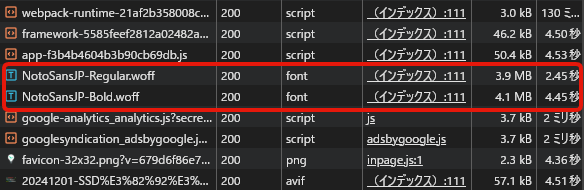
Because of this extensive coverage, when you download and use it as a web font (e.g., in WOFF format), even just the Regular and Bold weights can weigh in at roughly 4MB each. That means users have to download a huge amount of data every time they visit a page, creating a significant bottleneck for display speed.
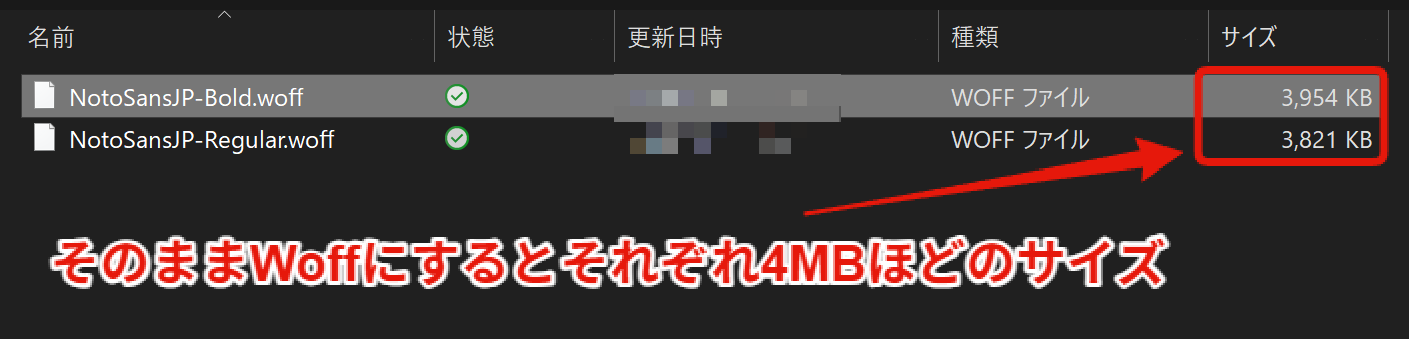
(The font files before subsetting -- notice how large they are.)
This is exactly why subsetting these massive font files is so important.
2. The Pitfall: How Subset Font Maker Dropped OTF Data and Broke the Layout
When researching font subsetting, you'll frequently find recommendations for a GUI tool called "Subset Font Maker." Following several tutorial guides, I used this tool along with "WOFF Converter" to create a subset WOFF font from Noto Sans JP (TTF format).
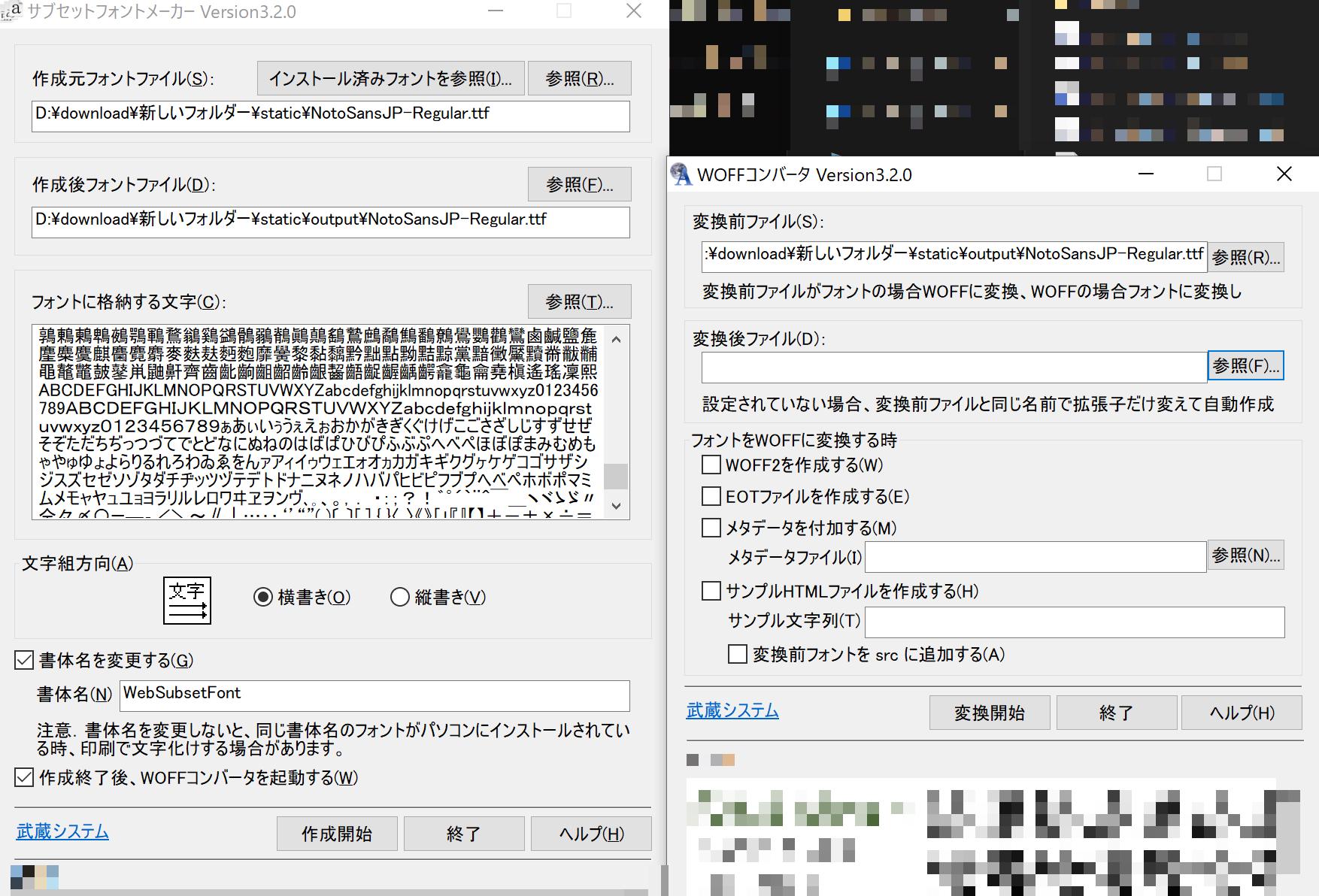
However, when I applied the generated font to my site, unexpected layout issues appeared.
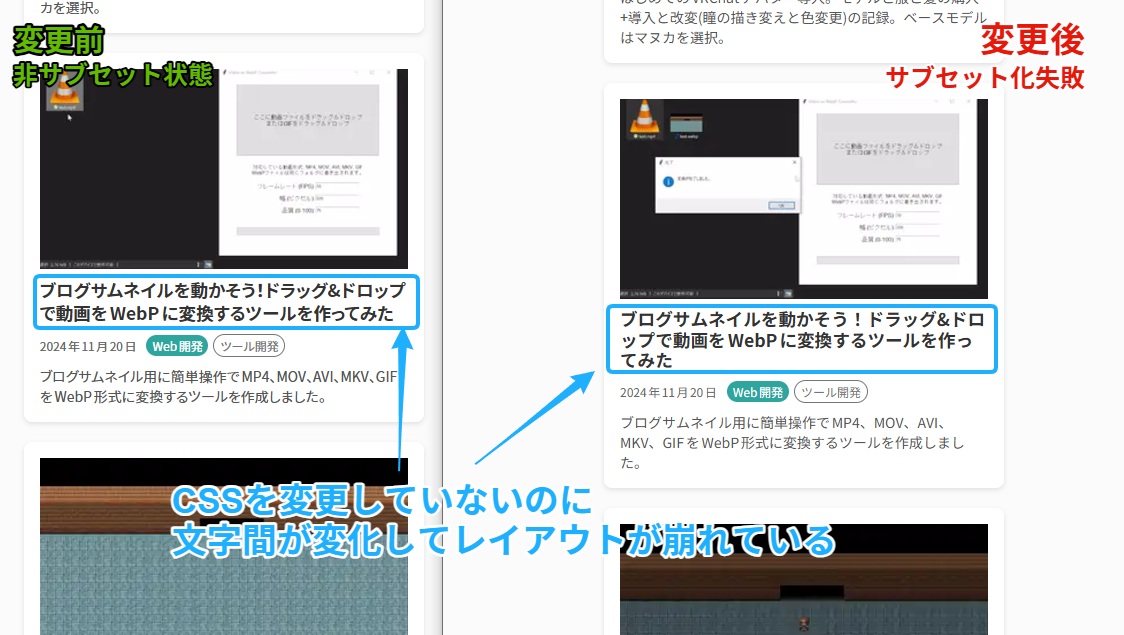
(Left: original rendering. Right: after conversion with Subset Font Maker. Notice how the character spacing in the article title is unnaturally wide.)
After investigating the cause, it turned out that Subset Font Maker had stripped important OTF (OpenType Font) data during the conversion process -- specifically the information needed for character spacing adjustments (kerning, pair kerning) stored in tables like GPOS.
OTF data does more than define character shapes; it contains critical information for fine-tuning the visual appearance of text, such as automatically adjusting spacing between characters, or substituting specific character combinations with ligatures (GSUB table). Without this data, character spacing reverts to default values, causing the layout to break.
There's no point in reducing file size if the visual quality suffers. So I searched for a tool that could perform high-precision subsetting while preserving OTF data, and that's when I found the Python library "FontTools."
3. The Solution: Step-by-Step Subsetting with FontTools
FontTools is a powerful suite of Python libraries for manipulating font files. It's open source and supports a wide range of advanced operations on TTF and OTF fonts -- subsetting, data editing, format conversion, and more. It's also conveniently usable from the command line.
Here's how to create a Noto Sans JP subset using FontTools:
3-1. Installing FontTools
FontTools is a Python library, so first make sure Python is installed on your system. Once Python is available, run the following pip command in your terminal to install FontTools:
pip install fonttools brotli zopfli
Installing brotli and zopfli alongside FontTools is recommended for WOFF2 support and higher compression ratios (via the --with-zopfli option).
3-2. Running the Subsetting Command
Next, use the pyftsubset command in your terminal to perform the subsetting. Navigate to the directory containing your original Noto Sans JP font file (e.g., NotoSansJP-Regular.ttf) and run the following command. (Adjust filenames and paths to match your environment.)
# Example: Create a subset WOFF2 from NotoSansJP-Regular.ttf
pyftsubset NotoSansJP-Regular.ttf \
  --output-file=NotoSansJP-Regular.woff2 \
  --flavor=woff2 \
  --layout-features='*' \
  --unicodes='U+0020-007E,U+3000-30FF,U+4E00-9FAF,U+FF01-FF60,U+FF65-FF9F' \
  --with-zopfli \
  --verbose
For Bold or other weights, simply change the input and output filenames and run the command again.
Command option breakdown:
-
NotoSansJP-Regular.ttfThe source font file (TTF or OTF) to subset.
-
--output-file=NotoSansJP-Regular.woff2The output filename and path for the subset font.
-
--flavor=woff2Specifies the output format as WOFF2. WOFF2 is optimized for web fonts and provides high compression ratios for smaller file sizes.
-
--layout-features='*'[KEY OPTION] This is what preserves OTF data. Setting
'*'retains all OpenType layout feature information, including kerning and ligatures. This prevents the layout issues that occurred with Subset Font Maker. -
--unicodes='...'[KEY OPTION] Specifies the Unicode ranges of characters to include in the subset. Characters outside these ranges will not be included and won't render properly (appearing as missing glyphs), so configure this carefully. The ranges in the example above cover:
U+0020-007E: Basic ASCII alphanumeric characters and symbolsU+3000-30FF: Full-width space, punctuation, hiragana, katakana, etc.U+4E00-9FAF: CJK Unified Ideographs (covers most commonly used kanji)U+FF01-FF60: Some full-width alphanumeric characters and symbolsU+FF65-FF9F: Half-width katakana
Adjust these ranges based on the characters your site actually uses. For example, add corresponding Unicode ranges if you use specific symbols or less common kanji.
-
--with-zopfliUses Google's Zopfli compression algorithm for even higher WOFF2 compression. Effective for further file size reduction. (Requires the
zopflilibrary.) -
--verboseOutputs detailed logs during the subsetting process. Useful for troubleshooting errors and verifying which data was included or excluded.
3-3. Loading the Generated WOFF2 File via CSS
Once the command completes successfully, a lightweight WOFF2 subset font file will be generated at the specified location. Upload this file to your web server and update your CSS to load it using @font-face rules.
/* Regular weight */
@font-face {
  font-family: 'Noto Sans JP'; /* Specify the font name */
  /* Path to the generated WOFF2 file */
  src: url('/path/to/your/fonts/NotoSansJP-Regular.woff2') format('woff2');
  font-weight: 400; /* or normal */
  font-style: normal;
  /* font-display: swap; controls behavior during font loading. Recommended. */
  font-display: swap;
}

/* Bold weight */
@font-face {
  font-family: 'Noto Sans JP';
  /* Path to the bold WOFF2 file */
  src: url('/path/to/your/fonts/NotoSansJP-Bold.woff2') format('woff2');
  font-weight: 700; /* or bold */
  font-style: normal;
  font-display: swap;
}

/* Add additional weights as needed */

/* Apply the font to body or specific elements */
body {
  font-family: 'Noto Sans JP', sans-serif;
}
Your website will now use the lightweight subset font.
4. Results: The Impact of FontTools Subsetting on Page Speed
Here are the results of subsetting Noto Sans JP with FontTools:
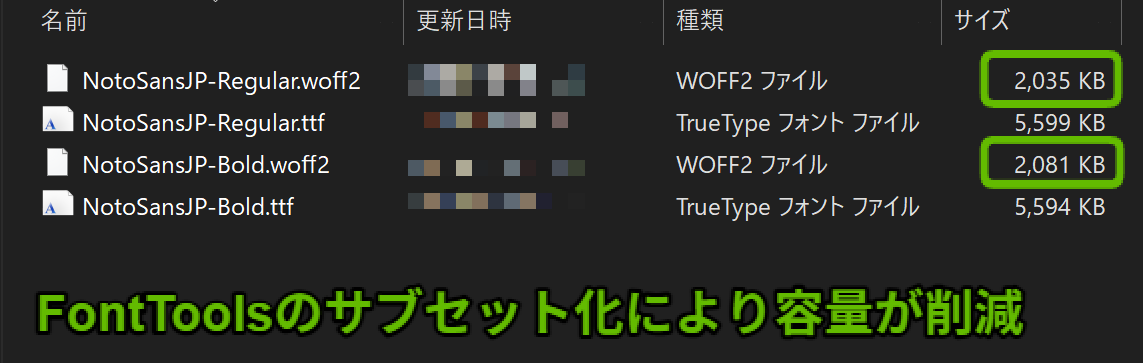
(After subsetting with FontTools -- the file sizes are dramatically reduced!)
This reduction in file size means the browser downloads less data, resulting in faster page load times. The following network analysis shows the font loading times before and after the change.
Before (without subsetting):
After (subsetting with FontTools):
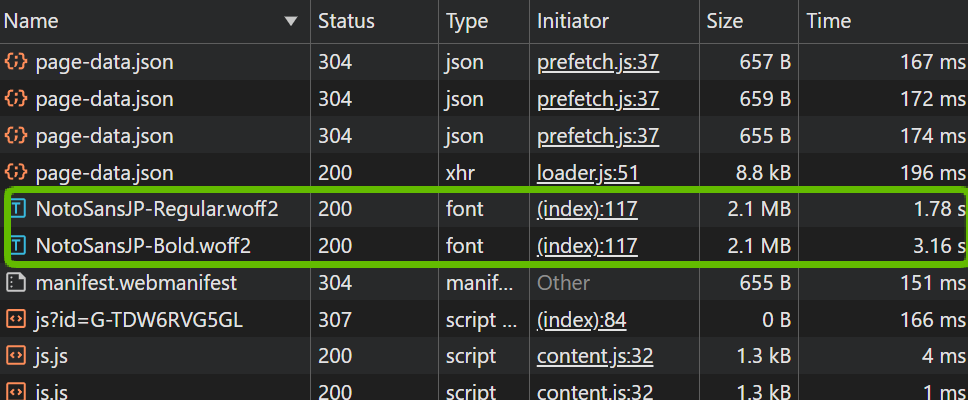
The reduced file size clearly results in shorter loading times. This directly contributes to improved page speed metrics like Core Web Vitals.
While FontTools is a command-line tool, once you understand the commands, it enables high-precision subsetting that preserves OTF data. If you're looking to improve your website's load speed -- especially if large Japanese font files are weighing it down -- I highly recommend giving FontTools subsetting a try. You can achieve even greater size reductions by further narrowing the character ranges in the --unicodes option.