I needed speech bubble images for blog posts and spent way too long browsing stock sites. The tail was facing the wrong way, the line thickness didn't match, or the shape was just slightly off from what I wanted.
Making them from scratch in Photoshop meant fiddling with paths and combining shapes — way too much effort for a simple speech bubble. So I decided to build a browser tool that lets you create them in seconds.

Just drag the edge of the shape to grow a tail, and you can create any speech bubble you want in seconds.
The Hassle of Searching for Speech Bubble Assets
Searching stock sites for speech bubbles comes with several problems. The tail points the wrong direction, the line thickness doesn't match your illustration, or you can't find that specific cloud shape you're looking for.
Trying to make your own in Photoshop — combining ellipses and triangles, merging paths — and you start thinking, "Why am I spending this much time on a single speech bubble?"
That's what motivated me to build a tool that makes creating speech bubbles quick and effortless.
What Is This Tool?

It's a browser-based speech bubble creator. Choose a base shape and line style, then just drag the edge of the preview area. A tail extends from where you drag, and you can freely adjust the tip position.
Your finished speech bubbles can be downloaded as transparent PNG images.
Features
- Drag the edge of the preview to create and adjust tails wherever you want
- Customize shape (ellipse, rectangle, cloud, spiky), line thickness, and color
- One-click presets like "comic style" and "thought bubble"
- Choose between standard (1x) and high-resolution (2x) export as transparent PNG
- Free for personal and commercial use (no credit required)
- Touch support for smartphones and tablets
How to Use
The basic workflow is three steps.
- Adjust the base shape
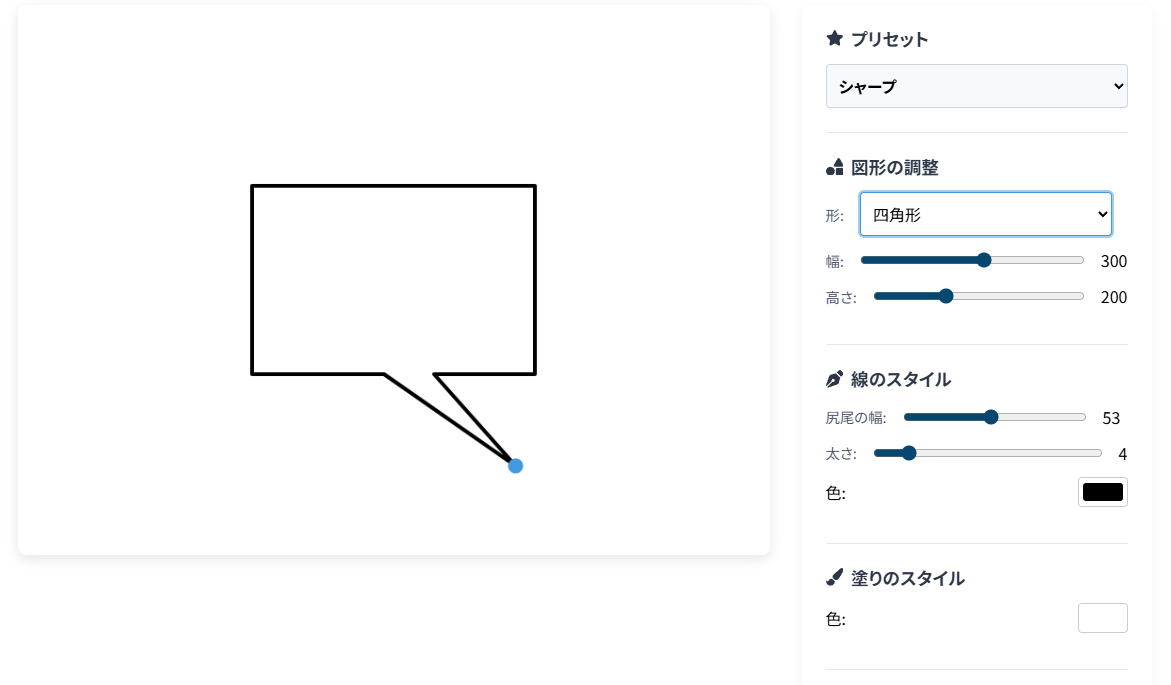
Use the settings panel on the right to set the shape and line style. Presets make this easy, but you can also fine-tune width, height, line thickness, and more.

- Create and adjust the tail
In the preview area on the left, click and drag the edge of the shape. A tail extends from that point — use the blue handle to adjust the tip position.
- Download
In the "Export" section, choose a resolution (1x/2x) and click the "Download PNG" button. Done!
When Can You Use It?
Here are some common use cases:
- Blog and website images: Perfect for adding dialogue to illustrations or photos.
- YouTube thumbnails and video captions: Great for character dialogue effects in game commentaries and tutorials.
- Social media posts: Adding a speech bubble to an image instantly makes your post more engaging.
Conclusion
I got tired of the hassle of searching for or hand-making speech bubbles, so I built a tool where you just drag to create them. All speech bubbles you make are free for personal and commercial use. I'd love it if you find it useful for your blog, videos, social media, and more.