Progress Checksheet Maker
Generate printable progress checksheets by choosing a cover and page range. Useful for tracking books or online courses on paper.
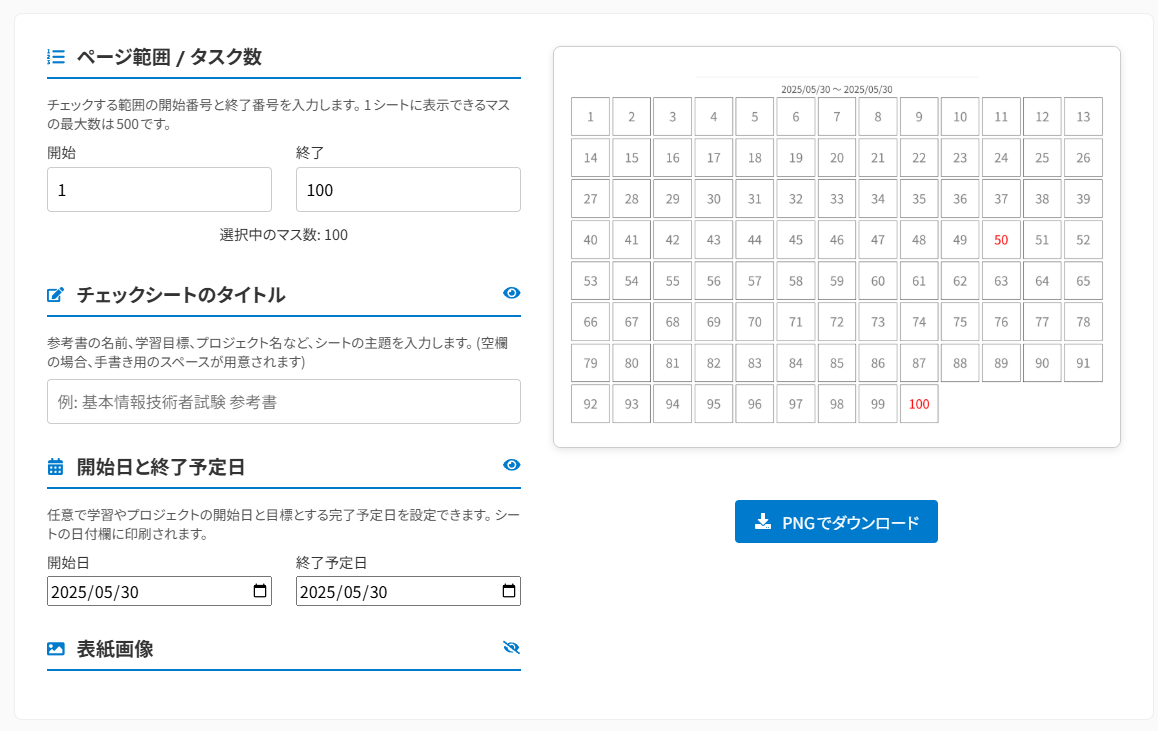
Set the sheet orientation (portrait/landscape) and page range. Supports up to 1,000 cells.
Enter a title and upload a cover image. Leave blank and the output will include a handwriting space.
Check the preview on the left, then save and print the image with the 'Download PNG' button.
Choose the sheet orientation. Landscape is recommended when using a cover image.
Enter the start and end numbers for the range you want to track. (Max 1,000 cells)
E.g. textbook name or goal. Leave blank for a handwriting space.
Processed locally. Images are never uploaded to a server. A sample image is used if none is set.
Drag & drop or click
Progress Checksheet Printer
Available on App Store. Easily create numbered checksheets. Post on your wall to visualize progress and stay motivated.
Create a Progress Sheet in 3 Easy Steps!
Set layout and page range
Choose the sheet orientation (portrait/landscape) and enter the start and end page numbers. Supports up to 1,000 cells.
Add title and image
Enter a textbook name or goal as the title and upload a cover image. Leave blank and the output will include a handwriting space.
Download and print
Check the preview and click 'Download PNG'. The image is saved as a PNG, so all you have to do is print it!
Here Are Some Ways to Use It!
- Tracking progress through a thick exam prep textbook
- Video-watching status for an online course
- Reading progress for a long novel or manga series
- Daily workout or study habit tracker
- Game quest or achievement completion tracker
- Completing a programming tutorial or bootcamp
- A 30-day journaling or challenge goal sheet
- Step-by-step crafting or model-building tracker
- Working through a movie or TV show watchlist
- Vocabulary book memorization progress
- Problem-set repetition tracker (e.g. 2nd pass done)
- Summer homework or workbook completion sheet for kids
- Blog post idea backlog burndown
- Reading through a new technical or instructional book
- Room-by-room deep-cleaning completion checklist
v1.4.0(2025/12/04)
- Unify theme colors for site-wide consistency
- Redesign settings panel (rounded corners, borders, independent style)
- Optimize UI to be more compact
v1.3.0(2025/10/15)
- UI improvement: Major tool layout update
- Improve page count input validation
v1.2.1(2025/08/16)
- Improve tile layout: Implement max tile size limit to display appropriate size (10-column basis) even with few tasks
v1.2.0(2025/07/30)
- Add portrait layout: Implement portrait/landscape layout toggle
- Increase max page count from 500 to 800
v1.1.2(2025/06/24)
- Major UI/UX improvement: Remove date input and show handwriting space only; replace eye icon with checkbox for more intuitive operation
- Enhance preview: Display gray dummy text when title/date is not set for easier usage preview
- Improve date field: Change from slash format to wide band format with 4-digit year support and improved writability
- Performance optimization: Optimize canvas rendering, reduce unnecessary redraws, add debounce for improved responsiveness
v1.1.1(2025/06/07)
- Apply title to download PNG filename when title is provided
- FIXED: Fix grid overlap display issue when changing page range
v1.1.0(2025/05/30)
- UI/UX improvement: Introduce 2-column layout, expand content width, change section heading style, reorder settings with default hidden state, add descriptions and adjust placement, improve page range input UI (side-by-side, cell count display), change visibility toggle to eye icon
- New features & fixes: Title input (default blank), date section (start date, deadline, display format change), handwriting space for empty title/date (underline only), improve grid size calculation (A4 drawing adjustment, min/max cell size), optional cover image (sample when enabled), 500 cell per sheet limit, add date prefix and `_checksheet` suffix to download filename
v1.0.0(2024/02/02)
- Initial release