
Why Reusability Matters
In Unreal Engine (UE) game development, you frequently encounter situations where you want multiple characters or objects to have common functionality.
Implementing such common behaviors individually within each Actor's Blueprint causes these problems:
- Code Duplication: Writing the same logic repeatedly reduces development efficiency.
- Difficult Modifications: Specification changes require modifying all Actor Blueprints, making errors likely.
- Increased Complexity: Individual Blueprints become bloated and hard to manage.
The key to solving these challenges is Blueprint Components.
What is a Blueprint Component?
A Blueprint Component is a module for encapsulating (bundling together) specific functionality or behavior.
The basic object hierarchy in Unreal Engine is based on "Actors," but Actors extend their functionality by attaching multiple Components beyond their own capabilities. For example, StaticMeshComponent provides appearance, and MovementComponent provides movement behavior to Actors.
| Feature | Actor | Component |
|---|---|---|
| Role | Basic unit of objects placed in the world | Module that adds functionality and behavior to Actors |
| Standalone Existence | Possible (can be placed in world) | Not possible (must be attached to an Actor) |
| Reusability | Primarily through inheritance | Primarily through attaching to multiple Actors |
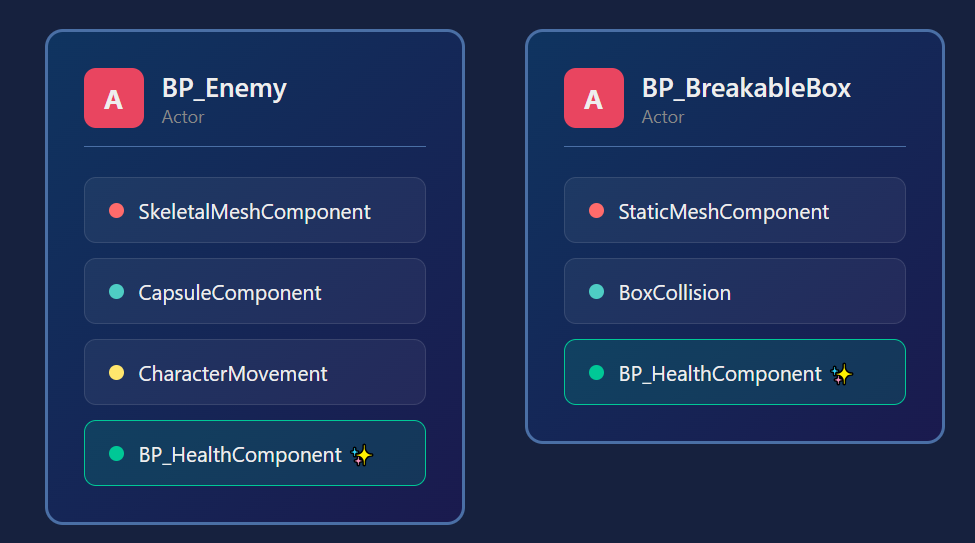
The biggest advantage of Blueprint Components is that once created, they can easily add their behavior to completely different types of Actors, even without inheritance relationships.
Creating a Reusable Health System Component
Here's a concrete example: implementing a "health system" as a Blueprint Component that can be attached to any Actor.
Step 1: Create the Blueprint Component
Right-click in Content Browser, select "Blueprint Class." Choose ActorComponent as parent class and name it BP_HealthComponent.
Choosing Between ActorComponent and SceneComponent
Parent Class Characteristics Use Cases ActorComponent Pure logic without Transform (position/rotation/scale) Health management, inventory, state management SceneComponent Has Transform, placed in world Camera arms, collision, effect spawn points Use
ActorComponentfor logic-only Components like health systems,SceneComponentfor Components that need world position information.
Step 2: Define Variables and Events
Define the data and functionality (behavior) this Component should have.
| Type | Name | Data Type | Description |
|---|---|---|---|
| Variable | MaxHealth | Float | Maximum health (set to Instance Editable) |
| Variable | CurrentHealth | Float | Current health |
| Function | ApplyDamage | Float input (DamageAmount) | Apply damage, reduce health |
| Event | OnHealthChanged | Float output (NewHealth) | Notify when health changes |
| Event | OnDied | None | Notify when health reaches 0 |
Step 3: Implement Damage Processing (ApplyDamage Function)
Within the ApplyDamage function, update CurrentHealth based on received damage and clamp it to not go below 0.
// Inside ApplyDamage function
// 1. Subtract DamageAmount from CurrentHealth
// 2. Clamp result with Max(0, result), set to CurrentHealth
// 3. Call OnHealthChanged Event Dispatcher
// 4. If CurrentHealth is 0 or below, call OnDied Event Dispatcher
Step 4: Attach to Actor and Use
- Open the Blueprint of the Actor you want to have health (e.g.,
BP_Enemy). - From the "Components" panel "Add" button, search for and attach
BP_HealthComponent. - Set
MaxHealthto desired value (e.g., 100.0) in Details panel. - In the Actor Blueprint's Event Graph, bind to
BP_HealthComponent'sOnDiedevent and implement enemy destruction logic (e.g.,Destroy Actor).
Now any Actor can have a common health system just by attaching BP_HealthComponent.
Component Communication Patterns
The most important aspect of making Components reusable is designing them so Components don't directly depend on the Owner Actor or other Components.
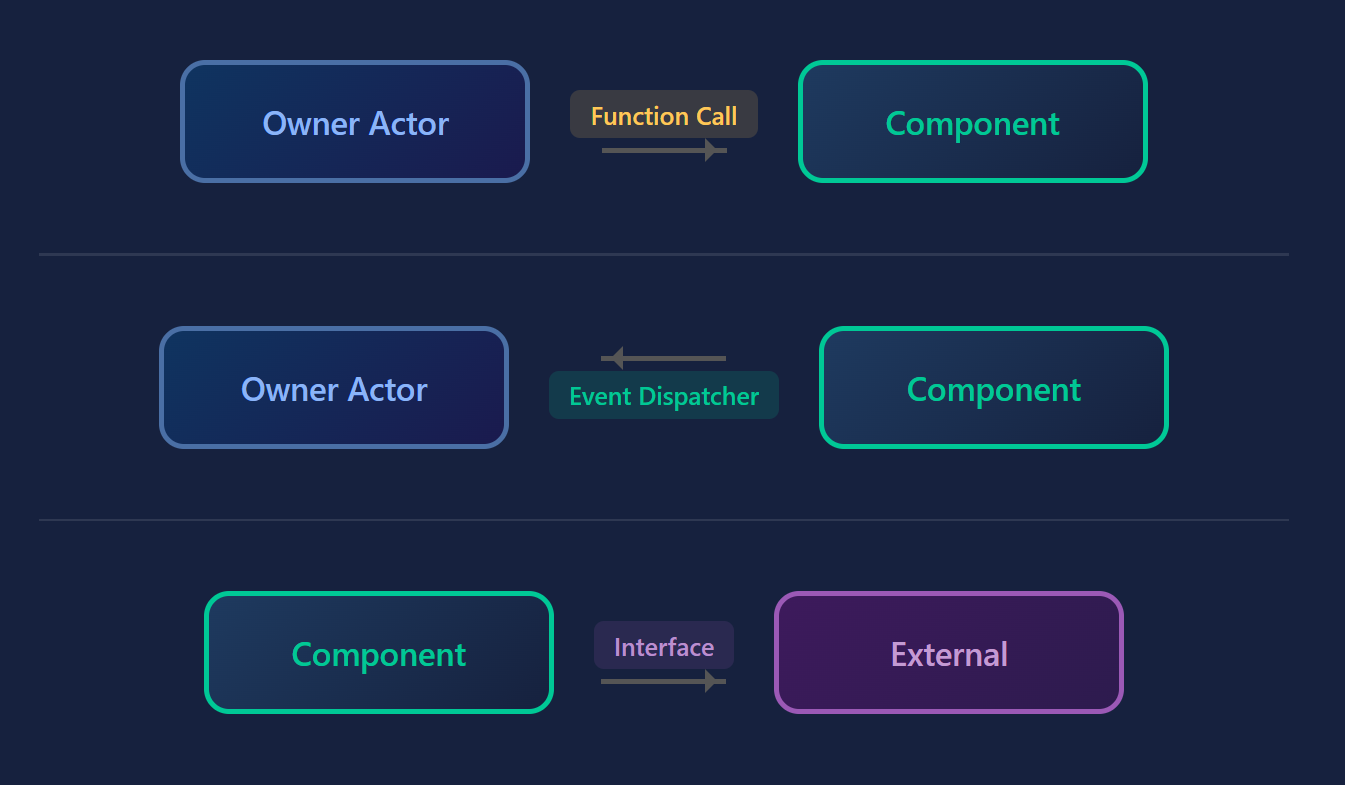
Best Practice: Using Event Dispatcher and Interface
To convey information from Components to Owner Actors or other systems, use Event Dispatchers.
- Component → Owner Actor Notification: As used in the
BP_HealthComponentexample withOnDied, broadcast (notify) events occurring within the Component via Event Dispatcher. The Owner Actor side binds to this event and implements specific processing (death animation, drop item generation, etc.). - Owner Actor → Component Commands: It's fine to call Component functions from Actors (e.g., calling
BP_HealthComponent'sApplyDamagefromBP_Enemy). - Component → External System Commands: When Components need to interact with other Actors or systems, use Blueprint Interfaces. This allows sending generic commands (e.g., "apply damage") without depending on specific Actor classes.
Common Mistake: Direct Casting
Avoid directly casting from Get Owner node to a specific Actor class (e.g., BP_PlayerCharacter) within Components and calling that Actor's specific functions.
// Bad Example: Loses reusability
// Inside Component: Get Owner -> Cast To BP_PlayerCharacter
// This Component becomes usable only with BP_PlayerCharacter
This design makes Components strongly dependent on specific Actors, failing to function when attached to other Actors. To improve reusability, always build logic from the perspective of generic ActorComponent.
Blueprint Component Design Principles
Blueprint Components are one of the most powerful tools for achieving "behavior reusability" in Unreal Engine.
| Key Point | Description |
|---|---|
| Purpose | Encapsulate common functionality and behavior, prevent code duplication, improve maintainability. |
| Design Principle | Design Components to not directly depend on attached Actors or other systems. |
| Communication Method | Use Event Dispatcher for notifications from Components to external, Blueprint Interface for generic commands. |
| Use Cases | Applicable to various common functionality: health systems, inventory management, special movement logic, interaction detection, etc. |
By properly utilizing Blueprint Components, your Unreal Engine project will become more modular and evolve into a flexible structure that can withstand large-scale development. Start by trying to Component-ize simple common functionality.