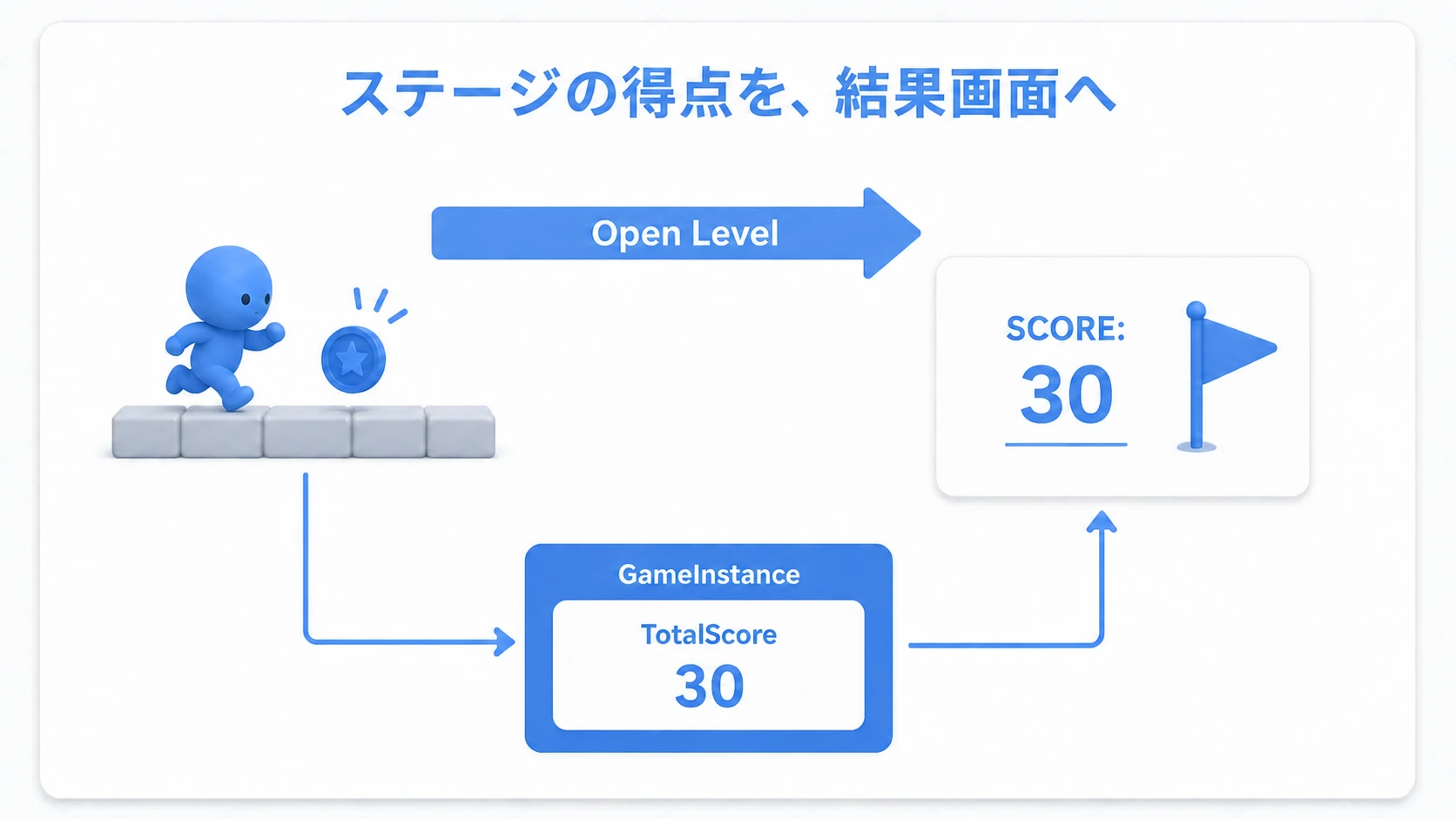
You want killing an enemy to raise the score, and a team reaching 10 points to win. So where do "the rule that 10 points wins", "the team's current score", and "how many I personally killed" belong?
UE has a Game Framework that divides the foundational roles of a game. The ones easiest to confuse, because their names are similar, are GameMode, GameState, and PlayerState. Splitting them into the rule-maker, the overall record, and the individual record makes their uses clear.
This article sorts out the three differences using score as the example, then sets up your own classes in Blueprint and reads a stored value back. How information gets shared in online play is explained through the same division of roles.

What You'll Learn
- What belongs in GameMode, GameState, and PlayerState
- The difference in what GameState and PlayerState hold
- What server, client, and replication mean
- Setting up all three classes in Blueprint and reading a GameState value
- Start by splitting into rules, overall, and individual
- GameMode: the referee that decides the rules
- GameState: the board holding overall status
- PlayerState: a results sheet per player
- Online, who decides the outcome?
- How a score reaches someone else's screen
- Hands-On: setting up all three classes in Blueprint
- Bonus: with or without Base, and how long data survives
- Summary
Start by splitting into rules, overall, and individual
Take a team match as the example and you can split it this way. A class is the type for creating an object with a role. A Blueprint Class is one way to author that type yourself. What gets created from that type and actually runs during play is what this article calls an "instance".
| Class | Responsibility | Team-match example |
|---|---|---|
| GameMode | Decides work according to the rules | Award points on a kill; the first team to 10 points wins |
| GameState | The game's overall current status | Red team 3, blue team 2, match in progress |
| PlayerState | Per-player status | Player A has 2 kills, player B has 1 |
"What counts as winning" and "what the score is now" are different pieces of information. The former goes to GameMode, the latter to GameState. "Who scored what within that" goes to PlayerState.

The same thinking applies in single player. That said, you do not have to split every number in a small prototype across three classes. Get a feel for the roles in the first half and adopt them where they help.
GameMode: the referee that decides the rules
GameMode decides how the game proceeds. Beyond being the rulebook, it also acts as the referee applying those rules.
In other engines : Unity and Godot have no standard class in this position. What is usually a hand-written manager script per scene is, in UE, provided from the start as a class tied to the Level .
- Which character to spawn where when a player joins
- Who gets how many points when an enemy is killed
- How to end the match when the win condition is met
None of that is automatically implemented to match your game. For "10 points wins", for instance, you build logic in GameMode that compares against 10 after updating the score and ends the match.
You can choose the default GameMode in the project's "Maps & Modes". To change it for one level, use that level's "World Settings → GameMode Override". The level-side setting takes priority over the project default (see the initial settings article).

GameState: the board holding overall status
GameState collects the game status everyone wants to know. Information that belongs to no single player, such as team scores and match progress, fits here.
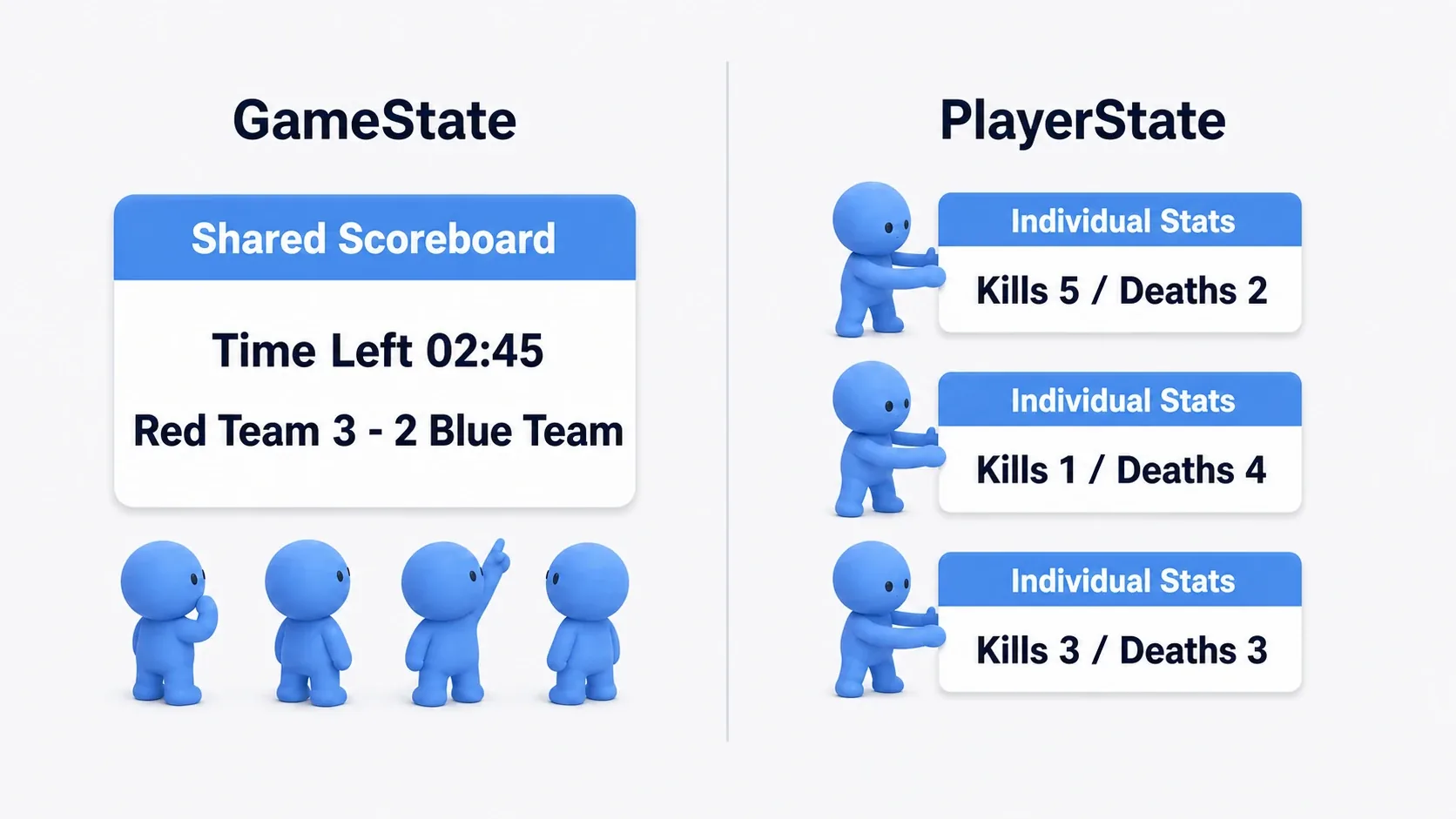
The "board" and "scoreboard" metaphors describe what it holds. Creating a GameState does not by itself display a scoreboard on screen. The UI that shows the numbers reads GameState's values and is built separately.
For custom team scores, add variables like RedTeamScore and BlueTeamScore . A variable is a place to remember a value. Naming one does not implement scoring; something like GameMode updates the value.
PlayerState: a results sheet per player
PlayerState holds each player's name and personal results. It does not mean information private to you; the point is that "whose information it is" is tied to one player . It is also what you use to list other people's names and scores.
GameState's PlayerArray contains references to the participants' PlayerStates. An Array is a container holding multiple values in order, and a reference is "the thing you use to name that target". Walk the list from GameState and you can access each results sheet.
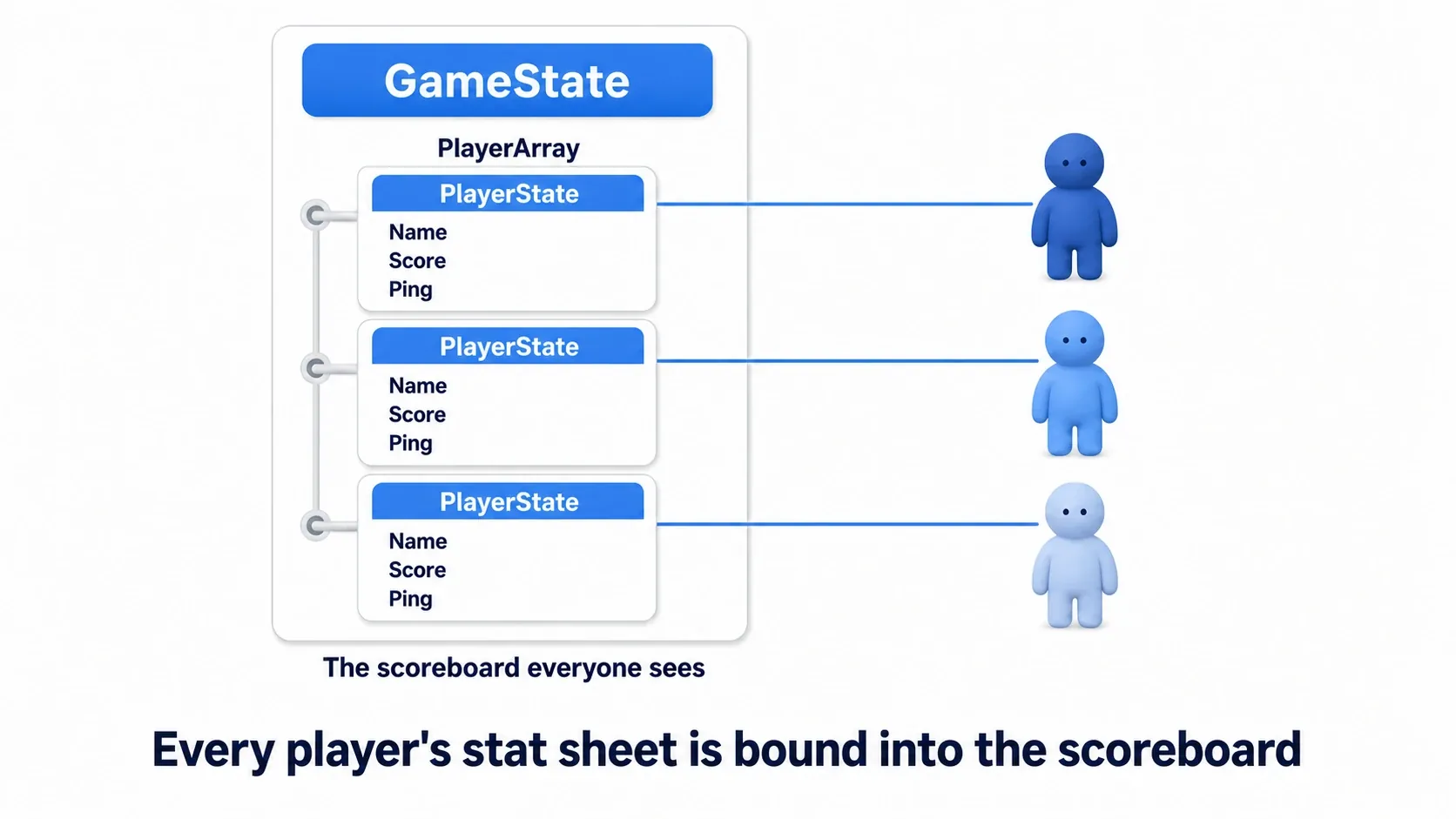
In the diagram, Name is the name, Score is the score, and Ping is a rough measure of network response time. PlayerState has features for names and scores, and you can add things like team number or coins collected for your own game. In a co-op game, for instance, GameState can hold "collected by everyone" while each PlayerState holds "collected by that person".
Keep it separate from the body you control
A Pawn is the body being controlled, and a PlayerController is the role handling the player's input. Character, meant for walking humanoids, is a kind of Pawn.
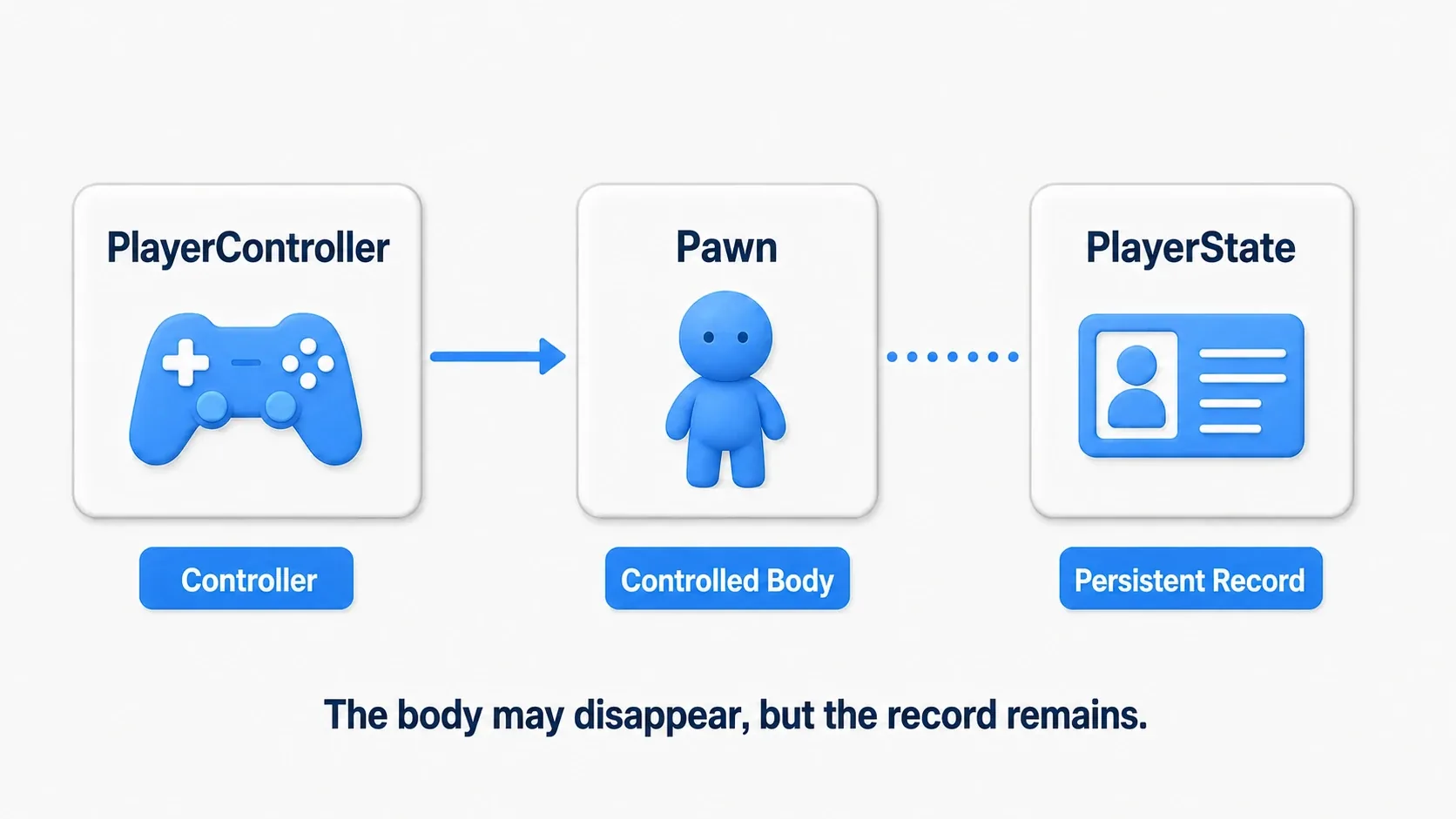
When a downed character is rebuilt during the same match, swapping only the Pawn and keeping the PlayerState carries personal results over. That is why values belonging to the current body, like HP, are separated from scores you want to survive death (see checkpoints and respawn).
Online, who decides the outcome?
In online play, each player runs their own game screen. If everyone decided the outcome from their own screen alone, results would disagree.
So a server manages the game's authoritative state and clients connect to it and play. The host's PC can double as the server, or you can use a dedicated one.

| Class | Server | Connected client |
|---|---|---|
| GameMode | Has the instance that processes rules | Has no such instance |
| GameState | Holds the overall status | Holds the replicated status |
| PlayerState | Holds each player's status | Holds each player's replicated status |
The mechanism that carries server-side values to clients to align state is called replication . GameState and PlayerState support it. However, variables you add yourself are not all shared automatically . Set "Replicated" or "RepNotify" in Blueprint on the variables you want shared.
Because the GameMode instance exists only on the server, calling Get Game Mode from a connected client returns nothing. That is why putting values everyone must see solely in GameMode leaves the display side unable to read them.
In single player, one game does both rule processing and display. There is no external server to connect to, and GameMode exists inside that game.
How a score reaches someone else's screen
Look at "kill an enemy and score" through the connections between roles.
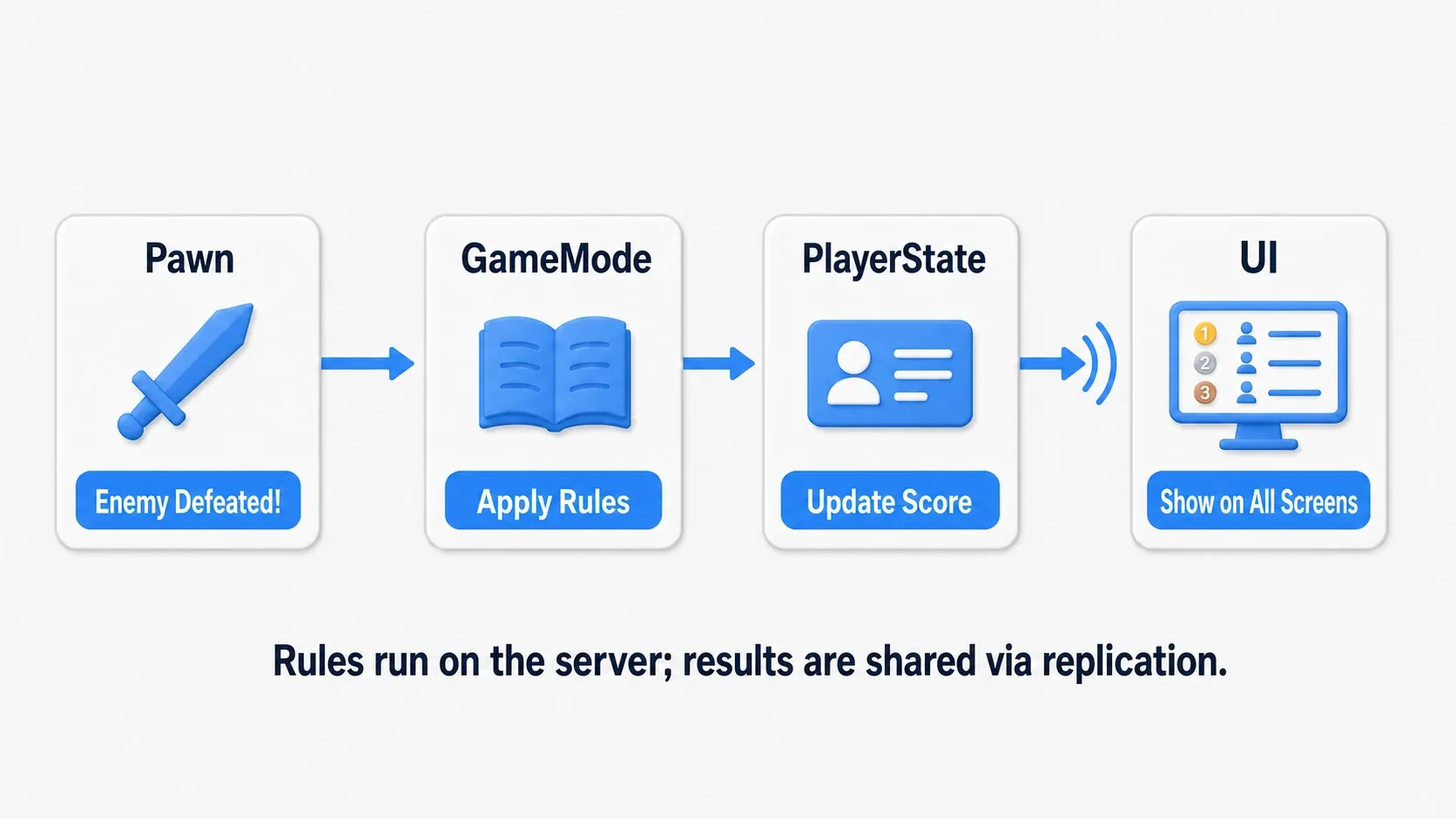
- The server confirms who killed the enemy.
- GameMode decides, per the rules, to award points to that player.
- The relevant PlayerState's individual results are updated. If there is a team score, it is reflected in GameState.
- Changes to values marked for replication travel from server to clients.
- Each screen's UI reads that value and updates the display.
What matters is separating three things: the logic that decides the outcome, the mechanism that shares values, and the logic that shows them . Even replicated, nothing changes on screen without logic that updates the UI. Networking is involved, so screens do not all change at exactly the same instant.
To send input from a client to the server, use mechanisms like RPC, "asking the other side of the game to run something". Networking implementation is covered in Multiplayer and replication basics. Here it is enough to tell where each piece of information belongs.
Hands-On: setting up all three classes in Blueprint
First, in a single-player test, confirm your own GameMode, GameState, and PlayerState are in use . Then read a number stored in GameState with a key press. This is the foundation before building a scoring game.
Save a test level from the Third Person template and set Play settings to "Number of Players: 1" and "Net Mode: Play Standalone". There is no need to test network sync here.
1. Prepare the three Blueprints
Create a practice folder in the Content Browser and prepare the following classes.
| What to create | How |
|---|---|
BP_PracticeGameMode | Duplicate the GameMode the template uses (usually BP_ThirdPersonGameMode) and rename it |
BP_PracticeGameState | Create from "Blueprint Class → All Classes" with GameStateBase as the parent |
BP_PracticePlayerState | Likewise, with PlayerState as the parent |
Duplicate the existing Third Person class for GameMode. That carries over settings the template's controls need, such as "Default Pawn Class". This assumes a template whose parent is GameModeBase. If the parent is GameMode, match the GameState side with GameState as its parent.
In each Blueprint's Event Graph, connect Event BeginPlay → Print String . BeginPlay is the event called when that instance starts play. If the duplicated GameMode already has BeginPlay logic, keep the connections and append to the end.
| Blueprint | Print String's In String |
|---|---|
| BP_PracticeGameMode | [Framework] GameMode ready |
| BP_PracticeGameState | [Framework] GameState ready |
| BP_PracticePlayerState | [Framework] PlayerState ready |
Turn on "Print to Screen" and "Print to Log" and set Duration to 5.0 . Compile and Save (see Print String and Output Log).
2. Register the classes on the GameMode

Open BP_PracticeGameMode and change these two entries in "Class Defaults".
| Entry | Class to specify |
|---|---|
| Game State Class | BP_PracticeGameState |
| Player State Class | BP_PracticePlayerState |
Compile and Save, then set BP_PracticeGameMode in the test level's "World Settings → GameMode Override" and save the level.
You do not drag the three into the level. Once the classes are set, UE creates the instances as play starts and players join. The setting inside GameMode decides "which types to use"; the level-side setting decides "which GameMode this level uses".
3. Play and confirm the three messages
On Play, three ready lines appear. Do not make their order a success condition; just confirm GameMode, GameState, and PlayerState each printed. If you miss them, search the Output Log for [Framework] .
If only GameMode prints, review the two Class Defaults entries. If nothing prints, check the level's GameMode Override, the connection from BeginPlay, and the Print String display settings.
4. Read a number from GameState
Stop Play and add an Integer variable TeamScore to BP_PracticeGameState. Integer is the type for whole numbers such as 0 , 1 , 2 . Compile, set the default to 0 , and save. Since this is single player, do not change Replication.
Open this test level's graph from the level editor's "Blueprints → Open Level Blueprint" and build the following.

- Right-click and place a keyboard
Kevent. - Place
Get Game Stateand createCast To BP_PracticeGameStatefrom its Return Value. Confirm Return Value is connected to the Object input. - Connect K's Pressed to the Cast's white exec input.
- Drag from the Cast's "As BP Practice Game State" and place
Get TeamScore. Connecting that Cast output to Get TeamScore's Target specifies whose value you read. - Call Print String from the Cast's success exec output. Connecting Get TeamScore's value to In String inserts a node converting integer to text.
Get Game State fetches the instance in use in the current level. The Cast confirms that target is a BP_PracticeGameState and makes the TeamScore you added readable. The Cast is not creating a new GameState.
Set Print String the same way as before, with screen and log output on and Duration 5. If nothing appears, call another Print String from Cast Failed printing GameState class mismatch to check whether the fetched type is different.
Compile, Save, Play, click the game window, and press K . If 0 appears, you are reading your GameState's value. Now stop Play, change TeamScore's default to 10 , Play again, and press K. This time it reads 10 .
At this point "create the classes", "register which classes to use", and "read a value from the created instance" are connected. In a real scoring game, the part where you hand-edit the default becomes scoring logic in GameMode or elsewhere.
| Problem | Where to check |
|---|---|
| The Cast fails | The GameMode in use, and its Game State Class |
| Get TeamScore is not found | Whether you searched from the Cast's success result, and whether you compiled |
| Nothing appears when pressing K | Whether input reaches the play window, the white exec wire, Print String settings |
| The old number appears | Whether you stopped Play, changed the default, compiled, saved, and restarted |
| The player stopped moving | Whether the pre-duplication GameMode's Default Pawn Class and Player Controller Class match |
Bonus: with or without Base, and how long data survives
The difference between GameModeBase and GameMode
UE has GameModeBase with the basic features, and GameMode which adds match progression. C++ documentation writes them with a leading A, as AGameModeBase and AGameMode .
| Combination | When to choose it |
|---|---|
| GameModeBase + GameStateBase | A simple starting point where you build the progression you need |
| GameMode + GameState | Using the standard match flow of waiting, in progress, finished |
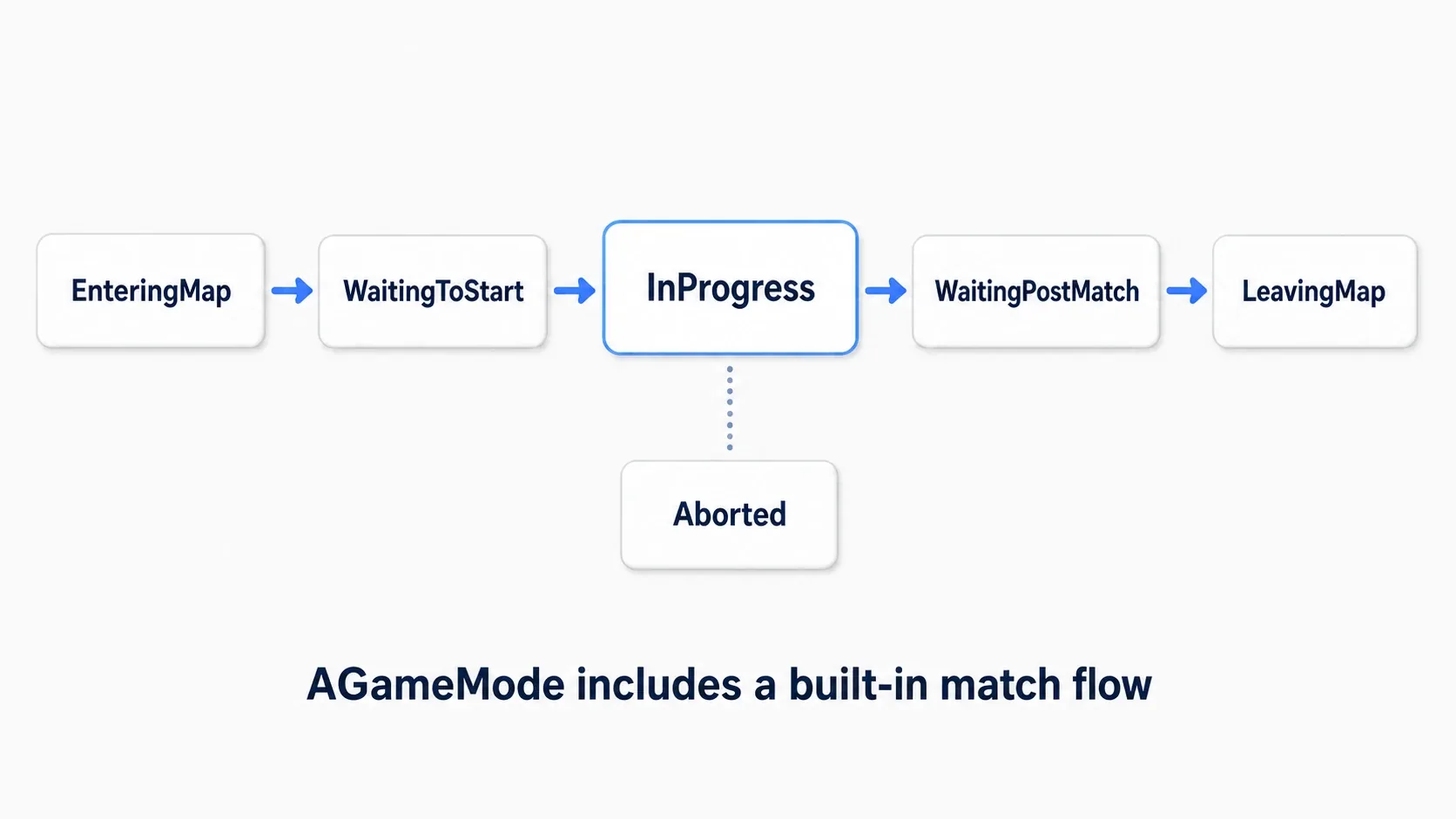
The mechanism for switching those progress states is called a state machine . In the diagram, WaitingToStart is waiting to begin, InProgress is the match, and WaitingPostMatch is after it ends. Even using GameMode, you build the win condition and result screen yourself. It is not a split of "multiplayer means GameMode, single player means GameModeBase".
Data you want to survive a level change
Rebuilding a Pawn and reloading a whole level are different things. Switching levels with a normal Open Level rebuilds these instances, so do not assume the same variables persist.
For information you want to carry across levels while the game runs, use GameInstance . For information you want after the game exits, save to something like SaveGame (see level transitions and where data lives and choosing a Subsystem). Networked Seamless Travel has a mechanism for carrying some things over, but it needs separate handling.
Keep replication separate from UI updates
RepNotify is a setting that lets you run logic when a replicated value arrives. It works as an update trigger. Since values can arrive before the UI exists, read the current value right after opening the UI and also handle later changes.
When testing networking, watch the Play settings. "Play as Listen Server" creates a server that also has a player; "Play as Client" creates a client connecting to a headless dedicated server. The latter has no server window where pressing K does anything. Follow the detailed procedure in the multiplayer article.
Summary
GameMode processes the rules, GameState holds overall status, and PlayerState records each individual. Splitting your thinking into "how it proceeds", "how it stands now", and "whose record it is" makes placement easy to decide.
Once the three classes exist, check the GameMode settings and the level's GameMode Override. Reading one value is enough at first. From there add scoring and win checks, and move on to replication settings when you want to share them online.
Further Reading