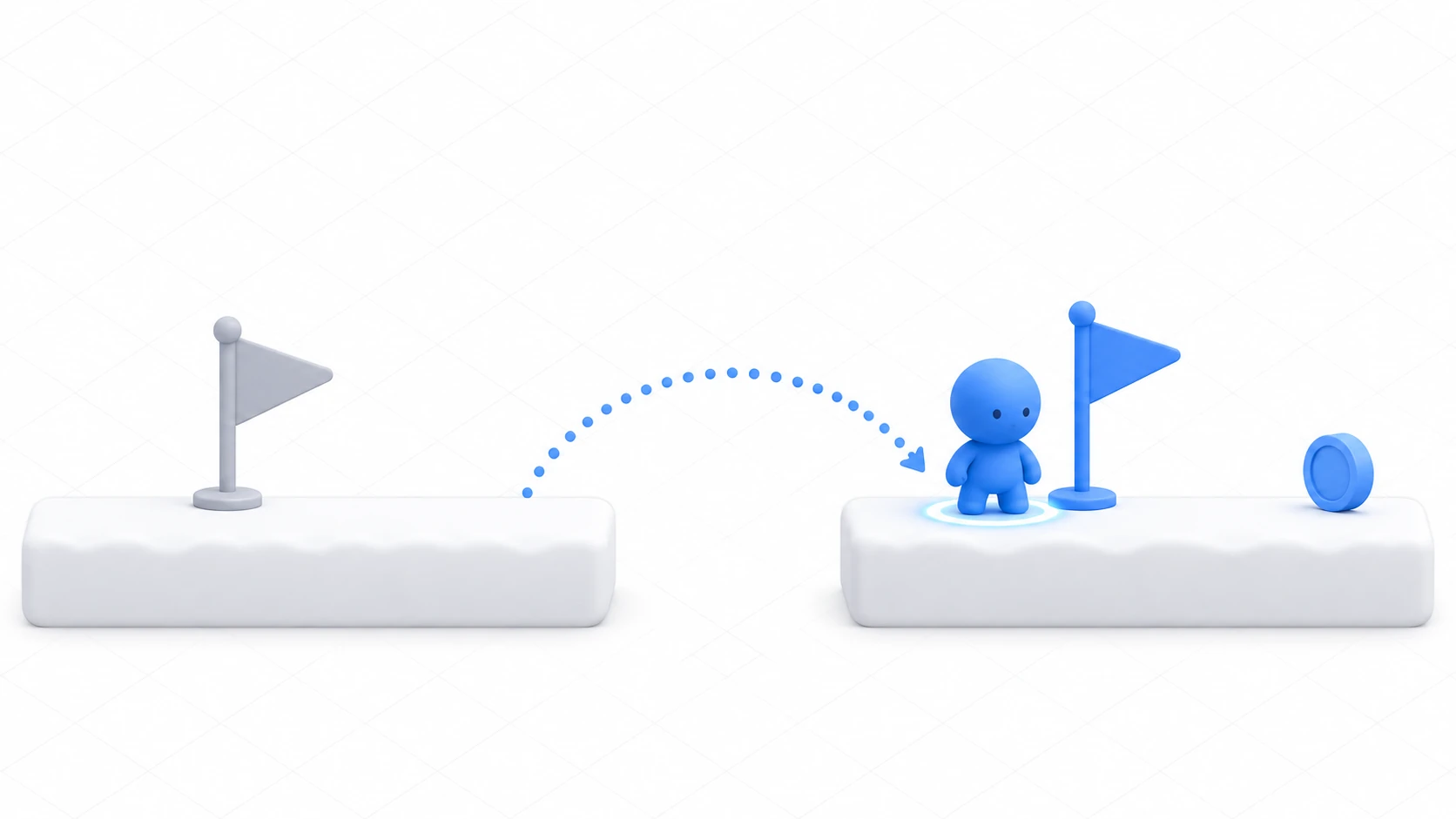
A checkpoint is a flag placed partway through a stage, so that a player who falls restarts from the last flag they touched. Only the player goes back. Collected coins and opened doors normally stay as they are.
If you build it by reloading the scene, everything other than the player gets rebuilt too. The coins you picked up are back on the ground, and the doors you opened close again.
This article explains how to have the player remember a single position and return to the last flag when they fall.
What You'll Learn
- Why a single position is all a checkpoint needs to remember
- How to notice the player has fallen, and how to keep the same process from running over and over
- The three things you assign when bringing the player back, and in what order
- How to think about leaving things as they are that shouldn't come back (collected coins, opened doors)
Tested with: Godot 4.7
The respawn position (respawn_position)
A checkpoint isn't save data. Nor is it a mechanism that remembers the whole state of the stage and restores it.
The player has one Vector2 variable, and each time they touch a flag, its value is overwritten. That's all.
var respawn_position := Vector2.ZERO
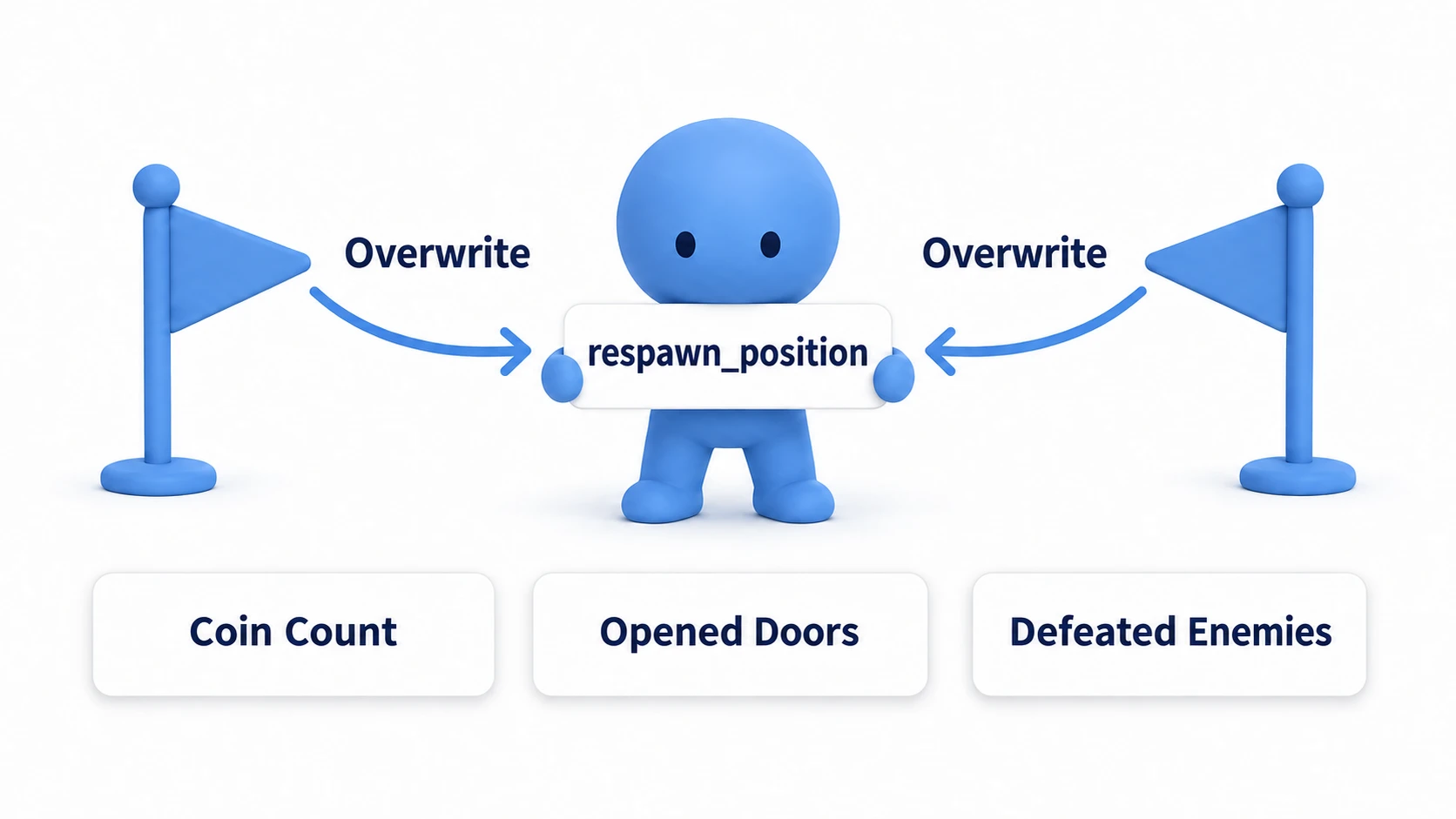
This variable doesn't contain the number of coins or the coin nodes that were removed. That's why they don't come back when you fall. Only the player returns, and the world carries on as it is.
It's not a list or a history, so however many flags you put up, it holds a single value. The moment you touch flag 2, flag 1's position is gone.
Swapping out the whole scene is a different story. That resets coins and doors to their initial values. How it works is in the game flow article. This article doesn't change scenes; it only assigns the values you want to restore.
In other engines: Unreal Engine has a mechanism where the GameMode uses a Player Start to rebuild the player's Pawn. In Unity, you write it yourself to fit your game, either returning to a saved position or rebuilding. This article doesn't rebuild; it returns the same player to the saved position.
The first respawn point and the foot of the flag (Marker2D)
Flags only overwrite, so you set the respawn point for before any flag is touched yourself, at the start. If you leave it at Vector2.ZERO, the player returns to the stage's origin (0, 0). That isn't necessarily where you want, so put where the game started into the first entry.
func _ready() -> void:
	respawn_position = global_position       # Where you're standing now becomes the first entry
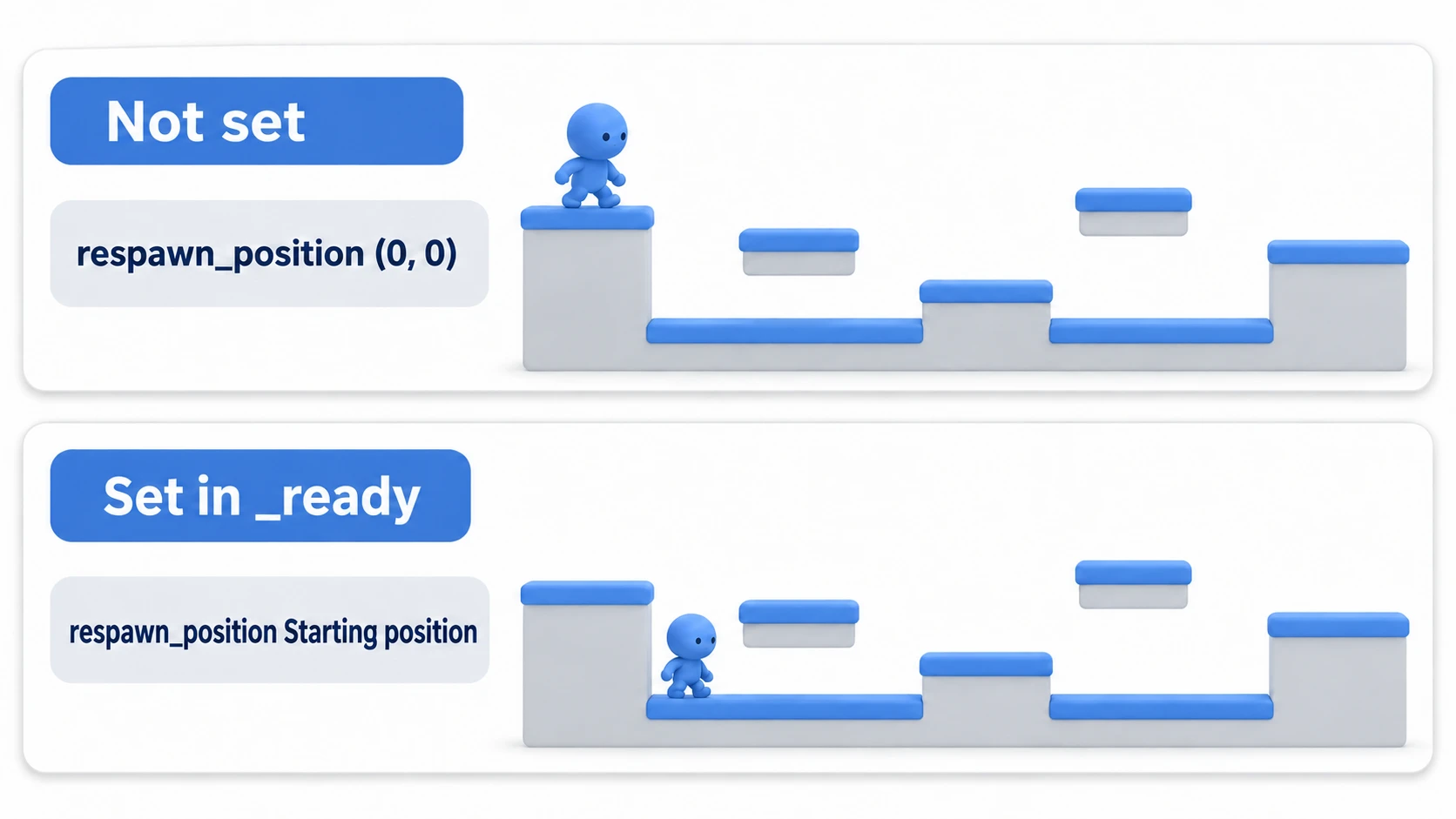
For a player placed in the editor, that's enough. If your game moves the player after starting, set it after moving.
When a flag is touched, get the position of the marker the flag holds. Not the position of the flag's Area2D itself, but the global_position of a Marker2D placed at the flag's foot. Place it not at ground level but at the height where the returned player's center should be. A flag's origin is often at the center of the image, and returning the player there buries them in the flagpole.
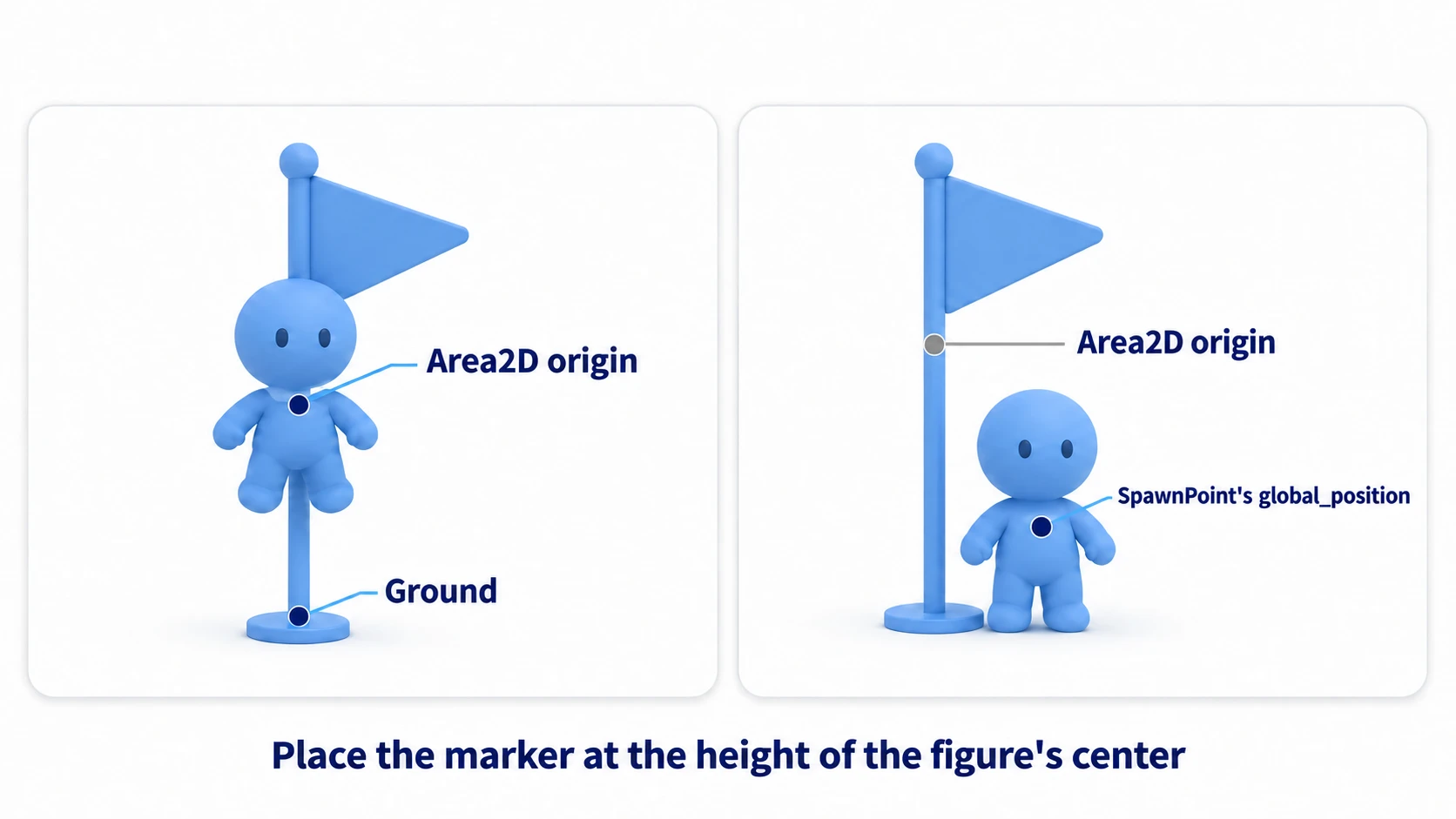
Why you use global_position rather than position is covered in the Marker2D article. The position of a marker placed as a child of the flag is relative to the flag.
Detecting a fall (KILL_Y)
For fall detection, just check the y coordinate inside _physics_process() (the function called on every physics step).
if global_position.y > KILL_Y:
In Godot 2D, down is positive, so you check for a fall with >. Use global_position.y rather than position.y so the value doesn't shift when the player is placed under a parent.
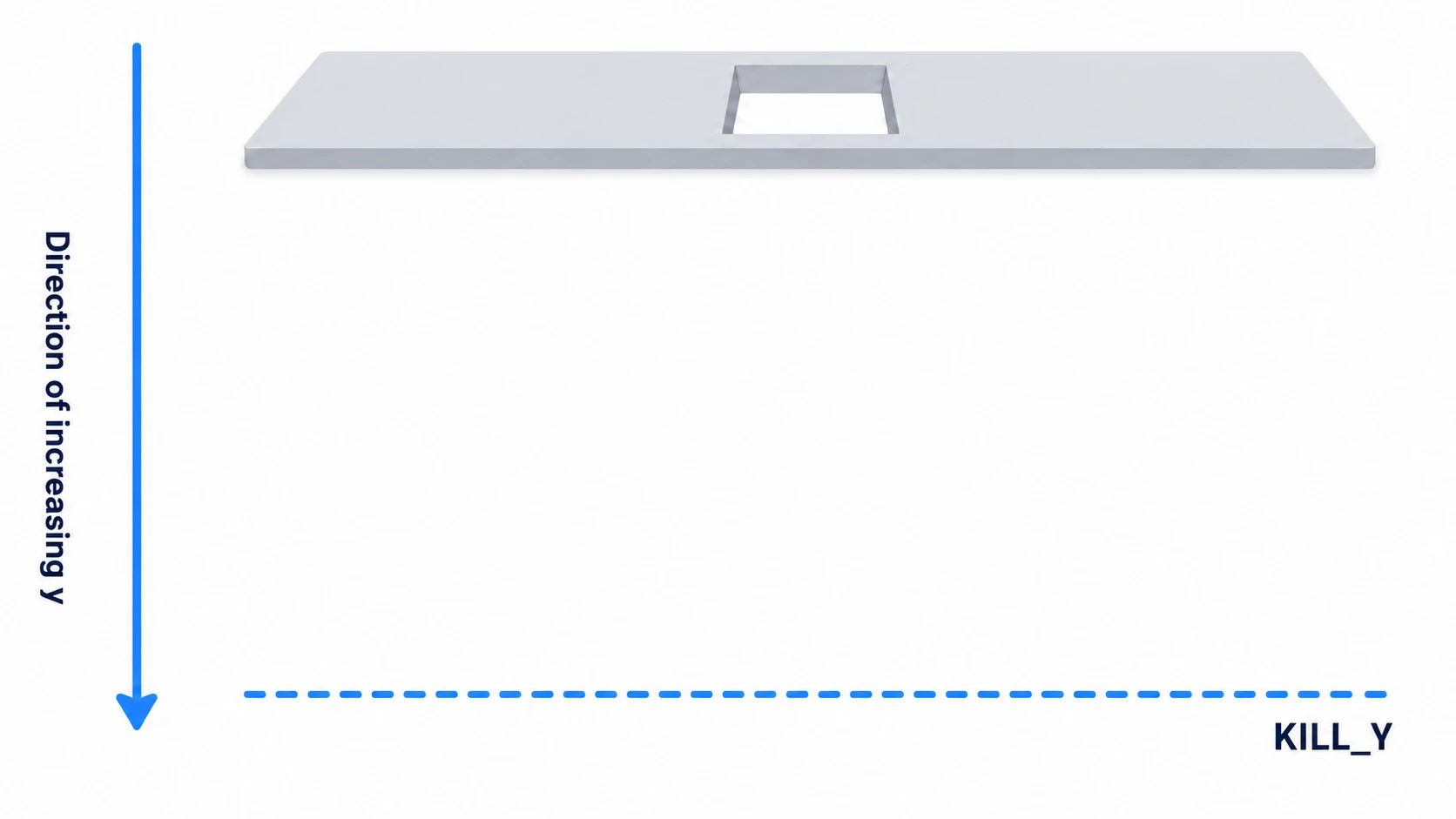
Draw the line clearly below the lowest floor, even below the art for the pit. What's being compared is the player's origin, so pick a height the origin never crosses during normal walking.
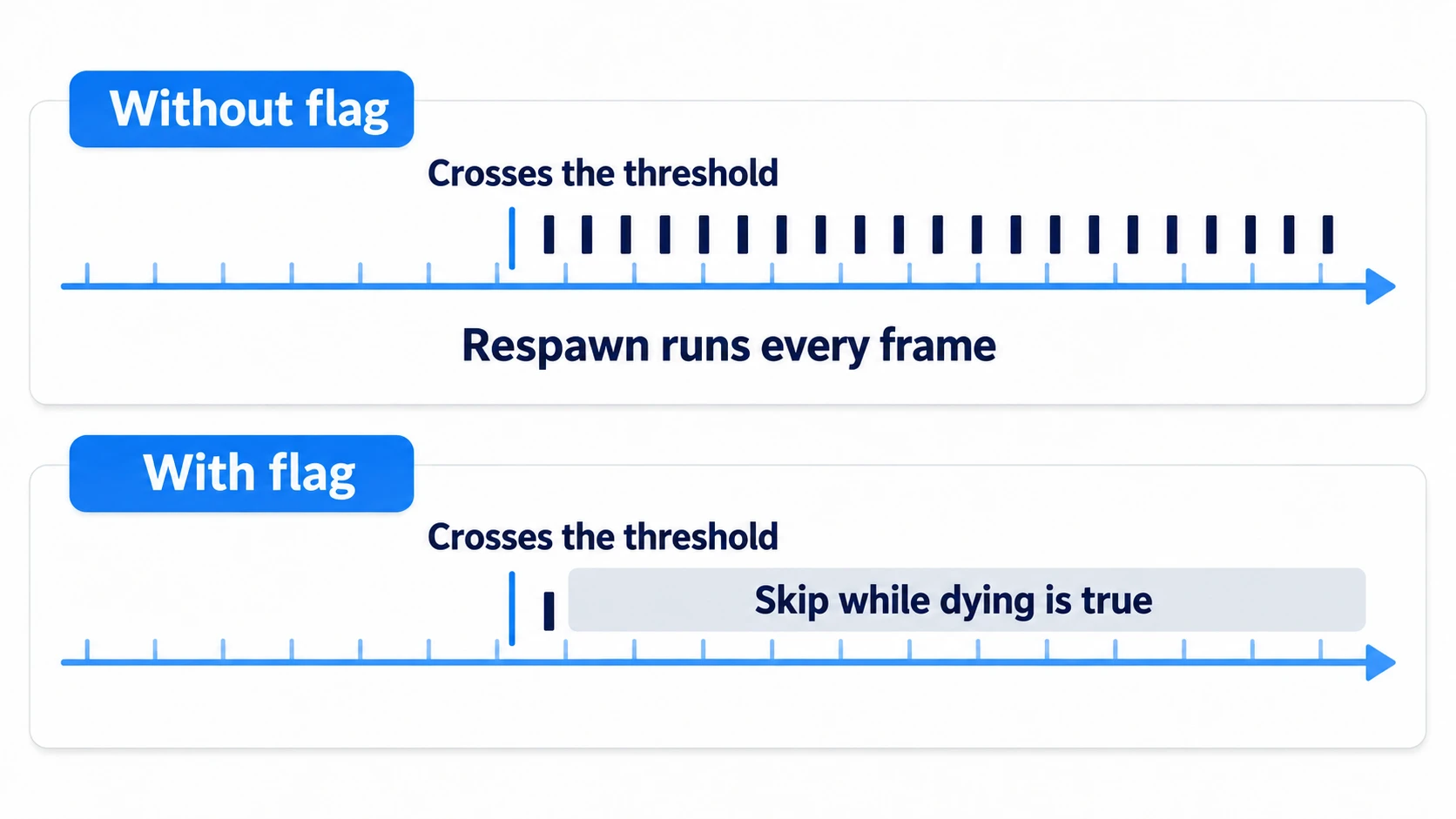
One more thing: this check is true every frame. While waiting to return, the position stays past the line. So set a flag called dying that means "dying," and while it's set, exit at the top of _physics_process(). The respawn process then starts only on the first frame the line is crossed.
The three values to restore on respawn
Wait a moment before bringing the player back. The wait is one line: await get_tree().create_timer(RESPAWN_DELAY, false, true).timeout. await pauses the rest of this function until the one-shot timer goes off (timeout). After that, you assign three things.
global_position = respawn_position       # Position
velocity = Vector2.ZERO                  # Velocity
dying = false                            # The flag, last
Reset the velocity to zero too, so the falling speed isn't carried over. If you later add values to the player (remaining double jumps, invincibility time after a hit, and so on), reset them here too. Anything you don't write here keeps its value from before the fall.
The false, true after create_timer() specify that the wait pauses while the game is paused, and that it counts in step with physics processing. Even if you add pausing later, the player won't return on their own while the game is paused.
dying is lowered last as a sign that the whole respawn process is done. Lower it while waiting, and the check runs on a frame when the player is still at the bottom of the pit, and they die again.
What stays as it is
Decide what you won't write in the respawn function (respawning means bringing back a fallen player so they can move again).
- The number of coins collected
- Coin nodes that were
queue_free()d - Opened doors, defeated enemies, flipped switches
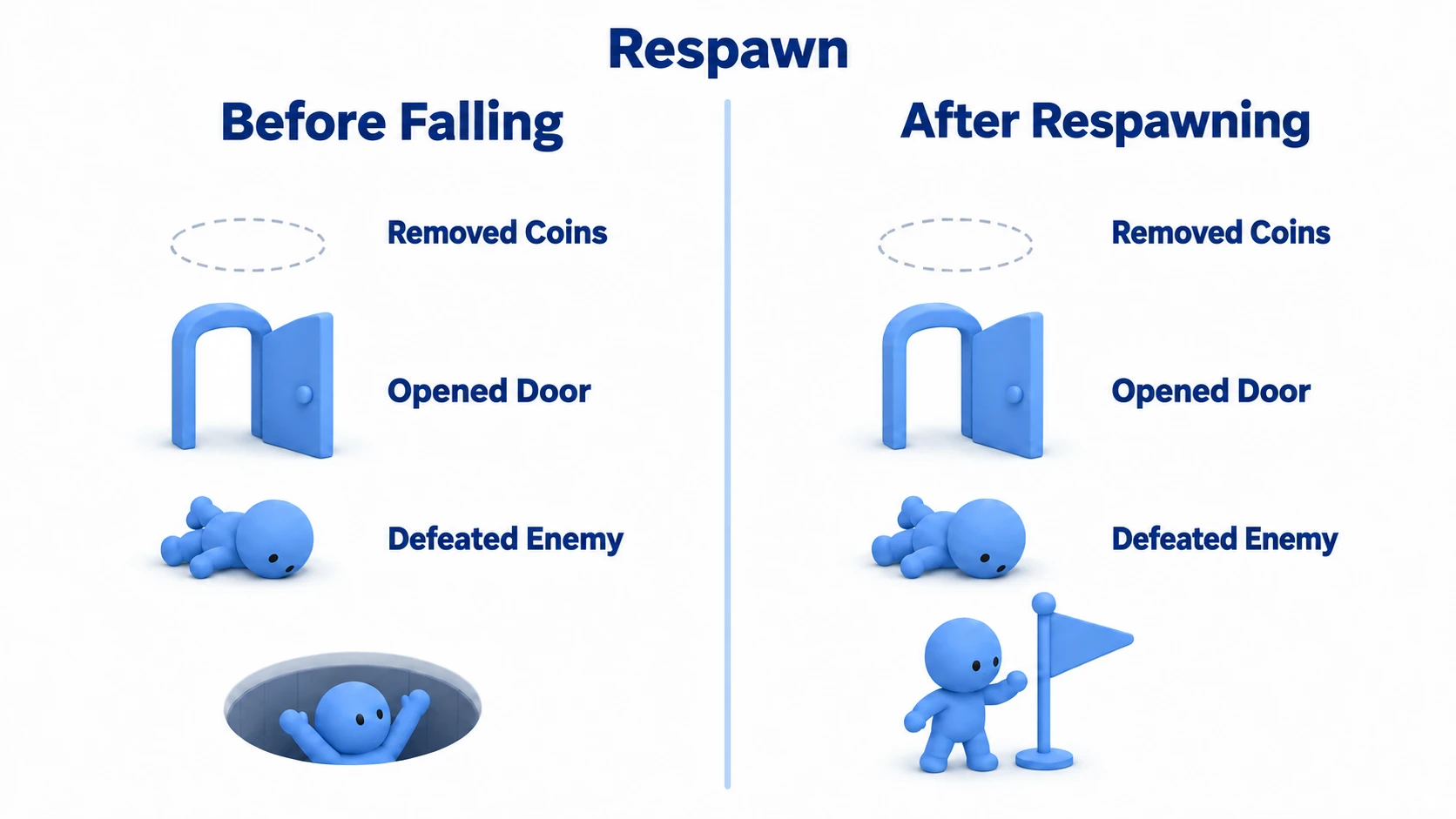
A node that's been queue_free()d no longer exists. Restoring it means rebuilding it. If you're going that far, reloading the scene is simpler. But a reload rebuilds the player too, so respawn_position goes back to the starting point. To bring the coins back and still restart from the flag, keep the respawn position in an Autoload. An Autoload lives outside the scene, so a reload doesn't erase it. If you only want to bring back the player, this article's approach is enough.
How far to rewind is a decision that shapes how the game feels. Some games revive defeated enemies; others leave them defeated. Decide that first, and you won't be unsure where to put the code you add later.
Hands-On: Fall into the same pit twice
Midpoints in a platformer, save rooms in a Metroidvania, recovery points in a racer — they're all "return to the last marker passed." Place two flags and one pit, and fall into the same pit twice.
① What to place
Create one new scene.
First, the flag scene. Put an Area2D at the root named Flag and attach checkpoint.gd.
- As a child of Flag, a Sprite2D (
icon.svg, Scale(0.4, 0.4)) - As a child of Flag, a CollisionShape2D (RectangleShape2D, size
(64, 96)) - As a child of Flag, a Marker2D named SpawnPoint. Position
(0, 16) - Save it as
Flag.tscn
SpawnPoint is shifted down a little so the player returns to the height of the flag's foot rather than its center. Place it where you want the returned player's origin to be; in this article's hands-on, the player's origin is at the center of its circle. Put it at a spot slightly above the floor.
Next, Main (root is a Node2D).
- Add a StaticBody2D, used for floors and walls that don't move, as a child of Main named GroundLeft. Position
(200, 500). Its child is a CollisionShape2D (RectangleShape2D, size(400, 64)) - Add a StaticBody2D as a child of Main named GroundRight. Position
(900, 500). Its child is the same CollisionShape2D - The gap between the two floors is the pit. Around
x400to700is empty - Add a CharacterBody2D as a child of Main named Player. Position
(100, 448)(the height where it stands right on the floor). Attachplayer.gd - As children of Player, a Sprite2D (
icon.svg, Scale(0.3, 0.3)), a CollisionShape2D (CircleShape2D, radius20), and a Camera2D (default settings) - Place two
Flag.tscninstances as children of Main, named Flag1 (position(250, 430)) and Flag2 (position(850, 430)). You'll set their numbers after writing the scripts in ② - Add three Area2Ds as children of Main named Coin1 (
(320, 440)), Coin2 ((820, 440)), and Coin3 ((980, 440)). Attachcoin.gdto each, and give each a Sprite2D (icon.svg, Scale(0.2, 0.2)) and a CollisionShape2D (CircleShape2D, radius24) as children - Add a CanvasLayer (a layer that stays fixed on screen even when the camera moves) as a child of Main named HUD. Give it two Label children, CoinLabel (16, 16) and FlagLabel (16, 48). Turn on "Access as Unique Name" for both from the right-click menu (this lets you get them by name alone, like
%CoinLabel) - Attach
main.gdto Main
Connect each body_entered to that node's own script. Select the node, double-click body_entered in the Signals dock, choose the node itself as the target, and press Connect. The receiving function's name defaults to _on_body_entered, and an empty function is created in the script, so replace its contents with the code below. For flags, open Flag.tscn and connect once on the root Flag, and it applies to both placed flags. For coins, connect each of the three placed in Main.
② Four scripts
All the excerpts from the text are in these four scripts. Write them like this.
# player.gd
extends CharacterBody2D

const SPEED := 300.0
const JUMP_VELOCITY := -600.0
const KILL_Y := 800.0
const RESPAWN_DELAY := 0.5

var respawn_position := Vector2.ZERO
var dying := false

var _flag: Area2D = null

func _ready() -> void:
	respawn_position = global_position             # The first entry
	%FlagLabel.text = "Respawn Start"

func set_checkpoint(pos: Vector2, flag: Area2D) -> void:
	if _flag == flag:
		return                                     # Do nothing for the same flag
	if _flag != null:
		_flag.turn_off()                           # Turn off the previous flag
	_flag = flag
	respawn_position = pos
	%FlagLabel.text = "Respawn %d" % flag.number

func _physics_process(delta: float) -> void:
	if dying:
		return                                     # Do nothing while dying
	if global_position.y > KILL_Y:
		dying = true
		_respawn_after_delay()
		return
	if not is_on_floor():
		velocity += get_gravity() * delta           # Fall using the gravity from Project Settings
	elif Input.is_action_just_pressed("ui_accept"):
		velocity.y = JUMP_VELOCITY
	velocity.x = Input.get_axis("ui_left", "ui_right") * SPEED
	move_and_slide()

func _respawn_after_delay() -> void:
	await get_tree().create_timer(RESPAWN_DELAY, false, true).timeout
	global_position = respawn_position
	velocity = Vector2.ZERO
	dying = false                                  # The flag, last
# checkpoint.gd
extends Area2D

@export var number := 1                            # Number in the Inspector

func _on_body_entered(body: Node2D) -> void:
	if not body.has_method("set_checkpoint"):
		return                                     # Ignore things that can't receive it
	body.set_checkpoint($SpawnPoint.global_position, self)
	$Sprite2D.modulate = Color(1.6, 1.6, 1.6)      # Values above 1 make it glow brighter

func turn_off() -> void:
	$Sprite2D.modulate = Color.WHITE
# coin.gd
extends Area2D

func _on_body_entered(body: Node2D) -> void:
	if not body.has_method("set_checkpoint"):
		return
	get_parent().add_coin()                        # Because it's a direct child of Main
	queue_free()
# main.gd
extends Node2D

var coins := 0

func _ready() -> void:
	%CoinLabel.text = "Coins 0"

func add_coin() -> void:
	coins += 1
	%CoinLabel.text = "Coins %d" % coins
Whether it's the player is checked with has_method("set_checkpoint"). It directly asks "can this receive a checkpoint," so you don't have to worry about the spelling of a group name.
set_checkpoint() turns away the same flag at the top because the player touches the same flag many times. The respawn point is inside that flag's collision area too, so every time the player comes back, the flag's body_entered fires again.
Once all four are written, select Flag1 and Flag2 under Main and set Number to 1 and 2 in the Inspector. The field is there now because you wrote @export.
③ Run it and check
The floors have no visuals, so turn on Visible Collision Shapes in the Debug menu, then open main.tscn and run it with F6. The floors and the pit are visible as collision shapes. Move with the arrow keys and jump with Space.
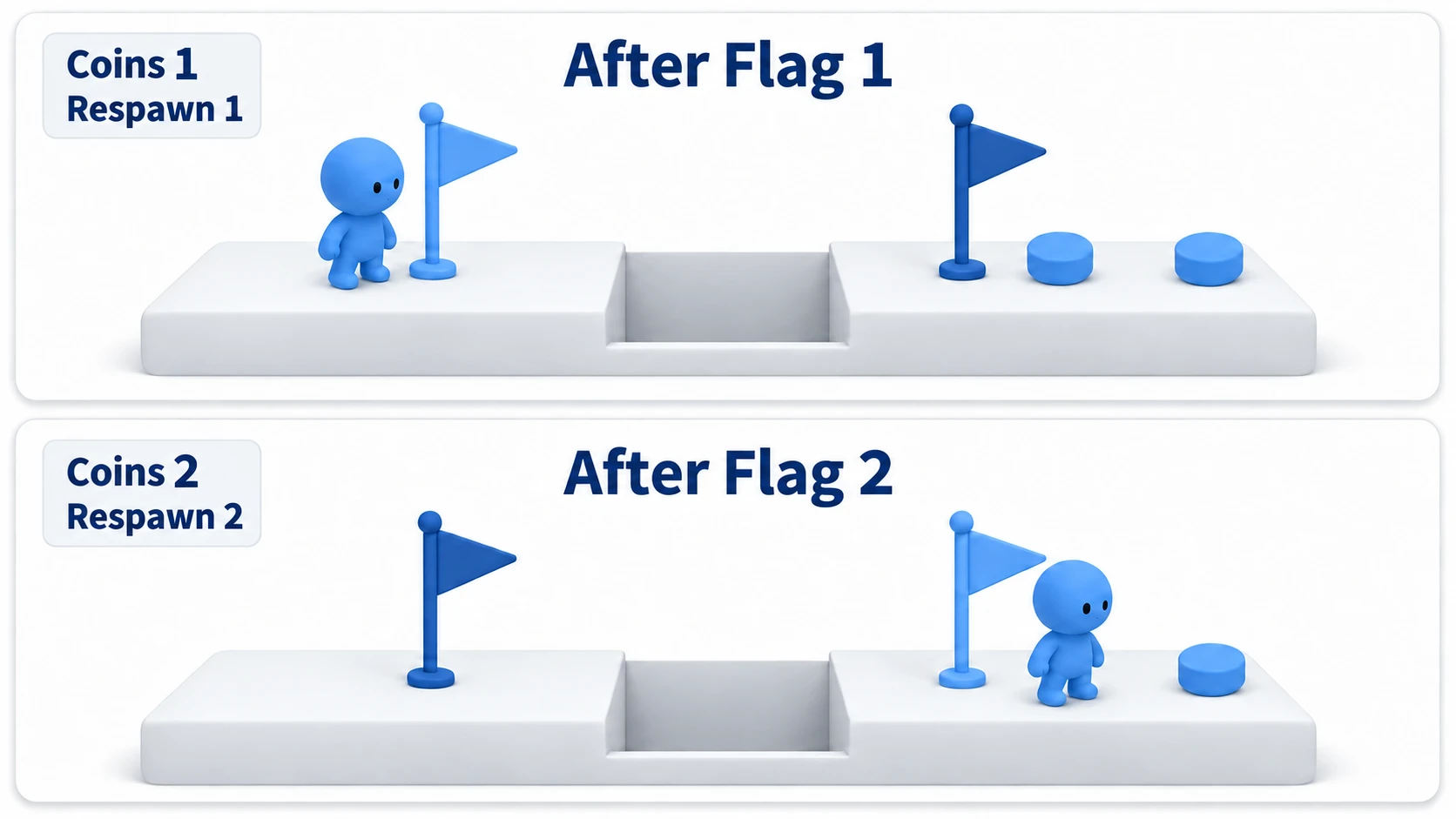
Walk right and touch flag 1; it brightens and the HUD changes to "Respawn 1". Keep going right, pick up Coin1, and once it shows "Coins 1", fall into the pit. 0.5 seconds after crossing the line below the pit, you're back at flag 1's foot, and the HUD still shows "Coins 1". If you returned to the start instead of flag 1, the flag's body_entered isn't connected.
Next, cross the pit. Near the right edge of the floor (past x 370), jump while holding right. If you let go of right as you jump, you go straight up and don't reach the other side. On the other side, pick up Coin2 and touch flag 2; flag 2 brightens, flag 1 returns to normal, and the HUD shows "Respawn 2".
Without taking Coin3 at the far right, head back left and fall into the same pit again. This time you return to flag 2's foot. It's the same pit, yet you come out somewhere different, because it's not the pit but the last flag you touched that decides the destination. The two coins you picked up don't reappear on the ground, and the HUD still shows "Coins 2".
Finally, break just one line. Put # at the start of the respawn_position = pos line in player.gd's set_checkpoint() and do the same steps again. The flags still brighten, and the HUD still changes to "Respawn 1" and "Respawn 2", yet every fall returns you to the start. The flag glow and the HUD are only display; what decides the respawn point is this single Vector2. Once you've checked, remove the #.
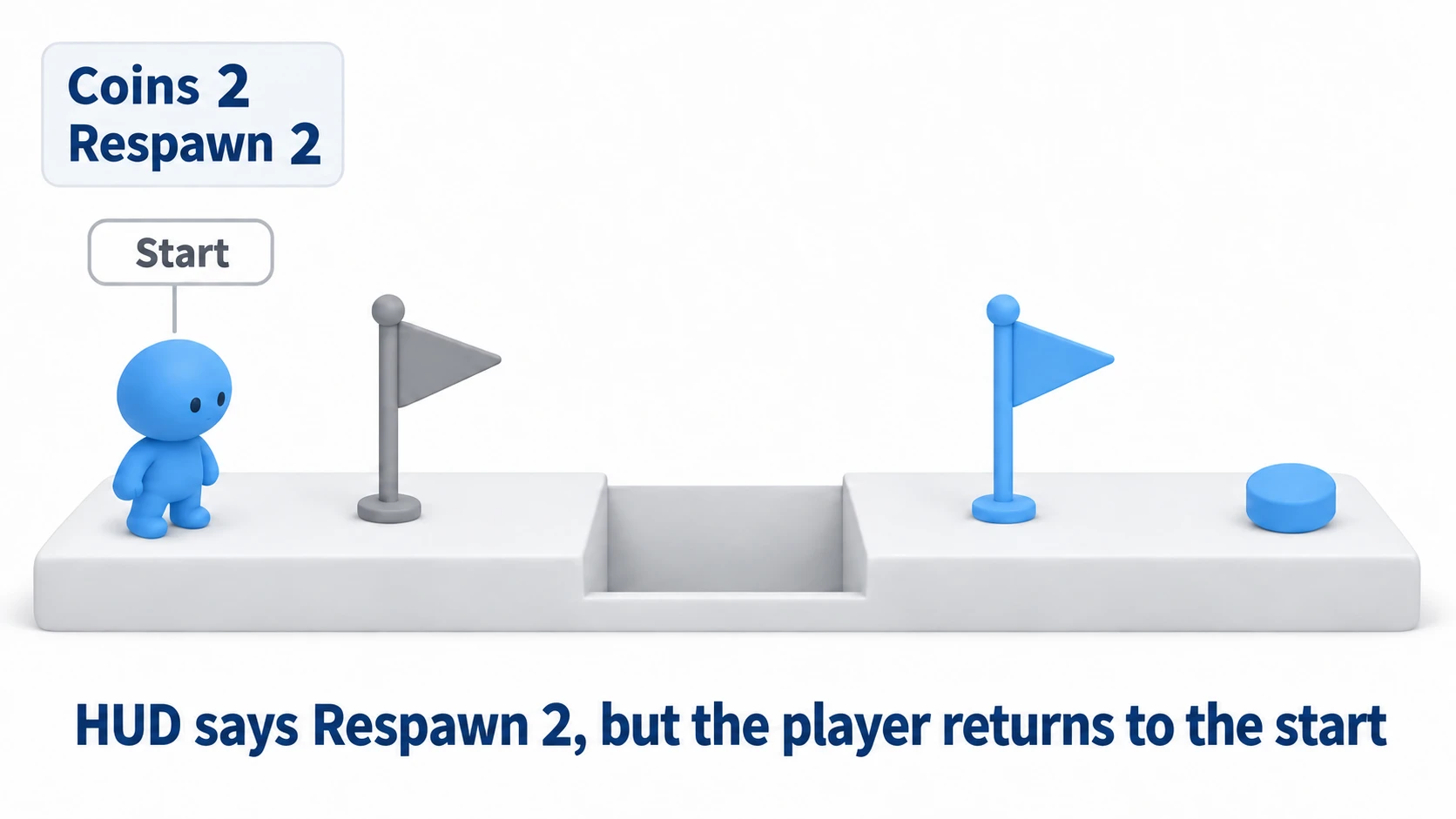
There are two key points.
- The memory is not a list but a single value that gets overwritten: Add more flags, and the player still holds one Vector2. There's no need to remember every flag passed
- Decide what not to write in the respawn process: Coins, doors, and enemies never appear in the respawn function. Not writing them is exactly what makes them "not come back"
Troubleshooting
| Symptom | Cause | Fix |
|---|---|---|
| After enabling Camera2D's Position Smoothing, the camera slides up from the bottom of the pit every time the player returns | The following camera is smoothly moving from the previous position to the new one | Call $Camera2D.reset_smoothing() after assigning the position. Camera movement is covered in the Camera2D article |
| Touching a spike (Area2D) doesn't bring the player back | The spike side only sets dying = true and doesn't call the process that starts the wait | Put setting the flag and starting the wait into one function like die(), and call it from both the fall check and the spike. Return right away at the top of die() if dying is already set |
| In a stage that continues downward, the player dies the moment they descend | KILL_Y is one line across the whole stage and catches the lower passage too | In stages that continue downward, kill with an Area2D placed at the bottom of the pit instead of a line |
| After turning on Project Settings → Physics → Common → Physics Interpolation, the player streaks across the screen the moment they return | Interpolation draws the path between the previous and new positions | Call reset_physics_interpolation() right after assigning the position. Interpolation is covered in the FPS management article |
Bonus: Good to Know First
Whether to fully restore HP the moment a flag is touched is a separate decision from remembering the respawn point. It's tempting to write them together, but keeping them apart lets you tune things like "flags don't heal, but returning restores full HP." If you put the full heal in the flag's body_entered, it fires again the moment the player returns, so every respawn heals fully.
Summary
- All it remembers is one position: A Vector2 overwritten each time a flag is touched, never a list or history
- The first entry is the starting position: Set
global_positionin_ready(). From flags, get the position of the Marker2D at their foot - Falling is
ycompared to a line: It's true every frame, so setdyingand skip the check entirely - Restore position, velocity, and the flag: Assign them after a short wait, and lower the flag last
- What you didn't write doesn't come back: Collected coins and opened doors never appear in the respawn function, so they stay as they are
If you only bring back the player, remembering one position is enough. How far does the game you're making rewind?