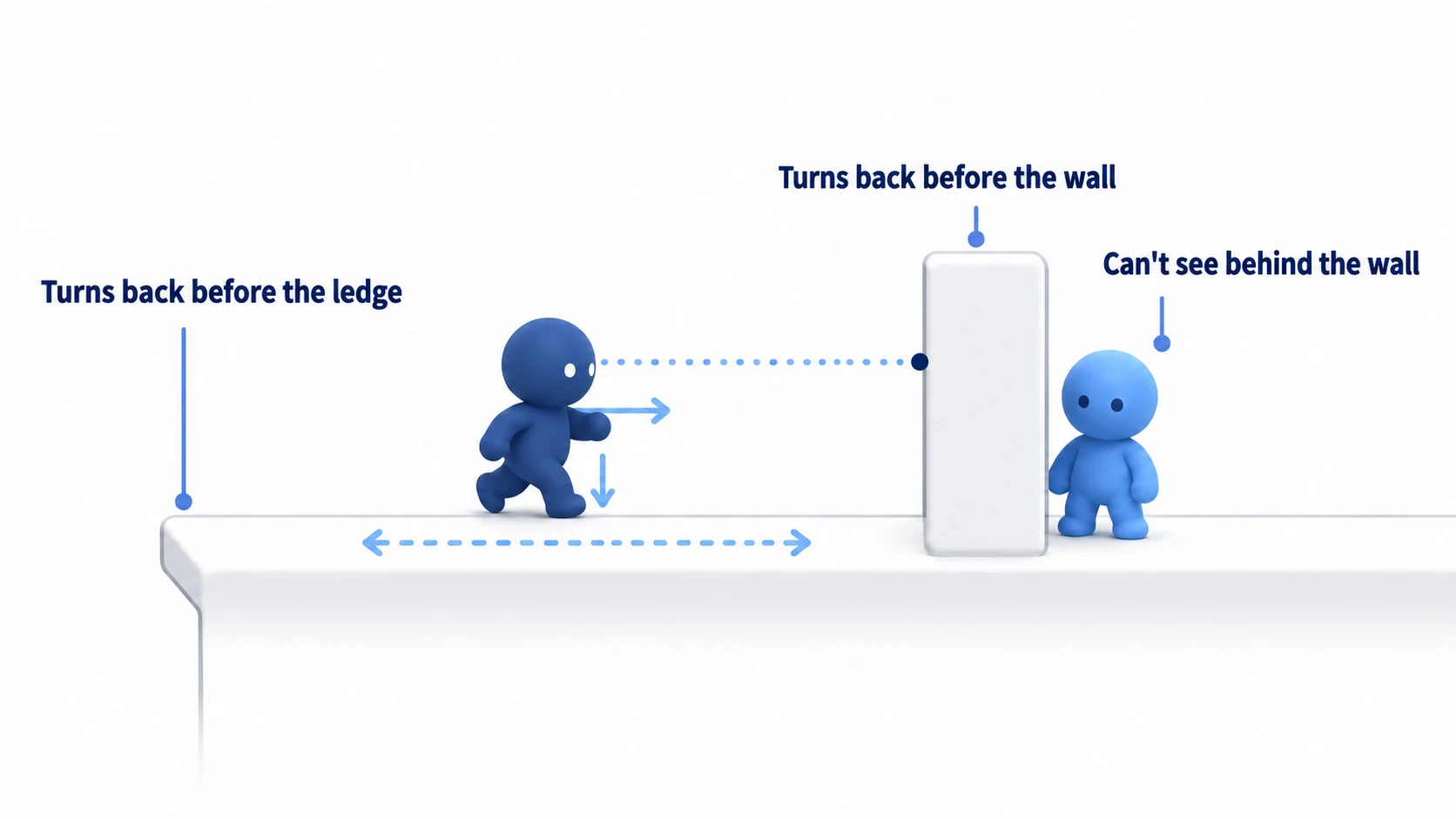
For an enemy that patrols in a side-scroller, you'll want three things: it turns back before a ledge, it turns back before a wall, and it doesn't notice a player behind a wall. In Godot, you build these by casting a single line with RayCast2D and checking the first thing that line hits.
Try to stop it with is_on_floor(), which answers whether it's standing on a floor, and it stays true right up until the fall, so the enemy walks off the edge. Make it notice by distance alone, and it comes after a player on the other side of a wall too.
This article covers using RayCast2D to check the ground, walls, and line of sight, and building an enemy that turns back before ledges and doesn't notice the player through walls. It also introduces ShapeCast2D, for when a line isn't enough.
What You'll Learn
- How to read RayCast2D's answer, "the first thing hit"
- How to check ledges, walls, and line of sight by where you place the line and how you read its answer
- Placing lines so they follow when the character turns around, and updating the result on the spot
- Splitting masks so the enemy doesn't mistake its own body or the player for a wall
Tested with: Godot 4.7
- How RayCast2D works
- Checking ledges, walls, and line of sight
- The line's direction and local coordinates
- When the result is updated
- Choosing what to hit (collision_mask)
- ShapeCast2D: checking with a shape that has width
- Hands-On: Build an Enemy That Turns Back Before Ledges and Can't See Through Walls
- Troubleshooting
- Bonus: Good to Know First
- Summary
How RayCast2D works
RayCast2D is a node that casts an invisible line from the node's position to target_position and answers with the one thing that line hits first. This line is called a ray, and casting a line to check is called raycasting.
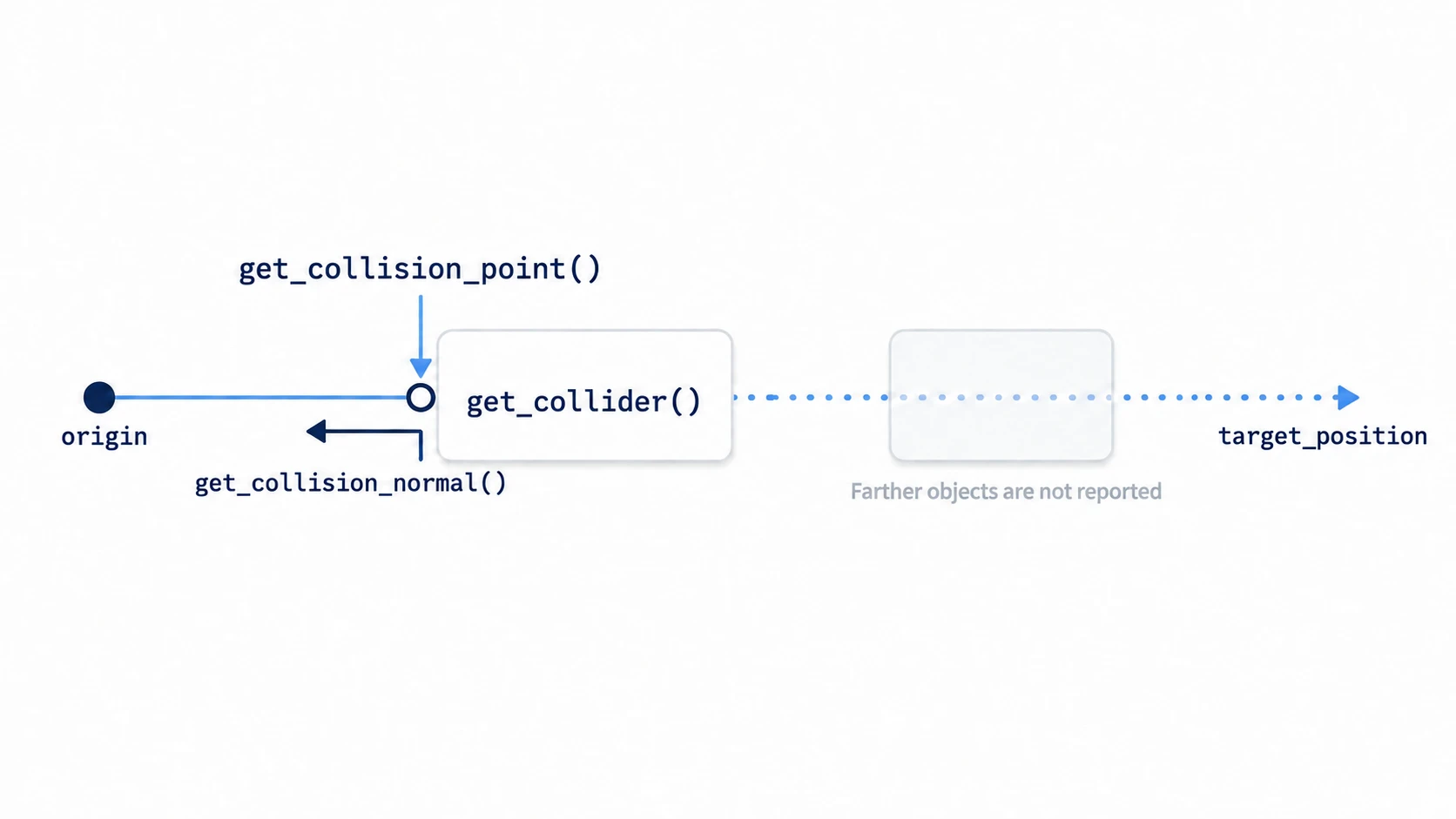
You read the answer with four methods.
is_colliding(): whether it hit anythingget_collider(): the first thing hitget_collision_point(): the point it hit (a position measured across the whole game world, not from the node)get_collision_normal(): the direction the hit surface faces
Use the hit point and surface direction only when is_colliding() is true. Even on frames where it misses, the values from the last time it hit are left behind.
The line is cast again every physics frame (one step of the physics calculation, 60 times per second by default), so read the results inside _physics_process(). A freshly placed RayCast2D has a target_position of (0, 50): a line 50 pixels straight down.
In other engines: it's close to Unity's
Physics2D.Raycastor Unreal Engine's Line Trace by Channel, which cast a line and check the first thing it hits.
Turn on Visible Collision Shapes in the Debug menu and run, and the line appears as an arrow. The arrow doesn't stop where it hits; it's always drawn all the way to target_position. It turns red while it's hitting something.
Checking ledges, walls, and line of sight
What is_on_floor() tells you is whether the previous move_and_slide() (the function that moves the body according to its velocity and stops it at walls and floors) touched the floor. What you want to know before a ledge is "is there still floor below one step ahead?", which is a different question.
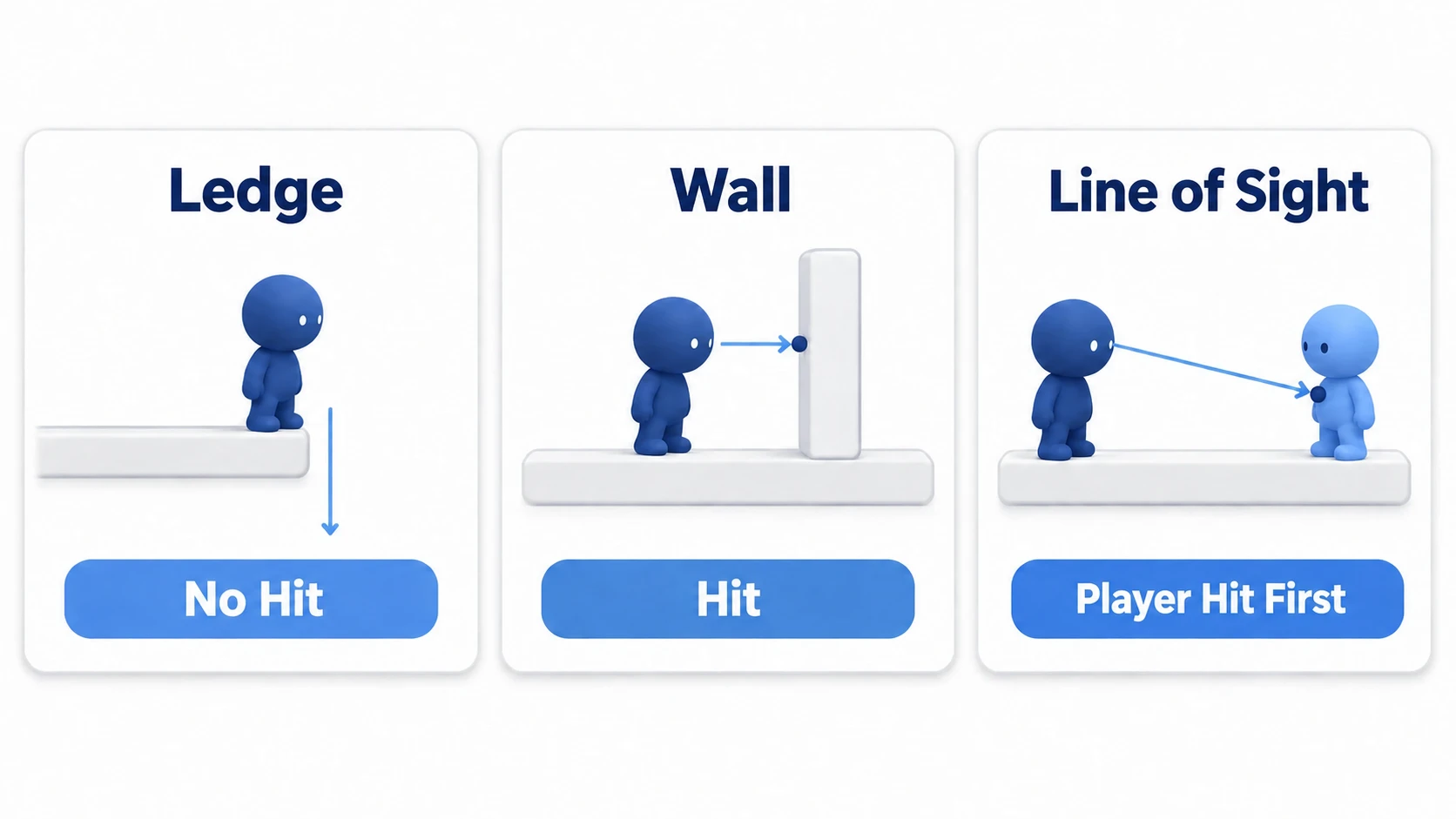
So cast a line straight down from a little in front of the body. Even with the same RayCast2D, changing where you place it lets you check three things.
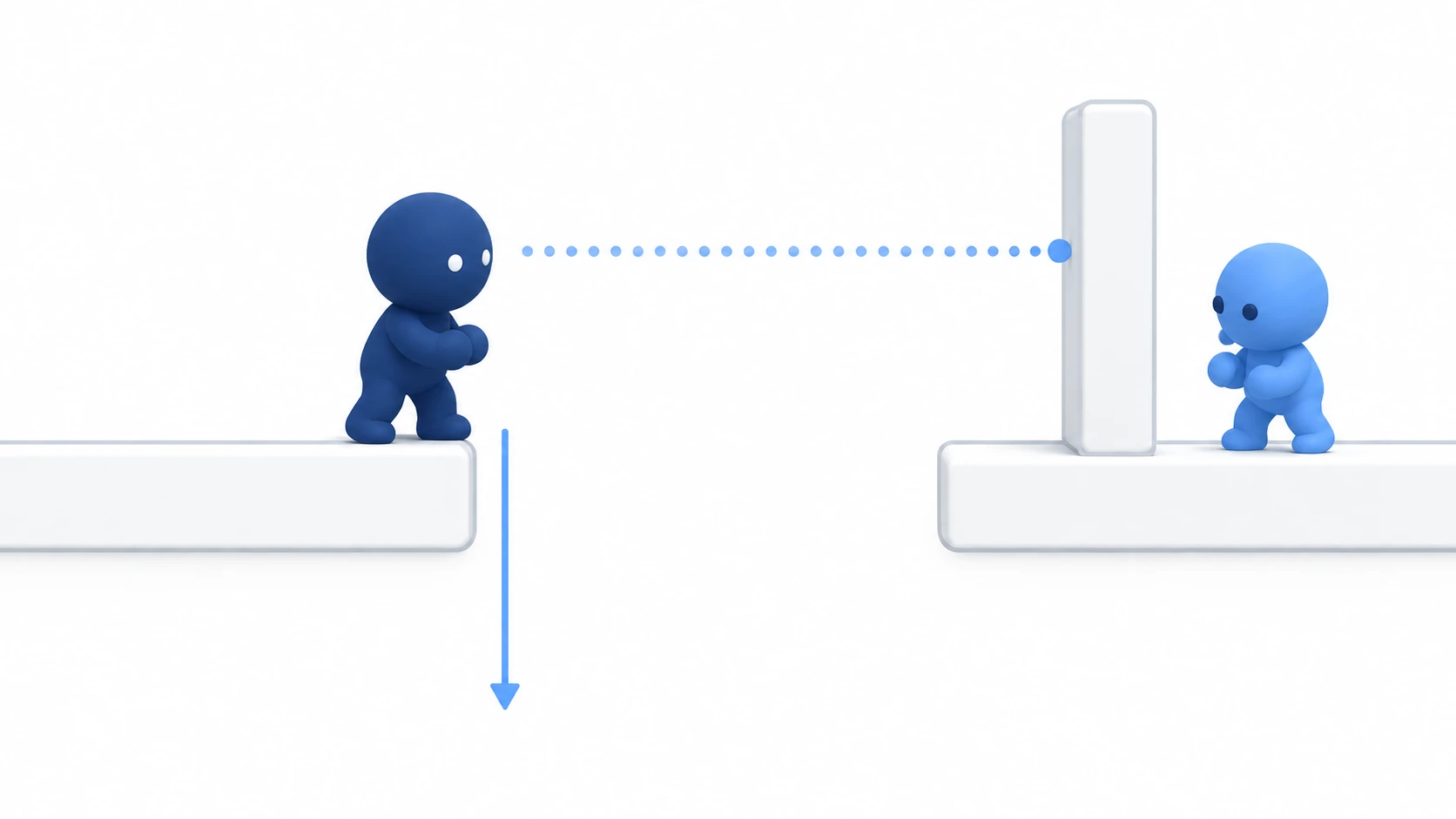
- Ledge: straight down from a little past the toes. If it doesn't hit, there's no floor ahead
- Wall: a short line forward from the body. If it hits, there's a wall right in front
- Line of sight: from the eyes to the target. If the first thing hit is the target, nothing is in between
is_on_wall() also tells you about walls, but only after the body has bumped into one. With a line, you can turn back before bumping.
The line's direction and local coordinates
target_position is a position as seen from the RayCast2D (local coordinates). The line moves along with the node, and if you rotate the parent, the line rotates too.
The trouble comes when the enemy turns around. Flip just the art with Sprite2D's flip_h, and the line still points right. It walks left while checking for walls on the right, and misses the ledge on the left.
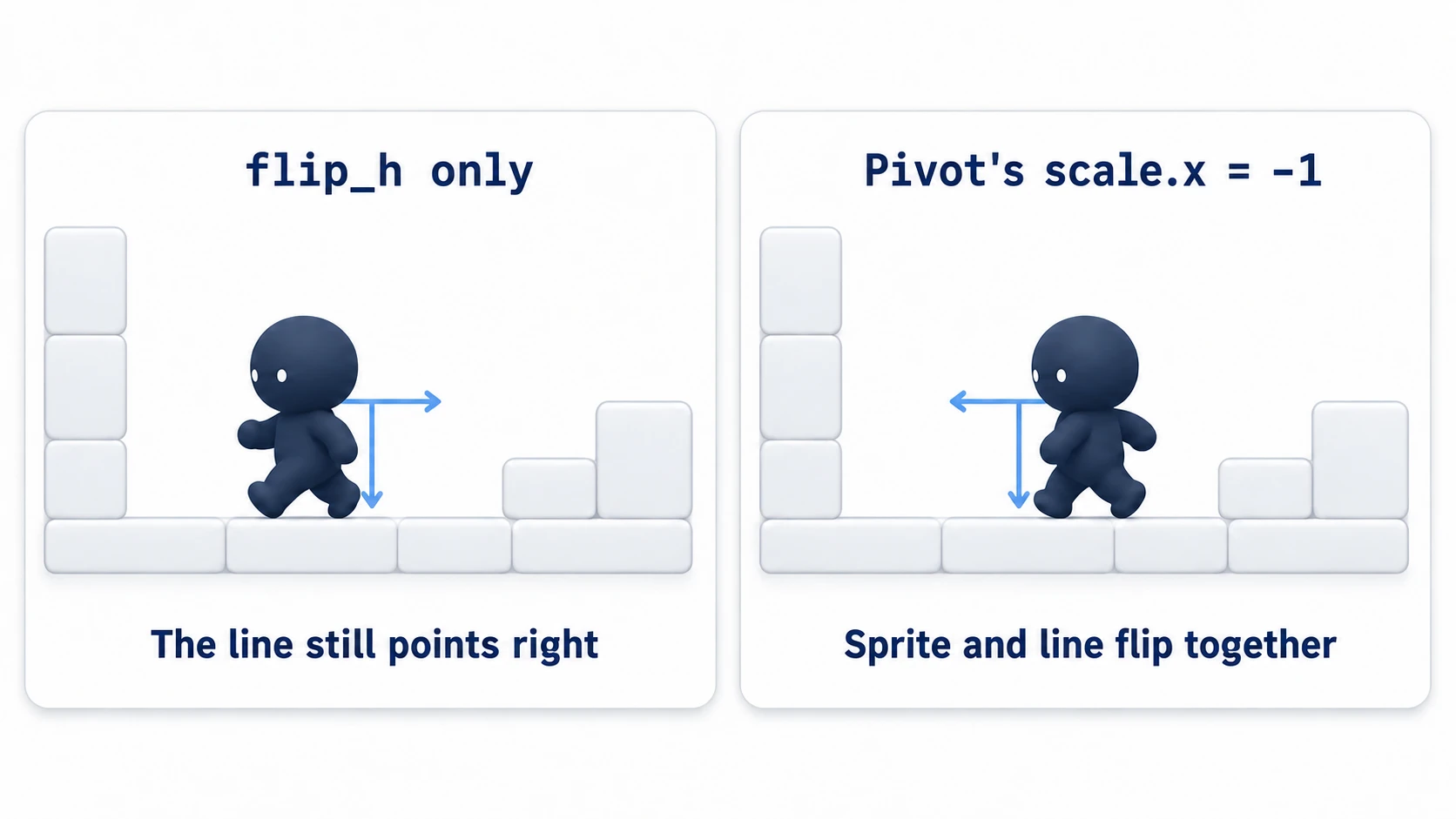
Put the Sprite2D and the lines together under a Node2D (here, Pivot). Set Pivot's scale.x to -1, and the art and the lines flip together. Leave the CharacterBody2D itself at normal scale, so the body's collision and movement aren't affected.
When the result is updated
RayCast2D recasts its line after the parent's _physics_process() has finished for that physics frame. Physics processing goes from the top of the tree down, so a child's line gets its turn after the parent. If you rewrite target_position in a script and read get_collider() right away, what comes back is the result for the line before you rewrote it.
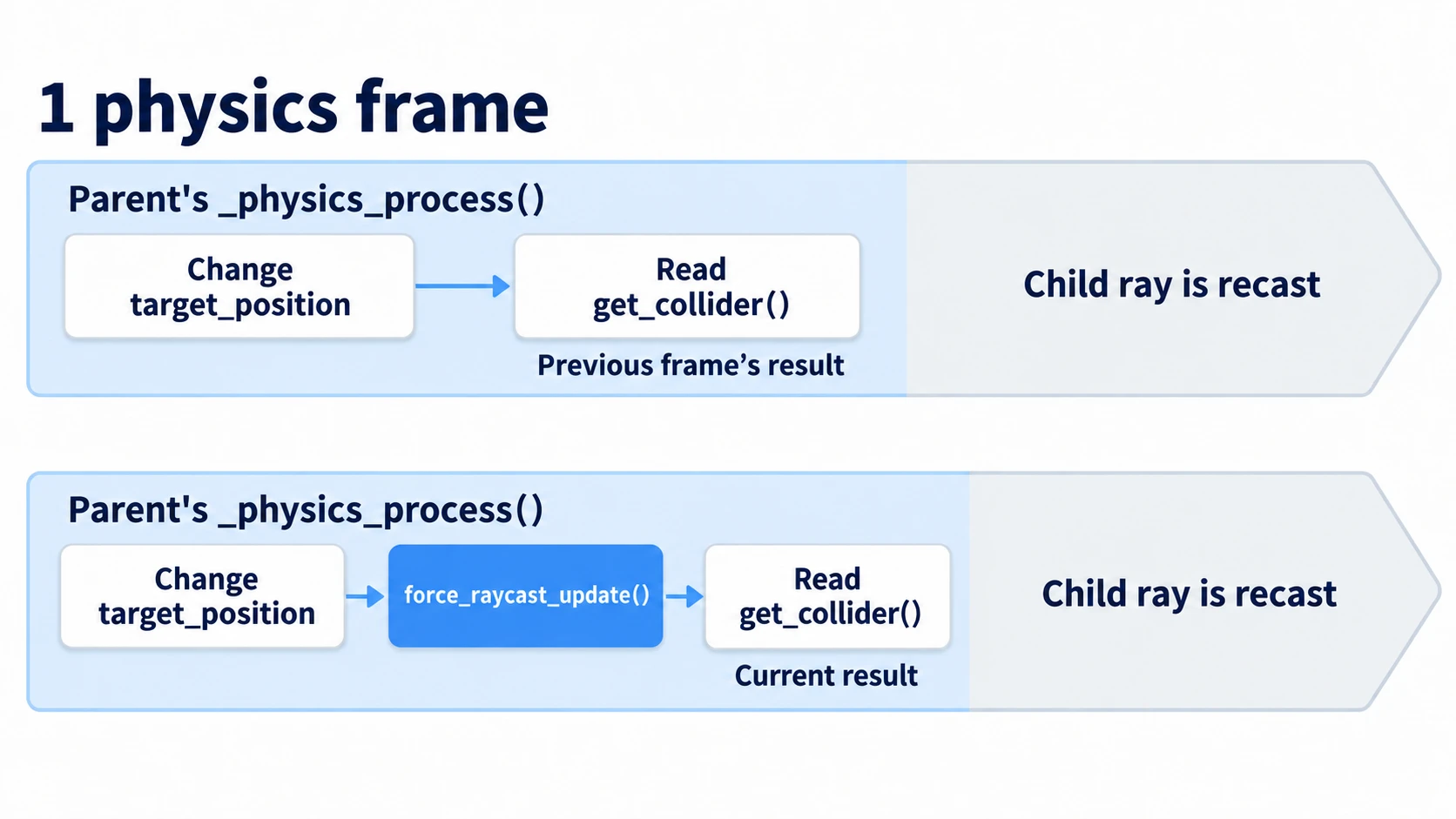
When you need the result on the spot, call force_raycast_update() before reading. It recasts with the current line and replaces the result. Use it for lines you re-aim at the target every frame, like line of sight. The patrol lines aren't read on the frame they change direction, so you don't need to call it for them.
Choosing what to hit (collision_mask)
A line only hits targets on layers checked in its collision_mask (which layers it collides with). How layers and masks work is covered in Collision Layers and Masks.
If the line that checks for walls also hits the player, the enemy thinks the player is a wall and turns back in front of them. Set the wall line's mask to the terrain layer only. The line of sight, on the other hand, gets both terrain and the player. Without the wall in it, the line passes straight through the wall and hits the player.
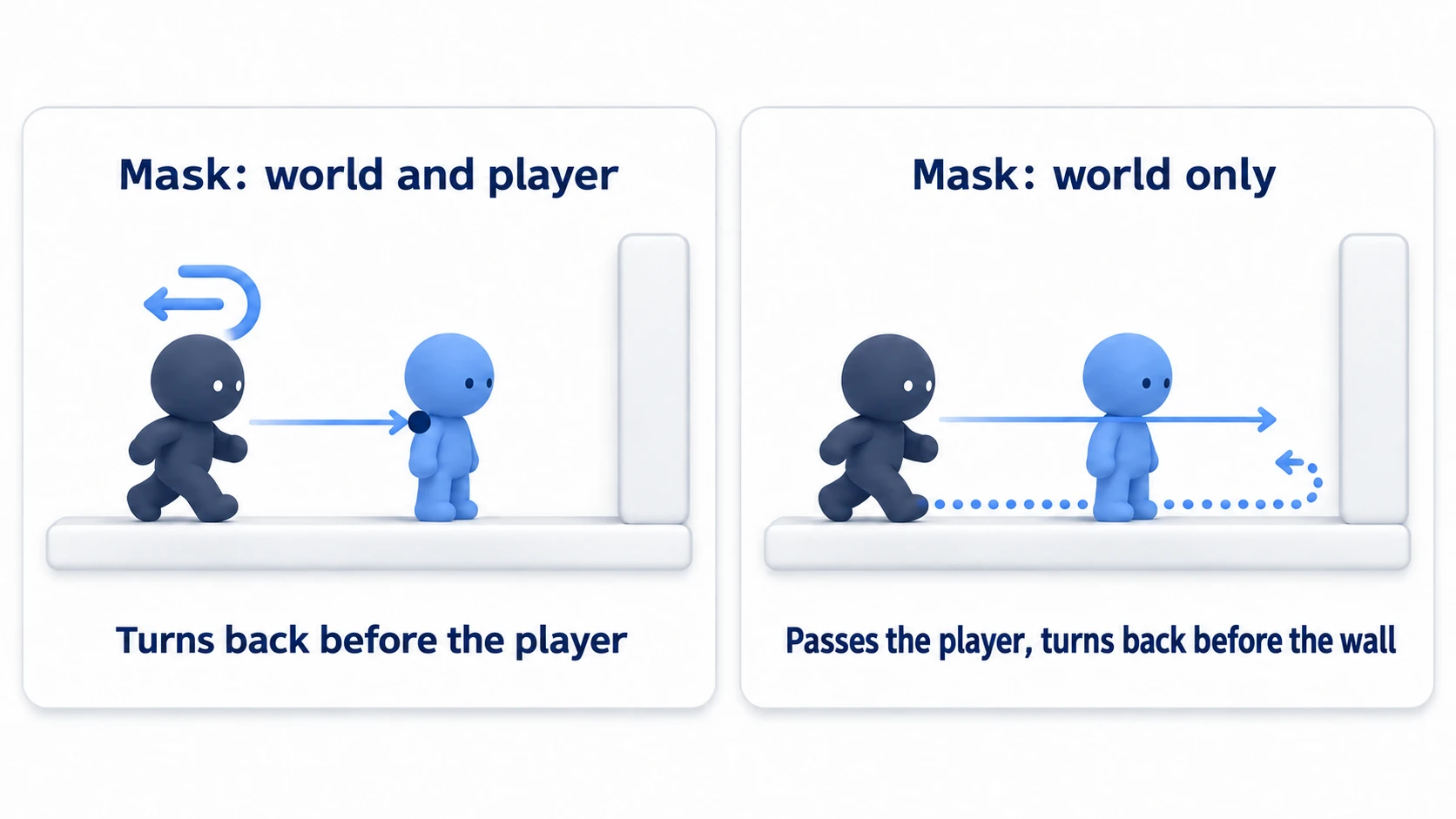
Watch out for your own body too. A line only automatically excludes its direct parent's collision (exclude_parent). For a line placed under Pivot, the direct parent is Pivot, so the enemy's body isn't excluded. Put the enemy's body on its own layer, and leave that layer out of the lines' masks.
ShapeCast2D: checking with a shape that has width
A line has no thickness. Even a small gap a body could step over, the line at the feet falls into and answers "no floor."
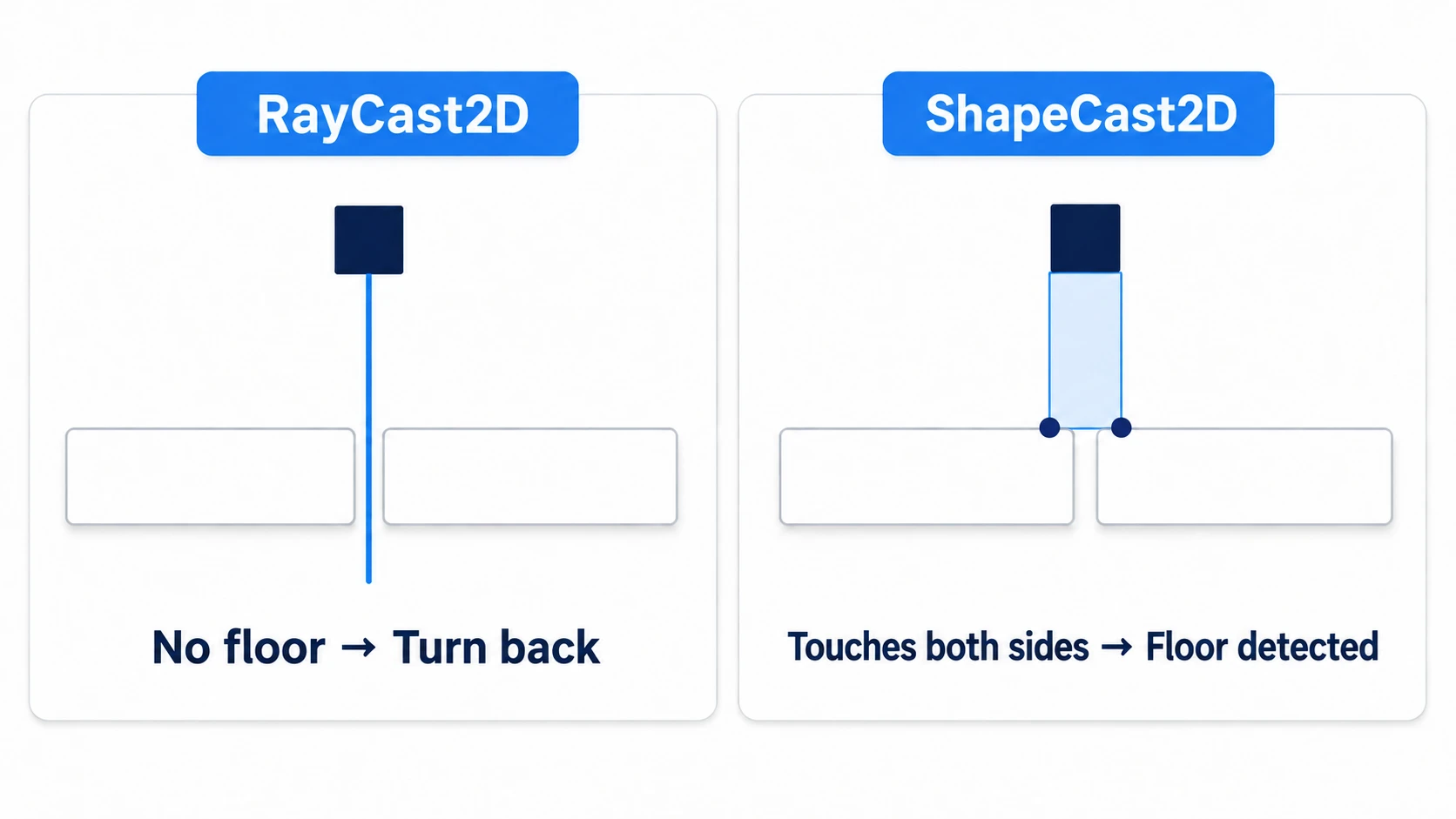
ShapeCast2D is a node that checks by moving a shape instead of a line. It moves the shape set in its shape property (an item on ShapeCast2D itself, not a child CollisionShape2D) to target_position, and collects the targets it's touching at the first position where it collides. Check the feet with a rectangle as wide as the body, and it touches the floor on both sides of the gap and answers "there's floor."
In exchange, at a ledge it keeps answering "there's floor" while part of the shape still touches the floor, so the enemy walks closer to the edge than with a line. Use a line for ledge checks and a shape for checks that step over gaps. It returns multiple targets, so read the count with get_collision_count() and the i-th target with get_collider(i).
Hands-On: Build an Enemy That Turns Back Before Ledges and Can't See Through Walls
A patrolling soldier in a side-scroller, a guard in a stealth action game, a grunt in a Metroidvania—enemies that check the ground, walls, and line of sight appear in every genre. Here you'll build an enemy that walks back and forth on a floor, turns back before ledges and walls, and doesn't notice a player behind a wall.
① What to place
Start from a new scene. You won't use any art assets. Instead, turn on Visible Collision Shapes in the Debug menu and work while watching the collision shapes and lines.
First, in Project Settings under Layer Names → 2D Physics, name layer 1 world, layer 2 player, and layer 3 enemy.
- Put a Node2D at the root as Main, save it as
main.tscn, and set it as the Main Scene - Place two StaticBody2Ds, give each a CollisionShape2D child with a RectangleShape2D. Leave their layer at
world
| Name | Position | Size |
|---|---|---|
| Ground | (480, 416) | (640, 32) |
| Wall | (704, 320) | (32, 160) |
- Place a CharacterBody2D as Player. Position (760, 376). Give it a CollisionShape2D child with a RectangleShape2D (32, 48)
- Set Player's Collision → Layer to
playeronly (uncheckworld). Don't attach a script, and add it to theplayergroup in the Groups dock. A group is a name tag you put on a node, and the enemy's script finds the player by this tag - Place a CharacterBody2D as Enemy and set its Position to (400, 384). Set Layer to
enemyonly and Mask toworldonly, and place these under it
| Node | Where | Settings |
|---|---|---|
| CollisionShape2D | child of Enemy | RectangleShape2D (32, 32) |
| Pivot (Node2D) | child of Enemy | as is |
| Sprite2D | child of Pivot | Texture set to icon.svg, Scale (0.25, 0.25) |
| FloorCheck (RayCast2D) | child of Pivot | Position (20, 0), Target Position (0, 24), Mask world |
| WallCheck (RayCast2D) | child of Pivot | Target Position (24, 0), Mask world |
| Sight (RayCast2D) | child of Enemy | Position (0, -8), Mask world and player |
| Alert (Label) | child of Enemy | Text !, Position (-4, -44), Visible off |
The floor spans x 160 to 800, with its top surface at y=400. The wall stands toward the right of the floor (x 688 to 720), and the player stands on the floor to the right of the wall. The enemy's body is 32×32, so it sits right on the floor when its center is at y=384.
② Put it together
Attach a script to Enemy.
# enemy.gd (Enemy's CharacterBody2D)
extends CharacterBody2D

const SPEED := 80.0          # patrol speed (pixels per second)
const GRAVITY := 980.0
const SIGHT_RANGE := 120.0   # doesn't notice the player beyond this

var direction := 1.0         # 1 is right, -1 is left

@onready var pivot: Node2D = $Pivot
@onready var floor_check: RayCast2D = $Pivot/FloorCheck
@onready var wall_check: RayCast2D = $Pivot/WallCheck
@onready var sight: RayCast2D = $Sight
@onready var alert: Label = $Alert
@onready var player: Node2D = get_tree().get_first_node_in_group("player")

func _physics_process(delta: float) -> void:
	if not is_on_floor():
		velocity.y += GRAVITY * delta

	if _can_see_player():
		alert.visible = true
		velocity.x = 0.0                          # stop once it notices
	else:
		alert.visible = false
		var no_floor := not floor_check.is_colliding()
		if is_on_floor() and (no_floor or wall_check.is_colliding()):
			direction = -direction                # turn back if there's no floor one step ahead, or a wall in front
			pivot.scale.x = direction             # flip the art and both lines together
		velocity.x = direction * SPEED

	move_and_slide()

func _can_see_player() -> bool:
	sight.target_position = sight.to_local(player.global_position)   # aim the end of the line at the player
	sight.force_raycast_update()                                     # recast the aimed line right now
	var close := global_position.distance_to(player.global_position) <= SIGHT_RANGE
	return close and sight.get_collider() == player                  # close, and the first thing hit is the player
FloorCheck starts 4 pixels past the front edge of the body (16 pixels from the center) and extends 24 pixels down. Its start is 16 pixels above the floor's top surface, so it never casts from inside the floor, and its end reaches 8 pixels below the top surface. A downward step deeper than 8 pixels is treated the same as a ledge, and the enemy turns back. When Pivot flips, FloorCheck moves to the front on the other side of the body, and WallCheck faces the other way too.
Only the line of sight sits outside Pivot and is re-aimed at the player every frame. Its direction is decided by the end of the line, so it doesn't need flipping. In exchange, it notices a player behind its back too. sight.to_local() is the function that converts a position in the world into a position as seen from Sight. Pass the player's world position (global_position) through it before putting it into target_position, and the end of the line reaches the player. After re-aiming, recast with force_raycast_update() before comparing the target.
③ Run it and check
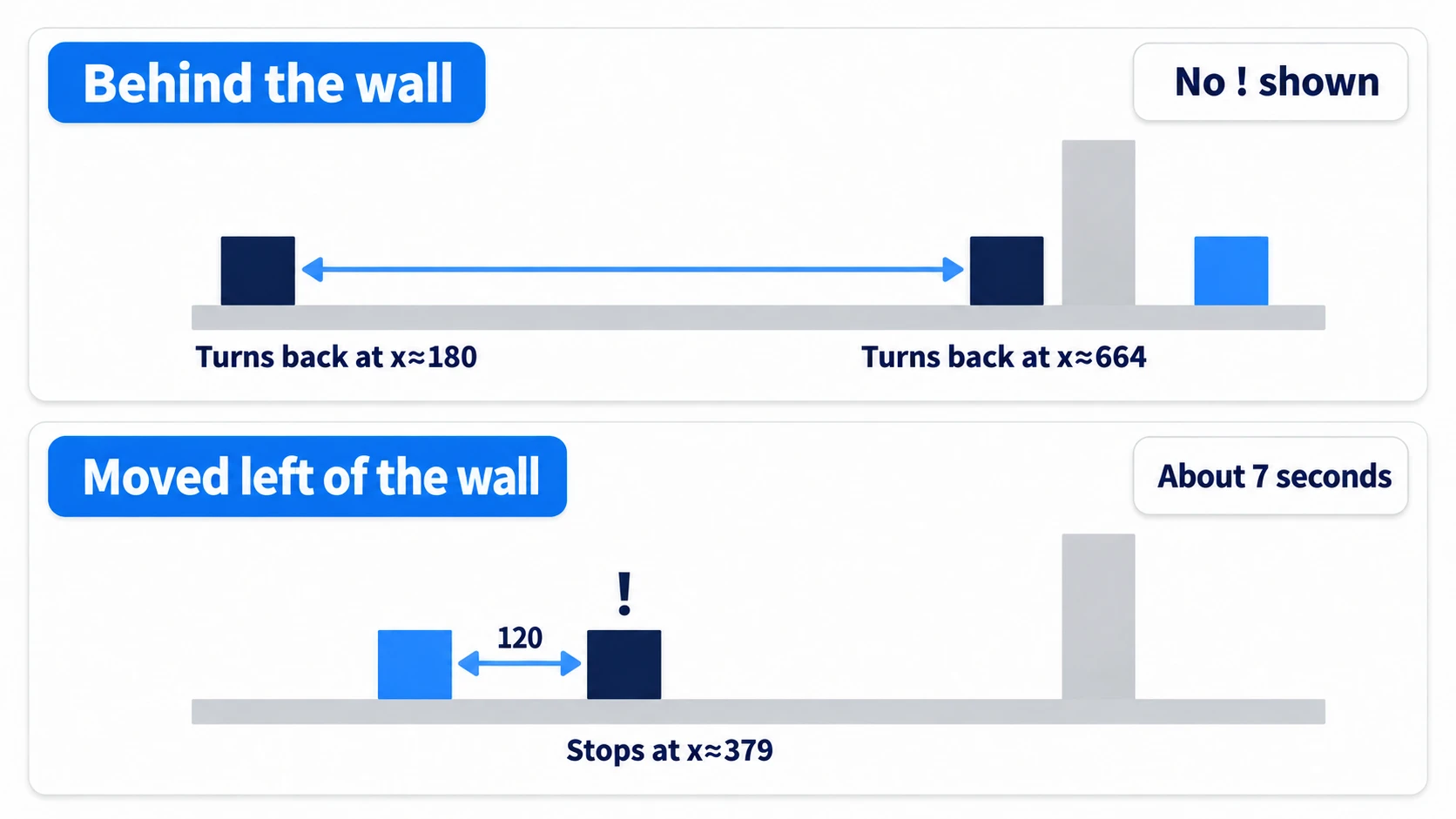
Run with F5 and watch the enemy's movement and the !. Check three things.
The enemy walks right and turns back when its center reaches x≈664. That's the moment the end of WallCheck reaches the wall, with still about 8 pixels of space between the body and the wall. Walking back left, at a center of x≈180 FloorCheck leaves the floor, and the enemy turns back just before the edge of the ledge. If it falls, FloorCheck's Mask or Target Position is wrong.
When it turns back in front of the wall, the player is about 96 pixels away, closer than the noticing distance of 120 pixels. Even so, no ! appears. The line from the eyes to the player hits the wall first. Sight's arrow runs through the wall all the way to the player and glows red. Red only means it hit something, so look at the ! to see who it hit.
To finish, change Player's Position to (260, 376) (on the floor to the left of the wall) and run. The enemy first walks right, turns back at the wall, comes back, and stops 120 pixels from the player (center x≈379), showing ! above its head. That's about 7 seconds after starting. If it walks past without stopping, player isn't in Player's Layer or Sight's Mask.
The lines and the noticing distance are the same as before. The only thing that changed is that there's no wall in between.
Two points.
- Read the line's answer according to where it's placed: a ledge is judged by not hitting, a wall by hitting, and line of sight by who's hit first. Even with the same RayCast2D, the answer you look at differs
- Recast a re-aimed line on the spot: after changing
target_position, callforce_raycast_update()before reading. Flip the patrol lines along with Pivot, and they answer in the new direction from the next frame
If you want this enemy to chase the player, the shape in State Machine Basics works as-is for switching states.
Troubleshooting
| Symptom | Cause | Fix |
|---|---|---|
| The enemy keeps turning around on a flat floor | The line's start point is buried inside the floor. By default, a ray doesn't hit shapes that contain its start point (hit_from_inside is off) | Move the start point outside the floor. Cast down from the height of the body's center, long enough to reach the floor |
Setting collision_mask = 3 in code doesn't see layer 3 | A mask's number is the sum of doubling values: layer 1 is 1, layer 2 is 2, layer 3 is 4. 3 means layers 1 and 2 | Specify by number, as with set_collision_mask_value(3, true) |
The ! flickers on and off at the corner of a wall | The line grazes the wall's corner, and the first target switches from frame to frame | Only treat the player as noticed when they've been visible for several frames in a row |
| The line doesn't hit a target made with Area2D | collide_with_areas is off by default | Turn on the line's Collide With → Areas |
Bonus: Good to Know First
- Casting without placing a node: one-off lines, like where a bullet lands, can be cast from code too. Build a query with
PhysicsRayQueryParameters2D.create()and pass it tointersect_ray()onget_world_2d().direct_space_state. Leave out the mask and it hits every layer, so specify only the layers of the targets you want to hit. Write it inside_physics_process() - An enemy that only looks forward: this article's enemy also notices a player behind its back. To make it forward-only, add one condition: whether the player is on the
directionside - Placement is the same in 3D: with RayCast3D, how you place and read lines doesn't change. In 3D, up is +Y, so a line cast straight down points
(0, -1, 0). Building a fan-shaped field of view is in Stealth Vision
Summary
- One line answers with only the first thing: whatever is farther back, what comes back is the closest target
- Ledges, walls, and line of sight differ in placement: a ledge is read by not hitting, a wall by hitting, and line of sight by who the target is
- Flip direction with the whole Pivot, and recast re-aimed lines:
target_positionis in local coordinates. To read in the same frame, useforce_raycast_update() - Choose targets with the mask: the wall line gets terrain only, the line of sight gets terrain and the player
- If a thin line isn't enough, use ShapeCast2D: check small gaps with a shape that has width
Start by placing a single RayCast2D, turning on Visible Collision Shapes, and running. Place lines while watching where the arrow turns red, and you can check ledges, walls, and line of sight the same way. Which line is the enemy you're building missing: the feet, the front, or the line of sight?