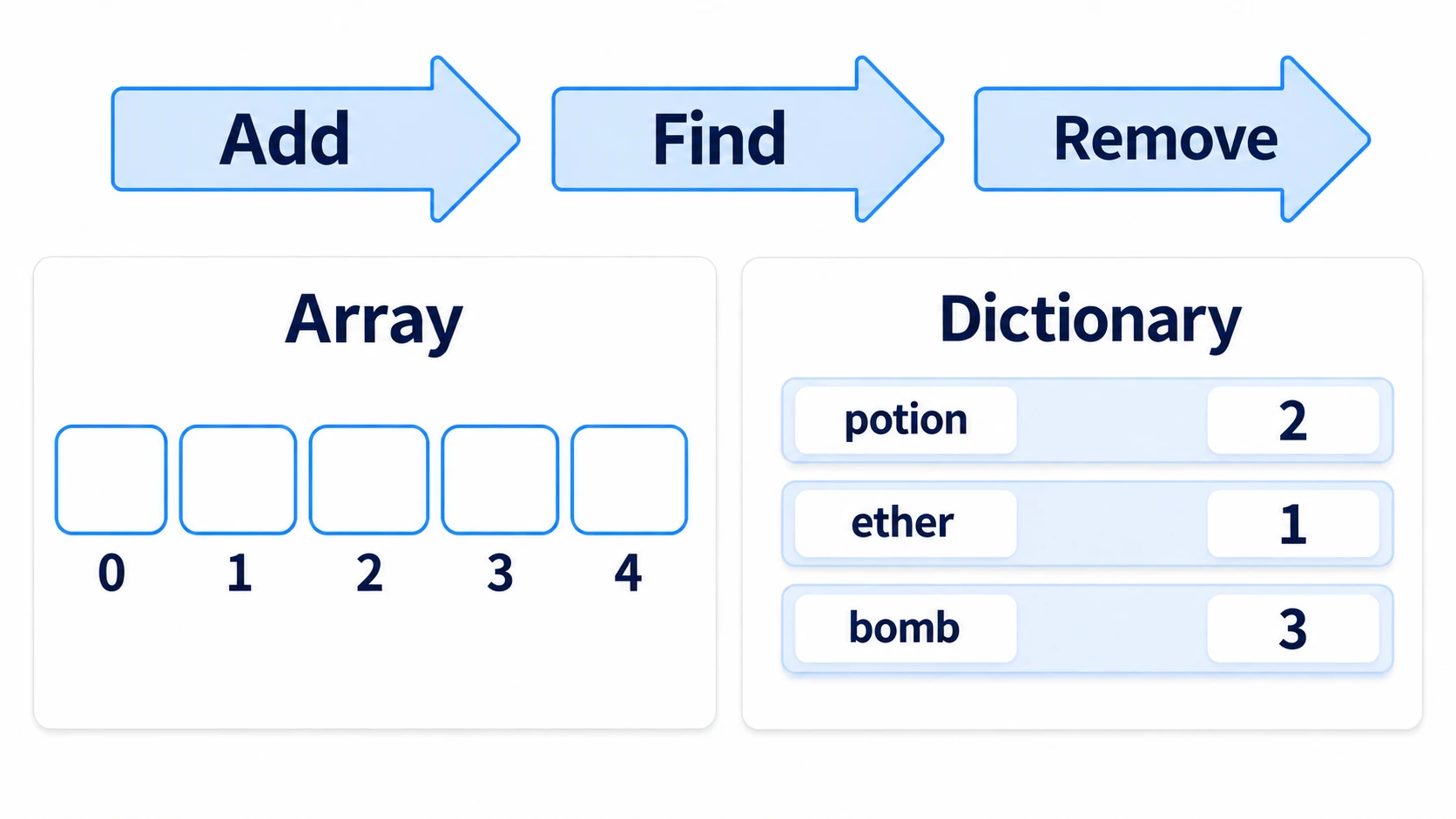
To hold a row of things of the same kind, like a roster of enemies, use an Array. To look up values by name, like item counts, use a Dictionary. For both, once you know how to add, find, and remove, you're covered for most situations.
Mix up how you write them, and a defeated enemy stays on the roster and the next attack throws an error, or your code that adds to an item count errors on the very first one. You can also put the list in another variable as a copy, only to have the original empty out along with it.
This article covers how to remove only the defeated enemies from a roster, and how to count picked-up items by type.
What You'll Learn
- A variable holds the container itself, not its contents
erasesearches for contents,remove_atremoves by position- Reading a missing key with
[]stops the game. Start counting withget(key, 0)- When removing several at once, loop over the indices (the numbers for each position) from the back
Tested with: Godot 4.7
Assignment and duplicate()
Put a number or string into another variable and the value is copied. An Array or Dictionary doesn't become a separate container when you put it in another variable with =. The same goes for nodes and resources such as images and .tres files: they point to the same instance.
var enemies: Array[String] = ["slime", "bat", "slime"]

func _ready() -> void:
	var backup = enemies      # meant to be a copy
	enemies.clear()
	print(backup.size())      # 0. backup is empty too
A variable holds the container itself, and assigning it just adds one more variable pointing to the same container. Take something out through one, and it's gone when you look through the other too. The same happens when you pass it to a function: clear() inside the function empties the caller's roster too.
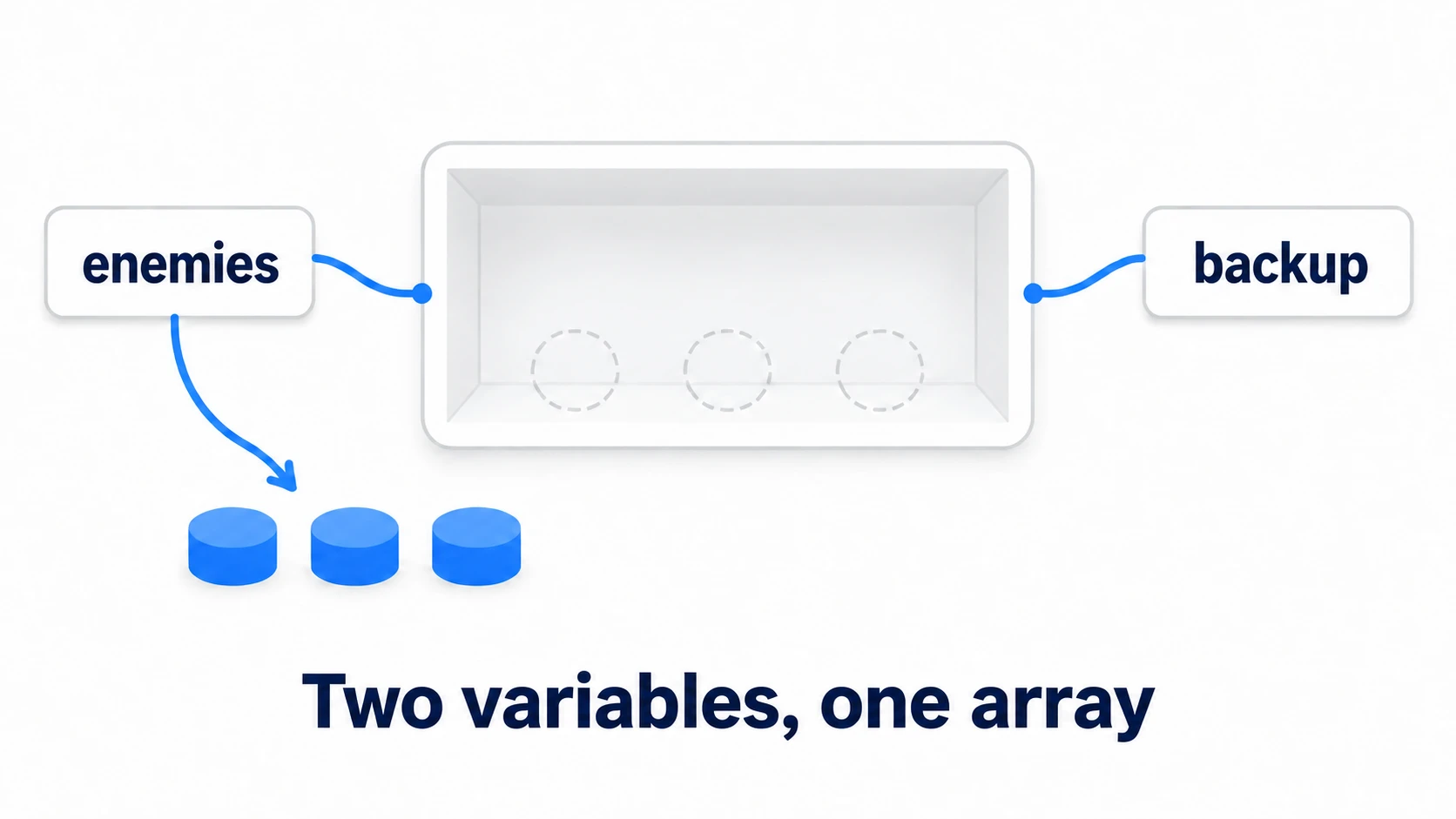
When you want a copy, use duplicate(). Write var backup = enemies.duplicate() and you get a separate container. But if the contents are nodes, only the container is copied, and the enemies inside are the same instances. Lower backup[0].hp and the enemy on the original roster loses HP too.
In other engines: Unity's
List<T>andDictionary<TKey, TValue>, which also point to the same container when assigned. UE's TArray and TMap serve similar purposes, but assigning them creates a separate container.
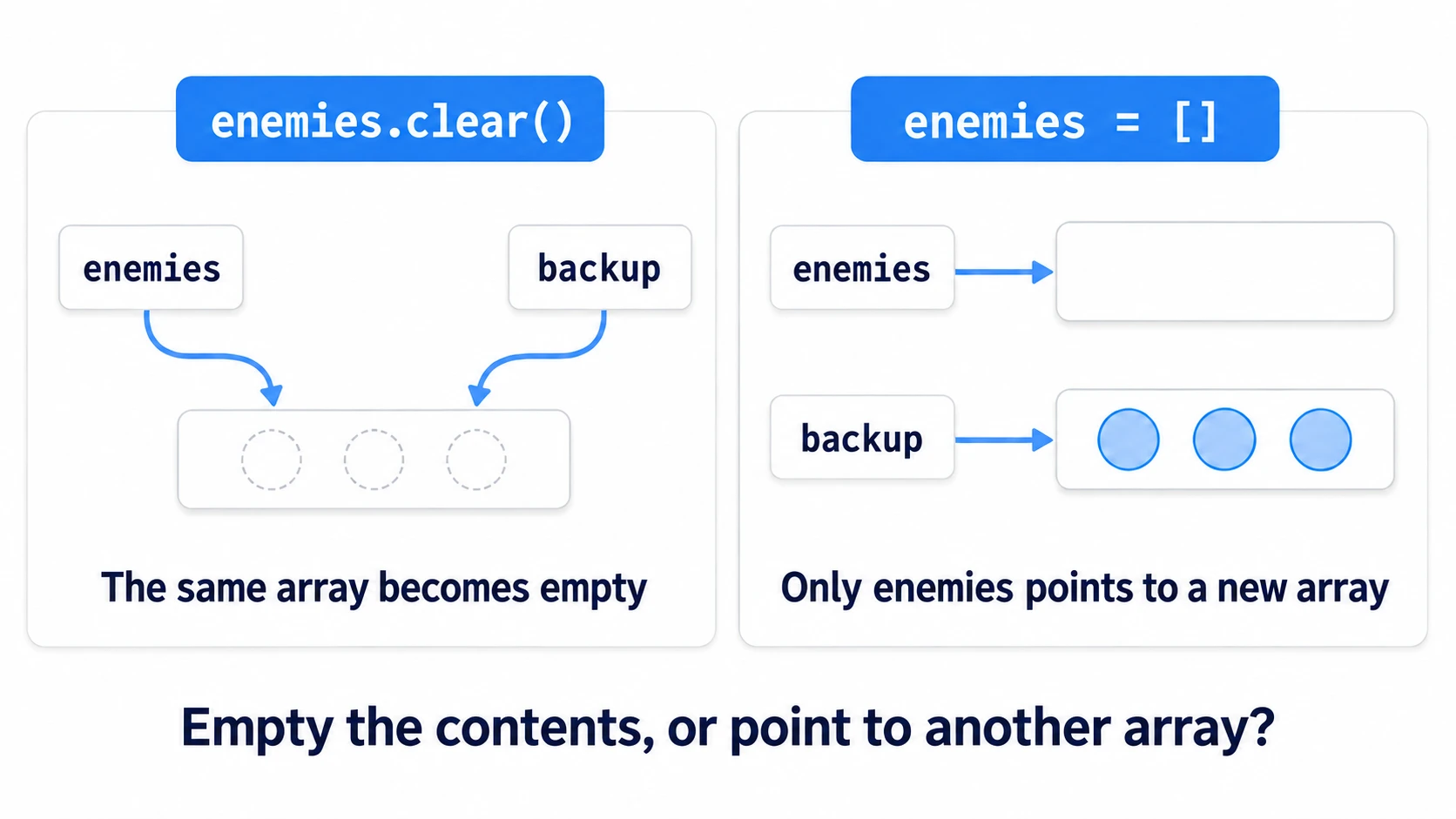
For the same reason, there are two ways to empty one. When one container is shared, as with backup = enemies, enemies.clear() empties that container, so it looks empty through backup too. enemies = [] just makes enemies point to a new empty container, so the original container and backup stay as they were.
Add, find, count (append, in, get)
An Array is a container ordered by number. Four verbs are enough.
var enemies: Array[String] = []

func _ready() -> void:
	enemies.append("slime")     # add to the end
	enemies.append("bat")
	print(enemies.size())       # 2. how many there are
	print("bat" in enemies)     # true. whether it's there

	for id in enemies:
		print(id)               # slime, then bat
in does the same thing as has(). It searches by comparing from the front in order, so the longer the roster, the longer it takes.
A Dictionary is a container where you look up values by name (key).
var bag: Dictionary[String, int] = {}

func _ready() -> void:
	bag["potion"] = 1           # put it in under a name
	print(bag["potion"])        # 1
	print("potion" in bag)      # true

	for id in bag:
		print(id, bag[id])      # comes out in the order you added them
A Dictionary's in looks only at keys. To search the values instead, use in on bag.values().
Here there's one step everyone trips on at first. Read a key that doesn't exist yet with [], and it stops on that line.
bag["ether"] += 1 # if there's no ether yet, it stops on the read
+= means "read, then add," so the read fails first. Code that starts a count uses get().
bag["ether"] = bag.get("ether", 0) + 1 # start from 0 if it's missing
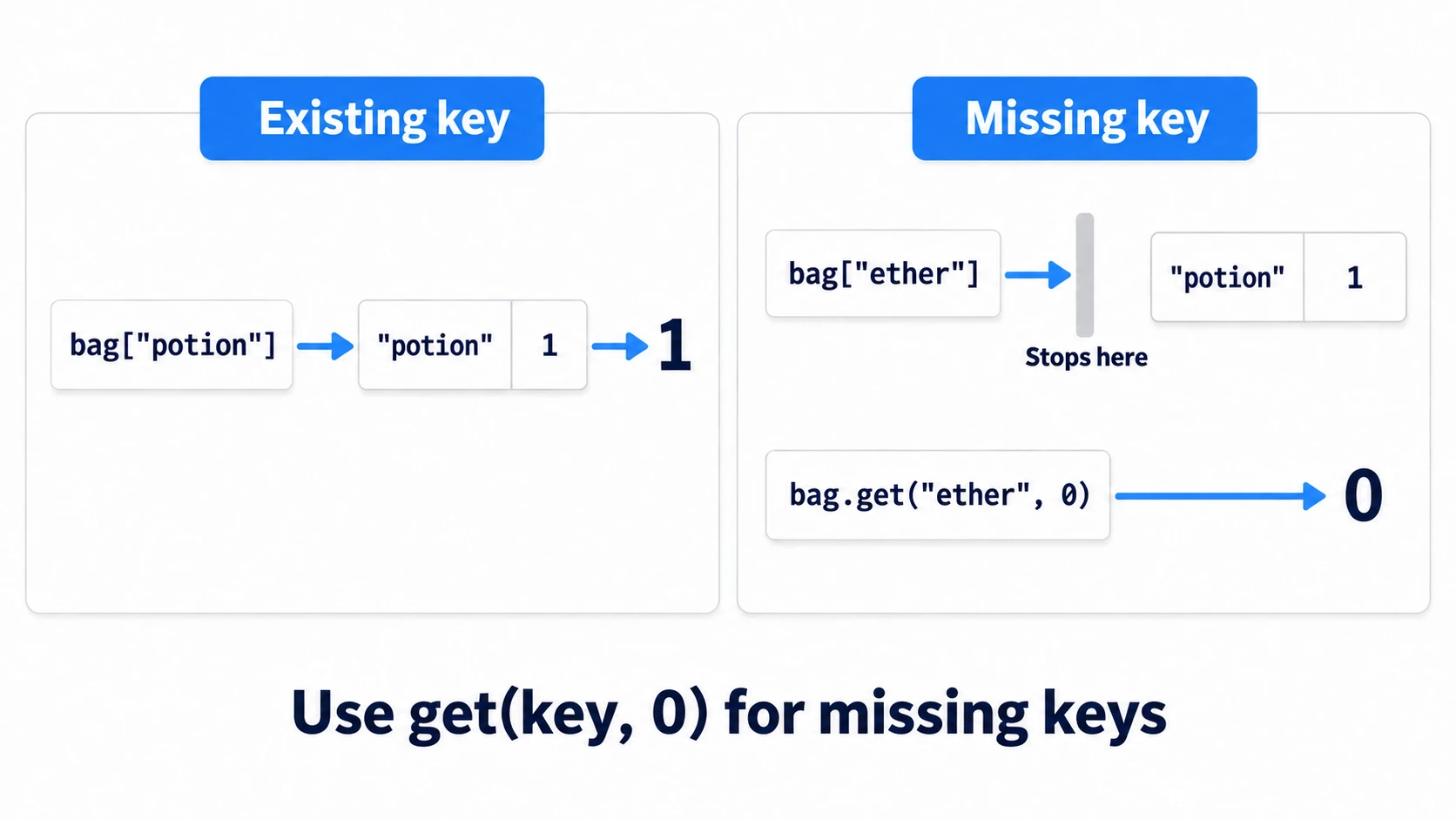
get(key, default) is a way of reading where you can say "use this if it's missing." Values you increase from 0, like item counts or kill counts, almost always take this form.
erase and remove_at
There are two ways to remove something from an Array, and they take different things.
enemies.erase("bat")        # find this content and remove it
enemies.remove_at(0)        # remove element 0
What erase takes is contents, not a position. So enemies.erase(0) goes looking for "an element whose value is 0." In an untyped Array, it doesn't find one, nothing happens, and no error appears either. You only notice it didn't get removed later.
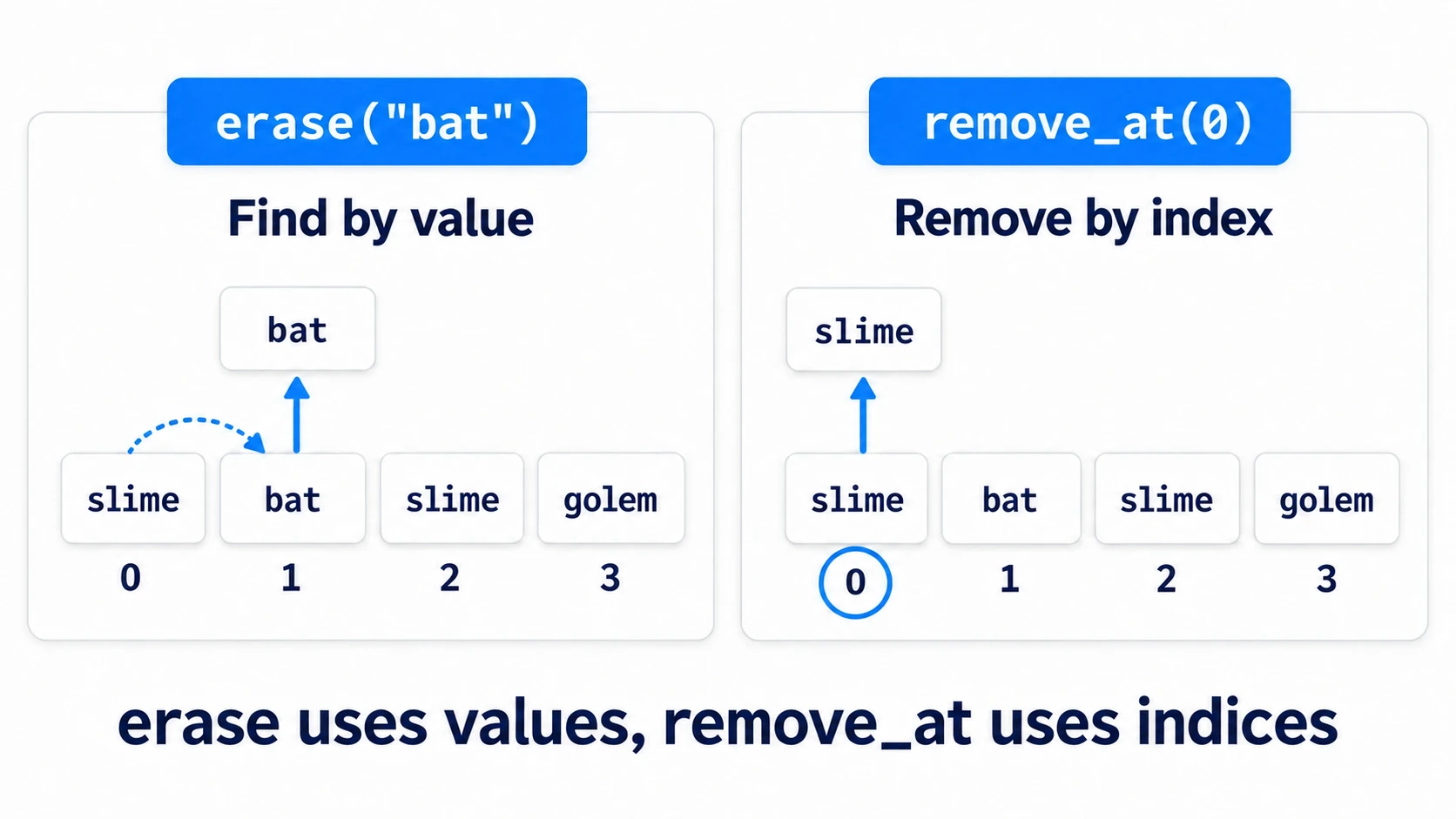
If you've written the content type, as in Array[String], an integer can't possibly be one of its contents, so you get a type error at runtime. Nothing gets removed either. Writing the type keeps this mix-up from slipping through silently.
A Dictionary removes by name. bag.erase("potion") returns true when it removed something. An Array's erase only removes the first match it finds and returns nothing. Check with in whether that value is still there.
Looping when removing several at once
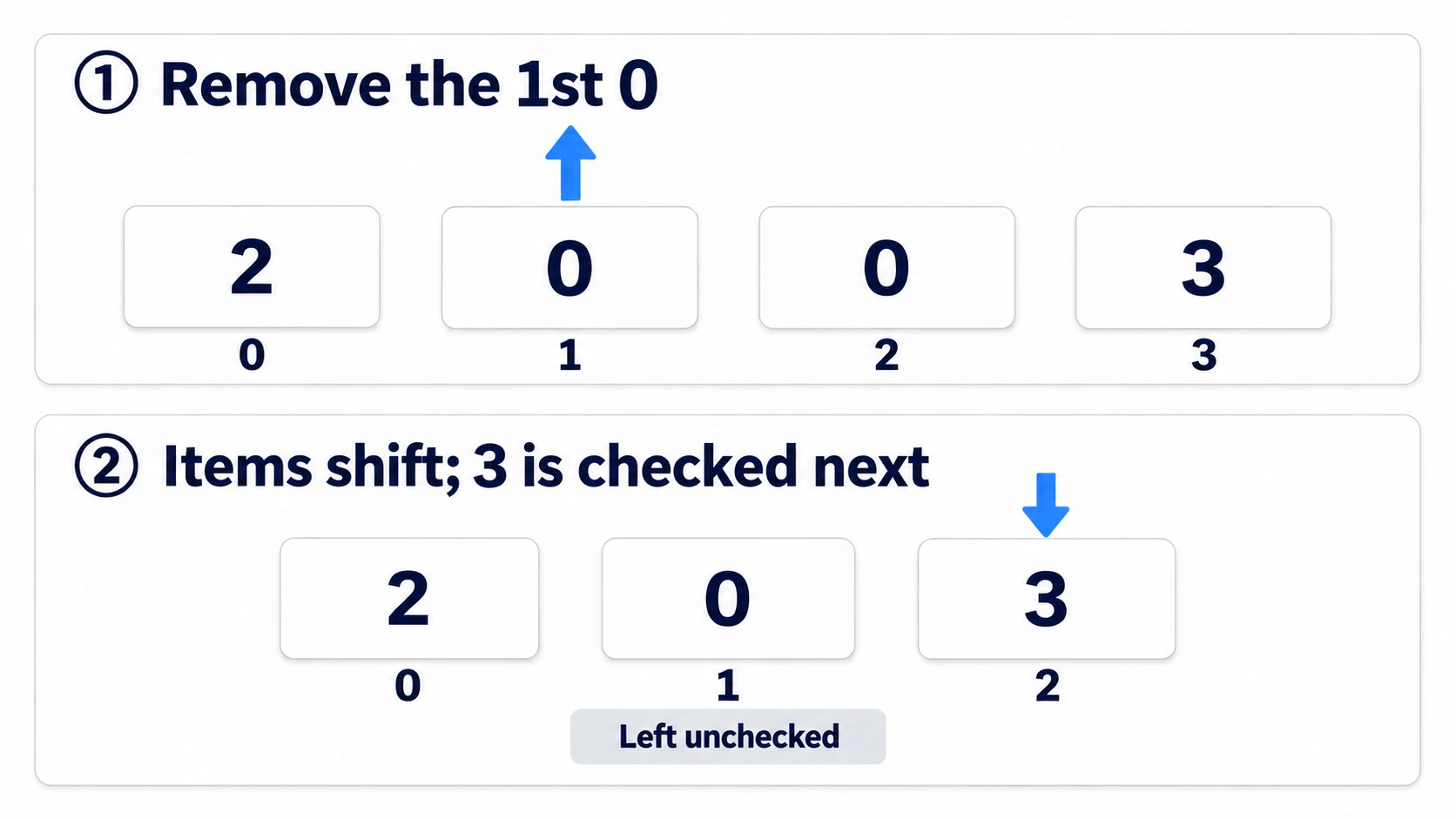
Removing elements from an array while looping over it with for isn't supported in Godot. For example, if you remove the element you're currently looking at, everything behind it shifts forward by one, and the next element gets left behind without being checked.
var hp_list: Array[int] = [2, 0, 0, 3]

func _ready() -> void:
	for hp in hp_list:          # don't do this
		if hp <= 0:
			hp_list.erase(hp)
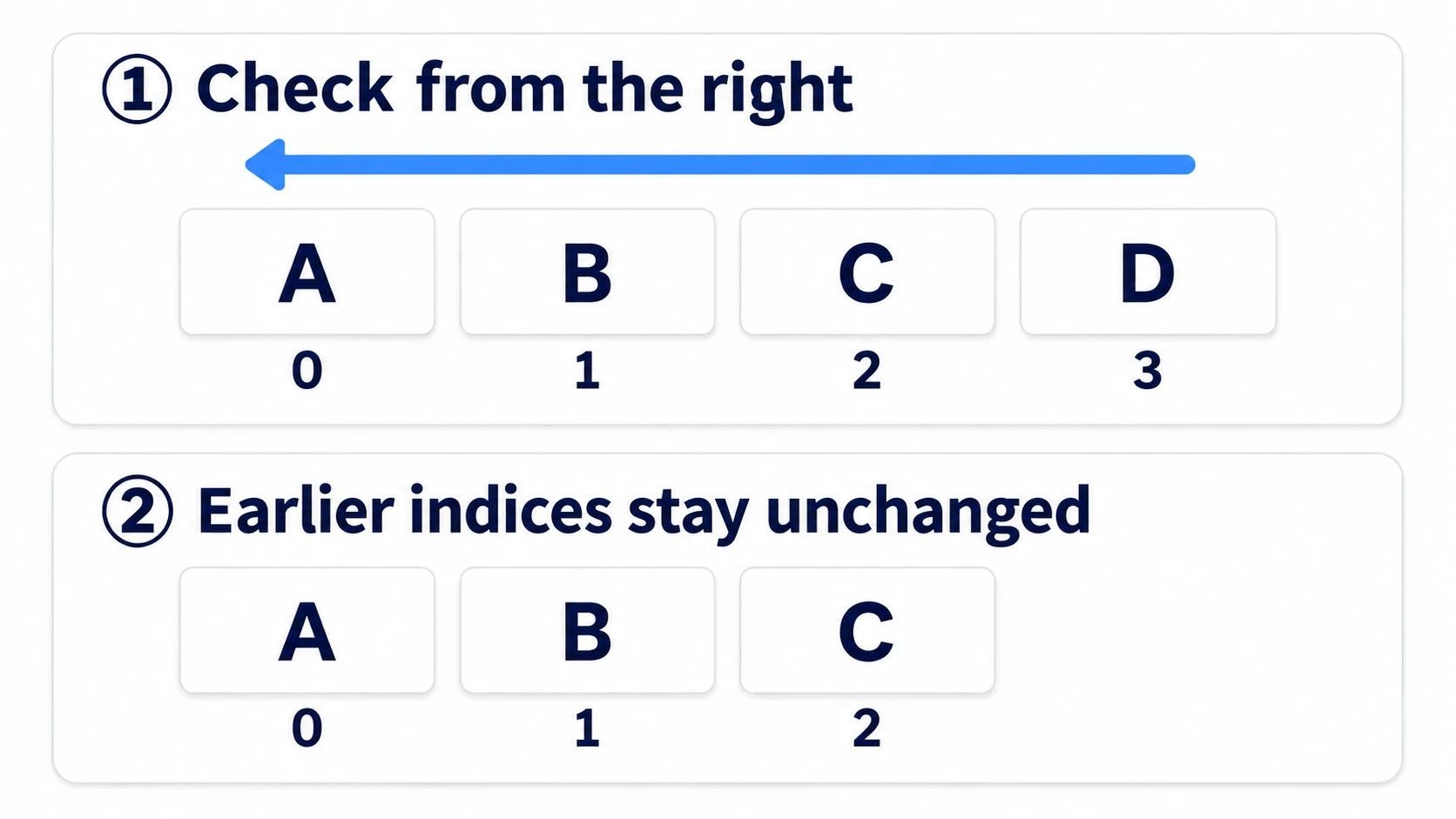
Loop over indices instead and go from the back, and it doesn't happen.
	for i in range(hp_list.size() - 1, -1, -1):
		if hp_list[i] <= 0:
			hp_list.remove_at(i)
What range() makes is a sequence of integers, 3, 2, 1, 0. It isn't looping over the array itself. The second -1 is the end marker meaning "stop just before this," so it checks down to 0. When you remove from the back, the numbers in front that you haven't looked at yet don't shift.
For a Dictionary, grab the list of keys first.
for id in bag.keys():
	if bag[id] <= 0:
		bag.erase(id)
What keys() returns is a separate array listing the keys at that moment. Touching bag while looping doesn't affect what you're looping over.
Typed Arrays and Dictionaries
Write the content type inside square brackets and other things can't get mixed in.
var enemies: Array[Node2D] = []
var bag: Dictionary[String, int] = {}
Try to put a string into an Array[Node2D] and it's rejected. Things don't carry on mixed together like they do without a type. Dictionary[String, int], which lets you write the types of both keys and values, is available from Godot 4.4.
The type only checks whether something is a kind of Node2D. It doesn't check whether a property you added yourself, like enemy.hp, exists, so that gets checked at runtime.
get_children() returns an array of child nodes, but its type is Array[Node], which isn't the same as Array[Node2D]. Node2D is a kind of Node, so in the hands-on you append each child as a Node2D one at a time, moving them into the roster.
Hands-On: Remove Defeated Enemies Together and Count Picked-Up Items
Grunts in a top-down ARPG, an enemy formation in a shooter, a room in a roguelite—scenes where an area attack takes down several enemies at once have the same shape across genres. You'll remove the defeated ones from the roster and count the items you pick up by type.
① What to place
Create one new scene, save it as main.tscn, and set it as the main scene. If you attach enemy.gd or item.gd to one node and then duplicate it with Ctrl + D, the duplicates get the same script too.
Main (Node2D)            main.gd
├── Player (CharacterBody2D)   player.gd
│   ├── Sprite2D
│   └── CollisionShape2D
├── Enemies (Node2D)
│   ├── Slime1 (Node2D)        enemy.gd
│   ├── Slime2 (Node2D)        enemy.gd
│   └── Slime3 (Node2D)        enemy.gd
├── Items (Node2D)
│   ├── Potion1 (Area2D)       item.gd
│   ├── Potion2 (Area2D)       item.gd
│   └── Ether1 (Area2D)        item.gd
└── Hud (Label)
Set the values like this.
| Node | Position and settings |
|---|---|
| Player | Position (120, 300). res://icon.svg in the Sprite2D's Texture, Scale (0.5, 0.5). The CollisionShape2D is a CircleShape2D with radius 24 |
Slime1 to 3 | Positions (400, 200), (500, 300), (600, 400). A Sprite2D child (res://icon.svg as its Texture, Scale (0.4, 0.4)). Set Hp in the Inspector (hp in the code) to 2, 1, and 1 |
| Potion1, Potion2 | Positions (250, 200) and (250, 400). A Sprite2D child (same Texture, Scale (0.3, 0.3)) and a CollisionShape2D (CircleShape2D with radius 32). Set Item Id in the Inspector (item_id in the code) to potion |
| Ether1 | Position (250, 300). Same as above. Set the Sprite2D's Modulate to blue so you can tell it apart. Item Id is ether |
| Hud | Position (20, 20) |
# enemy.gd
extends Node2D

@export var hp: int = 1
# item.gd
extends Area2D

@export var item_id: String = "potion"
# player.gd
extends CharacterBody2D

@export var speed: float = 220.0

func _physics_process(_delta: float) -> void:
	velocity = Input.get_vector("ui_left", "ui_right", "ui_up", "ui_down") * speed
	move_and_slide()
② Hold the roster and the item counts
Here's all of main.gd. From top to bottom: "the two containers," "registering at startup," "the area attack," "on pickup," and "the display."
# main.gd
extends Node2D

var enemies: Array[Node2D] = []            # roster of enemies still alive
var bag: Dictionary[String, int] = {}      # count per item type

@onready var hud: Label = $Hud

func _ready() -> void:
	for child in $Enemies.get_children():
		enemies.append(child as Node2D)    # it's an Array[Node], so treat each as a Node2D and move it over
	for child in $Items.get_children():
		var item := child as Area2D
		item.body_entered.connect(_on_item_touched.bind(item))
	_update_hud()

func _unhandled_input(event: InputEvent) -> void:
	if event.is_action_pressed("ui_accept"):   # an action mapped to Space and Enter out of the box
		_attack_all()

func _attack_all() -> void:
	for enemy in enemies:
		enemy.hp -= 1                      # only lower it. Don't remove here
	for i in range(enemies.size() - 1, -1, -1):
		var enemy := enemies[i]
		if enemy.hp <= 0:
			enemies.remove_at(i)           # first take it off the roster
			enemy.queue_free()             # then delete it
	_update_hud()

func _on_item_touched(body: Node2D, item: Area2D) -> void:
	if body != $Player:
		return
	var id: String = item.item_id
	bag[id] = bag.get(id, 0) + 1           # missing keys start counting from 0
	item.queue_free()
	_update_hud()

func _update_hud() -> void:
	hud.text = "Enemies %d / potion %d / ether %d" % [   # each %d is filled in order with the numbers on the right
		enemies.size(), bag.get("potion", 0), bag.get("ether", 0)
	]
The items use body_entered, which arrives when a body enters an Area2D. bind(item) appends the item itself after the body the signal passes. That's why the receiving function takes (body, item) in that order, and even with all three connected to the same function, you can tell which one was touched (Signals).
The for that lowers HP and the for that removes are separate. The pass that only lowers HP doesn't change the array, so it's fine to loop over it directly. Only the removing pass loops over indices from the back.
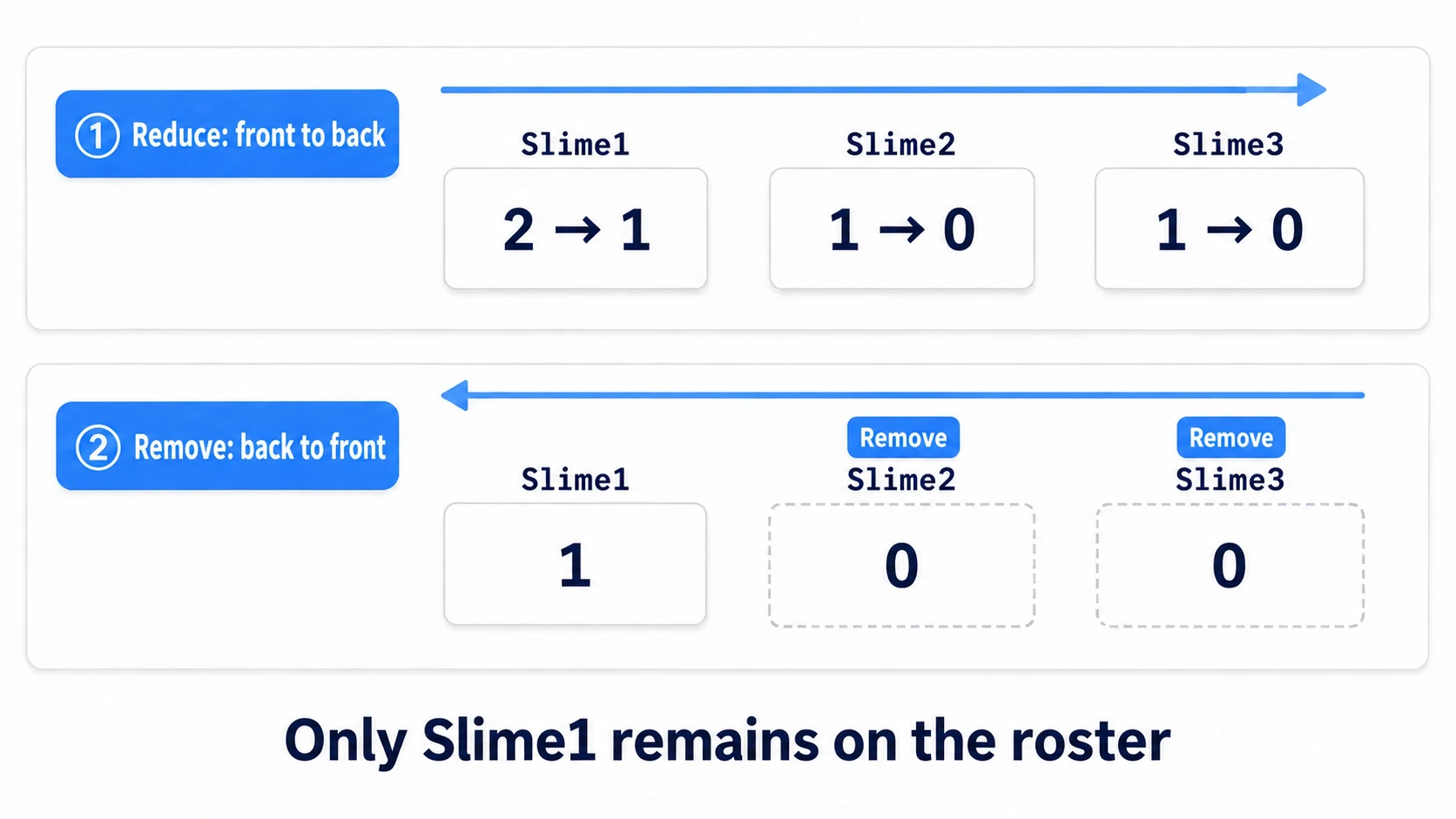
queue_free() reserves deletion at the end of the current frame, and doesn't delete on the spot. So what matters is not leaving deleted nodes on the roster. Leave one there, and the next attack goes to read hp on a node that's already gone (freed), causing an error. This article's hands-on sticks to one order: take it off the roster, then reserve the deletion.
enemy.hp and item.item_id are properties that Node2D and Area2D don't have. Even so, there's no error, and as long as the actual instance has enemy.gd or item.gd attached, it just works.
③ Run it and check
Run with F5. Enemies 3 / potion 0 / ether 0 appears in the top left. Check three things.
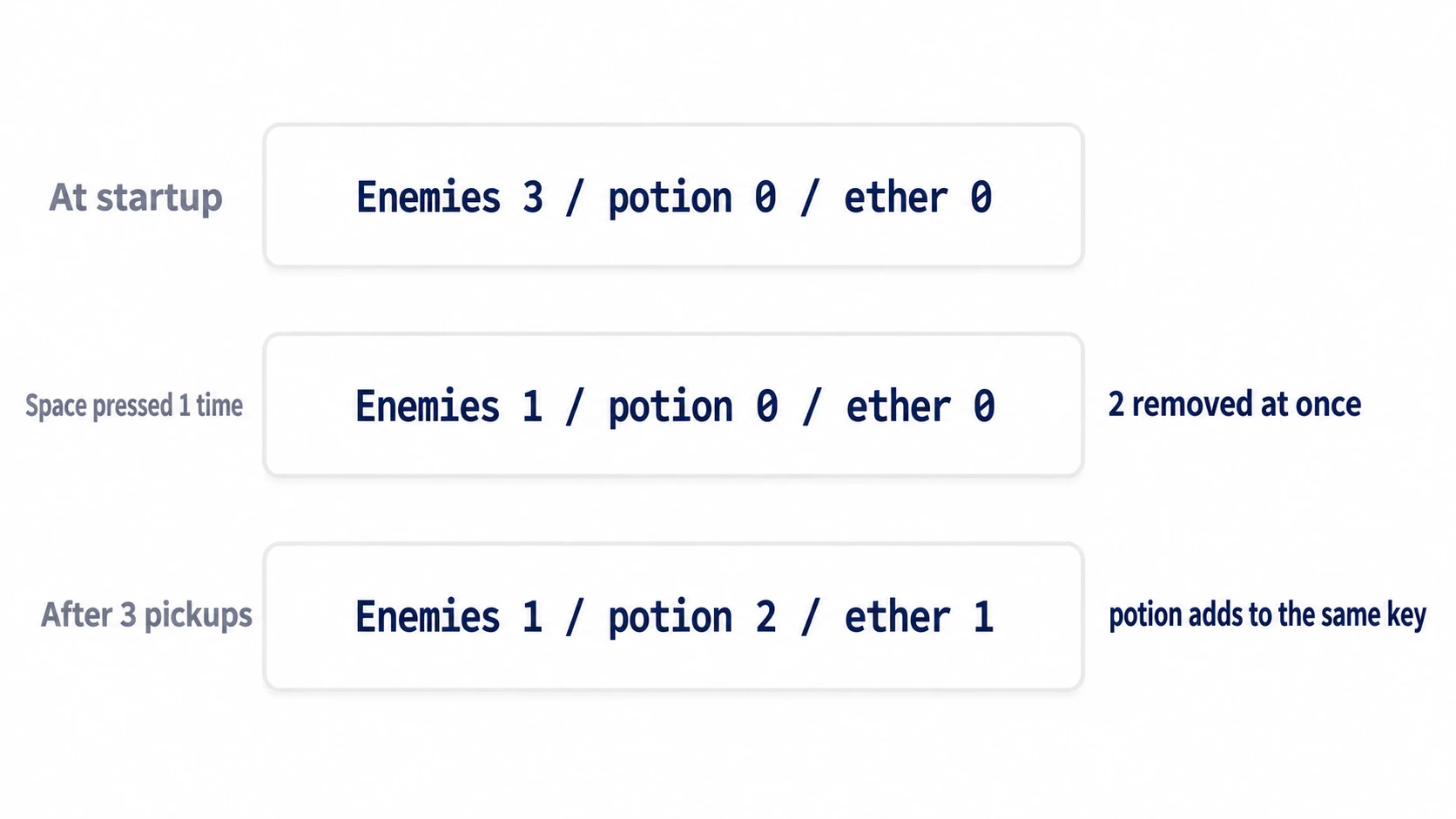
The first is when you press the space key once. The three enemies' HP becomes 1, 0, and 0, the two at 0 are removed together, and it changes to Enemies 1. With the front-to-back delete loop, Slime3 shifts forward when Slime2 is removed and stays on the roster without being checked.
The second is when you touch two potions and one ether with the arrow keys. The display becomes potion 2 / ether 1. potion gets added to the same key both times, and ether started counting from 0 on the first one. If it errors on the first pickup, you're reading with [] instead of get(key, 0).
The third is when you press space again. It becomes Enemies 0, and pressing more after that produces no errors. Because you remove before queue_free(), no deleted enemies remain on the roster.
Two points.
- Don't leave deleted things on the roster:
queue_free()doesn't delete on the spot. Pair it with removal and you'll never touch a freed node later - Start counted values with
get(key, 0): item counts, kill counts, per-floor scores, and any other value you increase from0can all be written this way. Designing items as an inventory is covered in Inventory System
Troubleshooting
| Symptom | Cause | Fix |
|---|---|---|
| Passing the roster to a function emptied the caller's roster too | Containers aren't copied when passed as arguments either. clear() or erase() inside the function touches the caller's container | If you don't want the function to change it, duplicate() it before passing it or at the top of the function |
Changing hp on an enemy in a duplicate()d roster changed the real enemy's hp too | Only the container is copied, and the enemies (nodes) inside are the same instances | If you want separate enemies, create new ones from enemy.tscn with instantiate() |
You duplicate()d a nested dictionary, but the array inside still changes along with the original | The default duplicate() copies only the outer layer | Use duplicate(true) to copy the arrays and dictionaries inside too. Nodes and resources stay the same instances even with true |
| Only enemies spawned later don't lose HP from the area attack | Registration on the roster happens only once, in _ready() at startup | Call enemies.append() where you spawn the enemy. For items, connect body_entered there too |
Bonus: Good to Know First
- You can rebuild instead of removing:
enemies = enemies.filter(func(e): return e.hp > 0)returns a new array holding only the elements that match the condition (func(e): ...is a small function written on the spot). You're not removing while looping, so nothing gets skipped. Delete the enemies that dropped off separately withqueue_free() keys()andvalues()are copies: both return new arrays. Sorting the array you got back doesn't change the order of the original Dictionary- Scripts you write can be types too: write
class_name Enemyat the top ofenemy.gdand you can writeArray[Enemy]. How to write types is in Static Typing - They can be nested: you can put an Array inside a Dictionary, as in
{ "stage": 1, "cleared": ["a", "b"] }. Turning that into a form you can save is covered in Save and Load
Summary
- A variable holds the container itself: it isn't copied on assignment or when passed to a function
duplicate()copies only the container: the nodes inside stay the same instances- Add with
append, find within: a Dictionary'sinlooks at keys. Start counts withget(key, 0) - Remove by contents, or by position:
erasesearches for contents,remove_atremoves by position - To remove several at once, go from the back: loop over indices from the back. For a Dictionary, loop over
keys()
If the syntax itself feels shaky, you can go back to GDScript Basics.
In the roster you're writing now, are you removing things with erase or with remove_at?