When you update your game and add or rename fields in the save, you need to keep saves from people who played the previous version readable too. For a JSON save, write a version number into it, and if it's an old version, move it to the current shape before using it.
Do nothing, and reading a newly added field throws an error, or a renamed field falls back to its default and the original value is lost on the next save.
This article explains how to write a version number into saves and move old saves to the current shape one step at a time before using them.

What You'll Learn
- How reading differs between adding a field and changing a name or container
- How to check the version number and pass the data through conversion functions one step at a time
- Why to convert the version number read from JSON into an integer
- How to keep the original save before migrating, and how to handle saves from a newer version
- Hands-on: read a v1 save in the v2 game
Tested with: Godot 4.7
- Save versions and the conversion flow
- Adding a field (get()'s default)
- Changing a name or container (conversion functions)
- How to compare version numbers (int())
- Backing up the original save, and newer-version saves
- Hands-On: Read a v1 Save in the v2 Game
- Troubleshooting
- Bonus: Good to Know First
- Summary
Save versions and the conversion flow
The fields you put in a save, and how they're arranged, are called "the save's shape." Each time you update the game and change the shape, raise the shape's number (its version) by one. The "v": 1 in the save from Save/Load Basics is this number.
When reading, look at the version number first. If it's older than the current game, pass it through conversion functions in order, "1 to 2," "2 to 3," to make it the current shape before using it. The main part of the game only ever sees the current shape. When writing, always write the current version too.
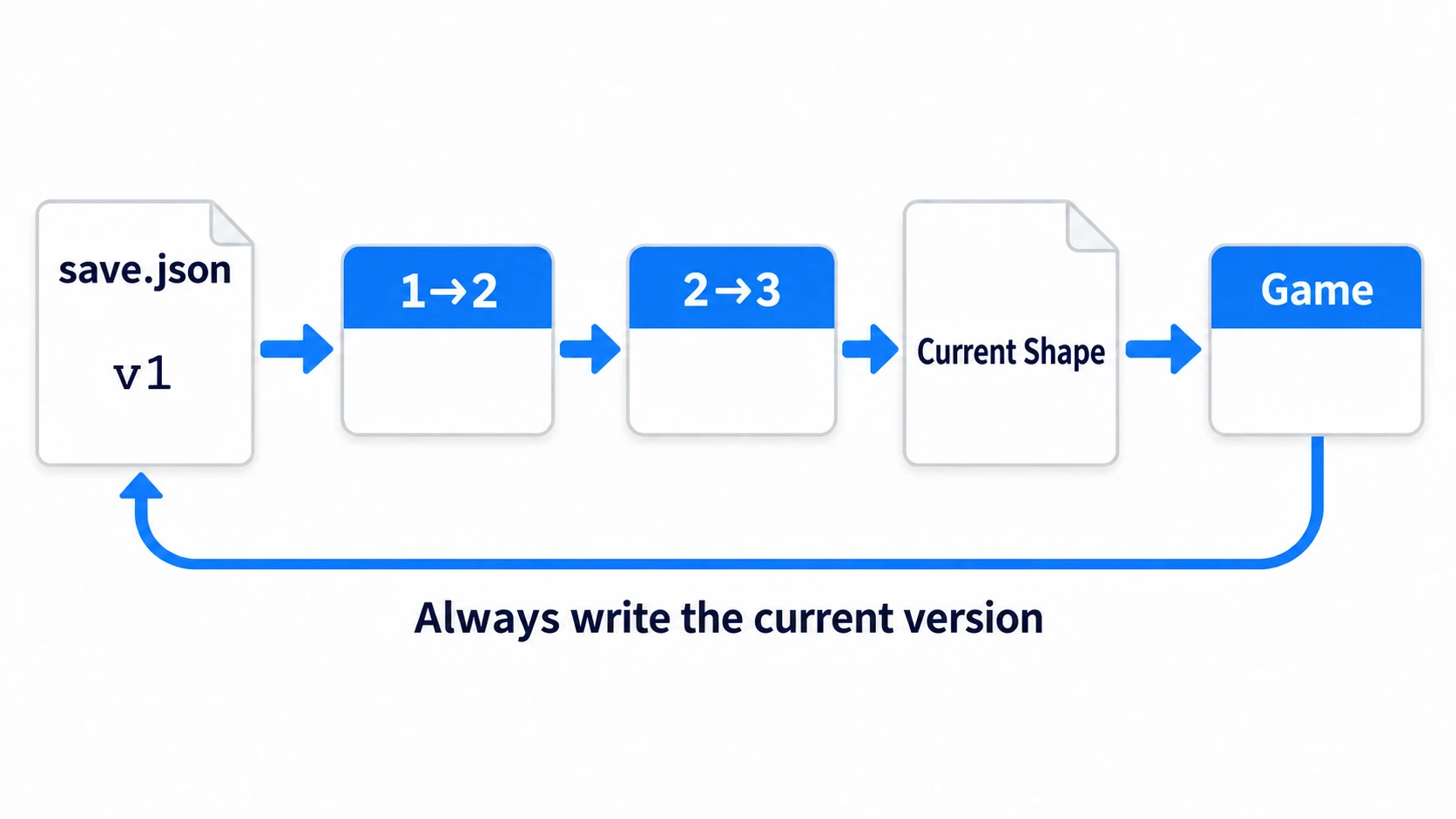
Split the differences between versions with if all over the game, and every new version adds more places to fix. Gather the conversions at the entrance for loading, and the main part of the game never needs to know about old shapes.
Adding a field (get()'s default)
Old saves don't have fields you added later. Reading with [], like data["gold"], causes a runtime error. Read with get(), writing the value to use when it's missing (the default) as the second argument.
var gold: int = data["gold"]            # runtime error with old saves
var gold := int(data.get("gold", 0))    # 0 if missing. JSON numbers are floats, so int()
But some fields need a different missing value for "people starting fresh" and "people who've been playing." For example, a "has seen the tutorial" field added later. If the tutorial shows when it's false and you read it as get("tutorial_done", false), people who've been playing see the tutorial again. If you want it true only for people who've been playing, fill it in with a conversion function, even though it looks like you're only adding a field.
In other engines: in UE's standard SaveGame, a variable added later to the same SaveGame class gets the class's default value if old saves have no value for it. When reading from a dictionary in Godot, you write that default yourself as
get()'s second argument.
Changing a name or container (conversion functions)
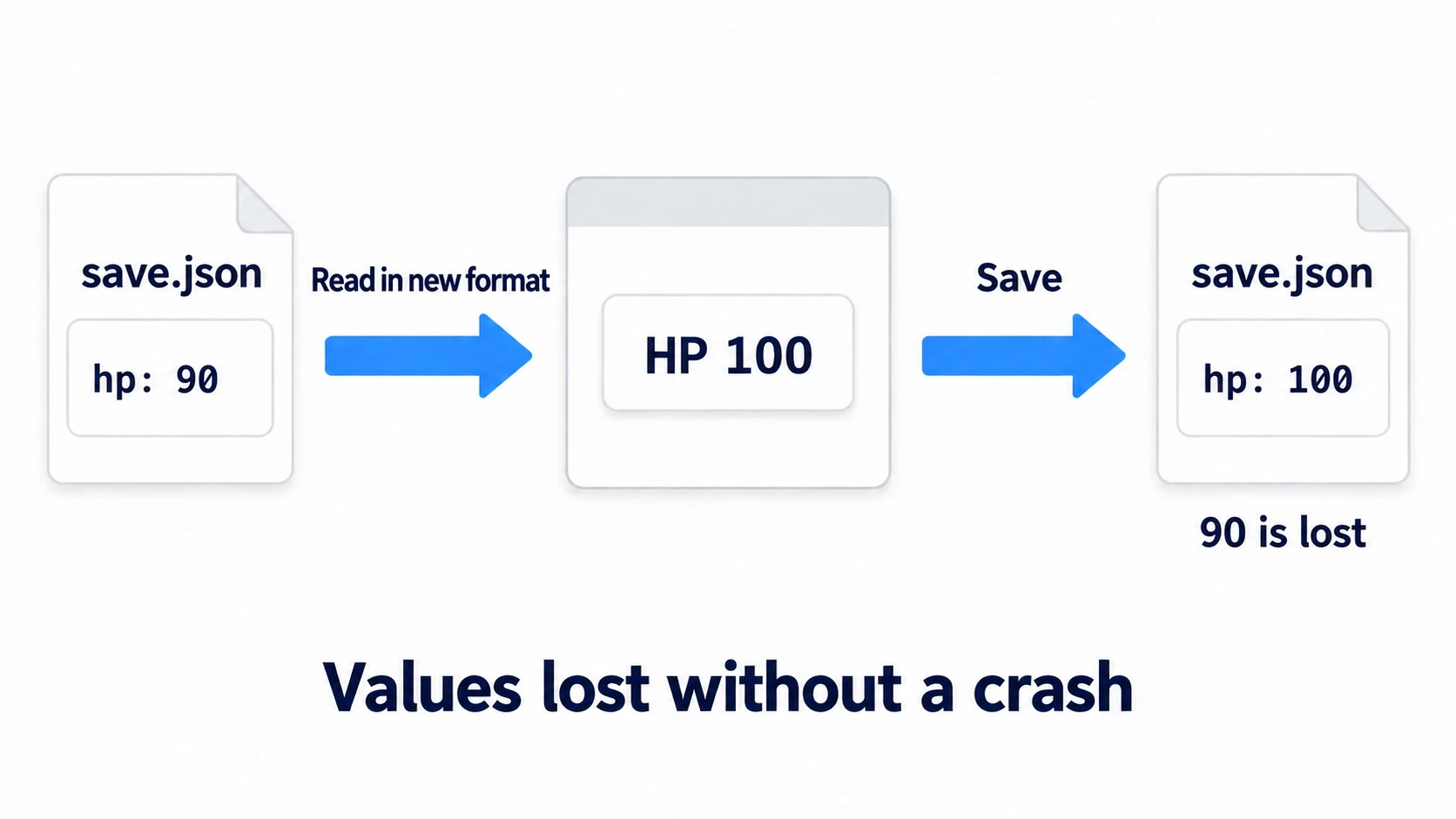
Say that in v2 you regroup HP and position inside a dictionary (a Dictionary holding pairs of names and values) called player. You've changed the keys' container. If you only update the loading to the new shape, old saves have no player, so get() returns the defaults. No error appears, and the game starts with HP at 100 and the position at the starting point.
The trouble comes next. Save in this state, and the file is overwritten with a dictionary rebuilt from the current values, so the "hp": 90 that was in the file disappears too. Since nothing crashes, you won't notice until a player tells you.
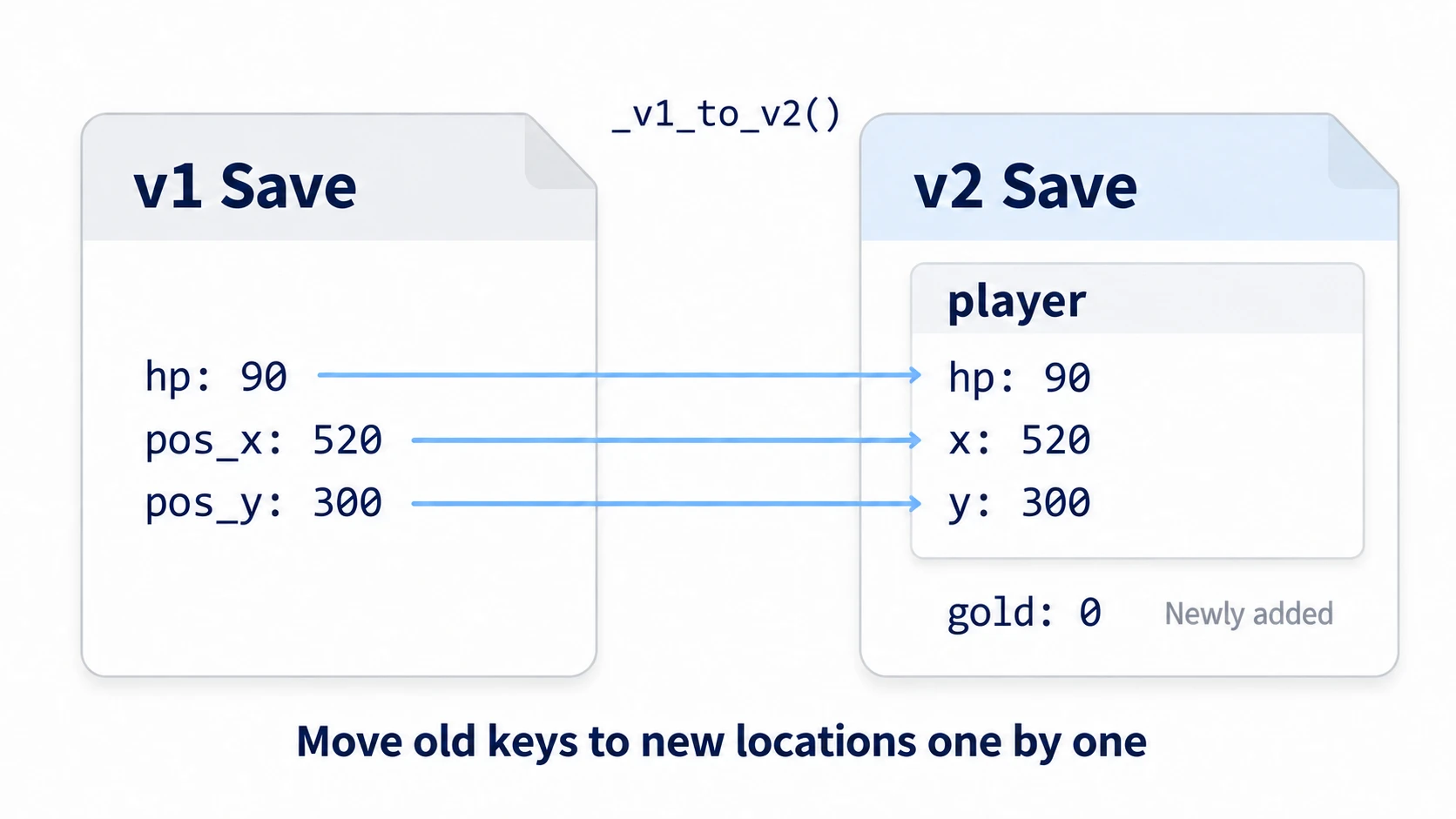
When you change a name, type, or container, write a function that moves the old shape to the new one. To move from v1 to v2, name it something like _v1_to_v2(), and have it only take the old dictionary and return a new one. It doesn't touch the file.
How to compare version numbers (int())
Numbers read from JSON become float (the type for numbers that can have decimals), even if written as integers. "v": 1 is 1.0. match, which branches on a value, compares types too, so 1.0 doesn't match 1:. Not a single conversion runs, and it slips right through without an error.
var v = JSON.parse_string('{"v": 1}')["v"]    # 1.0 (float)
match v:
	1:
		print("v1")    # doesn't get through. With int(v), it does
Use the version number after converting it to an integer with int(data.get("v", 1)). In this example, saves from before the version number was added are treated as v1, so the default when "v" is missing is 1. Make the current version number the default, and the conversions get skipped.
Backing up the original save, and newer-version saves
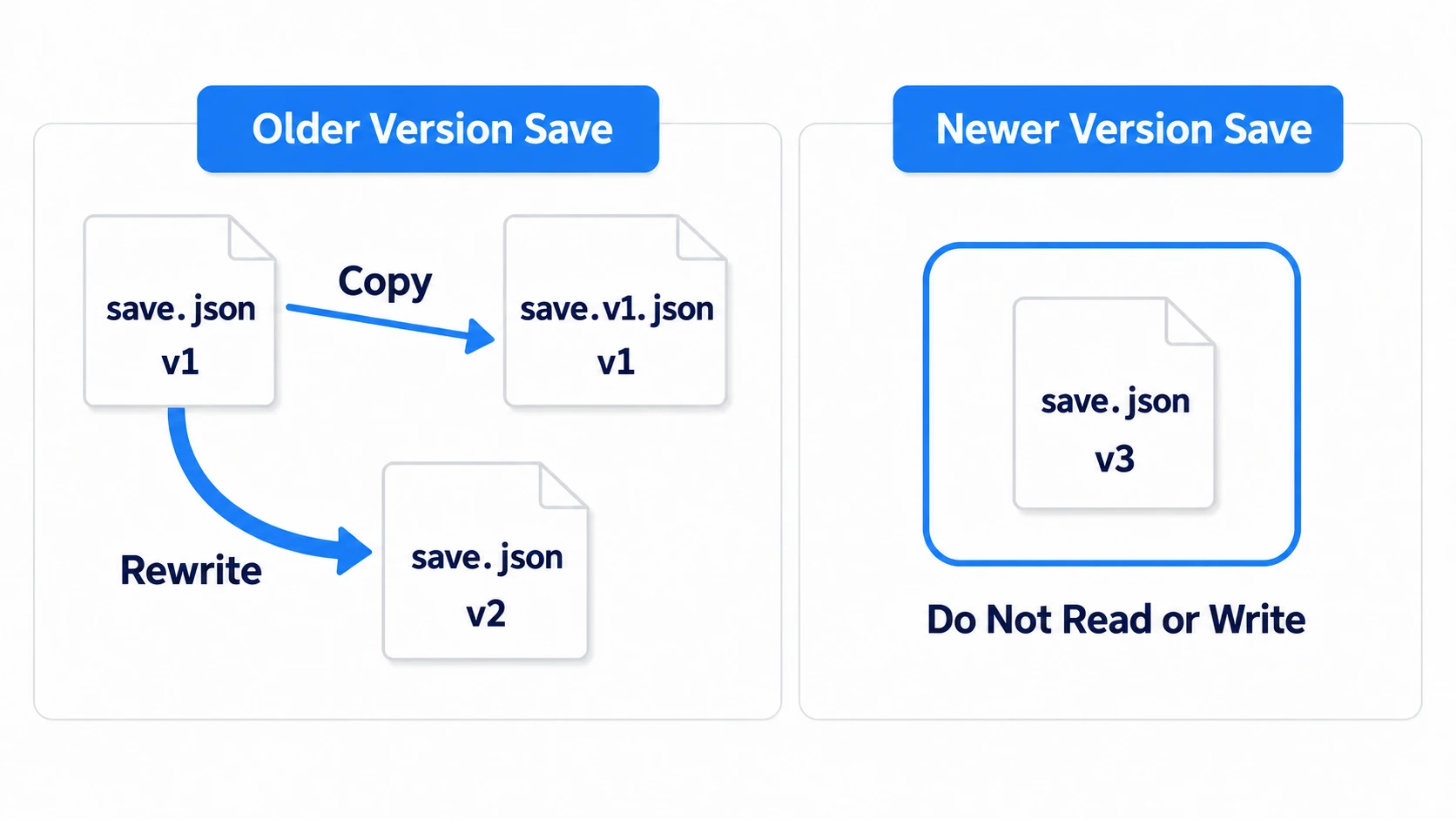
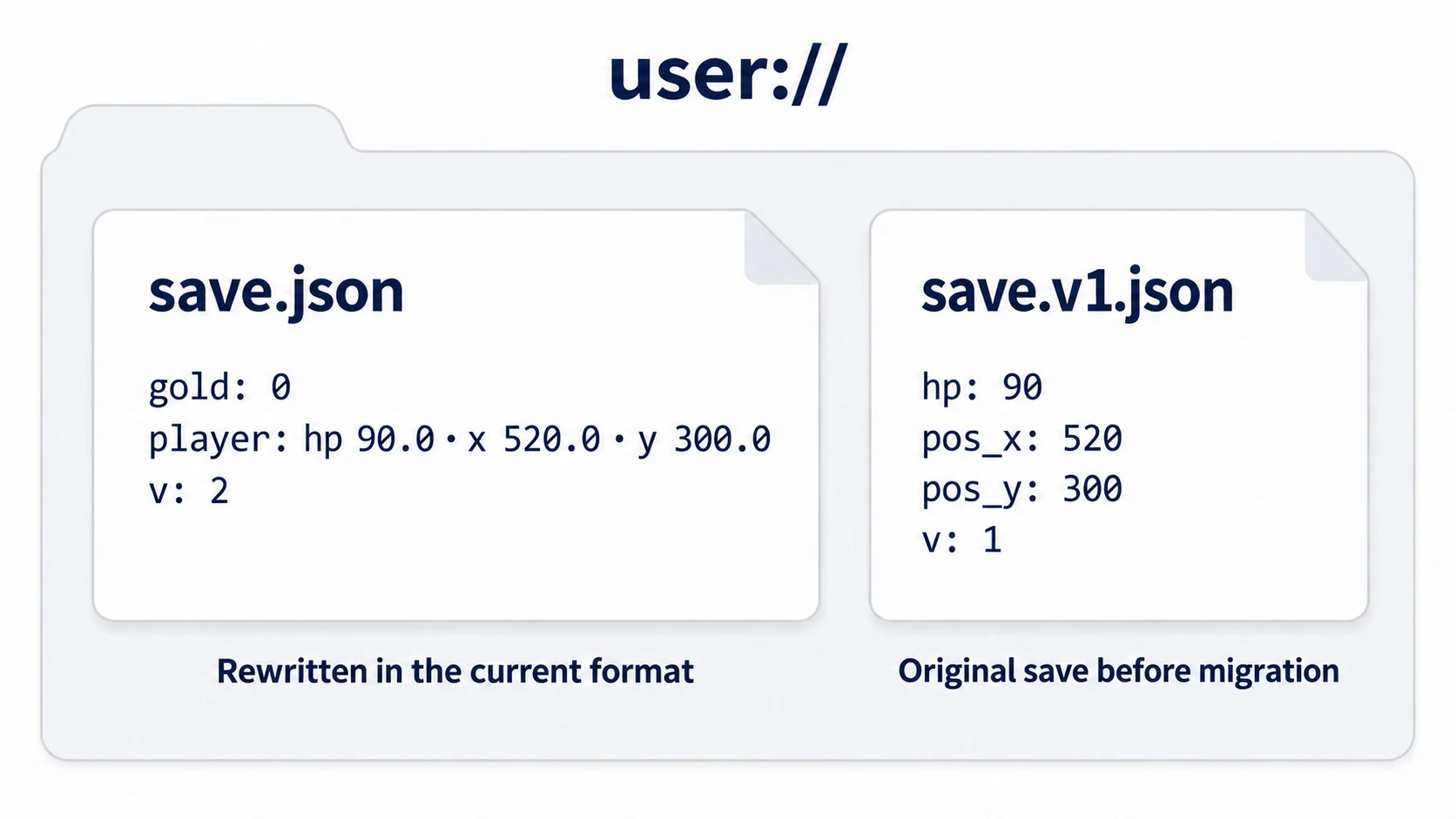
If a conversion function has a mistake, the original values are lost the moment you overwrite with the migrated save. Before rewriting, copy the original file under another name, like save.v1.json.
There's also the reverse accident: opening a save made by a newer version of the game in an older version. If the game reads only the fields it knows, even the older game can read it without crashing. Then, if it rebuilds the dictionary from only the fields it knows and saves, the new fields disappear from the file. Don't load saves from a newer version than the current game, and stop saving too.
Hands-On: Read a v1 Save in the v2 Game
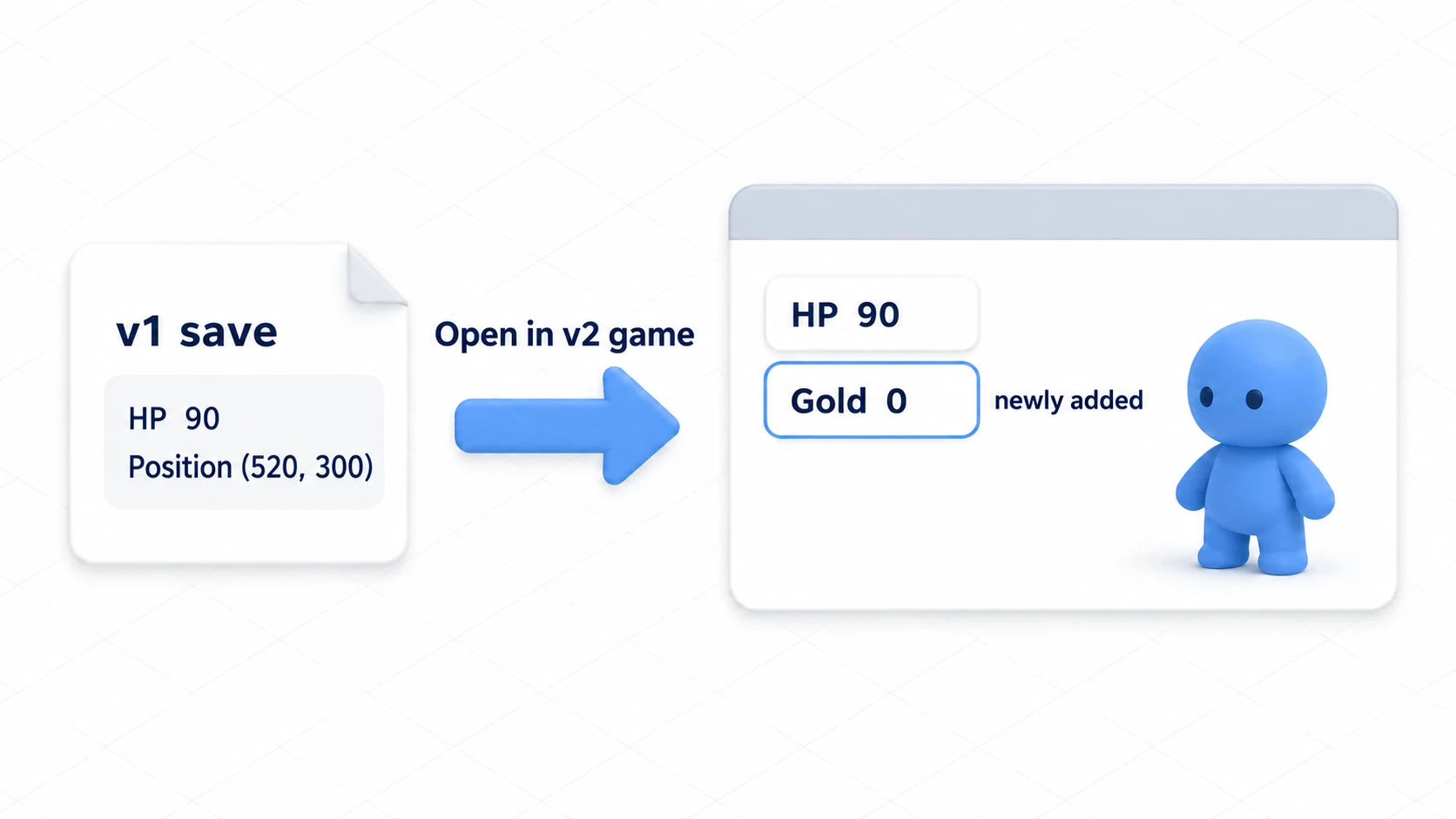
An RPG update, weekly updates in early access, carrying progress over from a demo to the full version—these are moments when you change the shape while keeping the saves of people who are playing. You'll read a v1 save, which kept only HP and position, in the v2 game. In v2, HP and position are regrouped into player, and gold is added.
① What to place
Start with a new 2D project.
- In a new scene, a Node2D named Main. As its child, place a Node2D named Player at
(200, 300)via Position in the Inspector. Under Player, a Sprite2D (icon.svgin Texture) - Under Main, one Label named Hud, at the top left of the screen
- Register
save_manager.gdasSaveManagerunder Project Settings' Globals tab → Autoload. Registering it as an Autoload lets any script call it by the nameSaveManager
There are two keys. F1 places a sample v1 save, and Space adds 10 gold and saves.
② Put it together
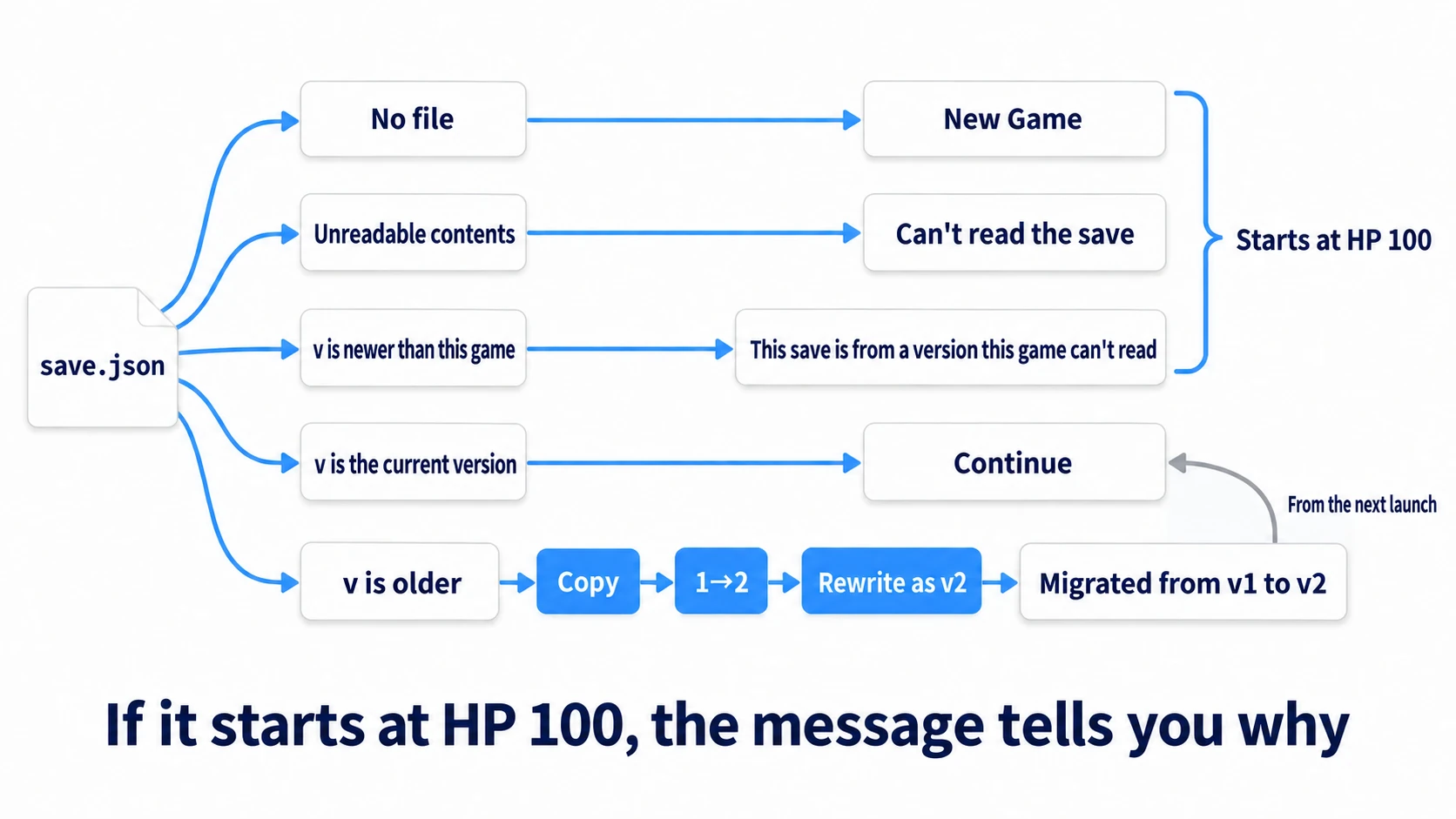
This is the part that reads the save and returns it in the current shape. Loading ends in one of five ways, and the top three all return an empty dictionary, so on screen they all look like starting at HP 100. You tell which one it was from the message shown at the top left.
# save_manager.gd (register as an Autoload named SaveManager)
extends Node

const SAVE_PATH := "user://save.json"
const SAVE_VERSION := 2                       # raise by one when you change the save's shape

var note := ""                                # a message to show on screen
var locked := false                           # don't write while this is true

# read the save and return it as a current-shape (v2) dictionary. Empty dictionary if unusable
func load_save() -> Dictionary:
	if not FileAccess.file_exists(SAVE_PATH):
		note = "New Game"
		return {}
	var data = JSON.parse_string(FileAccess.get_file_as_string(SAVE_PATH))
	if not data is Dictionary:
		return _refuse("Can't read the save")
	var v := int(data.get("v", 1))            # JSON numbers are floats. If missing, the oldest version
	if v < 1 or v > SAVE_VERSION:
		return _refuse("This save is from a version this game can't read")
	if v == SAVE_VERSION:
		note = "Continue"
		return data
	# before migrating, keep the original file under another name
	if DirAccess.copy_absolute(SAVE_PATH, "user://save.v%d.json" % v) != OK:
		return _refuse("Can't keep the original save, so not migrating")
	var from := v
	while v < SAVE_VERSION:                   # one step at a time to the current shape
		match v:
			1:
				data = _v1_to_v2(data)
			_:
				return _refuse("No conversion from v%d" % v)   # notice a forgotten conversion
		v += 1
	if not write_save(data):                  # rewrite in the current shape. No migration from next time
		return _refuse("Couldn't save the migrated save")
	note = "Migrated from v%d to v%d" % [from, SAVE_VERSION]
	return data

# don't read or overwrite saves that can't be read or are from an unknown version
func _refuse(message: String) -> Dictionary:
	locked = true
	note = message
	return {}

# v1 → v2: group HP and position into player, and add gold
func _v1_to_v2(old: Dictionary) -> Dictionary:
	return {
		"v": 2,
		"player": {
			"hp": old.get("hp", 100),
			"x": old.get("pos_x", 200.0),
			"y": old.get("pos_y", 300.0),
		},
		"gold": 0,
	}

# always write the current version. true if written
func write_save(data: Dictionary) -> bool:
	if locked:
		return false
	data["v"] = SAVE_VERSION
	var file := FileAccess.open(SAVE_PATH, FileAccess.WRITE)
	if file == null:
		return false
	return file.store_string(JSON.stringify(data, "\t"))
Main hands out the current-shape dictionary read at startup, and handles F1 and Space.
# main.gd (attach to Main)
extends Node2D

# a sample of the save the v1 game wrote. Every time you change the shape, check this still gets through
const V1_SAMPLE := '{"v": 1, "hp": 90, "pos_x": 520, "pos_y": 300}'

@onready var player: Node2D = $Player
@onready var hud: Label = $Hud

var hp := 100
var gold := 0

func _ready() -> void:
	var data := SaveManager.load_save()       # when it can be read, always the current shape (v2)
	if data.is_empty():
		return
	var p: Dictionary = data.get("player", {})
	hp = int(p.get("hp", 100))
	player.position = Vector2(p.get("x", 200.0), p.get("y", 300.0))
	gold = int(data.get("gold", 0))

func _unhandled_input(event: InputEvent) -> void:
	var key := event as InputEventKey
	if key == null or not key.pressed or key.echo:    # ignore releases and the auto-repeat while held
		return
	match key.keycode:
		KEY_F1:                               # place the v1 sample (for checking; remove from the game you ship)
			var file := FileAccess.open(SaveManager.SAVE_PATH, FileAccess.WRITE)
			file.store_string(V1_SAMPLE)
			file.close()
			SaveManager.note = "Placed the v1 sample. Close and reopen the game"
		KEY_SPACE:                            # add gold and save
			gold += 10
			var ok := SaveManager.write_save({
				"player": {"hp": hp, "x": player.position.x, "y": player.position.y},
				"gold": gold,
			})
			SaveManager.note = "Saved" if ok else "Won't write to this save"

func _process(_delta: float) -> void:
	hud.text = "%s\nHP %d / Position (%.0f, %.0f) / Gold %d" % [
		SaveManager.note, hp, player.position.x, player.position.y, gold]
③ Run it and check
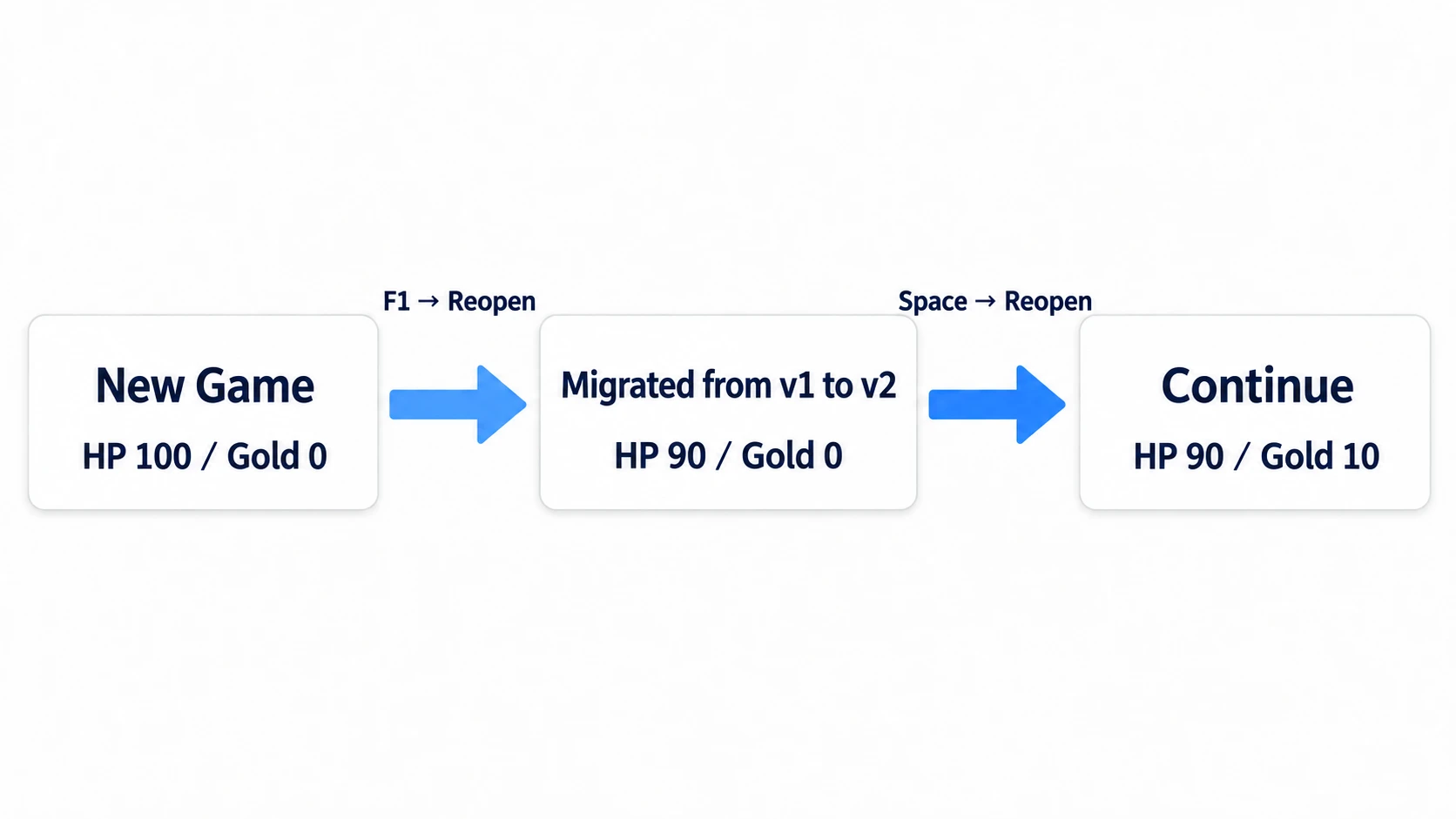
Open the Main scene and run it with F6. Check four things.
First, "New Game" and "HP 100 / Position (200, 300) / Gold 0" appear at the top left. Press F1 to place the v1 sample, close the game without pressing Space, and press F6 again. If "Migrated from v1 to v2" appears and it starts at HP 90, position (520, 300), and gold 0, HP and position have been carried over.
Next, open the save folder with Open User Data Folder in the editor's Project menu. save.json has been rewritten in the v2 shape, and the original sample remains as-is in save.v1.json next to it. In the freshly migrated save.json, HP and position are written with .0, like 90.0. Numbers read from JSON are simply written back out as floats; the values are carried over.
Then press Space to make gold 10, and after "Saved" appears, reopen. It's "Continue" with gold 10, and this time it reads the save as-is without migrating. You've kept playing with the old save's HP and position carried over.
Finally, check that newer-version saves are protected. Stop the game, open save.json in a text editor, change "v": 2 to 3, save, and run with F6. "This save is from a version this game can't read" appears, and it starts at HP 100. Press Space, and the gold on screen becomes 10, but "Won't write to this save" appears, and the file stays at 3. Don't press F1 during this check. When you're done checking, change 3 back to 2 and reopen, and writing works as before.
Two points.
- Conversion happens in one place, at the entrance for loading: by the time it leaves
load_save(), it's always the current shape. Even as versions grow to 3 and 4, all you add is onematchbranch and one conversion function - Keep one sample of an old version: keep a sample like
V1_SAMPLE, and every time you change the shape, you can check with F1 right away that the sample still gets through to the current shape
The basics of writing and reading saves are in Save/Load Basics.
Troubleshooting
| Symptom | Cause | Fix |
|---|---|---|
| Reopening shows "Continue" instead of "Migrated" | You pressed Space after F1 and overwrote the sample with a v2 save | Press F1 again, close without pressing Space, and reopen |
| "Migrated from v1 to v2" appears, but HP stays at 100 | The key names in _v1_to_v2() differ from the sample's keys (hp, pos_x, pos_y) | Fix the key names, place the sample again with F1, and reopen. A save that's been migrated once isn't migrated again |
| Running it shows "Identifier "SaveManager" not declared in the current scope." | save_manager.gd isn't registered as an Autoload, or the name is different | Register it under Project Settings' Globals → Autoload with the name SaveManager |
Bonus: Good to Know First
- Count the version number separately from the game's version: even when the game becomes 1.2.0, if the save's shape doesn't change, the version stays the same. Raise it as an integer, 1, 2, 3, only when you change the shape
- Don't delete conversion functions: even at v5, keep the 1→2 function. Someone who stayed on v1 for a while may launch the game again after a long time
- Put a version in settings files too: the ConfigFile in Settings Menu will also see the day you rename a key. Just like saves, put a version number in it
Summary
- After reading, look at the version first: if it's older, pass it through the conversion functions one step at a time to make it the current shape before using it. Always write the current version
- If you only add a field, use a default: read with
data.get("gold", 0). For fields whose default differs for people who've been playing, fill them in with a conversion - If you change a name or container, migrate: it starts with defaults without crashing, and the original value is lost on the next save. Write a function that moves the old dictionary to the new one
- Compare versions as integers: JSON numbers are floats.
matchafterint(data.get("v", 1)) - Keep the original, and don't touch newer versions: copy under another name before rewriting. Don't read or write versions newer than the current game
In your game's next update, which field in the save is likely to change shape first?