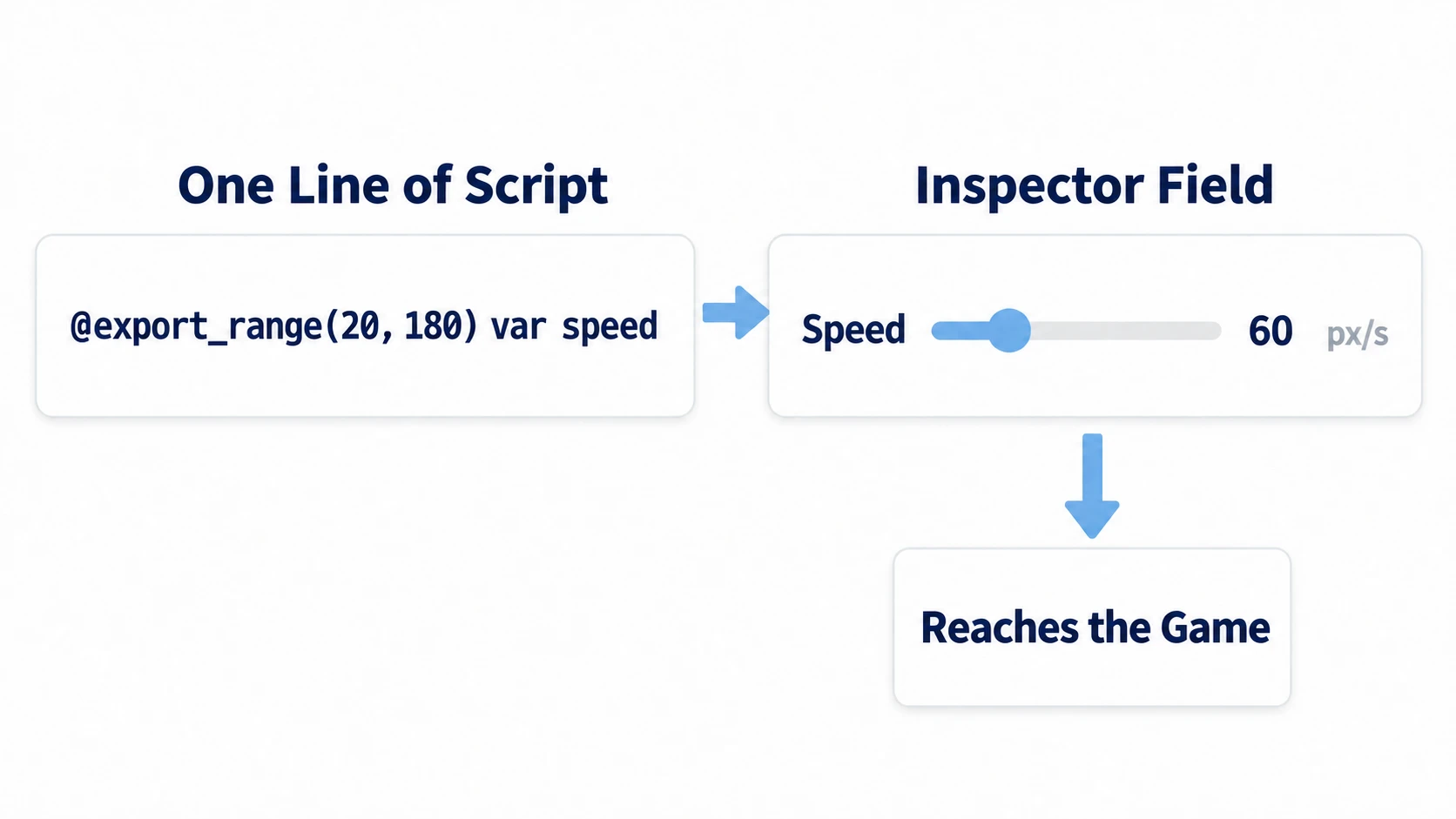
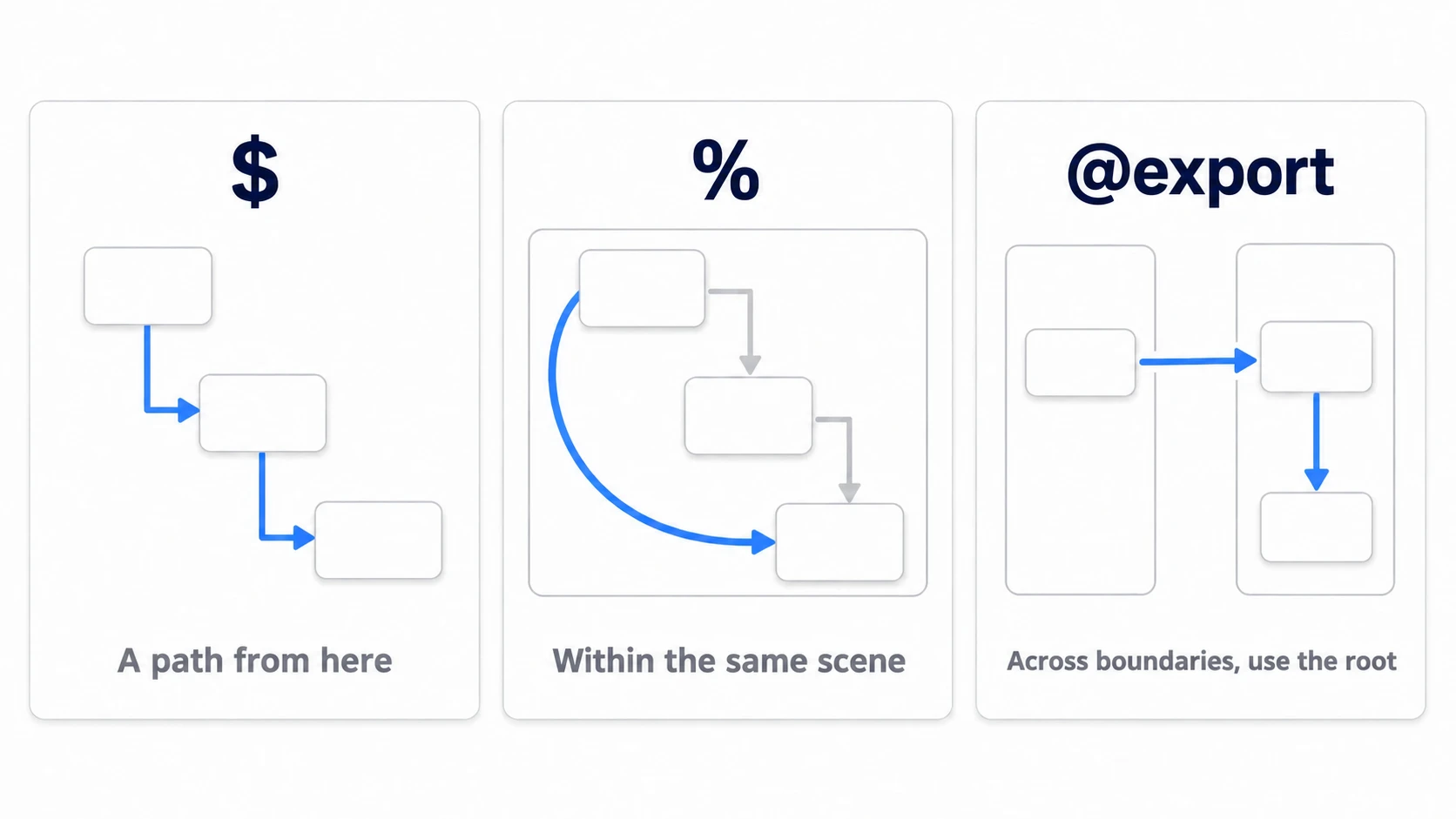
To use another node from a script, you need to grab that node (get a reference to it). In Godot, you choose between three ways: $, written as a path; %, which searches by name; and @export, where the node is passed to you from outside.
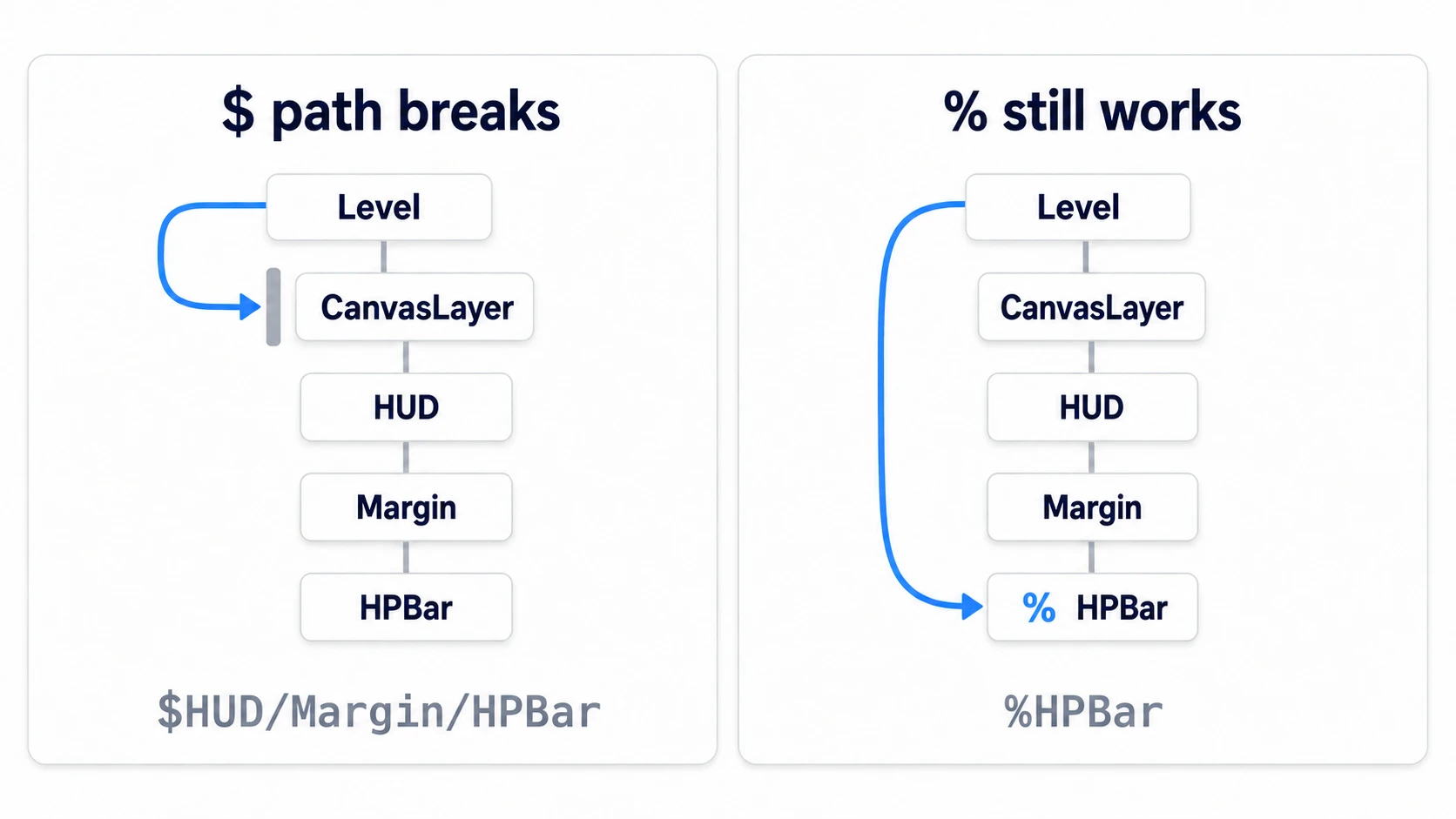
Write everything with $ paths without choosing, and moving a single node to a different level of the hierarchy breaks the path. The moment you put the UI under a CanvasLayer, code that worked until then crashes.
This article moves a HUD with an HP bar around to check how far each of the three ways reaches, and shows how to grab it in a way that doesn't break.
What You'll Learn
$is a path from where you are. It breaks when the hierarchy moves%only reaches nodes registered with a unique name, and only searches your own scene- Splitting a branch into another scene changes its owner, so
%no longer reaches it- When crossing scenes, don't reach inside. Call a method on the root
Tested with: Godot 4.7
- $ (a path from where you are)
- % (finding by unique name)
- How far % searches
- References across scenes (@export)
- Climbing up with get_parent()
- null and freed references
- Hands-On: An HP Bar That Survives Moving the HUD and Splitting It Into Its Own Scene
- Troubleshooting
- Bonus: Good to Know First
- Summary
$ (a path from where you are)
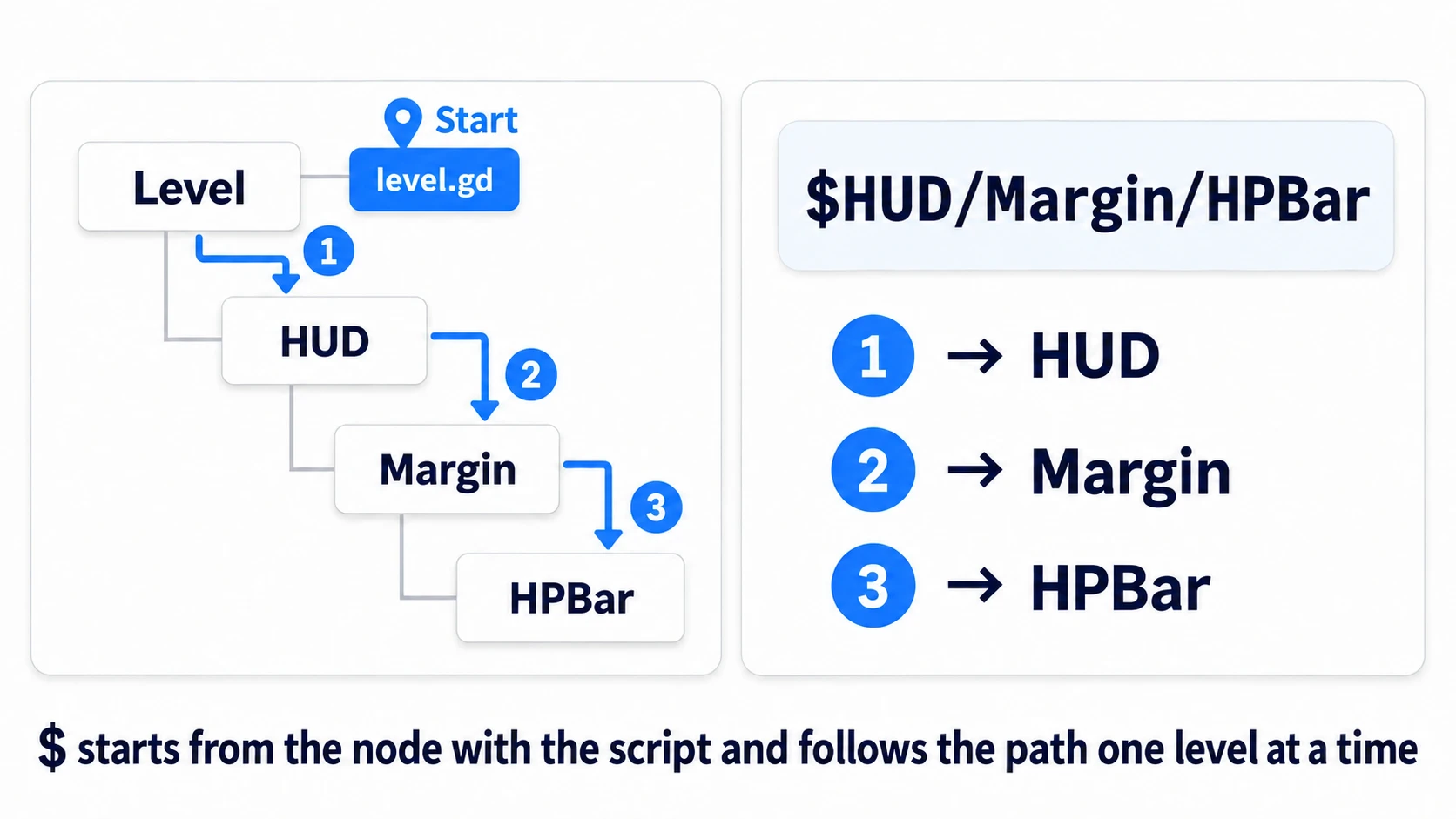
$ is shorthand for get_node(), and it's a path as seen from the node the script is attached to.
@onready var bar: ProgressBar = $HUD/Margin/HPBar
@onready var sprite: Sprite2D = $Sprite2D
@onready var sibling: Node2D = $"../Enemy"     # go up one level, then over to the sibling
When a name contains a space, wrap the whole path in quotes, as in $"HP Bar".
@onready is there because at the moment variables are initialized, the child nodes aren't all in place yet. Delay the assignment until right before _ready() and the node is there at the end of the $. Write $ into a member variable without it, and in 4.7 you get an error as soon as you write it: The default value uses "$" which won't return nodes in the scene tree before "_ready()" is called. There's more in Node Lifecycle.
Because it's a path, inserting just one node along the way breaks it. You put the UI under a CanvasLayer so it stays pinned to the screen even when the camera moves. You add a MarginContainer, which puts space around its contents, to tidy things up. Every routine change like this makes the paths you wrote stop matching.
% (finding by unique name)
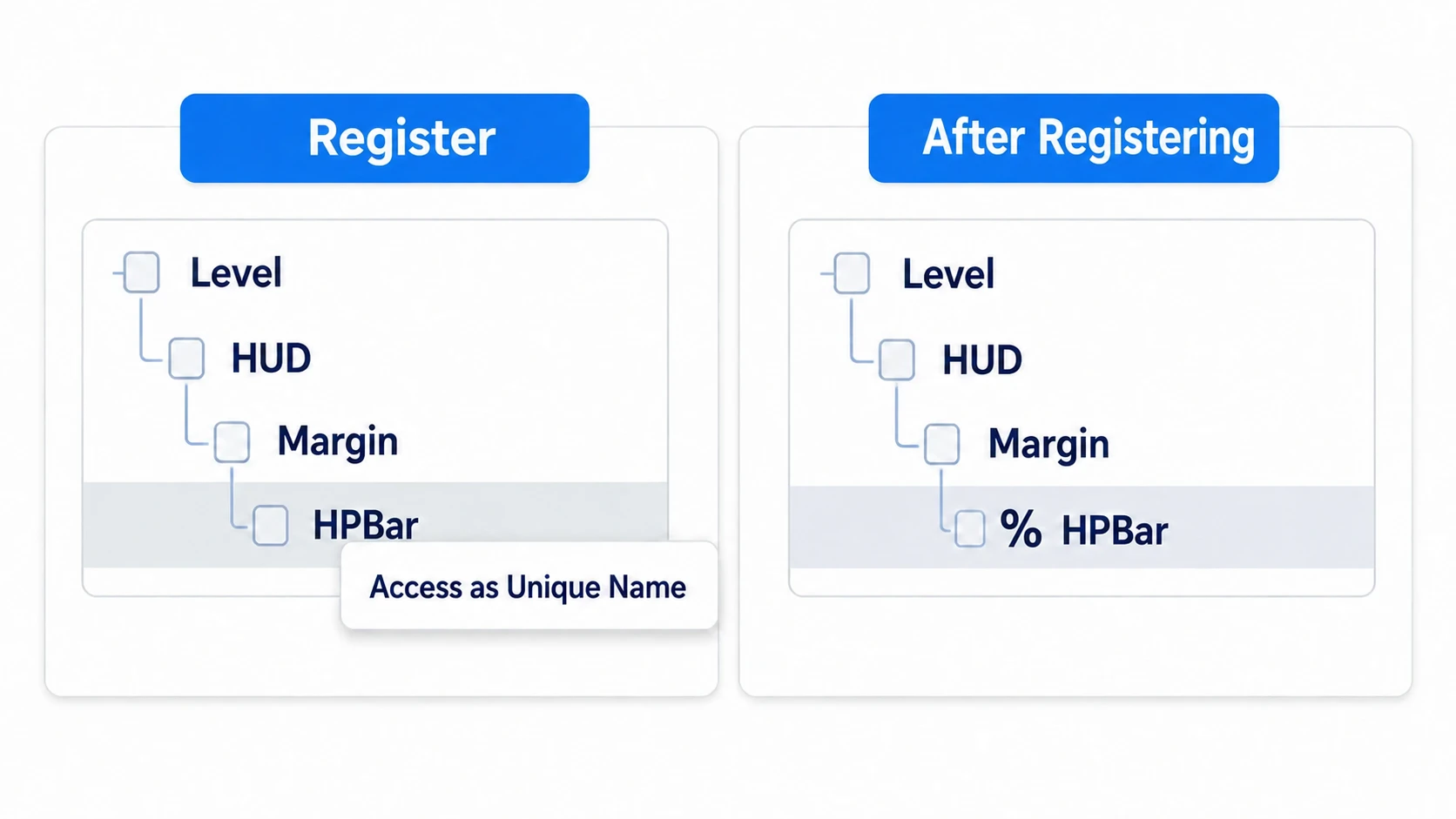
Write %HPBar and you can get a node by name instead of by path. Only nodes registered with a unique name can be found this way.
Right-click the node in the Scene dock and turn on Access as Unique Name. Once it's on, a % appears next to the node name in the Scene dock.
@onready var bar: ProgressBar = %HPBar
Now you can move the HUD under a CanvasLayer or add a MarginContainer without rewriting this line. To register it from code, use unique_name_in_owner = true.
It only searches registered nodes. If a node isn't registered, you can't get it even if the name matches.
How far % searches
This is the confusing part. % searches in this order:
- Unique names that you own (if you're the root of a scene, that scene's unique names)
- If none, the unique names held by your
owner(the root of the scene you belong to)
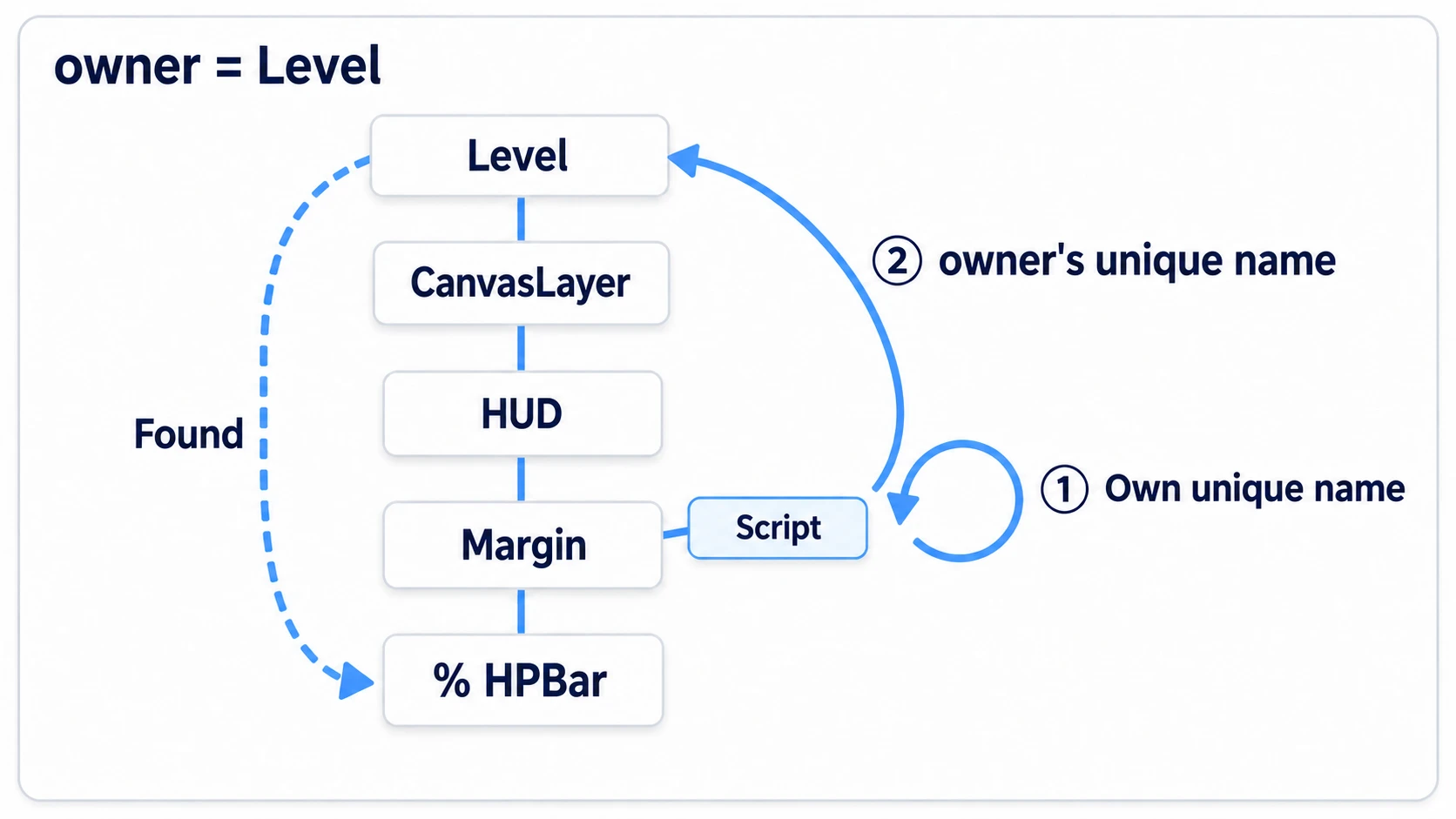
owner is a marker showing "which scene this node belongs to." Nodes placed in one .tscn are owned by that scene. So within the same scene, % reaches however many levels deep.
What changes is when you save a branch as a separate scene. Split everything under HUD out into hud.tscn, and HPBar's owner moves from Level to HUD. Writing %HPBar from Level's script no longer finds it. Only % stops reaching it. $, written as a path, follows names in the tree without looking at owners, so it still gets through after the split.
Even in the Remote tab that appears at the top of the Scene dock while running, HPBar is clearly visible under Level. You can see it but you can't get it. That's the most surprising thing about %.
References across scenes (@export)
So what do you do when you want to touch it from outside? Stop reaching in for the node inside, and instead ask the scene's root (its topmost node).
# hud.gd (attach to the root of hud.tscn)
class_name HUD   # give this script the type name HUD
extends Control

@onready var bar: ProgressBar = %HPBar

func set_hp(value: int) -> void:
	bar.value = value
# level.gd
extends Node2D

@export var hud: HUD        # drop the HUD in via the Inspector

func _ready() -> void:
	hud.set_hp(70)
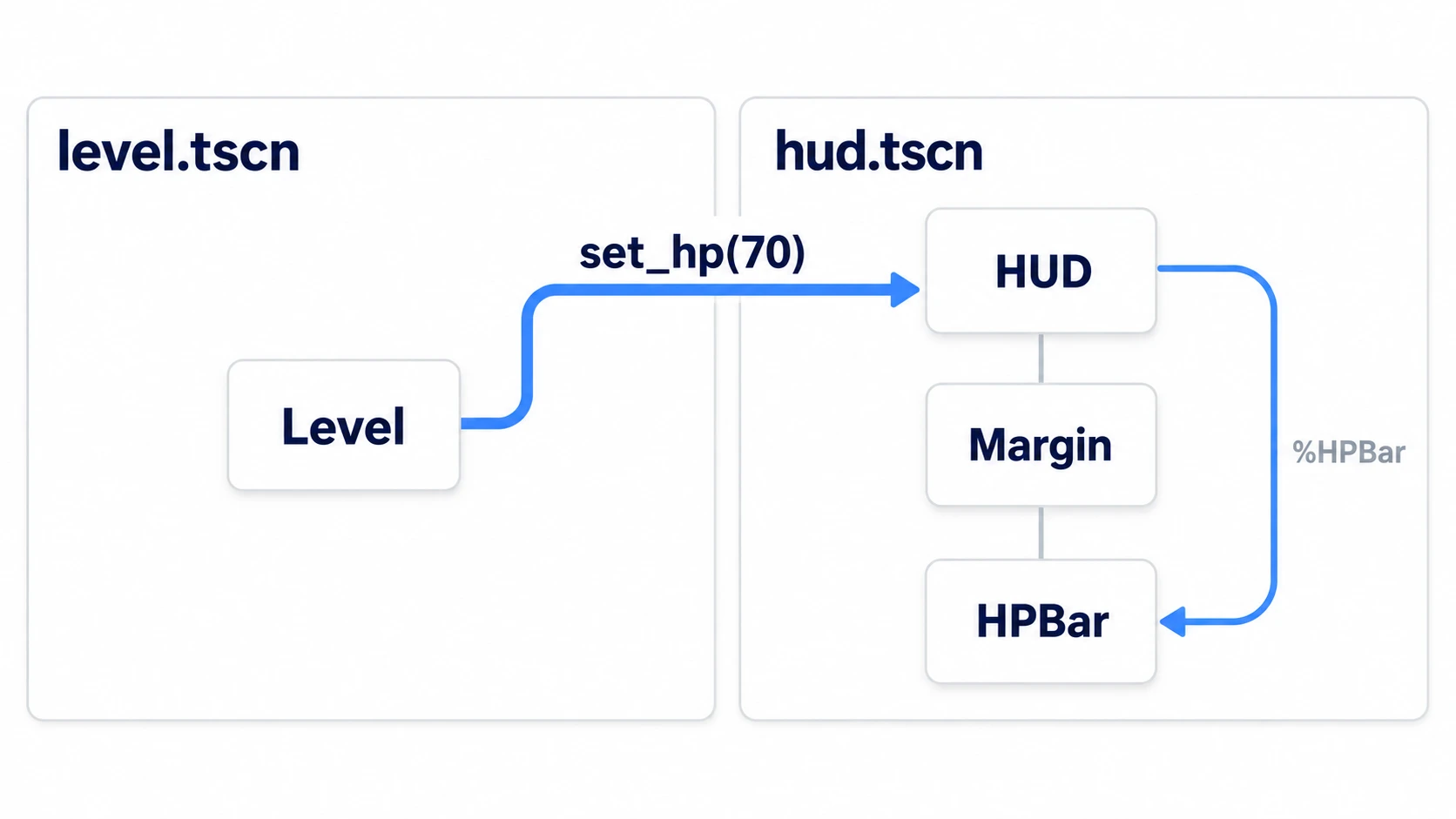
All Level knows is "HUD has a set_hp()." Insert a MarginContainer inside or add a second bar, and level.gd doesn't change by a single character.
In other engines: receiving a node with
@exporthas the same shape as dragging something into a[SerializeField]field in Unity. In Unreal Engine you'd hold the reference withUPROPERTY(EditAnywhere).
You can drop nodes placed in the scene you're editing into the @export var hud: HUD field. The root of a scene instanced as a separate scene can be dropped in as-is too, as long as the type matches. A HUD you instantiate() and add while running can't go in this field, so assign it in code with hud = … when you add it.
Climbing up with get_parent()
Climbing up with get_parent() is the most fragile way to grab something.
# script attached to Margin
func _ready() -> void:
	var level = get_parent().get_parent()    # assumes what's outside the HUD
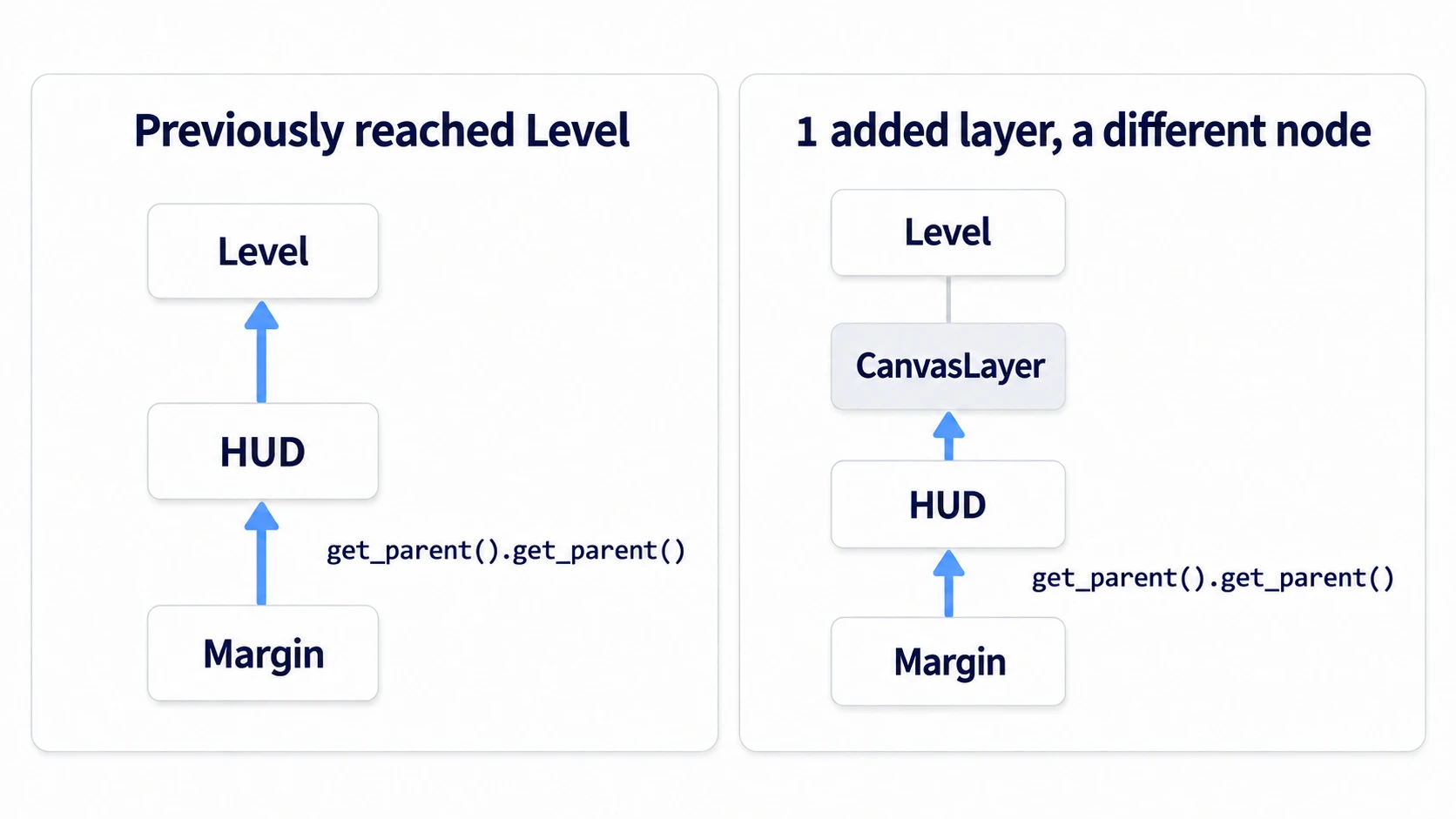
The moment a CanvasLayer is inserted, those two levels point to a different node. When you play that scene on its own with F6 (the key that runs only the scene you have open), the outer structure isn't loaded either. The parent of that scene's root is /root at the very top of the running tree (the game window itself). The node you expected is nowhere to be found.
Using parent-child relationships inside a scene is fine. What to avoid is assuming what exists outside. If you need something outside, have it passed to you with @export, or notify it with a signal.
null and freed references
Finally, there are two ways this can fail: you can't get the node, or it disappears after you got it.
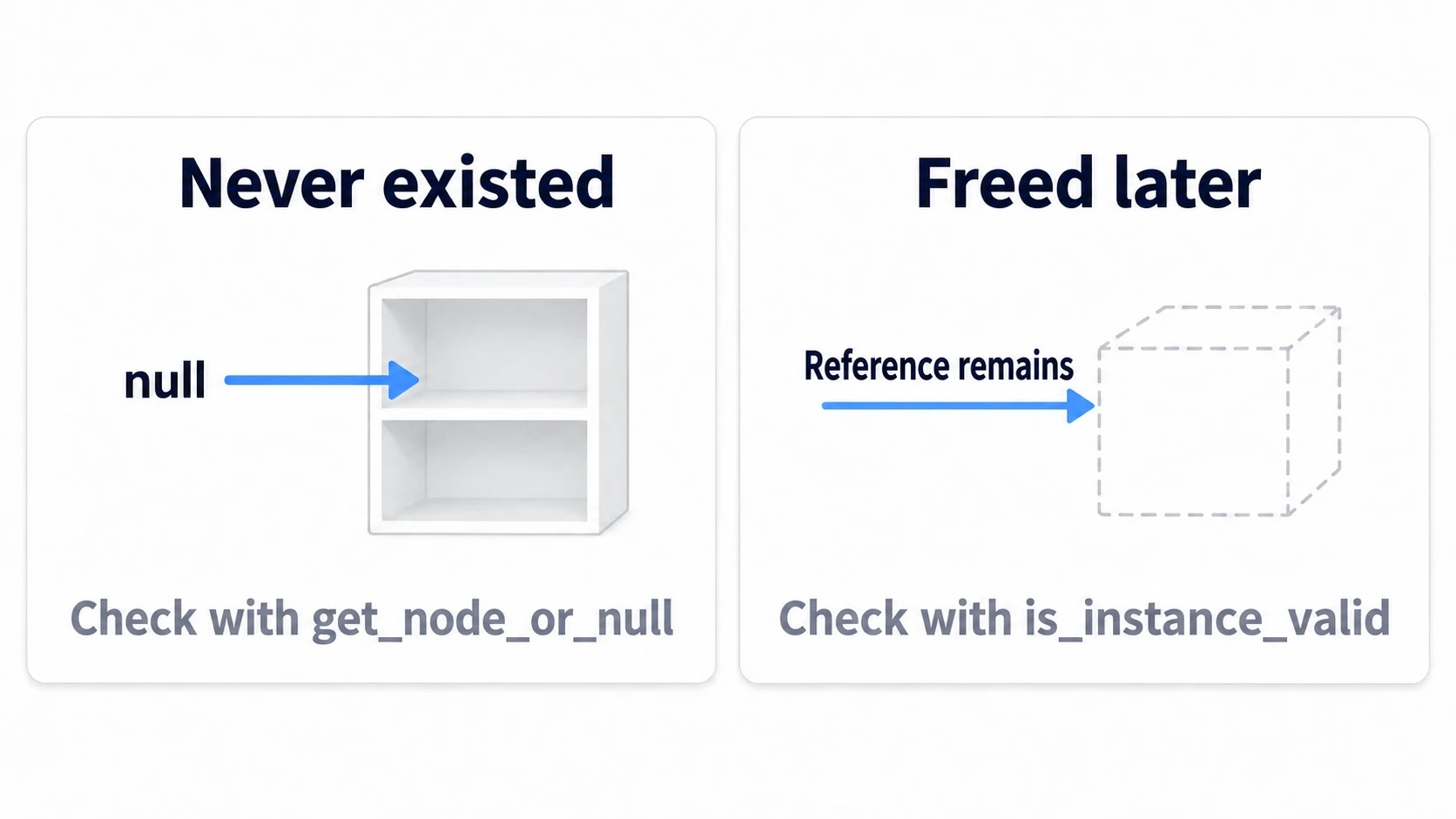
Use $ (get_node()) for nodes that should always be there. It errors when the node isn't found, so you notice typos in paths right away. For nodes that might not exist, use get_node_or_null() and check for null yourself.
When a node you grabbed gets queue_free()-d, the variable isn't rewritten to null. An invalid reference stays as-is. Check with is_instance_valid(node). But in the same frame you called queue_free(), it's still true, so if you also want to exclude nodes scheduled for deletion, check in the order is_instance_valid(node) and not node.is_queued_for_deletion(). Call is_queued_for_deletion() first on a reference that's already been freed and it errors right there.
Hands-On: An HP Bar That Survives Moving the HUD and Splitting It Into Its Own Scene
A health bar in an action game, a lives counter in a shooter, a move counter in a puzzle game—rearranging the hierarchy while polishing UI happens in every genre. You'll move the same HP bar through four stages and see what breaks where.
① What to place
Create one new scene, save it as level.tscn, and set it as the main scene.
Level (Node2D)                   level.gd
└── HUD (Control)
    └── Margin (MarginContainer)
        └── HPBar (ProgressBar)
HPBar is a ProgressBar, which shows a value's proportion as a horizontal bar. Set Max Value to 100, Value to 100, and Custom Minimum Size under Layout to (240, 24). Without a width, the bar is too thin to see it change. For Margin, enable Margin Left and Margin Top under Constants in Theme Overrides and enter 40, and it moves away from the corner of the screen.
Also right-click HPBar and register a unique name. If a % appears next to the name, it's registered.
# level.gd
extends Node2D

@onready var bar: ProgressBar = $HUD/Margin/HPBar

func _ready() -> void:
	bar.value -= 30
	print("Same node with %: ", %HPBar == bar)
Run with F5 and the bar goes to 70%, with true in the output. At this point both $ and % reach the same node. This is the starting point.
② Move the hierarchy and switch how you grab it
- Add a CanvasLayer under Level and drag HUD under it. Run with F5
- Rewrite the one line in
level.gdas@onready var bar: ProgressBar = %HPBarand run with F5 - Right-click HUD, choose Save Branch as Scene, and save it as
res://hud.tscn. Run with F5 - Rewrite the two scripts as below. Attach
hud.gdto HUD, the root ofhud.tscn. Select Level, drag the HUD in the scene into the Hud field in the Inspector, and run with F5
# hud.gd (attach to the root of hud.tscn)
class_name HUD
extends Control

@onready var bar: ProgressBar = %HPBar

func set_hp(value: int) -> void:
	bar.value = value
# level.gd
extends Node2D

@export var hud: HUD

func _ready() -> void:
	hud.set_hp(70)
Write class_name HUD and save, and the editor registers HUD as a type. Once it's registered, a Hud field appears in Level's Inspector.
③ Run it and check
Run with F5 at each step. Check three things.
The first is step 1. $HUD/Margin/HPBar can't be found, and an error appears in the output. HUD is no longer directly under Level, so the path broke partway. Switch to %HPBar in step 2 and the bar goes to 70% again. HPBar's owner is still level.tscn, so % reaches it however many levels down it is.
The second is step 3. This time %HPBar can't be found. HPBar's owner moved from level.tscn to hud.tscn. In the Scene dock after the split, HUD's contents are collapsed and not shown. Open the Remote tab and HPBar is visible under Level. You can see it but you can't get it: that's this step.
The third is step 4. hud.set_hp(70) brings the bar back to 70%. All level.gd knows is that there's a set_hp(). However you rearrange the hierarchy inside hud.tscn, this line doesn't change.
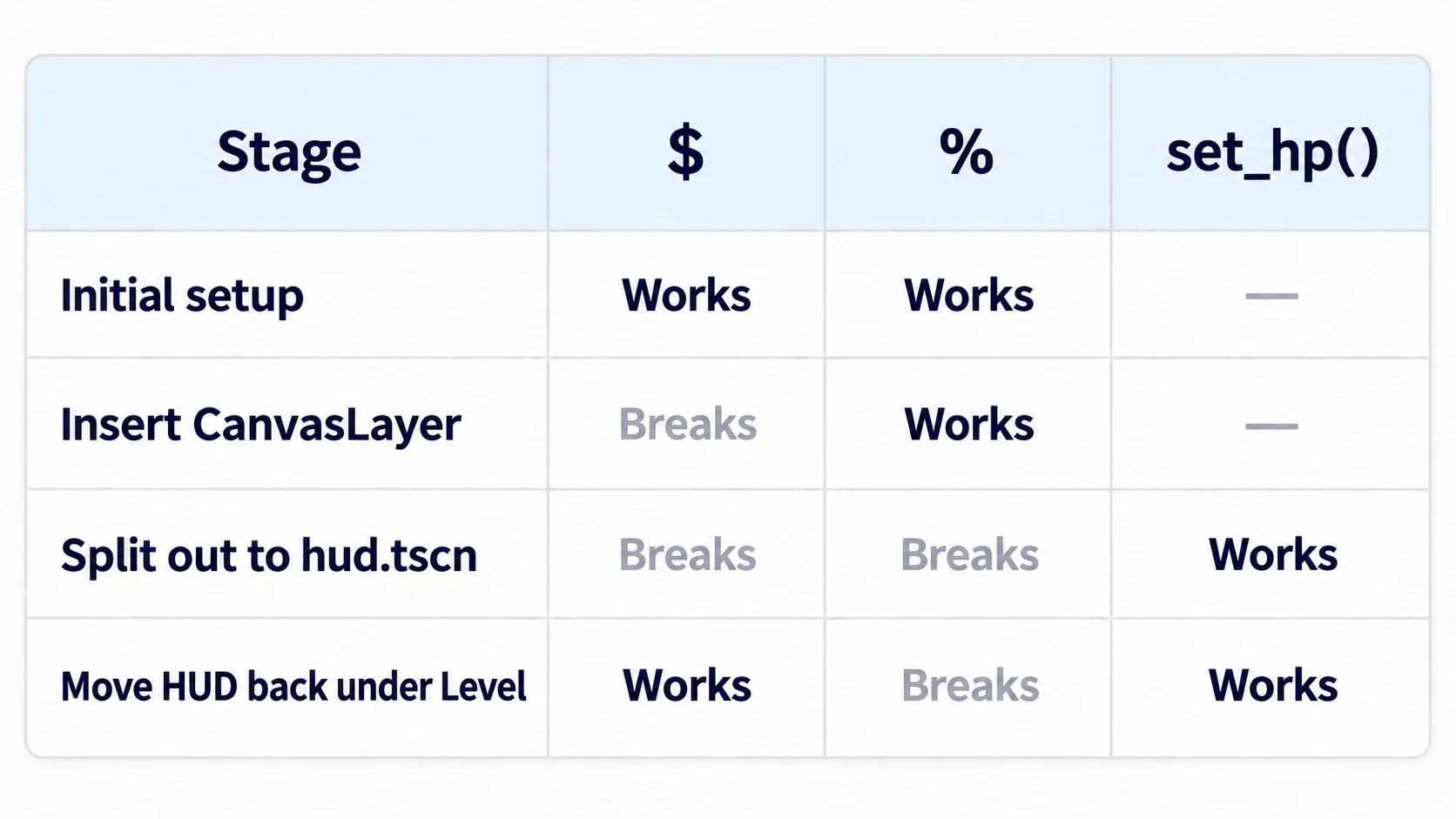
The last row in the figure is the case where you move HUD back directly under Level. The $HUD/Margin/HPBar path reaches it again. $ broke in the third row not because of the split, but because the CanvasLayer was still in between. $ doesn't look at owners. It just follows names in the tree.
Two points.
- Names only reach what your own scene owns: whether
%works isn't decided by depth. Just remember one thing: the moment you split a branch into another scene, its owner changes - Don't reach inside from outside: receive the root with
@exportand call its methods, and you're free to rearrange the hierarchy inside. When you want the other side to notify you, use signals
Troubleshooting
| Symptom | Cause | Fix |
|---|---|---|
A line with both @export and @onready turns red | The @onready assignment later overwrites the value set in the Inspector. In 4.7 this is an error by default | Use only one. If the node is passed to you, use just @export |
| It crashes when played on its own with F6 | It assumes what the outer parent is. When playing alone, climbing up lands on a different node, such as the /root window | Stop climbing with get_parent() and receive it with @export. When playing alone the field is empty, so check that it does nothing if it's null |
Giving a second node the same unique name produces an already claimed warning in the output | Only one of each unique name is allowed per scene. The registration on the one added later is removed | Change the name before registering |
You wrote %HPBar, but it can't get the HPBar in another scene | % only searches your own scene and your owner's scene | Receive that scene's root with @export and call the root's method |
Bonus: Good to Know First
- Only a HUD fits in the
@export var hud: HUDfield: only nodes withhud.gdattached can be dropped in. You also can't put HUD into a field of another type, like ProgressBar - Unique names can be set from code too: after adding a node as a child, set its
ownerto the root of the scene you want it registered in, then setunique_name_in_owner = true. Ifownerstays empty, the scene to register it in isn't decided - Going through the root reaches it from outside: once you grab the root, as in
$HUD.get_node("%HPBar"), you can reach the unique names inside too. But written this way, the outside knows names from the inside, so providing a method likeset_hp()is less fragile - What to read next: when you can grab things is in Node Lifecycle, and having the other side notify you is in Signals
Summary
$is a path: shorthand forget_node(), a path from where you are. Insert one node along the way and it breaks%finds registered nodes by name: your own unique names first, then yourowner's- Split it out and
%doesn't reach: because the owner changes.$reaches it as long as the path is the same - Cross scenes with
@export: receive the root and call its methods - Nodes that might not be there:
get_node_or_nullif it might not exist,is_instance_validif it might have been freed
Turn $ paths that break into unique names, and turn nodes in other scenes into calls to their root's methods. Of the $ paths in the script you're writing now, which ones would break if you inserted a single CanvasLayer along the way?