Anything that waits a set number of seconds, like an attack cooldown, an enemy spawn interval, or a stage time limit, is built with a Timer node. A Timer, once started, counts a set number of seconds and emits the timeout signal when it finishes counting.
Use it without knowing how it behaves, and mashing a button bypasses the cooldown, or the time-limit label jumps in the last second. Enemies may also keep spawning during a pause.
This article lines up three Timers, a cooldown, a spawn interval, and a time limit, to cover how their settings differ and how to stop them.
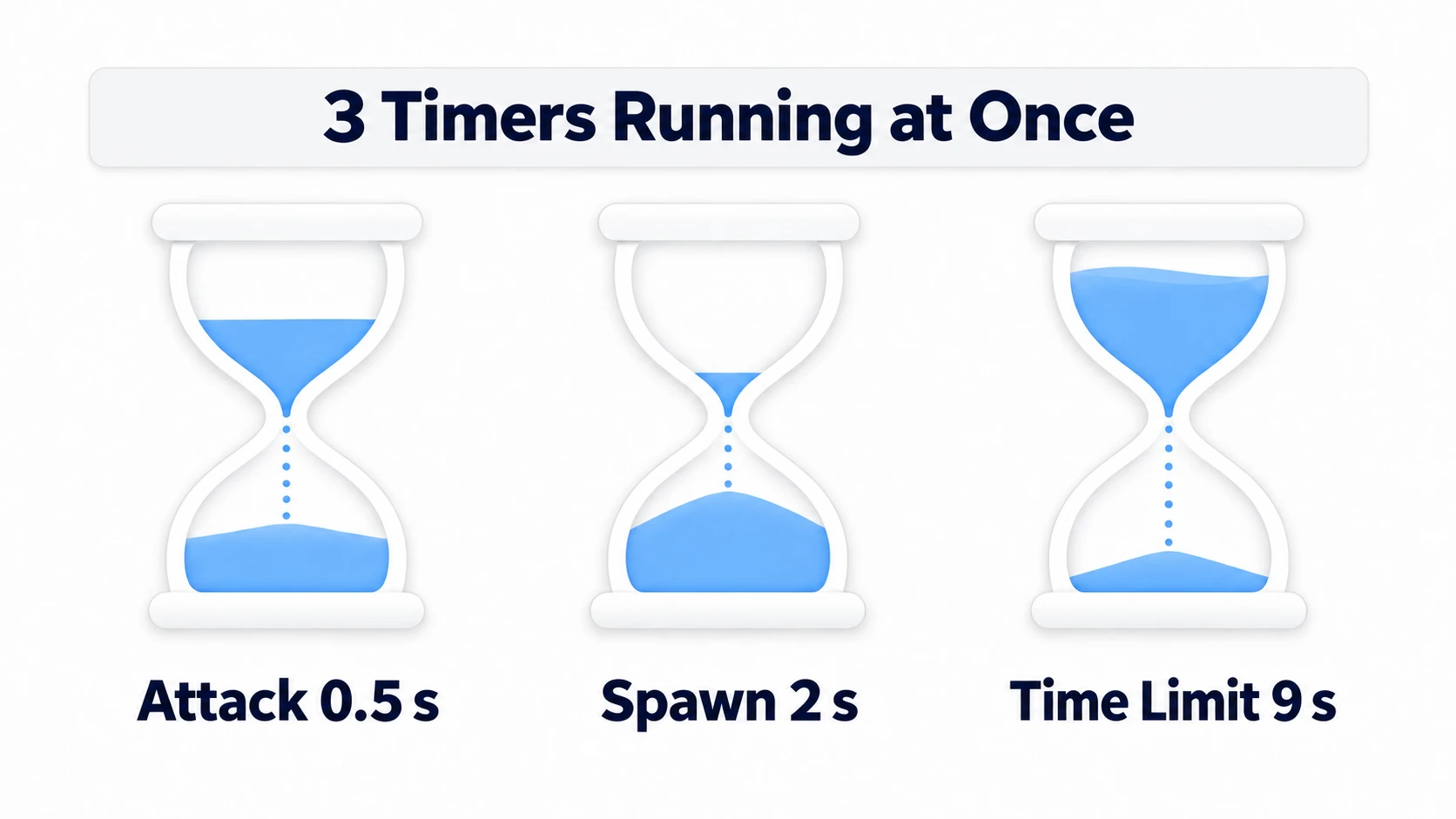
What You'll Learn
start()before it finishes counting throws away what's left and counts over from the beginningstart(0.5)rewrites the wait time itselftime_leftis0before starting and afterstop(). Display it withceili()stop()throws away what's left, whilepausedstops and keeps it
Tested with: Godot 4.7
- How a Timer works (timeout and one_shot)
- Settings for the three Timers
- Calling start() partway through
- start()'s argument (overwriting wait_time)
- Displaying the remaining time (time_left)
- Ways to stop it (stop, paused, pause)
- Hands-On: A Stage With a 0.5 s Attack, 2 s Spawns, and a 9 s Limit
- Troubleshooting
- Bonus: Good to Know First
- Summary
How a Timer works (timeout and one_shot)
A Timer does only one thing. Start it and it begins counting a set number of seconds, and when it finishes counting, it emits the timeout signal. Connect a function, as in $Timer.timeout.connect(_on_timeout), and that function is called every time it finishes counting.
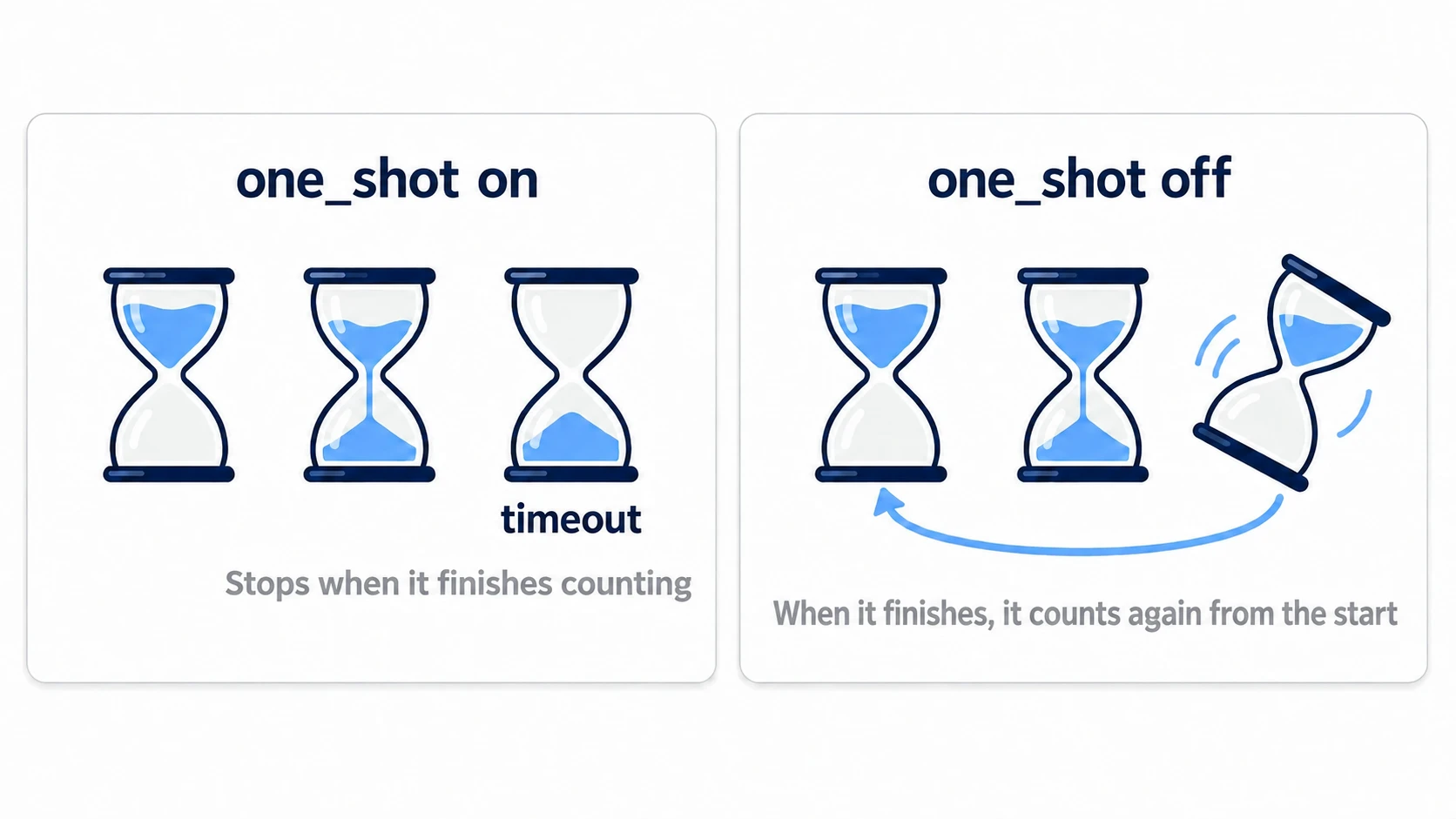
one_shot decides what happens after it finishes counting. With it on, it stops there. With it off, it starts counting again from the beginning.
In other engines: it plays a role close to Unreal Engine's
Set Timer by Event(turn on Looping to repeat). You can think of it as a node version of the waits you'd write in Unity withInvoke()or a coroutine.
If you just want to wait once and continue, you don't need a Timer node: await get_tree().create_timer(1.0).timeout is enough. When to use which is covered in await and Coroutines. What follows is about using the in-between state of a wait from buttons and labels. Reading what's left, stopping partway, branching on whether a button was pressed. If you need those three, place a Timer node.
Settings for the three Timers
Rather than memorizing a list of properties, it's faster to line up three with different uses.
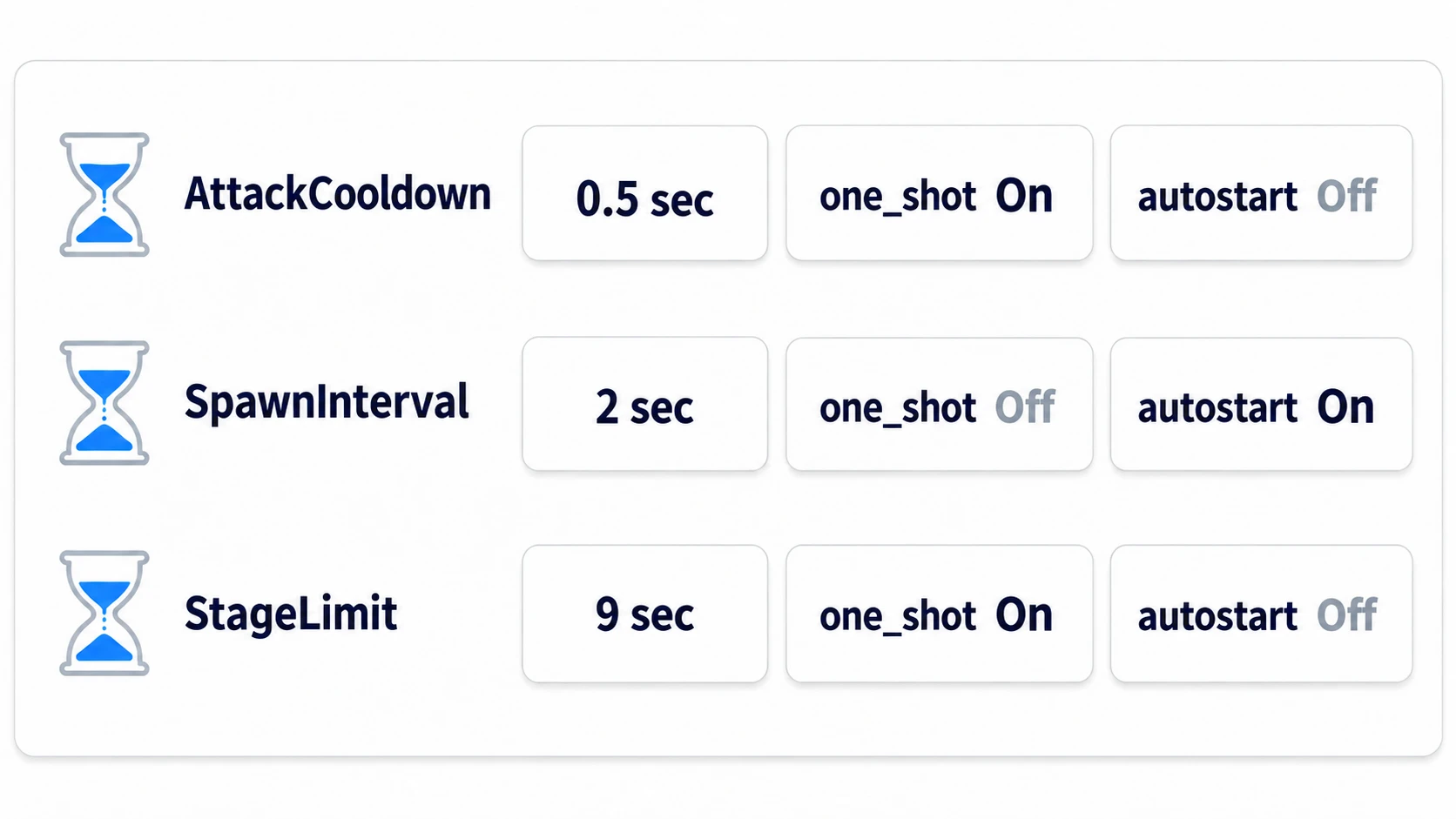
The attack cooldown (the wait after using something before you can use it again; 0.5 seconds here) and the time limit (9 seconds) have one_shot on and stop after counting once. Only the spawn interval (2 seconds) has it off and counts over again and again. The same timeout means something different for each of the three: for the attack, "ready for the next one"; for spawning, "the next enemy"; for the time limit, "the end."
autostart is a switch that starts the timer automatically when it enters the scene. For things like spawning that "start moving once placed," it's all you need. The time limit is started from code because it's nice to keep the start of the stage as a single line. If starting at the same moment the scene loads is fine, autostart works for this one too.
Calling start() partway through
Try writing the attack cooldown so that every press attacks and calls start().
# Only input the UI didn't use arrives here. ui_accept is mapped to Space and Enter out of the box
func _unhandled_input(event: InputEvent) -> void:
	if event.is_action_pressed("ui_accept"):
		attack_label.text = "Slash"
		attack_cooldown.start()     # counts over from the beginning every time you press
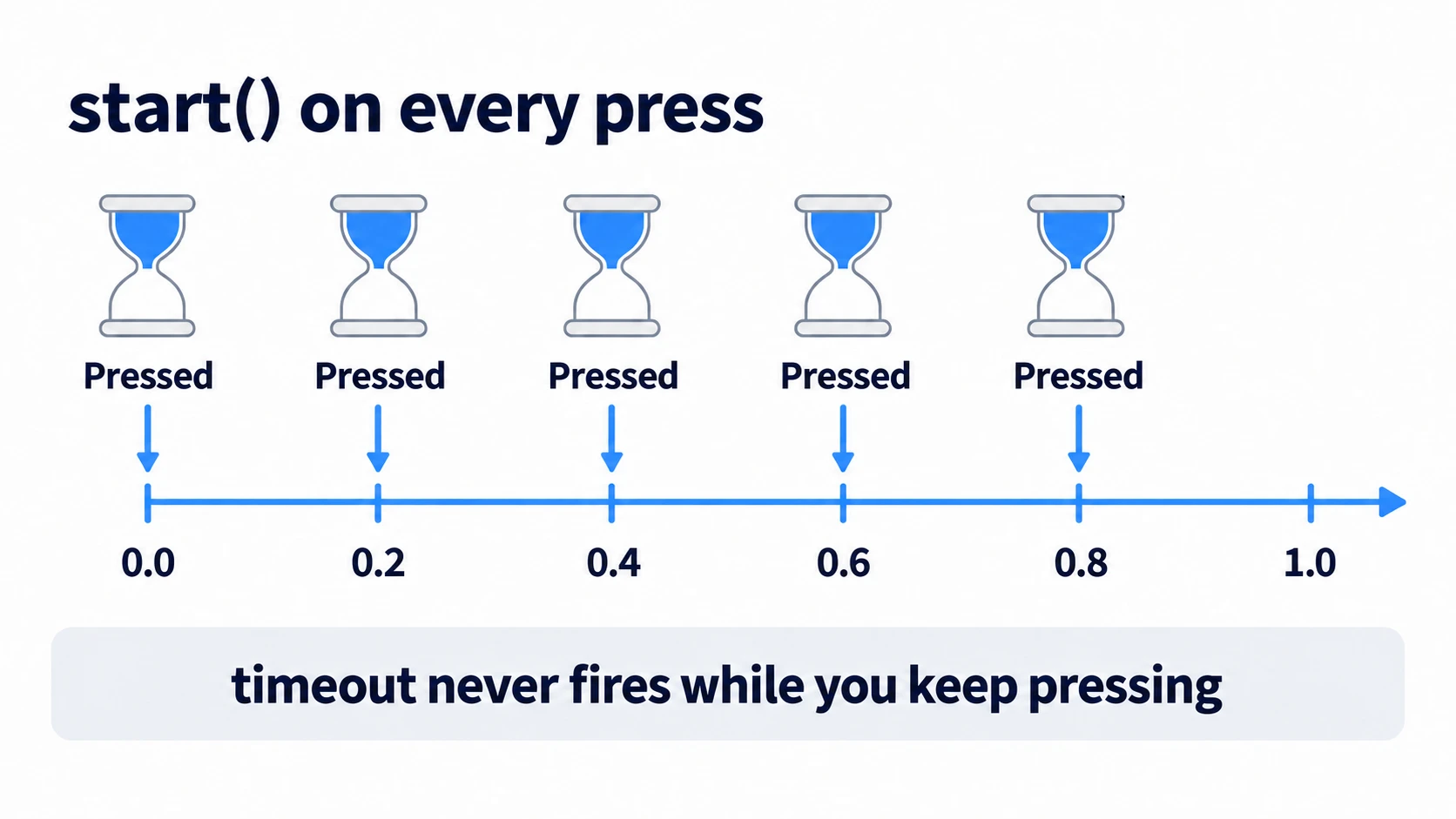
Mash it, and Slash appears on every press. The cooldown isn't working at all. What's more, while you keep pressing at 0.0, 0.2, and 0.4 seconds, what's left goes back to 0.5 seconds on each press. It never finishes counting, so timeout never fires. The signal to set AttackLabel back to ... never comes either.
What stops it is the button side. Add a check so it only swings when the timer is free.
func _unhandled_input(event: InputEvent) -> void:
	if event.is_action_pressed("ui_accept") and attack_cooldown.is_stopped():
		attack_label.text = "Slash"
		attack_cooldown.start()
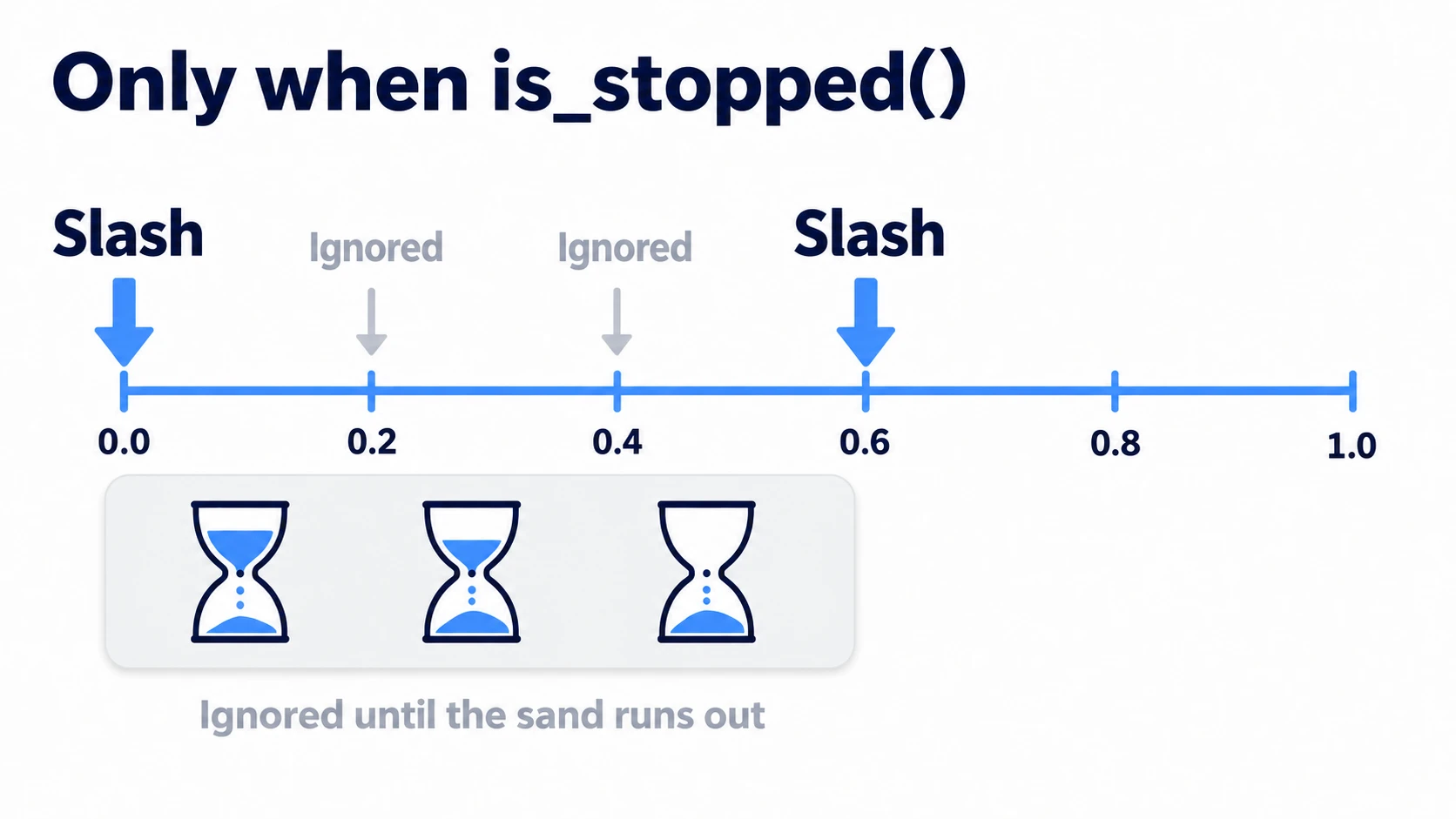
is_stopped() is true in three situations: before it's ever been started, after stop(), and after a one_shot timer has finished counting. While it's stopped with paused, which keeps what's left, it stays false. The press at 0.0 seconds goes through, and 0.2 and 0.4 seconds pass right over. The next one to go through is the press at 0.6 seconds, after it has finished counting.
Put the check on the button side. If you check is_stopped() inside the function connected to timeout, a one_shot timer has already stopped by the time you get there. It's always true, so the check is useless.
start()'s argument (overwriting wait_time)
You can pass a number of seconds to start(). It isn't an addition. It overwrites the length.
attack_cooldown.start(0.5)     # wait_time is rewritten to 0.5
attack_cooldown.start()        # still 0.5 seconds from now on. It doesn't go back to the Inspector value
Even if the Inspector says 2.0, once start(0.5) runs, that node's wait_time is 0.5. If you want it to run on the Inspector's value, don't pass an argument in the first place.
On the other hand, rewriting wait_time while it's running doesn't change what's left in the current count. What changes is the length the next time it starts counting.
Displaying the remaining time (time_left)
You can read the remaining time with time_left. There's just one thing to watch when displaying it.
func _process(_delta: float) -> void:
	time_label.text = "Time left %d" % ceili(stage_limit.time_left)
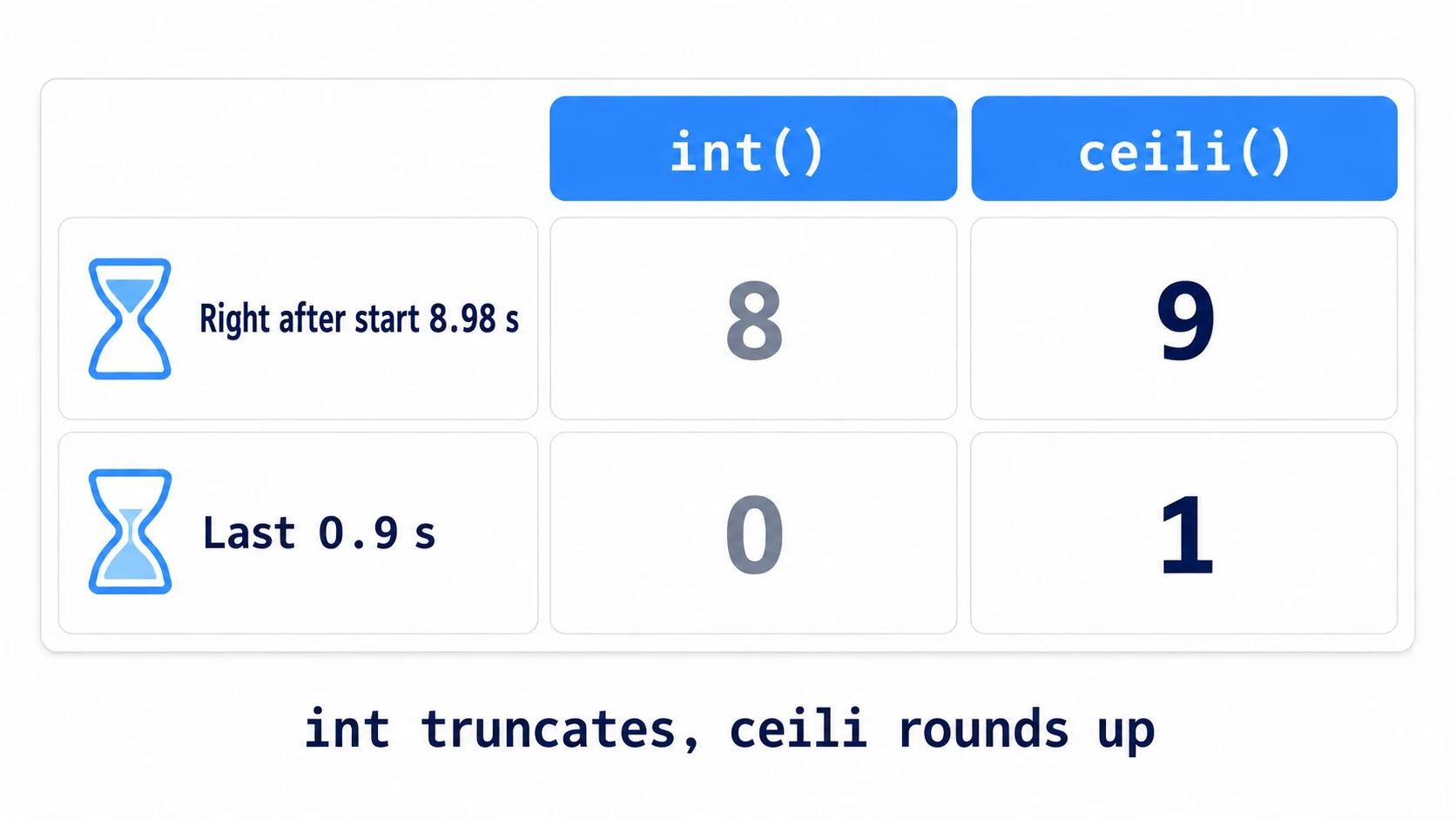
int(time_left) rounds down, so 8.98 right after starting shows as 8, and the last 0.9 shows as 0. You barely see 9, and it jumps to 0 in the last second. With ceili() (a function that rounds a decimal up to an integer), you can count from 9 down to 1.
One more thing: before starting and after stop(), time_left returns 0. The label shows 0 before starting too, so start updating the display once the stage has begun.
Leave the end check to timeout. Check time_left <= 0 inside _process and it's true before starting as well as every frame after it ends.
Ways to stop it (stop, paused, pause)
There are three ways to stop it, and they treat the remaining time differently.
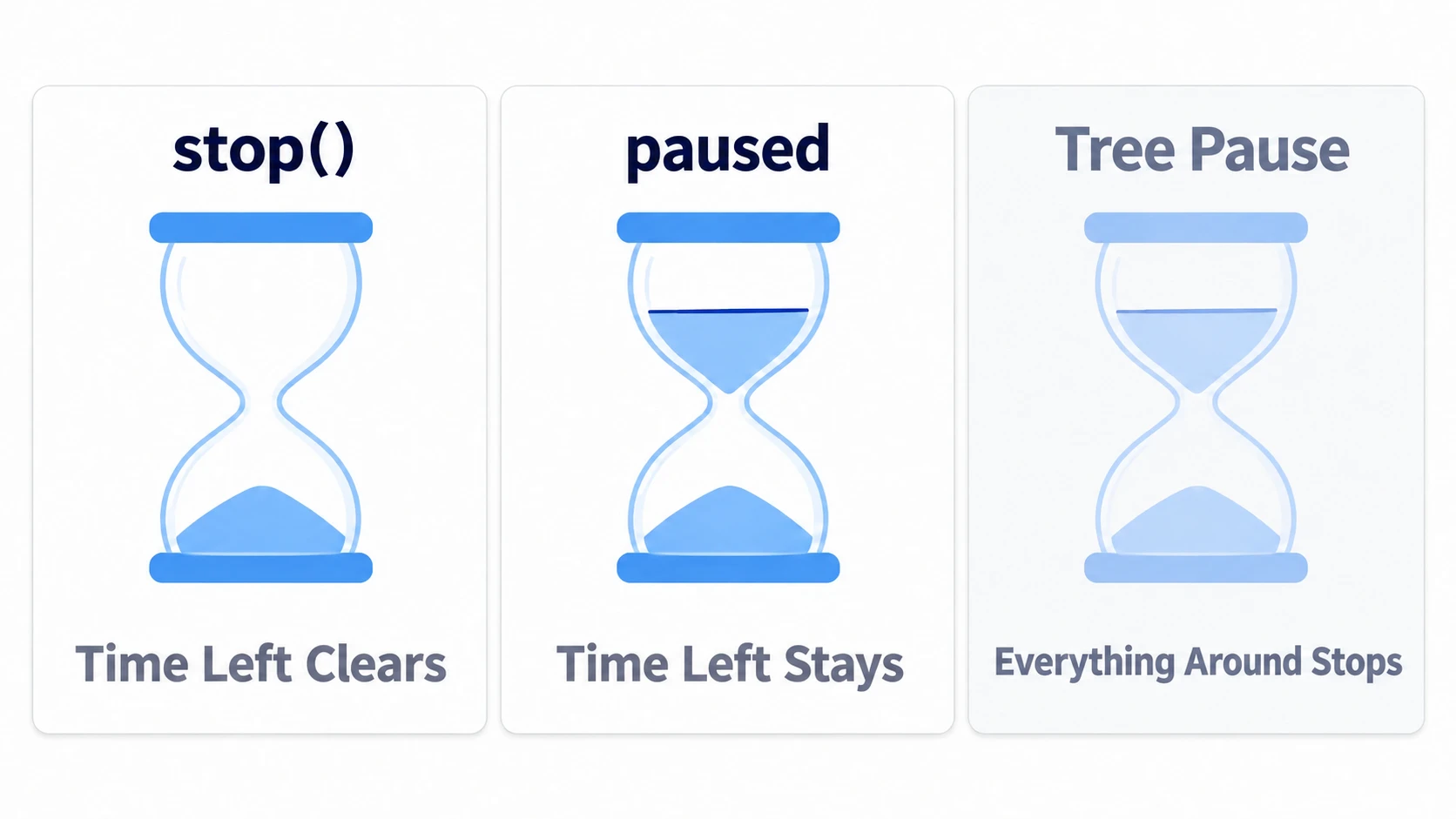
stop(): throws away what's left and stops.time_leftbecomes0, andtimeoutdoesn't firepaused = true: stops while keeping what's left. Set it back tofalseand it continues counting from thereget_tree().paused = true: stops the whole tree. The Timer stops too
For a node you want to keep running during a pause, set Process → Mode in the Inspector to Always. In code, that's process_mode = Node.PROCESS_MODE_ALWAYS. process_callback switches whether the remaining time goes down in the per-frame processing or the physics processing. Even set to Physics, it stops during a pause. These are two separate switches.
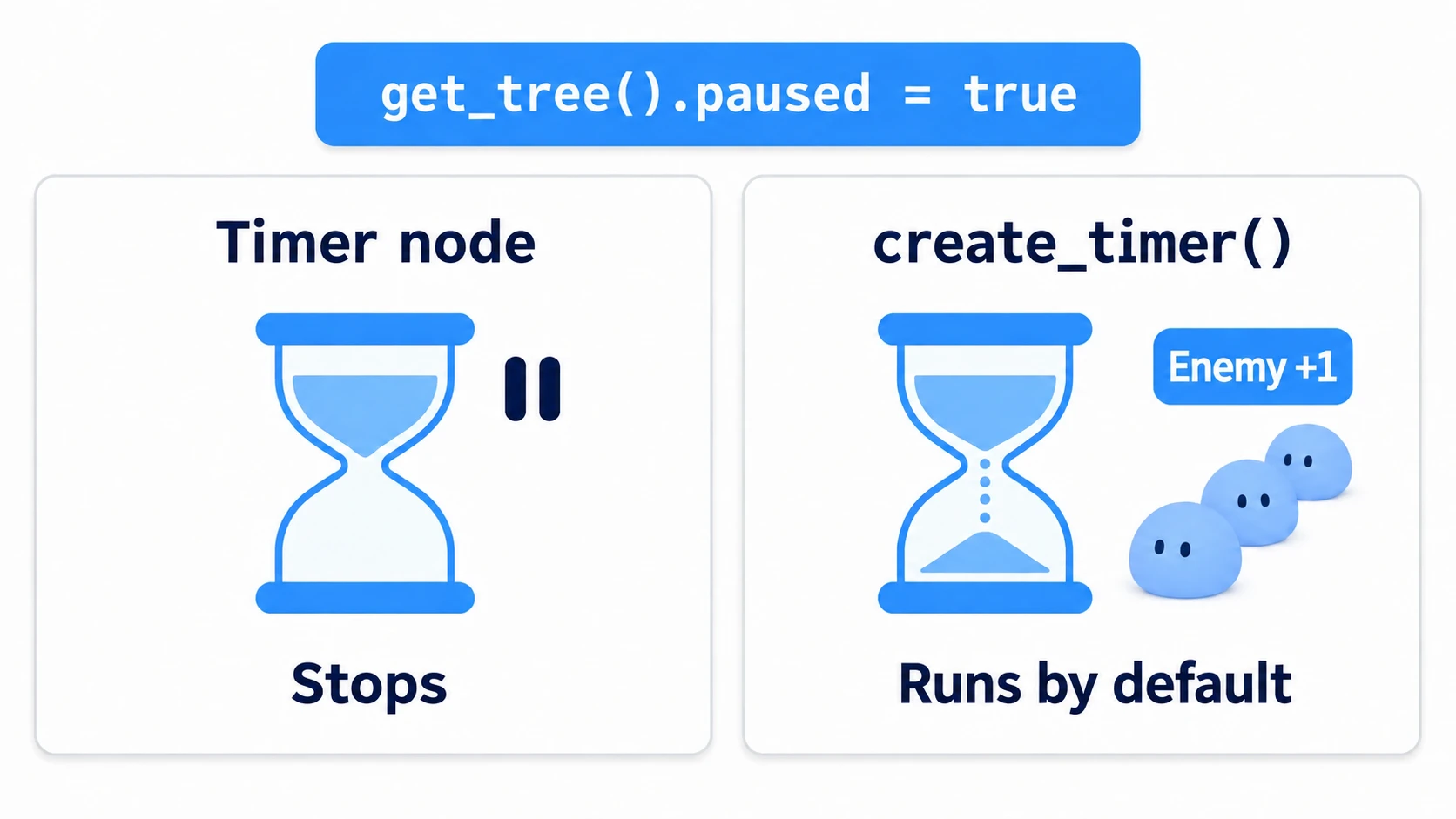
If enemies keep spawning during a pause, the cause is usually one of two things. Either spawning runs on get_tree().create_timer(), or the Timer's process_mode is Always, including when inherited from a parent. A throwaway timer from create_timer() keeps running during a pause by default. To stop it, pass a second argument as in create_timer(seconds, false), or leave periodic things to a Timer node. How to build a pause itself is in Pause and Process Mode.
Hands-On: A Stage With a 0.5 s Attack, 2 s Spawns, and a 9 s Limit
Attack intervals in an action game, spawns in tower defense, the countdown in a time attack—managing waits comes up in every genre. You'll run three at once and see how their settings differ.
① What to place
Create one new scene and save it as main.tscn. Set this scene under Project Settings → Application → Run → Main Scene.
Main (Node2D)                 main.gd
├── AttackCooldown (Timer)
├── SpawnInterval (Timer)
├── StageLimit (Timer)
└── Hud (VBoxContainer)       position (40, 40). A container that stacks its children vertically
    ├── TimeLabel (Label)
    ├── SpawnLabel (Label)
    └── AttackLabel (Label)
Set up the three Timers in the Inspector like this. Leave them named Timer, Timer2, and Timer3 and you'll lose track of which is which.
| Node | Wait Time | One Shot | Autostart |
|---|---|---|---|
| AttackCooldown | 0.5 | On | Off |
| SpawnInterval | 2.0 | Off | On |
| StageLimit | 9.0 | On | Off |
# main.gd
extends Node2D

@onready var attack_cooldown: Timer = $AttackCooldown
@onready var spawn_interval: Timer = $SpawnInterval
@onready var stage_limit: Timer = $StageLimit
@onready var time_label: Label = $Hud/TimeLabel
@onready var spawn_label: Label = $Hud/SpawnLabel
@onready var attack_label: Label = $Hud/AttackLabel

var spawned := 0
var finished := false

func _ready() -> void:
	attack_cooldown.timeout.connect(_on_attack_ready)
	spawn_interval.timeout.connect(_on_spawn)
	stage_limit.timeout.connect(_on_stage_end)
	spawn_label.text = "Enemies 0"
	attack_label.text = "..."
	stage_limit.start()                # the stage starts here

func _process(_delta: float) -> void:
	if not finished:
		time_label.text = "Time left %d" % ceili(stage_limit.time_left)

func _unhandled_input(event: InputEvent) -> void:
	if finished:
		return
	if event.is_action_pressed("ui_accept") and attack_cooldown.is_stopped():
		attack_label.text = "Slash"
		attack_cooldown.start()        # don't accept the next one until it's free

func _on_attack_ready() -> void:
	attack_label.text = "..."

func _on_spawn() -> void:
	spawned += 1
	spawn_label.text = "Enemies %d" % spawned

func _on_stage_end() -> void:
	finished = true
	spawn_interval.stop()              # stop spawning once it's over
	attack_cooldown.stop()             # stop() doesn't fire timeout, so change the display here
	time_label.text = "Time left 0"
	attack_label.text = "Finished"
② See how the three overlap
Before pressing F5, check what happens during the 9 seconds.
SpawnInterval has autostart, so it starts counting the moment it enters the scene. The first enemy appears after 2 seconds. If you want one to appear right at the start, call _on_spawn() once in _ready(), then leave the rest to the timer.
StageLimit starts with the start() in _ready() and fires timeout at 9 seconds. At that point _on_stage_end() stops spawning and the cooldown, and also turns away input.
③ Run it and check
Run with F5. Check three things. If space doesn't respond, click the game screen once.
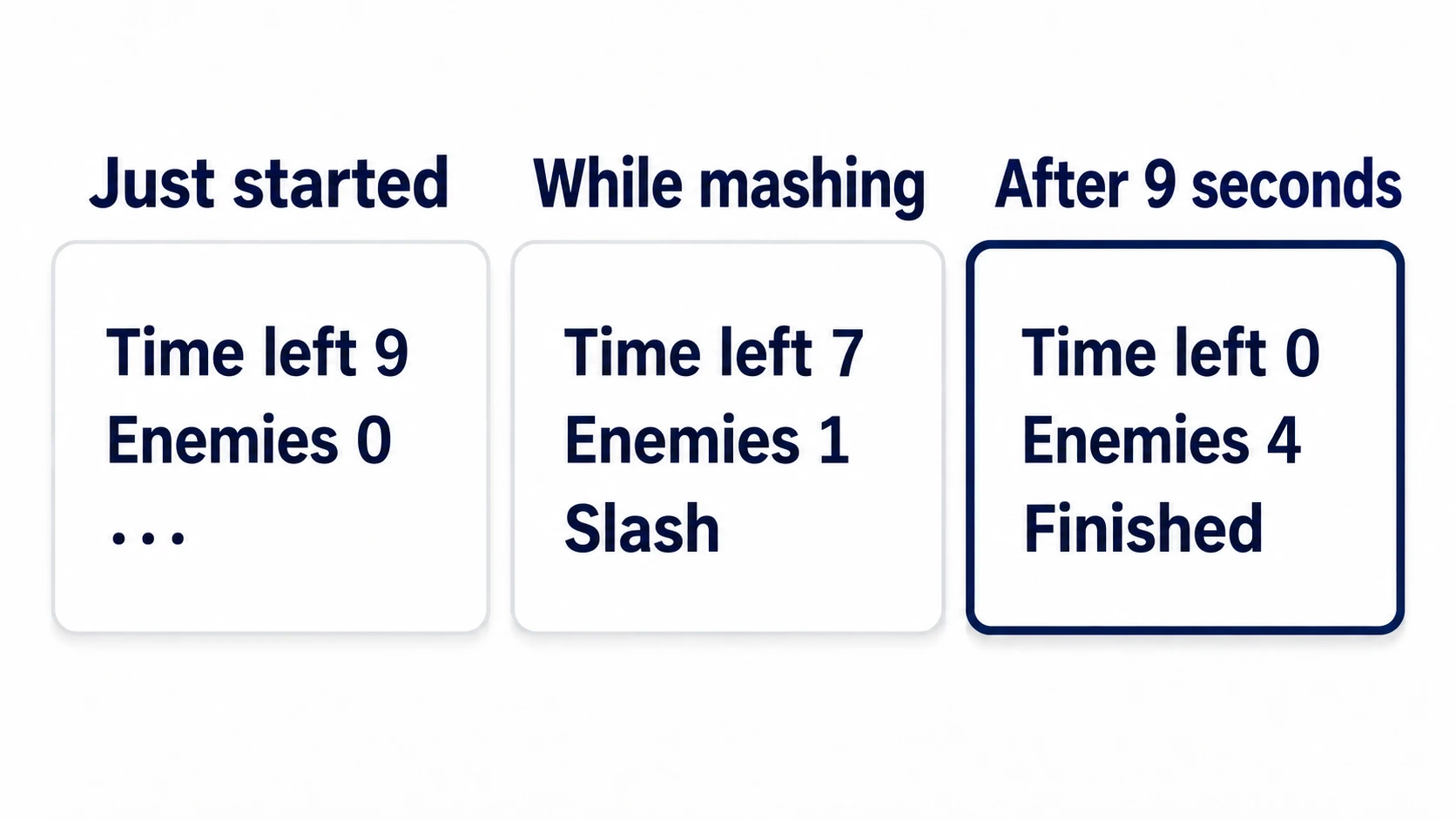
The first is the time limit. Right after starting it shows Time left 9, Enemies 0, and ..., and the number drops about once a second. If you display it with int(), it changes to 8 right after starting.
The second is the attack. Once it says Slash, pressing any number of times passes right over for about 0.5 seconds. Try removing the is_stopped() check, and every press goes through. While you keep pressing before 0.5 seconds pass, it stays at Slash and never goes back to ..., because you keep making it count over from the beginning before it finishes.
The third is spawning and the end. The Enemies count goes up at about 2, 4, 6, and 8 seconds, and at about 9 seconds it becomes Time left 0 and Finished. The enemies stop at 4, and pressing space after that does nothing. The three Timers ran all the way through, each with its own length and way of stopping.
Two points.
- Place one Timer per wait: count everything with one, as in "spawn on the 4th tick, end on the 18th," and the moment you change the attack speed, spawning and the end both break. Keep them separate with names, and later you only need to change the numbers in the Inspector
- Hand out the end from one place:
_on_stage_end()raisesfinished, stops spawning and the cooldown, and turns away input.stop()-ing the cooldown setsis_stopped()back totrue, so what actually stops input isfinished
Troubleshooting
| Symptom | Cause | Fix |
|---|---|---|
timeout never fires | You're calling start() every frame inside _process(). Like mashing, it counts over from the beginning every time | Start it only once, where the trigger happens, such as _ready() or the button handling |
| A Timer created in code doesn't run, and an error appears | You called start() before add_child(). It can't start outside the tree | add_child() it to a parent that's in the scene tree, then start() |
Stopping it partway doesn't run the cleanup written for timeout | stop() doesn't fire timeout | Call the same cleanup function from the side that stops it too |
| The cooldown only works the first time, and you can attack freely from the second on | AttackCooldown's One Shot is off. It doesn't stop after it finishes counting, so is_stopped() never goes back to true | Turn One Shot on (it's off by default) |
Bonus: Good to Know First
autostartturns itself off once started: after it starts automatically, the value at runtime goes back tofalse. The setting saved in the scene stays as-is, so the next time the scene opens it starts automatically againstart(0)doesn't go off immediately: pass0or less and the argument is ignored, starting with the currentwait_time.wait_timeitself can't be0either. The Inspector's minimum is0.001seconds- For just counting, doing it yourself is fine: add up
delta(the seconds since the last frame) in_processand you can count seconds. Think of Timer as that plus stopping, remaining time, andtimeout - Keep the owner close to the user: in the hands-on, the three were placed under Main so you could see them side by side. The attack cooldown really belongs as a child of whatever attacks, so it travels with it
Summary
- A Timer counts a set number of seconds: when it finishes counting it fires
timeout. Turnone_shotoff and it counts again from the beginning start()partway through counts over from the beginning: it throws away what's left. Put the check on the calling sidestart(0.5)rewriteswait_time: even the nextstart()with no argument uses that length- While stopped,
time_leftis0: before starting and afterstop(). Round the display up withceili() - Throw it away, or keep it:
stop()throws away what's left,pausedkeeps it. To keep running during a pause, set Process → Mode to Always
When "I want to stop it partway" or "I want to show what's left" comes up, that's the cue to place a Timer. Is there anywhere in _process right now where you're subtracting seconds yourself?