When you write initialization code for a node, you need to know when that function gets called. A Godot node passes through four milestones in a fixed order: it's born, enters the tree, finishes getting ready, and leaves the tree. The functions called are _init(), _enter_tree(), _ready(), and _exit_tree().
Write code without knowing the order, and things don't line up. For example, you set HP to 30 after instantiate() and then add_child(), yet the screen shows 100. No error appears, so the cause is hard to find.
This article checks when each of the four milestones is called using the Output panel, and covers a way of writing code so that initial values you pass in from outside don't vanish.
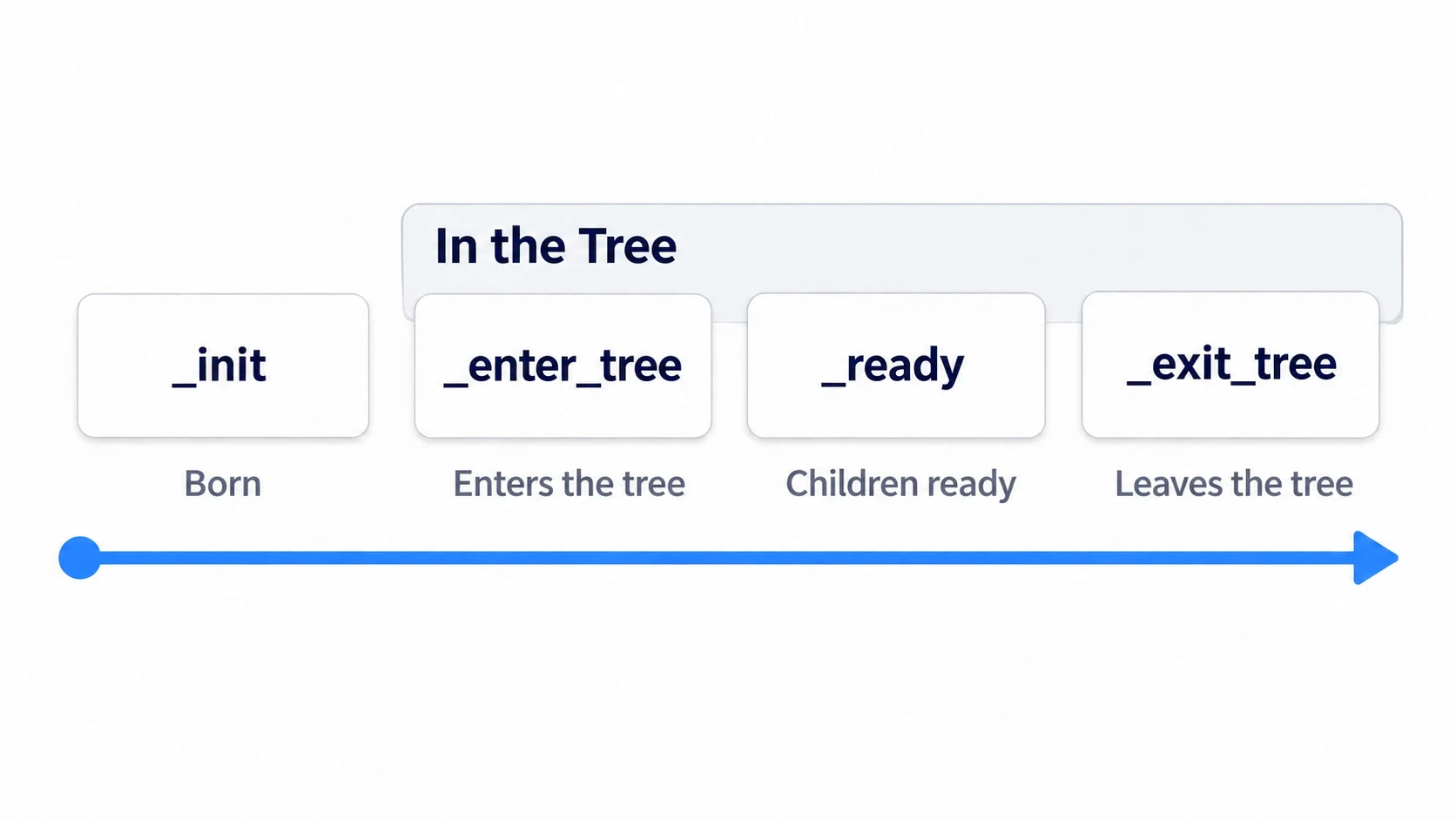
What You'll Learn
- The four milestones (
_init(),_enter_tree(),_ready(),_exit_tree()) and the order they're called in- Whether the parent or the child finishes
_ready()first- When
@onreadyvariables get their values- When a node added with
add_child()gets set up, and how to pass initial values so they don't vanish- Hands-on: check the order of three levels of nodes in the output, and fix the vanishing HP
Tested with: Godot 4.7
- Four milestones
- Parent and child order
- When @onready gets its value
- The order when you add with add_child()
- Passing initial values that don't vanish
- Removing (remove_child) and deleting (queue_free)
- Hands-On: Check the Order of Three Levels in the Output and Fix the Vanishing HP
- Troubleshooting
- Bonus: Good to Know First
- Summary
Four milestones
A node doesn't start working the moment it's created. The tree here means the hierarchy of nodes lined up while the game runs (the scene tree). Between entering it and leaving it, a node passes through these four milestones in this order.
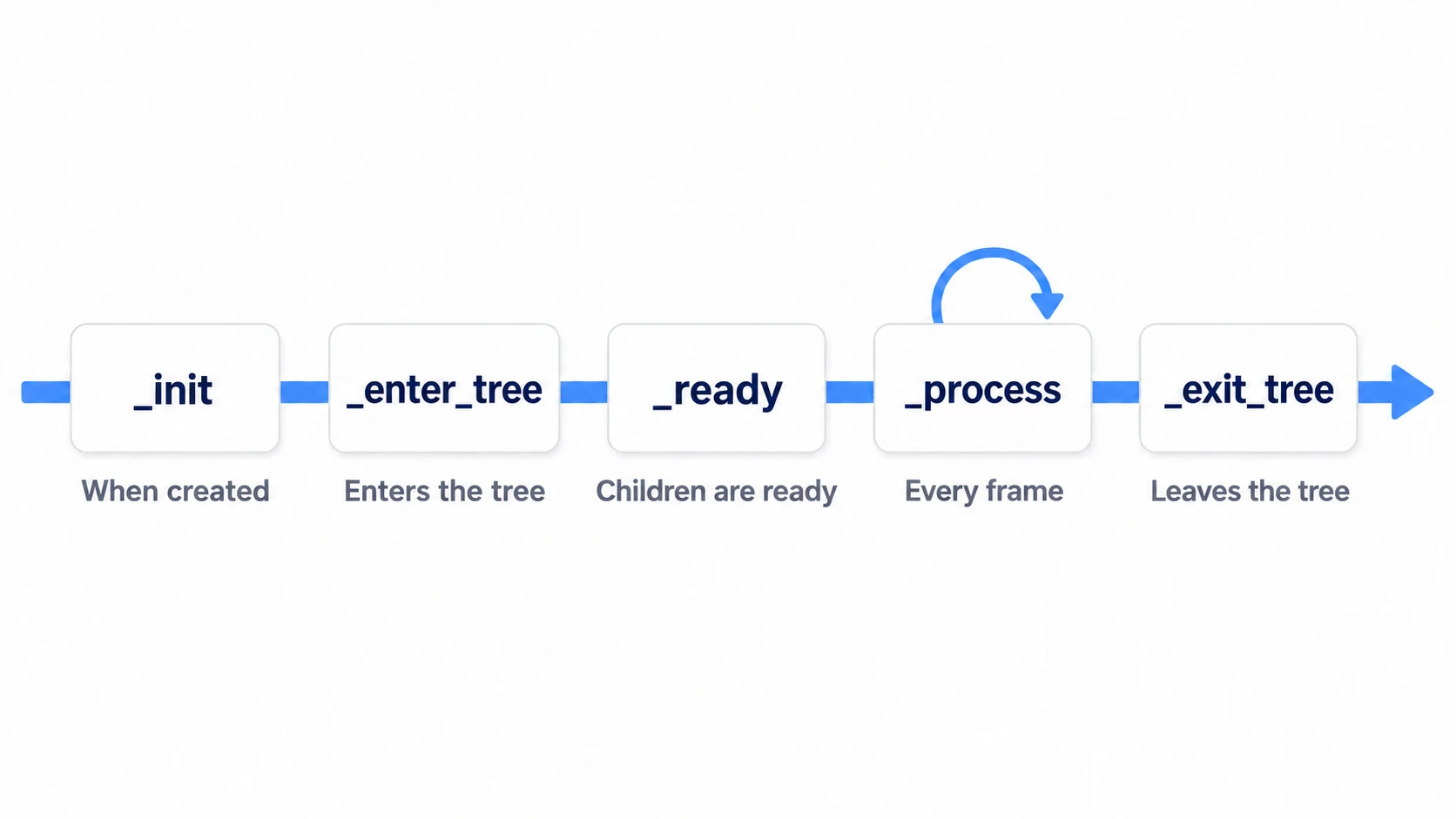
_init(): the moment the object is born. It's still outside the tree_enter_tree(): right after entering the tree. Its children hang below it, but they haven't had their turn yet_ready(): once every node below it is in place. Normally runs just once_exit_tree(): when it leaves the tree
_process() in the figure is the processing called every frame once setup is done. This article treats it separately from the milestones.
_init() alone is called regardless of the tree. It runs at the moment of instantiate(), even though the node isn't attached anywhere yet. At this point the values set in the Inspector haven't arrived. Reading a variable marked @export (the syntax that shows a variable in the Inspector) gives the initial value written in its declaration.
In other engines: Godot's
_ready()plays a role close to Unity'sStart()or UE'sBeginPlay, in that it's where you write setup at the start. The conditions and order in which they're called differ, so don't map it one-to-one onto Unity'sAwake().
Parent and child order
This is where it most goes against intuition. The parent, higher up the tree, finishes getting ready later.
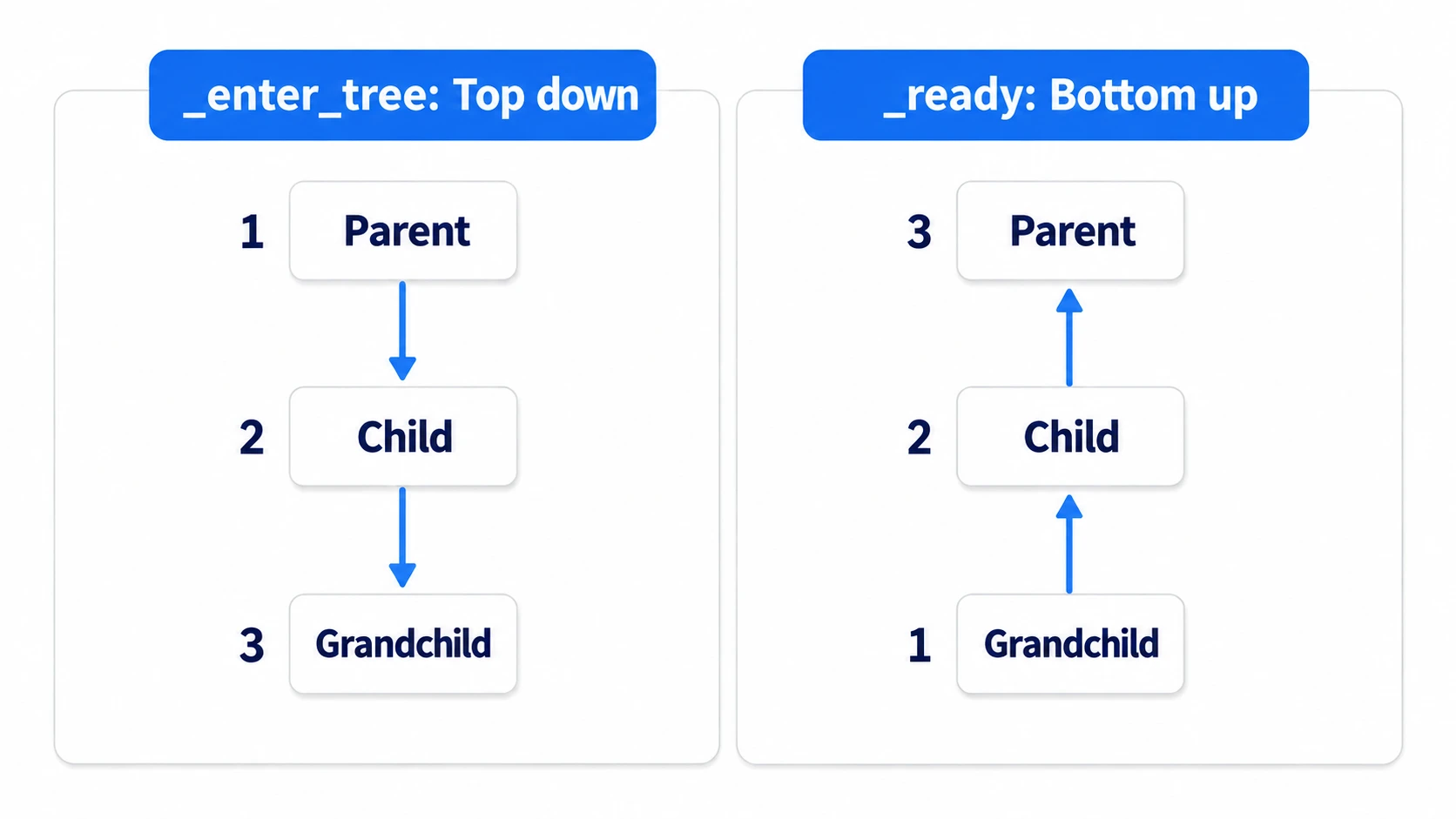
_enter_tree() comes down from the top. The parent enters, then the child, then the grandchild. _ready() goes the other way, up from the bottom: grandchild, child, parent.
There's a reason for this direction. _ready() is called once every node below it is in place. The child's _ready() isn't called until the grandchild has finished getting ready. That's why, inside the parent's _ready(), the child and grandchild are already usable.
_exit_tree() also goes child first. The child leaves, then the parent.
When @onready gets its value
@onready delays a variable's assignment until right before that node's _ready(). $HpLabel is the syntax for getting your own child by name.
extends Node2D

@onready var label: Label = $HpLabel   # assigned right before _ready()
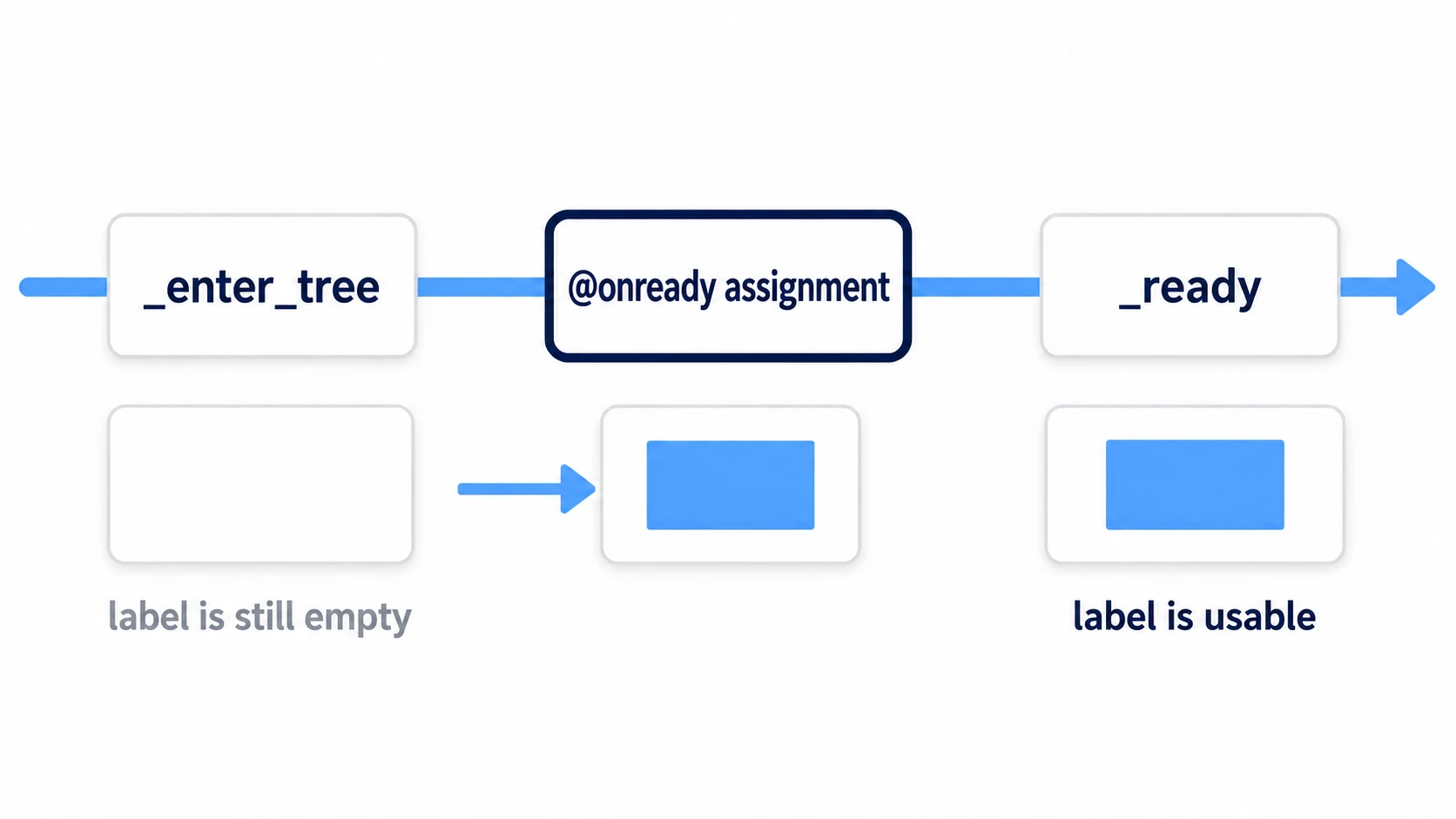
So reading label inside the first _enter_tree() gives nothing yet. When you want to use the same node in _enter_tree(), writing $HpLabel directly gets it.
The same goes across parent and child. The child's _ready() comes before the parent's, so reading the parent's @onready variable from there still gives an empty value.
The order when you add with add_child()
instantiate() is the function that creates a node instance from a scene. At this point it's still outside the tree. Add a node that's never been set up to a parent that's already in the tree, and it goes all the way through setup on the very line where you call add_child().
var e := enemy_scene.instantiate()   # _init happens here. _ready hasn't yet
print("Before adding")
add_child(e)                          # _enter_tree and _ready run inside this line
print("After adding")
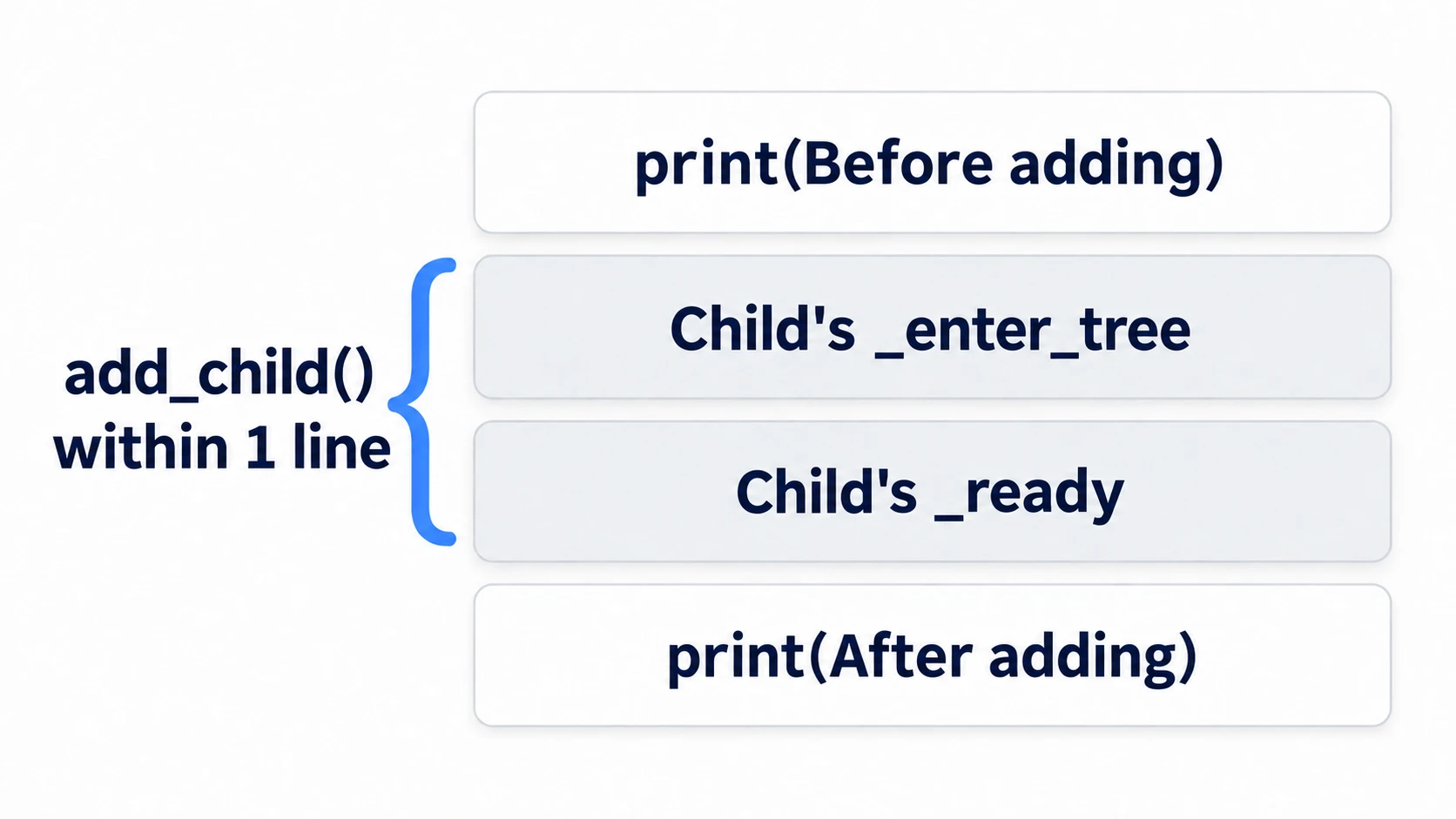
The output order is "Before adding," the child's _enter_tree, the child's _ready, then "After adding." By the time add_child() returns, that child is already up and running.
Nodes placed in the scene from startup get set up together when the scene enters the tree. Only nodes you add_child() while running finish setup inside that line. Even an enemy scene you built in the editor falls into the second case if you instantiate() and add it while running.
Passing initial values that don't vanish
Write code without knowing the order above, and the values you pass vanish. Say you pass e.hp = 30 after instantiate(), then add_child(). The child's _ready() runs inside add_child(). If the child's _ready() says hp = max_hp, the 30 you passed gets overwritten with 100 there. No error appears.
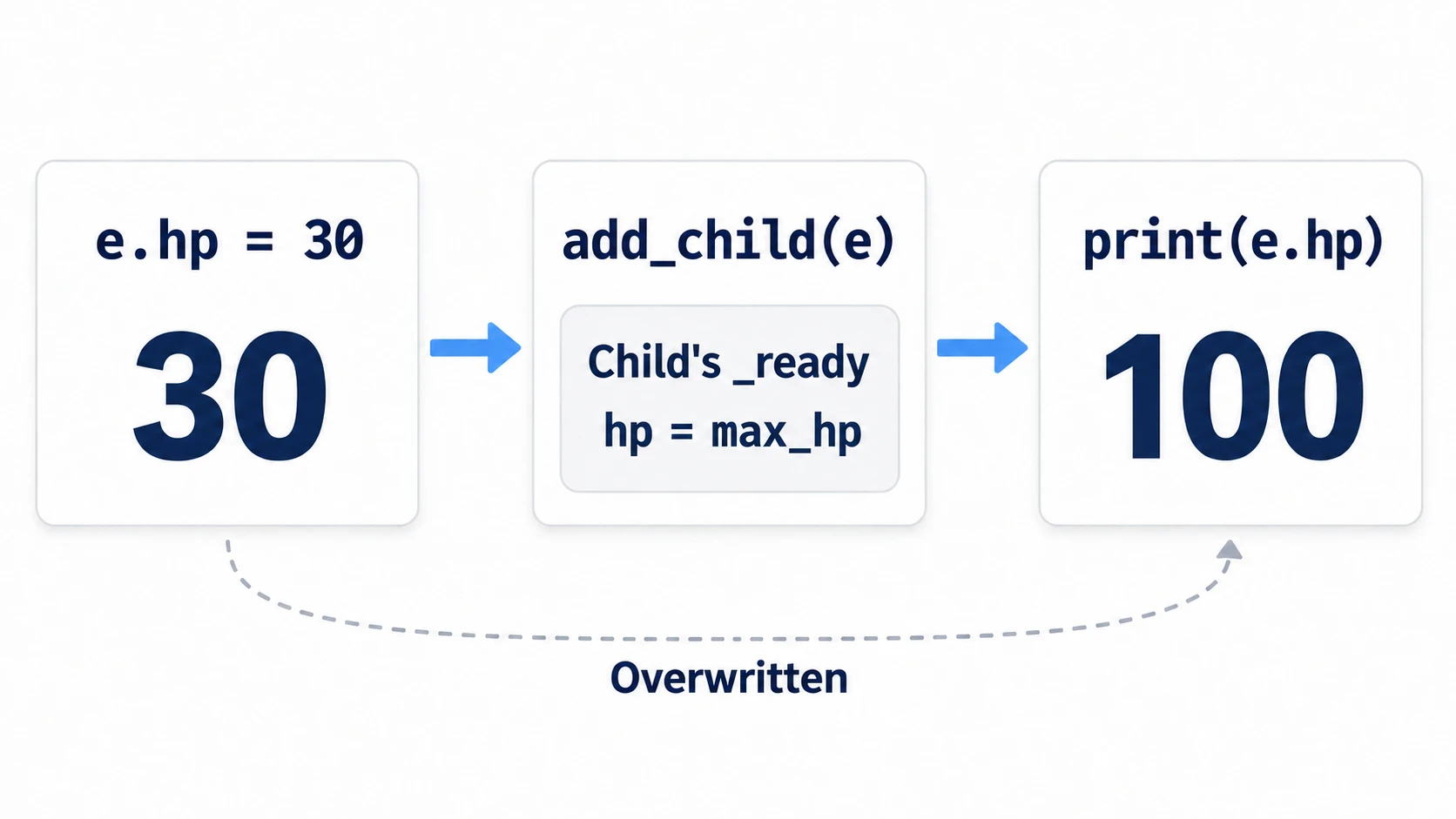
The fix is to decide initial values in one place. Decide them in the declaration or with @export, and make _ready() the side that reads the value and reflects it in the visuals.
# enemy.gd
@export var hp: int = 100

func _ready() -> void:
	label.text = str(hp)   # only read it. Don't rewrite it
Do this and the 30 you passed before add_child() stays as-is, and the label shows 30 too. When you want to pass something to a child placed in the scene before the child's _ready(), write to $Child from the parent's _enter_tree(). At that point the child hasn't gone through its own _enter_tree() yet.
Removing (remove_child) and deleting (queue_free)
Taking a node out of the tree and deleting it are not the same.
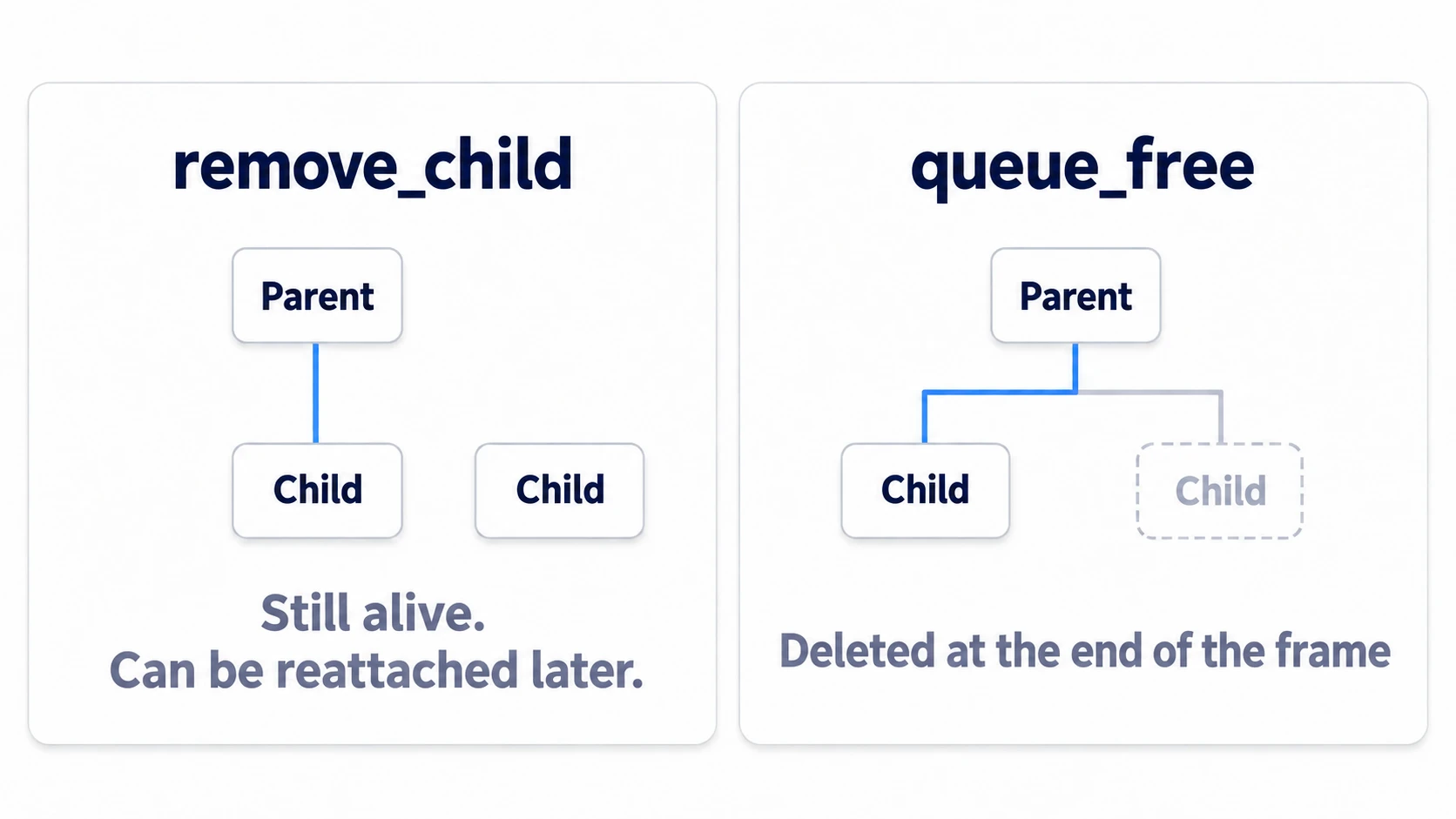
remove_child() only takes it out of the tree. The node itself stays alive, and if you hold it in a variable, you can add it back later. queue_free() destroys the node. It doesn't disappear on the spot. It's deleted in the cleanup at the end of that frame.
When you remove a node and add it back, only _enter_tree() runs. Neither _ready() nor the @onready assignments run.
If you want it to go through _ready() again, call request_ready() before adding it back. You have to call it on each node you re-add. It doesn't automatically apply to descendants.
Work you want to redo every time the node enters or leaves belongs in _enter_tree() from the start, with cleanup in _exit_tree().
Hands-On: Check the Order of Three Levels in the Output and Fix the Vanishing HP
A tower in tower defense and its child UI, a party in an RPG and each member, an enemy in a shooter and its equipment—parents holding children show up in every genre. See the order once with your own eyes, and you'll stop wondering where to write initialization.
① What to place
Create one new scene, save it as main.tscn, and set it as the main scene.
Main (Node2D)                 main.gd
└── Parent (Node2D)           lifecycle.gd   Who = Parent
    └── Child (Node2D)        lifecycle.gd   Who = Child
        └── Grandchild (Node2D)  lifecycle.gd   Who = Grandchild
Also create an enemy scene in a separate file. The root is a Node2D named Enemy. Put one Label under it named HpLabel, and save it as res://enemy.tscn.
② Put a print at each of the four milestones
lifecycle.gd is shared by the three nodes. Enter "Parent," "Child," and "Grandchild" for Who in the Inspector.
# lifecycle.gd
extends Node2D

@export var who: String = "?"

func _init() -> void:
	print("_init: who is ", who)   # the Inspector value hasn't arrived yet

func _enter_tree() -> void:
	print(who, " _enter_tree")

func _ready() -> void:
	print(who, " _ready")

func _exit_tree() -> void:
	print(who, " _exit_tree")
# enemy.gd (attach to the root of enemy.tscn)
extends Node2D

@export var hp: int = 100
@export var max_hp: int = 100

@onready var label: Label = $HpLabel

func _ready() -> void:
	hp = max_hp            # this one line erases the value passed in from outside
	label.text = str(hp)
# main.gd
extends Node2D

const EnemyScene := preload("res://enemy.tscn")

# Only input that UI such as buttons didn't use arrives here
func _unhandled_input(event: InputEvent) -> void:
	if event.is_action_pressed("ui_accept"):      # mapped to Space and Enter out of the box
		_spawn_enemy()
	elif event.is_action_pressed("ui_cancel"):    # mapped to Esc out of the box
		var p := get_node_or_null("Parent")   # null if not found. Keeps a second Esc from erroring
		if p != null:
			p.queue_free()

func _spawn_enemy() -> void:
	var e := EnemyScene.instantiate()
	e.position = Vector2(300, 200)
	e.hp = 30                      # pass it before add_child
	print("Just before adding hp = ", e.hp)
	add_child(e)
	print("Just after adding hp = ", e.hp)
③ Run it and check
Run with F5. Check three things.
The first is the Output panel right after startup. It lines up in this order:
_init: who is ?
_init: who is ?
_init: who is ?
Parent _enter_tree
Child _enter_tree
Grandchild _enter_tree
Grandchild _ready
Child _ready
Parent _ready
All three _init lines show ? because the "Parent," "Child," and "Grandchild" you entered in the Inspector haven't arrived yet. And _enter_tree lines up from the top, _ready from the bottom.
The second is Esc. Press it and Parent disappears, and leaving also goes child first.
Grandchild _exit_tree
Child _exit_tree
Parent _exit_tree
The third is the vanishing 30. Press the space key.
Just before adding hp = 30
Just after adding hp = 100
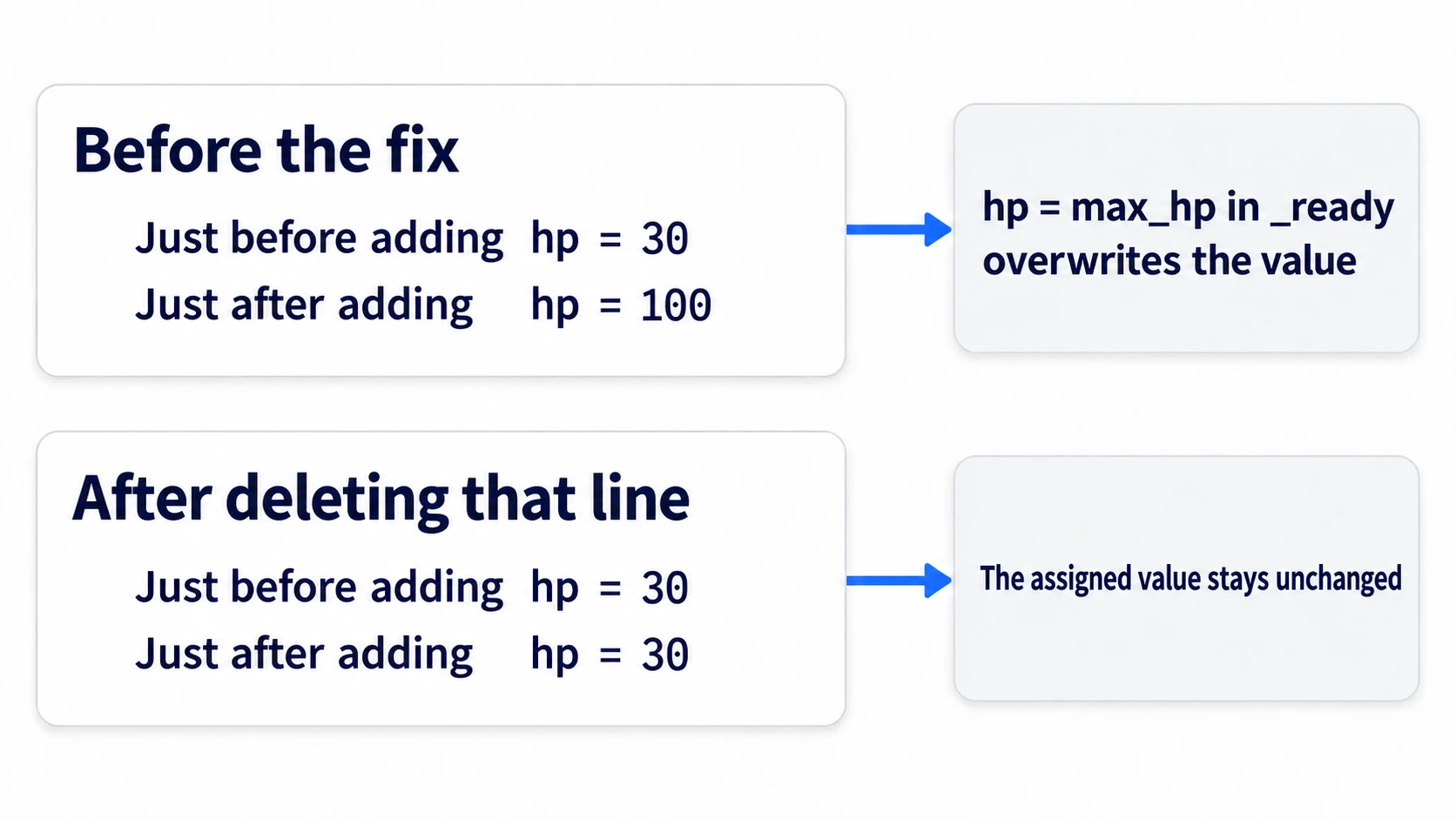
The 30 you passed turned into 100 during the single line add_child(). Delete hp = max_hp from enemy.gd, save, stop the game once, and rerun with F5. If the old enemy is still there, the new one overlaps it in the same spot and you can't tell them apart. Once it's running, press space.
Just before adding hp = 30
Just after adding hp = 30
HpLabel shows 30 too. The way you passed it was right from the start, and the cause of the vanishing was that one line in _ready().
Two points.
- Write initial values in only one place: decide them in the declaration or with
@export, and make_ready()the side that reads the value and reflects it in the visuals. Write from both and which one wins depends on how the node was created - Nodes present from startup and nodes added later finish setup at different times: children in the scene at startup all proceed through
_ready()together, while a child youadd_child()while running proceeds inside that line. How to put scenes together is in Scenes and Nodes
Troubleshooting
| Symptom | Cause | Fix |
|---|---|---|
| The start of each output line stays "?" instead of Parent, Child, and Grandchild | You didn't enter a value for Who on the three nodes | Select Parent, Child, and Grandchild one at a time and enter "Parent," "Child," and "Grandchild" for Who in the Inspector |
| Pressing space doesn't print the before and after lines | main.gd isn't attached to Main, or the game window isn't selected | Attach main.gd to Main. Click the game window once before pressing |
| Pressing space prints "Node not found: "HpLabel"" | The Label in enemy.tscn isn't named HpLabel | Open enemy.tscn, rename the Label to HpLabel, and save |
You deleted hp = max_hp, but right after adding it's still 100 | The change to enemy.gd isn't in the running game | Save enemy.gd, stop the game, and rerun with F5 |
Bonus: Good to Know First
- You can only pass arguments to
_init()when creating it in code:instantiate()through a scene can't take arguments. Make the values you want to pass@export, or put them into properties beforeadd_child() - Autoloads finish setup first: an autoload's (a node kept resident across every scene)
_ready()runs before the main scene's. So from an autoload's_ready(), you can't get the current scene, which doesn't exist yet - A parent class's
_ready()isn't called automatically: inherit a class and write_ready(), and the parent class's_ready()doesn't run. When you need it, callsuper()(the syntax for calling the same function in the class you inherit from).@onreadyassignments happen even without it - What to read next: when Inspector values arrive is in @export Basics, how to choose what you grab is in Node References, when to use
_processversus_physics_processis in The Game Loop, and ways of waiting are in await and Coroutines
Summary
- Four milestones: born, enters, finishes setup, leaves. At
_init(), the Inspector values aren't there yet - Direction of calls:
_enter_tree()goes parent to child, while_ready()and_exit_tree()go child to parent @onreadyhappens right before_ready(): in_enter_tree()it's still emptyadd_child()runs through_ready(): initial values in one place, with_ready()on the reading side- Re-adding doesn't run
_ready(): when you want it back, userequest_ready()
Add four print lines and run it once. Does the order in the Output panel match the order in your head?