The player has HP, the HUD displays an HP bar, the inventory uses items, and items heal the player. So far so natural.
But as you implement, you tend to end up with Player touching HUD directly, HUD also referencing Player, ItemData remembering Player, and Inventory holding ItemData. While it runs, nothing looks wrong. The pain shows up as crashes the moment you swap the UI, references that don't resolve in another scene, and no way to trace where HP changed.
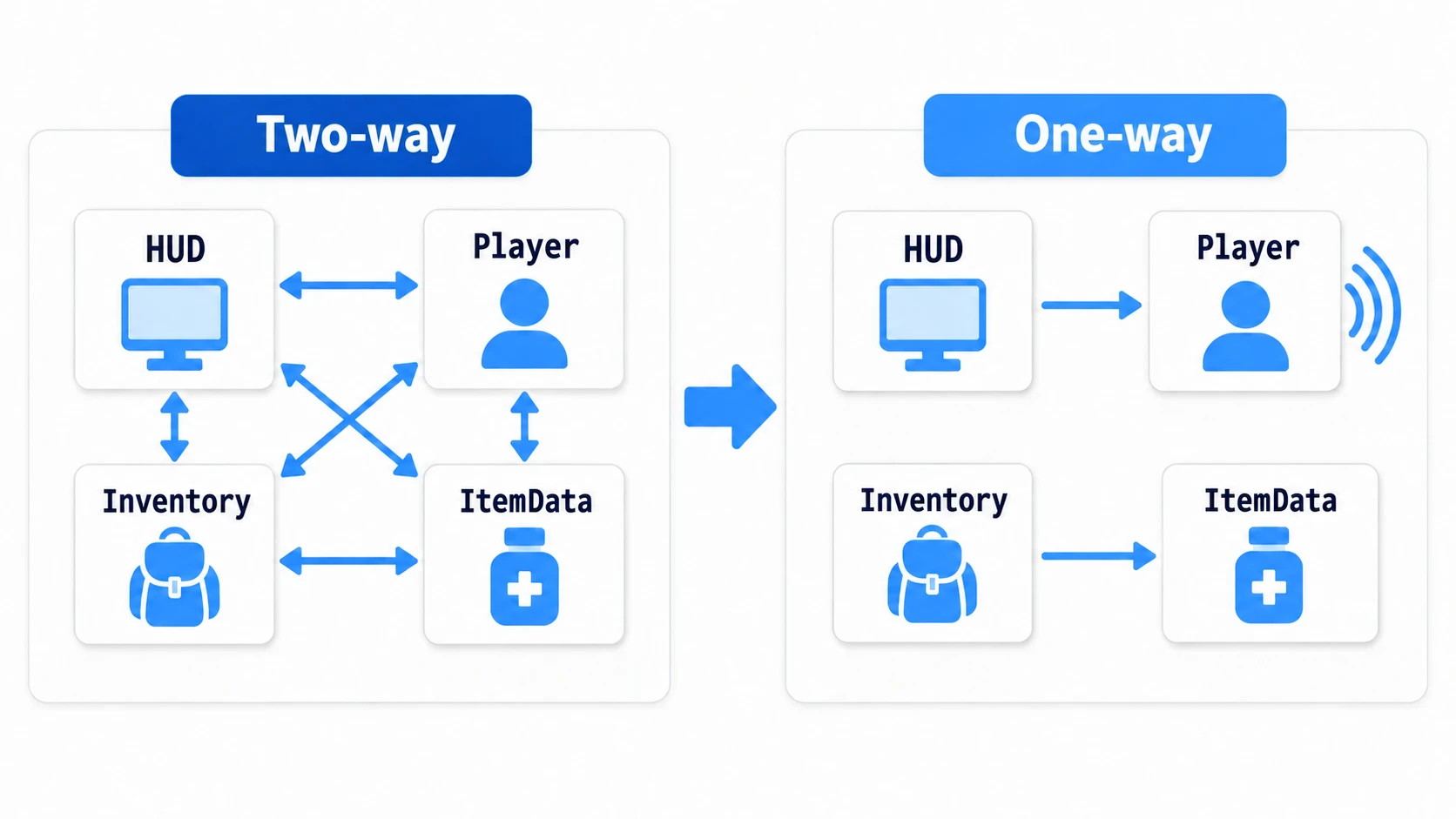
This article separates cyclic references from tangled dependencies. It's not only about memory management; the focus is the question beginners and intermediate developers actually get stuck on: which node is allowed to know about which node.
What You'll Learn
- The difference between a cyclic reference and a cyclic dependency
- Why the problem looks different for
NodeandRefCounted- When to use direct calls, signals, Autoload, and WeakRef
- How to design items, HUDs, and status effects safely
Tested with: Godot 4.7
- First, Separate "Reference" from "Dependency"
- What's Different Between Node and RefCounted
- Basic Rule: Keep Reference Direction One-Way
- Solution 1: Make Notifications Signals
- Solution 2: ItemData Shouldn't Remember the Player
- Solution 3: Break RefCounted Loops with WeakRef
- Solution 4: Move Cross-Scene Notifications to an Autoload
- Decision Flow: Which Approach to Pick
- Common Pitfalls
- Hands-On: Wiring Enemy Defeats to Score, HUD, and Achievements Loosely
- Bonus: Good to Know Beforehand
- Summary
- Further Reading
First, Separate "Reference" from "Dependency"
A reference is when one object holds another as a variable.
var player: Player
A dependency is when one piece of code knows another piece of code exists and knows its method names.
player.heal(20)
Cycles become a problem not merely because a variable exists. Once A knows B, B knows A, and the two call each other's methods, the code becomes fragile to change.
Player -> HUD
HUD    -> Player
In this shape, Player assumes HUD exists. It breaks easily in a test scene with no HUD, or in a scene that swaps in a boss-specific UI. And since the HUD also assumes the Player, you get initialization-order questions about which to set up first.
When sorting out dependencies, start with this question.
Does this object really need to know the other one exists?
What's Different Between Node and RefCounted
The confusing part about cyclic references is that not every Godot object is freed by the same mechanism.
| Kind | Examples | How it gets freed | Typical problem in a cycle |
|---|---|---|---|
Node types | CharacterBody2D, Control, Node2D | queue_free() (children go with their parent; just removing it from the tree doesn't free it) | Dangling references, initialization order, tight coupling |
RefCounted types | Resource, custom calculation classes | Freed once nothing references it | Mutual references keep it from being freed |
Words alone are hard to picture, so here are the two "ways of being freed" and the problems cycles cause, side by side.
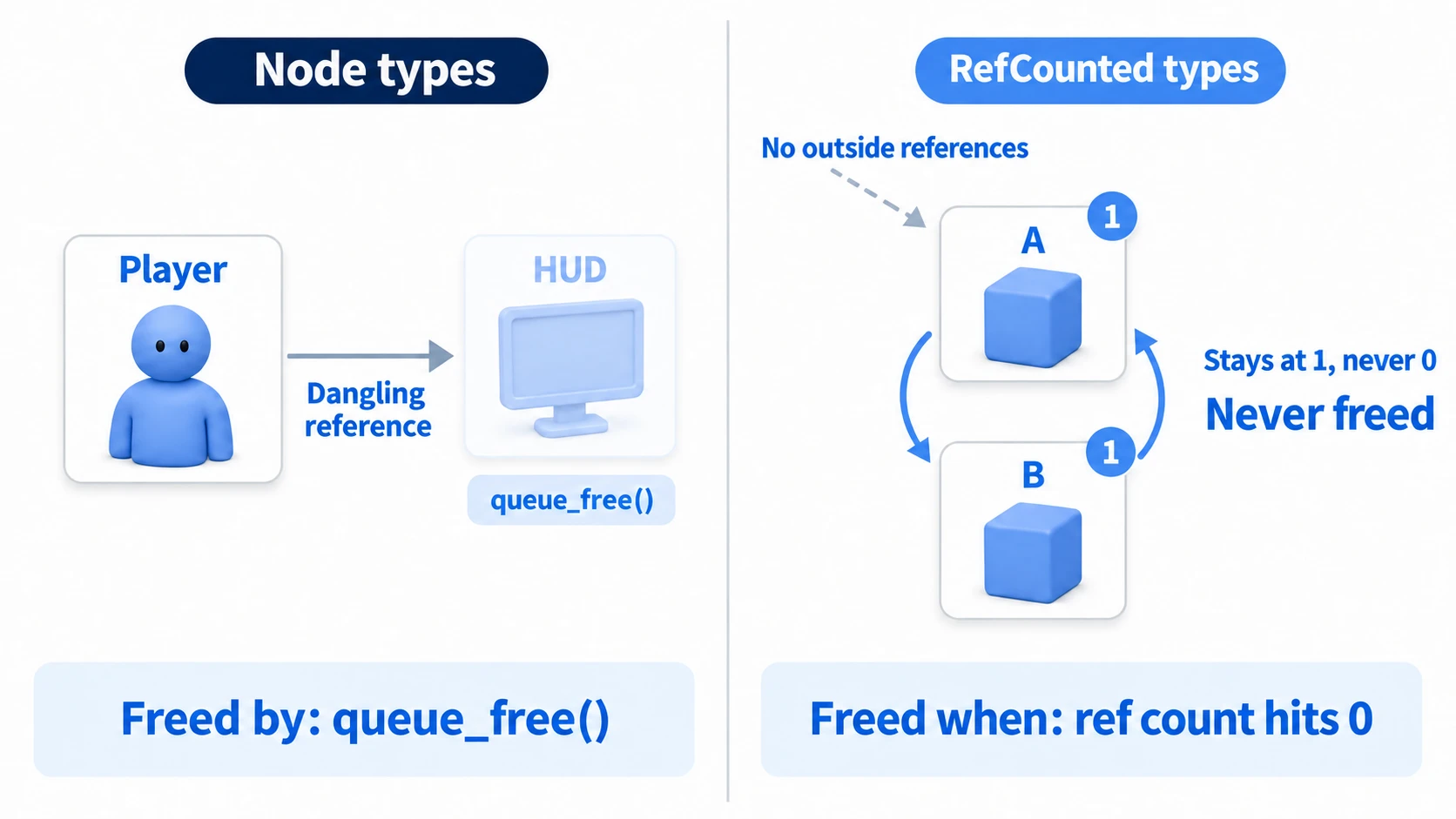
On the left, with Node types, calling queue_free() on the HUD leaves Player's reference pointing at a node that no longer exists (a dangling reference). Reference-count loops have nothing to do with it. On the right, with RefCounted types, if A and B reference each other, the count never reaches 0 even when nothing outside sees them, so they're never freed. Same word "cycle", completely different failure: Node types give you broken references, RefCounted types give you memory that won't go away.
Node is not RefCounted. Even if Player and HUD reference each other, that alone doesn't create a reference-count loop the way RefCounted objects do.
That doesn't mean mutual references between Nodes are safe, though. Using a stale reference after the other side was queue_free()d means touching an invalid instance. It also breaks when only one of them exists in a different scene.
Meanwhile, with Resource or custom classes extending RefCounted, reference-count loops do matter. If A holds B and B holds A, they keep referencing each other even after nothing outside can see them, so they resist being freed.
Basic Rule: Keep Reference Direction One-Way
Before reaching for any advanced technique, sort out the direction of references. Here's a bad example next to a good one.
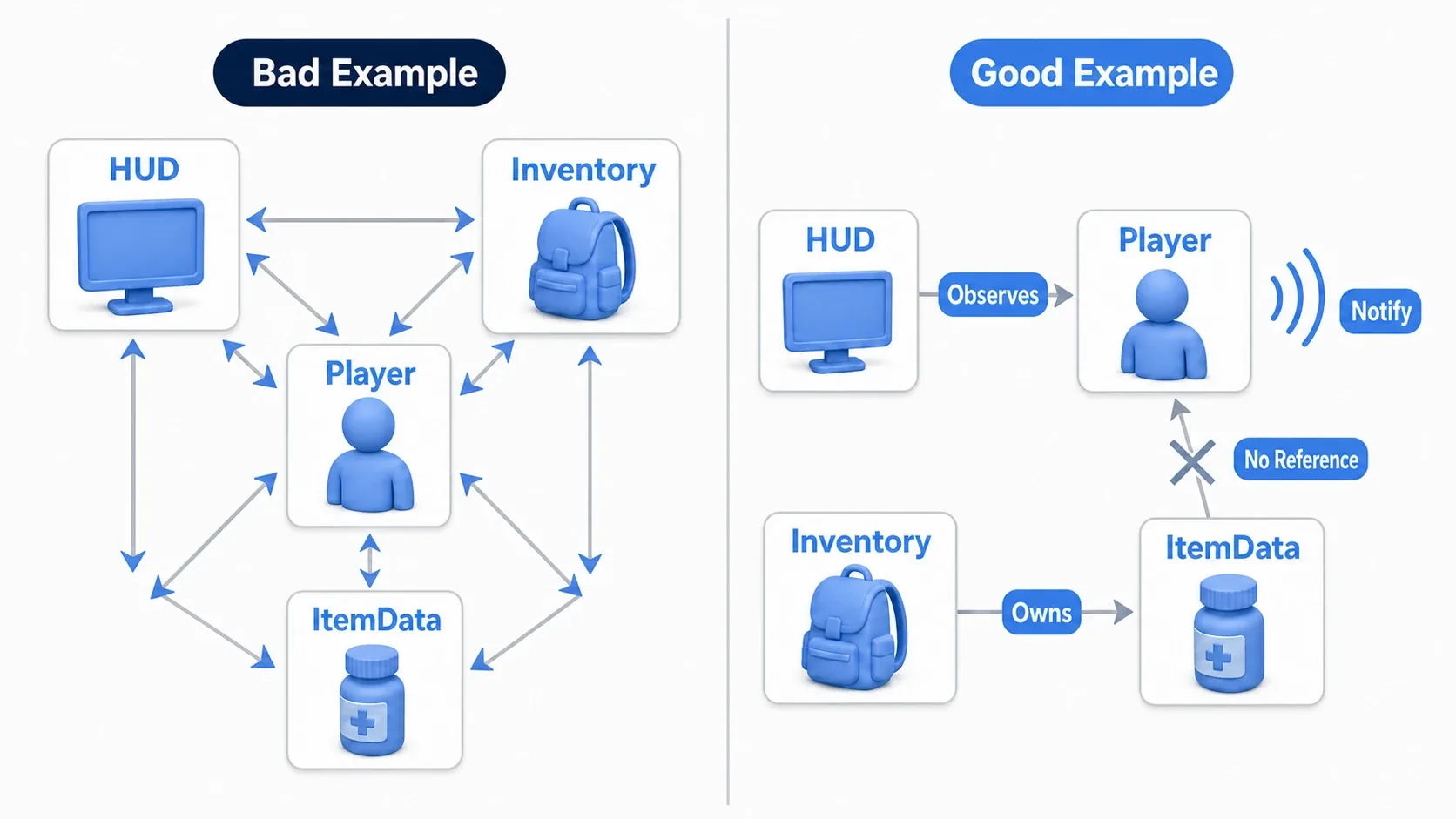
In the bad example, every object references every other, leaving a web with no obvious starting point. Just deciding on directions like the good example does, "the higher level knows the lower level", "the display side looks at the data source", "data doesn't remember its users", "whoever wants to notify emits a signal", makes things far more readable.
For an HP display, for instance, it's more robust for Player to announce HP changes and let HUD listen than for Player to update HUD directly.
# Bad example: the Player knows about the HUD and even its update method
@export var hud: HUD

func take_damage(amount: int) -> void:
    health -= amount
    hud.update_hp_bar(health, max_health)
This code is short, but the Player assumes the HUD exists. It breaks easily in a test scene with no HUD, or with a separate UI for online play that has no update_hp_bar().
Solution 1: Make Notifications Signals
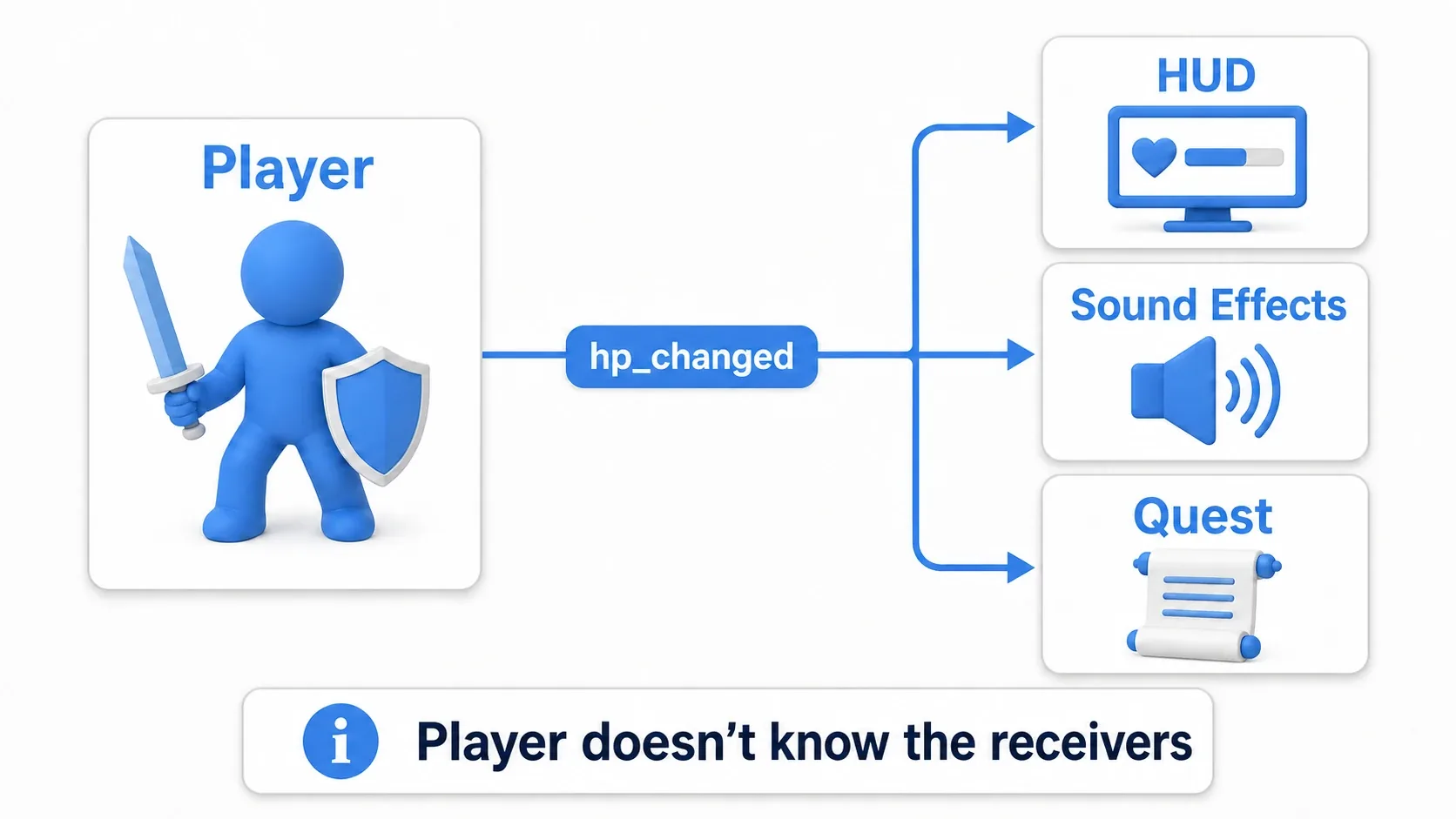
When several systems, HUD, sound effects, quest management, want to know that "the player took damage", signals are the right fit.
A signal doesn't command anyone; it announces "this happened". The emitter doesn't know who's listening. The basics of defining and connecting signals are covered in detail in Node Communication with Signals.
# player.gd
class_name Player
extends CharacterBody2D

signal hp_changed(current_hp: int, max_hp: int)

@export var max_hp: int = 100
var hp: int = max_hp

func take_damage(amount: int) -> void:
    hp = clamp(hp - amount, 0, max_hp)

    # The Player only announces that HP changed
    hp_changed.emit(hp, max_hp)
The HUD connects to the Player's signal and handles nothing but display.
# hud.gd
class_name HUD
extends Control

@export var player: Player
@onready var hp_bar: ProgressBar = $HPBar

func _ready() -> void:
    if player == null:
        return

    # The HUD observes the Player. The Player doesn't know the HUD exists
    player.hp_changed.connect(_on_player_hp_changed)
    _on_player_hp_changed(player.hp, player.max_hp)

func _on_player_hp_changed(current_hp: int, max_hp: int) -> void:
    hp_bar.max_value = max_hp
    hp_bar.value = current_hp
With this shape, Player knows nothing about the HUD's node name, what kind of HP bar it uses, or whether a sound plays. Swap the HUD for a different design and the Player code stays untouched.
Implementation Recipe: HP Updates in an Action RPG
For handling player HP in an action RPG, this split keeps things manageable.
Playerchanges HP throughtake_damage()andheal()- When HP changes, it calls
emit()onhp_changed HUDlistens to the signal to update the HP barSoundManagerlistens to the same signal for low-health and hit soundsQuestManagerlistens to the same signal for a "survive at 1 HP" achievement
The point is that the Player doesn't carry "update the HUD", "play a sound", and "unlock an achievement" all at once. The Player's job is changing HP correctly; the surrounding systems' job is listening and updating their own display or effects.
Solution 2: ItemData Shouldn't Remember the Player
Cyclic references show up a lot in inventories and items.
Player -> Inventory -> ItemData
ItemData -> Player
If a healing potion's ItemData holds a Player variable for "who to use it on", that ItemData becomes tied to one specific Player. It gets hard to reuse when another character drinks the same potion, when an enemy uses an item, or when a shop previews it.
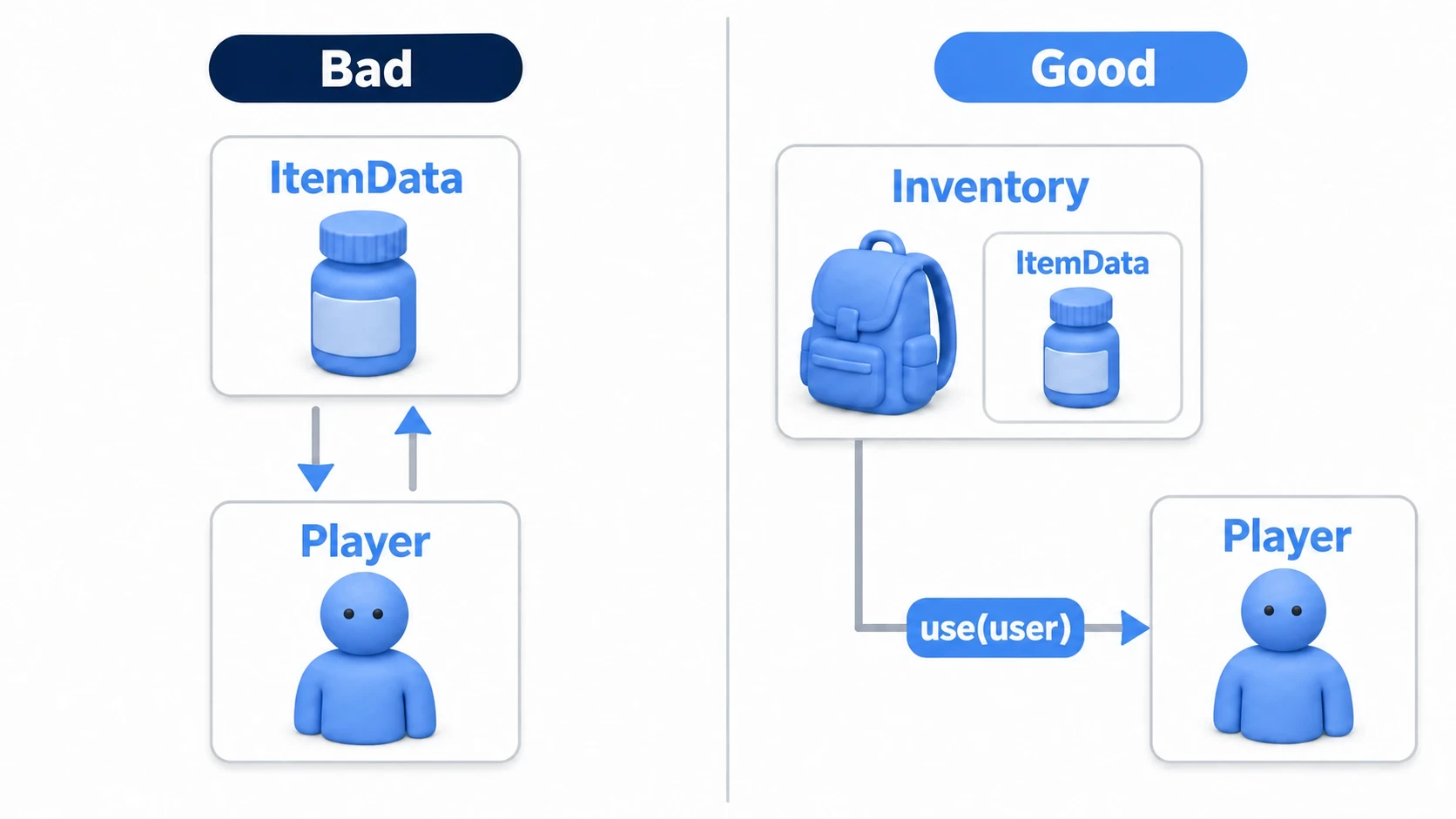
Here's the bad example.
# potion_data.gd
class_name PotionData
extends Resource

@export var heal_amount: int = 30
var owner: Player

func use() -> void:
    # ItemData remembers one specific Player
    owner.heal(heal_amount)
In this shape, the ItemData internally holds who it will be used on. Item data is much easier to work with when it sticks to reusable information: how much it heals, what its icon is, what its description says.
In the good example, the user is passed in as an argument at the moment of use.
# item_data.gd
class_name ItemData
extends Resource

@export var display_name: String
@export var heal_amount: int = 0

func use(user: Player) -> void:
    if user == null:
        return

    # Don't store the user; receive it on the spot
    user.heal(heal_amount)
# inventory.gd
class_name Inventory
extends Node

var items: Array[ItemData] = []

func use_item(index: int, user: Player) -> void:
    if index < 0 or index >= items.size():
        return

    # The Inventory passes in "who is using it" on the spot
    items[index].use(user)
Now ItemData doesn't remember any particular Player. You can pass in the player, an ally, an enemy, or a test character as the user.
Implementation Recipe: An RPG Inventory
For an RPG inventory, this split keeps cycles from forming.
| Role | Owns | Doesn't own |
|---|---|---|
ItemData | Name, description, heal amount, price | A reference to a specific Player |
Inventory | The list of ItemData being carried | The internals of Player HP logic |
Player | HP, MP, status effects | Specific UI nodes |
InventoryUI | Selection display, button input | Item effect calculation |
When the UI selects an item, pass in "who is using it" with something like Inventory.use_item(index, player). Since ItemData holds no Player, the same data works across save data, shops, a bestiary, and battle UI.
Solution 3: Break RefCounted Loops with WeakRef
This is where cyclic references become a memory-management topic.
RefCounted is freed automatically once nothing references it. That's convenient, but when two RefCounted objects strongly reference each other, the count never reaches 0 even after nothing outside can see them.
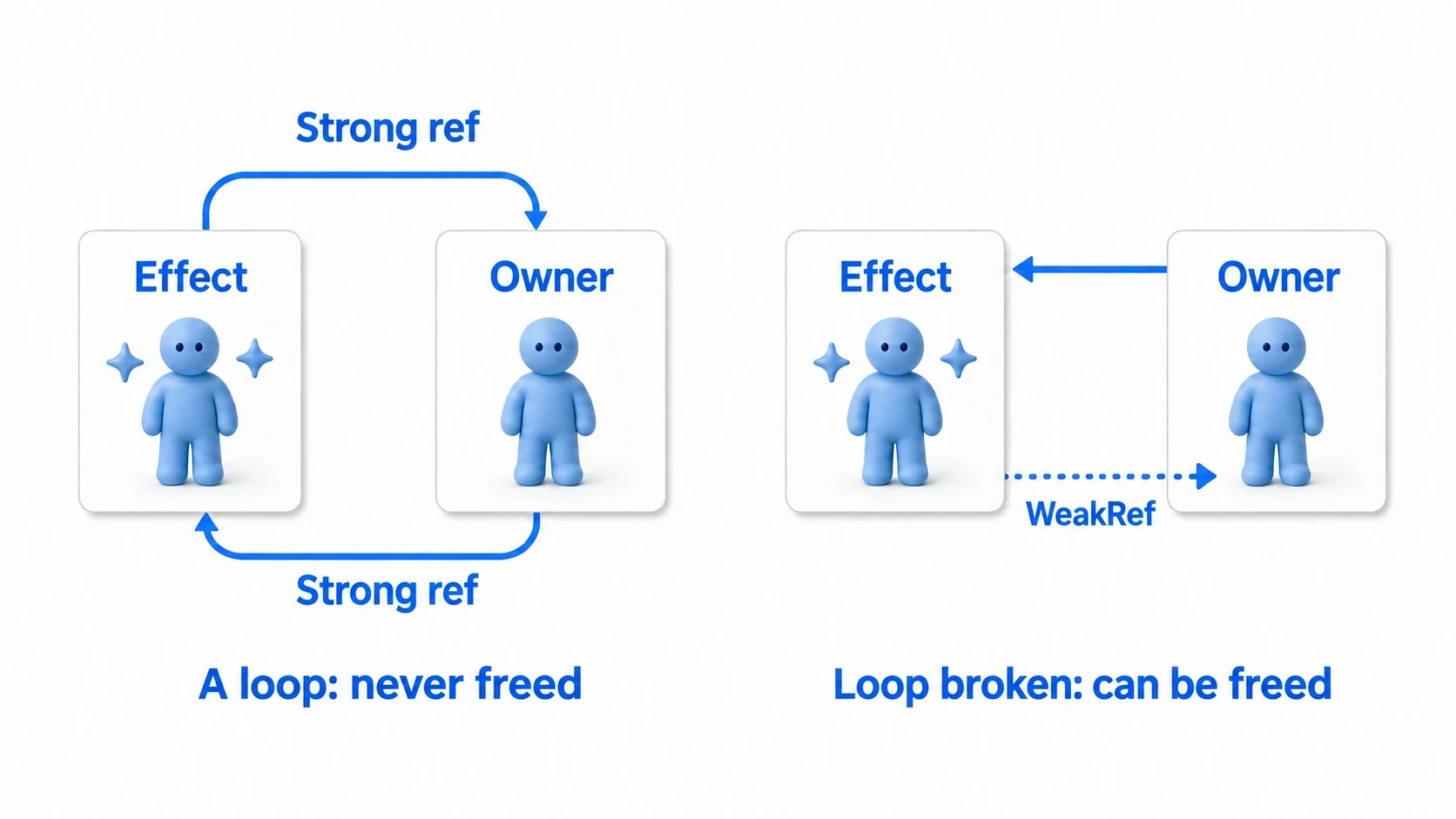
Say you build stat management as a RefCounted class and hold status effects as RefCounted too.
# character_stats.gd
class_name CharacterStats
extends RefCounted

var hp: int = 100
var effects: Array[StatusEffect] = []

func add_effect(effect: StatusEffect) -> void:
    effects.append(effect)

    # Stats strongly reference the Effect
    effect.owner_ref = weakref(self)
# status_effect.gd
class_name StatusEffect
extends RefCounted

var owner_ref: WeakRef
var damage_per_tick: int = 3

func apply_tick() -> void:
    if owner_ref == null:
        return

    # Resolve the weak reference each time and check it's still alive
    var owner := owner_ref.get_ref() as CharacterStats
    if owner == null:
        return

    owner.hp -= damage_per_tick
A WeakRef created by weakref(self) doesn't increase the reference count. StatusEffect can still touch its owner while the owner exists, but it doesn't hold on tightly enough to keep the owner from being freed.
Things to Watch When Using WeakRef
WeakRef is handy, but it shouldn't be your first choice. Most of the time, making the design one-way, using signals, or passing things as arguments is more readable.
Here's when WeakRef fits.
- Two
RefCountedobjects genuinely need to reference each other - An effect or task runs while checking whether its owner still exists
- You want to safely treat the other side as
nullwhen it disappears
If you do use WeakRef, don't forget to check the return value of get_ref(). A weak reference is not a guarantee that the other side exists; it's a way to fetch it if it does.
Solution 4: Move Cross-Scene Notifications to an Autoload
Direct references get especially tangled with cross-scene notifications.
Consider score, quests, sound effects, and achievements all reacting when an enemy dies.
Enemy -> ScoreManager
Enemy -> QuestManager
Enemy -> SoundManager
Enemy -> AchievementManager
This works, but the Enemy knows far too much about the game's management systems. It gets hard to reuse that enemy in another project or a test scene.
Game-wide events like these fit nicely in an Autoload event bus. For how to build Autoloads and what to watch out for, see Managing Data Across Scenes with Autoload.
# event_bus.gd (Autoload)
extends Node

signal enemy_defeated(enemy_id: String, position: Vector2, score: int)
# enemy.gd
extends CharacterBody2D

@export var enemy_id: String = "goblin"
@export var score_value: int = 100

func die() -> void:
    # The Enemy shares only the fact that it was defeated
    EventBus.enemy_defeated.emit(enemy_id, global_position, score_value)
    queue_free()
# score_manager.gd
extends Node

var score: int = 0

func _ready() -> void:
    EventBus.enemy_defeated.connect(_on_enemy_defeated)

func _on_enemy_defeated(_enemy_id: String, _position: Vector2, score_value: int) -> void:
    # The score side uses only the information it needs
    score += score_value
With an Autoload, the enemy doesn't know where ScoreManager lives or what it's called. Quest and achievement management can react to the same enemy_defeated too.
But turning the Autoload into a catch-all creates a different problem. Keep EventBus as a channel for notifications, and put the actual score calculation, quest progression, and save logic in their own dedicated classes.
Decision Flow: Which Approach to Pick
When references start getting tangled, work through them in this order.
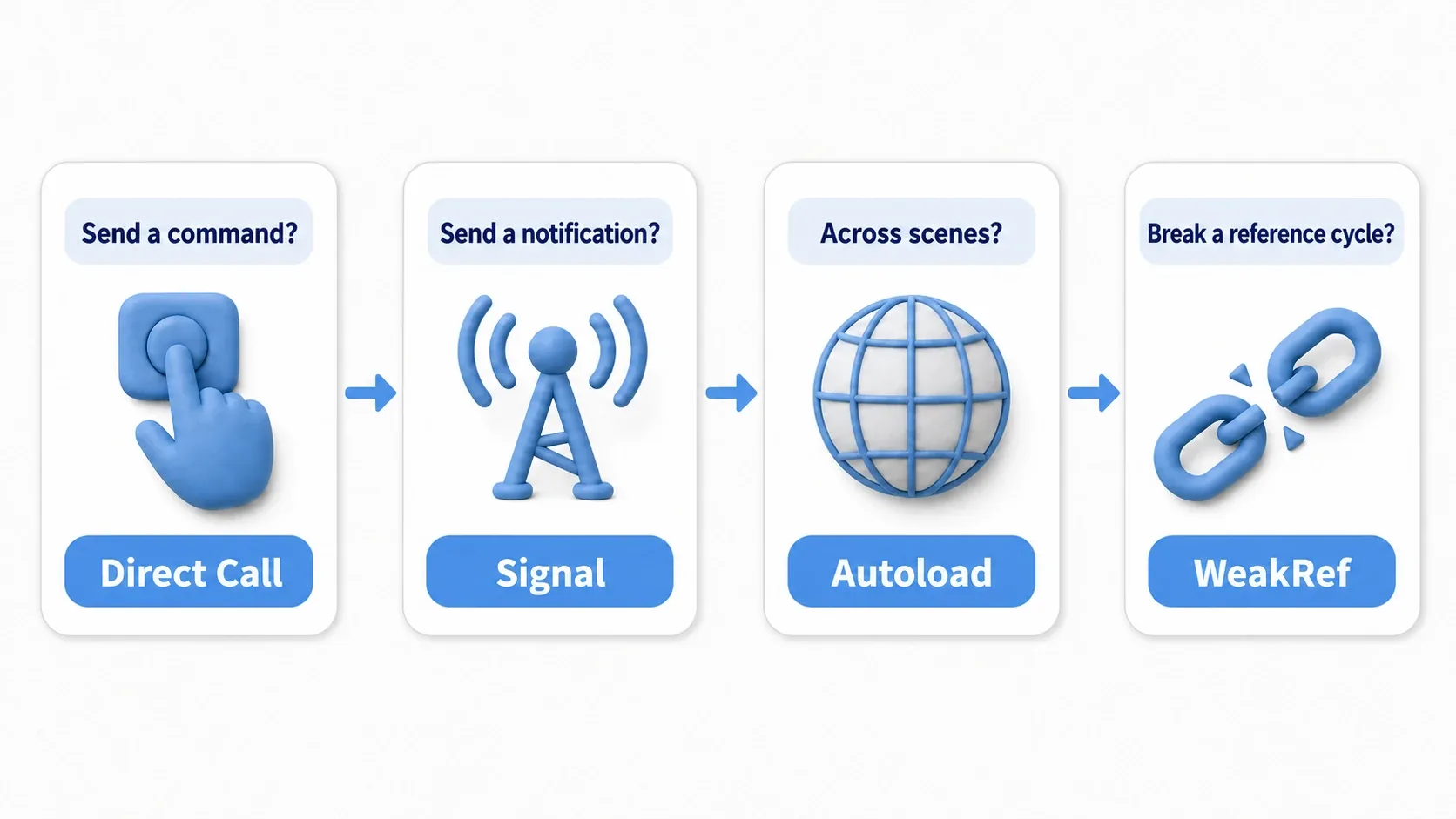
| What you want to do | The easy choice | Example |
|---|---|---|
| Give a concrete command to a specific object | Direct call | Call open() on a door |
| Announce that something happened | Signal | hp_changed, died |
| Notify several systems across scenes | Autoload event bus | enemy_defeated |
| Break a loop between RefCounted objects | WeakRef | A weak reference from StatusEffect to CharacterStats |
| Only need the other object momentarily | Pass as an argument | item.use(player) |
The takeaway test is simple.
"Do I need to remember this object permanently, or can I just be handed it for that one moment?"
Answering that question alone avoids most cyclic references.
Common Pitfalls
Turning Everything Into a Signal Until You Can't Follow It
Signals are useful, but making everything a signal makes it hard to trace where things happen.
For logic with a clear target that reads like a command, opening a door, pressing a button, attacking a specific target, a direct call is fine. Signals fit notifications where the emitter shouldn't have to know who listens.
Cramming Too Much State Into Autoloads
Autoloads are reachable from anywhere, which is convenient but also good at hiding dependencies.
If code like Global.player_hp -= 10 shows up all over, you can't trace where HP changed. Even when you keep values in an Autoload, provide mutation methods like take_damage() and add_score() so all changes go through one entry point. Investigating causes gets much easier.
Using WeakRef to Hide a Design Problem
WeakRef is a tool for breaking cycles, but it doesn't sort out the direction of your dependencies.
Giving ItemData a WeakRef to a Player when it shouldn't hold a Player at all avoids the reference-count problem while leaving responsibilities tangled. Ask first whether you need to hold the other object at all.
Assuming an Invalid Node Reference Is null
A variable doesn't automatically become null after its Node is freed. If a stale reference might get touched, check with is_instance_valid().
if is_instance_valid(target):
    # Only touch the target while the reference is still valid
    target.take_damage(10)
That said, a design that needs is_instance_valid() everywhere is a sign that reference ownership has gotten complicated. Think first about not storing stale Node references in the first place.
Hands-On: Wiring Enemy Defeats to Score, HUD, and Achievements Loosely
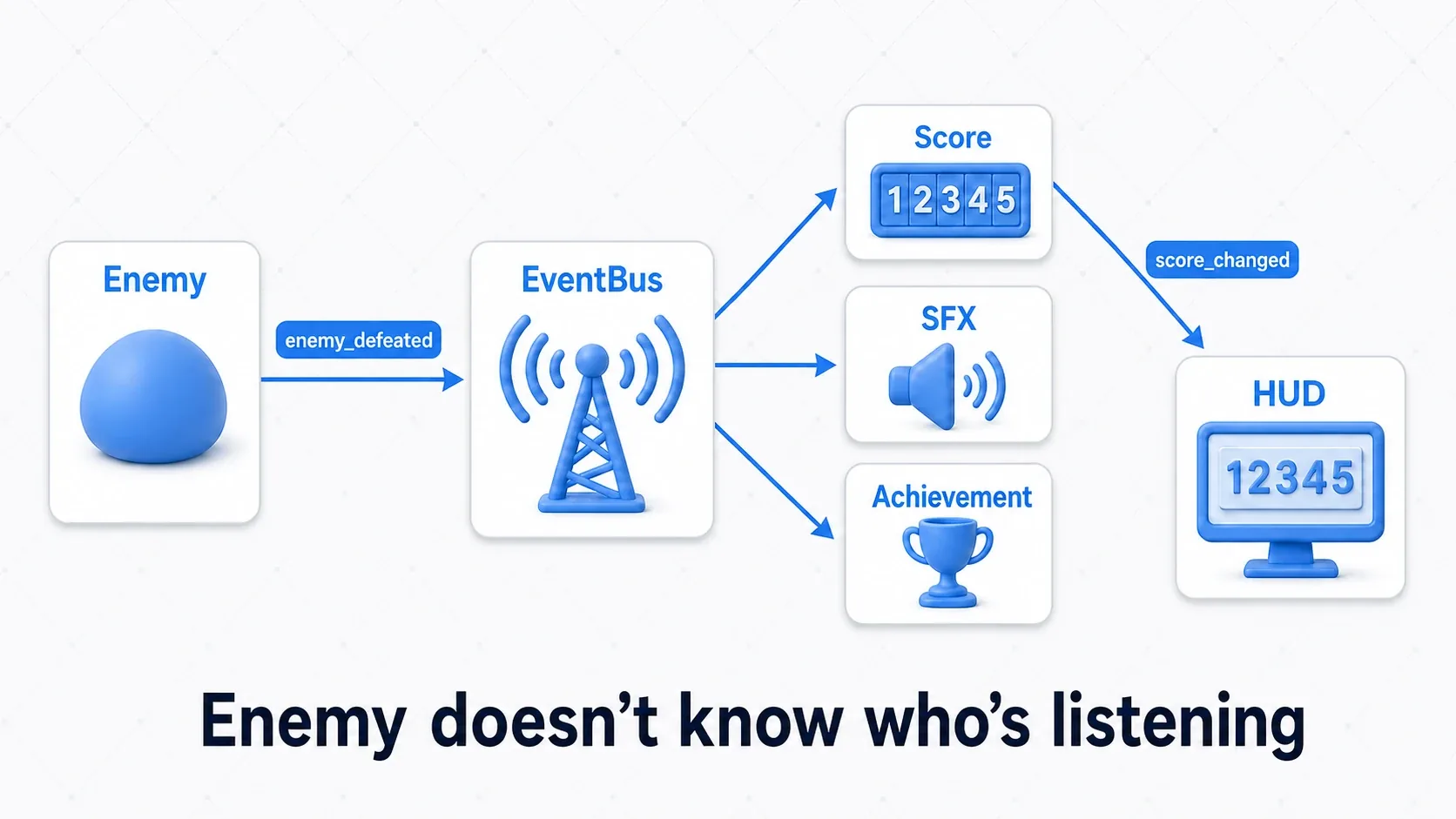
Finally, let's put the tools from this article (signals and the Autoload event bus) into one game. The subject is "defeating a single enemy makes several systems react at once", a situation that shows up in every genre.
- Roguelike: kills become score directly, and the HUD's score display goes up
- Beat 'em up: consecutive kills extend a combo and the sound effects get flashier
- Tower defense: defeating an enemy grants gold that funds the next tower
The genre differs, but the structure is the same. One fact, "an enemy was defeated", makes several systems react on their own: score, sound, achievements, and HUD. If the enemy calls each system directly, it knows too much about the game as a whole and can't be reused in a test scene or another project.
So the enemy just mutters "I've been defeated" into the EventBus.
First, set up one Autoload as the notification channel.
# event_bus.gd (Autoload)
extends Node

# The channel that carries game-wide "events"
signal enemy_defeated(enemy_id: String, position: Vector2, score: int)
The enemy publishes only the fact that it was defeated. It doesn't calculate score or play sounds itself.
# enemy.gd
extends CharacterBody2D

@export var enemy_id: String = "slime"
@export var score_value: int = 50

func die() -> void:
    # The enemy only announces it was defeated. It doesn't know who listens
    EventBus.enemy_defeated.emit(enemy_id, global_position, score_value)
    queue_free()
The score manager listens to the event, updates the score, and then announces its own score change with a signal.
# score_manager.gd (Autoload)
extends Node

signal score_changed(total: int)

var score: int = 0

func _ready() -> void:
    EventBus.enemy_defeated.connect(_on_enemy_defeated)

func _on_enemy_defeated(_enemy_id: String, _position: Vector2, score_value: int) -> void:
    score += score_value
    # Now it's this object's turn to announce "the score changed"
    score_changed.emit(score)
The HUD listens only to ScoreManager's score change. It knows nothing about enemies or what's inside EventBus.
# hud.gd
extends Control

@onready var score_label: Label = $ScoreLabel

func _ready() -> void:
    ScoreManager.score_changed.connect(_on_score_changed)
    _on_score_changed(ScoreManager.score)

func _on_score_changed(total: int) -> void:
    # The HUD doesn't know how score is calculated; it only displays it
    score_label.text = "SCORE: %d" % total
There are two points here.
- The enemy says nothing but "I was defeated": score updates, sound effects, and achievement unlocks each pick up the same
enemy_defeatedon their own. Switch genres and want to add combo effects or gold rewards? Add one more listener class and not a single line of enemy code changes. - Notify in two stages:
EventBusis the channel for game-wide events, andScoreManageris responsible for reporting its own state change viascore_changed. That way the HUD never has to know how score is calculated, and swapping the score display for a new design leaves ScoreManager untouched.
The abstract phrase "loose coupling" finally becomes something you can feel here. Because the enemy, score, and HUD know nothing of each other's internals, rebuilding one doesn't break the others in a chain. This design is exactly the combination of Managing Data Across Scenes with Autoload and Node Communication with Signals.
Bonus: Good to Know Beforehand
In Parent-Child Setups, Reduce "the Child Operating the Parent"
Code where a child node looks up its parent and operates it directly is easy at first.
get_parent().take_damage(10)
But move that child under a different parent and it breaks. For a component you want to reuse, have the parent listen to the child's signal so the child never has to know the parent's concrete class.
# hitbox.gd
extends Area2D

signal hit(damage: int)

@export var damage: int = 10

func _on_body_entered(_body: Node2D) -> void:
    # The HitBox knows nothing about the parent's HP logic; it just reports a hit
    hit.emit(damage)
Make Reference Direction Easy to Review
Dependencies are painful to untangle once a bug appears. In code review or your own passes, checking these is fast.
- Is UI or sound being touched directly from game logic?
- Does a
Resourcehold a specific Node from the scene? - Are Autoload values being modified directly from all over?
- Are distant references like
get_node("../../..")piling up?
This check pays off even while the game is small. Code with visible reference direction is code you can add features to without holding your breath.
Summary
- A cyclic reference is when reference arrows form a loop
NodeandRefCountedsuffer different problems from cycles- Making notifications signals frees the emitter from knowing the receiver
- Items and effects usually only need the other object passed as an argument, not stored
- When a loop between
RefCountedobjects is unavoidable, use WeakRef - Cross-scene shared events fit an Autoload event bus, but watch out for it becoming a catch-all
The goal of dependency management isn't just avoiding memory leaks. It's making a game you can fix later: one that survives a UI swap, runs in a test scene, and lets you trace where a value changed.
Further Reading
Related notes:
- Node Communication with Signals - the foundation for one-way notifications
- Managing Data Across Scenes with Autoload - how to build an event bus
- Managing AI and Player States with a State Machine - gathering state in one place to reduce tangles
- OOP Design Patterns in GDScript - a deeper look at splitting responsibilities
Official documentation: