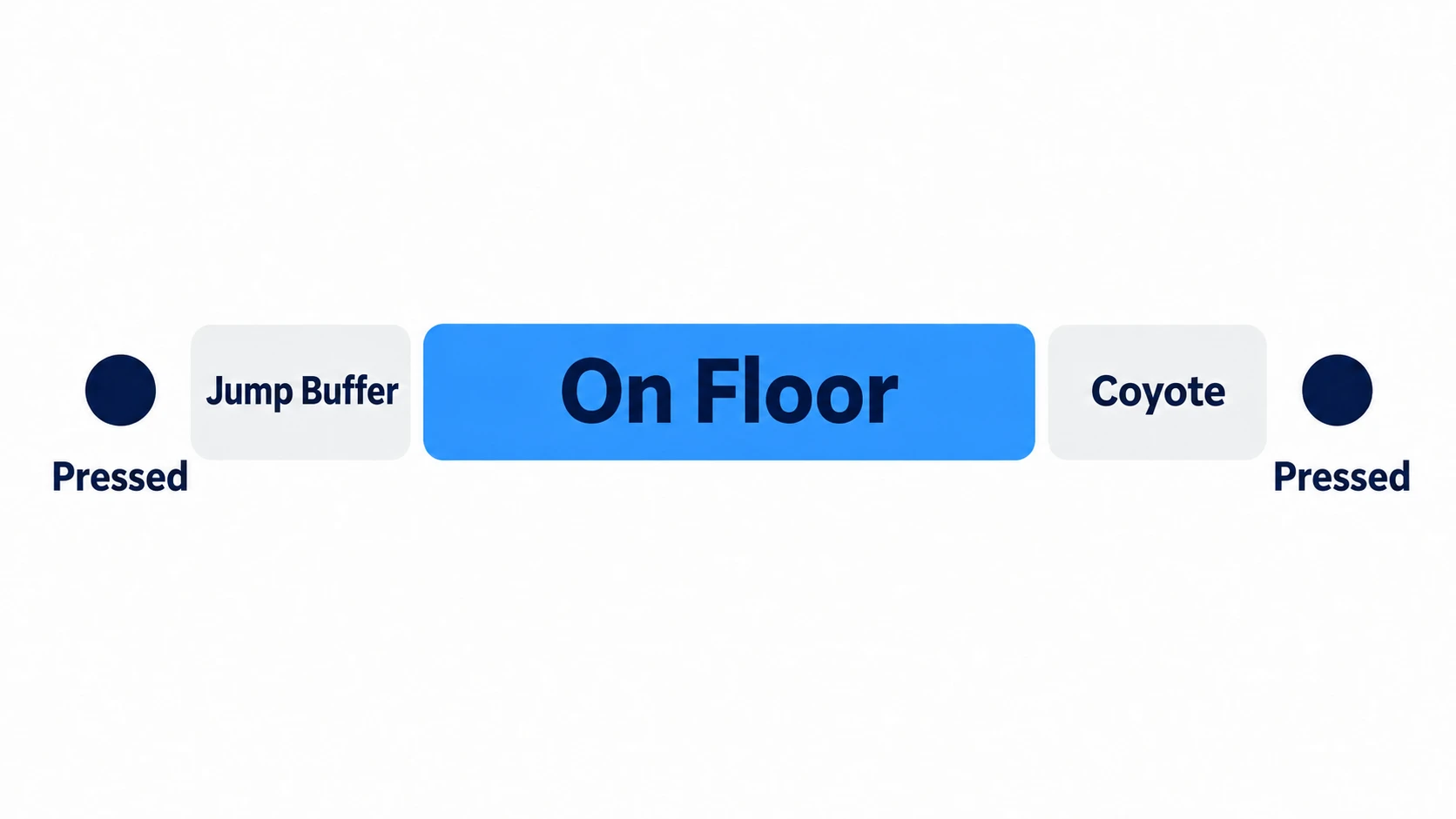
To make jumping in a side-scroller feel good, you also catch jumps pressed at the edge of a ledge or just before landing. There are two pieces: "coyote time," which lets you jump for a moment after leaving the floor, and "jump buffering," which remembers a jump pressed before landing.
Without them, you press jump at the edge of a ledge and fall anyway, or a jump pressed just before landing disappears. That's because the frame you press and the frames you're on the floor drift apart, earlier or later.
This article explains how to fill that drift with two countdown timers, and how to check that it works.
What You'll Learn
- The two kinds of jump timing drift
- How to write coyote time (leeway after leaving the floor)
- How to write jump buffering (remembering a jump pressed before landing)
- How to split the condition into "wants to jump" and "can jump," and the order inside
_physics_process- Hands-on: check both grace periods on an L-shaped ledge
Tested with: Godot 4.7
Jump timing drift
A jump can fail for many reasons, but if you only count timing, there are just two.
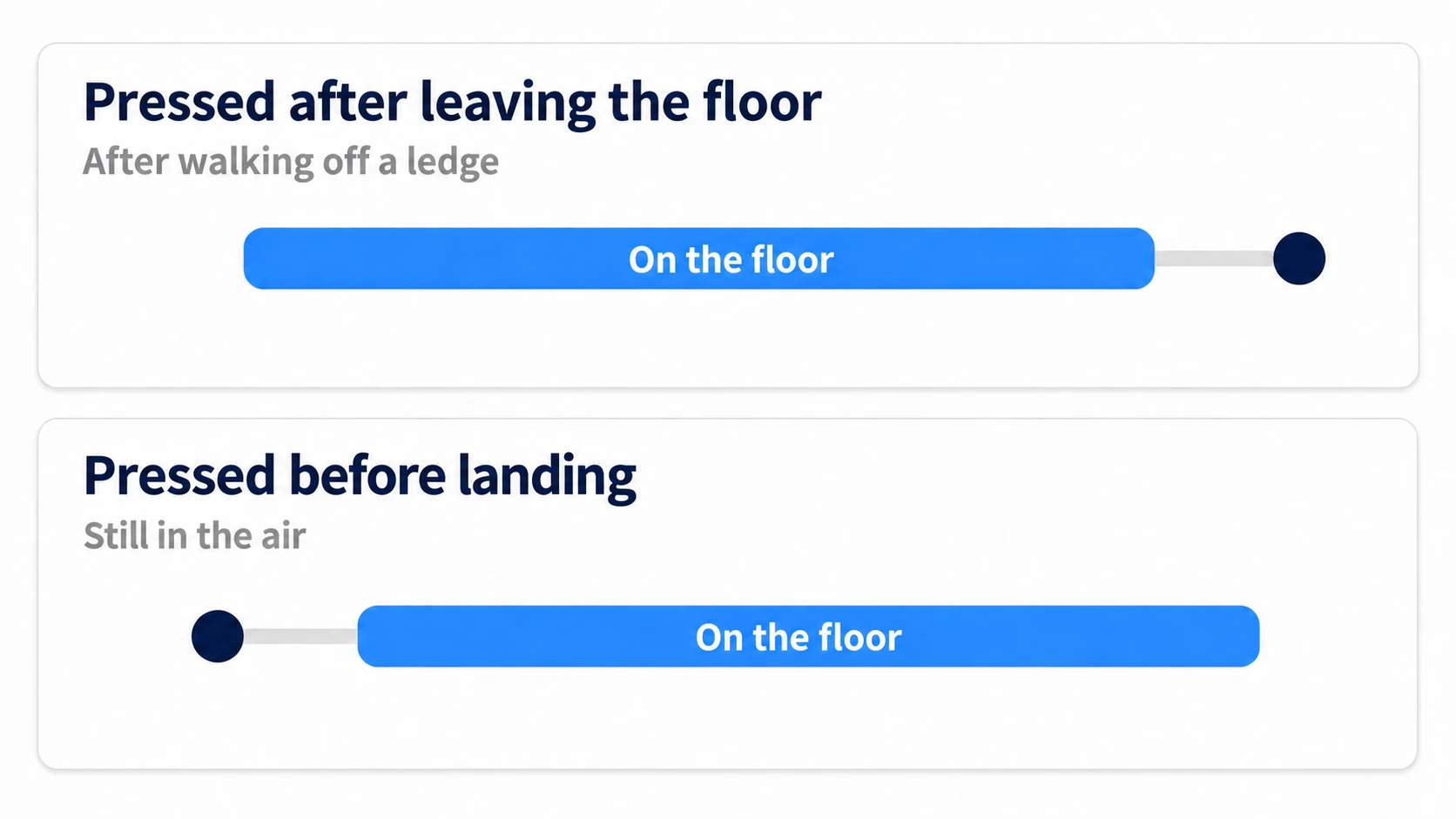
If the moment you press falls within the time you're on the floor, you jump. There are two ways it can drift.
- Pressed after leaving the floor: you've walked off the ledge and are already starting to fall
- Pressed before landing: you're still in the air
Each one is filled differently. For drift after leaving, you extend the time you can jump a little past leaving the floor and catch the press there. For drift before landing, you remember the press and use it when you land.
Coyote time (leeway after leaving the floor)
After leaving the floor, you allow a jump for a short while. All it takes is one countdown timer.
if on_floor:
	coyote_timer = COYOTE_TIME     # stays at the maximum while on the floor
else:
	coyote_timer -= delta
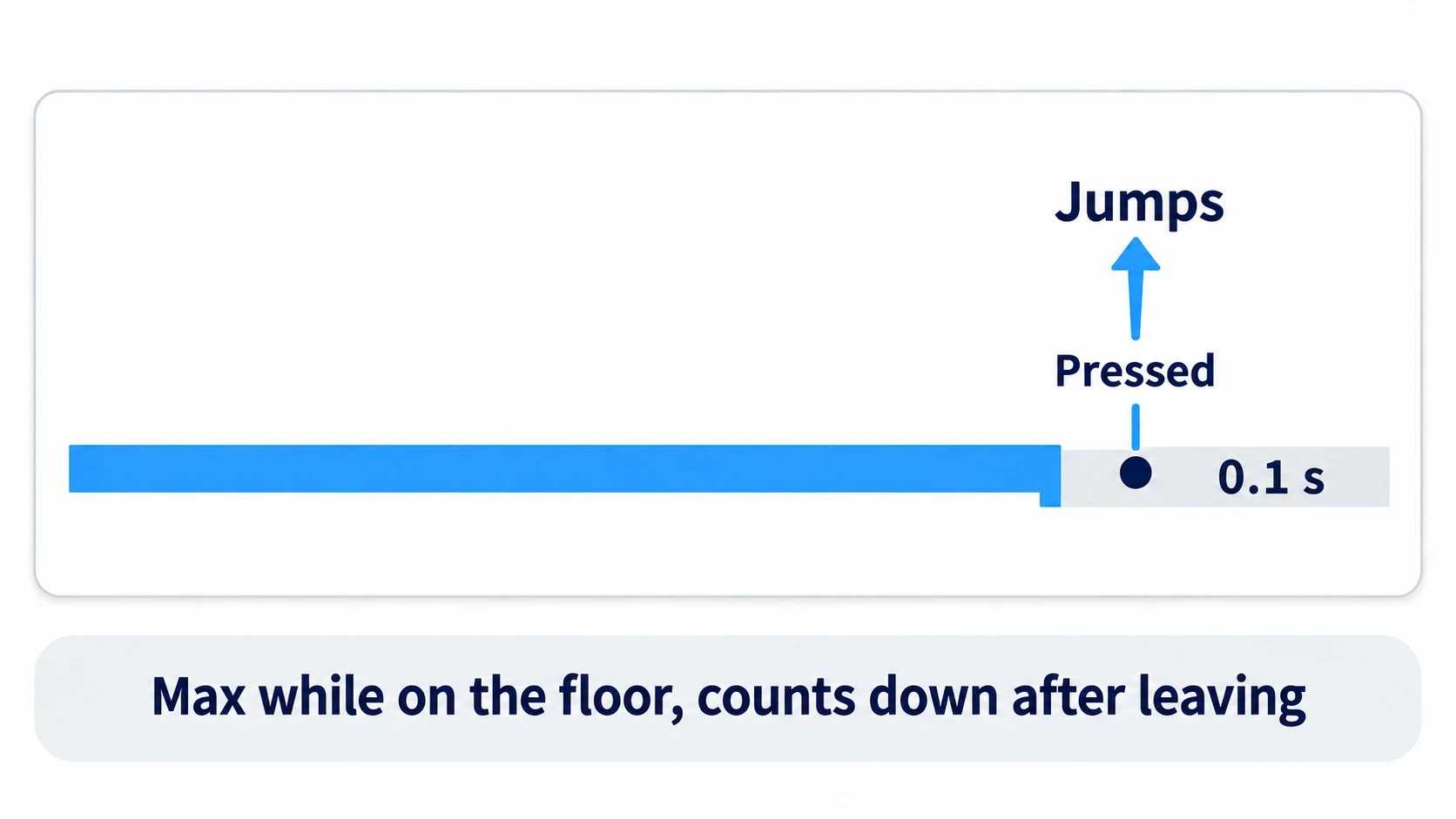
While grounded, you set it back to its maximum value (COYOTE_TIME) every frame. It starts counting down the moment you leave the floor, and you can jump until it reaches 0. delta is the number of seconds since the previous frame, so the timer counts down in seconds.
When you leave the floor by jumping yourself, the timer starts counting down in exactly the same way. If you leave it alone, pressing again right after leaving the floor also passes the check. That's what causes the midair double jump.
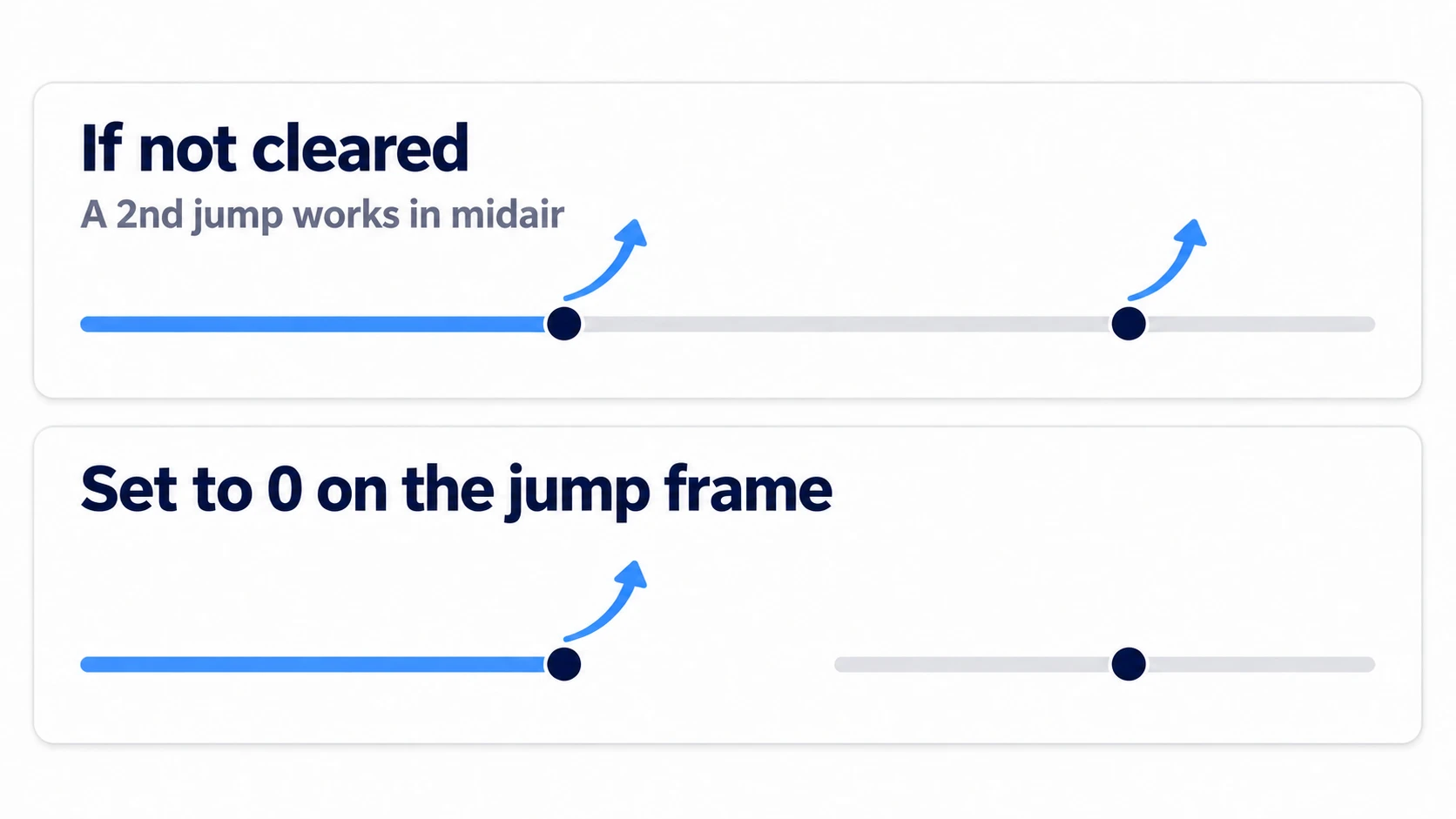
To stop it, write coyote_timer = 0.0 on the frame the jump goes through, after the line that sets it back to the maximum. On the frame you jump, is_on_floor() (which returns whether the previous move_and_slide() touched the floor) is still true, so if the order is reversed, the timer goes back to the maximum within that same frame. This zeroing line goes together with the jump buffer you'll add next.
Jump buffering (remembering a pressed jump)
The just-pressed check is only true on that one frame. If you press 3 frames before landing, it's already gone by the time you land.
if jump_pressed:
	jump_buffer_timer = BUFFER_TIME    # remember only the moment of the press
else:
	jump_buffer_timer -= delta
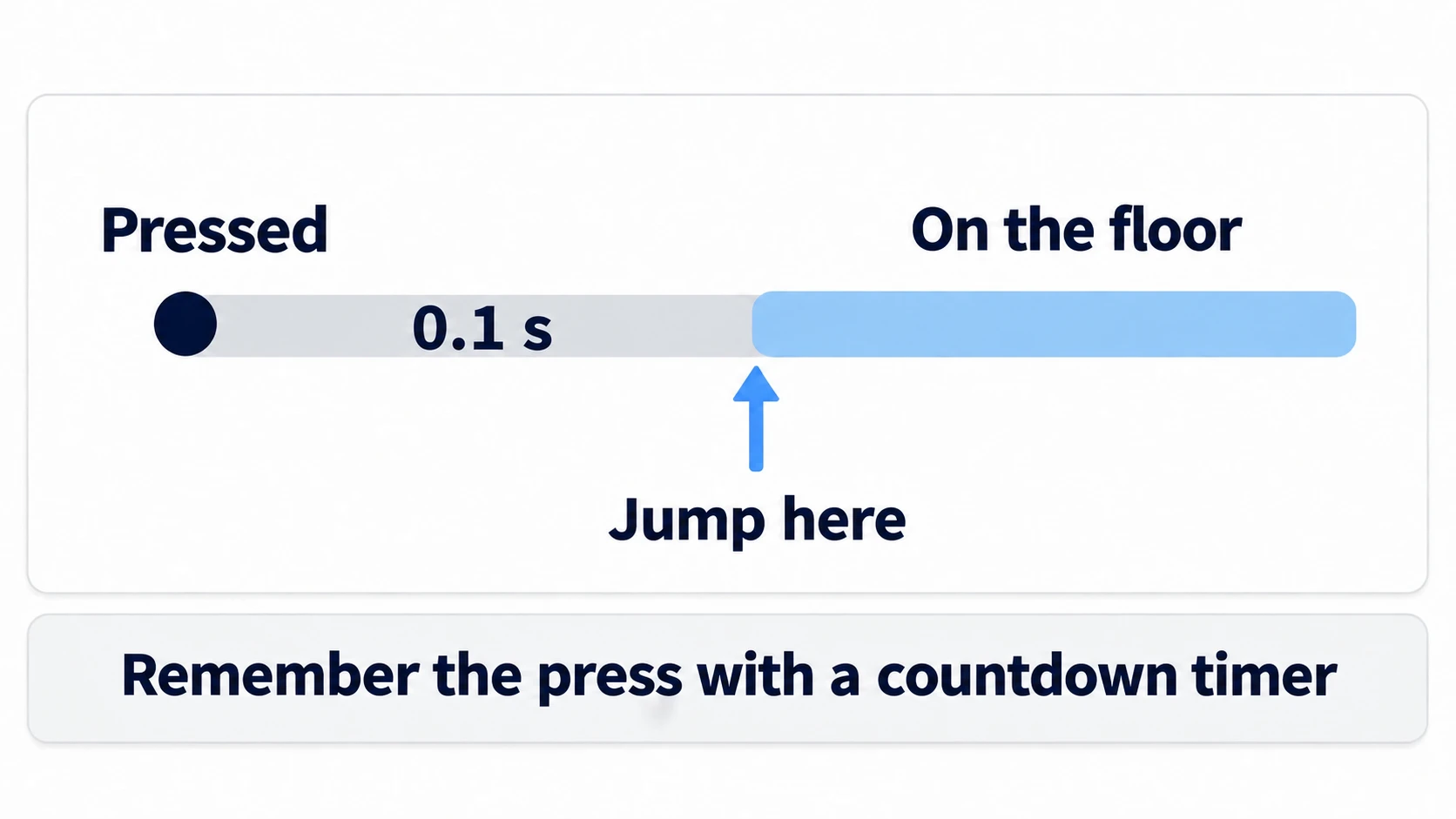
Remember only the single moment of the press. If you remember it with is_action_pressed() (true while held), the timer goes back to the maximum every frame for as long as the button is held, and the character keeps jumping on its own every time it lands.
How to choose between the three input checks is covered in Input Checks Explained.
The jump condition (wants to jump and can jump)
Now that you have two timers, write the condition. Requiring both at once causes a problem.
if jump_buffer_timer > 0.0 and coyote_timer > 0.0: # this causes trouble
With this form, as soon as you set COYOTE_TIME to 0, you can't jump even when pressing on the floor. You lose the ability to compare with the grace periods turned off. Write it split in two instead.
var wants_jump := jump_pressed or jump_buffer_timer > 0.0
var can_jump := on_floor or coyote_timer > 0.0

if wants_jump and can_jump:
	velocity.y = JUMP_VELOCITY
	coyote_timer = 0.0
	jump_buffer_timer = 0.0
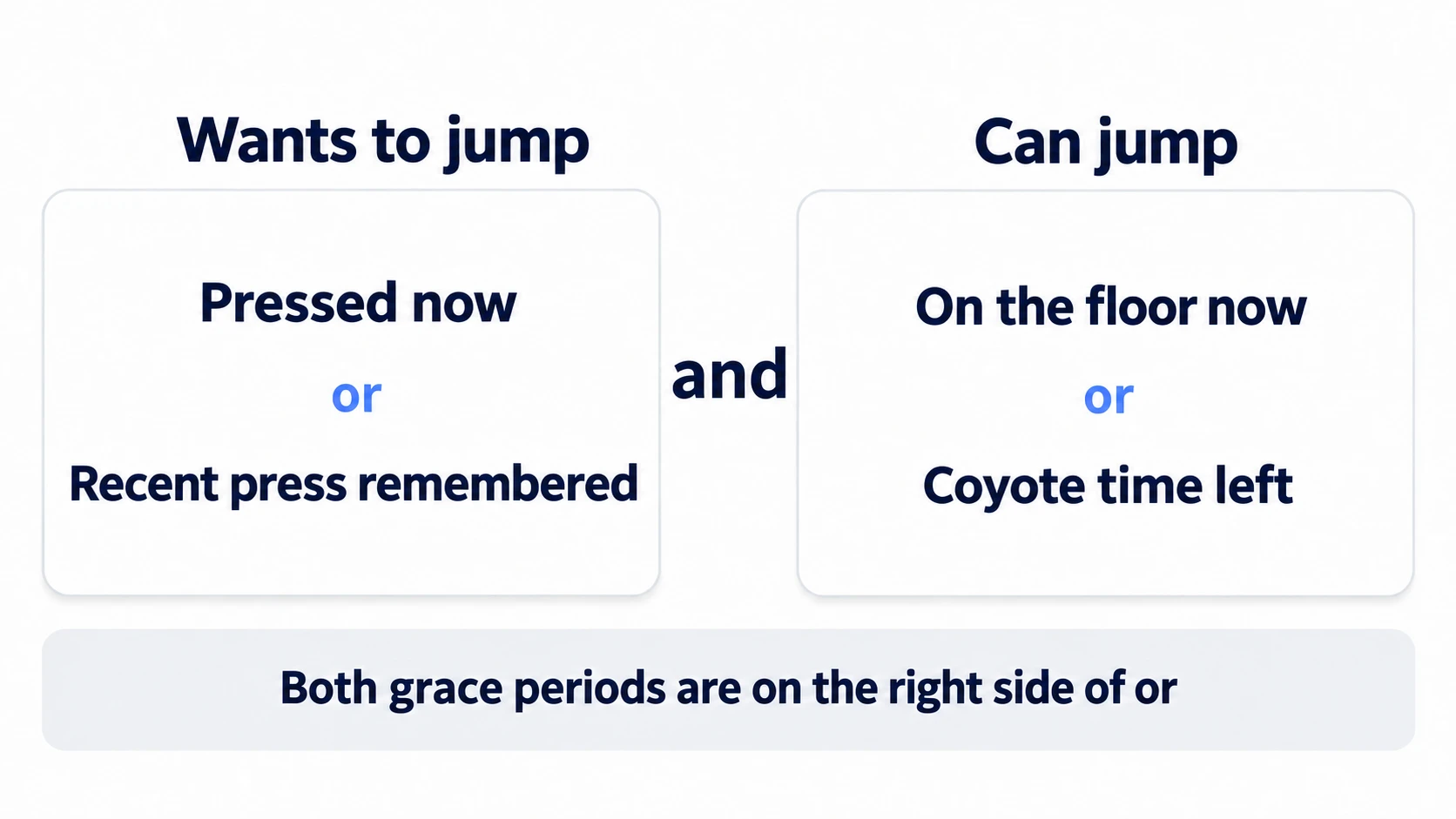
"Wants to jump" means you pressed just now, or a recent press is still remembered. "Can jump" means you're on the floor now, or you left it only a moment ago. Each grace period sits only on the right side of an or, so even at 0, the normal jump on the left side still works.
The order inside _physics_process
Now line up all the pieces in one function. The order matters.
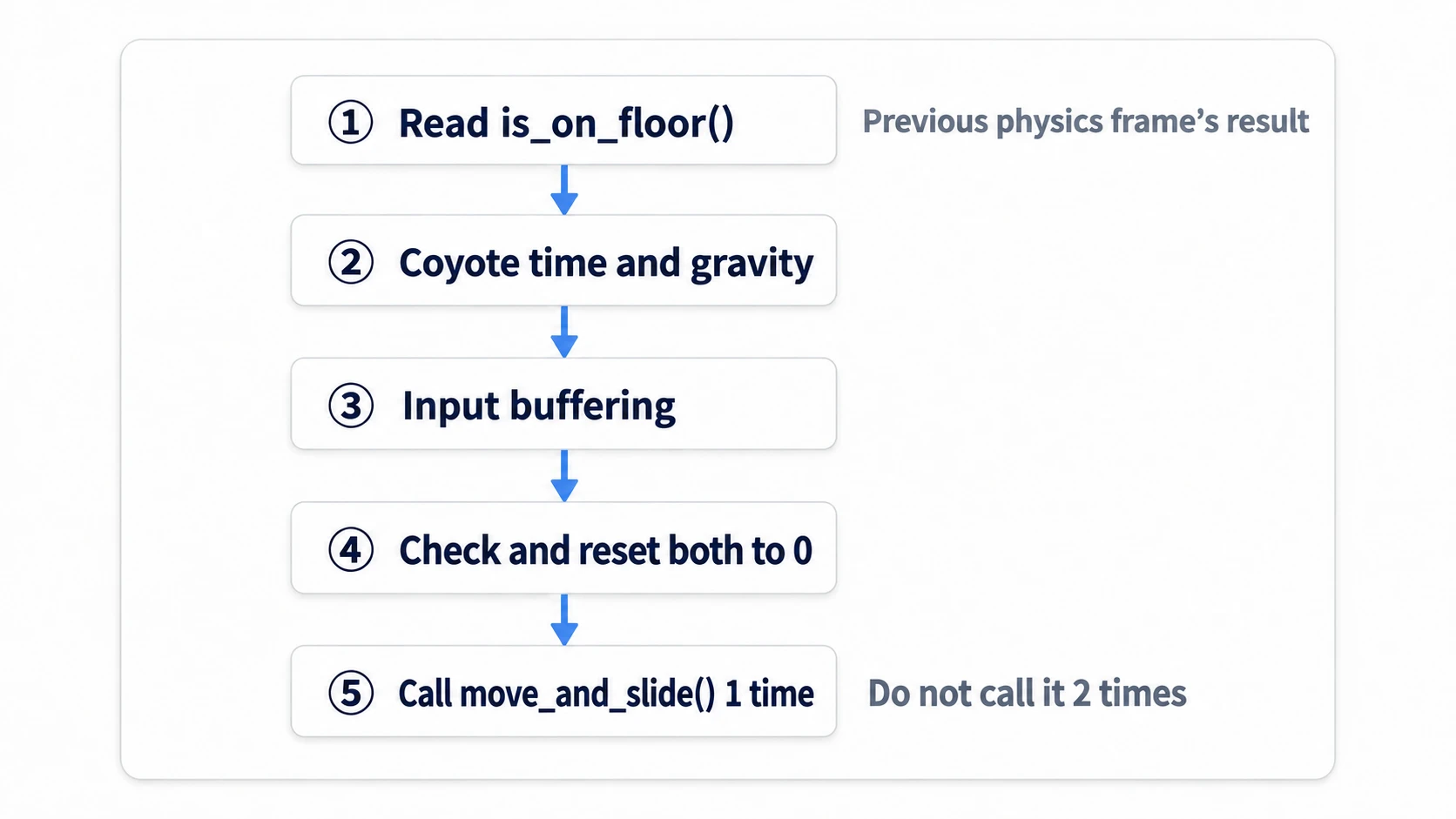
- Read
is_on_floor(). It returns whether themove_and_slide()of the previous physics frame (one physics step, 60 per second by default) hit the floor - If grounded, set
coyote_timerto the maximum; if airborne, count it down and add gravity - If the button was just pressed, set
jump_buffer_timerto the maximum; otherwise count it down - If both "wants to jump" and "can jump" hold, overwrite
velocity.yand set both timers to0 - Set the horizontal velocity and call
move_and_slide()exactly once
Calling move_and_slide() twice doubles the movement on that frame and overwrites the floor contact result. It's fine to read the just-pressed check inside _physics_process. Inside physics processing, Input.is_action_just_pressed() judges presses against physics frames.
Hands-On: Check Both Grace Periods on an L-Shaped Ledge
A side-scrolling action game's ledges, platform hopping in a Metroidvania, a falling section in a puzzle platformer: jump input leeway pays off in any genre. With one step down, you can check both grace periods separately.
① What to place
Create a new scene, save it as main.tscn, and set it as the main scene. Put the player and the HUD in that same main.tscn (names with % can only be looked up within the same scene).
Main (Node2D)
├── UpperFloor (StaticBody2D)      Position (300, 300)
│   └── CollisionShape2D           RectangleShape2D  (400, 32)
├── LowerFloor (StaticBody2D)      Position (760, 560)
│   └── CollisionShape2D           RectangleShape2D  (500, 32)
├── Player (CharacterBody2D)       Position (200, 260)   player.gd
│   ├── Sprite2D                   icon.svg, Scale (0.25, 0.25)
│   └── CollisionShape2D           RectangleShape2D  (32, 32)
└── Hud (CanvasLayer)             layer drawn fixed to the screen
    └── VBox (VBoxContainer)       Position (24, 24). Stacks children vertically
        ├── CoyoteBar (ProgressBar)
        ├── BufferBar (ProgressBar)
        └── CountLabel (Label)
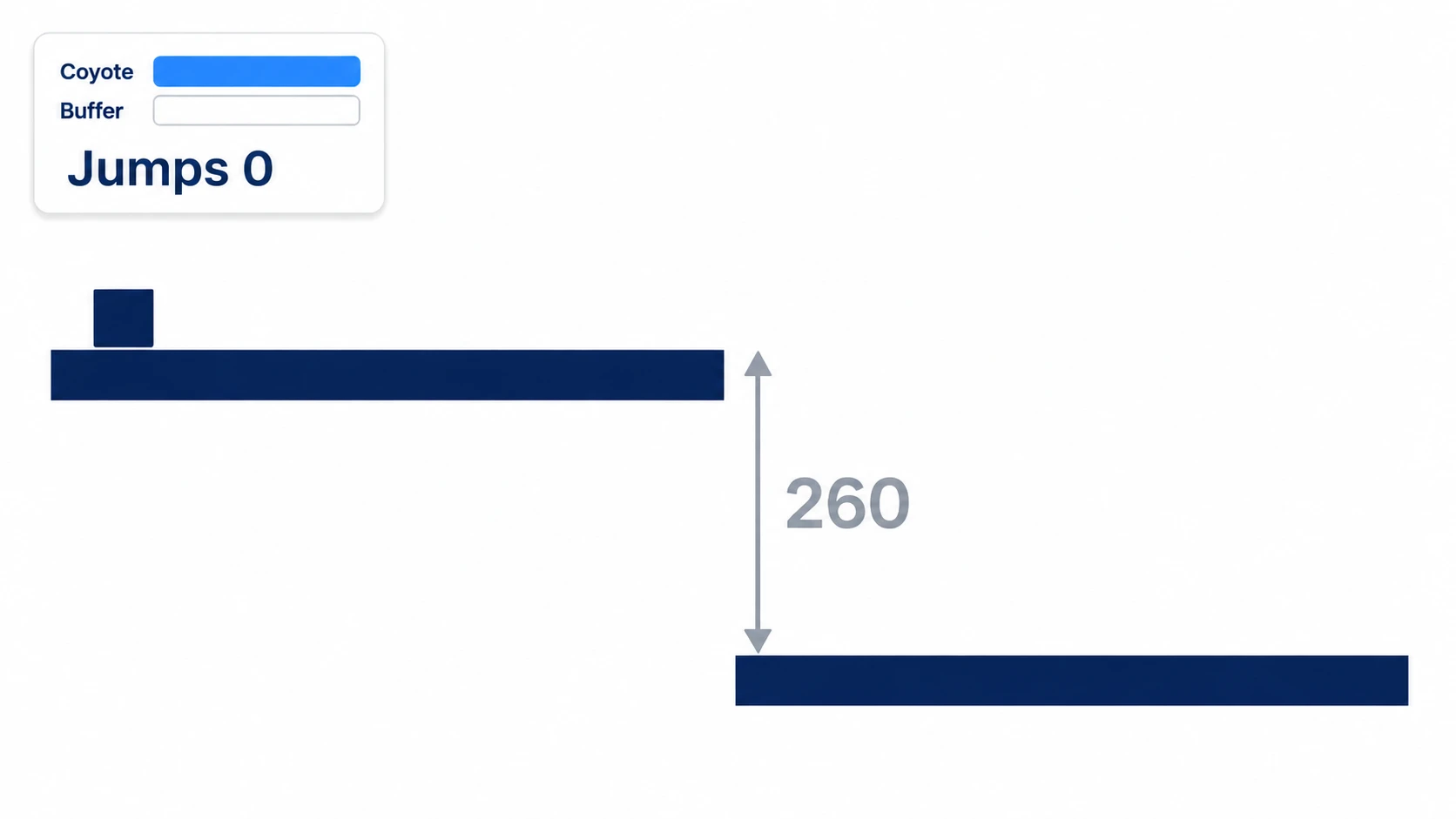
The floors have no sprites, so you won't see their shapes when you run the game. Turn on Visible Collision Shapes from the Debug menu at the top of the editor to show the collision outlines, which makes checking easier.
For CoyoteBar, BufferBar, and CountLabel, right-click each in the Scene dock and turn on Access as Unique Name (the setting that lets scripts reach them by a % name). Setting Custom Minimum Size on VBox to (240, 0) gives the bars a comfortable width. The upper and lower floors are 260 apart vertically, so falling all the way takes about 0.7 seconds. The 0.1 seconds of coyote time runs out partway through. In the Input Map tab of Project Settings, type jump into Add New Action and add it, then register the Space key with the + on that row (Input Map Basics).
② Keep two countdown timers
Here's the full player.gd.
# player.gd
extends CharacterBody2D

const SPEED := 220.0
const JUMP_VELOCITY := -400.0       # up is negative in 2D
const COYOTE_TIME := 0.1
const BUFFER_TIME := 0.1

var coyote_timer := 0.0
var jump_buffer_timer := 0.0
var jump_count := 0

@onready var coyote_bar: ProgressBar = %CoyoteBar
@onready var buffer_bar: ProgressBar = %BufferBar
@onready var count_label: Label = %CountLabel

func _physics_process(delta: float) -> void:
	var on_floor := is_on_floor()          # result from the previous physics frame

	if on_floor:
		coyote_timer = COYOTE_TIME
	else:
		coyote_timer -= delta
		velocity += get_gravity() * delta

	var jump_pressed := Input.is_action_just_pressed("jump")
	if jump_pressed:
		jump_buffer_timer = BUFFER_TIME
	else:
		jump_buffer_timer -= delta

	var wants_jump := jump_pressed or jump_buffer_timer > 0.0
	var can_jump := on_floor or coyote_timer > 0.0
	if wants_jump and can_jump:
		velocity.y = JUMP_VELOCITY
		coyote_timer = 0.0                 # otherwise a second jump goes through in midair
		jump_buffer_timer = 0.0
		jump_count += 1

	velocity.x = Input.get_axis("ui_left", "ui_right") * SPEED
	move_and_slide()
	_update_hud()

func _update_hud() -> void:
	coyote_bar.value = _ratio(coyote_timer, COYOTE_TIME)
	buffer_bar.value = _ratio(jump_buffer_timer, BUFFER_TIME)
	count_label.text = "Jumps %d" % jump_count

func _ratio(left: float, limit: float) -> float:
	if limit <= 0.0:
		return 0.0                         # don't divide by 0
	return clampf(left / limit, 0.0, 1.0) * 100.0
jump_count is shown because changing a color only on the frame the jump goes through is too fast for the eye to follow. You judge by whether the count went up.
③ Run it and check
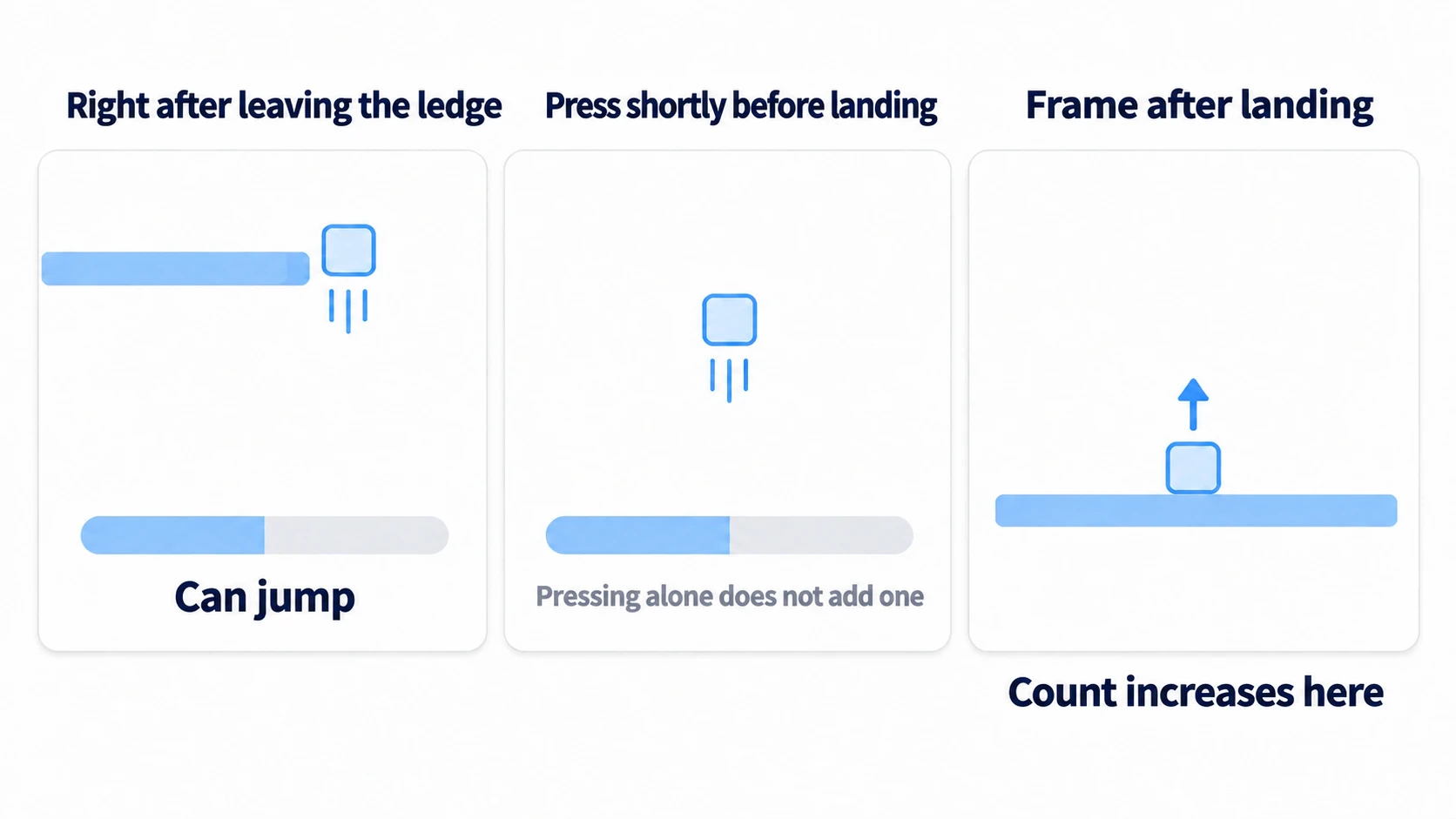
Press F5 to run, and walk with the right arrow to the edge of the upper floor. There are four things to watch.
First, coyote time. Press Space right after you start falling off the edge. As long as the coyote bar isn't empty, the count goes up and you jump even though you're in the air. The bar empties in 0.1 seconds, so you have to press quite quickly. If you can't make it in time, lengthening COYOTE_TIME to around 0.3 makes it easier to see (change it back afterward).
Next, jump buffering. Fall toward the lower floor and press a little before you touch down. The count doesn't go up on the frame you press. It goes up on the physics frame after your feet reach the lower floor. That's because is_on_floor() returns the previous frame's result, and since it's 1/60 of a second later, it looks the same as the moment of landing.
The third is forgetting to clear the timer. Comment out only the coyote_timer = 0.0 line, press Space on the upper floor, and press again while the coyote bar still has time left. The second press goes through in midair and the count goes up by two. Once you've confirmed it, restore the line.
To finish, set both COYOTE_TIME and BUFFER_TIME to 0.0 and repeat the first and second moves. Pressing right after falling off the edge no longer raises the count and you just fall, and a jump pressed before touching down doesn't happen when you land. Pressing on the floor still gives you a normal jump. The two presses that were caught earlier were caught by the two timers you added.
There are two key points.
- On the frame the jump goes through, set both to
0: Leaving coyote time in place lets a second jump through in midair. For the buffer, it keeps the same press from being used again on ledges where the fall to the next landing is short - Watch the collision shape, not the sprite: A rectangular collision shape counts as on the floor as long as the edge of its bottom still rests on the floor's top surface. If you can still jump at the edge in the final
0.0test, that's not coyote time; you were still standing on the floor
Troubleshooting
| Symptom | Cause | Fix |
|---|---|---|
| Running it prints "Node not found: "%CoyoteBar"" | Access as Unique Name isn't set on CoyoteBar and the others | In the Scene dock, right-click CoyoteBar, BufferBar, and CountLabel and turn on Access as Unique Name |
| A second jump still goes through in midair even though you zero the timers on the jump frame | The line that sets it to the maximum comes after the zeroing line. On the frame you jump, is_on_floor() is still true, so the timer goes back to the maximum in that same frame | Put the line that sets it to the maximum first, and the zeroing line after it |
Pressing Space doesn't raise the count, and the output fills with The InputMap action "jump" doesn't exist. | There's no jump in the Input Map. Reading a name that doesn't exist prints this error every frame and returns false | Add jump to the Input Map in Project Settings and assign the Space key |
Bonus: Good to Know First
- 0.1 seconds is a starting point: If it still feels like you can jump in midair, shorten it; if you fall off ledges every time, lengthen it. Keeping it in seconds rather than frames preserves the length of the grace period even if you change the physics FPS (the number of physics updates per second, 60 by default)
- The arc after the jump is a separate topic: Variable jump height, where letting go cuts the rise short, is in Input Checks Explained. This article only goes as far as "whether to accept the jump on that frame"
- If you combine it with attacks: A setup that accepts jumps and attacks only on the ground and ignores them during an attack is in Player State Machine Basics
- How the floor itself is handled: Which surfaces count as floor, such as whether touching a wall lets you jump, is in Choosing a motion_mode, and movement and slowing down is in move_and_slide and move_toward
Summary
- There are two kinds of timing miss: The press spills past the right or left end of the on-floor span. Coyote time covers the moment after leaving, and jump buffering covers the moment before landing
- Count coyote time down in the air: Keep it at the maximum while grounded and subtract
deltawhile airborne - Remember only the moment of the press: Once the jump goes through, zero both timers on that frame
- Split "wants to jump" from "can jump": With the two apart, a normal jump still works even with the grace periods at
0 - Call
move_and_slide()once, last: Call it only once, at the end of the frame
If your jump condition uses is_on_floor() as-is, that's exactly where players fall off ledges. What does the jump condition you're writing right now look like?