You built a GameManager, learned singletons and DontDestroyOnLoad. AudioManager, SaveManager, QuestManager… they're handy, so they multiply — and somewhere past five, things change. Playing directly from the Game scene crashes instantly with null (the managers only exist if you start from the title). Managers call each other in Awake and break or work by lottery of execution order. Return to the title screen and the persistent objects have doubled.
Each one was built correctly, yet the combination breaks. What's missing isn't how to build each manager — it's a place that assembles the whole. In this article, we rebuild the foundation so that everything persistent is assembled exactly once, in a fixed order, in an initial Bootstrap scene.

What you'll learn
- The real reason more managers means more breakage (creation sites and init order are scattered)
- Building a Bootstrap scene that assembles everything persistent exactly once
- Ending the Awake lottery with an explicit, centralized
Initialize()flow- The
RuntimeInitializeOnLoadMethodsafety net that makes any scene playable
Tested with: Unity 6 (6000.x)
- The Paradox: More Managers, More Breakage
- The Bootstrap Scene: One Place to Assemble
- Make Order Explicit with Initialize(), Not Awake
- The Safety Net: Play from Any Scene
- Scene Structure: Persistent Layer and Content Layer
- Hands-On: Title→Game→Result, Keeping Only Audio and Save
- Bonus: Good Things to Know Ahead of Time
- Summary
The Paradox: More Managers, More Breakage
Each manager is correct — so why does adding more break things? The cause isn't functionality, it's placement. The typical setup looks like this: GameManager lives in the title scene, AudioManager is dropped into every scene "just in case," SaveManager only exists in the Game scene. Each one calls DontDestroyOnLoad in its own Awake and, while it's there, goes looking for the other managers.
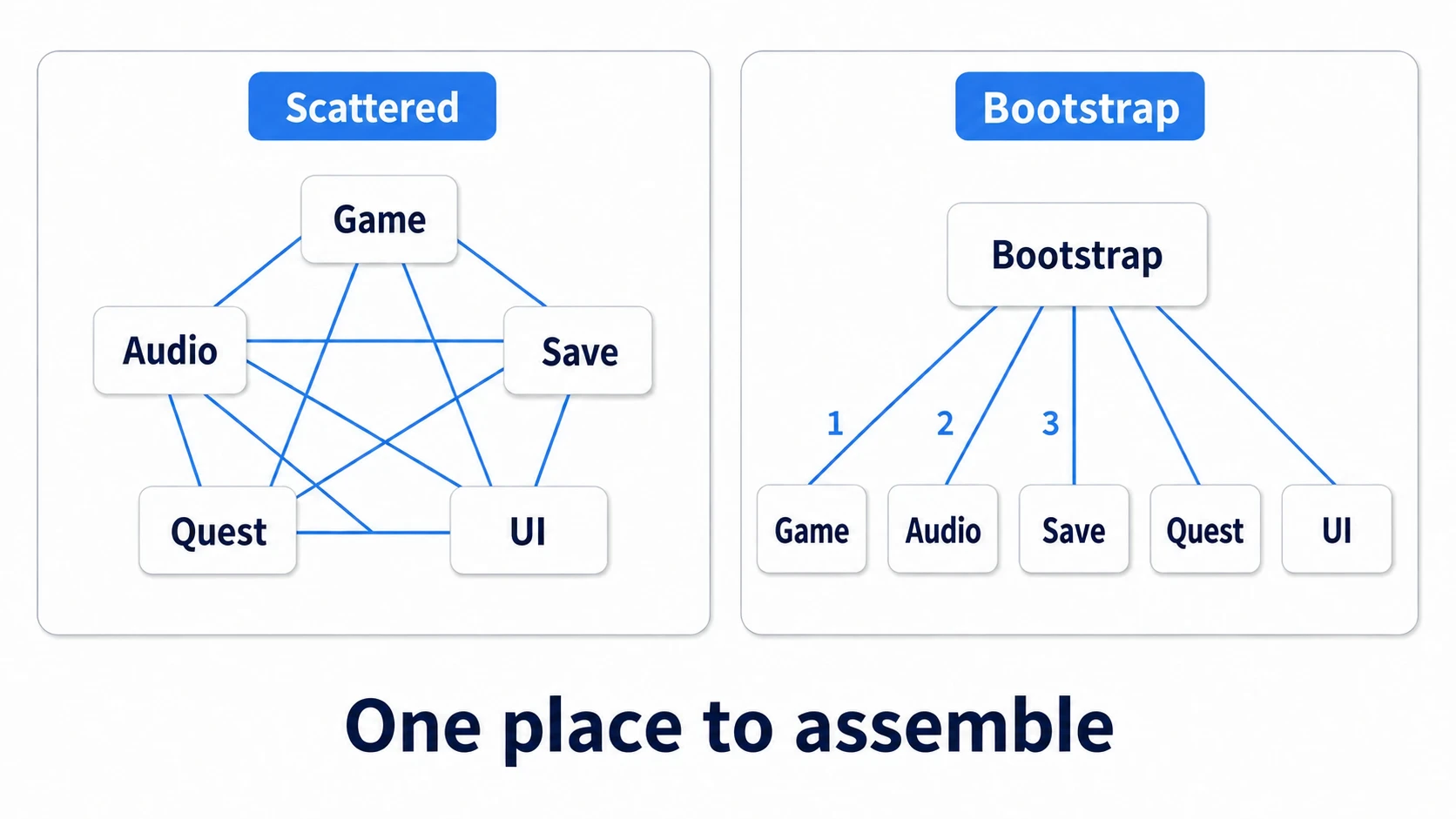
This arrangement is born with three holes.
- Creation sites are scattered: which managers exist depends on which scene you pressed Play from. Start from the Game scene and there's no GameManager — null — and suddenly you can only test via full runs from the title
- Initialization order is a lottery: Unity doesn't guarantee Awake order by default. AudioManager's Awake runs before SaveManager's and can't read the saved volume — a failure that changes with your setup and your edits. A few clean runs don't mean you're safe
- Duplicates appear: a manager placed in a scene is created anew every time you return to that scene, joining its
DontDestroyOnLoad-ed predecessor — the doubled-BGM phenomenon (the classic accident from the DontDestroyOnLoad article)
What the three share: nobody has decided when, where, and in what order things get created. So we create the place that decides.
The Bootstrap Scene: One Place to Assemble
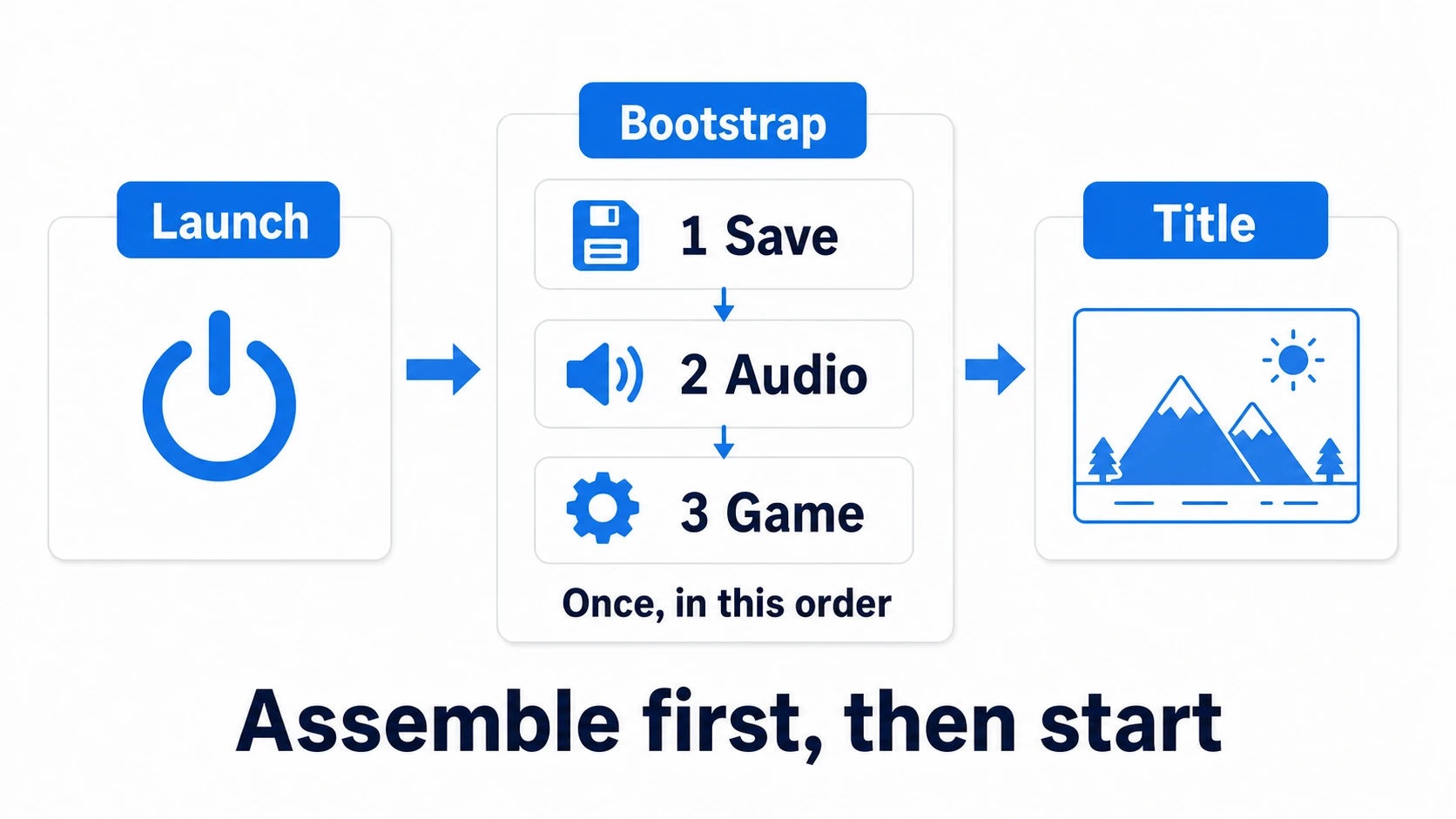
The Bootstrap scene is a tiny assembly-only scene loaded exactly once at game start. Its entire contents: one root object carrying the managers. The player never sees it — once assembly finishes, it moves on to the title.
using UnityEngine;
using UnityEngine.SceneManagement;

public class Bootstrapper : MonoBehaviour
{
    // every persistent manager is a child of this object, wired in the Inspector
    [SerializeField] private SaveManager saveManager;
    [SerializeField] private AudioManager audioManager;
    [SerializeField] private GameManager gameManager;

    private void Awake()
    {
        // Remember whether we started from the Bootstrap scene before DontDestroyOnLoad moves us (used in the safety-net section below)
        bool startedFromBootstrap = gameObject.scene.name == "Bootstrap";

        DontDestroyOnLoad(gameObject); // persistence happens here, once

        // the initialization order is written here, once, top to bottom
        saveManager.Initialize();              // 1. read save data
        audioManager.Initialize(saveManager);  // 2. apply saved volume
        gameManager.Initialize();              // 3. prepare game flow

        if (startedFromBootstrap) SceneManager.LoadScene("Title"); // assembly done — on to the title
    }
}
Three points. First, the persistent managers all live as children of one root object — DontDestroyOnLoad is called once on the root, and the hierarchy itself doubles as a visible "list of everything persistent." Second, no other scene contains a manager — with a single creation site, duplication is impossible by construction. Third, dependencies now flow one way, Bootstrap → managers. The spider web of managers hunting each other becomes a tree fed from the top.
tips: This "single place where dependencies are assembled" has a name in design circles: the Composition Root. DI containers like VContainer essentially automate exactly this — internalize it with a manual Bootstrap and a future container adoption will feel natural.
Make Order Explicit with Initialize(), Not Awake
In the code above, each manager was initialized through its own Initialize() method. Awake exists — so why? This is the heart of the Bootstrap design.
You cannot choose the order Awakes run in. Script Execution Order can rearrange them, but then the dependency graph hides inside a settings screen, invisible when reading the code. So we draw one rule:
- Awake may contain only self-contained setup (initializing your own fields, etc.)
- Anything that touches another manager moves to
Initialize(), and only the Bootstrap decides the calling order
There's one more catch: nothing guarantees the parent's (Bootstrapper's) Awake runs before the child managers' Awake either. When Initialize() is called, that manager's own Awake may not have run yet, so prepare whatever Initialize() uses (components you get with GetComponent, for example) inside Initialize() itself.
public class AudioManager : MonoBehaviour
{
    private float bgmVolume;

    // not in Awake: no guarantee SaveManager is ready at that point

    public void Initialize(SaveManager save)
    {
        // by the time this is called, SaveManager is guaranteed ready
        bgmVolume = save.Data.bgmVolume;
        ApplyVolume();
    }
}
Note how Initialize(SaveManager save) receives what it needs as a parameter. The fact "AudioManager depends on SaveManager" is now recorded in a method signature. Stop the implicit hunting via FindObjectOfType or Instance, and the entire dependency picture becomes readable from the single Bootstrapper file.
The Safety Net: Play from Any Scene
Right after building the Bootstrap, a workflow problem appears: open the Game scene, press Play, and no manager exists — you never passed through Bootstrap. Navigating back to the Bootstrap scene before every test run is, frankly, unbearable.
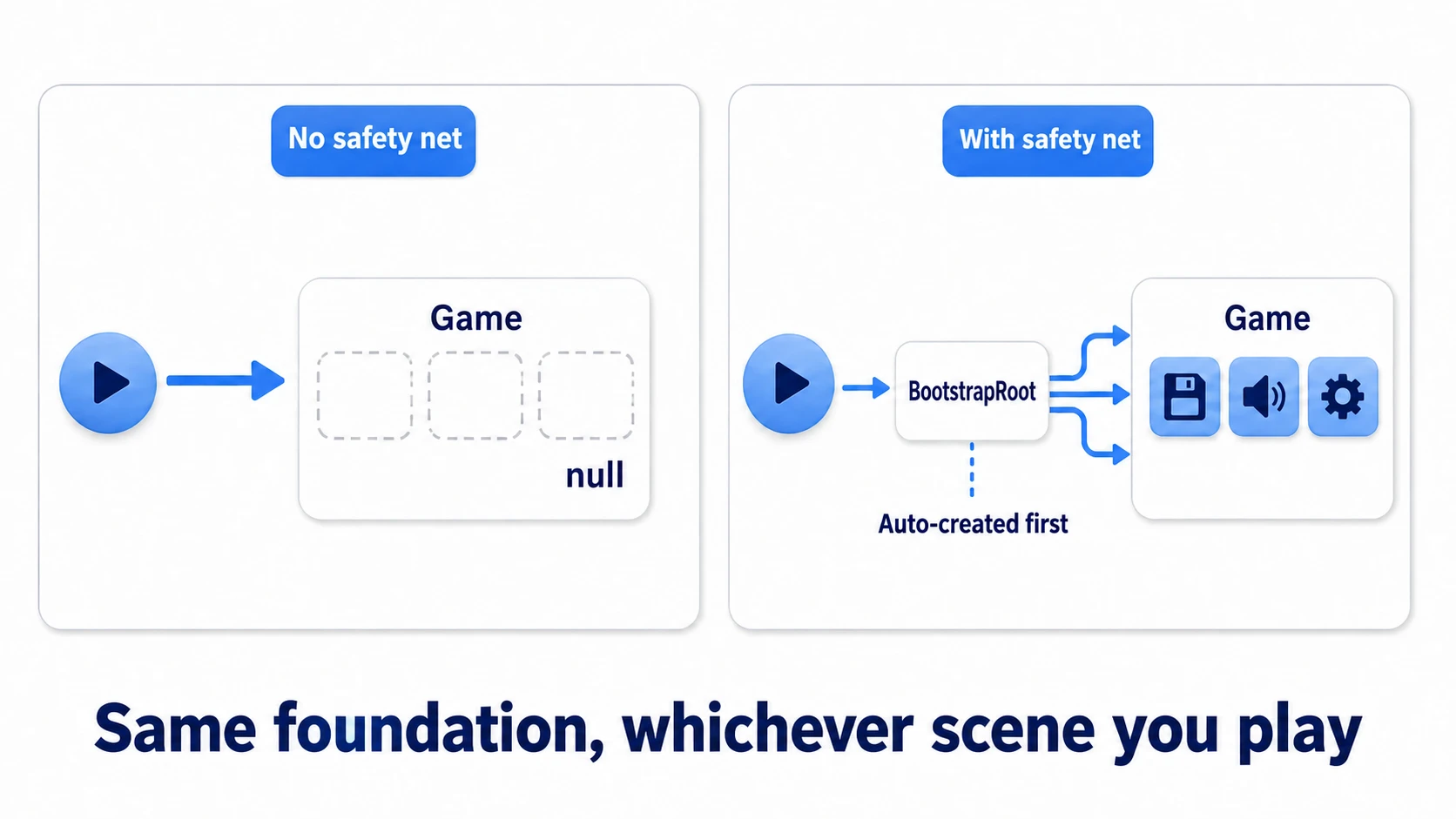
Unity provides the insurance: RuntimeInitializeOnLoadMethod. It registers a static method that always runs before the scene loads — and there we plant "if no Bootstrap exists yet, spawn it from a prefab."
using UnityEngine;

public static class BootstrapLoader
{
    [RuntimeInitializeOnLoadMethod(RuntimeInitializeLoadType.BeforeSceneLoad)]
    private static void EnsureBootstrap()
    {
        if (Object.FindAnyObjectByType<Bootstrapper>() != null) return; // already there — do nothing

        var prefab = Resources.Load<GameObject>("BootstrapRoot"); // Resources/BootstrapRoot.prefab
        Object.Instantiate(prefab);
    }
}
Two preparations: turn the manager-laden root into a BootstrapRoot prefab inside a Resources folder, and make the final LoadScene("Title") in Bootstrapper run only when the game actually started from the Bootstrap scene (that's startedFromBootstrap in the code above; when playing an arbitrary scene in the editor, you want to stay in that scene).
Now whichever scene you press Play from, the same foundation stands up first. Builds boot properly through the Bootstrap scene at the top of the Scene List under File > Build Profiles; in the editor, the safety net catches you — and the "can only test via full runs" problem disappears.
Scene Structure: Persistent Layer and Content Layer
With a Bootstrap in place, your scenes sort themselves into two layers.
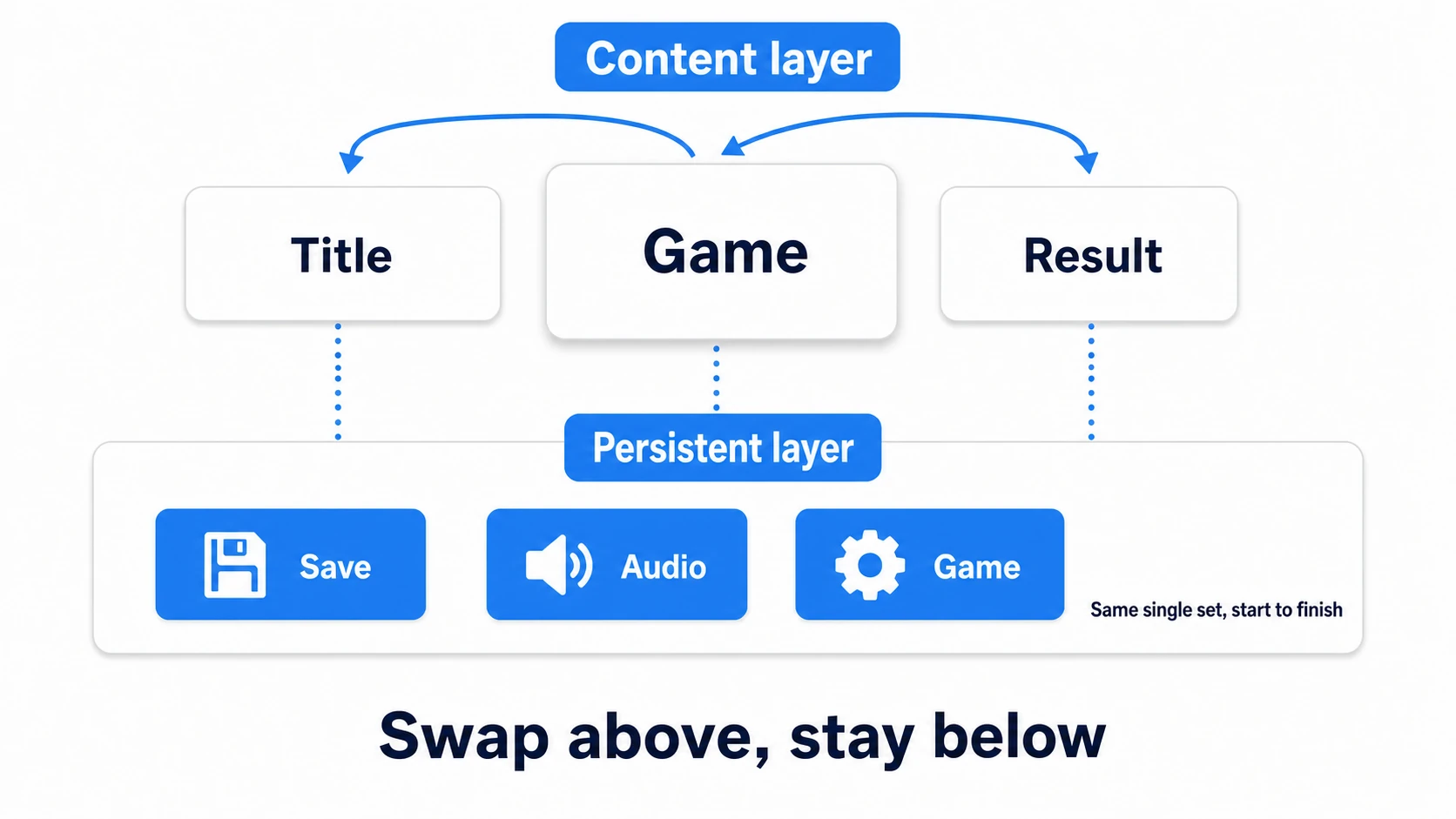
- Persistent layer: the
DontDestroyOnLoadmanagers Bootstrap assembled. Exactly one of each, from launch to quit - Content layer: Title, Game, Result — the actual scenes, swapped wholesale via
LoadScenefrom the scene management article
Content scenes hold "only what that moment needs" and never anything persistent. However many times you travel between scenes, the persistent layer neither grows nor shrinks — that's the guarantee of the two-layer structure.
tips: The advanced form keeps the persistent layer as a "Persistent scene" loaded additively (
LoadSceneMode.Additive) and swaps only content scenes on top — useful for split-loading large maps. But the DontDestroyOnLoad two-layer version is plenty to start.
Hands-On: Title→Game→Result, Keeping Only Audio and Save
To finish, we port the 60-second coin game (Title→Game→Result) from the GameManager article onto the Bootstrap structure. RPG, puzzle, or runner — any game that crosses scenes follows the same steps.
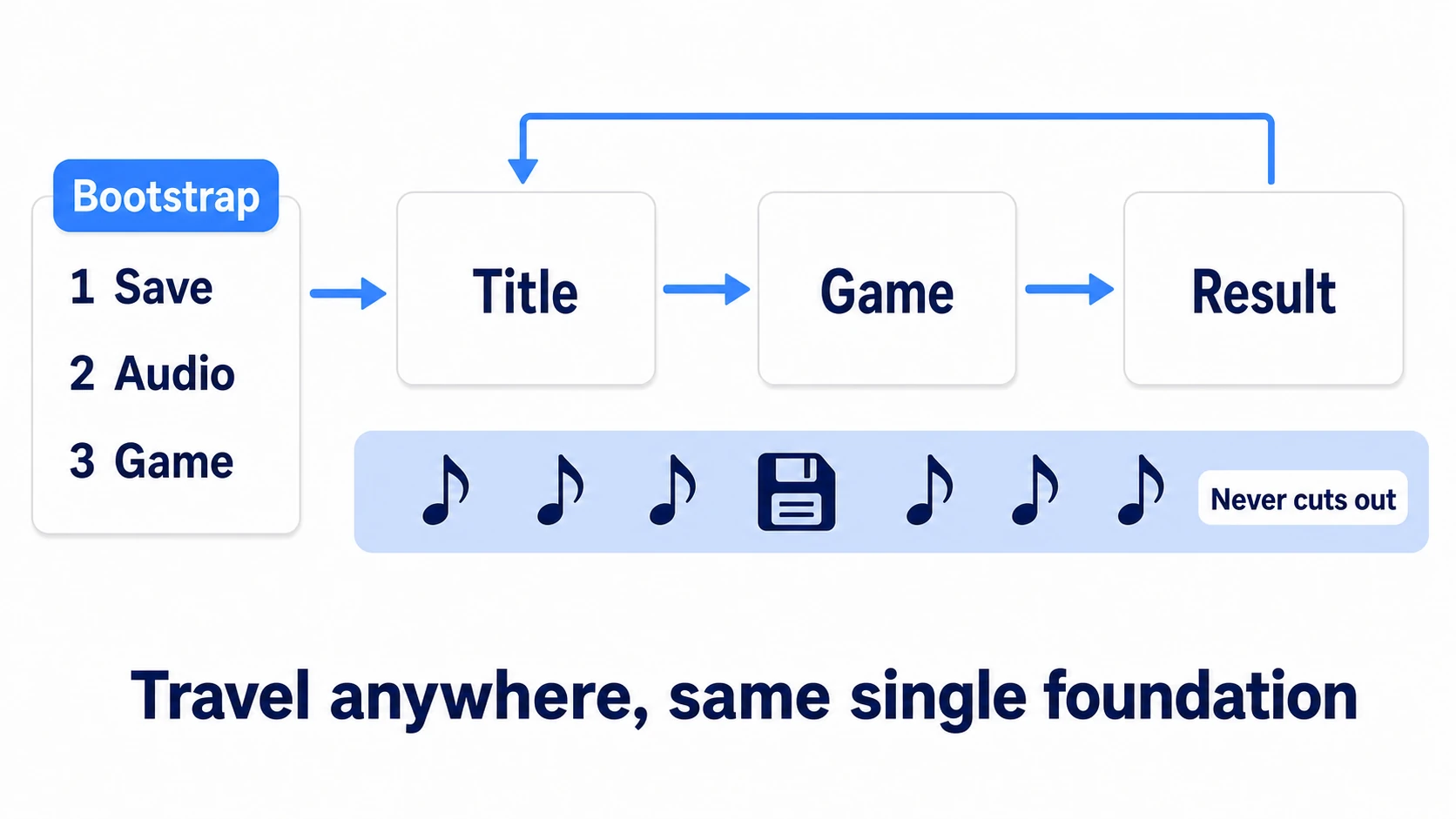
Just four steps.
- Create the Bootstrap scene: in an empty scene, add a
BootstrapRootobject, line upSaveManager,AudioManager, andGameManageras children, attachBootstrapperto the parent, and wire it up in the Inspector - Evict managers from every scene: delete the managers that used to sit in Title, Game, and Result (this is the most satisfying moment)
- Move dependent code from Awake to Initialize(): pull the "find and call another manager" lines out of each Awake, move them into
Initialize(), and line the calls up in order inside the Bootstrapper - Plant the safety net: prefab
BootstrapRootinto Resources, addBootstrapLoader, and put the Bootstrap scene first in the Scene List under File > Build Profiles
Press Play and verify. First a full run from Bootstrap — the title BGM plays, and through Game→Result and back to the title, the BGM never cuts and the hierarchy shows the same single set of persistent objects from start to finish. Next, open the Game scene directly and press Play — the safety net kicks in, and the game starts with every manager present. Finally, bounce between Result and Title a few times and confirm the persistent layer hasn't grown. Done.
Two takeaways. Because creation and initialization order were gathered into one place (the Bootstrapper), "from anywhere, any number of round trips" is guaranteed the same foundation. And because dependencies are passed as parameters, however many managers you add, reading the Bootstrapper shows the whole picture.
Bonus: Good Things to Know Ahead of Time
- No need to abandon singletons:
Instanceaccess stays convenient. Combined with Bootstrap, the realistic arrangement is "only Bootstrap creates; the singleton's Awake creation logic demotes to a duplicate-self-destruct backstop." Details in the singleton article - Keep runtime chatter loosely coupled: Bootstrap centralizes assembly, not runtime communication. In-game notifications between systems are still the domain of event channels
- DI containers are this road's extension: VContainer and Zenject automate the assembly we hand-wrote here, via attributes and configuration. Consider them when team scale makes the manual Bootstrapper unwieldy
- The loading screen lives next door: when startup loading grows long, combine with async loading to show a logo or loading screen while Bootstrap assembles
Summary
- Managers break as they multiply because nobody decided creation site, init order, and duplication
- A Bootstrap scene assembles everything persistent once, in a fixed order. No other scene holds a manager
- Dependent initialization moves from Awake to
Initialize(); the order is written once in the Bootstrapper, and dependencies are passed as parameters - The
RuntimeInitializeOnLoadMethodsafety net stands the same foundation up from any scene - Think of scenes as a persistent layer and a content layer
Managers stop being "things that break as they multiply" and become "things the foundation absorbs as they multiply." Next time you add one — which line of your Bootstrapper will it slot into?