The places where 2D game physics trips people up are remarkably predictable. Your character tips over from the momentum of landing. Fast bullets pass straight through walls. You get snagged on slopes and tile seams. And every one of these has a standard, well-known fix.
This article covers the heart of 2D physics—Rigidbody2D and Collider2D—from the basics through fixes for the classic problems, up to the implementation idioms of 2D platformers.

What You'll Learn
- How 2D differs from 3D—the 2D components are a completely separate system
- The role of each
Body Type(Dynamic/Kinematic/Static)- Choosing a
Collider2D—why Capsule is the standard for charactersIs Triggerand collision events (coin pickups, damage zones)- Fixes for the big three problems (tipping over, tunneling, jittering)
Tested with: Unity 6 (6000.x)
3D and 2D Physics Are Separate Worlds
Unity ships with two independent physics engines: one for 3D (PhysX) and one for 2D (Box2D). Rigidbody and Rigidbody2D, BoxCollider and BoxCollider2D—they only share similar names. They never interact with each other.
"I added a Rigidbody but OnCollisionEnter2D never fires"—the number one beginner pitfall in 2D is mixing in 3D components. In a 2D game, use only the components with the 2D suffix.
An object with a Rigidbody2D comes under the 2D physics engine's control: it falls with gravity, moves with forces, and collides with other objects. Two differences from the 3D version:
- Everything happens on the XY plane: There is no movement along the Z axis.
- Rotation is a single
float: Unlike 3D'sQuaternion, it only tracks the rotation angle around the Z axis.
Body Type: Three Types, Chosen by Role
A Rigidbody2D's behavior changes dramatically with its Body Type. Choose based on "who moves this object?"
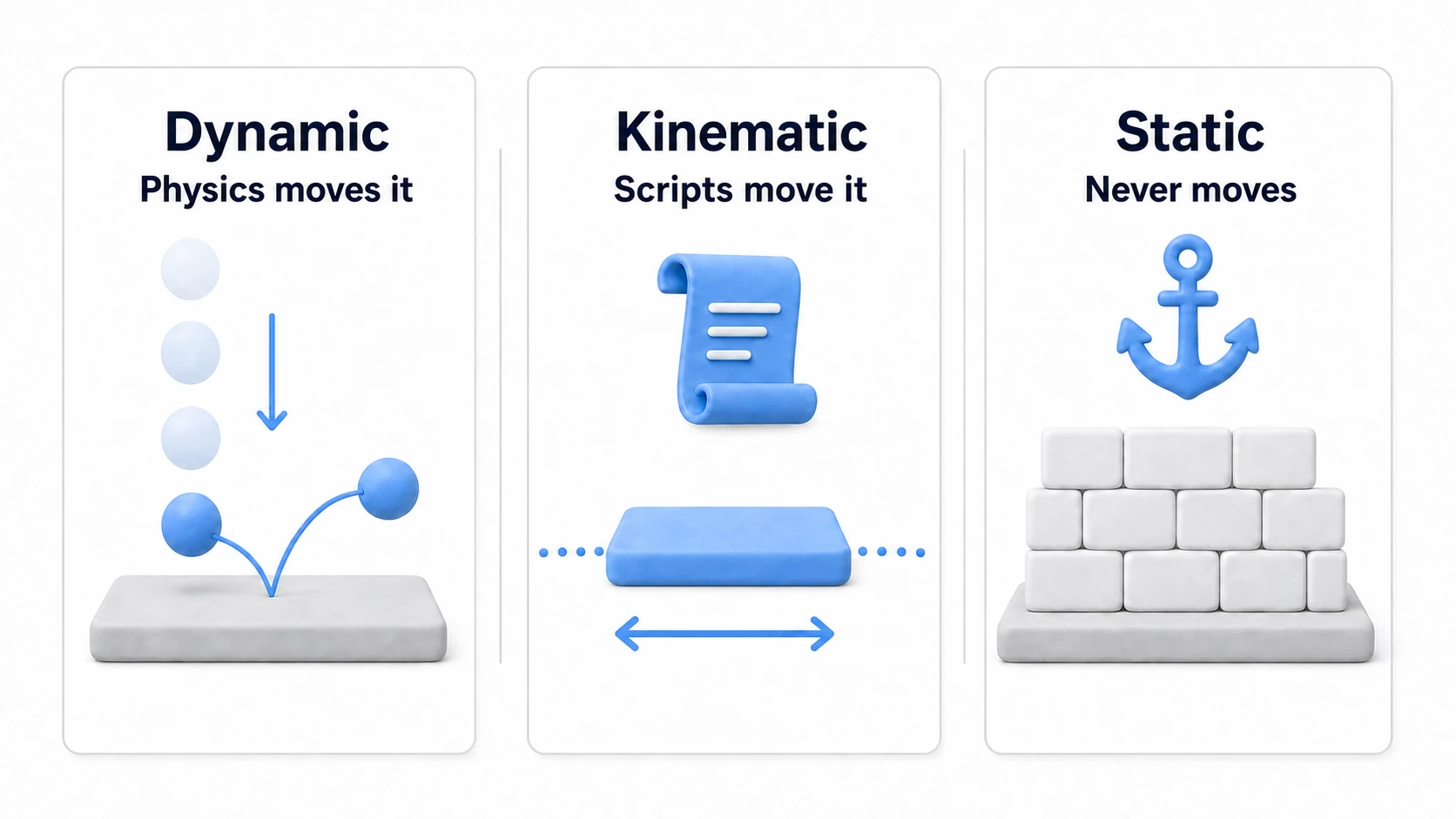
| Body Type | Moved by | Use for | Behavior |
|---|---|---|---|
| Dynamic | The physics engine | Players, enemies, thrown bombs, falling rocks | Fully subject to gravity, forces, and collisions (default) |
| Kinematic | Your scripts | Moving platforms, lifts, enemies on rails | Ignores gravity and collision responses; move it with MovePosition() etc. |
| Static | Nobody | Ground, walls, immovable obstacles | Completely fixed. Cheapest to simulate |
tips: If you forget to add a
Rigidbody2Dto static terrain, a lone Collider2D is still treated as a "static object." However, if there's any chance you'll move it at runtime, the correct practice is to add a KinematicRigidbody2D—moving a collider without a Rigidbody makes the physics engine rebuild it each time, which gets expensive when there are many.
Collider2D: Defining the Collision Shape
A Collider2D defines the physical "shape." To the physics engine, the real body of your object is the collider's shape, not the visible Sprite.
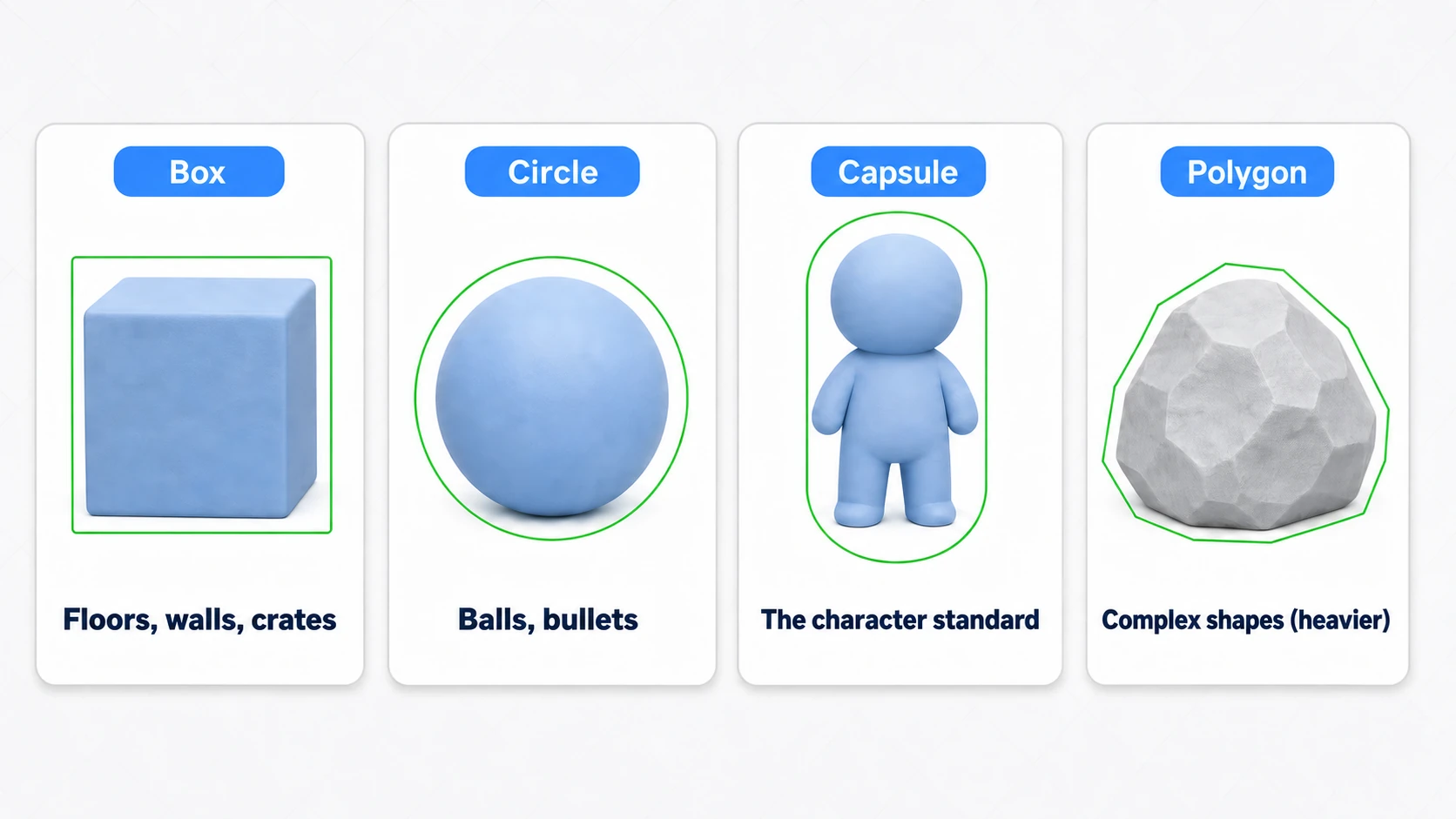
BoxCollider2D: Rectangle. Floors, walls, crates—the most versatile and lightweight.CircleCollider2D: Circle. For balls and bullets. Its shape doesn't change when rotating, making it great for spinning objects.CapsuleCollider2D: Capsule. The standard for player hitboxes. The rounded bottom prevents corners from snagging on slopes and tile seams.PolygonCollider2D: Auto-generates a polygon from the Sprite's shape. Precise, but heavier with more vertices—overkill for a character's everyday hitbox.CompositeCollider2D: Merges multiple colliders into one. The classic use is consolidating a tilemap's manyBoxCollider2Ds for optimization.
"Capsule for characters, Box (+ Composite) for terrain, Circle for balls"—start with this combination and you won't go wrong.
Is Trigger and Collision Events
Turn on a Collider2D's Is Trigger and the physical response disappears—it becomes a sensor that only detects overlap. Use it wherever you want detection without collision: coin pickups, damage zones, goal lines.
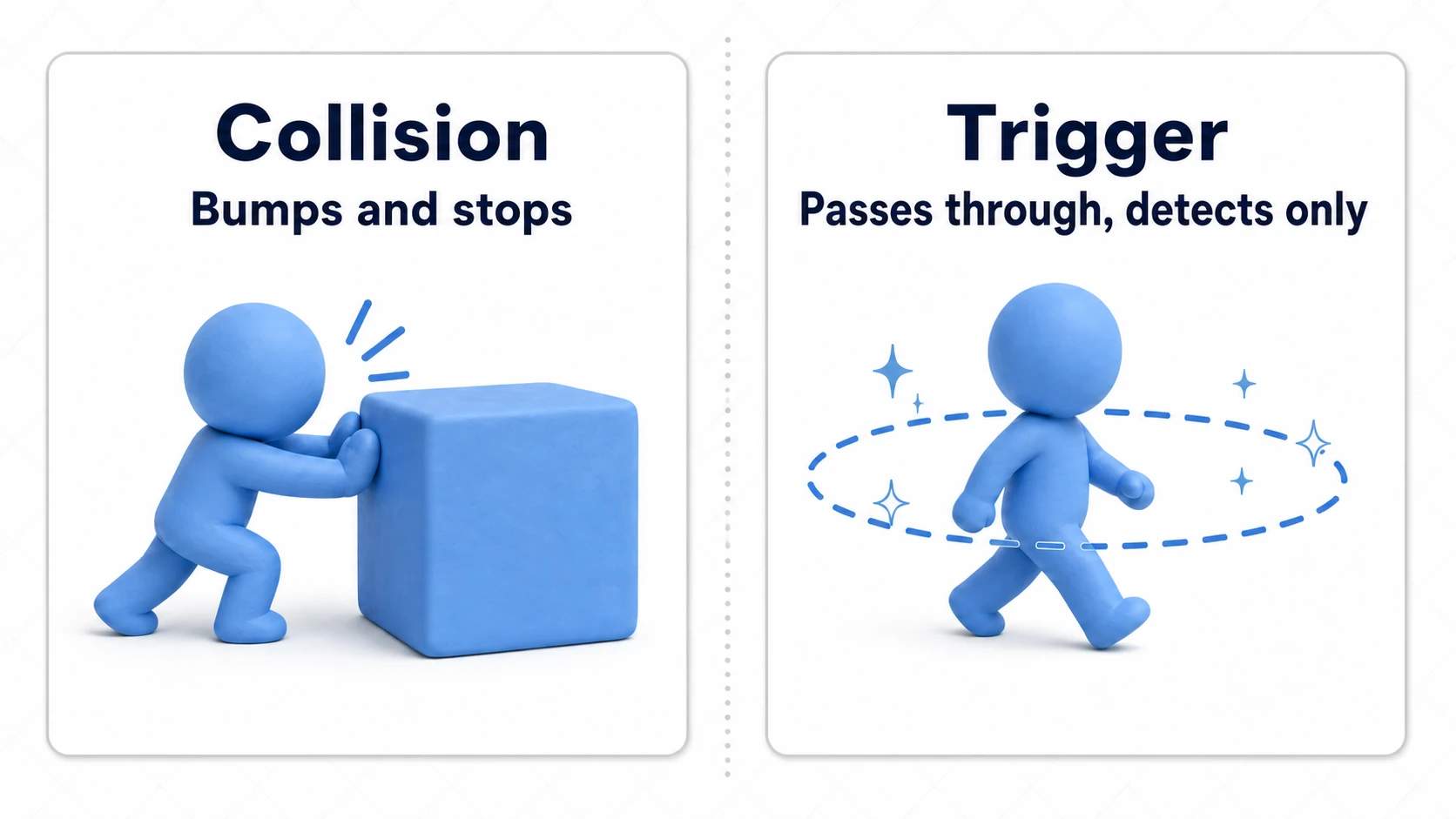
In scripts, you receive them through the corresponding pair of events:
using UnityEngine;

public class PlayerController2D : MonoBehaviour
{
    // Detects physical collisions (with response)
    private void OnCollisionEnter2D(Collision2D collision)
    {
        if (collision.gameObject.CompareTag("Enemy"))
        {
            Debug.Log("Hit an enemy!");
        }
    }

    // Detects triggers (overlap)
    private void OnTriggerEnter2D(Collider2D other)
    {
        if (other.CompareTag("Coin"))
        {
            Debug.Log("Got a coin!");
            Destroy(other.gameObject);
        }
    }
}
The conditions for these events to fire and how to use Enter/Stay/Exit are covered in detail in the OnTrigger and OnCollision article.
Classic 2D Physics Problems and Fixes
All three problems from the intro can be fixed right in the Rigidbody2D's Inspector.
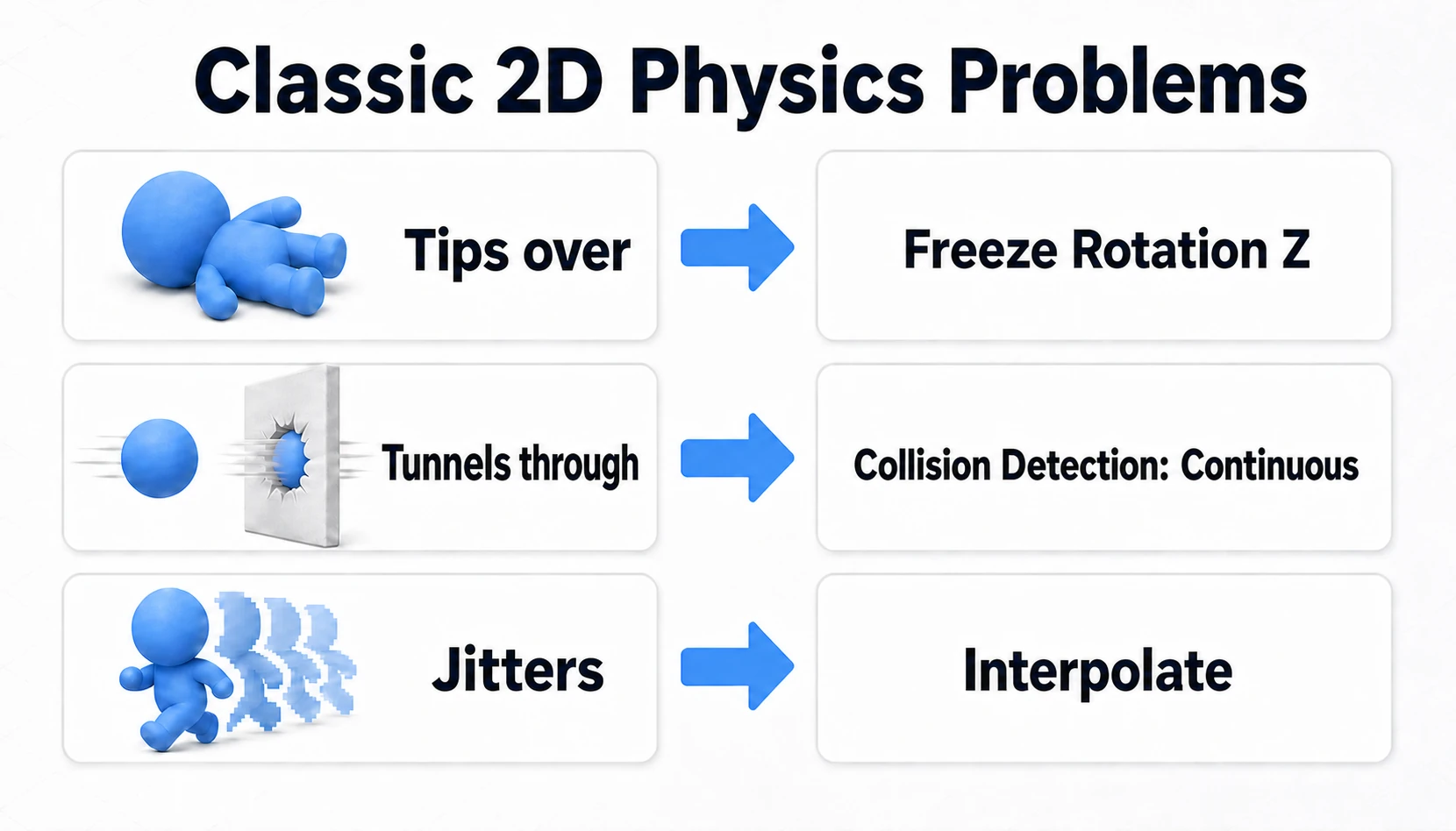
| Symptom | Cause | Fix |
|---|---|---|
| Character tips over on its own | Dynamic bodies rotate on collision | Enable Constraints > Freeze Rotation Z |
| Fast bullets tunnel through walls | Discrete doesn't check the movement within a physics step continuously | Set Collision Detection to Continuous |
| Movement looks jittery | Physics runs on the FixedUpdate cycle, rendering per frame | Set Interpolate to Interpolate |
Freeze Rotation Z in particular is near-mandatory for player characters. A 2D action hero is exactly the kind of object you want "moved by physics, but never rolling over."
Hands-On: A 2D Action Hero That Doesn't Tip or Tunnel
A side-scroller protagonist, a metroidvania double-jumper, a block you roll around in a physics puzzler—the foundation for any "character you control" in 2D is almost always the same three-piece kit. Let's assemble the settings above into a moving character.
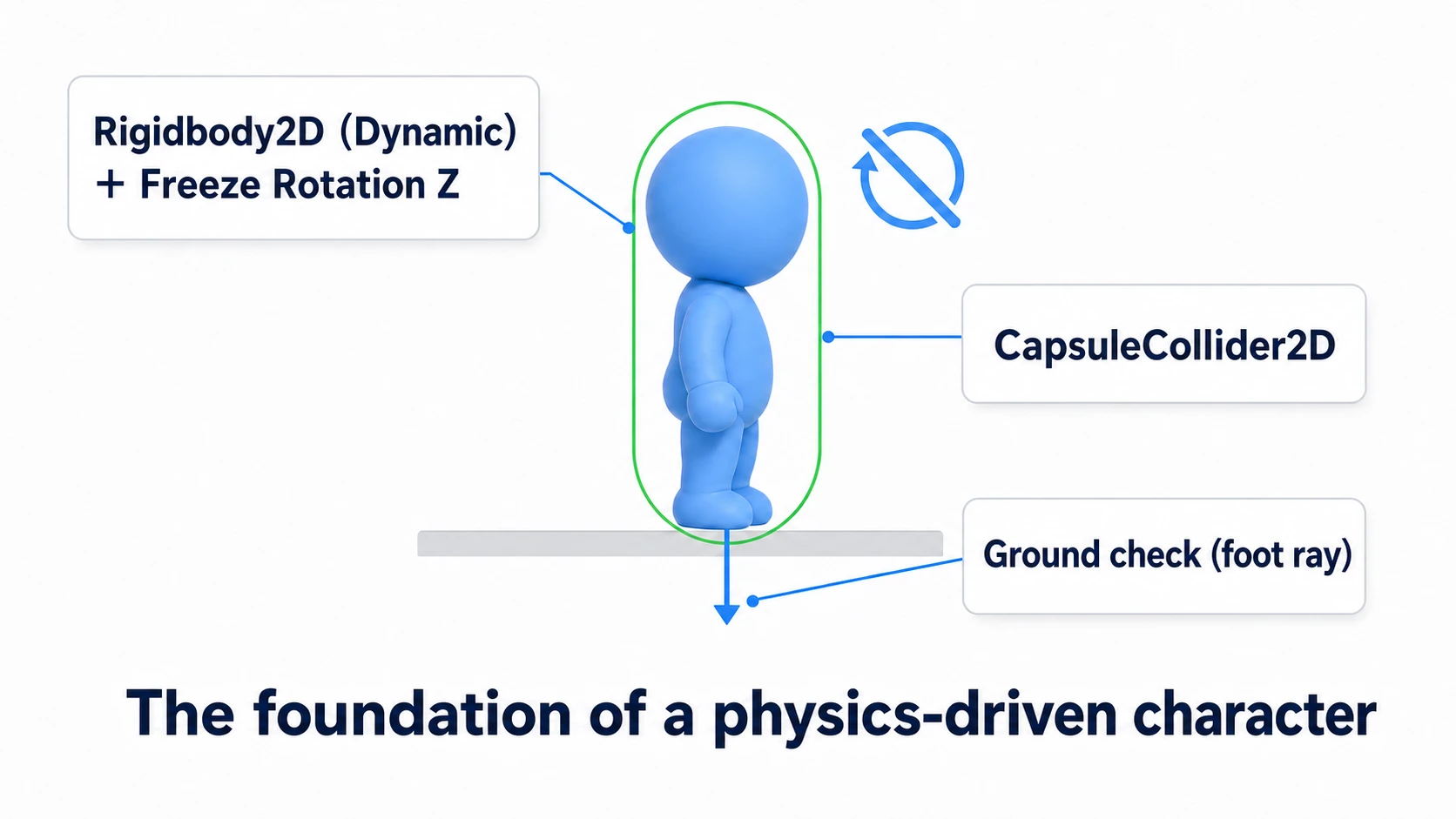
- Rigidbody2D (Dynamic) + Freeze Rotation Z: Moved by physics, but with rotation locked so collisions can't knock it over.
- CapsuleCollider2D: A rounded bottom that won't snag on ledges or tile seams.
- Ground check (a ray at the feet): A short downward probe that decides whether jumping is allowed.
With the kit in place, movement and jumping are scripted. The 2D action staple is to overwrite only the horizontal component of linearVelocity (formerly velocity) and leave the vertical to physics (gravity and jump arcs).
using UnityEngine;

[RequireComponent(typeof(Rigidbody2D))]
public class PlatformerMove : MonoBehaviour
{
    [SerializeField] private float moveSpeed = 8f;
    [SerializeField] private float jumpPower = 12f;
    [SerializeField] private LayerMask groundLayer;  // Limit the ground check to the "ground" layer only (pick the layer your ground is on; left at Nothing, you can never jump)
    [SerializeField] private Transform groundCheck;   // An empty object placed at the feet (assign it in the Inspector)

    private Rigidbody2D rb;

    void Awake() => rb = GetComponent<Rigidbody2D>();

    void Update()
    {
        float x = Input.GetAxisRaw("Horizontal");
        // Overwrite only the horizontal; leave vertical (gravity, jump velocity) to physics
        rb.linearVelocity = new Vector2(x * moveSpeed, rb.linearVelocity.y);

        // Jump only while grounded (overwrite the vertical velocity)
        if (Input.GetButtonDown("Jump") && IsGrounded())
        {
            rb.linearVelocity = new Vector2(rb.linearVelocity.x, jumpPower);
        }
    }

    // Grounded if a small circle at the feet overlaps the ground layer
    private bool IsGrounded()
    {
        return Physics2D.OverlapCircle(groundCheck.position, 0.1f, groundLayer) != null;
    }
}
Input.GetAxisRaw belongs to the old Input Manager. If it throws in a new Unity 6 project, set Active Input Handling under Project Settings > Player to Both (this restarts the editor).
Two points matter most here.
- Horizontal by velocity, vertical by physics: Input overwrites only the
xoflinearVelocity, passingythrough untouched. The physics engine computes gravity and the jump arc for you, so your code only has to "overwriteyat the moment of takeoff." - Check the ground from the collider's feet:
IsGrounded()usesPhysics2D.OverlapCirclefrom thegroundCheckat the feet, looking only at the ground layer. It's the essential check that prevents infinite mid-air jumping (for thePhysics2D.Raycastapproach, see the Raycast article).
Strictly speaking, forces and velocity should be applied in FixedUpdate (read input in Update, apply physics in FixedUpdate—see the Update vs FixedUpdate article). Get it moving first; split them if jitter starts bothering you.
tips:
velocitywas replaced bylinearVelocityin Unity 6. The oldvelocitystill works but gives an obsolete warning (see the Unity 6 API migration guide). One-way platforms you can jump onto from below are built withPlatform Effector 2D(see Bonus).
Bonus: Good to Know for Later
- Physics Material 2D: A "material" you assign to colliders, with
FrictionandBounciness—slippery ice floors and super balls. It also fixes wall-sticking (holding toward a wall mid-jump and not falling): use a material with Friction 0. - Effector2D: A family of components that give colliders special force fields.
Platform Effector 2Dgives you "platforms you can jump through from below" (one-way platforms) (also turn on Used By Effector on the platform's collider, or it has no effect)—required knowledge for 2D platformers. - Tilemap Collider 2D: For tilemap terrain, the standard combo is
Tilemap Collider 2D+Composite Collider 2D. Per-tile colliders get merged, which also reduces seam snagging. - Physics update timing: Strictly, forces and velocity belong in
FixedUpdate(see the Update vs FixedUpdate article).
Summary
- 2D physics is a separate system from 3D. Use only the
2D-suffixed components. - Choose Body Type by "who moves it": physics = Dynamic, script = Kinematic, immovable = Static.
- Colliders: "characters = Capsule, terrain = Box, balls = Circle." Overly precise Polygons are expensive.
- For detection without response, use
Is Trigger+ theOnTrigger2Dfamily of events. - Tipping → Freeze Rotation Z, tunneling → Continuous, jitter → Interpolate. The big three are all solved in the Inspector.
The physics engine hands you believable motion for free. Start your character with the three-piece kit: Rigidbody2D + CapsuleCollider2D + Freeze Rotation Z.