The tension of a stealth game comes from the thrill that "the enemy might spot you." Hiding in the shadows, threading through blind spots — the heart of that experience is the enemy's field of view (FOV) detection. But when it comes down to it, how do you implement "visible / not visible"? The truth is, splitting the view check into three stages — distance, angle, and occlusion — makes it surprisingly simple.
This article assembles a mechanism to detect the player with an enemy's field of view. Narrow the range by distance, form a view cone by angle, and check wall occlusion with a Raycast — this three-stage detection logic, plus state transitions on detection and visualizing the view with Gizmos. A companion to the "chase" of AI pathfinding with NavMesh, this one specializes in "detection."
What you'll learn
- The three stages of view checking (distance → angle → occlusion)
- Forming a view cone by angle (
Vector3.Angle)- Checking wall occlusion with a Raycast
- State transitions on detection (patrol → chase)
- Debugging by visualizing the view with Gizmos
Tested on: Unity 6 (6000.x)
Think of view checking in three stages
"Can the enemy see the player" — trying to judge this in one shot feels hard, but thinking of it as stacking three conditions with AND makes it instantly clear.
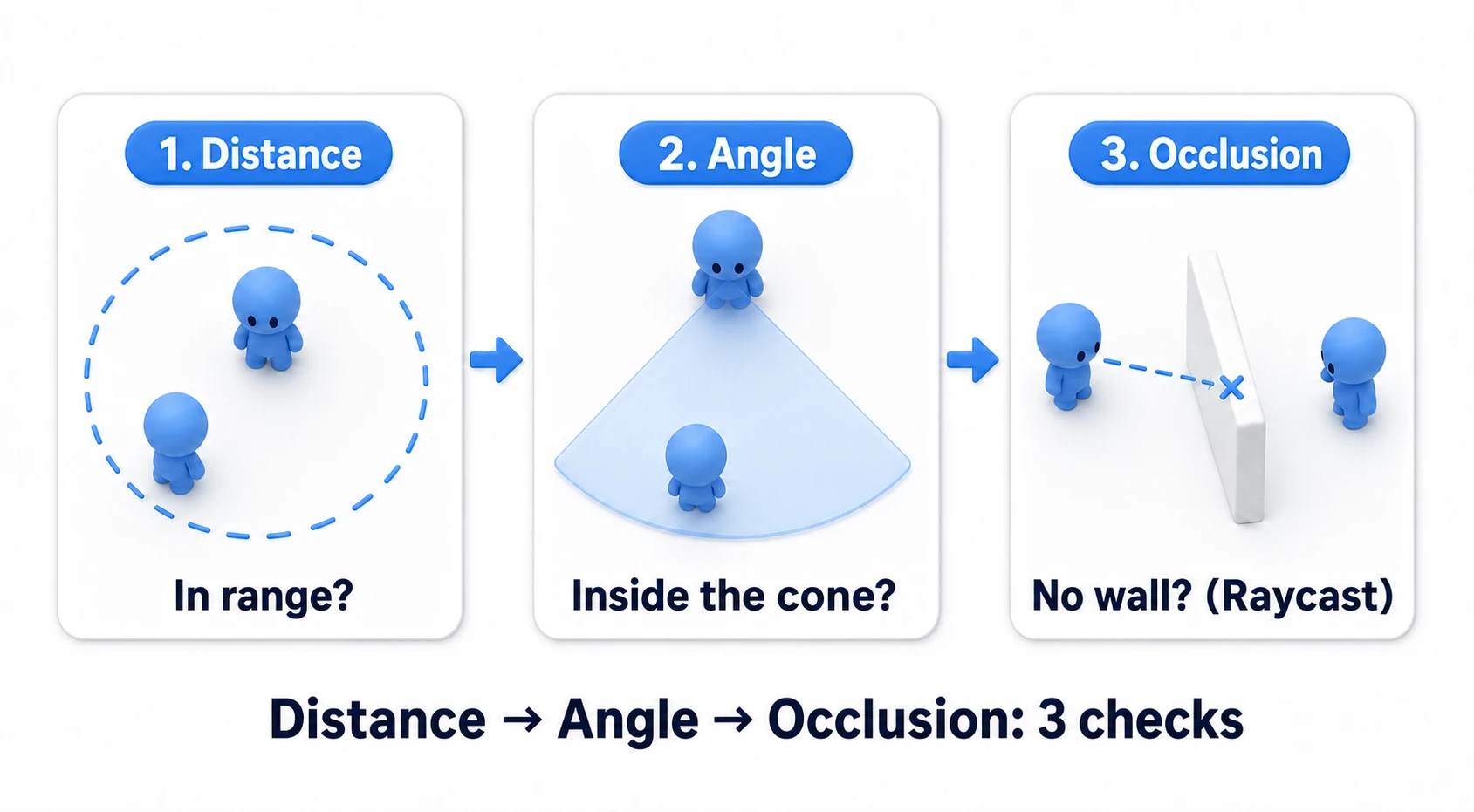
| Stage | What it checks |
|---|---|
| 1. Distance | Is the player within reach of the view (not too near, not too far) |
| 2. Angle | Is the player inside the view angle (within the front cone) |
| 3. Occlusion | Is there no wall between enemy and player (Raycast) |
Checking in this order is the point. Go from the cheapest check, and bail early if it fails. First distance (one subtraction), then angle, and last the heaviest, the Raycast. Early-return with "if too far, don't even check angle or Raycast" and it stays light even with many enemies. Only when all three hold do you judge "the player is seen."
Form a cone with distance and angle
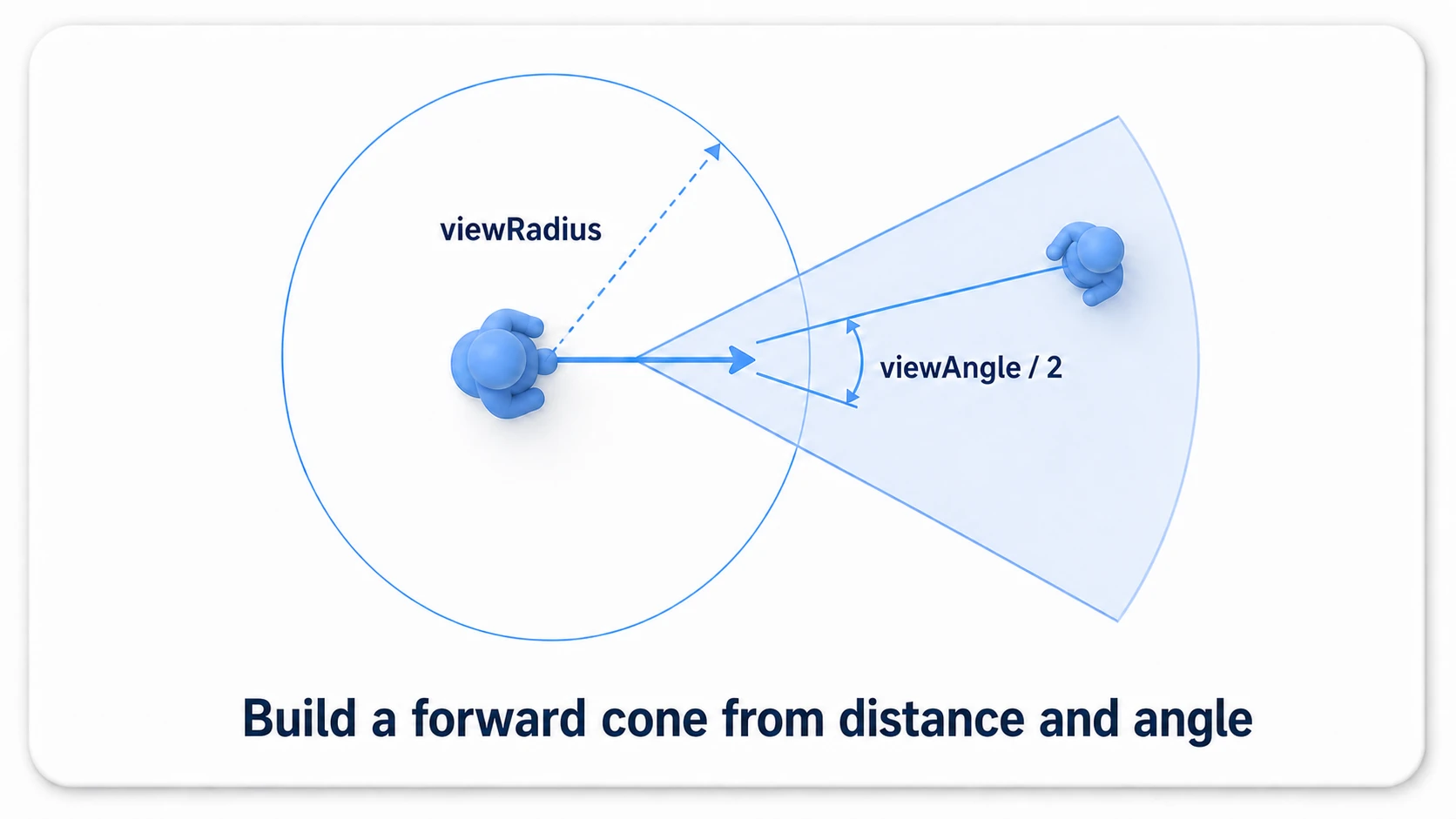
First, form a fan-shaped view cone in front of the enemy with "distance" and "angle." This is the skeleton of view checking.
using UnityEngine;

public class FieldOfView : MonoBehaviour
{
    [SerializeField] private float viewRadius = 8f;      // View reach distance
    [SerializeField] private float viewAngle = 90f;      // View angle (degrees)
    [SerializeField] private float eyeHeight = 1.6f;     // Height of the enemy's "eyes"
    [SerializeField] private float targetHeight = 1.2f;  // Height to aim at on the player (chest)
    [SerializeField] private Transform player;
    [SerializeField] private LayerMask obstacleMask;     // Wall layer

    public bool CanSeePlayer()
    {
        // Draw the sight line "eyes to chest," not "feet to feet"
        Vector3 eye = transform.position + Vector3.up * eyeHeight;
        Vector3 targetPoint = player.position + Vector3.up * targetHeight;
        Vector3 toPlayer = targetPoint - eye;

        // (1) Distance: not visible if out of range
        float distance = toPlayer.magnitude;
        if (distance > viewRadius) return false;

        // (2) Angle: not visible if the angle from the front exceeds half the view angle
        float angle = Vector3.Angle(transform.forward, toPlayer);
        if (angle > viewAngle / 2f) return false;

        // (3) On to the occlusion check (next section)
        return !Physics.Raycast(eye, toPlayer.normalized, distance, obstacleMask);
    }
}
The angle check is the crux. Measure the angle between the enemy's forward vector (transform.forward) and the direction from enemy to player with Vector3.Angle, and if it's at most half the view angle, the player is inside the cone. With a 90-degree view angle, that's 45 degrees to each side of the front. Distance and angle alone define the "front fan."
Note that eyeHeight and targetHeight assume transform.position sits at the feet. If the origin is at the center of the body, as with a standard Capsule, use about 0.6 for eyeHeight and 0.2 for targetHeight.
Check occlusion with a Raycast
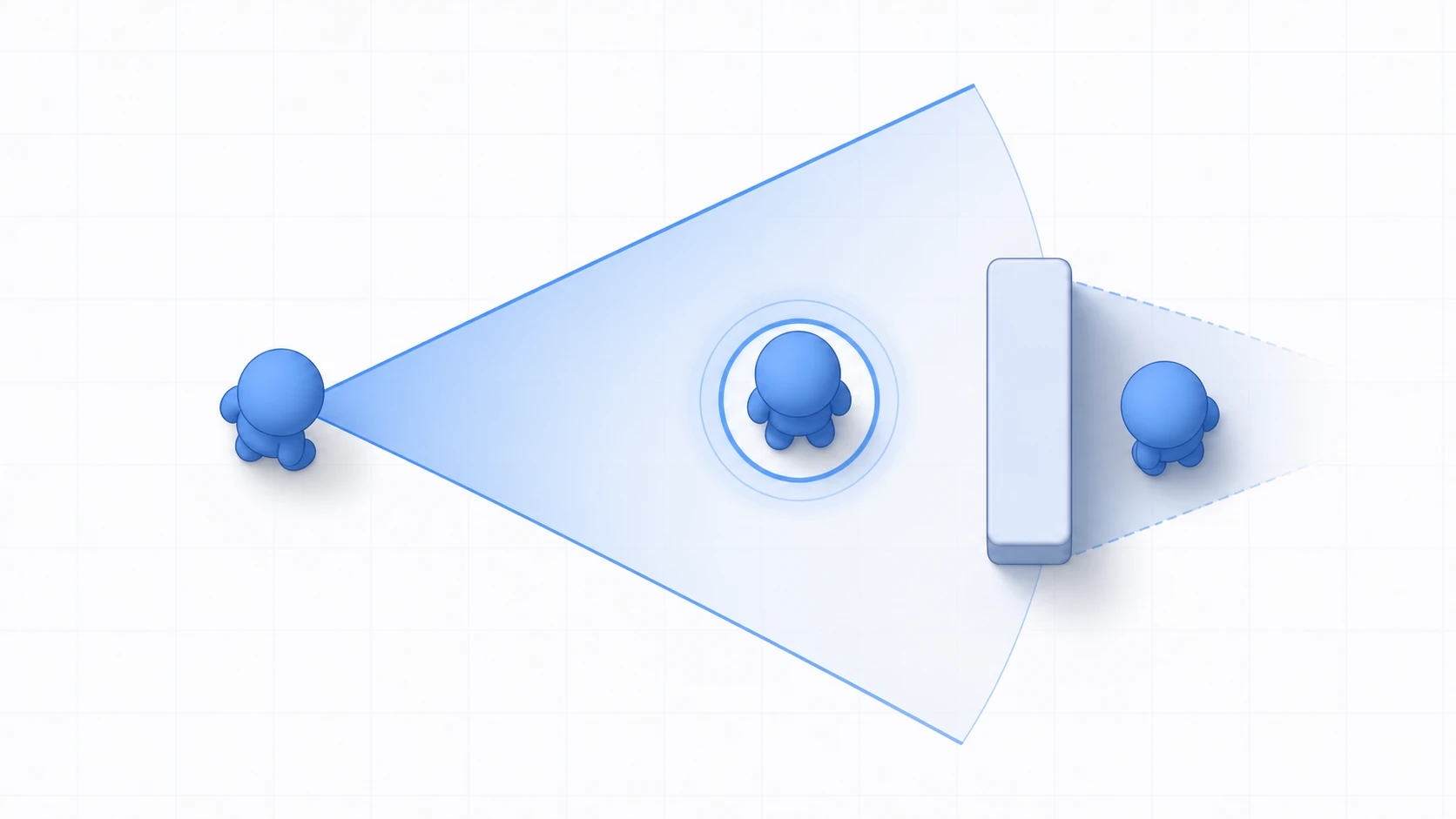
Even if distance and angle hold, if there's a wall between, it shouldn't be visible. This occlusion check is what makes "hiding in the shadows" work in a stealth game.
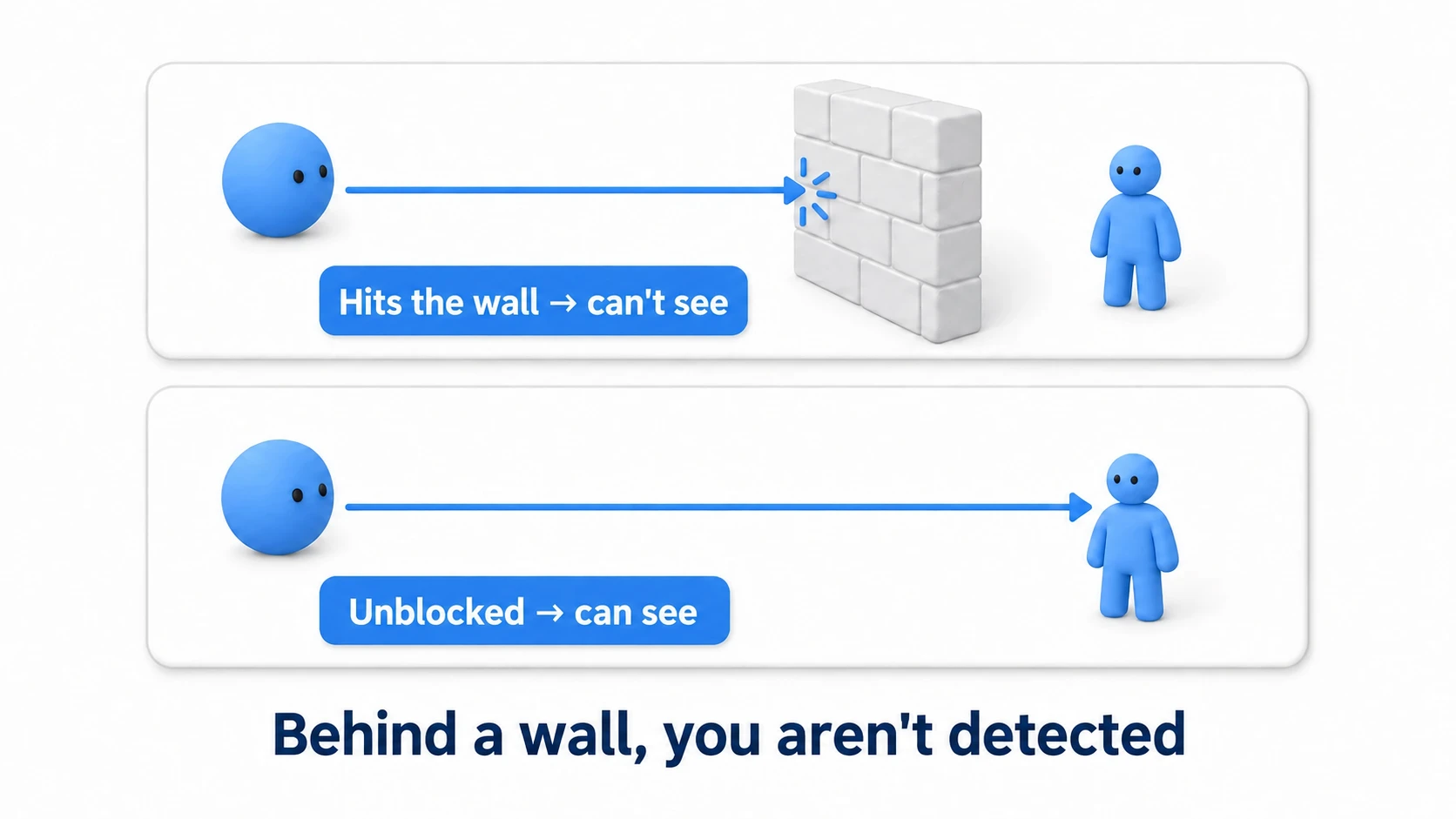
The method is a Raycast. Cast a ray from the enemy's eye toward the player and check whether it hits a wall (obstacle layer).
- Hit a wall → the player is beyond the wall. Not visible (hiding)
- Reached the player without hitting anything → nothing blocks. Visible
The last line of the previous section's code is this. Physics.Raycast(origin, direction, distance, obstacleMask) checks whether there's an obstacle-layer wall between here and the player, returning false (not visible) on a hit and true (visible) otherwise. Now the moment the player steps behind a pillar or wall, they vanish from the enemy's view — the basic stealth behavior is complete.
Draw the sight line "eyes to chest": that's what
eyeHeightandtargetHeightin the code are for. With the origin at the feet, a waist-high crate gets "seen through" for a false detection, or a low curb "hides" the player when it shouldn't — the feel of cover drifts away from reality. Connecting "the enemy's eyes to the player's chest" makes crouching and low-cover play feel natural.
Visualize the view with Gizmos
The view is invisible, so tuning it is hard as-is. That's where Gizmos come in — draw the view cone in the Scene view to visualize it. This is an essential technique for stealth AI development.
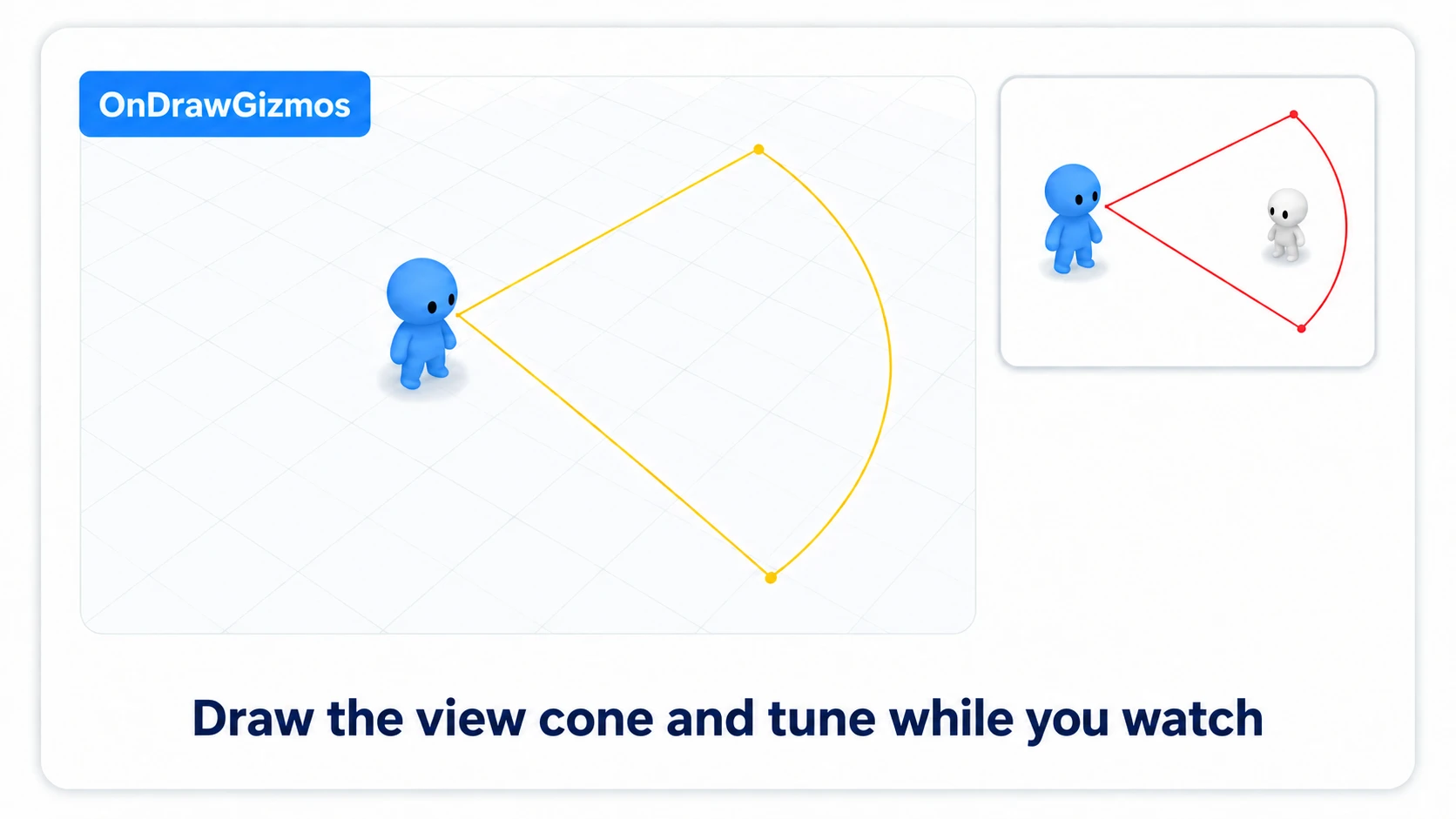
// Draw the view cone in the Scene view (visible even without running)
void OnDrawGizmos()
{
    // Draw from the same "eye" the check uses (drawing from the feet makes it look out of step with the check)
    Vector3 eye = transform.position + Vector3.up * eyeHeight;

    Gizmos.color = Color.yellow;
    // Show the view distance as a circle
    Gizmos.DrawWireSphere(eye, viewRadius);

    // Left and right boundary lines of the view angle
    Vector3 left = Quaternion.Euler(0, -viewAngle / 2f, 0) * transform.forward;
    Vector3 right = Quaternion.Euler(0, viewAngle / 2f, 0) * transform.forward;
    Gizmos.DrawLine(eye, eye + left * viewRadius);
    Gizmos.DrawLine(eye, eye + right * viewRadius);
}
Writing drawing code in OnDrawGizmos shows the view in the Scene view even without running the game. Draw the view distance as a circle and the view angle as two lines, and the fan cone becomes visible. The circle is only a distance guide; what the enemy sees is the fan between the two lines. Now you can tune things like "this wall creates a blind spot" or "the view angle is too wide" while actually watching. Change the Gizmos color to red on detection and the moment of spotting is clear at a glance too.
Practice: an enemy that chases when it spots you
Once view checking works, all that's left is to move the AI on detection. A stealth game's guard, a Metal Gear-style lookout, a horror game's roaming enemy — this detection logic is the heart of all of them.
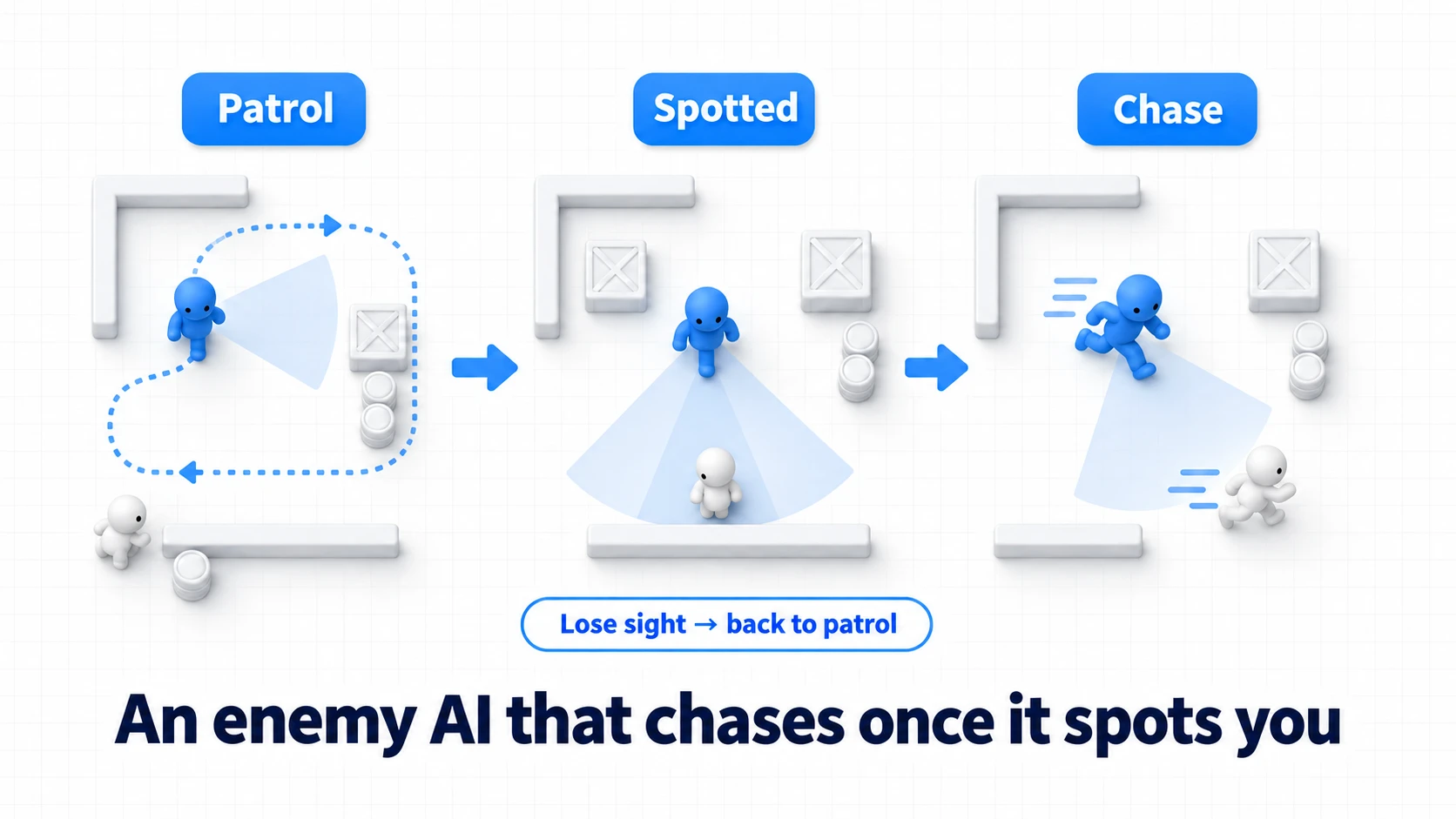
Connect the detection result to the AI's state transitions. The flow:
- The enemy usually patrols
- Call
CanSeePlayer()every frame (or at intervals) - When it returns
true, transition to chase and pursue the player with NavMesh - When the player hides and
falsepersists, return to patrol after a delay
void Update()
{
    if (CanSeePlayer())
    {
        lastSeenTime = Time.time;
        state = State.Chase;           // Spotted → chase
        agent.SetDestination(player.position);
    }
    else if (state == State.Chase && Time.time - lastSeenTime > loseSightDelay)
    {
        state = State.Patrol;          // Lost for a while → back to patrol
    }
}
Two points: "detection is a flag, behavior is a state" (CanSeePlayer() just returns whether it's visible; switch chase/patrol states based on it — separate detection from behavior) and "give losing sight a grace period" (giving up the instant they hide feels unnatural; keep chasing for loseSightDelay, and return to patrol only if still not found — this "persistence" is what feels like real AI). This detection logic drops straight into a state machine's "patrol ⇔ chase" transition condition or a Behavior Tree's "visible?" condition node.
Three traps when it doesn't work: (1) Forget to add the wall layer to
obstacleMask, and the Raycast hits nothing — the enemy detects you through walls. (2) The opposite: include the player's layer in the mask, and the Ray hits the player's own body as "cover" — the enemy can never find anyone. Keep the mask to occluders only. (3) When the player weaves along the edge of the view angle, detection flickers on and off rapidly. Switch to the "suspicion" approach below and the flicker dissolves on its own.
Going Further: Detect with a Suspicion Meter, Not a 0-or-1
Getting spotted the instant you graze the view cone feels unfair to the player. The fix is a suspicion meter — "you get found if they keep seeing you." The mechanism is nothing more than accumulating the time detection persists.
[SerializeField] private float detectTime = 1.5f;  // Seconds of being seen before you're spotted
private float suspicion;  // Suspicion level, 0 to 1

void Update()
{
    if (CanSeePlayer())
        suspicion += Time.deltaTime / detectTime;          // Rises while visible
    else
        suspicion -= Time.deltaTime / (detectTime * 2f);   // Falls slowly while hidden
    suspicion = Mathf.Clamp01(suspicion);

    if (suspicion >= 1f)
    {
        lastSeenTime = Time.time;
        state = State.Chase;   // Spotted only when the meter fills
        agent.SetDestination(player.position);
    }
}
Scale a "?" icon above the enemy's head by suspicion and you've built that Metal Gear-style tension. The player gets the thrill of a grace window — "they saw me, hide!" — and the edge-flicker problem disappears at the same time. One meter, three payoffs: a stealth classic.
Good to know first
- It doesn't need to run every frame: running the view check every frame for every enemy gets heavy. Once every 0.1–0.2 seconds barely feels different. Throttle with
InvokeRepeatingor a coroutine. When you throttle, add that interval (0.1 seconds or so) to the alert level instead ofTime.deltaTime(Time.deltaTimeis the length of the last single frame, so the meter barely fills). - The same idea in 2D: in 2D games too, the three stages of distance, angle, and
Physics2D.Raycastare the same. Just reinterpret the axes, like usingtransform.rightas the front. - Measure the angle on the horizontal plane when heights differ:
toPlayerincludes the vertical difference, so a player above or below on stairs can fall outside the angle check even when straight ahead horizontally. Flatten it withVector3.ProjectOnPlane(toPlayer, Vector3.up)before measuring the angle (don't flatten the occlusion Raycast). - Combine with sound detection: adding "notice when footsteps are near" on top of the view makes it more full-featured. Implement view (see) and hearing (hear) as separate detections, spotting on either — a classic pattern.
Summary
- View checking stacks three stages with AND: distance → angle → occlusion (Raycast)
- Go from the cheapest check and early-return on failure to keep it light
- Angle is inside when
Vector3.Angle(forward vector vs player direction) is at most half the view angle - Occlusion is whether
Physics.Raycasthits a wall. A hit means not visible (hiding) - Draw the view cone in the Scene view with Gizmos and tune while watching
- Detection is a flag, chase/patrol are states. Give losing sight a grace period
- If instant detection feels unfair, use a suspicion meter: fill it only while the player is visible, and detect when it's full
Start by drawing the enemy's view cone with Gizmos and printing a debug log when the player enters it. Once you see detection vanish as the player steps behind a wall, the heart of a stealth game is done. What blind spots will your game's lookout have?
Further reading
- The Complete Guide to Raycast — the foundation of the occlusion check
- AI Pathfinding with NavMesh — implementing the "chase" after detection
- State Machine Design Pattern — managing the patrol ⇔ chase state
- Designing Enemy AI with Behavior Trees — building "visible?" into a condition node
- Unity ScriptReference: Physics.Raycast — the primary source on occlusion checks