"My Rigidbody character stutters for some reason" or "movement speed changes depending on the PC"—the cause may be where you wrote the code (Update or FixedUpdate). These two look very similar, but their execution timing and roles are fundamentally different.
This article breaks down how Update() and FixedUpdate() work with diagrams, so you can decide without hesitation which one each piece of code belongs in.
What You'll Learn
- The difference in execution timing between
UpdateandFixedUpdate(with diagrams)- Why "input and visuals go in Update, physics goes in FixedUpdate"
- How
Time.deltaTimemakes movement frame-rate independent- The
Rigidbody.velocitychange in Unity 6
Tested with: Unity 6 (6000.x) / Input System
Execution Timing Differences
The most important difference between Update() and FixedUpdate() is when they're called.
Update()
- Called once per frame.
- Execution interval depends on frame rate. On a high-performance PC running the game at 120 frames per second (120fps), it's called 120 times per second; on a low-performance system at 30fps, only 30 times per second. The interval is not constant.
FixedUpdate()
- Called at fixed time intervals.
- The default interval is 0.02 seconds, configurable in
Edit > Project Settings > TimeunderFixed Timestep. - Execution interval is independent of frame rate. It is guaranteed to be called at constant intervals.
Placing the two call patterns side by side on a timeline makes the difference obvious at a glance.
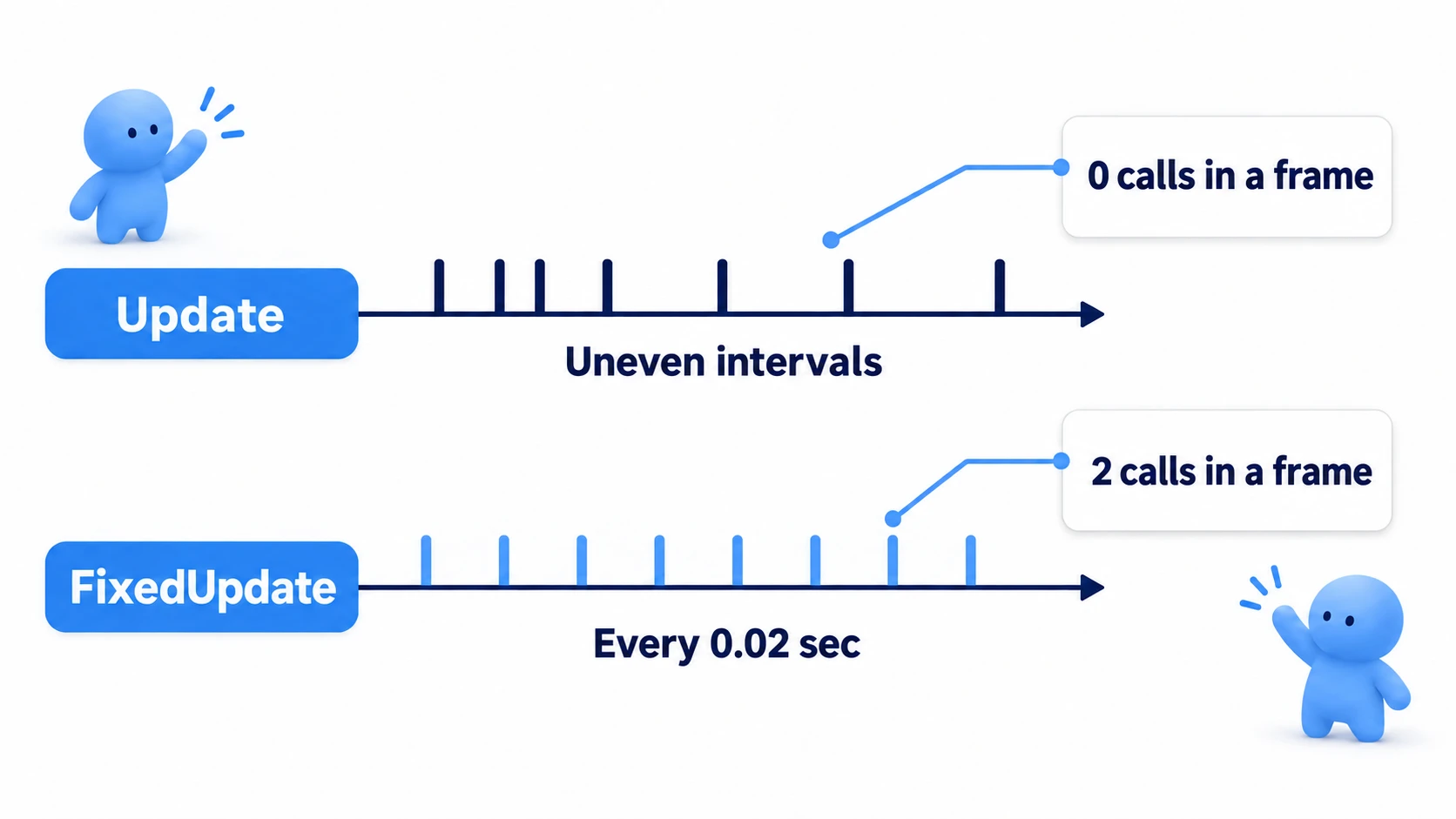
At high frame rates, Update() may be called several times before one FixedUpdate() call. Conversely, at low frame rates, FixedUpdate() may be called multiple times within a single frame.
Note: In other words, frames where
FixedUpdate()is never called—and frames where it's called multiple times—are perfectly normal. Because of this, putting "pressed this instant" checks likeKeyboard.current.spaceKey.wasPressedThisFrame(orInput.GetKeyDown()with the old Input Manager) insideFixedUpdate()can cause missed inputs. Always detect input inUpdate().
Use Case Guidelines
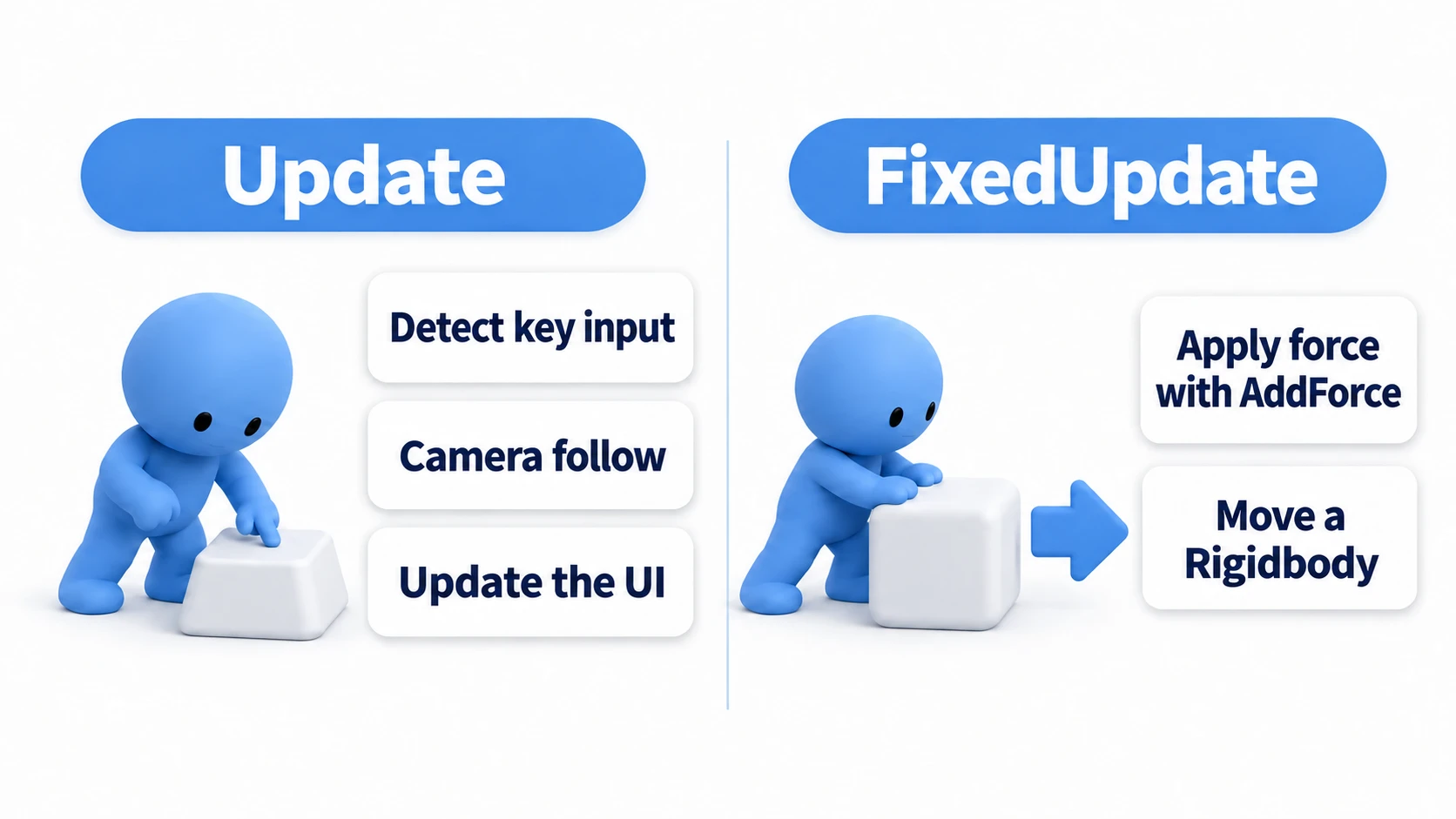
This timing difference clearly separates their uses. The diagram below maps them to real development scenarios. Remember it as: "anything the player sees goes in Update, anything handed to the physics engine goes in FixedUpdate."
Primary Uses for Update()
Suitable for processing that may change state each frame without strict time constraints. Update synchronizes with frame rendering, making it ideal for visual processing and input detection.
- Input handling: Check player input every frame with
Keyboard.current(orInput.GetKey()with the old Input Manager), etc. - Character movement (without physics): Simple movement using
transform.Translate(). - Timers and cooldowns
- UI updates
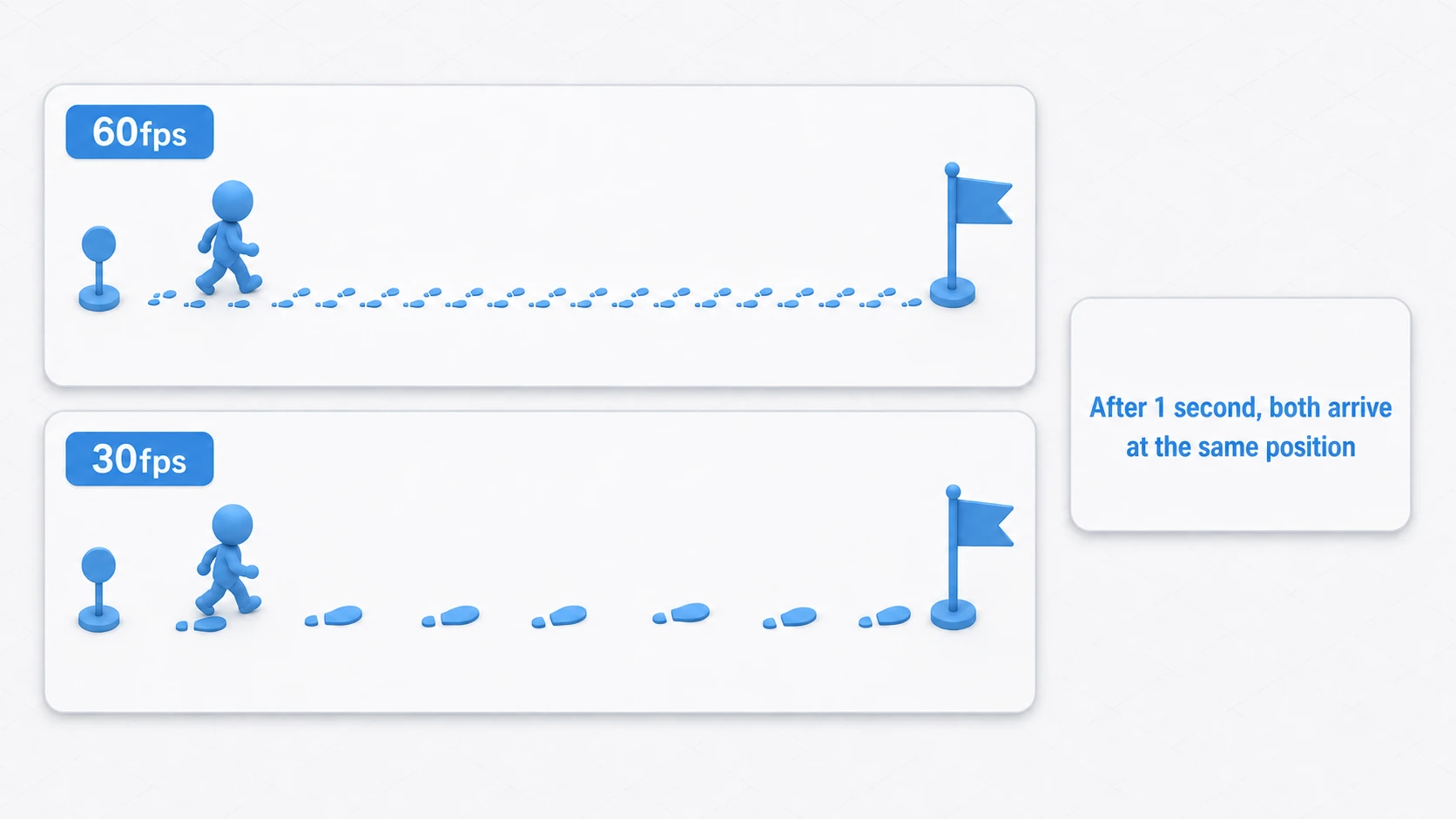
When performing movement in Update, never forget to multiply by Time.deltaTime. Time.deltaTime represents the time elapsed since the previous frame. Multiplying your movement amount by it keeps speed consistent even when the frame rate fluctuates.
Think of it as "automatic stride adjustment." At high fps, where frames are finely sliced, you take many small steps; at low fps, where frames are coarse, you take fewer big steps—and after one second, both arrive at exactly the same position.
using UnityEngine;
using UnityEngine.InputSystem;

public class SimplePlayerMovement : MonoBehaviour
{
    public float speed = 5f;

    void Update()
    {
        // Get input (D = +1, A = -1)
        var kb = Keyboard.current;
        float horizontal = 0f;
        if (kb != null && kb.dKey.isPressed) horizontal += 1f;
        if (kb != null && kb.aKey.isPressed) horizontal -= 1f;

        // Multiply by Time.deltaTime for frame-rate-independent movement
        transform.Translate(Vector3.right * horizontal * speed * Time.deltaTime);
    }
}
Primary Uses for FixedUpdate()
Because the execution interval is guaranteed, anything you hand to the physics engine—applying forces or changing velocity on a Rigidbody—belongs in FixedUpdate(). Unity's physics engine (PhysX) runs its update step in sync with FixedUpdate() timing.
- Applying force to a
Rigidbody: Add force withrb.AddForce()or torque withrb.AddTorque(). - Changing
Rigidbodyvelocity: Directly modifyrb.linearVelocity. - Physics-based character controllers
Note: The velocity property was renamed from
velocitytolinearVelocityin Unity 6 (Unity 2022 LTS still usesvelocity). When older articles or sample code userb.velocity, read it asrb.linearVelocity(the old name triggers deprecation warnings).
If you continuously apply force to a Rigidbody in Update(), frame rate fluctuation changes how many times force is applied, resulting in unstable object movement. With FixedUpdate(), force is applied at constant intervals, giving you reproducible, stable physics behavior.
One crucial detail ties back to the earlier note: read input in Update(), store it in a variable, and use that stored value in FixedUpdate(). This "read in Update → apply in FixedUpdate" pattern is the standard shape for any physics-driven character. When you pass a "pressed this instant" input such as a jump this way, don't assign jumpPressed = wasItPressed; every frame. The next Update overwrites it with false, and if no FixedUpdate ran in between, the input is lost. Set it to true only when pressed, and set it back to false after FixedUpdate uses it.
using UnityEngine;
using UnityEngine.InputSystem;

[RequireComponent(typeof(Rigidbody))]
public class PhysicsPlayerMovement : MonoBehaviour
{
    public float moveForce = 50f;
    private Rigidbody rb;
    private float horizontal;

    void Awake()
    {
        rb = GetComponent<Rigidbody>();
    }

    void Update()
    {
        // Read input in Update and store it (D = +1, A = -1)
        var kb = Keyboard.current;
        horizontal = 0f;
        if (kb != null && kb.dKey.isPressed) horizontal += 1f;
        if (kb != null && kb.aKey.isPressed) horizontal -= 1f;
    }

    void FixedUpdate()
    {
        // Use the stored input, applying force in sync with the physics step
        rb.AddForce(Vector3.right * horizontal * moveForce);
    }
}
Note: Inside
FixedUpdate(), readingTime.deltaTimereturns the fixed timestep (the same value asTime.fixedDeltaTime)—that's by design. You don't multiply by it when handing work to the physics engine viaAddForce()or velocity assignments, but if you integrate positions or velocities yourself insideFixedUpdate(), you do useTime.deltaTime. "Never use deltaTime in FixedUpdate" is not quite accurate—keep the distinction in mind.
Bonus: Good to Know for Later
Once you've mastered the Update/FixedUpdate split, these topics are the natural next step.
- Where they fit in the overall lifecycle:
UpdateandFixedUpdateare just one part of the bigger flow—Awake→Start→ the per-frame loop. The full picture is diagrammed in the lifecycle article. - A deeper understanding of Rigidbody itself: How forces are applied (the different
ForceModeoptions) and the Interpolate setting are essential for stable physics behavior. The Rigidbody article covers them in detail. LateUpdate, the third update function: There's alsoLateUpdate(), called after allUpdatecalls finish—the go-to place for camera follow logic. It's covered in the lifecycle article as well.
Summary
Proper use of Update() vs FixedUpdate() is crucial for Unity performance and behavior stability. Keep these rules in mind:
Update() | FixedUpdate() | |
|---|---|---|
| Timing | Per frame (variable) | Fixed interval (constant) |
| Primary Use | Input, non-physics movement, game logic | Physics with Rigidbody |
| Note | Use Time.deltaTime | No multiplication needed for physics APIs like AddForce (deltaTime returns the fixed step) |
"Physics in FixedUpdate, everything else in Update—and read input in Update, use it in FixedUpdate."
Remember this simple principle to prevent many problems. Understand each function's role and develop the habit of writing code in the appropriate place.