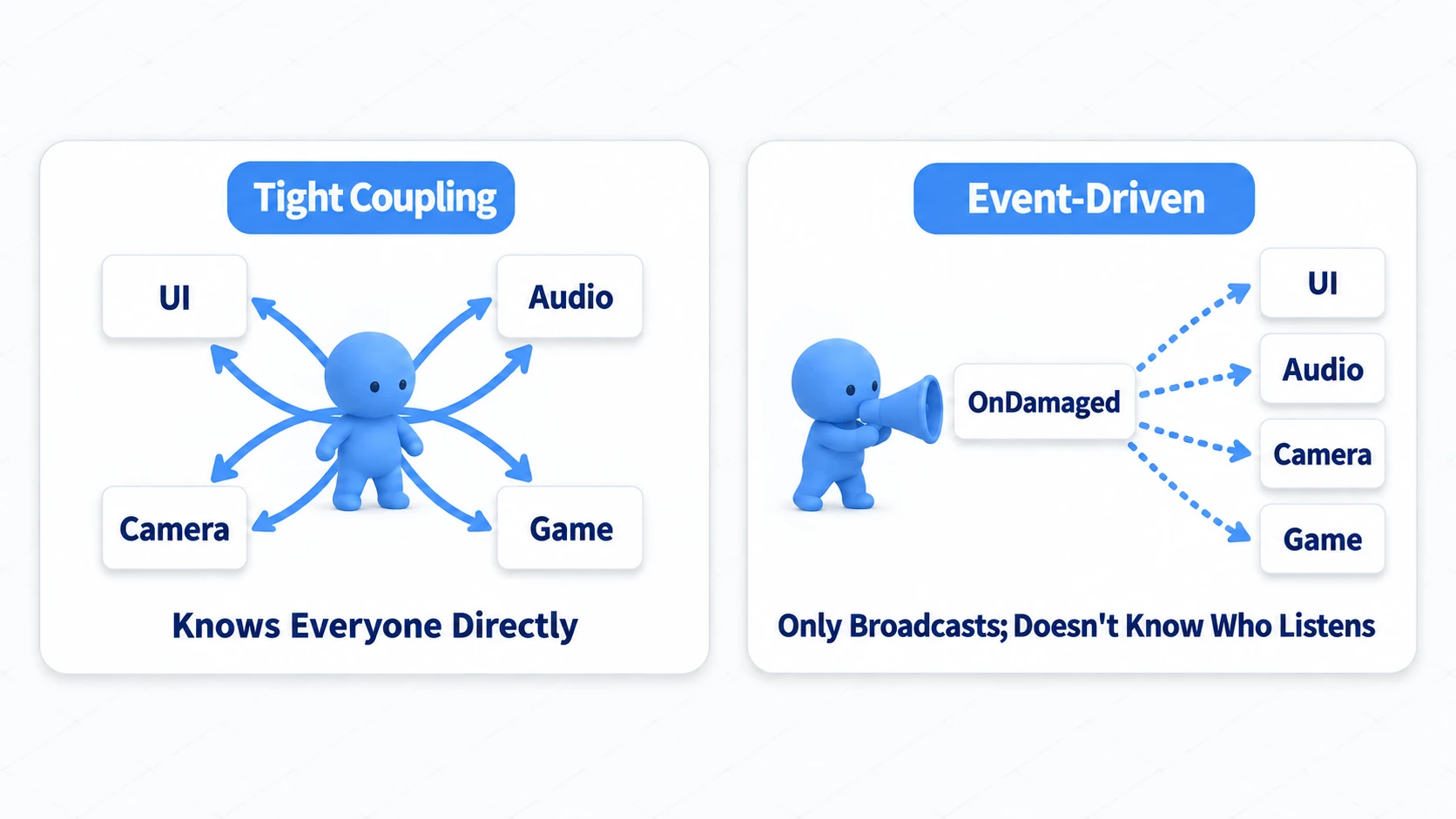
The player takes damage, so you update the health bar, play a scream, shake the camera, and check for game over—and before you know it, your player script knows about UIManager, AudioManager, CameraManager, and everything else. Congratulations: you've built the kind of code where fixing one thing breaks everything.
This "everyone knows everyone" situation (tight coupling) is exactly what event-driven design with C# delegates and events is built to break. The player just shouts "I took damage!"—it doesn't need to know who's listening. In this article, we'll walk through how that works and how to implement it.

What You'll Learn
- The 3 problems with "tightly coupled" code full of direct references
- How delegates ("references to methods") and events ("safe wrappers") relate
- Why the golden rule is: subscribe in
OnEnable, unsubscribe inOnDisable- A loosely coupled implementation example using a health system
Tested with: Unity 6 (6000.x)
Why Direct References Fall Apart
The most naive implementation has the player script directly reference UIManager, AudioManager, CameraManager, GameManager, and so on, calling each of their methods. But this approach (tight coupling) causes plenty of problems.
- Tangled dependencies: The player script ends up depending on many systems—UI, audio, and more—that it has no business knowing about.
- Poor extensibility: Want to add "notify the achievement system"? You now have to modify the player script.
- Poor reusability: Try reusing this player setup for an enemy character, and you drag along UI and camera dependencies the enemy doesn't need—reuse becomes anything but simple.
The core idea of event-driven design is to completely separate "the side that announces something (an event) happened" from "the side that wants to do something when that event happens."
What Is a Delegate?
A delegate is, in a nutshell, "a type that can hold references to methods." With delegates, you can treat methods like variables—passing them to other methods or storing them in class fields.
// First, define the delegate "type"
// This defines "a method that returns void and takes one int parameter"
public delegate void MyDelegate(int number);

public class DelegateExample
{
    public void Run()
    {
        // Assign a method to a delegate variable
        MyDelegate myDelegate = PrintNumber;
        myDelegate += PrintDoubleNumber; // Multicast delegate: you can register multiple methods

        // Invoke the delegate (all registered methods are called)
        myDelegate(5);
        // Output:
        // Number: 5
        // Double Number: 10
    }

    void PrintNumber(int num) { Debug.Log($"Number: {num}"); }
    void PrintDoubleNumber(int num) { Debug.Log($"Double Number: {num * 2}"); }
}
Note: In real projects, instead of defining
delegatetypes by hand each time, most developers use the generic delegate types built into .NET:Action(no return value) andFunc(with a return value).Action<int>means "a method that takes one int parameter and returns nothing."
What Is an Event?
Delegates are powerful, but a public delegate variable can be invoked freely from outside the class (myDelegate(5)) or have all its registered methods wiped out (myDelegate = null)—the encapsulation is weak.
An event wraps a delegate and restricts outside code to only registering (+=) and unregistering (-=) methods. Raising (invoking) the event can only be done from inside the class that declared it. This gives you a safe event notification pattern.
A Practical Unity Example: A Loosely Coupled Health System
Let's implement a player health system using event-driven design. Before the code, get the big picture from this diagram.
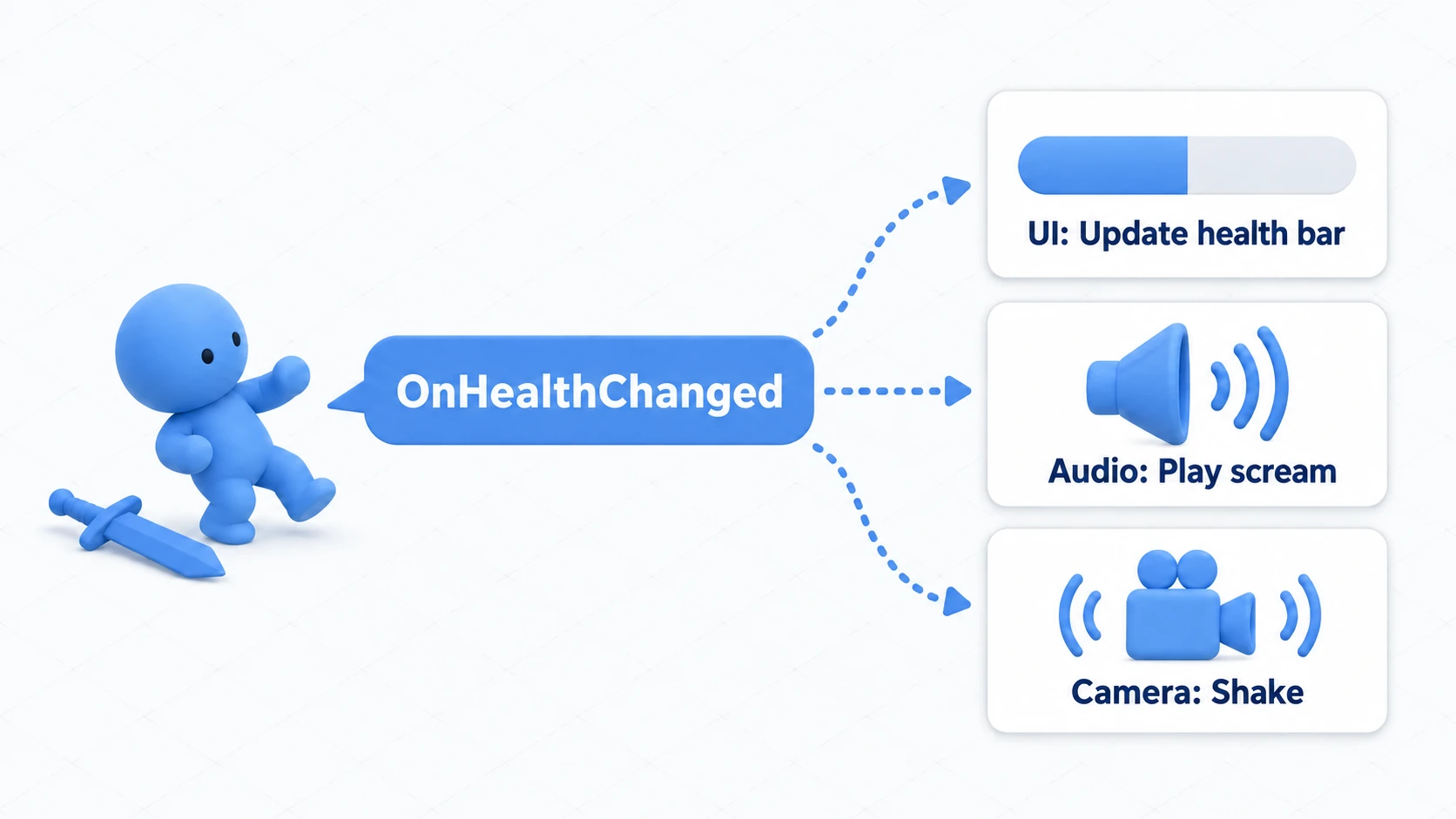
The player simply raises (shouts) an OnHealthChanged event. The UI, audio, and camera that subscribe to it receive the notification and each do their own job. Now let's turn this shape into code.
1. The event publisher (PlayerHealth.cs)
The PlayerHealth class announces via events that damage was taken and that health reached zero. This class knows absolutely nothing about UI or audio.
using System;
using UnityEngine;

public class PlayerHealth : MonoBehaviour
{
    // Event definitions
    // Action<T> is a handy delegate type built into .NET

    // Instance event: announces "THIS player's" health changes
    public event Action<int, int> OnHealthChanged; // Args: current health, max health

    // Static event: reserved for "game-wide signals"
    public static event Action OnPlayerDied;

    public int maxHealth = 100;
    private int currentHealth;

    private void Start()
    {
        currentHealth = maxHealth;
    }

    public void TakeDamage(int damage)
    {
        currentHealth -= damage;
        if (currentHealth < 0) currentHealth = 0;

        // Raise the event (subscribers, if any, get notified)
        // ?.Invoke() is the safe way to call it, preventing NullReferenceException when there are no subscribers
        OnHealthChanged?.Invoke(currentHealth, maxHealth);

        if (currentHealth <= 0)
        {
            OnPlayerDied?.Invoke();
        }
    }
}
2. The event subscribers (UIManager.cs, AudioManager.cs)
UIManager and AudioManager subscribe to PlayerHealth's events and run their own logic when notified.
// UIManager.cs
using UnityEngine;
using TMPro; // Required for TextMeshPro

public class UIManager : MonoBehaviour
{
    [SerializeField] private PlayerHealth player; // The one and only reference to what we watch
    public TextMeshProUGUI healthText;

    private void OnEnable() // When the object becomes enabled
    {
        // Subscribe to the player's event
        player.OnHealthChanged += UpdateHealthUI;
    }

    private void OnDisable() // When the object becomes disabled
    {
        // Always unsubscribe (prevents lingering references to destroyed objects)
        player.OnHealthChanged -= UpdateHealthUI;
    }

    private void UpdateHealthUI(int current, int max)
    {
        healthText.text = $"HP: {current} / {max}";
    }
}

// AudioManager.cs
using UnityEngine;

public class AudioManager : MonoBehaviour
{
    private void OnEnable()
    {
        PlayerHealth.OnPlayerDied += PlayDeathSound;
    }

    private void OnDisable()
    {
        PlayerHealth.OnPlayerDied -= PlayDeathSound;
    }

    private void PlayDeathSound()
    {
        // Play the death sound here
    }
}
Notice that we're using two kinds of events. Health changes are about which specific object they belong to, so OnHealthChanged is an instance event — the subscriber holds exactly one reference to what it watches. Meanwhile, a game-wide signal like OnPlayerDied doesn't need to distinguish who sent it, so it's a static event you can subscribe to directly through the class name. Why this split matters becomes crystal clear in the next hands-on section, where we scale up to three enemies.
The Golden Rule: Subscribe in OnEnable, Unsubscribe in OnDisable
If you subscribe (+=) and forget to unsubscribe (-=), the event keeps holding a reference even after the object is destroyed. With static events, that reference survives scene changes too, becoming a breeding ground for hard-to-find bugs: methods on destroyed objects get called and throw errors once they touch Unity objects, and the publisher keeps holding the subscribers, so they never leave memory.
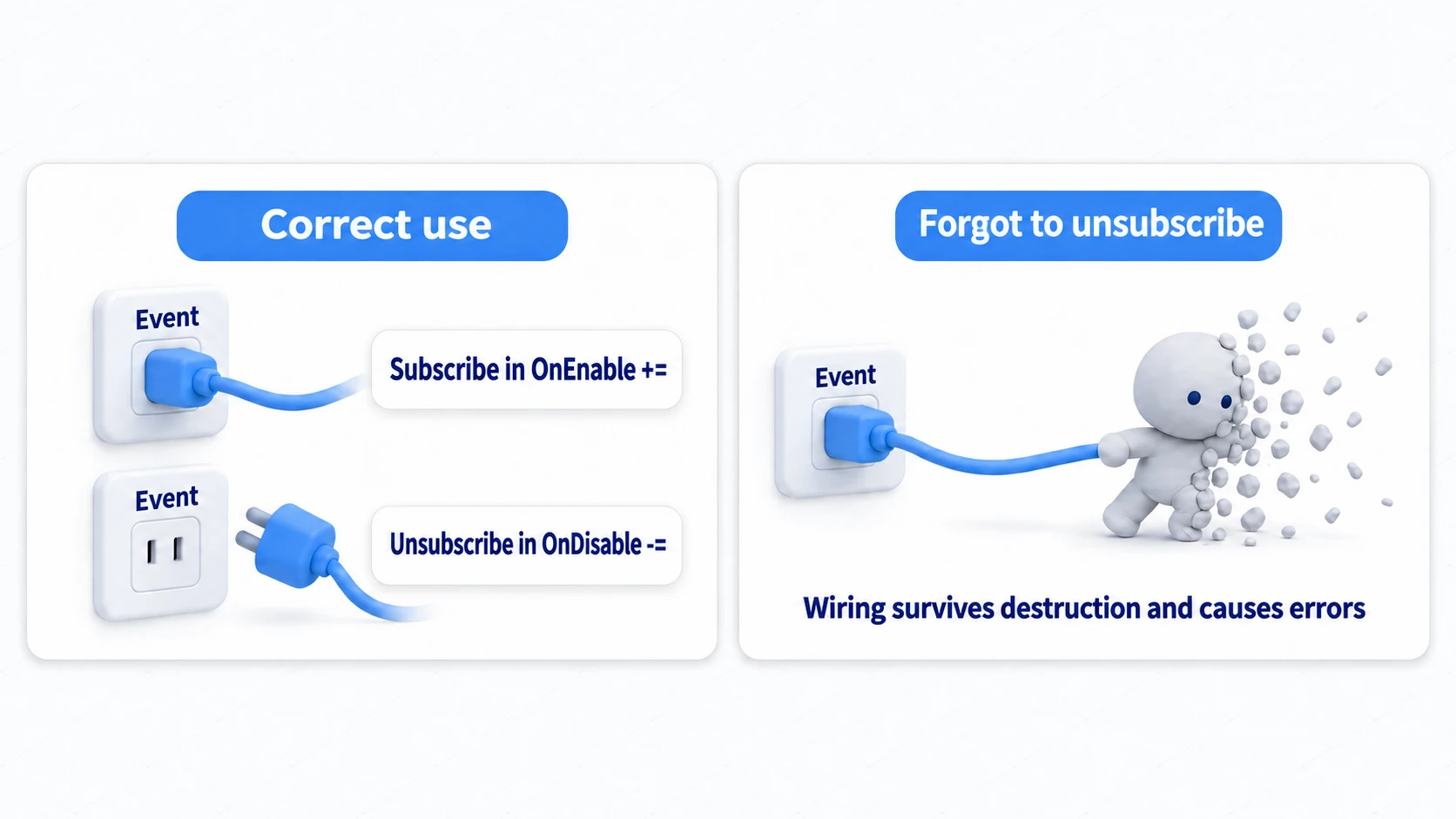
Putting the -= in OnDestroy instead needs care too. Update stops when you turn a component off, but a C# event keeps calling a subscription that's still in place, even while the object is hidden.
Make it a habit to write them as a pair: "If you += in OnEnable, always -= in OnDisable."
Hands-On: Health Bars That Don't Cross Wires with Three Enemies
Instance events prove their worth the moment multiple objects of the same class coexist. Three enemies lined up in an ARPG, dozens of units in an RTS, MMO-style floating HP bars — whether you can prevent "I attacked enemy B, so why did everyone's bar go down?" comes down to how you hold your events.
Setup: Give your enemy prefab an EnemyHealth plus an overhead Slider with an EnemyHealthBar, and place three of them (A, B, C) in the scene. Put the overhead Slider on a Canvas that's a child of the enemy, set the Canvas's Render Mode to World Space and its Scale to (0.01, 0.01, 0.01) (at 1 it's bigger than the room), and drag the parent enemy into the bar's Owner field and the Slider into its Slider field.
// File name: EnemyHealth.cs — attach to each enemy
using System;
using UnityEngine;

public class EnemyHealth : MonoBehaviour
{
    // Instance event: announces health changes for THIS enemy only
    public event Action<int, int> OnHealthChanged;

    public int maxHealth = 30;
    private int currentHealth;

    void Awake() { currentHealth = maxHealth; }

    public void TakeDamage(int damage)
    {
        currentHealth = Mathf.Max(currentHealth - damage, 0);
        OnHealthChanged?.Invoke(currentHealth, maxHealth);
    }

    [ContextMenu("Deal 10 damage")] // For testing. Callable from the Inspector menu
    void Damage10() { TakeDamage(10); }
}
// File name: EnemyHealthBar.cs — attach to each enemy's overhead HP bar
using UnityEngine;
using UnityEngine.UI;

public class EnemyHealthBar : MonoBehaviour
{
    [SerializeField] private EnemyHealth owner; // My one master. Watch this one only
    [SerializeField] private Slider slider;

    void OnEnable()  { owner.OnHealthChanged += UpdateBar; }
    void OnDisable() { owner.OnHealthChanged -= UpdateBar; }

    void UpdateBar(int current, int max)
    {
        slider.value = (float)current / max;
    }
}
Press Play, select enemy B (the one in the middle) in the Hierarchy, and choose Deal 10 damage from the "⋮" menu at the top right of its EnemyHealth in the Inspector. B's bar drops to about two-thirds, while A and C don't budge. A single owner reference automatically routes every notification to the right destination — that's the payoff of instance events.
If you made OnHealthChanged a static event instead, attacking enemy B would make all three bars react at once. A static event exists once per class, so it can't tell "whose health is this about?" Trying to fix that means adding the sender as an argument and filtering on the subscriber side — defeating the whole point. Keep the decision rule simple:
- The sender's identity matters (getting hit, HP, selection state) → instance event
- A game-wide signal (Game Over, pause, stage clear) → a static event is the easy choice (an instance event on a
GameManagerworks too), or an event channel once it needs to span scenes
Think of a hit on enemy B as a letter dropped in B's mailbox, and Game Over as an announcement over the school PA. Broadcast a letter over the PA, and everyone reads it as if it were addressed to them, just like the three bars.
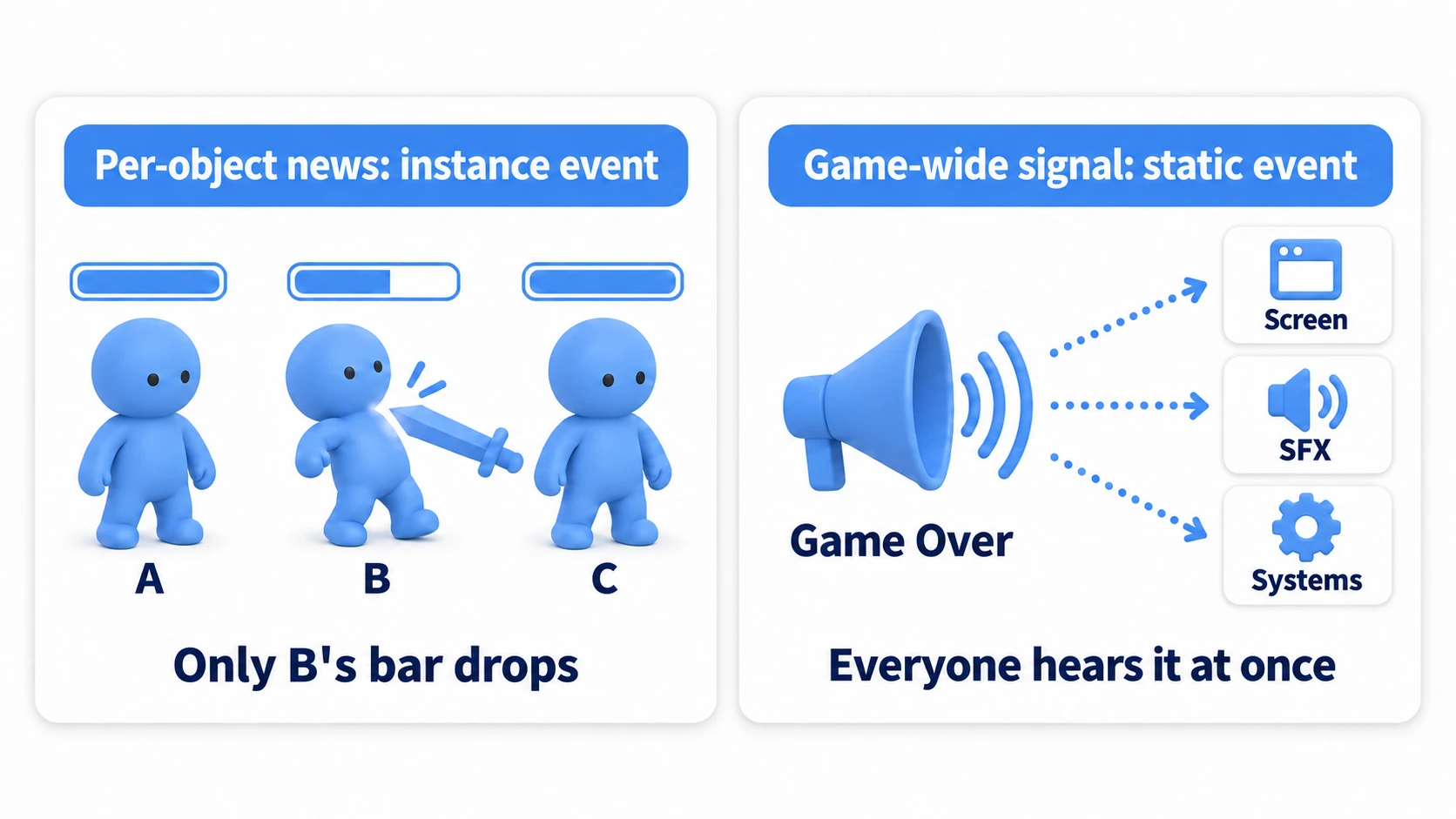
The final check is simple: does what you see on screen match "who should this news reach?" Hit enemy B and only B's bar moves; only a game-wide signal like Game Over fans out to UI, audio, and camera at once. Once you're choosing between instance and static events by that feel, event design is your tool now.
Bonus: Good to Know for Later
Once you're comfortable with event-driven design, these topics come into view next.
- When to use UnityEvent instead: There's also
UnityEvent, which lets you wire up subscriptions in the Inspector (the same mechanism as a Button'sOnClick). A good rule of thumb: use UnityEvent for connections designers want to rewire, and C# events for notifications inside code. - The static event reset problem:
staticevents don't go away when you switch scenes. If you unsubscribe inOnDisable, no stale subscriptions remain, but if Domain Reload is turned off in Enter Play Mode Settings (the default for new Unity 6.6 projects), any subscription you forgot to remove carries over into the next Play session. As your project grows, the event channel pattern—using ScriptableObjects as event containers—is a strong option. We cover it as a follow-up to this article in the event channel design article. - Lambda subscriptions are hard to remove later: If you subscribe with something like
owner.OnHealthChanged += (c, m) => slider.value = (float)c / m;, an identical-looking-=usually won't remove it, because there's no guarantee that two separately written lambdas count as the same one. Use a method name for any subscription you'll need to remove. - Events before hunting for objects: Designs that hunt for other objects with
GetComponentorFindFirstObjectByTypeare a source of tight coupling. Brush up on the fundamentals of getting references in the GetComponent article.
Summary
Event-driven design is a fundamental yet powerful technique for writing clean, scalable code in Unity.
- Tightly coupled direct references make code hard to modify and reuse.
- A delegate is a "reference to a method"; an event is a "safe wrapper around a delegate."
- The publisher only announces "what happened." It doesn't need to know the subscribers exist.
- Subscribers subscribe (
+=) to the events they care about and always unsubscribe (-=) inOnDisable. - With this pattern, each system works independently, giving you a loosely coupled, highly extensible design.
Before hunting down other objects and calling them directly, ask yourself: "Could this be an event notification instead?" That habit will lift your code to a more professional level.