In the events and delegates article, we learned that static event lets you decouple objects from each other. But once you use it in earnest, the next wall appears: subscribers are hard-coding the class name with PlayerHealth.OnHealthChanged, and after a scene reload, stale subscriptions linger and events fire twice. The loose coupling you worked for is only half achieved.
The next step is the event channel pattern: turning the event itself into a ScriptableObject asset. In this article, we'll look at exactly where static events hit their limits and what changes when you channel-ify them, with full implementation code.
What You'll Learn
- The two limitations of
static event(class-name dependency and subscriptions that survive scene loads)- The event channel concept: treating events as assets
- Why ScriptableObject is the ideal container for events (the nature of SOs)
- How to implement and wire up
VoidEventChannelSOand typed channels- Design cases you can apply to your own project, like coin collection and pausing
- How to spot operations that should NOT be channeled (e.g., damage with a known target)
Tested with: Unity 6 (6000.x)
- The Two Limits of Static Events
- What Is an Event Channel?
- Why Is ScriptableObject the Best Fit?
- Implementation: Channel SO, Publishing, and Subscribing
- Design Cases: Applying This to Your Own Project
- Choosing Between the Three Event Approaches
- Caution: Don't Channel Operations with a Known Target
- Bonus: Good to Know for Later
- Summary
The Two Limits of Static Events
First, let's pin down exactly where the static event approach falls short. Compare the two diagrams below.
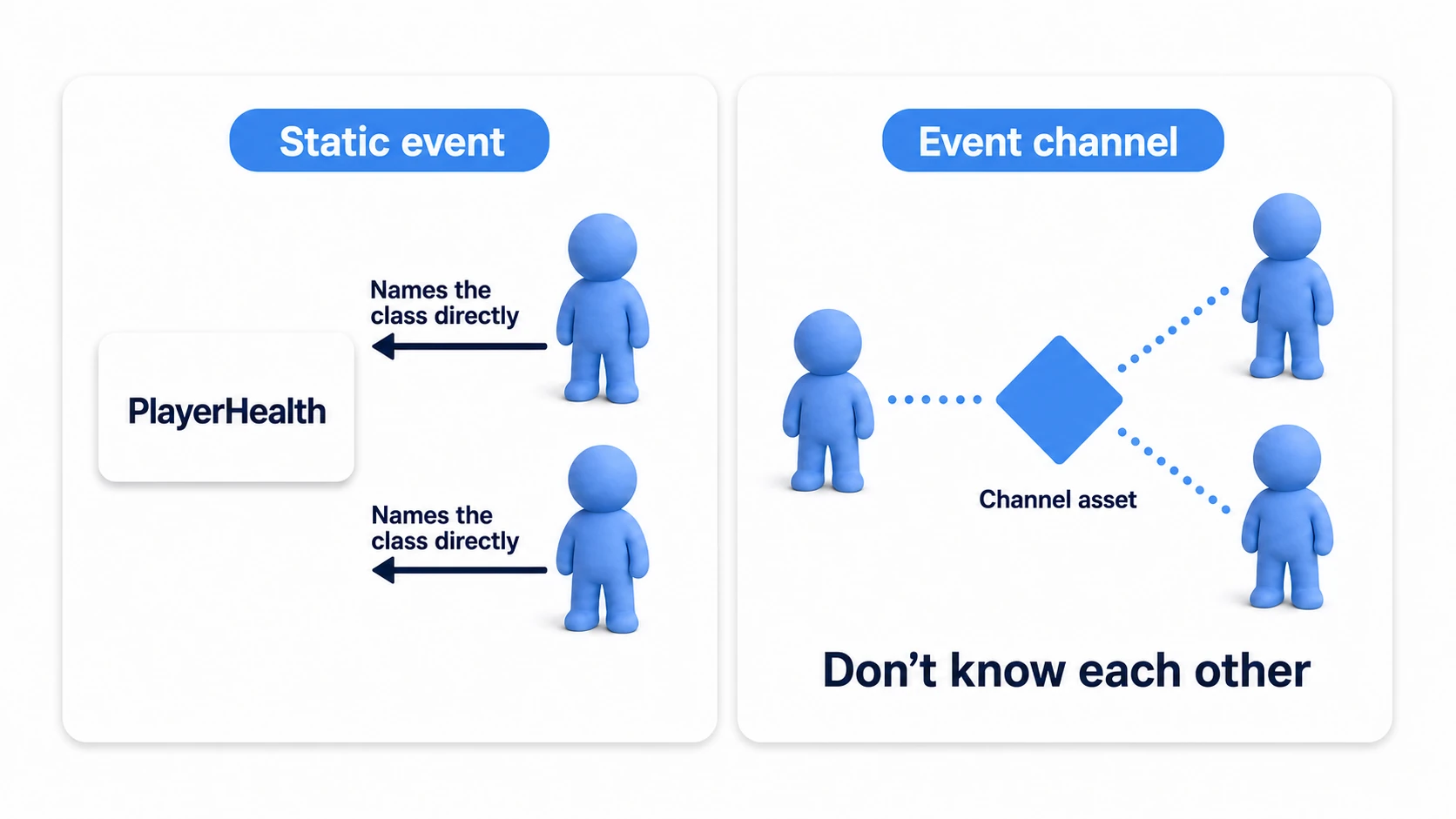
Limit 1: The class-name dependency remains
Subscribers write PlayerHealth.OnHealthChanged += .... That means the UI knows "the publisher of the health event is the PlayerHealth class." The moment you want to swap the publisher for a boss-specific BossHealth, or replace it with a test dummy, you have to rewrite every subscriber.
Limit 2: Subscriptions survive scene loads
A static event lives as long as its class, so it doesn't go away when you reload a scene. Forget to unsubscribe in even one place and references to destroyed objects stick around, producing hard-to-find bugs like "events fire twice after retrying" or "errors appear but I can't tell where they come from."
What Is an Event Channel?
The event channel pattern solves both limits by making the event an independent asset instead of something a class owns.
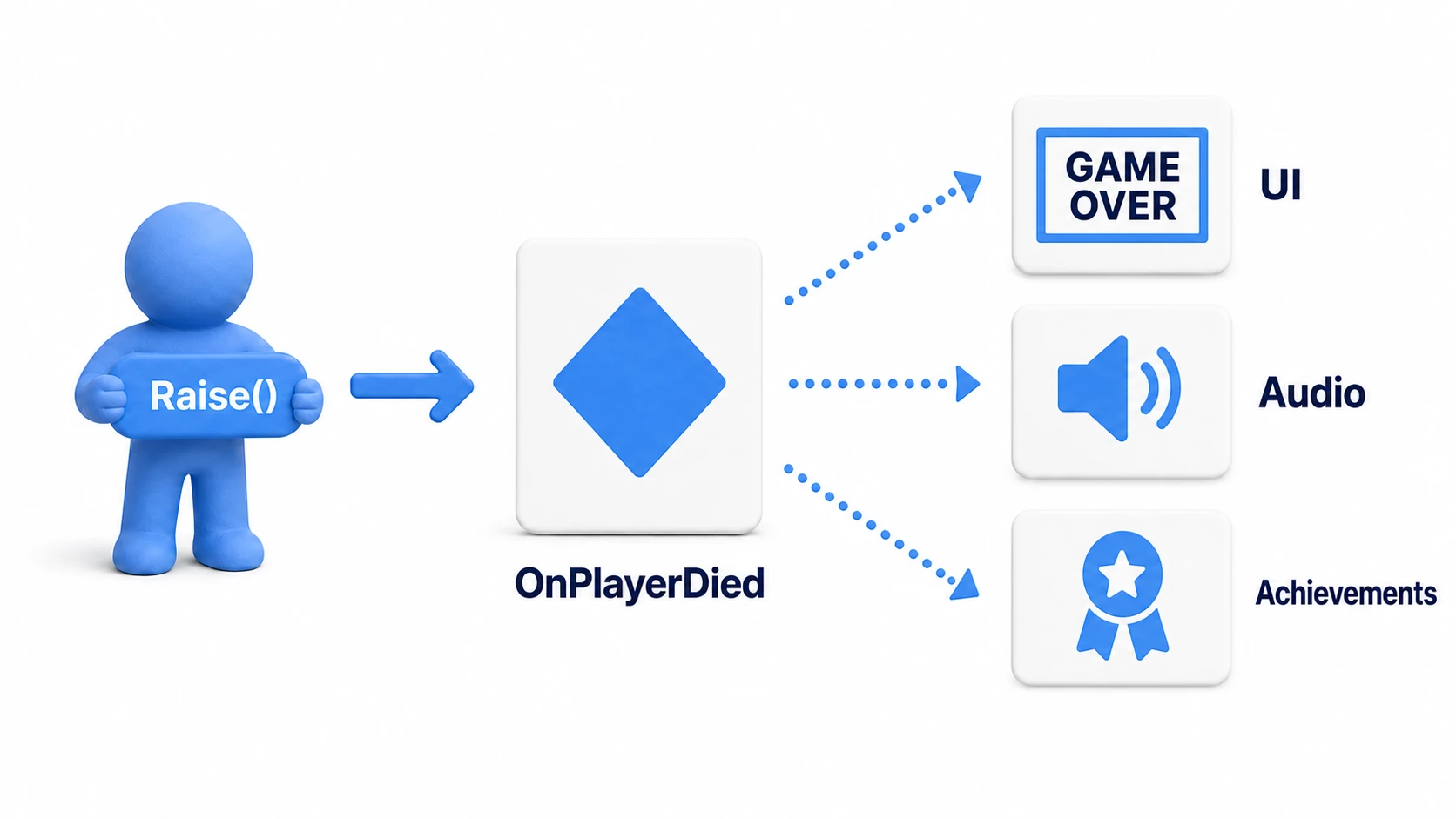
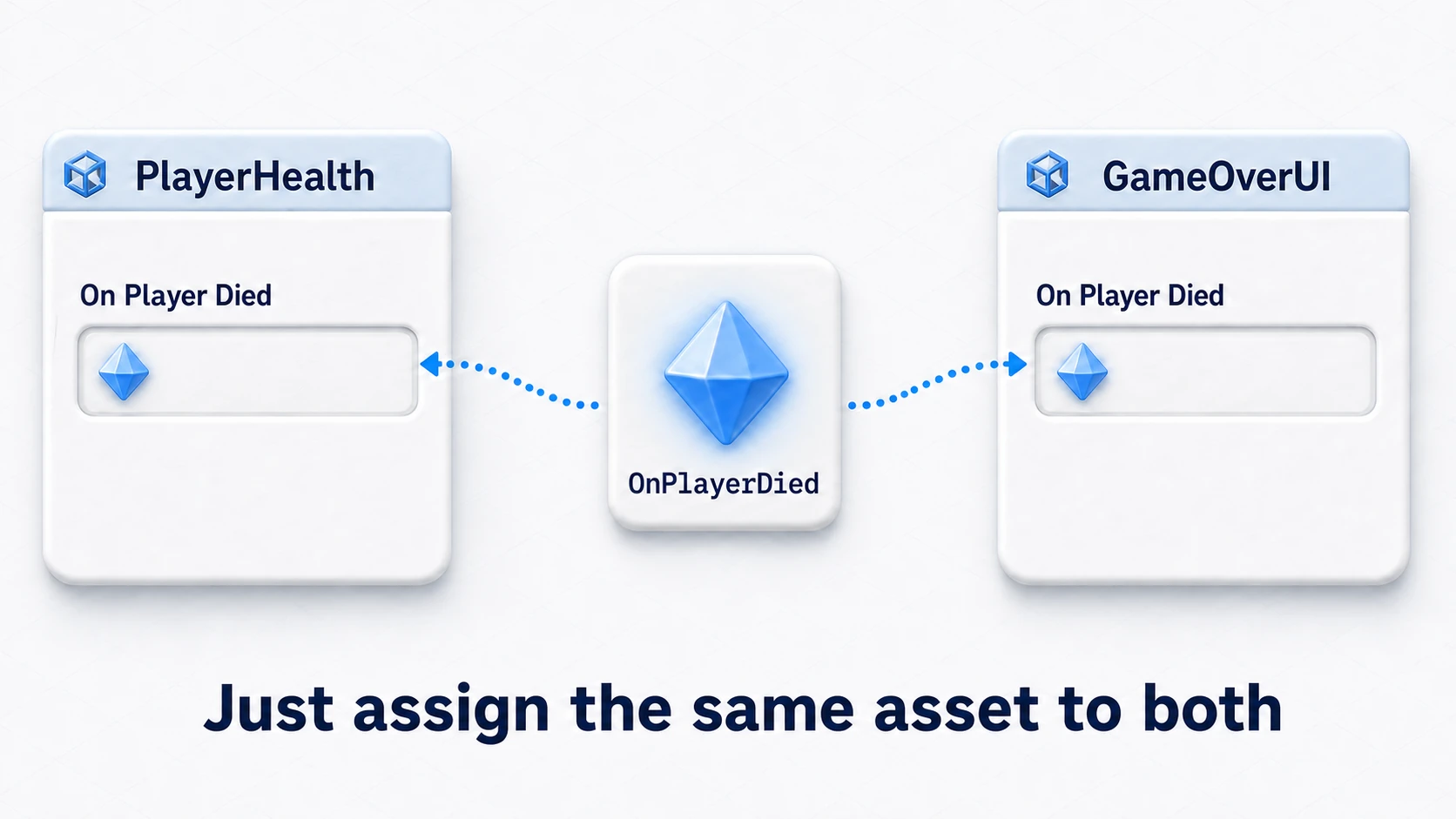
You create an event asset (the channel) as a ScriptableObject and place it in your project as a file like OnPlayerDied.asset. The publisher simply asks this asset to fire; subscribers simply listen to this asset. Neither side knows the other exists at all.
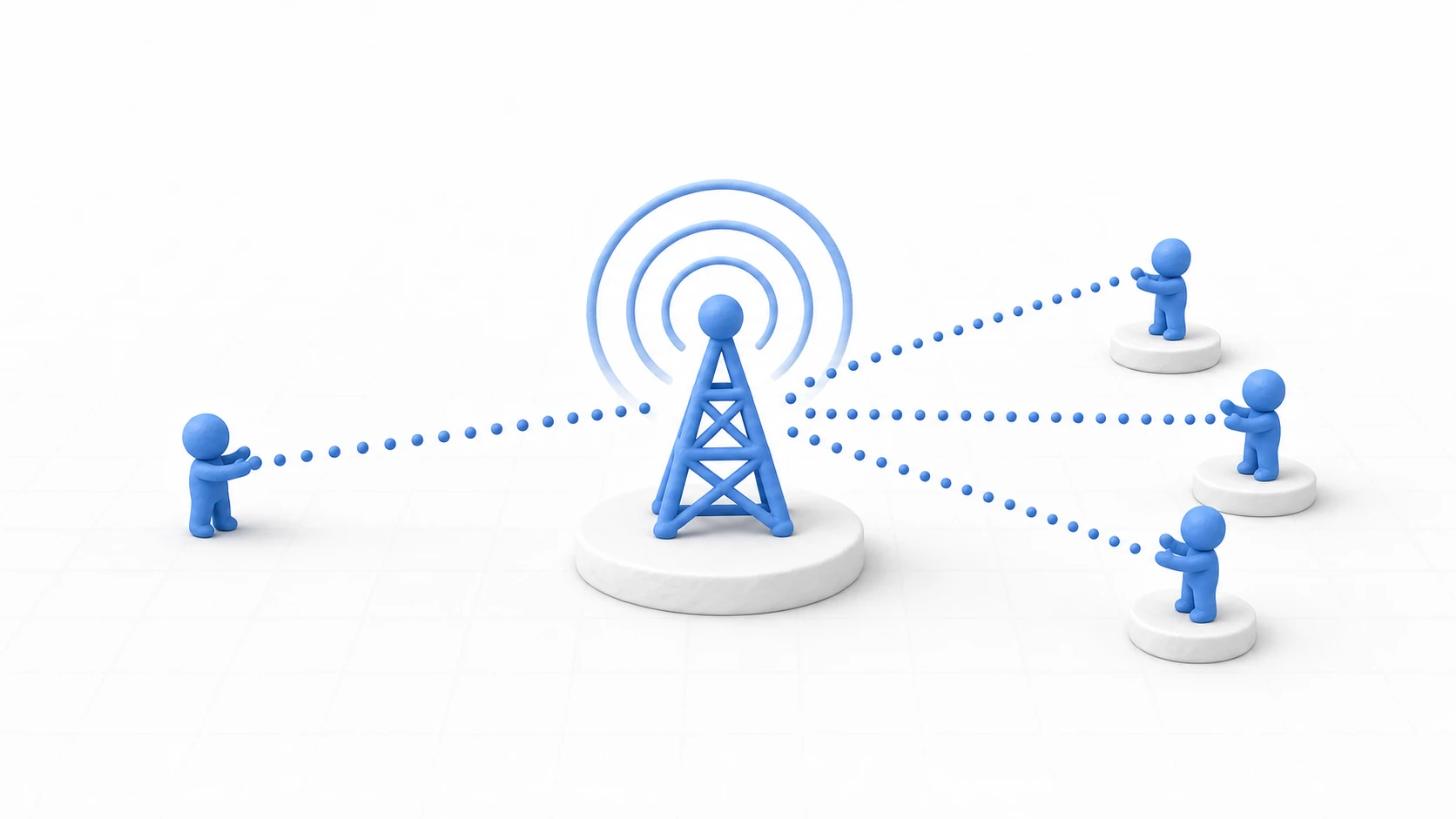
Think of it like radio: a static event is like going to listen to a specific person (a class) directly, while a channel is like tuning into a frequency (an asset)—whoever is broadcasting, you'll hear it. Swap out the broadcaster, and listeners don't have to change a thing.
Why Is ScriptableObject the Best Fit?
You could build an "event container" with a plain C# class, so why ScriptableObject? This is the heart of the pattern. The key lies in the following properties of SOs.
Property 1: It lives in the project, not in a scene
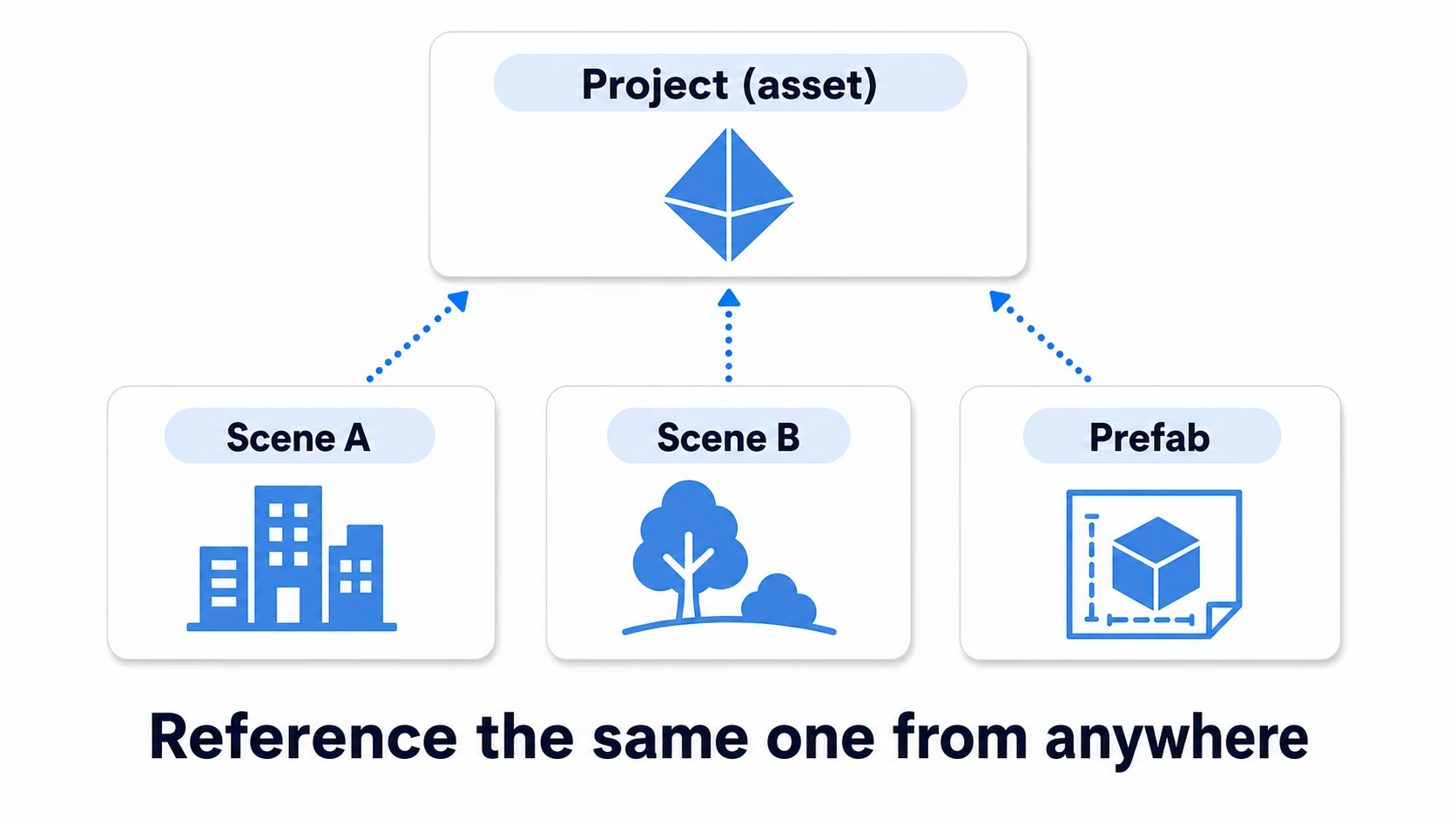
A MonoBehaviour sits on a GameObject inside a scene, so it gets destroyed along with the scene. A ScriptableObject, on the other hand, is an asset in your project, independent of any scene. No matter how many scenes you load and unload, the channel—your relay point—stays right where it is. As a hand-off point for events, there's no more stable footing.
Property 2: Everyone can reference the same single instance
Assign the asset to an Inspector slot, and objects in Scene A and objects in Scene B all point at the same in-memory instance. That's why cross-scene notifications just work, with no special machinery. Try this with a plain C# class and you're back to the "how do I distribute the shared instance?" problem—which drags you right back to statics and singletons.
Property 3: Prefabs can reference it
This is the one that matters most in practice. Prefabs cannot pre-reference objects inside a scene (the Inspector won't even let you assign them). So if a prefab wanted to notify a UI element in the scene, your only option used to be hunting for it with Find-style calls after instantiation. But a reference to an asset can be baked into a prefab. Route it through a channel, and "prefab notifies someone in the scene" becomes writable with zero searching.
Note: ScriptableObject is usually introduced as a "data container" (config values, item data, and so on). We cover those basics in the ScriptableObject article. The event channel takes that same "asset independent of scenes" nature and applies it to notifications instead of data.
Implementation: Channel SO, Publishing, and Subscribing
The implementation is surprisingly simple. Let's start with a "no arguments" event channel.
1. The channel itself (VoidEventChannelSO.cs)
using UnityEngine;
using UnityEngine.Events;

// Channel asset for "no-argument events"
[CreateAssetMenu(menuName = "Events/Void Event Channel")]
public class VoidEventChannelSO : ScriptableObject
{
    // The event subscribers += / -= to
    public event UnityAction OnEventRaised;

    // The method publishers call
    public void Raise()
    {
        OnEventRaised?.Invoke();
    }
}
Once created, right-click in the Project window and choose "Events > Void Event Channel" to create an asset (e.g., OnPlayerDied.asset). Each asset is one broadcast station.
2. The publisher (PlayerHealth.cs)
using UnityEngine;

public class PlayerHealth : MonoBehaviour
{
    // Assign the channel asset in the Inspector
    [SerializeField] private VoidEventChannelSO onPlayerDied;

    private int currentHealth = 100;

    public void TakeDamage(int damage)
    {
        currentHealth -= damage;

        if (currentHealth <= 0)
        {
            // Fire at the "channel," not at a class name
            onPlayerDied.Raise();
        }
    }
}
3. The subscriber (GameOverUI.cs)
using UnityEngine;

public class GameOverUI : MonoBehaviour
{
    // Assign the same channel asset in the Inspector
    [SerializeField] private VoidEventChannelSO onPlayerDied;

    private void OnEnable()
    {
        onPlayerDied.OnEventRaised += ShowGameOverScreen;
    }

    private void OnDisable()
    {
        // Same iron rule as static events: always unsubscribe in OnDisable
        onPlayerDied.OnEventRaised -= ShowGameOverScreen;
    }

    private void ShowGameOverScreen()
    {
        // Show the game over screen
    }
}
All that's left is to drag and drop the same channel asset into both the publisher's and subscriber's Inspector slots, and the wiring is done. In code, PlayerHealth and GameOverUI never write each other's names even once.
When You Need to Pass a Value: Typed Channels
If you want to pass along a value like "current health," create a typed channel.
using UnityEngine;
using UnityEngine.Events;

// Event channel that passes a single int value
[CreateAssetMenu(menuName = "Events/Int Event Channel")]
public class IntEventChannelSO : ScriptableObject
{
    public event UnityAction<int> OnEventRaised;

    public void Raise(int value)
    {
        OnEventRaised?.Invoke(value);
    }
}
The standard approach is to create one channel class per type you need—float, string, and so on. A handful of channel classes for your most common types will cover almost every notification.
Note: A channel SO is an asset, so it also survives across scenes—meaning forgetting to unsubscribe is just as dangerous as with static events. The iron rule from the events and delegates article—always pair
+=inOnEnablewith-=inOnDisable—applies to channels exactly as written. Stick to that pair, and each subscriber will naturally detach viaOnDisablewhen its scene is torn down. If Domain Reload is turned off in Enter Play Mode Settings (the default for new Unity 6.6 projects), any subscription you forgot to remove carries over into the next Play session.
Design Cases: Applying This to Your Own Project
Beyond game-over notifications, here are two classic cases. Use them to build an intuition for "which events feel great to channel-ify."
Case 1: Coin Collection — Notifications from a Prefab
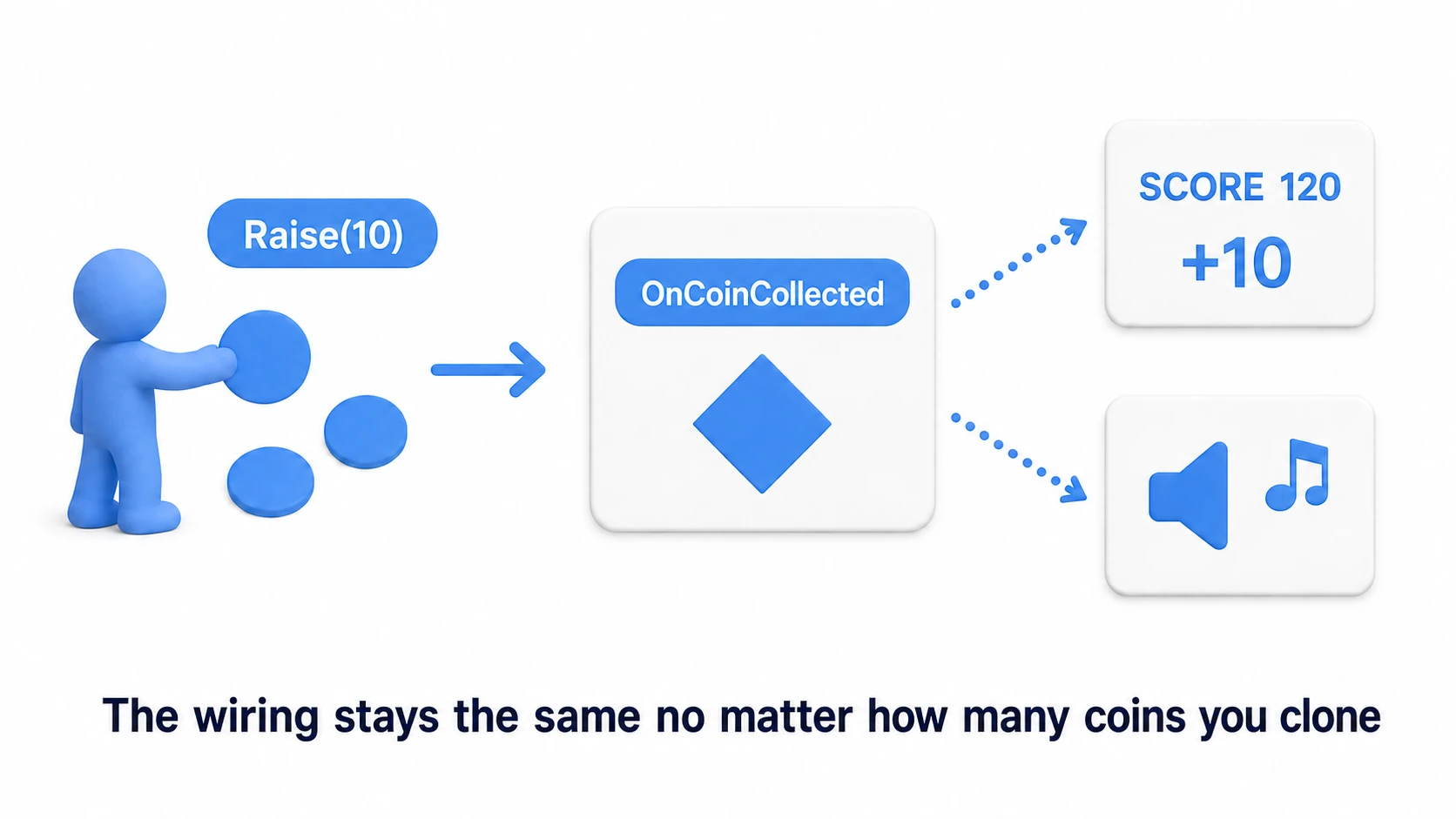
Coins are prefabs, duplicated by the dozens across a scene. Each coin can't reference the score UI directly (as noted earlier, prefabs can't reference scene objects), but a reference to a channel asset can be baked into the prefab.
using UnityEngine;

public class Coin : MonoBehaviour
{
    [SerializeField] private IntEventChannelSO onCoinCollected;
    [SerializeField] private int value = 10;

    private void OnTriggerEnter(Collider other)
    {
        if (!other.CompareTag("Player")) return;

        // Knows nothing about the score UI or SFX. Just pushes a value into the channel
        onCoinCollected.Raise(value);
        Destroy(gameObject);
    }
}
On the subscribing side you have the score UI (+= AddScore) and the sound effects (+= PlayCoinSE). Place 100 coins, add new coin types (silver, gold)—the wiring never grows. As long as they all Raise the same channel, nothing on the systems side changes (for OnTriggerEnter to be called, turn on Is Trigger on the coin's Collider and give the player a Rigidbody).
Case 2: Pause — One Action, Every System Reacts at Once
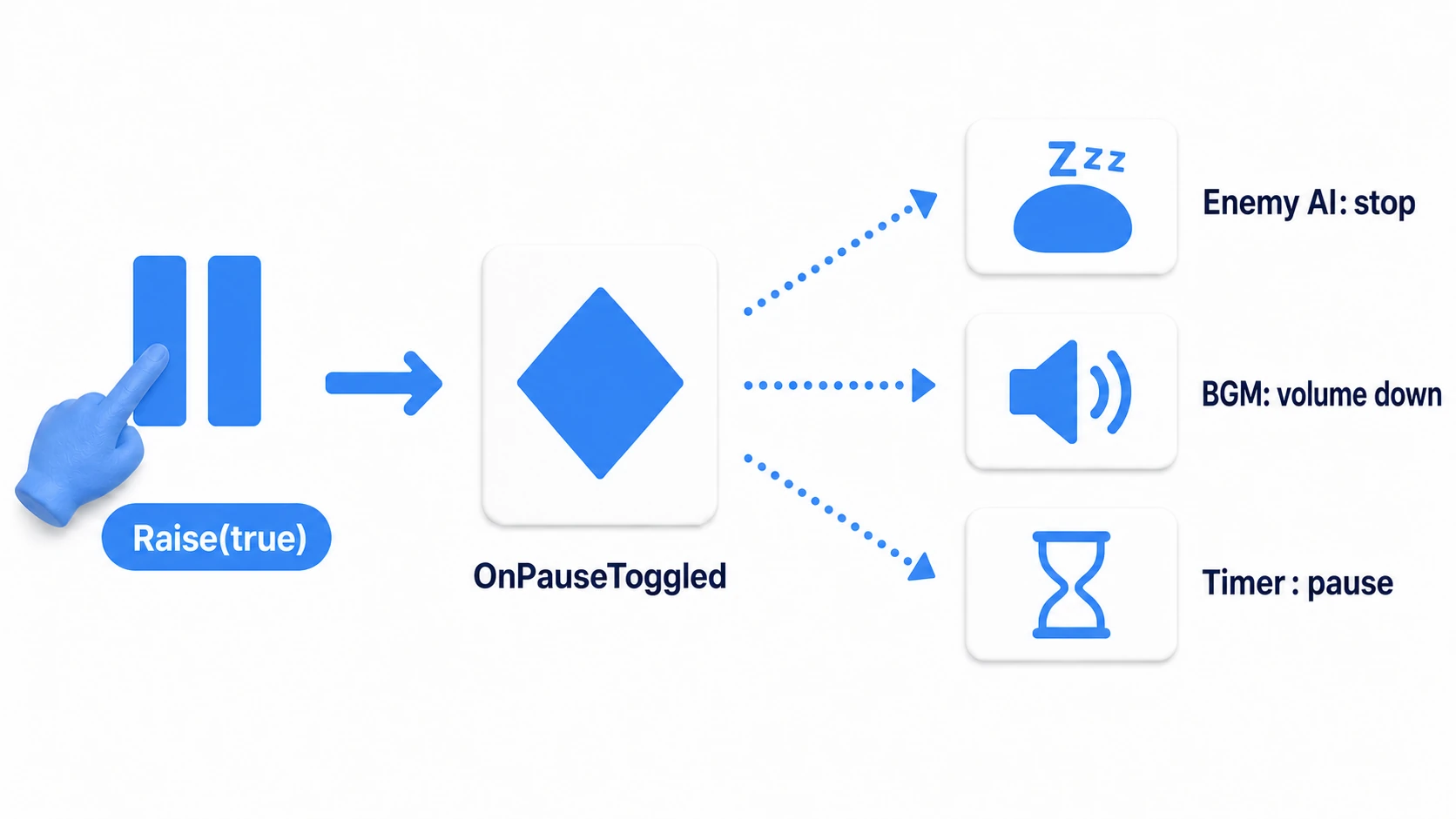
Pause is the poster child for features whose effects scatter across the entire game: stop enemy AI, duck the BGM, halt the timer, and so on. If the pause button calls each system one by one, every new system means modifying the button.
Create a single channel that passes a bool (BoolEventChannelSO), and have the button do nothing but call onPauseToggled.Raise(true). Later, when you decide "particles should stop during pause too," the particle manager just adds one line to subscribe. The button on the publishing side is never touched.
What these two cases share is this property: "whether publishers multiply (coins) or subscribers multiply (pause), you never have to modify the other side." If there's a connection in your project where you've thought "fixing this means fixing that too," that's your candidate for channel-ification.
Choosing Between the Three Event Approaches
You now hold three cards. Play each one where it's strongest.
| Approach | Wired in | Best for | Watch out for |
|---|---|---|---|
| C# event (incl. static) | Code | Notifications within a class or between tight pairs; small, self-contained connections | Class-name dependency; static events keep stale subscriptions |
| UnityEvent | Inspector | Places designers rewire in the scene, like a button's OnClick | Limited to in-scene references; slower to invoke |
| Event channel (SO) | Inspector (asset) | Notifications across scenes and prefabs; system-to-system links where publishers get swapped | Requires managing assets and wiring |
Here's a rule of thumb.
- Start with C# events. They're plenty for notifications within one class or among two or three tightly related classes
- Use UnityEvent where designers should rewire things in the Inspector (buttons, trigger zones, and so on)
- When you catch yourself thinking "lots of systems in lots of scenes want to hear this event," consider a channel
Caution: Don't Channel Operations with a Known Target
Event channels are not a silver bullet. In fact, using them for one-to-one operations with an obvious recipient will reliably make your life harder.
The classic example is damage handling. When a sword hits an enemy, the target you want to damage is obviously "the enemy the sword just hit." Try to route this through a channel and here's what happens.
- You end up carrying "which enemy" information (IDs or references) in the event arguments
- Every enemy subscribes to the same channel and, on every notification, checks "is this meant for me?"
- The flow of "who took the damage" becomes hard to trace across code and the editor, making debugging a detour
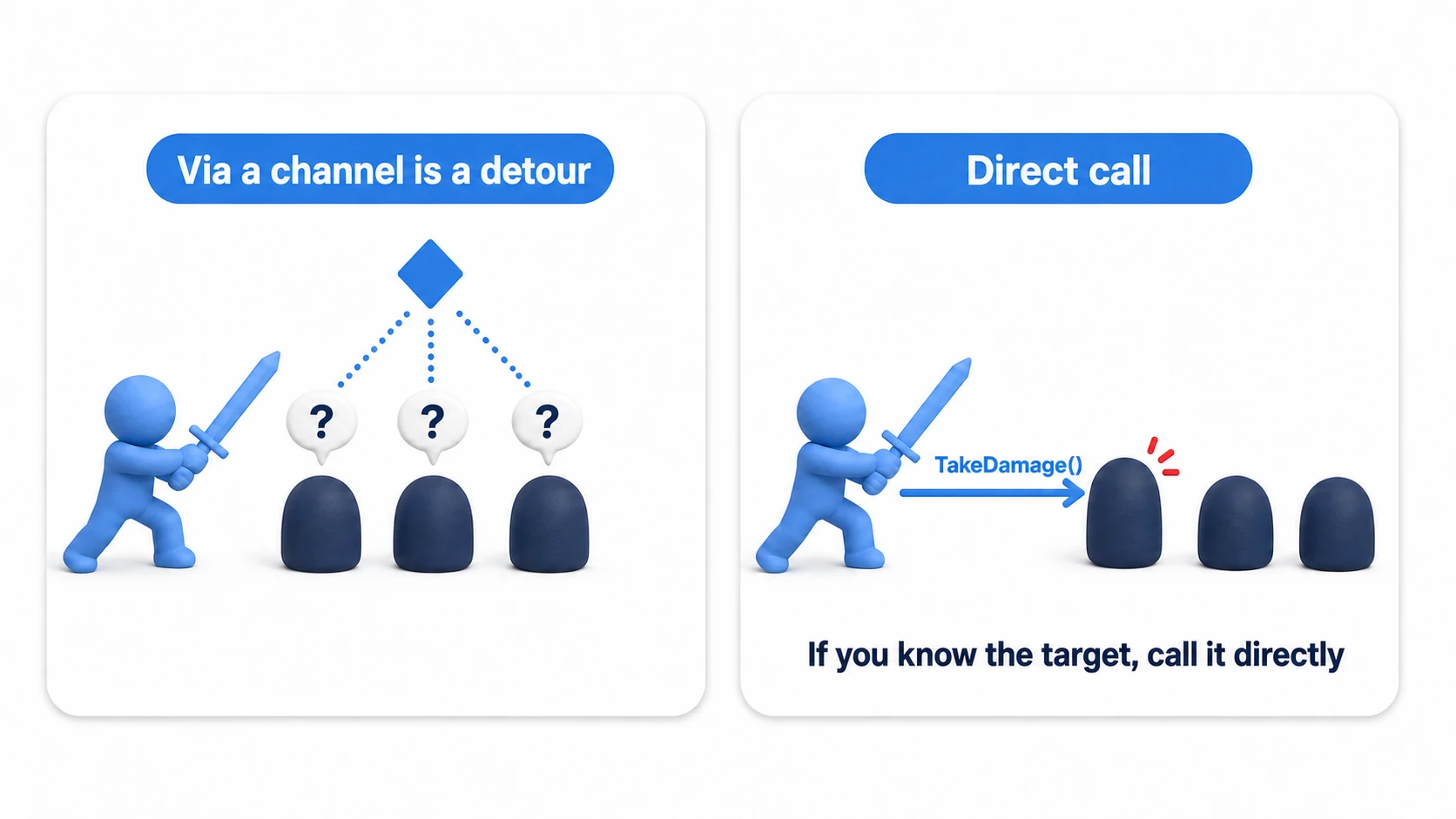
The right answer here is the good old direct call. Grab the component from the collision partner with TryGetComponent and call the method outright.
using UnityEngine;

public class Sword : MonoBehaviour
{
    [SerializeField] private int damage = 25;

    private void OnTriggerEnter(Collider other)
    {
        // The target is "the enemy I just hit" -> grab it directly and call directly
        if (other.TryGetComponent<EnemyHealth>(out var enemy))
        {
            enemy.TakeDamage(damage);
        }
    }
}
The decision rule is simple: "can you identify the recipient?"
- Recipient is identifiable (collision partner, yourself, something already referenced in the Inspector) → call directly via
GetComponent-style access - Recipient is unknown, plural, or will grow and shrink over time (UI updates, SFX, achievements, saving) → event channel
In practice, the standard play is a two-step: "do the work directly, broadcast the result through a channel." The sword damages the enemy via a direct call, then the damaged enemy publishes the result—"my HP changed"—on an OnEnemyDamaged channel for the UI and SFX to hear. This combination gives you the best of both worlds. For the fundamentals of direct calls, see the GetComponent article.
Bonus: Good to Know for Later
Once you're comfortable with event channels, these topics come into view next.
- An alternative: componentized listeners: Another school of thought turns the subscribing side into a generic
GameEventListenercomponent (with responses wired via UnityEvent), letting you add subscribers without writing code. We walk through an implementation in the ScriptableObject article. - A debug fire button: Add a "manually Raise from the editor" button to your channel SO and you can test things like the game-over screen in an instant. For an introduction to editor scripting, see the editor extension article.
- Keeping channels organized: As channels multiply, carve out folders under
Assets/Events/and standardize naming as "On + event" (OnPlayerDied,OnScoreChanged) so nothing gets lost. Unity's official sample project (Open Projects: Chop Chop) is worth a look as a real-world example of this design applied at scale.
Summary
The event channel pattern pushes the loose coupling of static events all the way to "free from class names too."
- Limits of static events: Subscribers stay dependent on the publisher's class name, and subscriptions easily survive scene loads.
- Event channels: Turn the event into a ScriptableObject asset; publishers and subscribers share only the channel.
- Why SO is the best fit: It lives in the project rather than a scene, everyone references the same single instance, and even prefabs can reference it.
- Implementation is a three-piece set: the channel SO (
Raise+event), the publisher ([SerializeField]+Raise()), and the subscriber (+=/-=inOnEnable/OnDisable). - To pass values, create a typed channel per type.
- Where it shines: notifications with mass-produced publishers (coin collection) or ever-growing subscribers (pause) are prime candidates.
- The courage NOT to channel: for one-to-one operations with a clear target (damage to a collision partner, etc.), call directly via
TryGetComponent. The two-step "do the work directly, broadcast the result through a channel" is the standard play. - Choosing a tool: C# events for small, tight connections; UnityEvent for designer wiring within a scene; channels for system-to-system links across scenes and prefabs.
From "not knowing who's listening" to "not even knowing who's shouting." With this one step, the systems in your game can finally be developed and tested truly independently.