The score lives on the player, the game-over check lives on an enemy, and the restart logic sits inside a UI button—once you move past the prototype stage and start building a real game, the question of "who owns the overall game state?" stays fuzzy while logic scatters everywhere. From then on, every spec change sends you on a tour through half a dozen scripts.
The most classic and widely used design pattern for solving this is the Game Manager. You appoint a single "command center" that centrally manages game-wide state and logic—this article covers its responsibilities, an enum + Singleton implementation, and how to keep it from ballooning out of control.

What You'll Learn
- What happens when logic scatters, and the four responsibilities a Game Manager takes on
- Managing game states (Title / Playing / Paused / GameOver) with an
enum- A Singleton +
DontDestroyOnLoadimplementation (copy-paste ready)- How to split responsibilities and avoid the "god class" trap
Tested with: Unity 6 (6000.x)
Main Roles of a Game Manager
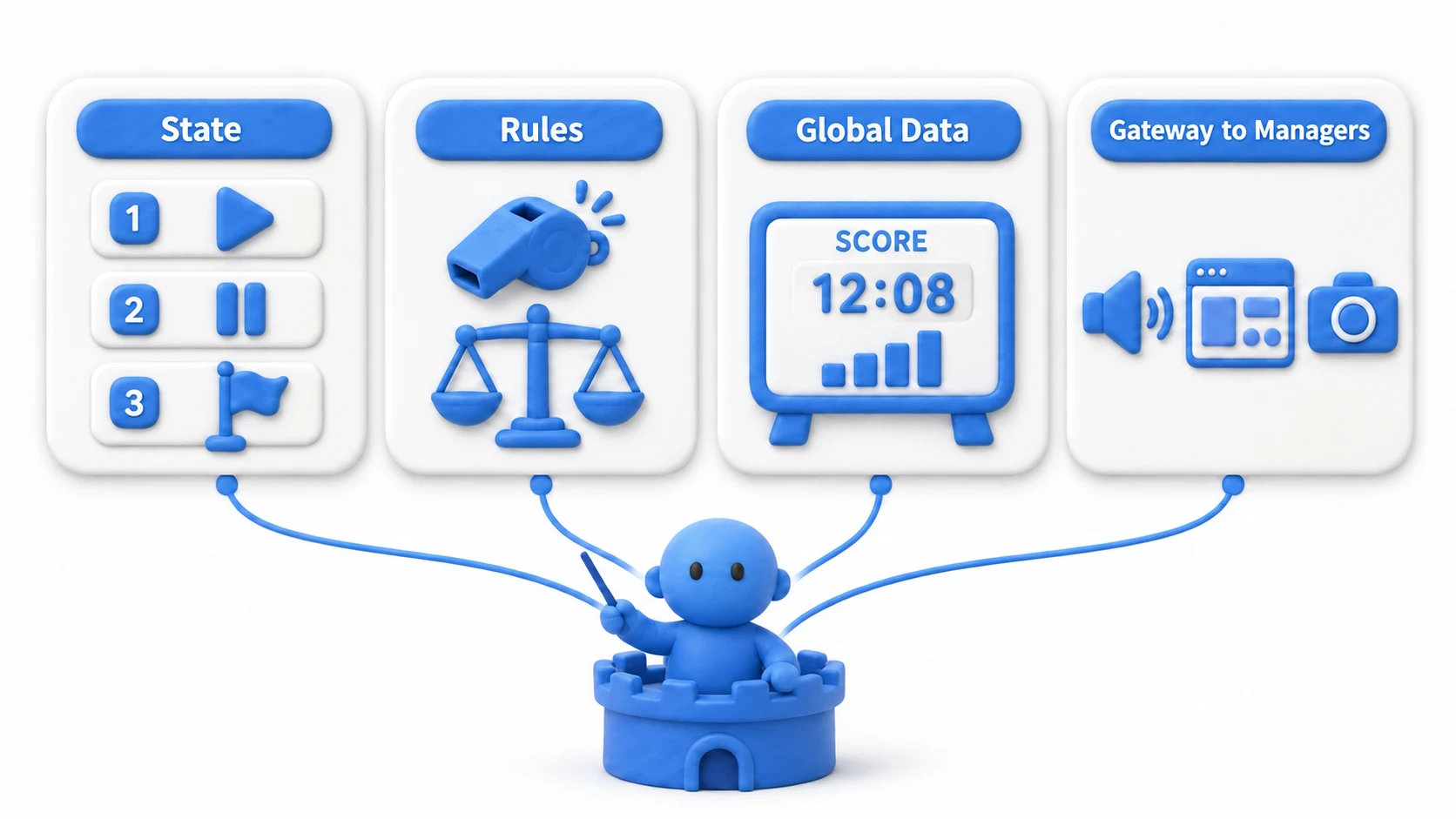
What you put into a Game Manager varies with the size and genre of your game, but it typically covers the following responsibilities.
-
Game State Management: Holds the game state defined with an
enum(e.g.,Title,Playing,Paused,GameOver) and controls transitions between them. Depending on the current state, it can disable player input or show/hide UI. -
Game Rule Management: Handles the core rules of the game—score calculation, countdown timers, win/loss condition checks.
-
Global Data Management: Stores data that multiple objects or scenes need to access, such as the player's score, lives, and experience points.
-
Providing References to Other Objects: Holds references to other important manager classes—Player, UIManager, AudioManager—and serves as a convenient gateway for other objects to reach them.
Managing Game State with an enum
The heart of a Game Manager is tracking "what state is the game in right now?" Title screen, playing, paused, game over—the game is always in exactly one of these states and moves between them along fixed routes.
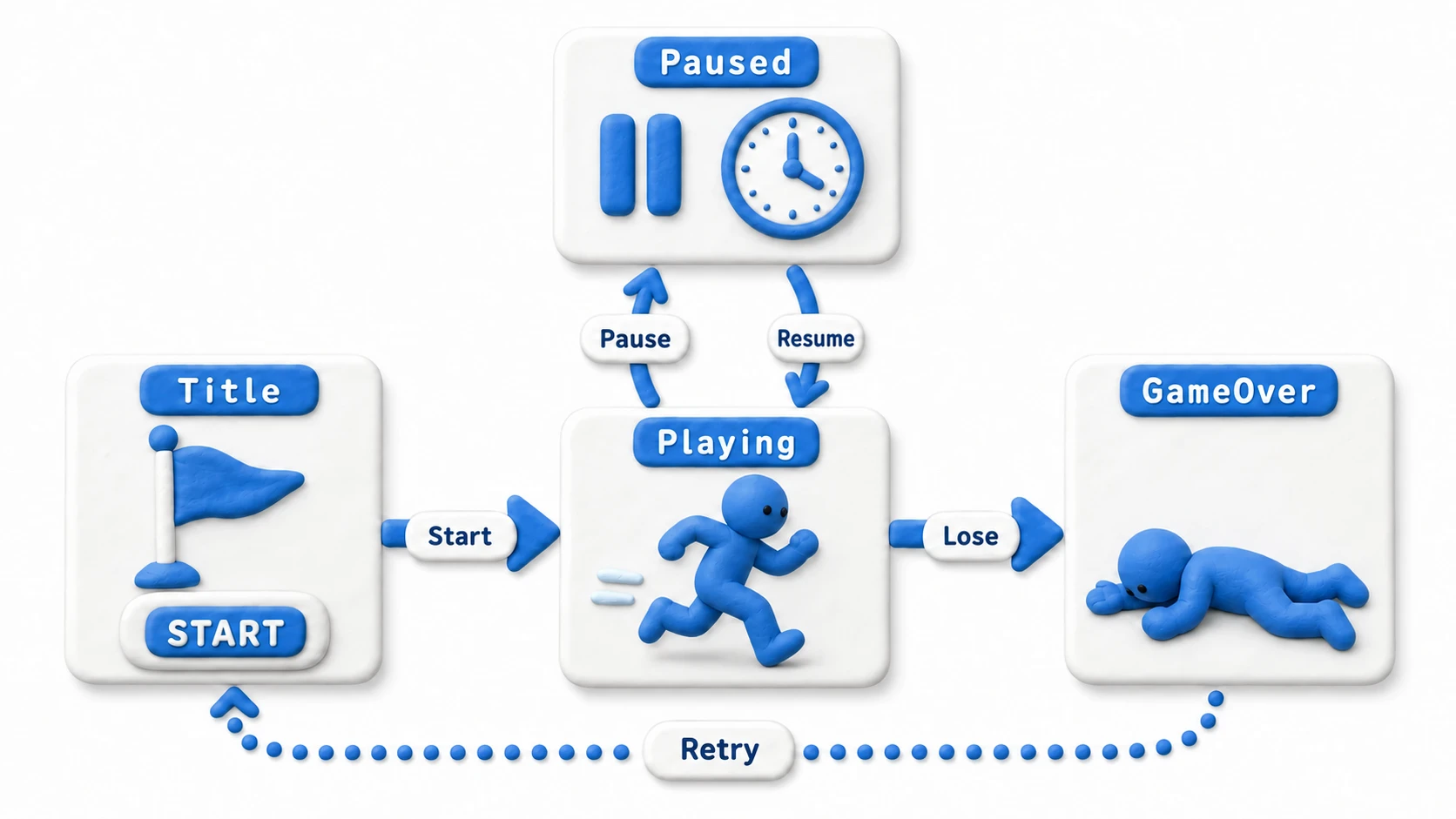
The perfect tool for expressing this "exactly one" is an enum. Unlike strings ("Playing" and the like), typos become compile errors, and enums pair beautifully with switch statements. Once you have many states and the per-state logic grows complex, consider stepping up to the class-per-state approach covered in the State pattern article.
Implementation with the Singleton Pattern
A Game Manager must be guaranteed to exist as exactly one instance in the game. The design pattern that guarantees this "single instance" and makes it easily accessible from anywhere is the Singleton (see the Singleton pattern article for how it works under the hood).
Here is a Game Manager implementation using the most basic form of the Singleton pattern.
using UnityEngine;
using UnityEngine.SceneManagement;

public class GameManager : MonoBehaviour
{
    // Static field holding the singleton instance
    public static GameManager Instance { get; private set; }

    // Enum defining the game states
    public enum GameState { Title, Playing, Paused, GameOver }
    public GameState CurrentState { get; private set; }

    // Global game data
    public int Score { get; private set; }

    private void Awake()
    {
        // Singleton pattern implementation
        // If no instance exists yet, make this the one and only instance
        if (Instance == null)
        {
            Instance = this;
            // Keep this object alive across scene loads
            DontDestroyOnLoad(gameObject);
        }
        // If an instance already exists, destroy this new one
        else
        {
            Destroy(gameObject);
            return;
        }

        // Set the initial state
        CurrentState = GameState.Title;
    }

    // Method to add score (callable from anywhere)
    public void AddScore(int amount)
    {
        if (CurrentState != GameState.Playing) return;
        Score += amount;
        // UIManager.Instance.UpdateScoreUI(Score); // Ask the UI to update
    }

    // Method to change the game state
    public void ChangeState(GameState newState)
    {
        if (CurrentState == newState) return;

        CurrentState = newState;

        // Run state-specific logic
        switch (newState)
        {
            case GameState.Title:
                // Prepare the title screen
                break;
            case GameState.Playing:
                // Prepare for gameplay
                Time.timeScale = 1f; // Resume time
                break;
            case GameState.Paused:
                // Handle pausing
                Time.timeScale = 0f; // Stop time
                break;
            case GameState.GameOver:
                // Handle game over
                break;
        }
    }

    // Example calls from other scripts:
    // GameManager.Instance.AddScore(100);
    // GameManager.Instance.ChangeState(GameManager.GameState.GameOver);
}
Note: Notice the
if (CurrentState != GameState.Playing) return;at the top ofAddScore. The rule "score only increases during play" is enforced in one place. This is the concrete payoff of centralized state management—all of these small safeguards accumulate in the Game Manager.
How to Use
- Create an empty GameObject and name it "GameManager".
- Attach the
GameManager.csscript above. - Turn this GameManager object into a Prefab and place it in your game's starting scene (splash or title screen)—it will then live on as the single instance for the entire game.
DontDestroyOnLoad(gameObject); is the crucial call that keeps the GameManager object from being destroyed when scenes change (see the DontDestroyOnLoad article for details).
Caveats of the Game Manager
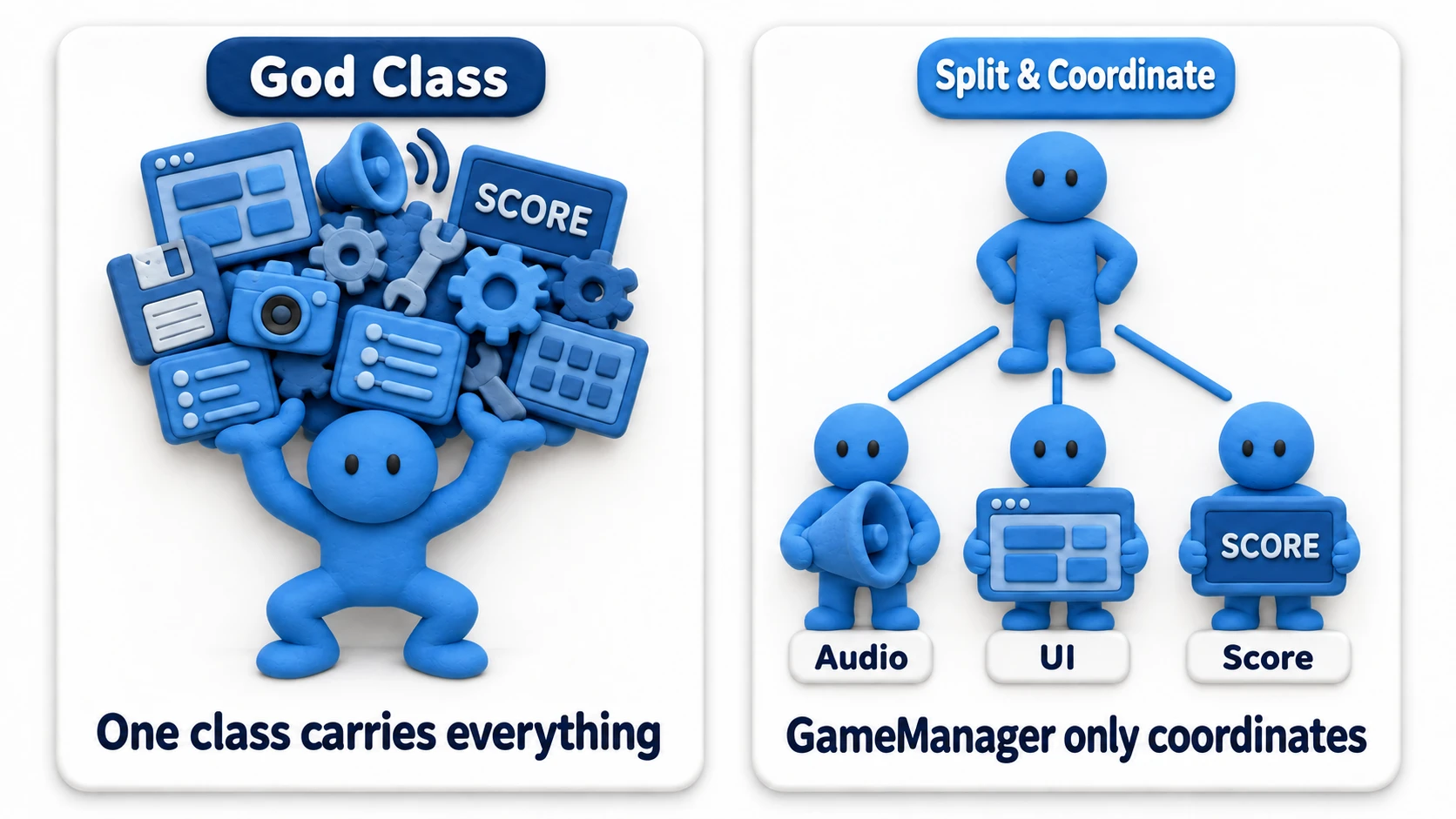
The Singleton pattern is extremely convenient, but overusing it can cause problems. The biggest danger is turning your GameManager into a "god class" by stuffing everything into it.
- Tight Coupling: Because any script can reach
GameManager.Instance, all kinds of objects end up strongly dependent on the GameManager, which can hurt code reusability and testability. - Bloated Responsibilities: Cram every bit of game logic into the GameManager and you'll quickly end up with a giant, unmanageable class. Split features into dedicated manager classes—
ScoreManager,UIManager,AudioManager—and let the GameManager stick strictly to coordinating them. That's the healthier design.
Note: A useful self-check: "Is this feature I'm about to add to the GameManager truly a game-wide concern?" If it only matters to a specific scene or character, it belongs on that scene or character instead.
Hands-On: A 60-Second Coin Game, from Start to Retry
With the theory in place, let's complete one whole game. The rules are simple: collect coins for 60 seconds, hit the results screen when time runs out, and retry for another round. This tiny game contains every element of flow management — start, remaining time, score, end, and retry. And the key discipline here: the GameManager makes only the progression decisions. Coin spawning, UI drawing, and audio are not its problem.
// File name: CoinGameManager.cs — a command center that owns ONLY progression decisions
using System;
using UnityEngine;

public class CoinGameManager : MonoBehaviour
{
    public static CoinGameManager Instance { get; private set; }

    public enum GameState { Title, Playing, Result }
    public GameState CurrentState { get; private set; } = GameState.Title;

    public float TimeLeft { get; private set; }
    public int Score { get; private set; }

    public const float PlayTime = 60f; // Shrink to 5f while testing

    // Announce only "the state changed." UI and audio are the subscribers' job
    public event Action<GameState> OnStateChanged;

    void Awake()
    {
        if (Instance != null && Instance != this) { Destroy(gameObject); return; }
        Instance = this;
    }

    void Update()
    {
        if (CurrentState != GameState.Playing) return; // Time only moves while Playing

        TimeLeft -= Time.deltaTime;
        if (TimeLeft <= 0f)
        {
            TimeLeft = 0f;
            ChangeState(GameState.Result); // Time's up → results
        }
    }

    // The title's Start button and the Result screen's Retry button both call this
    public void StartGame()
    {
        if (CurrentState == GameState.Playing) return; // Don't restart a match that's already running
        Score = 0;              // Always reset on every retry
        TimeLeft = PlayTime;
        ChangeState(GameState.Playing);
    }

    public void AddScore(int amount)
    {
        if (CurrentState != GameState.Playing) return; // The score never moves outside Playing
        Score += amount;
    }

    void ChangeState(GameState next)
    {
        if (CurrentState == next) return; // Reject double transitions to the same state
        CurrentState = next;
        OnStateChanged?.Invoke(next);
    }
}
The coin side is just a few lines that "report being picked up." Turn on Is Trigger on the coin's Collider, give the player a Collider and a Rigidbody, and set its Tag to Player (trigger events aren't called unless one of the two has a Rigidbody):
// File name: Coin.cs
using UnityEngine;

public class Coin : MonoBehaviour
{
    void OnTriggerEnter(Collider other)
    {
        if (!other.CompareTag("Player")) return;
        CoinGameManager.Instance.AddScore(10);
        Destroy(gameObject);
    }
}
And the results UI subscribes to OnStateChanged and simply "shows the panel only during Result." The GameManager doesn't even know the UI exists. If you attach it to the panel itself, Start isn't called while the panel is hidden, so it never appears.
// The essence of ResultUI.cs (attach it to an always-visible Canvas, not the result panel itself, and put the result panel in the panel field)
[SerializeField] private GameObject panel;

// Start runs after every Awake, so Instance is always set (in OnEnable it may still be empty)
void Start()     { CoinGameManager.Instance.OnStateChanged += HandleState; }
void OnDestroy() { CoinGameManager.Instance.OnStateChanged -= HandleState; }

void HandleState(CoinGameManager.GameState state)
{
    panel.SetActive(state == CoinGameManager.GameState.Result);
}
To recap the division of labor: progression decisions (start, time, score, end) belong to the GameManager; coin creation to a Spawner; display to the UI; sound to the audio side. Check that not a single UI or audio word appears in the GameManager's code — that's what "sticking to coordination" looks like in practice.
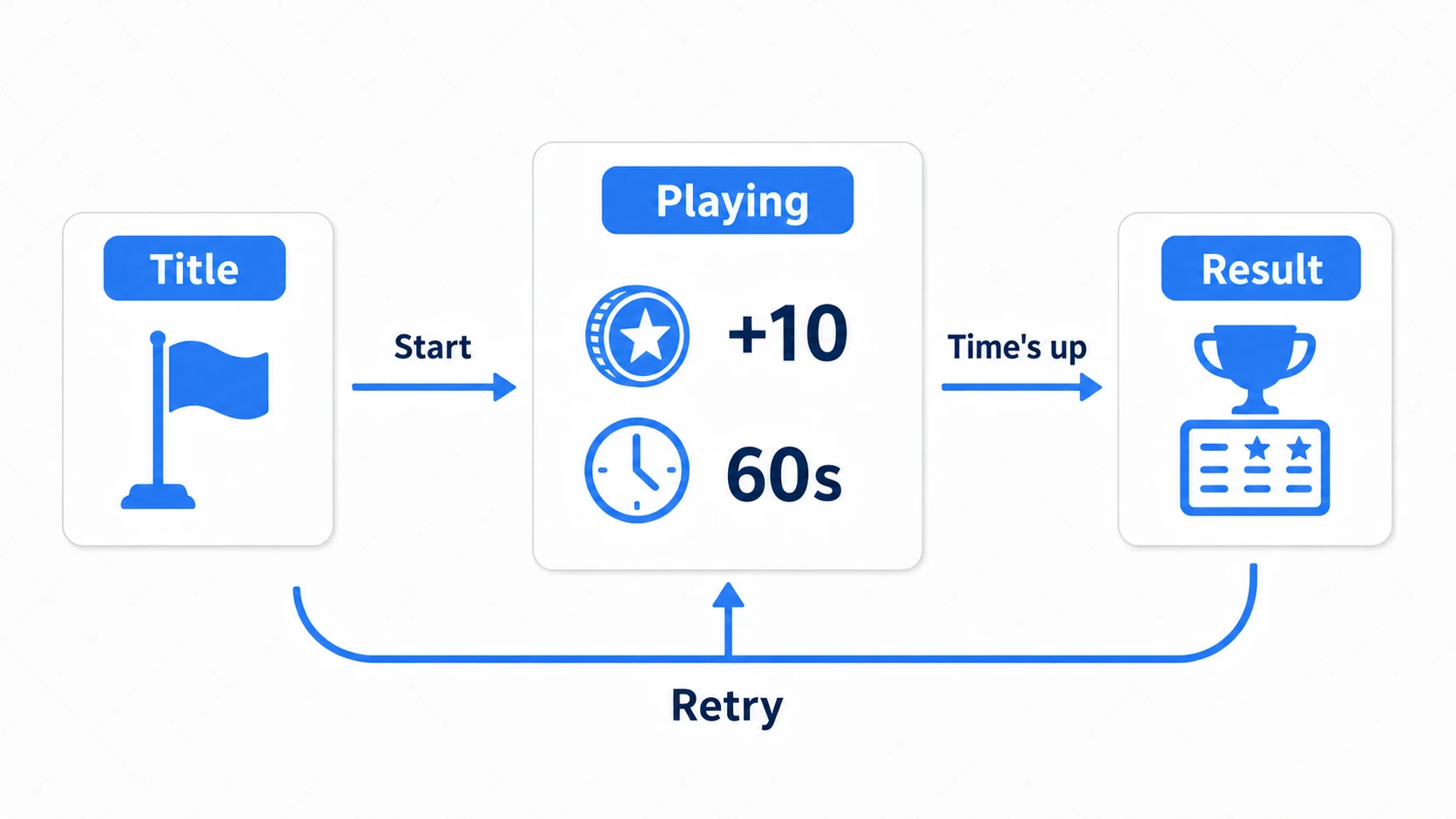
The finishing test is mashing the Retry button. If every press puts you on the same starting line — score 0, timer full — then initialization is properly gathered in one place: StartGame. And if round two ever opens with last round's score, you already know exactly where to look.
Bonus: Good to Know for Later
Once the skeleton of your Game Manager is in place, these topics come into view next.
- When state logic gets complex, reach for the State pattern: If your
switchcases keep swelling, it's time for the class-per-state approach in the State pattern article. Migrating from theenumversion is a natural step. - Broadcast "the state changed" via events: Calling UI and sound directly inside
ChangeStatedeepens coupling. Notifying through an event likeOnGameStateChangedor an event channel keeps the GameManager slim. - Side effects of
Time.timeScale = 0: It's the standard pause trick, but whileTime.deltaTimeinUpdatedrops to 0,Time.unscaledDeltaTimekeeps ticking. Remember to use the unscaled variants when you want menu animations to keep playing while paused, and you won't get stuck. Also,timeScaleisn't reset when you reload a scene. If you set it to 0 on game over, set it back to 1 on retry (forget, and everything looks reset but nothing moves).
Summary
The Game Manager is a powerful design pattern for organizing the structure of a complex game and keeping it easy to reason about.
- Acts as a "command center" that centrally manages game-wide state, rules, and global data.
- Uses the
Singletonpattern so exactly one instance exists in the game at all times. - Uses
DontDestroyOnLoad()to persist the object across scenes. - Defines game states with an
enumand handles transition logic in aswitchstatement. Move to the State pattern when things get complex. - Prevents responsibility bloat by splitting features into dedicated managers, with the GameManager sticking to coordination.
Just adopting this basic Game Manager shape will dramatically tidy up your game's codebase and make adding features and debugging far easier.