"My BGM cut off when I switched scenes." "My score got reset." — When you load a scene, every object in the old scene gets destroyed. That's Unity's default behavior. But sooner or later you'll have objects like a BGM player or a game manager that you want to survive the transition.
That's exactly what DontDestroyOnLoad() is for. In this article, we'll cover the basic usage, the "duplicate object" trap that catches every beginner, and the classic fix: combining it with the Singleton pattern.

What You'll Learn
- Why objects disappear on scene changes, and what
DontDestroyOnLoaddoes about it- The basic usage (just call it in
Awake)- Why the classic "duplicate object" pitfall happens
- A safe persistence implementation using the Singleton pattern
Tested with: Unity 6 (6000.x)
Basic Concept of DontDestroyOnLoad
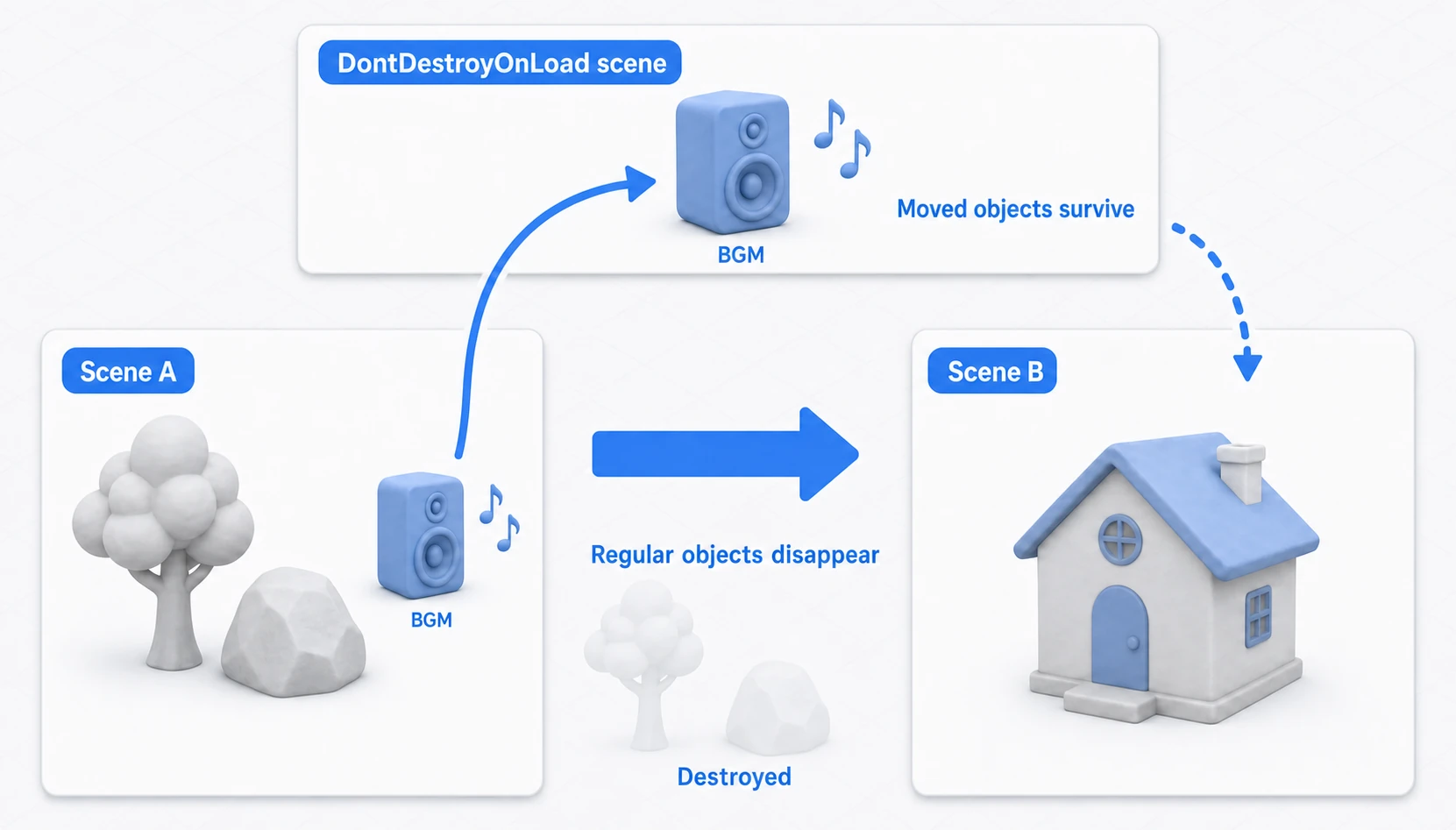
DontDestroyOnLoad is a static method on the Object class. When you pass a GameObject to this method, that object moves to a special internal scene called the "DontDestroyOnLoad scene" and is no longer affected by subsequent scene transitions.
Unlike regular scenes, the DontDestroyOnLoad scene is never destroyed until the game exits. This makes it easy to manage objects that need to exist for the entire lifetime of the game, such as BGM players and game managers.
Code Example 1: Basic Usage
The simplest usage is to call DontDestroyOnLoad(this.gameObject) inside the Awake() method of a script attached to the object you want to persist.
The following example is a script meant to be attached to an object that plays background music.
using UnityEngine;

public class BgmPlayer : MonoBehaviour
{
    void Awake()
    {
        // Keep this GameObject alive across scene transitions
        DontDestroyOnLoad(this.gameObject);

        // Add BGM playback logic here
        Debug.Log("BGM player created and DontDestroyOnLoad applied.");
    }
}
As long as a GameObject with this script is placed in the scene, it will survive any number of scene transitions without being destroyed.
Common Pitfall for Beginners: Duplicate Objects
The most common mistake beginners make with DontDestroyOnLoad is duplicate object creation.
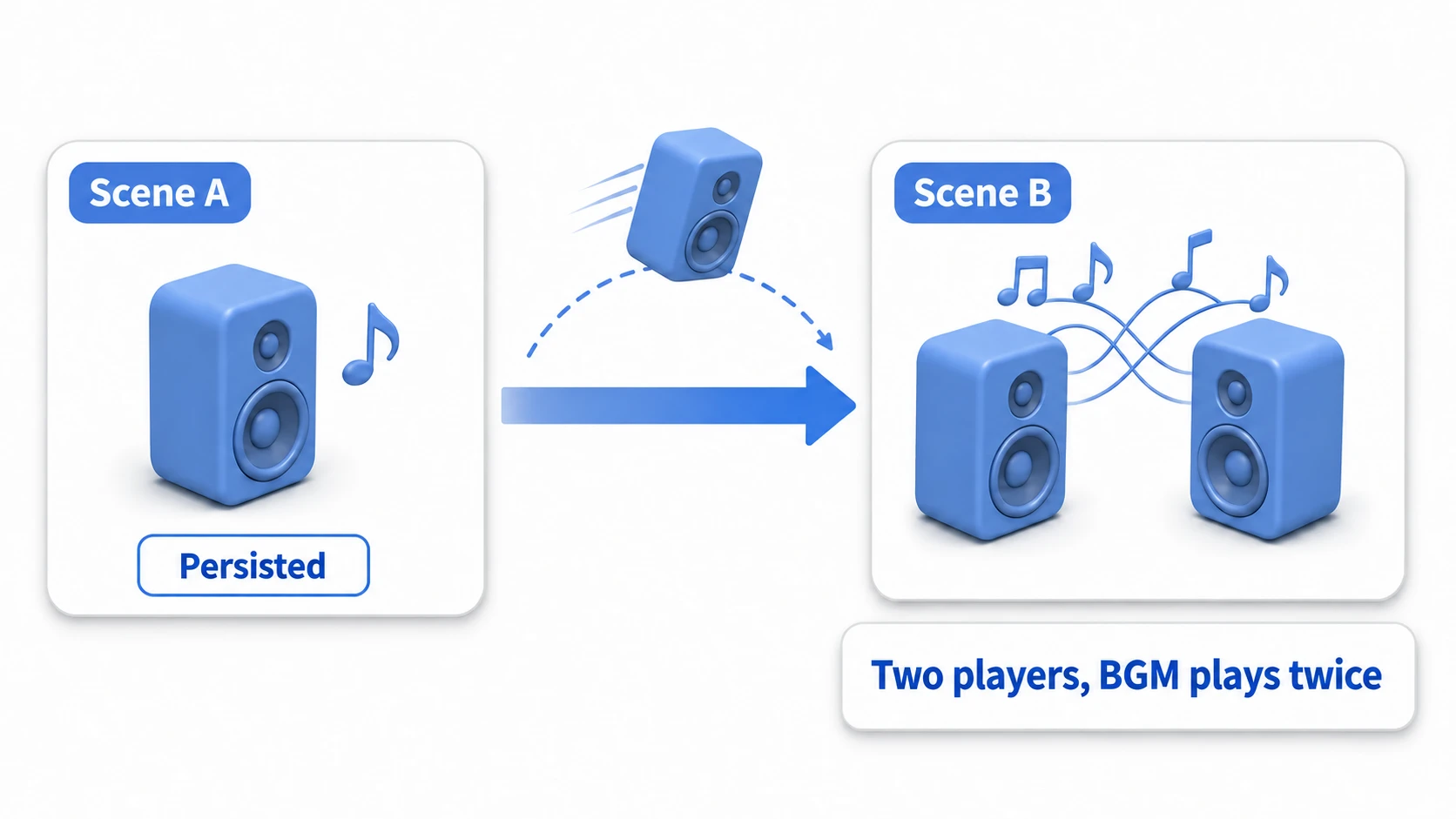
For example, suppose the BgmPlayer above is placed in Scene A, and the same BgmPlayer is also placed in Scene B. When you move from Scene A to Scene B, here's what happens:
DontDestroyOnLoadis applied to Scene A'sBgmPlayer, making it persistent.- When Scene B loads, the new
BgmPlayerplaced in Scene B is created. - As a result, two
BgmPlayerobjects now exist in the game, and you end up with problems like the BGM playing twice at once.
Code Example 2: Safe Management with the Singleton Pattern
To solve this duplication problem and guarantee that exactly one instance of your persistent object exists in the game, DontDestroyOnLoad is typically combined with the Singleton pattern.
The Singleton pattern is a design pattern (a well-established design recipe) that "guarantees only one instance of a class ever exists."
The following GameManager script is a practical example combining DontDestroyOnLoad with the Singleton pattern.
using UnityEngine;

public class GameManager : MonoBehaviour
{
    // Static instance for external access
    public static GameManager Instance { get; private set; }

    void Awake()
    {
        // Check if an instance already exists
        if (Instance != null && Instance != this)
        {
            // If one already exists, destroy this newly created one to prevent duplicates
            Destroy(this.gameObject);
            return;
        }

        // If no instance exists yet, register this one as the Instance
        Instance = this;

        // Keep it alive across scene transitions
        DontDestroyOnLoad(this.gameObject);

        Debug.Log("GameManager initialized and persisted.");
    }

    // Example: a game state method accessible from anywhere
    public void AddScore(int amount)
    {
        // Score addition logic goes here
        Debug.Log("Score increased by " + amount + " points.");
    }
}
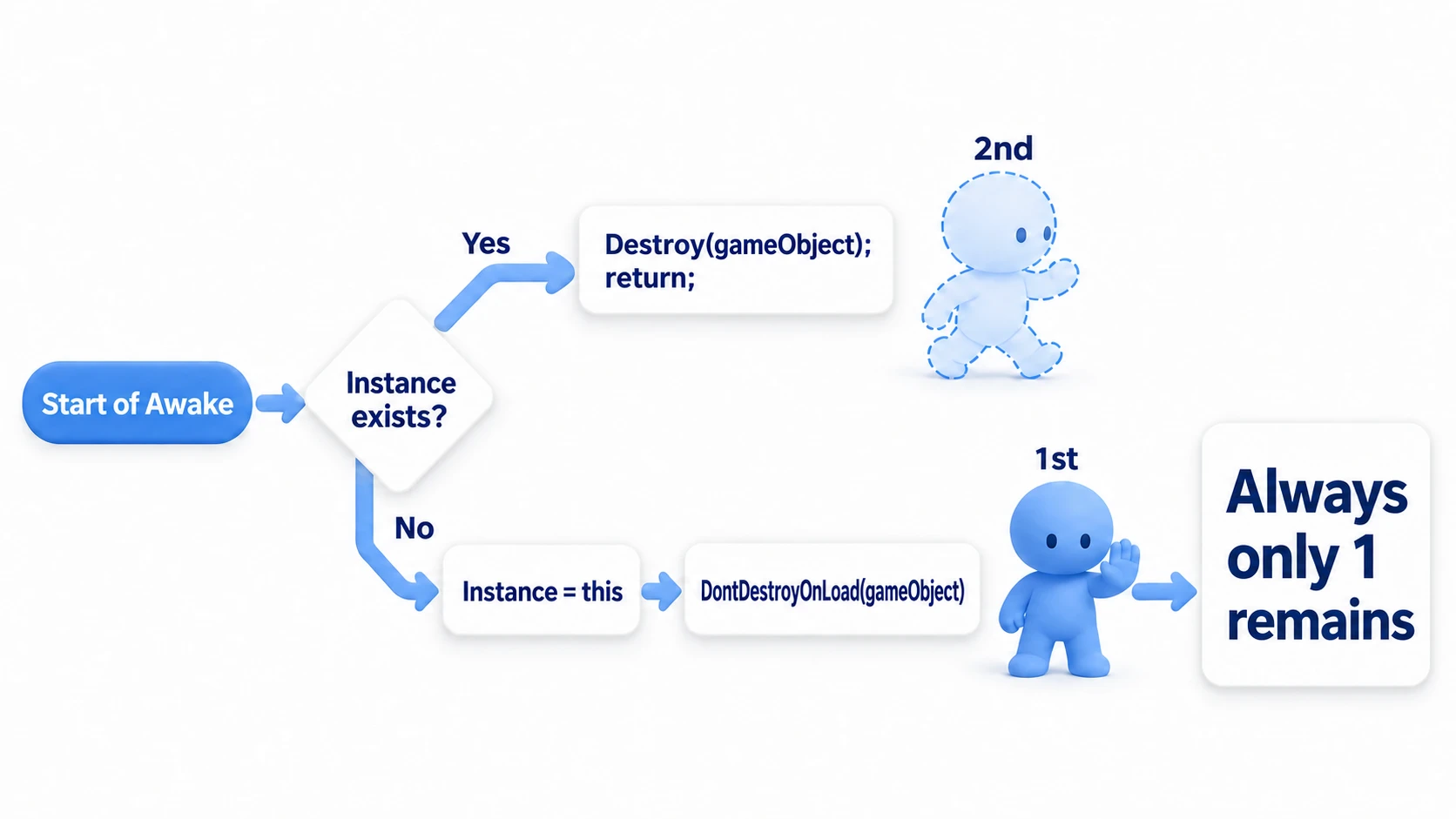
The key point of this code is that it checks whether an instance already exists inside Awake(), and if one does, it immediately destroys the newly created copy of itself. This guarantees that no matter how many times you load scenes, only one GameManager ever exists.
Think of it as a gatekeeper check: if the first one is already inside, any second one that shows up later gets turned away at the gate (Destroy).
From any other script, you can now safely access this manager at any time with GameManager.Instance.AddScore(100);.
Hands-On: One BGM Track Across Title, Game, and Results
Now that you understand the mechanism, let's finish it in its most common form. Whether you're making an RPG, a puzzle game, or a visual novel, the goal is the same: cycle through Title → Game → Results → Title as many times as you like, and the BGM keeps playing — never cut off, never doubled, exactly one track.
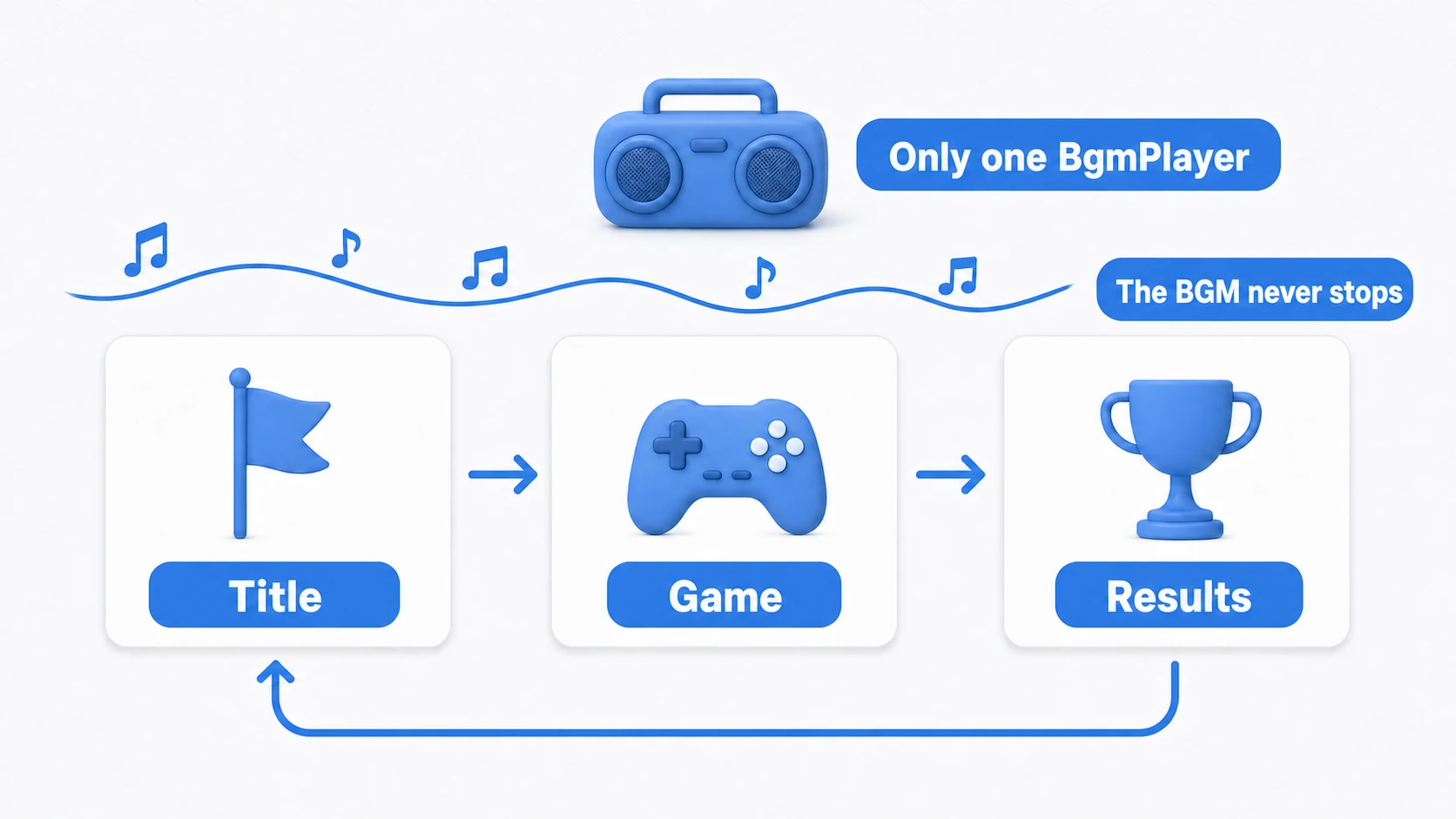
We'll add the gatekeeper to the earlier BgmPlayer.
using UnityEngine;

[RequireComponent(typeof(AudioSource))]
public class BgmPlayer : MonoBehaviour
{
    public static BgmPlayer Instance { get; private set; }

    void Awake()
    {
        // Gatekeeper check: if the first one is already here, turn the second one away
        if (Instance != null && Instance != this)
        {
            Destroy(gameObject);
            return;
        }
        Instance = this;
        DontDestroyOnLoad(gameObject); // Must be called on a root GameObject (it won't persist as a child)
        GetComponent<AudioSource>().Play(); // Only the one that passed the gate plays
    }
}
Setup steps:
- In the title scene, create an empty GameObject named "BgmPlayer" at the top level of the Hierarchy (root). Add an
AudioSource(assign your BGM to the Audio Resource field in Unity 6, turn onLoop, and turn offPlay On Awake) plus the script above. WithPlay On Awakeon, the second copy can start playing before the gatekeeper destroys it, so you may hear it doubled for a moment - Don't place it in the game or results scenes. The single instance carried over from the title handles everything (and even if you accidentally place one, the gatekeeper destroys the duplicate)
- Cycle Title → Game → Results → Title three times and verify that (a) the BGM never cuts off, and (b) the "DontDestroyOnLoad" section that appears in the Hierarchy during Play mode, separate from your normal scenes, contains exactly one
BgmPlayer
Separate "What Persists" from "What Resets"
A common mistake once you get comfortable with persistent objects is leaving per-run state sitting on the persistent manager. Your score and lives survive the return to the title screen, and you get the "New Game starts with last run's score" bug. Here's the dividing line:
- OK to persist: BGM, settings like volume, "what has been unlocked" save data
- Reset on New Game: score, lives, combos, and other per-run state. Always initialize them when a run starts
// If your persistent GameManager holds per-run state, don't forget to reset it at the start
public void StartNewGame()
{
    score = 0;
    lives = 3;
    SceneManager.LoadScene("Game");
}
The final check is three round trips in Play mode. Title → Game → Results and back again — the BGM never hiccups, and the DontDestroyOnLoad section of the Hierarchy holds exactly one BgmPlayer. If a New Game ever greets you with last run's score, the culprit is an overloaded persistent object — revisit the reset in StartNewGame.
Bonus: Good to Know for Later
Once you're comfortable with persistent objects, these topics are a natural next step.
- It won't persist on a child object:
DontDestroyOnLoadonly works on root GameObjects (or components on them). Call it on a child and the Console shows a warning, and the object disappears on the next scene change. If you need to keep it, detach it withtransform.SetParent(null)first. - Unsubscribe from static events on destroy: If a scene object subscribes to a static event like
SceneManager.sceneLoaded += OnSceneLoadedand forgets to-=inOnDestroy, subscriptions pile up every time you revisit the scene, and the same handler runs two, three times. - Going deeper on the Singleton pattern: It's convenient, but overusing it can tangle up your dependencies — it's a double-edged sword. Learn the correct implementation and the caveats in the Singleton pattern article.
- How scene transitions work in the first place: The usage of
LoadScene/LoadSceneAsyncis covered in the SceneManager article. - If it's "just data," you may not need to persist an object at all: For data like scores and settings, instead of keeping a whole GameObject alive, you can hold it in a ScriptableObject or in save data. The ScriptableObject article and the save & load article are good references.
- When the managers you keep start to multiply: which managers exist and the order they initialize start to depend on which scene you launch from. How to create them all in one first scene is covered in the Bootstrap Scene Primer.
Summary
DontDestroyOnLoad is a powerful tool for managing persistent objects in Unity. Here are the key takeaways from this article:
- Role of DontDestroyOnLoad: Use it to keep specific GameObjects alive across scene changes. It's well suited for things that persist across the whole game, like BGM players and game managers.
- Basic usage: Call
DontDestroyOnLoad(this.gameObject)inside theAwake()method of a script attached to the object you want to persist. - Biggest caveat: Using
DontDestroyOnLoadon its own can create duplicate objects every time you switch scenes, which is a common source of bugs. - Practical solution: The recommended approach is to combine
DontDestroyOnLoadwith the Singleton pattern, which prevents duplication and guarantees a single instance throughout the game. - Access method: By making it a Singleton, you can safely and easily access the persistent object from anywhere in the game via
ClassName.Instance.
With this knowledge in hand, scene management and object persistence in your Unity projects will be much more robust. Happy game developing!