The moment two windows move in sync in the Netcode for GameObjects intro is magical. Then reality arrives: "how do I connect this to my friend's house?" You send them your IP. Nothing connects. Code that runs perfectly on localhost goes silent in front of the internet.
The cause isn't your code — it's network structure. This article uses Unity Gaming Services (UGS) Relay (traffic relaying) and Lobby (a room with a short code) to build the smallest online co-op session that works without touching anyone's router.
What you'll learn
- Why it won't connect over the internet when localhost works (NAT)
- The Lobby / Relay / NGO division of labor
- UGS initialization and anonymous sign-in
- The host's Relay allocation and join code; the client's join
- A room your friend enters with a short lobby code, plus heartbeats
- Hands-on: a two-player co-op room behind one code
- Cleanup when someone disconnects
Tested with: Unity 6 (6000.x), Netcode for GameObjects 2.x, Multiplayer Services 1.x (Relay, Lobby) (UGS APIs evolve quickly — check each package's official docs if something doesn't compile)
- Why the internet says no
- Three tools, three jobs
- Setup: UGS init and anonymous sign-in
- Host: allocate Relay, mint a join code
- Client: join with the code
- Lobby: turning the join code into a room password
- Hands-on: a two-player co-op room behind one code
- Disconnect cleanup
- Bonus: things worth knowing early
- Summary
Why the internet says no
Localhost (127.0.0.1) and LAN connections are conversations inside the same house. Across the internet, though, both your home router and your friend's — each running NAT — stand in the way.
NAT lets traffic out, but blocks unsolicited connections coming in as intruders. An NGO host listens for connections like a server, so your friend's client gets stopped cold at your router. That's the whole story behind "I sent my IP and nothing happened."
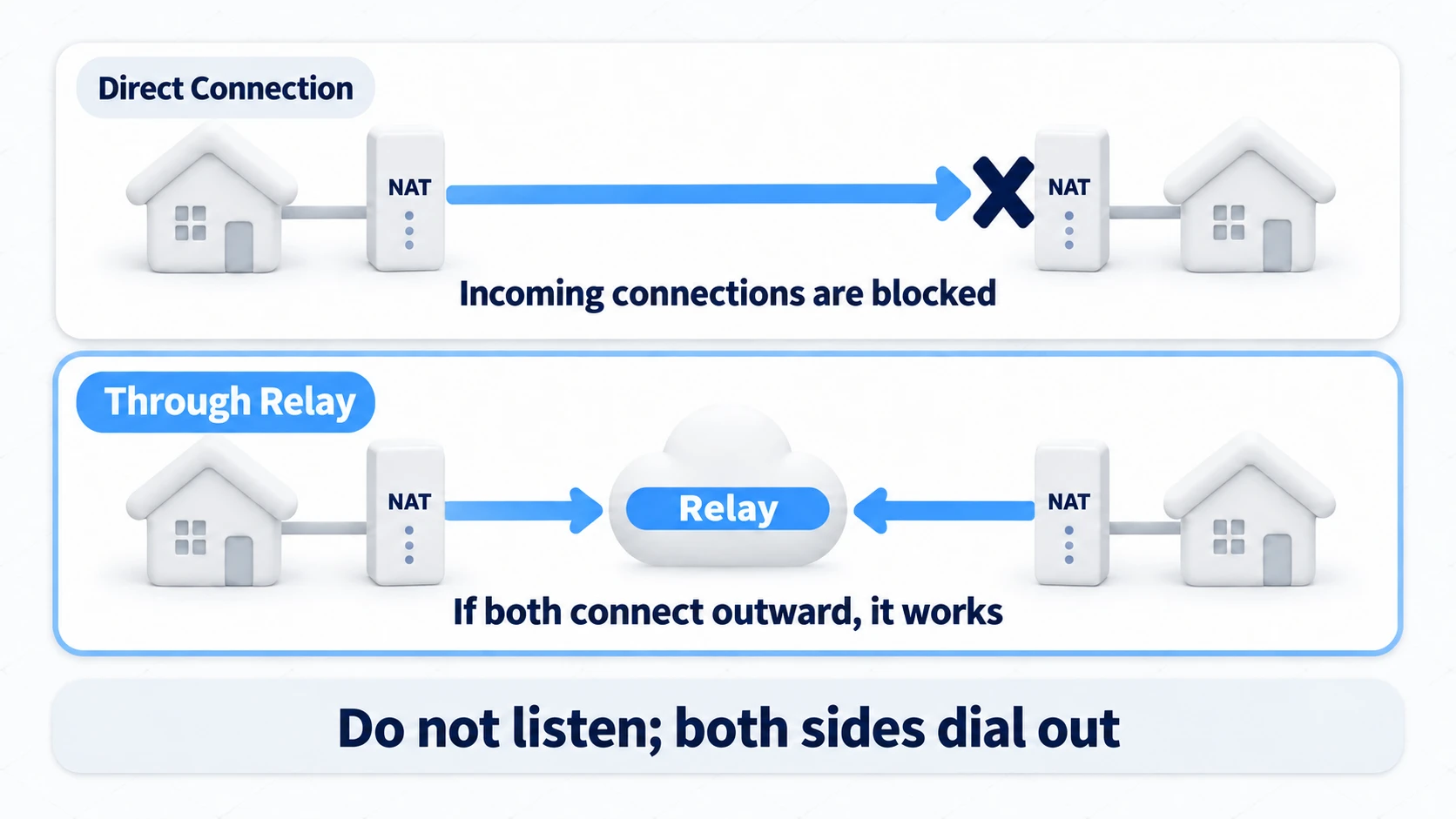
The answer is a relay. Both host and client connect outward, on their own initiative, to a relay server operated by Unity. Outbound traffic passes NAT freely, so no router configuration is needed on either side. All traffic then flows through the relay. No port forwarding favors to ask, no static IPs.
Three tools, three jobs
Three similarly-named tools appear in an online session. Pin their roles down first.
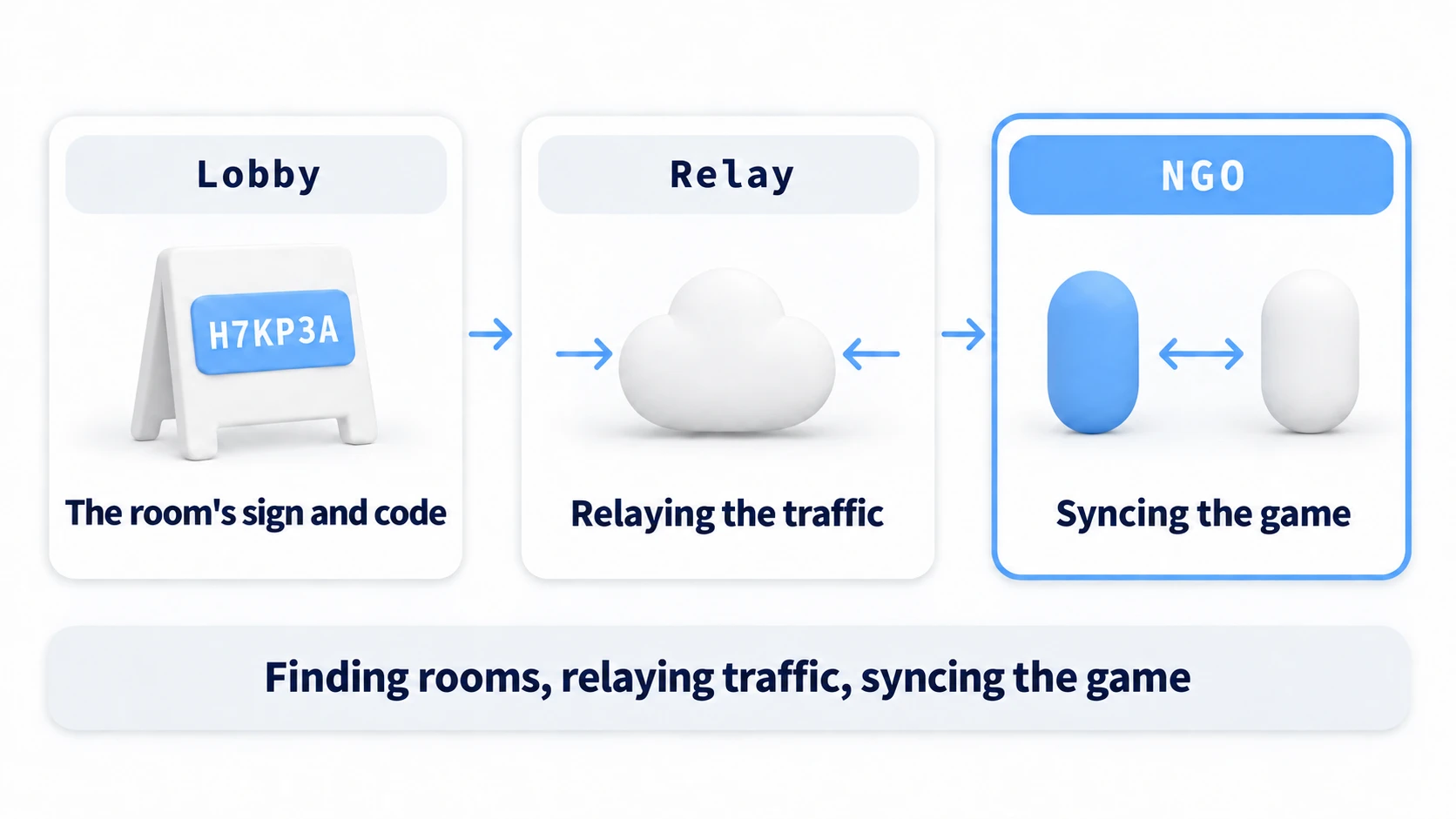
| Tool | Job | Think of it as |
|---|---|---|
| Lobby | Manage room info and its password | The venue's front desk |
| Relay | Carry traffic through NAT | The telephone exchange |
| NGO | Sync positions and state in-game | The conversation itself |
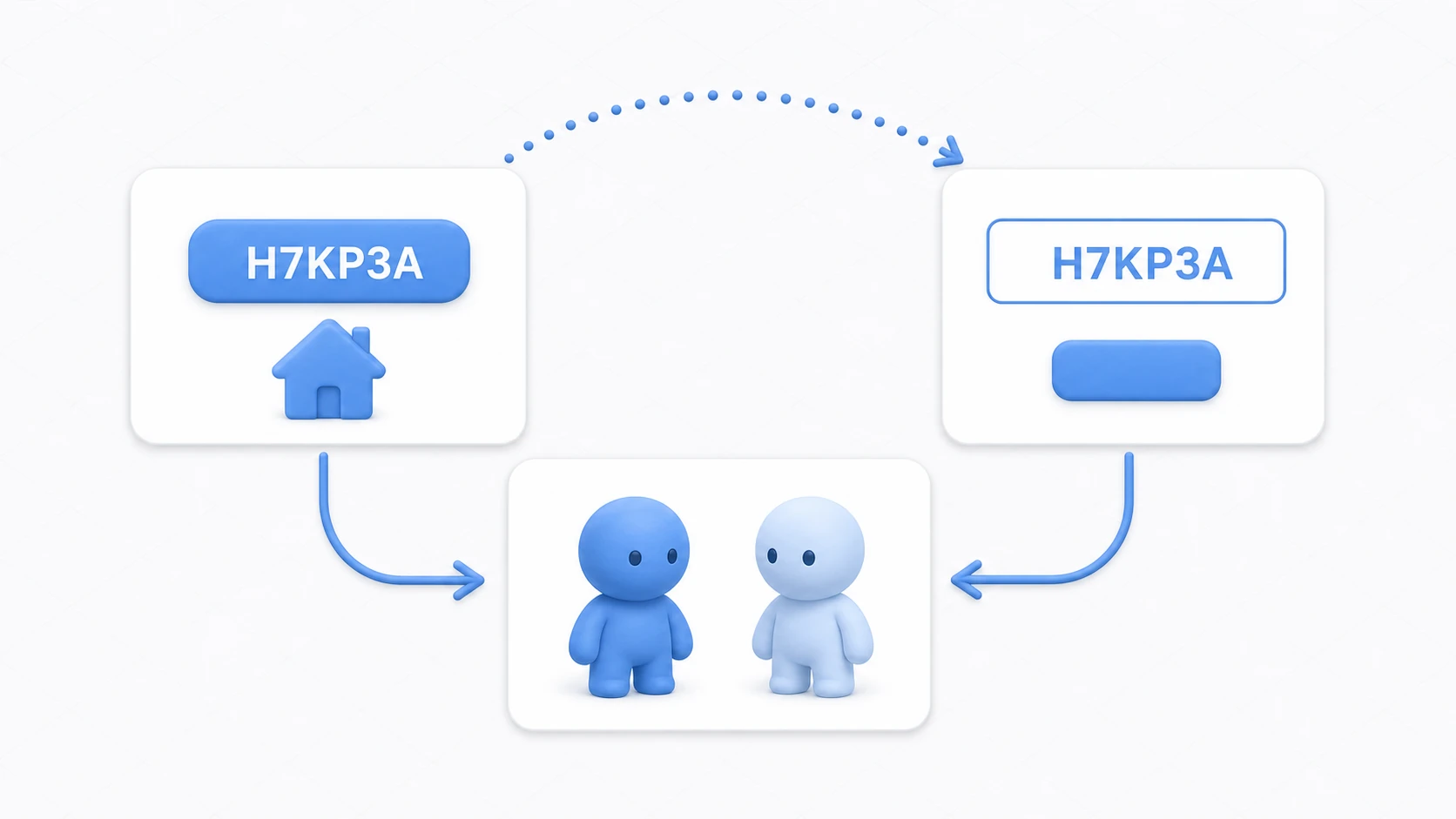
The flow: the host reserves a Relay slot → pins its ticket (join code) to a Lobby room → the client enters the room with the room code, picks up the ticket, connects to Relay → NGO syncs exactly as it always has. Your NGO code — NetworkVariables, RPCs — doesn't change by one character. Only the way you connect changes.
Setup: UGS init and anonymous sign-in
Add the Multiplayer Services package (com.unity.services.multiplayer, which includes Relay and Lobby) via the Package Manager, then link the project to UGS under Project Settings > Services (you'll need a Unity project on the dashboard, with Relay and Lobby enabled).
The first code job is initializing UGS and signing in. All UGS APIs use async/await — skim coroutines vs. async/await first if that's fuzzy.
using Unity.Services.Authentication;
using Unity.Services.Core;
using UnityEngine;

public static class UgsBootstrap
{
    public static async System.Threading.Tasks.Task EnsureSignedInAsync()
    {
        // 1. Initialize UGS once after startup
        if (UnityServices.State != ServicesInitializationState.Initialized)
        {
            await UnityServices.InitializeAsync();
        }

        // 2. Anonymous sign-in (a player ID with no account registration)
        if (!AuthenticationService.Instance.IsSignedIn)
        {
            await AuthenticationService.Instance.SignInAnonymouslyAsync();
            Debug.Log("Signed in: " + AuthenticationService.Instance.PlayerId);
        }
    }
}
Anonymous sign-in gives you an anonymous account with no email or password. It's created automatically the first time, and on the same device you sign in with the same player ID next time. Relay and Lobby both require it to identify who is making requests. For indie online features, starting anonymous is the norm.
Host: allocate Relay, mint a join code
The host does two things: reserve a relay slot (allocation) and mint its join code.
using Unity.Netcode;
using Unity.Netcode.Transports.UTP;
using Unity.Services.Relay;
using Unity.Services.Relay.Models;

public static async System.Threading.Tasks.Task<string> StartHostWithRelayAsync(int maxClients)
{
    // 1. Ask Relay for a slot that can carry up to N clients
    Allocation allocation = await RelayService.Instance.CreateAllocationAsync(maxClients);

    // 2. Mint the entry ticket (join code) for that slot
    string joinCode = await RelayService.Instance.GetJoinCodeAsync(allocation.AllocationId);

    // 3. Tell NGO's transport to route through Relay instead of connecting directly
    var transport = NetworkManager.Singleton.GetComponent<UnityTransport>();
    transport.SetRelayServerData(allocation.ToRelayServerData("dtls"));

    // 4. Start the host as usual
    NetworkManager.Singleton.StartHost();
    return joinCode;
}
maxClients excludes the host (1 for two-player co-op). "dtls" selects encrypted transport — leave it unless you have a reason not to (for a Web build, use "wss" and turn on Use WebSockets in UnityTransport). The returned joinCode is about six alphanumerics, and only someone holding it can enter this relay slot.
Client: join with the code
The client simply joins the same slot with the code it was given.
public static async System.Threading.Tasks.Task JoinWithRelayAsync(string joinCode)
{
    // 1. Join the slot the host reserved, using the join code
    JoinAllocation joinAllocation = await RelayService.Instance.JoinAllocationAsync(joinCode);

    // 2. Hand the transport the client-side relay settings
    var transport = NetworkManager.Singleton.GetComponent<UnityTransport>();
    transport.SetRelayServerData(joinAllocation.ToRelayServerData("dtls"));

    // 3. Start the client as usual
    NetworkManager.Singleton.StartClient();
}
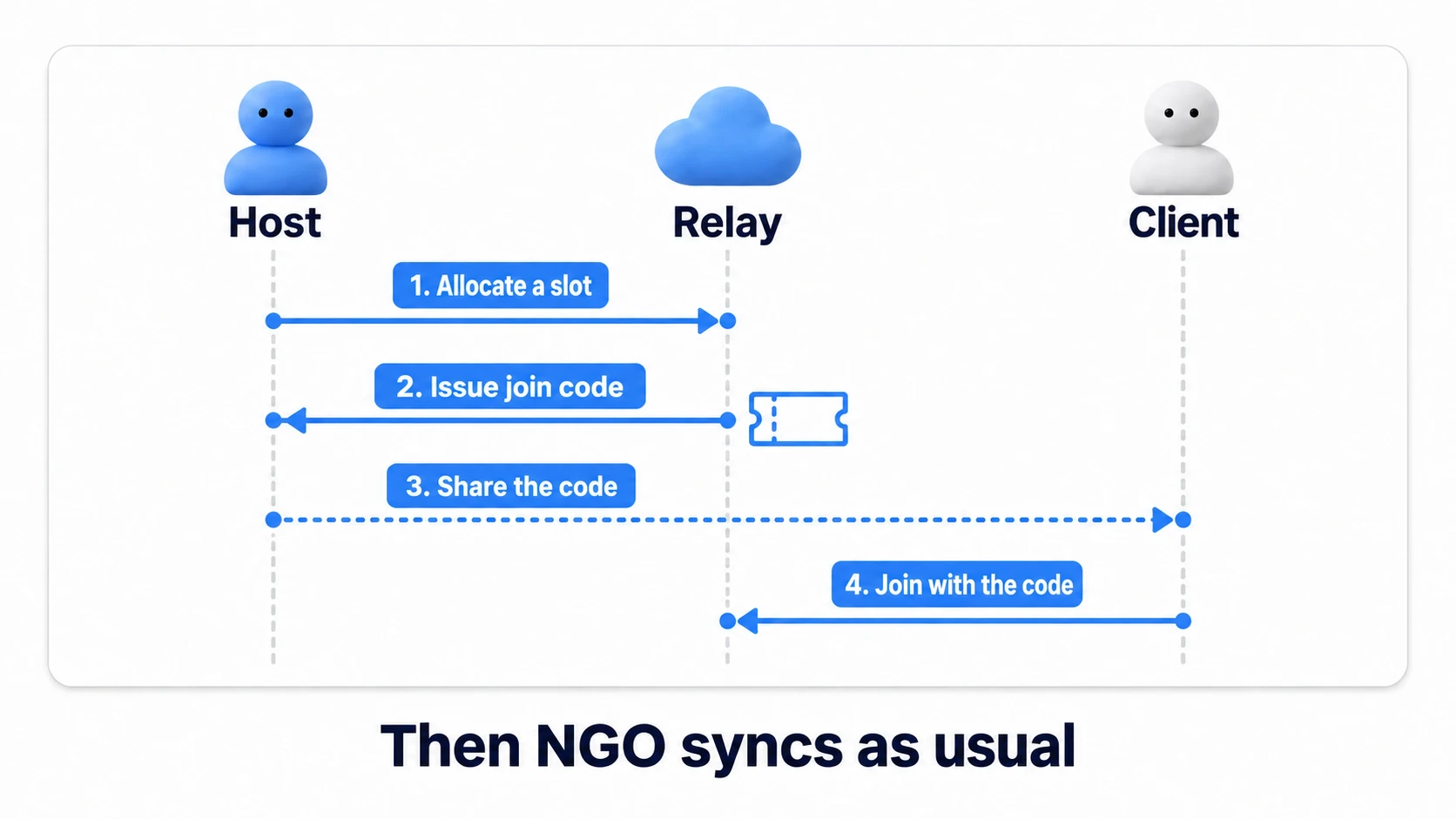
At this point, honestly, you can already play with a friend by pasting the join code into Discord. But asking people to copy six characters every session is clunky. So we hand room management to Lobby.
Lobby: turning the join code into a room password
Lobby is a database of rooms. A room has a name, capacity, arbitrary data — and a lobby code players can join with. Create a lobby that carries the Relay join code in its data, and players only ever share the lobby code.
Lobby has one idiosyncrasy: the heartbeat. To keep abandoned rooms from piling up, a room that stops pinging goes inactive after a while (30 seconds by default) and drops out of searches; after an hour it expires and gets deleted. While the room lives, the host must keep saying "still here" (every 15-20 seconds is typical).
Hands-on: a two-player co-op room behind one code
Time to assemble the parts into one manager. Press "Create room" and a code appears on screen; your friend types it in and walks into your game — the skeleton of every online co-op.
// OnlineSession.cs — one per scene (same object as the NetworkManager is fine)
using System.Collections;
using Unity.Netcode;
using Unity.Netcode.Transports.UTP;
using Unity.Services.Lobbies;
using Unity.Services.Lobbies.Models;
using Unity.Services.Relay;
using Unity.Services.Relay.Models;
using UnityEngine;

public class OnlineSession : MonoBehaviour
{
    public string LobbyCode { get; private set; } // the code you show in the UI

    private Lobby currentLobby;

    // ---- Host: create the room ----
    public async void CreateRoom()
    {
        await UgsBootstrap.EnsureSignedInAsync();

        // Reserve a Relay slot and get its join code (co-op for two = 1 client)
        Allocation allocation = await RelayService.Instance.CreateAllocationAsync(1);
        string relayJoinCode = await RelayService.Instance.GetJoinCodeAsync(allocation.AllocationId);

        // Create a Lobby that carries the Relay join code in its data
        var options = new CreateLobbyOptions
        {
            IsPrivate = true, // Only people with the code can join (keep it out of searches)
            Data = new System.Collections.Generic.Dictionary<string, DataObject>
            {
                { "relayJoinCode", new DataObject(DataObject.VisibilityOptions.Member, relayJoinCode) }
            }
        };
        currentLobby = await LobbyService.Instance.CreateLobbyAsync("CoopRoom", 2, options);
        LobbyCode = currentLobby.LobbyCode; // ← this is what you send your friend

        // Keep the room alive with heartbeats
        StartCoroutine(HeartbeatLoop());

        // Start hosting through Relay
        var transport = NetworkManager.Singleton.GetComponent<UnityTransport>();
        transport.SetRelayServerData(allocation.ToRelayServerData("dtls"));
        NetworkManager.Singleton.StartHost();

        Debug.Log("Room created. Code: " + LobbyCode);
    }

    // ---- Client: enter with the code ----
    public async void JoinRoom(string lobbyCode)
    {
        await UgsBootstrap.EnsureSignedInAsync();

        // Enter the room by code, pick up the stored Relay join code
        currentLobby = await LobbyService.Instance.JoinLobbyByCodeAsync(lobbyCode);
        string relayJoinCode = currentLobby.Data["relayJoinCode"].Value;

        // Join Relay and start the client
        JoinAllocation joinAllocation = await RelayService.Instance.JoinAllocationAsync(relayJoinCode);
        var transport = NetworkManager.Singleton.GetComponent<UnityTransport>();
        transport.SetRelayServerData(joinAllocation.ToRelayServerData("dtls"));
        NetworkManager.Singleton.StartClient();
    }

    // ---- Host: keep the room alive ----
    IEnumerator HeartbeatLoop()
    {
        while (currentLobby != null)
        {
            var ping = LobbyService.Instance.SendHeartbeatPingAsync(currentLobby.Id);
            yield return new WaitUntil(() => ping.IsCompleted);   // Wait until it's sent (so requests don't pile up)
            if (ping.IsFaulted) Debug.LogWarning("Heartbeat failed: " + ping.Exception.InnerException?.Message);
            yield return new WaitForSecondsRealtime(15f);         // Keeps running while paused (timeScale = 0)
        }
    }

    // ---- Cleanup (used in the next section) ----
    public async void LeaveRoom()
    {
        if (currentLobby != null)
        {
            try
            {
                if (currentLobby.HostId == Unity.Services.Authentication.AuthenticationService.Instance.PlayerId)
                {
                    await LobbyService.Instance.DeleteLobbyAsync(currentLobby.Id); // hosts fold the room
                }
                else
                {
                    await LobbyService.Instance.RemovePlayerAsync(
                        currentLobby.Id,
                        Unity.Services.Authentication.AuthenticationService.Instance.PlayerId);
                }
            }
            catch (LobbyServiceException e)
            {
                Debug.LogWarning("Lobby cleanup failed: " + e.Message);
            }
            currentLobby = null;
        }

        if (NetworkManager.Singleton.IsListening)
        {
            NetworkManager.Singleton.Shutdown();
        }
    }
}
The UI can be minimal: a "Create room" button wired to CreateRoom, a code input field plus "Join" wired to JoinRoom, and a Text showing LobbyCode.
Test by running a build next to the Editor. But the real verification is handing the build to a friend on a different network — send the room code from your screen, and when their character appears in your world, you've beaten NAT. If JoinLobbyByCodeAsync throws, check for a typo (enter the code exactly as shown), a room that no longer exists (the host folded it, for example), or a full room.
Two takeaways. Not one character of your NGO sync code changed (only the connection entrance did). Players only ever see the lobby code (the Relay join code hides inside the room's data).
Disconnect cleanup
Online reality is less about connecting and more about after it breaks. When your friend's connection drops, a silently frozen character is the worst version of that moment. Detect it with NGO's disconnect callback and clean up visibly.
void Start()
{
    NetworkManager.Singleton.OnClientDisconnectCallback += HandleDisconnect;
}

void OnDestroy()
{
    if (NetworkManager.Singleton != null)
    {
        NetworkManager.Singleton.OnClientDisconnectCallback -= HandleDisconnect;
    }
}

void HandleDisconnect(ulong clientId)
{
    if (!NetworkManager.Singleton.IsHost && clientId == NetworkManager.Singleton.LocalClientId)
    {
        // As a client, our own disconnect arrived = we lost the server (the host dropped, our own connection failed, etc.)
        Debug.Log("Lost connection to the host. Returning to title");
        LeaveRoom();
        // Load the title scene and show a message here
    }
    else if (NetworkManager.Singleton.IsHost)
    {
        // As host, a participant left
        Debug.Log("Player left: " + clientId);
        // Show "your friend left the game" etc.
    }
}
The minimum rules: a client treats losing the server as session over and returns to the title immediately (the NGO host doubles as the server — there's nothing to continue). The host announces the departure and keeps the room open for the next player. And when you leave, use LeaveRoom to fold the lobby before shutting down — skip that and a ghost room lingers until its heartbeats lapse.
Bonus: things worth knowing early
- Pricing and the free tier: Relay bills by concurrent users (monthly average) and data transfer, Lobby by data transfer, with free tiers that comfortably cover development and friend tests. Check the official pricing page before releasing — numbers change, so this article deliberately omits them
- Freeing a dropped player's slot: when a client's connection drops, its Lobby slot can stay taken. Have each player register its own Relay
AllocationIdwithLobbyService.Instance.UpdatePlayerAsync(UpdatePlayerOptions.AllocationId), and Lobby removes that player when Relay sees the disconnect - Regions: Relay allocations can specify a region. Unspecified, UGS picks one; for players in the same country, explicitly choosing a nearby region can cut latency
- The Unity 6 path: the Multiplayer Services package you installed in this article also includes the Sessions API, which bundles the Lobby + Relay + NGO wiring into one call. Understanding this article's bare wiring tells you exactly what Sessions automates for you
- What's next: when movement jitter starts to bother you, that's the world of interpolation, prediction, and lag compensation. Start with NGO's
NetworkTransforminterpolation settings - No networking needed on one machine: if two players just share one screen, you need neither Relay nor Lobby (Split-Screen Local Multiplayer)
Summary
- The internet says no because NAT blocks unsolicited inbound connections; Relay solves it by having both sides connect outward
- Three tools: Lobby = the front desk, Relay = the exchange, NGO = the conversation. Your sync code doesn't change
- Host: allocation → join code →
SetRelayServerData→ StartHost. Client: join by code → StartClient - Lobby hides the join code in room data; players share only the room code. Hosts keep the heartbeat going
- It's done when disconnects are handled: clients return to title, hosts announce and continue, and leavers fold the room
The first time a character controlled from another house walks into your screen, it feels nothing like two local windows. So — who gets your room code this weekend?