Around the time you can copy sample code and get a character moving, you glance at your own PlayerController.cs — movement, HP, items, UI updates, all crammed together, and suddenly it's several hundred lines. Fixing one part breaks another, and you have no idea how you're supposed to split it into classes. It's the wall every beginner hits right after learning variables and functions.
This article stocks your toolbox for getting over that wall: classes and instances, value types, reference types, and null, properties, inheritance vs. composition, and interfaces. At the end, we'll use an interface called IDamageable to make the player, an enemy, and a wooden crate all respond to the same sword swing.
What you'll learn
- A class is a bundle of data and behavior; an instance is the actual thing built from it
- Value types vs. reference types, and what
null/ NullReferenceException really mean- Unity's special rule: destroyed objects compare as
== null- Why to use
[SerializeField] privateand properties instead ofpublicfields- How to choose between inheritance and composition (Unity is a "snap parts together" engine)
- Using an interface to unify "things that can take damage" — with a working example
Tested with: Unity 2022.3 LTS / Unity 6
- What breaks when everything goes into PlayerController
- A class is a bundle of data and behavior
- Value types, reference types, and null
- Narrow the doorway: SerializeField private and properties
- Inheritance vs. composition
- An interface is a promise of what something can do
- Hands-on: one sword that can hit the player, enemies, and crates
- Bonus: terms you'll meet later
- Summary
What breaks when everything goes into PlayerController
First, let's name the problem. Does this script look familiar?
public class PlayerController : MonoBehaviour
{
    // Movement, HP, coins, UI, audio... all of it, right here
    public float moveSpeed = 5f;
    public int health = 100;
    public int coinCount = 0;
    public Text healthText;
    public AudioClip damageSound;

    void Update()
    {
        // 30 lines of movement
        // 40 lines of damage handling
        // 20 lines of coin logic
        // 30 lines of UI updates ...
    }
}
It works — for now. But this style starts falling apart the moment the project grows even a little.
- You can't find what to fix: you want to fix a jump bug, but you're wading through HP and UI code to find it
- One change ripples everywhere: rename an HP variable and an invincibility check buried in the movement code breaks with it
- Nothing is reusable: you want enemies to have HP too, but there's no way to pull just the HP part out of this
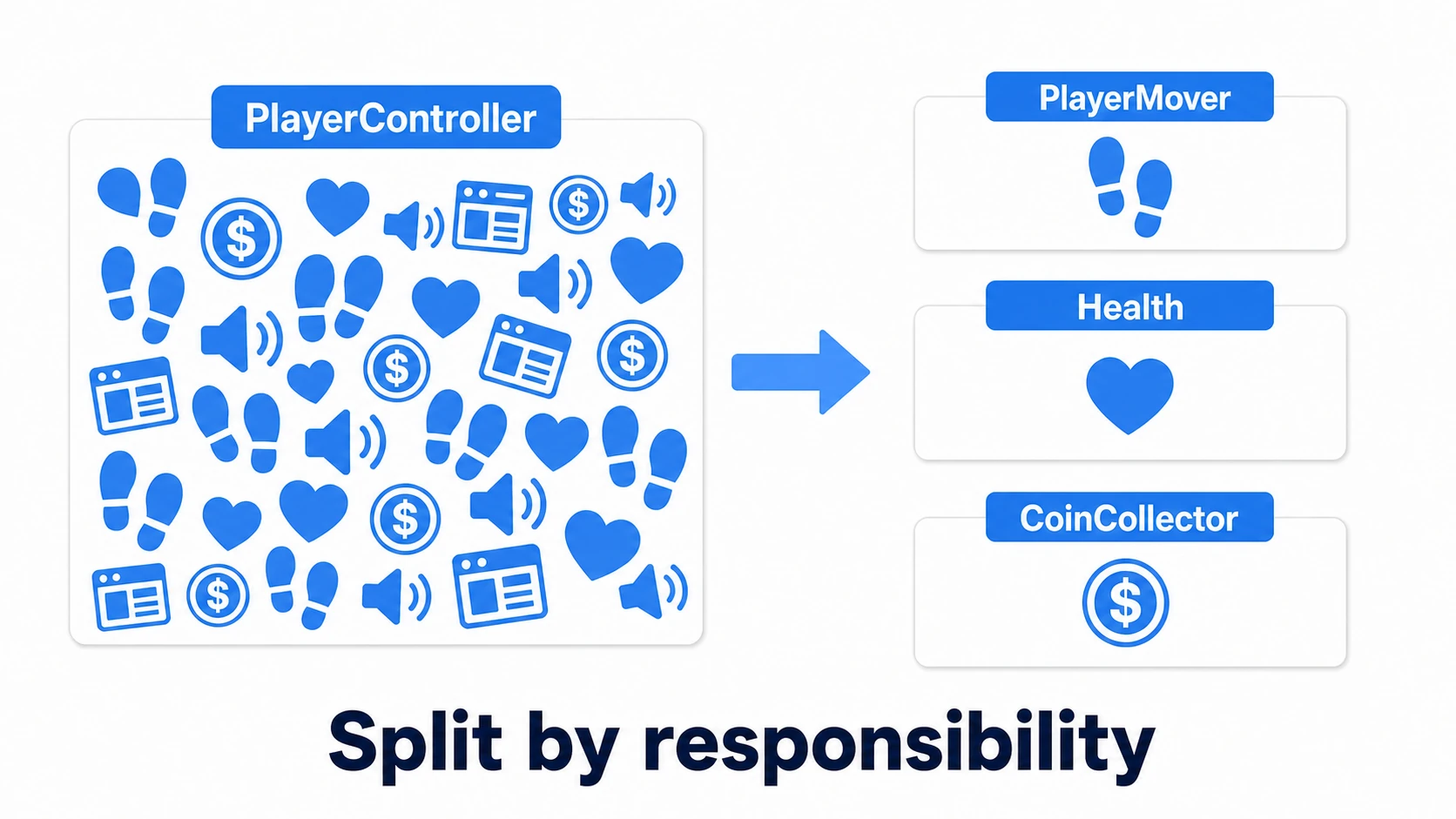
The fix points in one simple direction: split it into small classes, one per responsibility. Movement goes in PlayerMover, HP in Health, coins in CoinCollector. This is exactly the "combine small parts" philosophy we saw in GameObjects and Components. The rest of this article walks through the C# syntax you need to do the splitting.
A class is a bundle of data and behavior
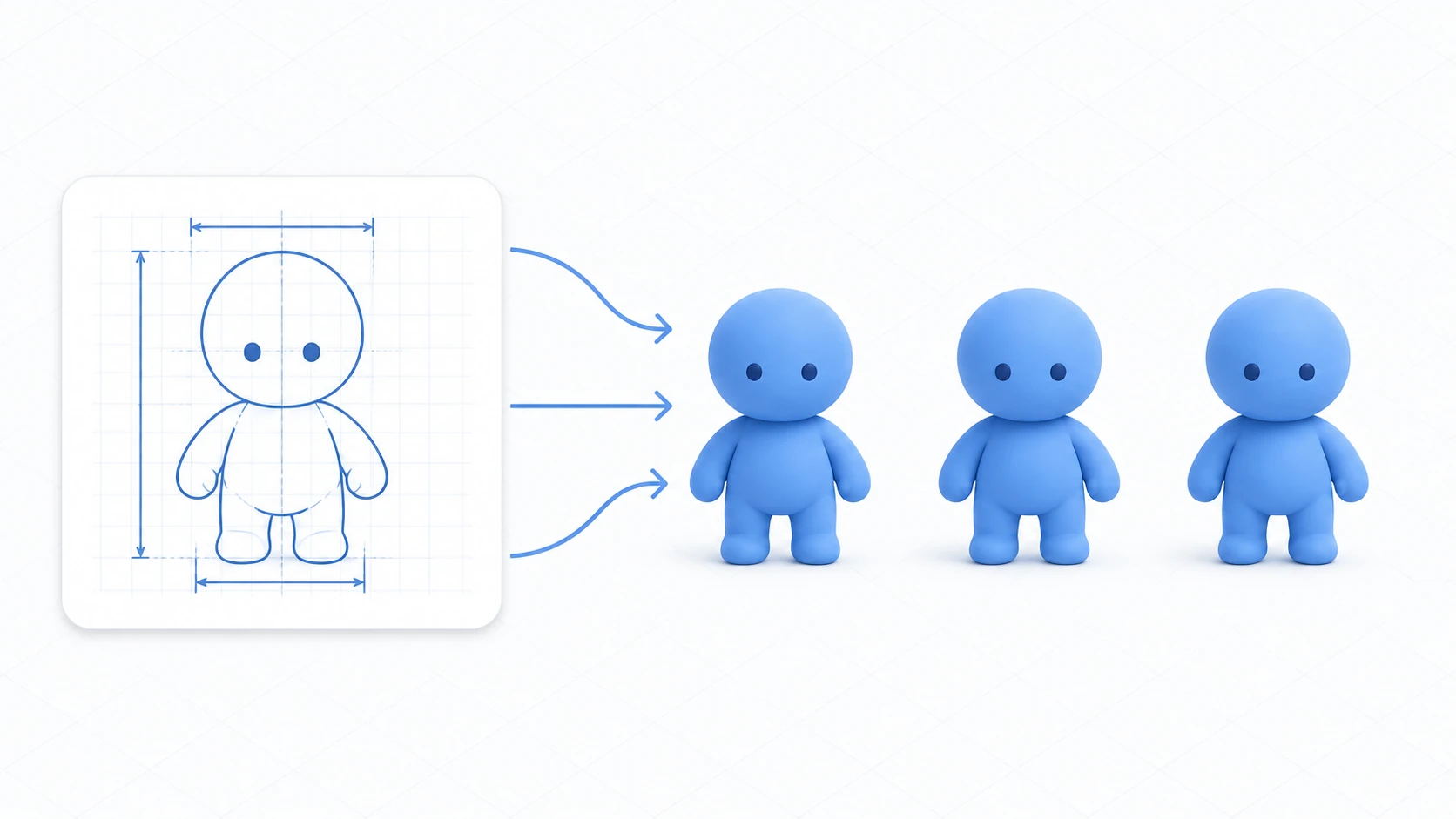
A class is a "blueprint" that bundles related variables (data) and functions (behavior) together. The actual thing built from the blueprint is called an instance.
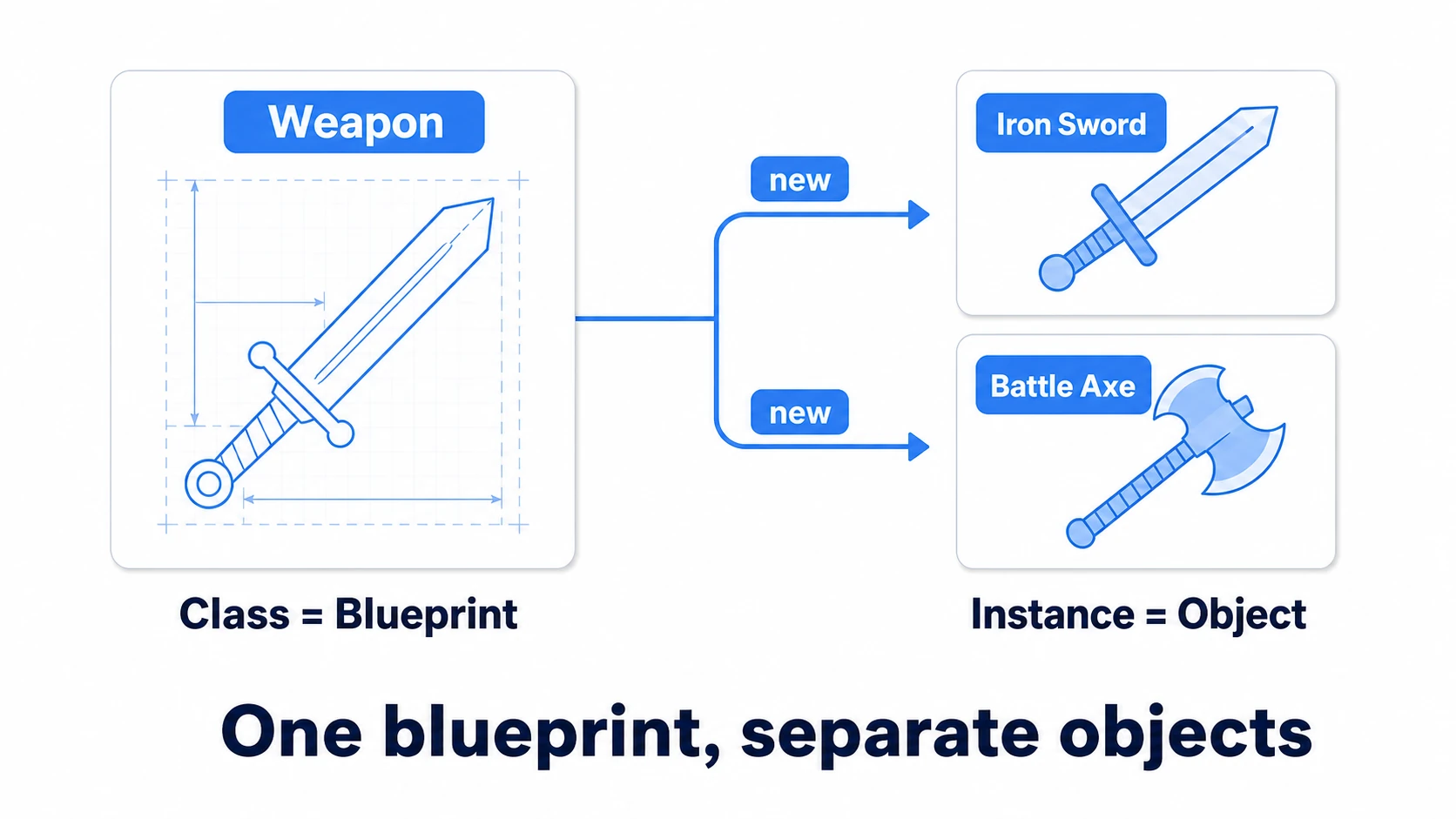
Let's write a pure C# class that doesn't inherit from MonoBehaviour.
// Weapon.cs — a plain class that does NOT inherit MonoBehaviour
public class Weapon
{
    // Data (what this weapon remembers)
    public string weaponName;
    public int damage;

    // Constructor: the initialization function called the moment it's new-ed
    public Weapon(string name, int damageValue)
    {
        weaponName = name;
        damage = damageValue;
    }

    // Behavior (what this weapon can do)
    public string GetLabel()
    {
        return weaponName + " (ATK " + damage + ")";
    }
}
The caller creates instances with new.
Weapon sword = new Weapon("Iron Sword", 10);
Weapon axe = new Weapon("Battle Axe", 25);

Debug.Log(sword.GetLabel()); // Iron Sword (ATK 10)
Debug.Log(axe.GetLabel());   // Battle Axe (ATK 25)
The key point: sword and axe are separate objects built from the same blueprint, each holding its own independent data. "If there are 10 enemies, there are 10 instances of EnemyHealth, each with its own HP" — that intuition is the foundation for everything else in this article.
Note: Classes that inherit
MonoBehaviourare the one kind you can nevernew. They only work as components on a GameObject, so you create them withAddComponent()or by attaching them in the editor. Flip that around, and it means pure data and rules that don't need a GameObject (wallet math, damage formulas, and so on) can live in plain classes likeWeaponabove. See the MonoBehaviour article for details.
Value types, reference types, and null
Once you start using classes, you quickly run into something strange: "I copied it, but changing one changed the other too." That's the difference between value types and reference types.
- Value types (
int,float,bool,Vector3, ...): assignment copies the contents. Changing the copy doesn't touch the original - Reference types (all classes — including
string, arrays, andGameObject): assignment copies a reference (an address) to the same object. Change it through either variable, and the one shared object changes
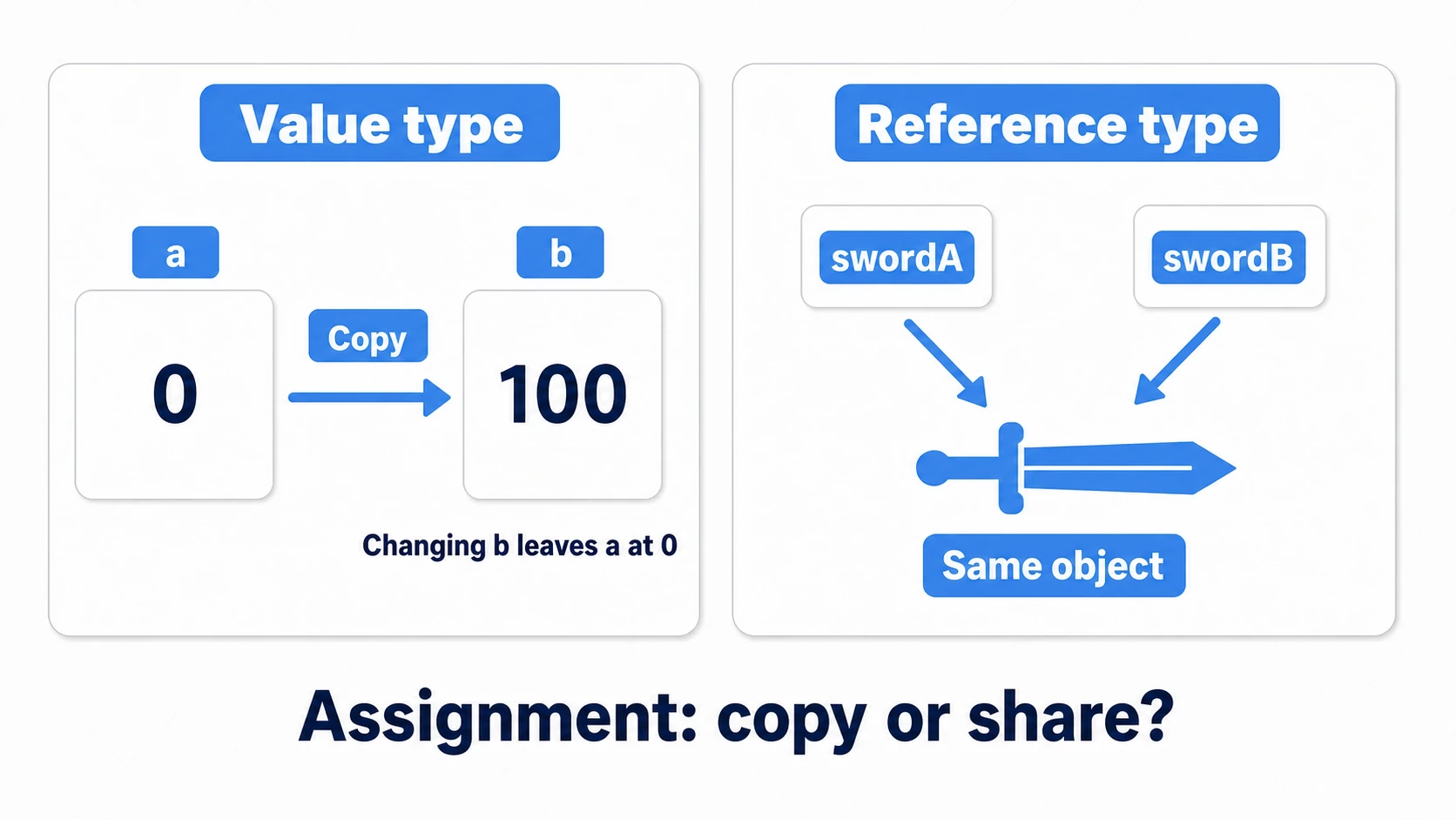
// Value type: a copy, so changing b leaves a alone
Vector3 a = new Vector3(0, 0, 0);
Vector3 b = a;
b.x = 100f;
Debug.Log(a.x); // still 0

// Reference type: swordA and swordB point at THE SAME weapon
Weapon swordA = new Weapon("Iron Sword", 10);
Weapon swordB = swordA;
swordB.damage = 999;
Debug.Log(swordA.damage); // now 999!
This isn't a bug — it's reference types working as designed. It's also why you can hand the same enemy list to both your AI and your UI and have everyone looking at "the same enemies."
null means "pointing at nothing"
A reference-type variable can be in a state where it points at no object at all. That state is null. Access a member on a null variable and you get the king of beginner errors: NullReferenceException.
Weapon currentWeapon = null; // not holding a weapon yet

// currentWeapon points at nothing, so this line throws
// NullReferenceException: Object reference not set to an instance of an object
Debug.Log(currentWeapon.damage);
The basic defense is "check before you use."
if (currentWeapon != null)
{
    Debug.Log(currentWeapon.damage);
}
For how to hunt this error down (identifying which variable was null from the error message and line number), see the debugging guide.
Unity's special "destroyed object" check
Here's a rule specific to Unity, and it matters. After you Destroy() a GameObject or Component, your C# variable still technically points at something — but Unity deliberately makes == null return true for it.
[SerializeField] private EnemyHealth enemy;

void DefeatEnemy()
{
    Destroy(enemy.gameObject);
}

void Update()
{
    // Once the destruction has run, enemy == null is true (Unity's special rule)
    if (enemy != null)
    {
        Debug.Log(enemy.name);
    }
}
Destroy() only schedules the destruction; the object actually goes away after that frame's Update and similar processing finish. From then on, a plain null check tells you whether the object has been destroyed. But there's a trap: C#'s convenient ?. and ?? operators bypass this special rule. They'll treat a destroyed object as still alive, so the code after them either throws an error or quietly runs when it should have stopped. So for Unity objects, the deliberately old-fashioned if (obj != null) is the correct choice.
Narrow the doorway: SerializeField private and properties
Once your classes are split up, the next decision is how much the outside world gets to touch. Make everything public and any class can overwrite anything — and one day you're searching every script in the project for whoever set HP to a negative number.
Two rules cover almost everything.
1. If you only want to tweak it in the Inspector, use [SerializeField] private
public class Health : MonoBehaviour
{
    // Shows up in the Inspector, but no other class can write to it
    [SerializeField] private int maxHealth = 100;
}
2. If other classes need to read a value, expose it through a read-only property
public class Health : MonoBehaviour
{
    [SerializeField] private int maxHealth = 100;

    // Anyone can read it; only this class can write it
    public int Current { get; private set; }

    void Awake()
    {
        Current = maxHealth;
    }

    public void TakeDamage(int amount)
    {
        // All writes go through this one doorway, so the
        // "never below zero" rule is always enforced
        Current = Mathf.Max(0, Current - amount);
    }
}
A property is like a variable that doubles as a checkpoint for reads and writes. With get; private set;, anyone can read — only the owning class can write. Funnel every HP change through TakeDamage(), and "HP went negative" becomes a bug that structurally cannot happen. When you eventually want change notifications too, the events and delegates article is the next step.
Inheritance vs. composition
Inheritance lets you build on an existing class and write only the differences. You already use it every day — the : in public class Player : MonoBehaviour is inheritance, and it's the reason Start() and Update() get called at all.
The classic hands-on use case is enemy variations.
// A base class holding what all enemies share
public class EnemyBase : MonoBehaviour
{
    [SerializeField] protected float moveSpeed = 2f;

    // virtual: child classes may override this
    protected virtual void Move()
    {
        transform.Translate(Vector3.left * moveSpeed * Time.deltaTime);
    }

    void Update()
    {
        Move();
    }
}

// Slime: uses the shared movement as-is
public class Slime : EnemyBase
{
}

// Bat: overrides only how it moves
public class Bat : EnemyBase
{
    protected override void Move()
    {
        float wave = Mathf.Sin(Time.time * 5f);
        transform.Translate(new Vector3(-moveSpeed, wave, 0) * Time.deltaTime);
    }
}
Useful — but inheritance can work too well. Stack the tree deep (EnemyBase → FlyingEnemy → FireFlyingEnemy → ...) and a one-line change in the base ripples through every descendant. You're right back to the god class problem: no idea what's safe to touch.
That's when you should remember the design Unity itself is built on: composition — combining parts. A "flying enemy" doesn't have to be "an enemy that inherits from a flying class." It can be "an enemy object with a Flying component added."
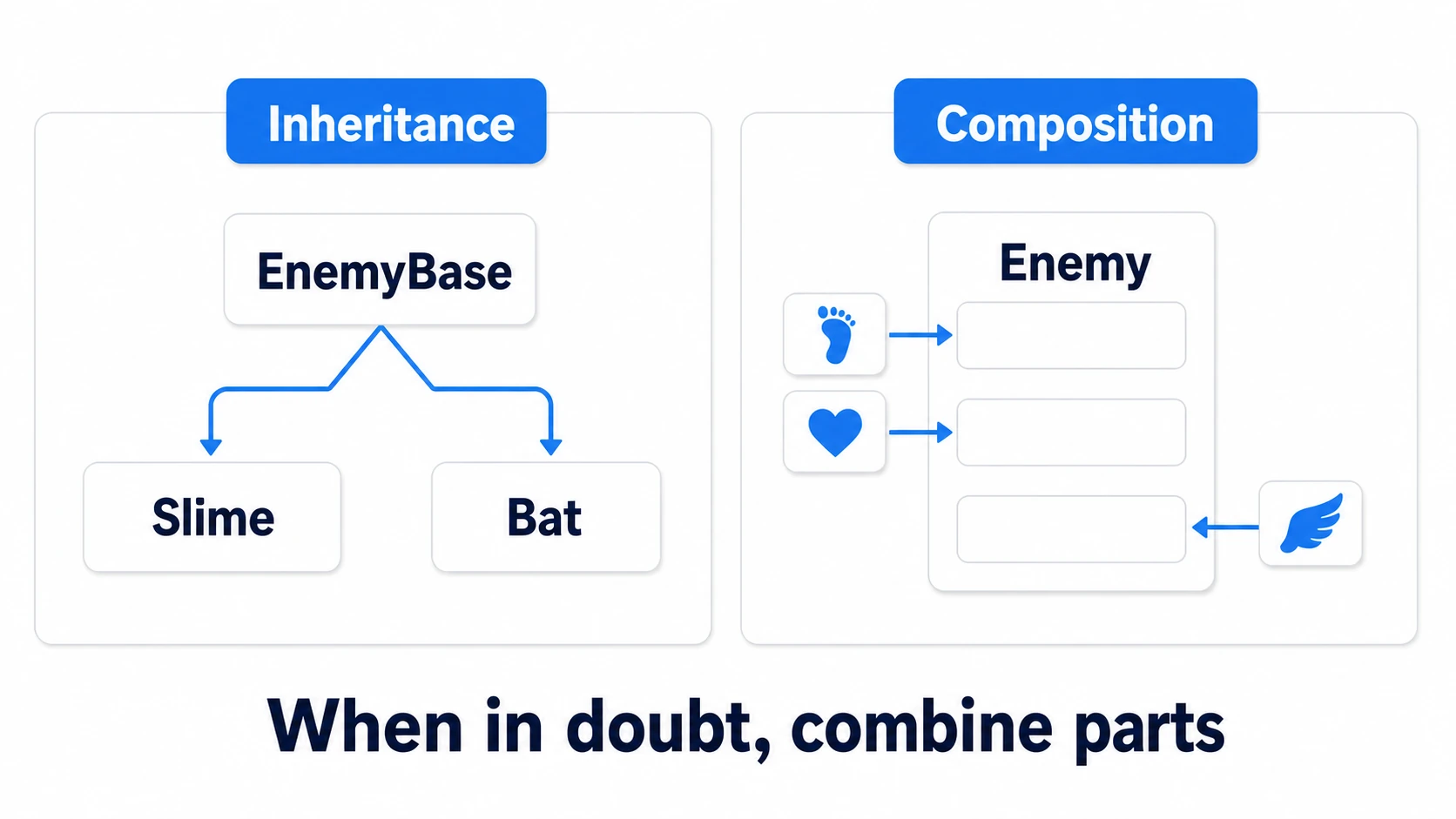
Rules of thumb:
| Test | Reach for |
|---|---|
| "A Slime is an Enemy" sounds natural (is-a) | Inheritance (keep it shallow — one or two levels) |
| "The enemy has a flying ability" sounds more natural (has-a) | Composition (add a component) |
| Unrelated types just need the same promise | An interface (next section) |
When in doubt, start by considering composition. Inheritance isn't bad — a shallow "a Slime is an enemy" hierarchy is handy. The "snap parts together to build three different objects" instinct from the GameObject and Components article is, unchanged, good architecture.
An interface is a promise of what something can do
The last tool is the interface. An interface is a list of promises with no implementation: "any class that signs this will definitely have these functions."
// The promise: "this thing can take damage"
public interface IDamageable
{
    void TakeDamage(int amount);
}
Why is this powerful? Think about the player, an enemy, and a breakable crate. They're not variations of each other — forcing them under one shared parent class would be unnatural. But they do share exactly one thing: all of them can take damage.
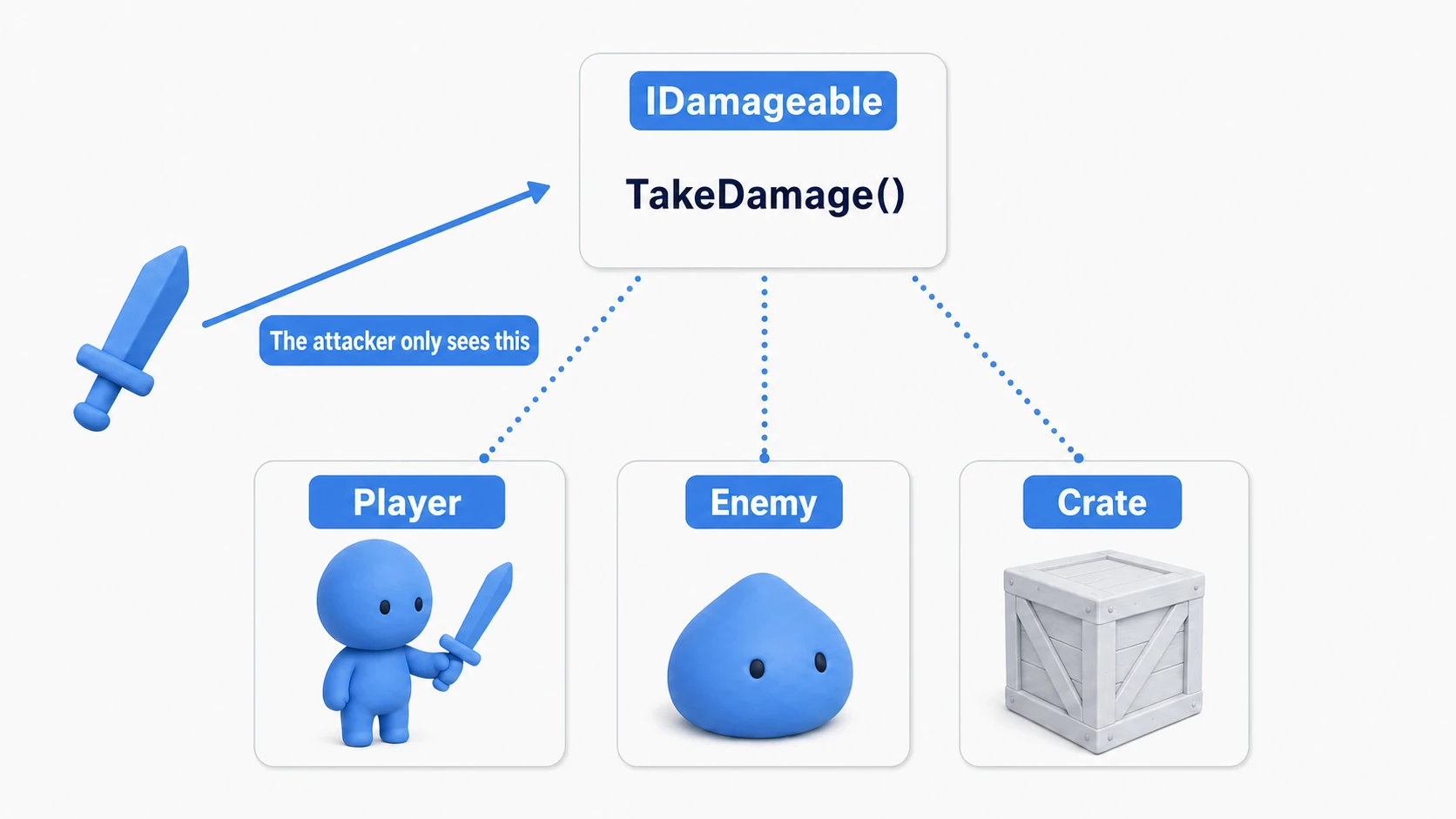
An interface lets you cut across unrelated class hierarchies and have them all make the same promise.
// Only one base class allowed — but implement as many interfaces as you like, comma-separated
public class EnemyHealth : MonoBehaviour, IDamageable
{
    public void TakeDamage(int amount)
    {
        // Promised methods must be public. What they DO is up to each class
    }
}
And the attacking side no longer needs to know what it hit. "If it has IDamageable, I can hit it" — that's the whole rule. Let's wire it up for real.
Hands-on: one sword that can hit the player, enemies, and crates
A sword swing in an action RPG, a bullet in a shooter, a block-breaking move in a puzzle game — every genre has "one attack that lands on many different kinds of things." Here we'll build it with a sword and IDamageable.
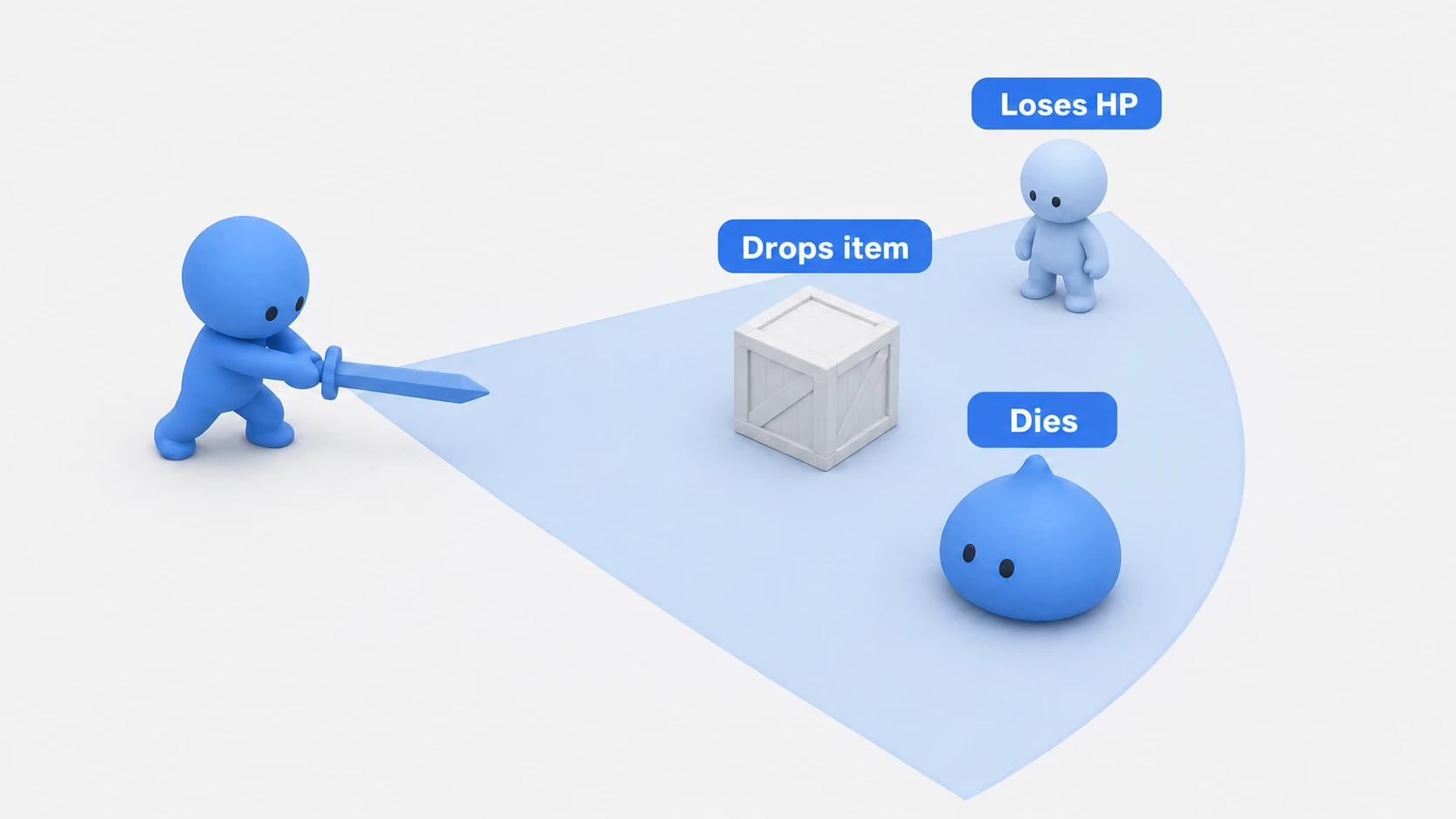
Here's what "done" looks like: one swing, and the enemy loses HP and dies, the crate shatters and drops an item, and an ally caught in the arc loses HP. The sword script doesn't know a single one of those class names.
First, define the promise.
// IDamageable.cs — the "can take damage" contract
public interface IDamageable
{
    void TakeDamage(int amount);
}
The attacker looks only at the promise. Attach this to the sword's hitbox (a Collider with Is Trigger enabled). Trigger detection needs a Rigidbody on one of the two overlapping objects, so also add a Rigidbody to the sword and turn on Is Kinematic (so gravity won't pull it down).
// SwordAttack.cs — attach to the sword's hitbox
using UnityEngine;

public class SwordAttack : MonoBehaviour
{
    [SerializeField] private int damage = 10;

    private void OnTriggerEnter(Collider other)
    {
        // If it can take damage, we can hit it — whatever it is
        if (other.TryGetComponent<IDamageable>(out IDamageable target))
        {
            target.TakeDamage(damage);
        }
    }
}
Each receiver implements the promise its own way.
// EnemyHealth.cs — enemy: falls when HP runs out
using UnityEngine;

public class EnemyHealth : MonoBehaviour, IDamageable
{
    [SerializeField] private int maxHealth = 30;
    private int currentHealth;

    void Awake()
    {
        currentHealth = maxHealth;
    }

    public void TakeDamage(int amount)
    {
        currentHealth -= amount;
        Debug.Log(name + " HP: " + currentHealth);

        if (currentHealth <= 0)
        {
            Destroy(gameObject);
        }
    }
}
// BreakableCrate.cs — crate: breaks in one hit and drops an item
using UnityEngine;

public class BreakableCrate : MonoBehaviour, IDamageable
{
    [SerializeField] private GameObject itemPrefab;

    public void TakeDamage(int amount)
    {
        // The crate has no HP and ignores the damage amount — that freedom is the point
        if (itemPrefab != null)
        {
            Instantiate(itemPrefab, transform.position, Quaternion.identity);
        }
        Destroy(gameObject);
    }
}
// PlayerHealth.cs — ally: loses HP, game over at zero
using UnityEngine;

public class PlayerHealth : MonoBehaviour, IDamageable
{
    [SerializeField] private int maxHealth = 100;

    public int Current { get; private set; }

    void Awake()
    {
        Current = maxHealth;
    }

    public void TakeDamage(int amount)
    {
        Current = Mathf.Max(0, Current - amount);
        Debug.Log("Player HP: " + Current);

        if (Current == 0)
        {
            Debug.Log("Game Over");
        }
    }
}
Press Play, grab the sword with the Move tool in the Scene view, and touch it to the enemy, the crate, and your ally, in that order. OnTriggerEnter fires only once, at the moment the overlap begins, so pull the sword back out of the target after each hit before going in again. The enemy disappears after three hits, the crate turns into an item in one, and the ally's HP ticks down in the Console — three different reactions from the same SwordAttack. Now look at SwordAttack.cs one more time. There is not a single if (it's an enemy) or if (it's a crate) branch. That absence is the achievement.
Tomorrow, when you want a breakable streetlamp, all you do is give the streetlamp a class that implements IDamageable. You won't touch a single character of SwordAttack.cs. And if a swing does nothing at all, there are two places to look: is Is Trigger enabled on the sword's Collider, and does the sword have a Rigidbody? And remember TryGetComponent only looks at the Collider's own GameObject — if the Collider lives on a child object, switch to GetComponentInParent to search up the hierarchy. In a 2D game, use OnTriggerEnter2D (which takes a Collider2D) instead of OnTriggerEnter.
Two takeaways. The attacker sees only the interface (so the code doesn't break when you add content). Each receiver owns its reaction (so enemies and crates are free to respond differently). This "decouple through promises" instinct leads straight into the State pattern and event-driven design.
Bonus: terms you'll meet later
Once you start using these tools, you'll run into the following words. A name and one line each is all you need today.
abstract(abstract classes): a class meant only as a foundation, never instantiated on its own. Look it up the day you don't wantEnemyBaseplaced directly in a scenestatic(static members): variables and functions that belong to the class itself, not an instance. It's why you callMathf.Max()withoutnew Mathf(). Powerful, but overuse breeds tight coupling — learn it with etiquette in the Singleton pattern article- Generics (
<T>): a slot where a type gets plugged in later. You already use them —List<int>,GetComponent<Rigidbody>(). Using generics starts today; writing your own can wait a long time
Summary
- A class bundles data and behavior; an instance is the actual thing. Splitting into small classes per responsibility is the first cure for god classes
- Classes are reference types: assignment shares one object, and
nullmeans pointing at nothing - In Unity, destroyed objects compare as
== null— and?./??bypass that rule, so don't use them on Unity objects - Inspector-only tweaking →
[SerializeField] private; read access for others → aget; private set;property - Use inheritance shallowly for true is-a relationships; when in doubt, lean toward composition
- An interface is a promise of capability — it lets one attack, one system, one line of code handle wildly different things
Next time you open your project, look at your longest script — how many "chunks that could be their own class" can you already see?