Building an inventory, you line up variables named Item1 , Item2 , Item3 . Managing enemies, you create Enemy1 and Enemy2 . Every increase means adding another variable and similar nodes.
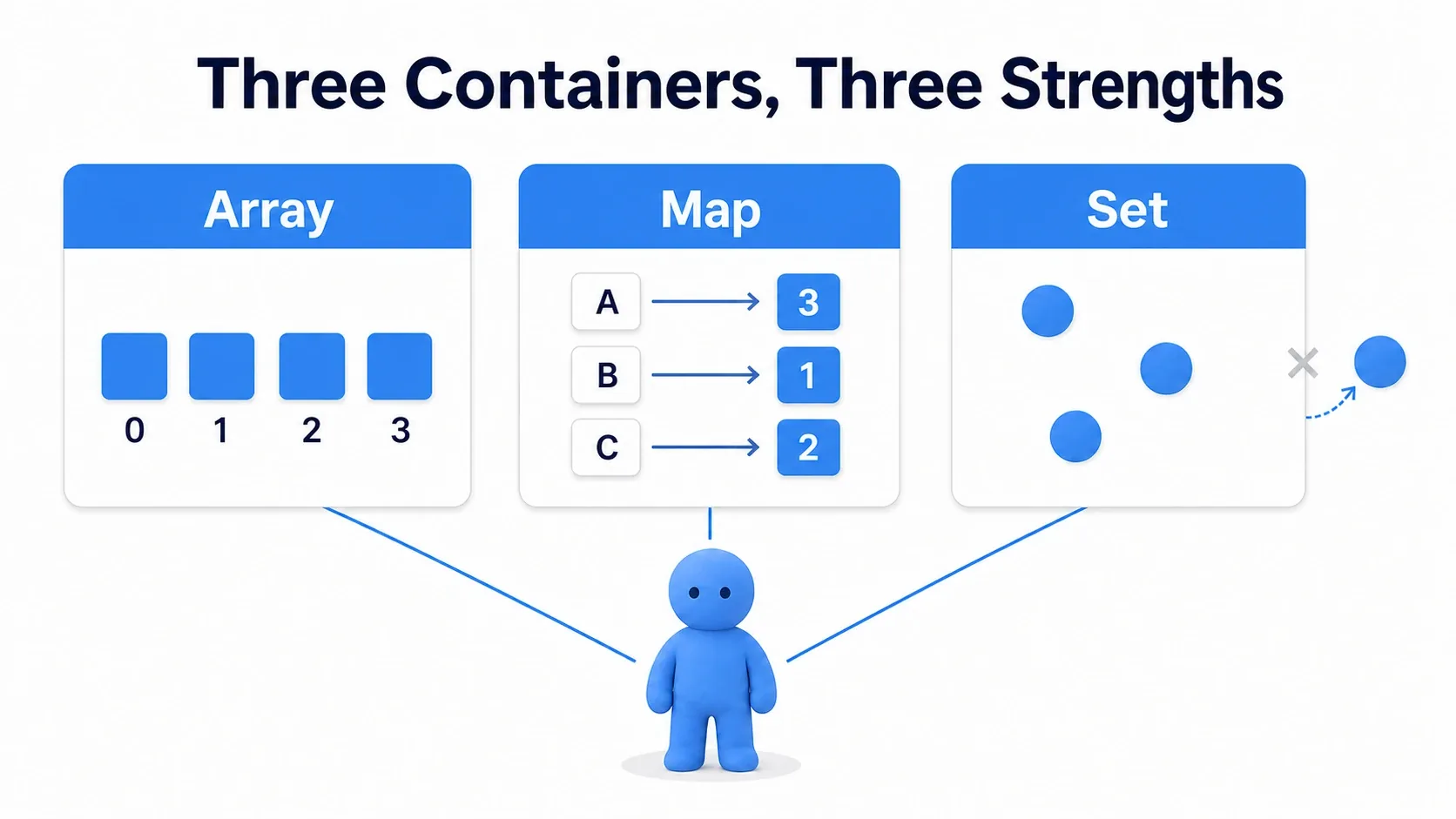
That is what containers are for. Blueprint has three kinds, Array, Set, and Map , all containers for holding several values of the same type. Choose by asking whether you want to keep the order, to record only the kinds, or to know a quantity from an ID . Here we record the same pickups in all three and compare what each can tell us.
What You'll Learn
- Array = ordered / Set = no duplicates / Map = looked up by key
- Containers are chosen with the toggle button to the right of a variable's type
- Array's main nodes, and how to fix Index out of bounds
- Why adding or removing during a loop skips the next element
- Hands-on: an inventory managing item IDs and quantities with a Map
- The difference between the three containers
- Containers toggle to the right of the type
- Array's main nodes
- For Each Loop and modifying during a loop
- Set: the container with no duplicates
- Map: the container looked up by key
- Hands-On: build an inventory that counts quantities
- Bonus: Good to Know Up Front
- Summary
The difference between the three containers
All three gather multiple pieces of data. One item inside is an element . What differs is how you search and retrieve.
| Container | How it holds things | Questions it answers well | What it is bad at |
|---|---|---|---|
| Array | In order. Duplicates allowed | "What is the third?" "How many total?" | Finding a value means comparing in order |
| Set | No duplicates. No order | "Do I have this?" | There is no "third" |
| Map | Key and value pairs. No order | "What is this key's value?" | It cannot hold the same key twice |
Put into game terms, the choice becomes clear.
- Array : a log in pickup order, party ordering, waypoint patrol order. Things where the order itself carries meaning
- Set : IDs of items already obtained, unlocked stages, monsters registered in a catalog. Things you do not want registered twice
- Map : item ID to quantity, player name to score, key name to setting. Things you want to look up by something
A key is the handle specifying the data you want. Holding "Herb → 3" in a Map makes Herb the key and 3 the value. Its role differs from an array's position number.

Containers toggle to the right of the type
In Blueprint, you first choose the element type, then specify whether you hold one of them or gather them into an Array, Set, or Map.
Create a variable in the My Blueprint panel and the Details panel shows Variable Type . There is a small button to the right of the type dropdown offering four choices.
| Display | Meaning |
|---|---|
| Single Variable | A normal variable (one) |
| Array | An array |
| Set | A set |
| Map | A dictionary. Choosing it adds another field for the value type |
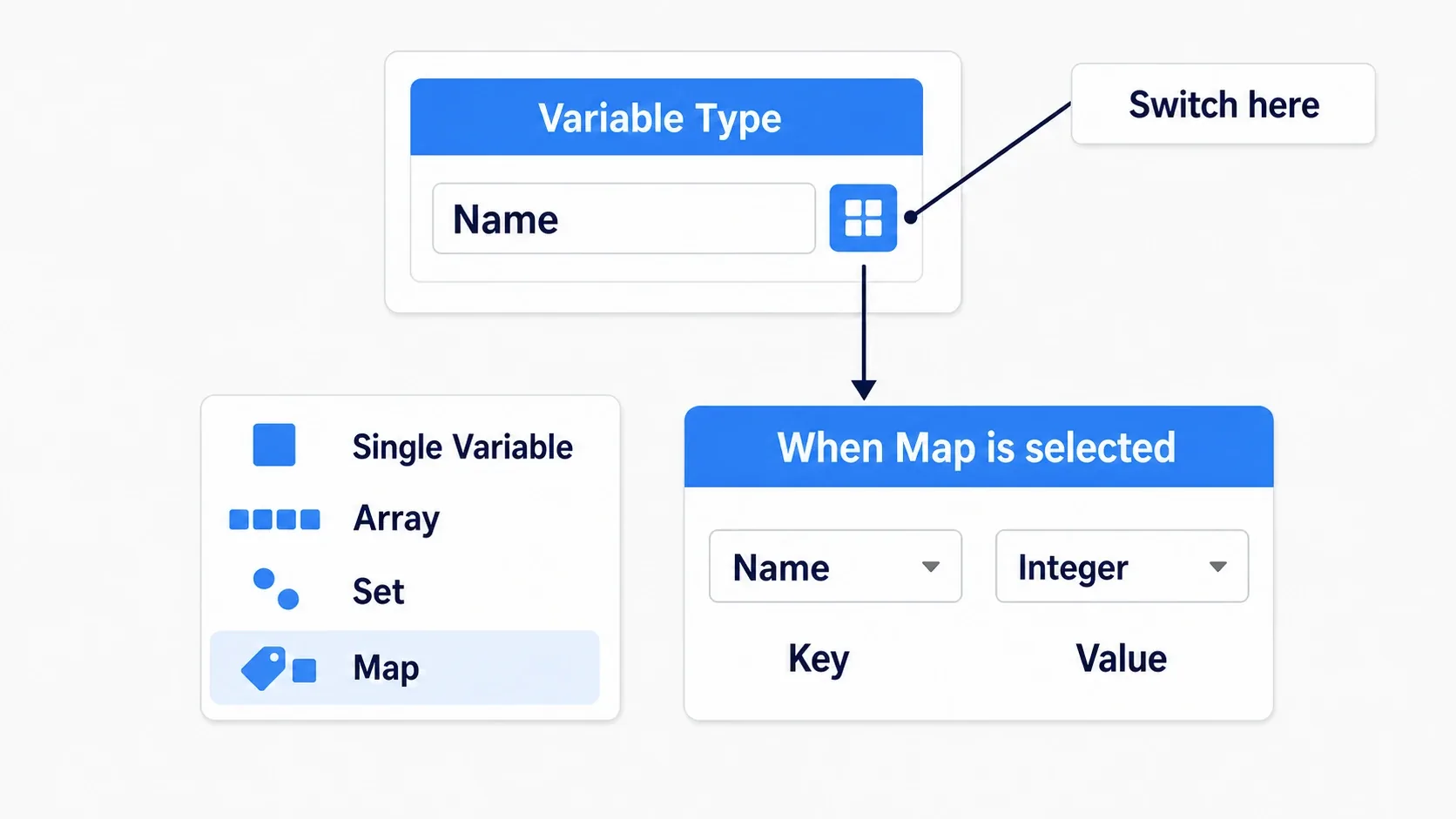
Only Map gives you two fields. The left is the key type and the right is the value type. For "item ID (Name) → quantity (Integer)", set Name on the left and Integer on the right.
Name is the type used for identifiers like Herb and Potion. It suits separating the text "Herb" shown on screen from the ID used in logic. Some types cannot be Set elements or Map keys, so we standardize item IDs on Name here.
Array's main nodes
Array is the most used of the three. Drag an array variable into the graph and pull from its pin to see the candidates.
| Node | What it does | Notes |
|---|---|---|
| Add | Appends to the end | Returns the index it was added at |
| Insert | Inserts at a given index | Later elements shift back by one |
| Remove Index | Removes by number | Later elements shift forward by one |
| Remove Item | Removes by content | Removes all matches |
| Get (a copy) | Retrieves by number | Specifying out of range causes an error |
| Set Array Elem | Rewrites the value at a given index | With Size to Fit off it uses an existing index; on, it grows the array as needed |
| Length | Returns the element count | 0 when empty |
| Last Index | Returns the last index (Length - 1) | -1 for an empty array |
| Contains Item | Returns whether it is contained as Boolean | true if found, false if not |
| Find Item | Returns the index found | Returns -1 when not found |
| Is Valid Index | Returns whether that index is usable | Use it as a safety check before Get |
An index is the number specifying a position in an Array. It starts at 0 , so three elements are numbered 0, 1, 2. Length is the count 3 and Last Index is the final number 2. Boolean (bool) is the type handling true when a condition holds and false when it does not.

Getting with an out-of-range index prints something like this to the Output Log. The wording varies by node and version, but index and length let you trace the cause.
Blueprint Runtime Error: "Attempted to access index 3 from array 'PickupLog' of length 3!"
It means "index 3 was requested from an array of 3". Index 3 is the fourth from the start, so it does not exist. The count and the last index differ by one.
There are two ways to prevent it. Feed the checked Boolean into a Branch's Condition and use Get only on the True side. A Branch splits execution into True and False by condition.
- Check with Is Valid Index before Get : use this when the index comes from outside (a UI click position, a saved value)
- Check for empty before reading the last element too :
Last Indexis handy but is -1 on an empty array. Either Get only on the True side of aLength > 0Branch, or check Last Index with Is Valid Index
Get (a copy) retrieves a copy of the value. When the array holds structs, rewriting the retrieved copy does not change the original element. Use
Set Array Elemto write it back. This trips people up, so the struct article covers the mechanism and the fix in detail.
For Each Loop and modifying during a loop
Use For Each Loop to process an array one element at a time. Pull from an array pin and it appears among the candidates.
| Pin | Contents |
|---|---|
| Loop Body | Runs for each element |
| Array Element | The content at that moment |
| Array Index | The index at that moment |
| Completed | Runs once after everything finishes |
To stop partway, use For Each Loop with Break . Sending execution into the Break pin ends the loop there. Handy for "stop at the first match".
What to watch for is adding to or removing from the array you are iterating, inside a For Each Loop . The count and indices change, so you may not process things in the order you expected.
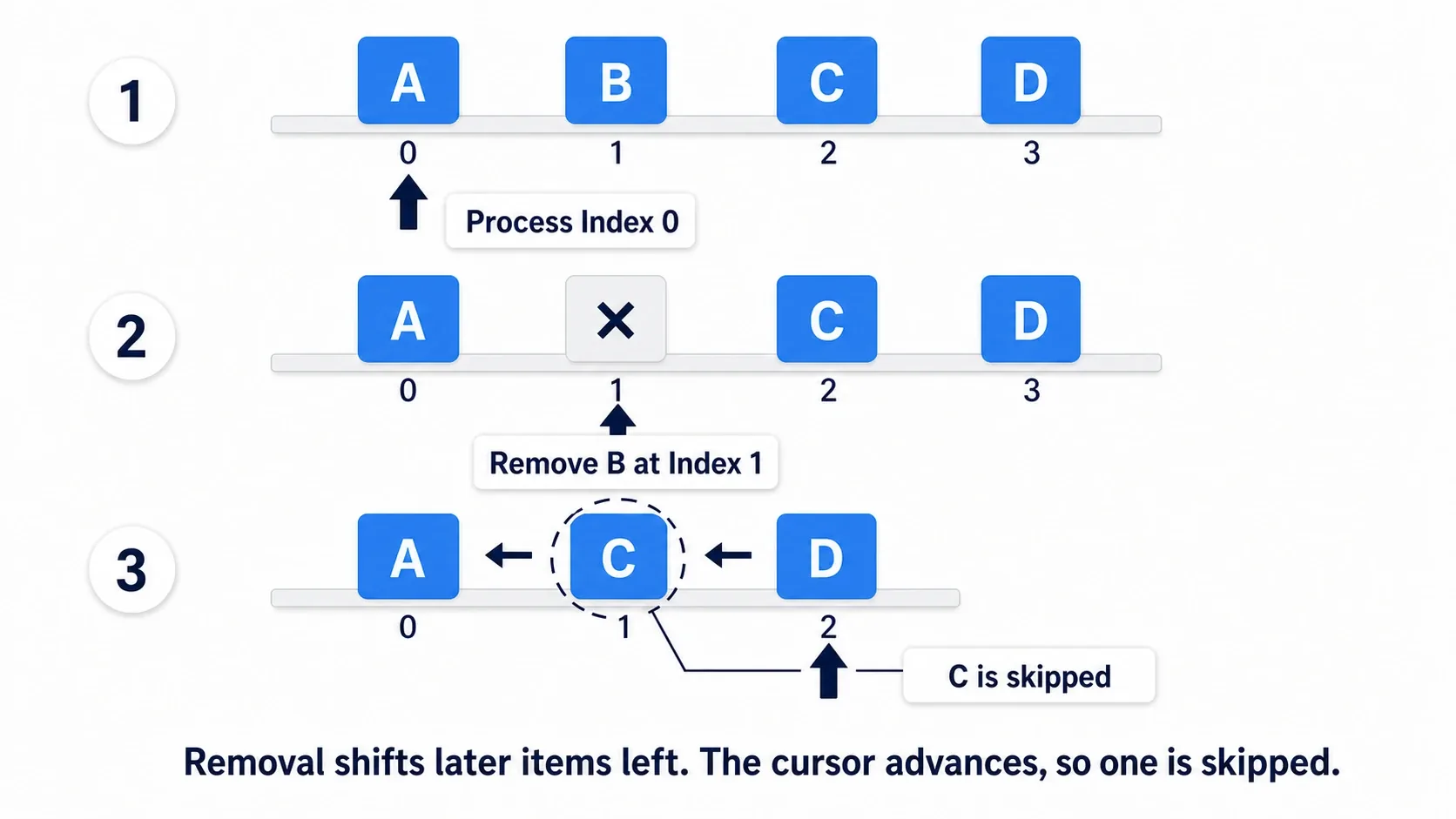
The reason is clear from the mechanism. For Each Loop simply advances an index from 0 . With A, B, C, D , removing index 1 ( B ) shifts C to index 1 and D to index 2. The loop looks at index 2 next, so C , which moved to index 1, is never processed .
The same causes you to miss adjacent targets when "removing enemies at 0 HP from an array".
The clearest first approach is not modifying the original array until you finish reading it.
- Gather removal targets in a separate array : during the loop only add to
RemoveTargets, andRemove Itemthem together afterCompleted. The most straightforward and readable method - Build a new array of what remains :
Addonly the matching elements to another array and swap it into the original variable at the end
The same goes for additions: gathering into a separate array and adding after processing keeps this loop's scope clear. Distinguish updating existing element values from changing counts and positions.
Set: the container with no duplicates
A Set cannot hold the same value twice . Add ing a value already present does not increase the count. It is not an error either; it is quietly ignored.
| Node | What it does |
|---|---|
| Add | Adds. Nothing happens if it is already there |
| Remove | Removes by content |
| Contains | Returns whether it is contained as a bool |
| Length | Returns the element count |
| To Array | Converts to an array (use this to loop) |
Sets suit cases where you only need to know whether you have something .
- IDs of items already obtained (opening the same chest twice adds nothing)
- IDs of unlocked stages
- Monster IDs registered in a catalog
- IDs of NPCs you have already talked to

Choosing a Set states structurally that "this list never holds the same ID twice". Arrays also have Add Unique , which does not add duplicates. Array plus Add Unique when you also want order; Set when recording presence is the main purpose.
Sets have no indices . There is no Get(0) , and order is not guaranteed. To process one at a time, convert with To Array and loop over that.
Map: the container looked up by key
A Map holds key and value pairs . For example the ID Herb paired with a quantity of 3.
| Node | What it does | Notes |
|---|---|---|
| Add | Registers a key and value | Overwrites if the key exists |
| Find | Retrieves a value by key | Returns the value and a found bool |
| Contains | Returns whether the key exists as a bool | |
| Remove | Removes by key | |
| Keys | Returns the keys as an array | Use this to loop |
| Values | Returns the values as an array | |
| Length | Returns the number of pairs |
We use a Map here to know a quantity from an item ID . Map<Name, Integer> denotes "a Map with Name keys and integer values". Find with Herb and you retrieve its quantity.
Two things to keep in mind with Maps.
First, Add overwrites. It is not "do nothing if it already exists". To increase a count, the flow is Find the current value, add 1, and put it back with Add . We build that in the hands-on.

Second, order is not guaranteed. The array from Keys is not necessarily in insertion order. Removing elements can rearrange it too. To fix display order, keep a separate Array for it. Order that Array as Herb, Potion, and Find the Map by those IDs, and you can display them without relying on insertion order.
Values retrieved by Find are copies too. When the value type is a struct, rewriting what Find returned does not change the original Map. Putting it back with
Addon the same key is reliable (see the struct article).
Hands-On: build an inventory that counts quantities
An RPG's inventory, a roguelike's floor drops, a survival game's crafting materials. "Pick things up and count them" appears in every genre. Here we record the same pickups in all three containers at once and see with our own eyes that each answers a different question .
What it looks like running
After picking up herbs three times and a potion once, the three containers hold this.
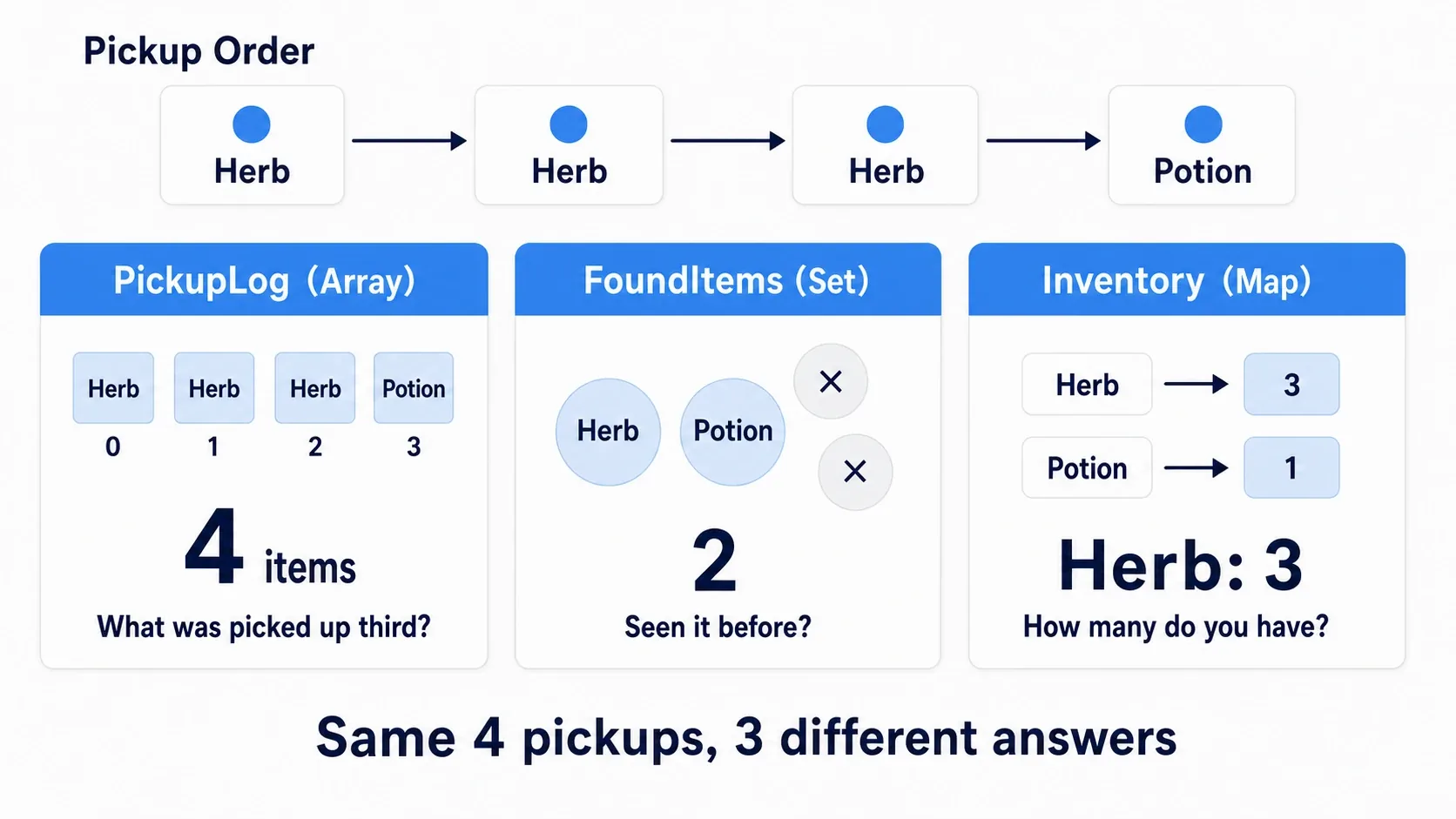
| Container | Contents | The question it answers |
|---|---|---|
PickupLog (Array) | Herb, Herb, Herb, Potion (4) | "What did I pick up third?" |
FoundItems (Set) | Herb, Potion (2) | "Have I ever seen a Potion?" |
Inventory (Map) | Herb → 3, Potion → 1 | "How many herbs do I have?" |
Reproduction conditions
Create a Blueprint BP_ContainerTester with Actor as its parent and place one in the level. This exercise calls the pickup logic from BeginPlay, so no floor items or input are needed. Create the following variables in Variables, with all defaults empty after compiling.
| Variable name | Type | Container | Default |
|---|---|---|---|
PickupLog | Name | Array | (empty) |
FoundItems | Name | Set | (empty) |
Inventory | Name → Integer | Map | (empty) |
Switch containers with the button to the right of Variable Type in the Details panel. Choosing Map for Inventory gives two fields; set Name on the left and Integer on the right .
Create the PickupItem function
Create a new PickupItem under Functions in the My Blueprint panel and add one input pin.
| Input pin | Type |
|---|---|
ItemID | Name |
Leave the function's Pure off. Add to the Array history and the Set of kinds, then update the Map quantity. The nodes share the name Add but differ by container, so place a Get of each container variable and drag from that pin to create the node.
First, record the pickup history and the kinds found.
- From PickupItem's entry, wire white exec to the Array Add. Target Array is PickupLog and New Item is the function's ItemID.
- Continue to the Set Add. Target Set is FoundItems and New Item is the same ItemID.

Now put the same ID into the Set. Duplicates collapse into one automatically.

The Get ItemID in the diagram reads the input passed to the function. Wiring the same value from the ItemID pin on the function's entry is fine too. Do not create a new Class Variable.
Next, update the quantity. With PickupItem open, create an Integer Local Variable NewCount with default 0. It holds the count we are about to write. A Local Variable is used only inside that function (see Blueprint variable basics).
Create Find and a Map Add from a Get of Inventory and wire them as follows.
| Where to connect | Value to pass |
|---|---|
| Find's Target Map | Inventory |
| Find's Key | ItemID |
Integer + 's A | Find's Value |
+ 's B | 1 |
| Map Add's Target Map | Inventory |
| Map Add's Key | ItemID |
| Set NewCount's value | The + result |
| Map Add's Value | Get NewCount |
Connect the Set Add's white exec output to Set NewCount, and its output to the Map Add's exec input. That computes the new count before writing to the Map. Find and the integer addition take no white exec wire. They are evaluated when Set NewCount needs the value.

Write the counted result back to the same key.

The point is Find the current count, add 1, and put it back on the same key . The Map Add is not a node that increments automatically. Passing 1 to Value every time would overwrite with 1 no matter how many you pick up.
Our Map's value is an Integer, so Finding an unregistered key gives Value 0. 0 + 1 makes the first one, which is why this tally does not need Find's found Boolean.
For logic that distinguishes "unregistered" from "registered but zero", check Find's Boolean output with a Branch as well. The value 0 alone cannot tell them apart.
Call it and confirm
Call it four times from BeginPlay in the Event Graph. Compile after creating the function, place four PickupItem call nodes, and chain the white exec wires. Use Herb for the first three ItemIDs and Potion for the last.
Event BeginPlay
  → PickupItem (ItemID: Herb)
  → PickupItem (ItemID: Herb)
  → PickupItem (ItemID: Herb)
  → PickupItem (ItemID: Potion)

  → Print String (Log count)
  → Print String (Found kinds)
  → Print String (Herb quantity)
The numbers for the three Print Strings are PickupLog's Length, FoundItems' Length, and the Value from Finding Inventory with Key = Herb. Length and Find have no exec pins, so connect their numeric outputs for display.
Convert the numbers to String and feed them into Append 's B. Put Log: , Found: , and Herb: into A in turn and pass Append's result to Print String's In String. Connecting an Integer wire to a String input inserts a conversion node.
Set Print String's Duration to 10 seconds, compile, save, and Play. Seeing these three messages means success. Read the labels and numbers rather than their vertical order on screen.
Log: 4
Found: 2
Herb: 3
Four pickups make the Array 4 , two kinds make the Set 2 , and three herbs make the Map value 3 . The point of this hands-on is that the same four calls produce three different answers .
Now add another PickupItem (Herb) between the fourth PickupItem and the first Print String. Log becomes 5, Found stays 2, and Herb becomes 4. Only the Set not growing is exactly the Set's nature.
Troubleshooting:
- Herb is always 1 → you put 1 straight into
Addwithout adding Find's result - The same item is counted separately → check for ID spelling differences like
HerbversusHerbs. Name is case-insensitive, soHerbandherbare the same ID - Found becomes 4 →
FoundItemsis an Array, not a Set. Check the container setting in the Details panel - Log stays 0 → the
AddforPickupLoghas its Target connected to a different variable - No Print String output →
PickupItem's exec pins are not chained through (see Print String debugging)
In a real game you call PickupItem from logic receiving touched items or rewards. Here, four calls confirmed you can extract "order", "kind", and "quantity" separately from the same events.
Once an item's contents grow to "name, attack, and icon", it is time to make the value a struct. Build S_Item in the struct article and use it directly as a Data Table row.
To move on to laying inventory out on screen and using it, inventory implementation is the next subject.
Bonus: Good to Know Up Front
- For large searches, revisit how you search : Array's Contains Item compares values in order. If searching a large dataset repeatedly is heavy, first check how often you call it, and consider managing it with a Set or Map if that fits. For small lists, prioritize the order and meaning your data needs
- Arrays can be filled up front : you can enter elements in advance in the Details panel's Default Value. For fixed counts like "five patrol points", setting them in the level is easier to verify than
Adding at runtime - To carry quantities to the next session, save them : this Actor's Map is lost when you stop Play. Create a Map of the same type in a SaveGame, copy the values, and call the save logic to carry it over. Creating a variable does not save it to a file (see saving and loading)
- Fixed content belongs in a DataTable : data decided at design time , like "the list of all items", is easier to manage in a DataTable than hand-entered into a Blueprint array (see Data Table basics and data-driven design with Data Assets)
- Do not forget the empty case : calling
Get(0)on an array whoseLengthis 0 errors. Logic like "target the first enemy" should always pair with a Length > 0 check . This kind of slip is also collected in common Blueprint mistakes
Summary
| Question | Container to choose |
|---|---|
| Does order carry meaning? | Array |
| Do you want no duplicates, or just presence? | Set |
| Do you want to look something up by a handle? | Map |
- Containers switch with the button to the right of the variable type . Only Map gets two fields
- Array indices start at 0 .
Lengthand the maximum index differ by one - Do not change the indices you are processing during a loop. Start by gathering targets in a separate array
- A Map's
Addoverwrites . To increase a count, do Find → +1 → Add
Once you can gather multiple values, you can try organizing states like "idle, moving, attacking" next. That is covered in managing state with Enum and Switch.
Keep the pickup order, record the kinds found, count the quantities. From the same pickups, you choose the container that matches the information you want to keep.
Further Reading