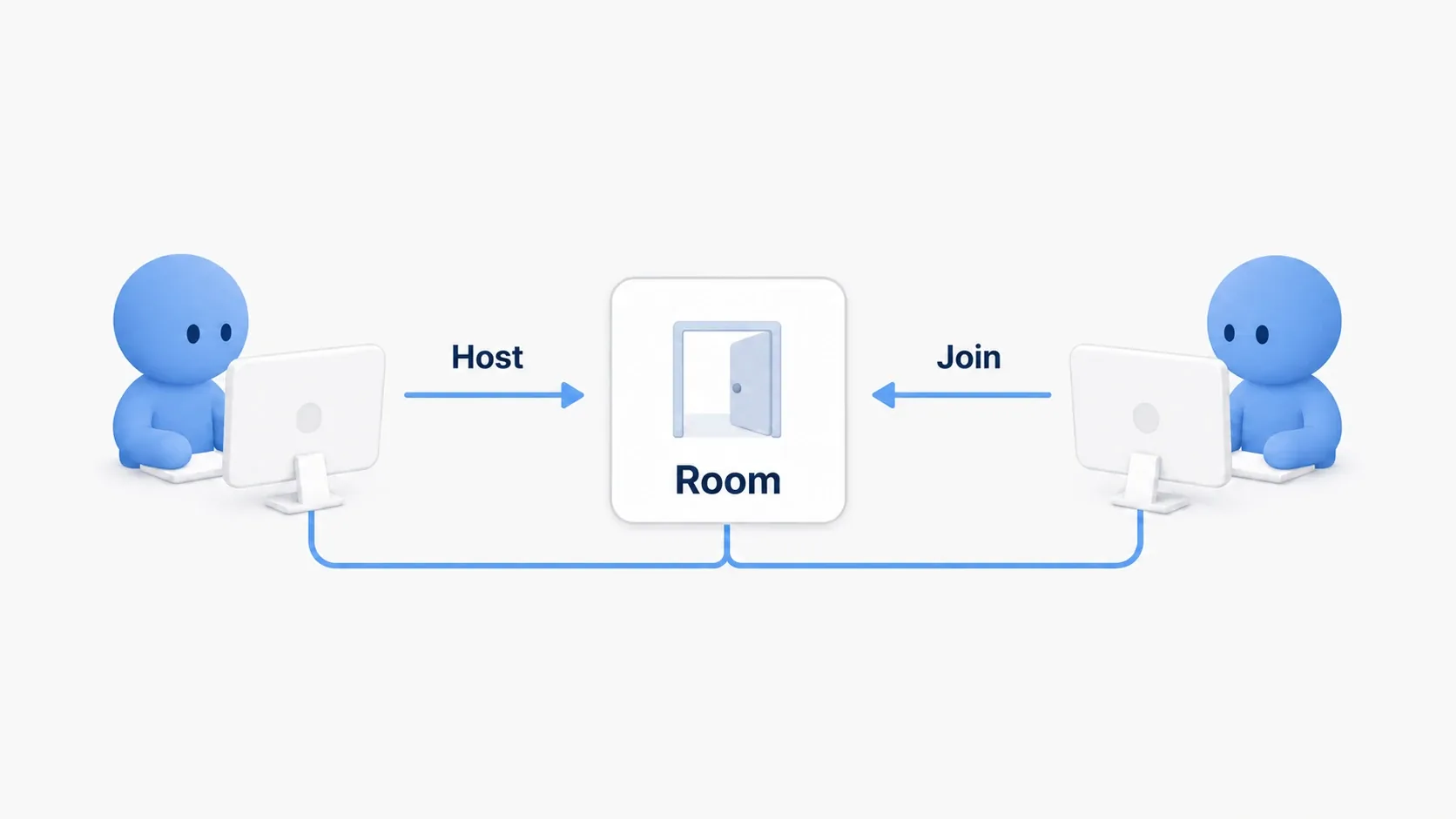
The door opened on your screen but stayed shut on your friend's. Even in the same game, simply moving a mesh the way you would in single player does not necessarily change their screen.
In multiplayer, the game runs in each player's environment. Between them you exchange the request "please open" and the state "it is currently open" to align the worlds people see.
This article builds a door that rises when you step into a zone in front of it. The player asks, the server decides, and the resulting state is shared. Let's confirm that flow in Blueprint across two game windows.

What You'll Learn
- How work is divided between server and clients
- The difference between requests via RPC and shared state via Replication
- Opening a shared door by going through your own Character
- Testing on two screens and investigating how far the logic reached
- The same world runs in each environment
- First, walk around on two screens
- RPC sends requests; Replication sends state
- A Server RPC uses your own Character as its entry
- Hands-On: prepare a shared door that rises
- Reflect the open state in the appearance
- Ask the server from your Character
- Verify on the server and open the door
- Test from the client side first
- Bonus: Good to Know Up Front
- Summary
The same world runs in each environment
The server decides shared game state such as door open/closed and enemy HP. Clients connect and play. They take input, send the requests they need, and reflect arriving state on their screens.
Server and clients each have a door Actor. Changing one Actor's variable does not directly rewrite the Actor in another environment. A mechanism carrying state over the network is required.

Clients also process cameras, UI, and input-driven motion. For a shared door, rather than treating one person's view as correct, gather the decision about whether it may open on the server and things stay organized.
We test with a Listen Server , where one participant is both server and player. That person is the host. The rest connect as clients.
First, walk around on two screens
Use the Blueprint Third Person template with the standard BP_ThirdPersonCharacter . If you already use your own Character, substitute its name in the Cast later.
UE's PIE (Play In Editor) runs the game from the editor. Set the following in the menu beside Play. If entries are missing, open Multiplayer Options from "Advanced Settings".
| Entry | Setting | Meaning |
|---|---|---|
| Play display mode | New Editor Window (PIE) | Opens the game in a separate window |
| Number of Players | 2 | Launches two instances of the game |
| Net Mode | Play As Listen Server | Makes one the host and the other a client |
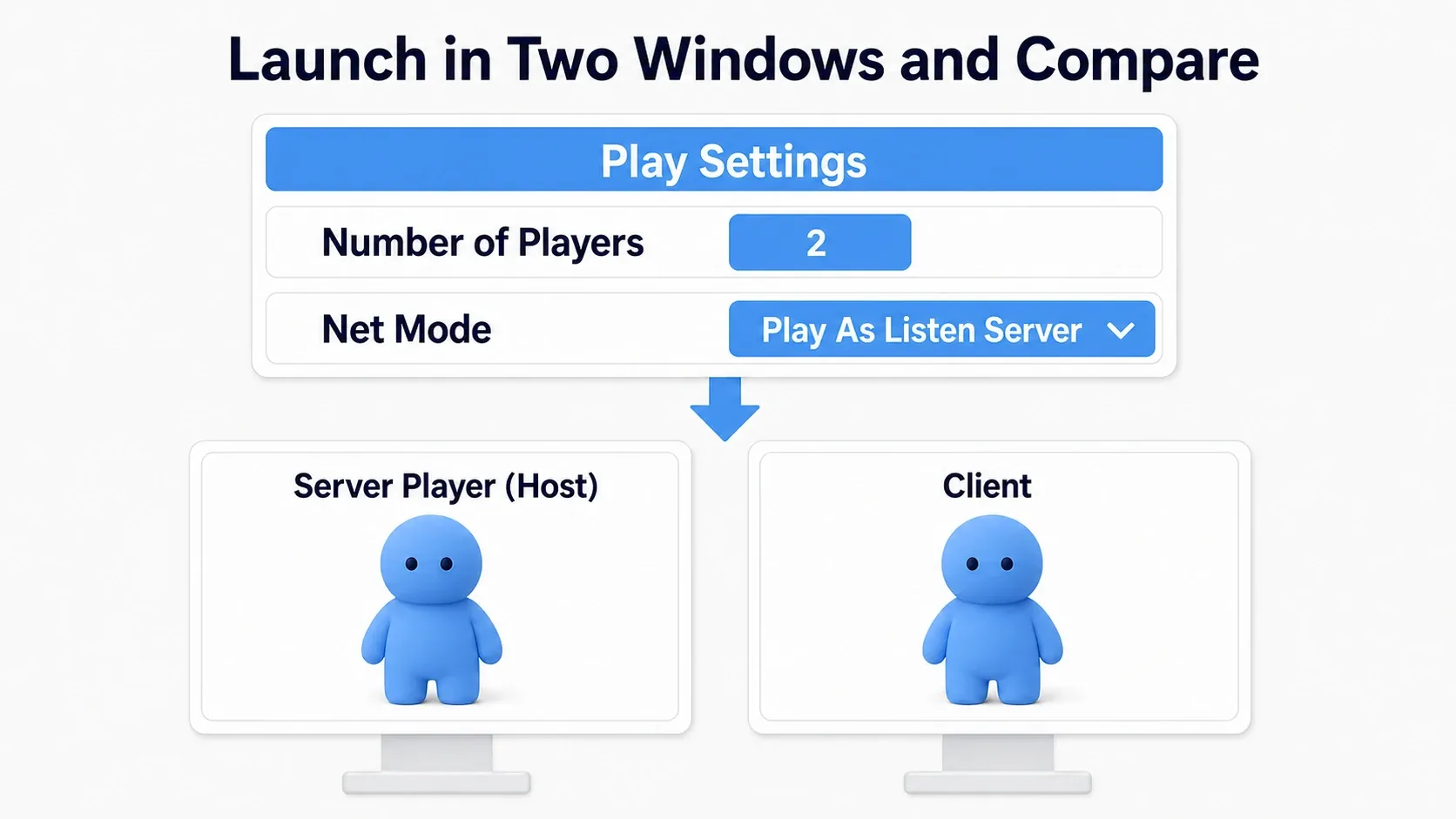
Place two Player Starts in the level without overlapping. Play and the host and client windows open. Distinguish them by the Server / Client labels in the window titles.
Click one, move that character, and confirm the same character moves in the other. Shift + F1 returns mouse control to the editor, making the other window easier to select.
Getting this far means the two games are connected. Template character movement is synced by UE's own mechanism, but the door we build decides its shared state ourselves.
RPC sends requests; Replication sends state
For the door, split two roles.
| What you convey | Mechanism used | Door example |
|---|---|---|
| Work you want done on the other side | RPC | Please open this door |
| Current state you want shared | Replication | This door is open |
An RPC calls logic on the other side of the network. Here a Server RPC requests from a client to the server. The server checks conditions and, if fine, sets the door's bDoorOpen to true.
Replication carries that value to clients. Clients read the received value and open the door in their environment.

Configure both the Actor and the variable
Turning on Replicates in an Actor's Class Defaults makes it a target for replication and syncing. Then configure Replication per shared variable.
| Variable setting | What happens |
|---|---|
| Replicated | The server's value is reflected on clients |
| RepNotify | Reflects the value and calls a notify function on receiving a change |
RepNotify is the entry for "the value arrived, so update the appearance too". Making bDoorOpen RepNotify creates a function OnRep_bDoorOpen . We update the door's appearance from there.
In Blueprint, setting that variable with a normal Set node calls RepNotify on that side as well. Our hands-on uses that so the server side and the receiving side run the same display update.

Note that Replication is not a mechanism sending every value to every player every frame. Which targets receive updates changes with distance and the like, and intermediate values of something changed rapidly do not all necessarily arrive. Give the door the state "is it open now".
A Server RPC uses your own Character as its entry
Sending an RPC from a client to the server requires the Actor owning that RPC to be owned by the sending client . Ownership here means "which player this Actor is connected to" on the network.
The Character and PlayerController you control hold that connection. A shared door placed in a level, meanwhile, is normally not owned by a specific client. Touching it or storing a reference to it does not create ownership.

In the hands-on, touching the door triggers a Server RPC defined on your own Character . We pass it a reference to "the door to open". A reference is what specifies that door later.
The problem is not "calling from the door's graph". What matters is which Actor the RPC is defined on and who the call's Target is . Calling the shared door's own Server RPC from a client does not meet the ownership condition, so it does not run on the server.
Authority and the character you control are different
Authority indicates whether you are the side deciding that Actor's state. For our shared door, the server's door has Authority. Switch Has Authority narrows logic to that side.
Is Locally Controlled , meanwhile, checks "is this the character controlled in this environment". Both clients and the host have a character they control. The steps below use that difference to separate who sends the request from who rewrites state.
Hands-On: prepare a shared door that rises
Stepping into the zone in front raises the door so you can pass. Once open, it stays open until you restart Play. Let's align that one state change across both screens.

Place the components
Create BP_SharedDoor with Actor as its parent. Add these three as children of DefaultSceneRoot. Keep all three directly under DefaultSceneRoot; do not make ButtonZone a child of DoorMesh.
| Name | Type | Settings |
|---|---|---|
DoorMesh | Static Mesh | Cube, Location (0, 0, 100) , Scale (0.2, 2, 2) , Movable, BlockAll |
ButtonZone | Box Collision | Location (-150, 0, 50) , Box Extent (80, 140, 50) , OverlapOnlyPawn, Generate Overlap Events on |
ButtonMarker | Static Mesh | Cube, Location (-150, 0, 5) , Scale (1.6, 2.8, 0.1) , NoCollision |

Turn on "Show Engine Content" in the Content Browser to select the Cube from /Engine/BasicShapes/Cube . ButtonMarker marks where to step. ButtonZone handles the contact test.
Box Extent is half the box's size. ButtonZone becomes 160 cm wide, 280 cm deep, and 100 cm tall. Overlap reports entering a region rather than blocking you.
Turn Replicates on and Replicate Movement off in Class Defaults. We do not send the whole Actor's movement; each environment moves the child DoorMesh from the open state. Leave DoorMesh's "Component Replicates" and "Simulate Physics" off as well.
Create the variables and logic entry points
Prepare the following on BP_SharedDoor. Create functions with the + on "My Blueprint"'s Functions.
| Name | Kind | Setting / role |
|---|---|---|
bDoorOpen | Boolean variable | Default false, Replication = RepNotify |
ApplyDoorState | Function | No arguments. Reflects state in appearance |
OpenDoor | Function | No arguments. Sets the open state on the server |
Making bDoorOpen RepNotify automatically adds OnRep_bDoorOpen . You do not create a same-named function yourself. Compile and save.
Reflect the open state in the appearance
ApplyDoorState changes DoorMesh's relative location , measured from its parent DefaultSceneRoot. That keeps the opening the same wherever the door Actor sits in the level.
| bDoorOpen | DoorMesh's relative location | Result |
|---|---|---|
| false | (0, 0, 100) | A panel 200 cm tall from the floor blocks the way |
| true | (0, 0, 350) | The panel moves 250 cm up and you can pass beneath |
Choose the location from the state
Open ApplyDoorState and place Select Vector . Set A to (0, 0, 350) and B to (0, 0, 100) , and connect a Get of bDoorOpen to Pick A. A Vector here is a position expressed as X, Y, and Z.

Pick A true gives A and false gives B from Return Value. It just picks "the upper location when open, the lower when closed".
Wire exec from the function entry to Set Relative Location . Drag DoorMesh from Components into the graph and connect it to Target. Connect Select Vector's Return Value to New Location and leave Sweep and Teleport off.

Target is "the part to move" and New Location is "where to move it". We do not animate here; we switch to a fixed position.
Call the same function from the notify and the initial display
Open OnRep_bDoorOpen and call ApplyDoorState from its entry. Also call ApplyDoorState from Event BeginPlay in the Event Graph to align the appearance at startup. Target on both is Self, the door itself.

ApplyDoorState only "places it at the location matching the current state", so calling it again with the same value never lifts the door further. HP bars and lamp colors are also easier to handle when appearance is derived from the current value.
Ask the server from your Character
Prepare the RPC on the Character
Open BP_ThirdPersonCharacter, right-click in the Event Graph to add a Custom Event, and name it Server_RequestOpenDoor . Select the event and set the following in Details.
| Entry | Setting |
|---|---|
| Replicates | Run on Server |
| Reliable | On |
| Inputs | Door : BP_SharedDoor Object Reference |

Reliable resends until receipt is confirmed. Use it for occasional requests like this open request. It is not a guarantee that ownership can be ignored or that messages arrive after disconnection. Sending many in a row builds up a queue, so avoid calling it from Tick.
Confirm Replicates is on in the Character's Class Defaults and compile. Now the door side can call this event.
Inspect the character that entered the door zone
Return to BP_SharedDoor. Select ButtonZone and add On Component Begin Overlap from the events section in Details. Wire the exec output to Cast to BP_ThirdPersonCharacter with Other Actor into its Object input. Cast Failed does nothing.

The Cast here confirms "can the thing that entered be treated as this Character". Drag from the success output As BP Third Person Character and search for Is Locally Controlled . Use the node taking the character as Target and returning a red Boolean with no exec pins.

Wire the Cast's success exec output to a Branch with Is Locally Controlled's Return Value into Condition. From True, call Server_RequestOpenDoor . Connect the Cast's As BP Third Person Character to the RPC's Target and a Self node to the Door input.

That Self is BP_SharedDoor itself , the graph you are editing. You are asking the target Character to "open this door". The Branch's False side does nothing, so the same character visible in other environments does not send duplicate requests.
The diagrams split the same Overlap graph. You do not create a Cast or Is Locally Controlled per diagram.
Verify on the server and open the door
Check the specified door and the distance
Return to BP_ThirdPersonCharacter's Server_RequestOpenDoor. From here on, this runs on that Character's server side.
From the entry, wire to the exec-pin Is Valid . Pass the event's Door output to Input Object and leave Is Not Valid unconnected. Is Valid checks that the target is not empty and is usable.

Then place Get Distance To with Target Self and Other Actor the event's Door. That Self is the server-side Character itself . Feed Return Value into < (Less, numeric comparison) A with B at 400.0 .

Wire exec from Is Valid's success into a Branch with the comparison into Condition. From True, call the Door's OpenDoor , connecting the same event's Door to Target. False does nothing.

We check whether the Character and the door's origin are under 400 cm apart, using the server's positions. 400 cm is a value for this layout, with room to still qualify after stepping a bit past the zone's entrance. In a real game, also check that door's conditions here, such as holding a key or having permission.
Change the door's shared state
Open BP_SharedDoor's OpenDoor. Place Switch Has Authority from the entry and wire only the Authority side to Set bDoorOpen (true). Remote does nothing.

Now only the server's door rewrites shared state. Switch Has Authority is not a node that sends work to the server. It only checks which side is running and splits the path. Sending was handled by the earlier Server RPC.
Blueprint's Set bDoorOpen calls OnRep_bDoorOpen, changing the host's appearance. When the value arrives on clients, they too go from OnRep_bDoorOpen into ApplyDoorState. There is no need to add another ApplyDoorState right after the Set.
Looking back at the whole wiring, the flow is:
BP_SharedDoor (the operating side)
ButtonZone's Begin Overlap
  → Cast to BP_ThirdPersonCharacter (Object = Other Actor)
  → Branch (that Character's Is Locally Controlled)
      True → that Character's Server_RequestOpenDoor (Door = this door)

BP_ThirdPersonCharacter (server side)
Server_RequestOpenDoor (Run on Server / Reliable)
  → Is Valid (Door)
  → Branch (Self.GetDistanceTo(Door) < 400)
      True → Door.OpenDoor()

BP_SharedDoor (server side)
OpenDoor → Switch Has Authority → Authority → Set bDoorOpen (true)
  → OnRep_bDoorOpen from the Blueprint Set → ApplyDoorState

BP_SharedDoor (receiving side)
bDoorOpen change received → OnRep_bDoorOpen → ApplyDoorState
Test from the client side first
Compile and save both Blueprints. Place one BP_SharedDoor on the floor and put the two Player Starts outside ButtonZone. Set the Actor's Scale to (1, 1, 1) and keep about 500 cm from the door for easy testing.
- Play with two players on Listen Server. Confirm the door is closed on both screens.
- Operate the client window and step onto the floor marker. The door rising on both screens is success.
- Walk under the door and confirm passage in both environments.
- Stop Play and start again. This time have the host step on the marker and confirm it opens on both screens.
We test the client first to verify the path that sends a request to the server. Testing only on the host can run it directly server-side, hiding a send failure from the client.
Investigate the path one stage at a time
When it does not work, check with Print String and Output Log. Temporarily logging right before the RPC call, after the server-side Is Valid succeeds, and on OpenDoor's Authority side narrows down where it stopped. In PIE, also watch the Server / Client labels in logs. Running several games in one editor can show logs from another window; do not judge which side ran from the displaying window alone.
| Symptom | Where to check |
|---|---|
| Stepping on the marker does nothing | Generate Overlap Events on ButtonZone and the Character's Capsule, the Cast target, the start positions |
| Only the host can open it | Whether the RPC is on the Character, whether Target is the touching Character, whether it is Run on Server |
| The RPC arrives but it does not open | Whether Door is valid, whether the distance is under 400, whether OpenDoor's Target is Door |
| It opens on the host but stays shut on clients | The door's Replicates, bDoorOpen's RepNotify, the OnRep to ApplyDoorState connection |
| The state is true on both but nothing moves | DoorMesh's Movable, Set Relative Location's Target and New Location |
| Trying the second player changes nothing | It stays open once opened by design. Restart Play to test |
What happens when you change it only locally
You can also confirm why shared state matters with a short experiment. Stop Play, disconnect the wire from the door's Branch True to the RPC, and connect it to Set bDoorOpen (true) instead.
In a fresh Play, stepping only the client onto the marker opens the door in that environment via the Set's RepNotify, but no value is sent to the server. The host's door stays shut. Afterwards, remove the added Set and restore the RPC connection.

RepNotify being called and the change reaching the other side are different things. Knowing that difference is the clue when investigating "it only opened for me".
Bonus: Good to Know Up Front
Hold state you want to keep in variables. Holding "the door is open" lets you hand the current state to a client that becomes a replication target later. Sending only the opening effect over Multicast does not replay that past effect for someone who could not receive it.
RPCs have other destinations. A Client RPC notifies the client owning that Actor. A Multicast RPC, called from the server, runs on the server itself and on the connections where that Actor is replicated. Calling Multicast from a client does not broadcast to everyone.
You do not have to keep standing on it here. To extend it to closing when you leave, consider two players standing on it at once. Closing on any single End Overlap would close it while the other is still standing there.
Smooth opening can come later. We switched positions here, but a Timeline can move toward the current state instead. Confirm the open state is shared first, then add presentation.
Movement sync involves other mechanisms too. Replicate Movement mainly handles the Actor root's movement. Not every child mesh's relative location or arbitrary variable is sent by that checkbox alone. Characters also have dedicated movement synchronization.
After it works on one PC, test other network conditions. Testing with added latency and packet loss, and testing on a Dedicated Server where the host does not play, reveals problems the minimal two-window setup hides. A dedicated server runs only the game's progression, with no player of its own.
Joining over the internet is the next stage. PIE prepared the connection for us. The flow where a friend finds and joins a room is organized in the sessions and online connection article. Where shared scores live is also covered in GameMode, GameState, and PlayerState.
Summary
For the shared door, your Character requested with a Server RPC and the server decided the door's state. Clients received that state via Replication and updated the appearance from RepNotify.
Do not judge success from your own screen alone; operate the client first and compare both the host's and the client's state. Following "who asked, where it was decided, and who received the result" is the foundation for your next shared gimmick.
Reference: Networking overview, PIE multiplayer options, Replicating actor properties and Blueprint RepNotify, RPC execution conditions.