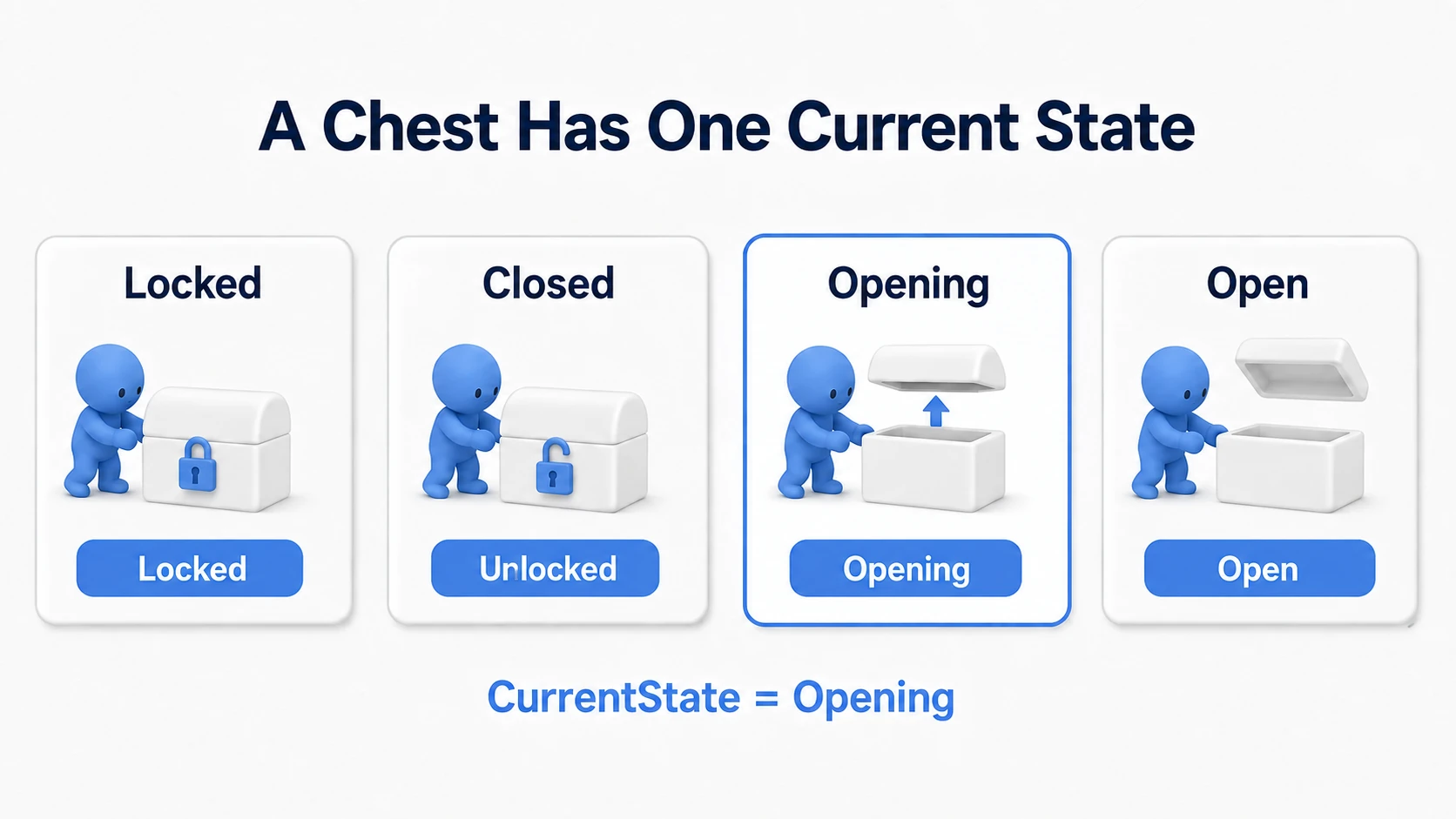
A sword hits, so the enemy's HP drops. You shoot a breakable box, so its durability drops. They are similar, but writing per-target HP calculations on the attacking side means more places to edit when you add invincibility or defense.
UE's Apply Damage lets the attacker say "20 damage to this target" and the receiver reduce HP by its own rules. This article first builds killing a Cube in front of you in five attacks, then adds invincibility so mashing does not land damage immediately.

What You'll Learn
- The division between delivering damage and reducing HP
- Attacking with E and killing 100 HP in 20-point steps
- Refusing additional damage for one second after a hit
- Choosing between Point and Radial Damage, and passing the attacker and causer
- Apply Damage is "the entry point delivering damage"
- Hands-On: kill the Cube in front in five hits
- Invincibility: no HP reduction for one second after a hit
- Choosing among three nodes by attack type
- What is the difference between Damage Causer and Instigator?
- Convey the attack kind with Damage Type
- Reuse health logic with a Component
- Bonus: Good to Know Up Front
- Summary
Apply Damage is "the entry point delivering damage"
An Actor represents each individual thing placed in a level, such as an enemy or a box. Apply Damage is the node specifying that Actor and passing a damage amount. On the receiving Blueprint, Event AnyDamage starts the logic after receiving the notification.
Deliver 20 damage and a normal enemy goes from HP 100 to 80, while a guarding enemy takes half and goes to 90. Those rules live on the receiver. The attacker does not need to find and rewrite the target's HP variable.
What matters here is that calling Apply Damage does not create HP or death logic . HP is a variable you make. You also wire the continuation: "receive the notification → reduce HP → destroy at 0".

Directly rewriting the target's HP works for a small prototype. But rather than writing "do not reduce if the target is invincible" on both the sword and the bullet, judging it once at the receiver's entry makes rules easier to change. It is close to the thinking of building a shared call with Blueprint Interface.
Hands-On: kill the Cube in front in five hits
Use a Third Person template Blueprint project . Choose None if the version offers a "Variant". If you can create variables and connect node pins, you can follow along.
Pressing E once sends 20 damage to the Cube in front of the character. The screen shows the current HP as 80 → 60 → 40 → 20 → 0 , and on the fifth hit Destroyed appears and the Cube disappears. Build the per-press reduction first and add invincibility in the next section.

1. Prepare the Cube that takes damage
- Create a Blueprint Class with Actor as its parent and name it
BP_Damageable. - Add a Static Mesh component named
DamageMeshand assign the standardCube(Engine/BasicShapes). If you cannot find it, turn on engine content display in the asset picker. Leaving it as a child ofDefaultSceneRootis fine. - Set DamageMesh's location and rotation to
0and Scale toX=1.5 / Y=1.5 / Z=2. Turn "Simulate Physics" off and set "Collision Presets" toBlockAll. - Confirm "Can Be Damaged" is on in "Class Defaults". It decides whether the Actor can take standard damage.
- Place one in the level with the Actor's own Scale at
1, 1, 1. The Cube is 200 cm tall, so raising the Actor's center 100 cm above the floor puts its bottom on the floor.
Place it about 300 cm from the player start, somewhere you can walk around and face. Our attack test passes through the character's center height. We made the Cube tall so that line is easy to hit.
Create these variables on BP_Damageable, compile, and set the defaults. Float is the numeric type handling decimals.
| Variable | Type | Default | Role here |
|---|---|---|---|
MaxHealth | Float | 100 | Maximum HP |
CurrentHealth | Float | 0 | Current HP |
In the event graph, wire Event BeginPlay → Set CurrentHealth with a Get MaxHealth as the value. Now every Play starts current HP at the maximum 100.
2. Cast an attack test in front of the character
Open BP_ThirdPersonCharacter 's event graph and add a keyboard E event and Line Trace By Channel . Wire white exec from E 's Pressed to the Trace.
A Line Trace draws an invisible line and finds the first thing blocking it. Here we check from the character's position to 500 cm ahead. We use no animation or sword model; this line is the attack test.
Build the line's start and end like this.
| Trace input | Value to connect |
|---|---|
Start | Get Actor Location (Target Self) |
End | Get Actor Location + Get Actor Forward Vector × 500 |
Get Actor Forward Vector is a length-1 arrow representing "the direction this character faces". Multiplying by 500 makes it 500 cm long, and adding it to the current position gives the line's end. Use Vector × Float for the multiply and Vector + Vector for the add. If both multiply inputs become Vectors, right-click the pin taking 500 and convert it to Float.

Match the Trace settings to these.
| Setting | Value |
|---|---|
Trace Channel | Visibility |
Trace Complex | Off |
Ignore Self | On |
Draw Debug Type | For Duration |
Draw Time | 1.0 |
Visibility decides "what blocks the line" here. The BlockAll we set blocks that test, so the line hits the Cube. Ignore Self excludes yourself from the test.

The diagram is split in two. Connect the previous diagram's + output to this diagram's End . You can split the same Get Actor Location node into both Start and the addition.
Compile and Play now, click the game window, and press E . Watch whether the line, drawn for one second, reaches the Cube. Rotating only the camera may not change the character's facing. Walk toward the Cube to face it and test within 500 cm.
3. Send 20 damage to the Actor you hit
Use the Trace's outputs and wire this.
- Connect the white exec output to a
Branchand the redReturn Valueto itsCondition. That Boolean becomestruewhen something blocking the line is found. - Create
Break Hit ResultfromOut Hit. A Hit Result bundles the Actor hit and the position.Breakextracts its contents. - Call
Apply Damagefrom the Branch'sTrue. LeaveFalseunconnected.
Apply Damage 's inputs are as follows.

The left edge of the diagram is the Trace output side you built in the previous step. Do not add a second Trace.
| Input | Value here | Meaning |
|---|---|---|
Damaged Actor | Break Hit Result's Hit Actor | The target you hit |
Base Damage | 20 | The damage amount delivered |
Event Instigator | Get Controller (Target Self) | The attacking character's Controller |
Damage Causer | Self | The character that is this attack's source |
Damage Type Class | DamageType | The standard damage kind |
Self is "the Actor running this graph", the player character here. We sort out Controller versus Damage Causer after the hands-on.
Delivering damage to the target you hit is now prepared. The Cube still does not disappear. Next we build what happens after it is received.
4. Reduce HP on the receiver and print it
Return to BP_Damageable and add Event AnyDamage to its event graph. Put it in the Cube's Blueprint that takes damage , not the level Blueprint.
Call Set CurrentHealth from Event AnyDamage 's white output. Compute the assigned value in this order.
- Place a Float subtraction with
Get CurrentHealthon the upper input and the event'sDamageon the lower one. We compute current HP minus damage taken . - Pass the result to
Clamp (Float)'sValuewithMin0andMaxGet MaxHealth. - Connect Clamp's output to
Set CurrentHealth's value.
Clamp keeps a number within a range. Dealing 20 damage to a target at HP 10 gives 0 instead of -10.

Both the white wire from the left and the green Damage wire come from the Event AnyDamage you created.
Next place a Print String and wire it from Set CurrentHealth's white output. Connecting Get CurrentHealth to In String inserts a number-to-string conversion node. Turn "Print to Screen" on and set Duration to 10 .

The top row is the initialization from step 1 and the bottom row is the display you are building; they are separate flows. Wire the bottom row's Print from the Set CurrentHealth that reduced HP.
Replay and press E once and the screen shows 80 (or 80.0 depending on formatting). That is the Cube itself reducing its own HP after receiving the notification.
5. Destroy the Cube at 0 HP
Add a Branch after the Print String with Get CurrentHealth <= 0 into Condition. From True , call a Print String (text Destroyed , Duration 10 ) and then Destroy Actor (Target Self). Leave False empty for now.

Connect this Branch's True to the next diagram's Print String white input. The Print showing the HP number and the Print showing Destroyed are different nodes.

Compile, replay, and press E five times at the Cube. Release and press again each time; holding does not repeat Pressed.
| Hits landed | HP displayed | The Cube |
|---|---|---|
| 1 | 80 | Remains |
| 2 | 60 | Remains |
| 3 | 40 | Remains |
| 4 | 20 | Remains |
| 5 | 0, then Destroyed | Disappears |
The initial 100 is not printed on BeginPlay, so it never appears. If the Cube remains after reaching 0, check the connections from the death Branch's True side.
Invincibility: no HP reduction for one second after a hit
Our Cube currently loses HP once per press when you mash E . Let's add the rule "after taking damage once, refuse the next for one second". That is our invincibility window .
The attacker still calls Apply Damage. The receiver, on receiving a notification while invincible, ends before reducing HP.
Record whether it is invincible
Add two variables to BP_Damageable.
| Variable | Type | Default | Role |
|---|---|---|---|
IsInvincible | Boolean | false | true while invincible |
InvincibleTime | Float | 1.0 | How long invincibility lasts |
Insert the following between Event AnyDamage and Set CurrentHealth.
- Wire Event AnyDamage's white output to a
BranchwithGet IsInvincibleinto Condition. - Leave
Trueempty. Being invincible, it ends there. - From
False, callSet IsInvinciblewith the valuetrue. - Rewire its white output into the existing
Set CurrentHealth. Keep the numeric wire from Damage into the subtraction.
That blocks the next notification immediately after taking a hit. As is, though, it stays invincible forever, so we also build the release.

Release it after one second with a Timer
A Timer calls an event once a specified time passes. Create a custom event EndInvincible on BP_Damageable and call Set IsInvincible (value false ) from its white output.
Next, wire Set Timer by Event to the False side you left empty on the Branch checking whether HP is 0. The order is "start the invincibility-release timer only while still alive".
Event: connect the red square output of theEndInvincibleyou createdTime:Get InvincibleTimeLooping: off

The red wire specifies "call this event when the time arrives". Its role differs from white wires. Turning Looping off calls it exactly once after one second. We do not use the Timer's return value.
Keep InvincibleTime greater than 0. Passing 0 or less to that node does not fire the release event immediately.
Compare mashing against spaced attacks
Compile and restart Play for each case, so you start at current HP 100 and not invincible.
| Action | Expected result |
|---|---|
| Land one hit and press again within that second | Only the first 80 appears; the extra press reduces nothing |
| Land one hit, wait longer than a second, and hit again | It drops to 80, then 60 |
| Land five hits with more than a second between each | 80 → 60 → 40 → 20 → 0, then Destroyed and it disappears |
Now change InvincibleTime to 2.0 . Replay and the same mashing spaces the HP drops further apart. Set it back to 1.0 afterwards.
You can try damage amounts too. Setting the attacker's Base Damage to 40 and replaying gives 60 → 20 → 0 in three well-spaced hits. The last not being -20 is Clamp at work. Set it back to 20 afterwards.
Duplicating the Cube side by side gives each its own HP and invincibility. Turn to aim at one at a time. Our Line Trace targets the first thing blocking the line, so one press does not hit a Cube behind another.
When it does not work
| Symptom | Where to check |
|---|---|
| No line appears when pressing E | Whether you clicked the game window, and whether the E event is on the BP_ThirdPersonCharacter you control |
| The line does not reach the Cube | The character's facing, the 500 cm distance, the line and Cube heights. Whether Trace's End is "position + direction × 500" |
| The line hits but no HP appears | Whether DamageMesh blocks Visibility, whether Can Be Damaged is on, whether AnyDamage is on BP_Damageable |
| It reaches 0 on the first hit | Whether BeginPlay copies MaxHealth into CurrentHealth, and whether the subtraction is "CurrentHealth − Damage" |
| Nothing drops from the second hit on | The Timer's red Event connection, whether Time is positive, whether EndInvincible sets it false |
| HP drops while invincible | Whether the Branch right after AnyDamage leaves True empty and continues only False into the HP calculation |
Visually checking the line is covered in the Line Trace article and value checking in the Print String article.
Choosing among three nodes by attack type
So far we used Apply Damage, specifying one target and an amount. For gunfire and explosions, the extra information you pass and how you find targets differ.

| Node | How targets are decided | What it suits |
|---|---|---|
Apply Damage | One target you specify | Contact damage or poison, where position is unneeded |
Apply Point Damage | One target you specify, plus the hit position and direction | Spawning effects at a gunshot's impact point |
Apply Radial Damage | Finds qualifying targets from a center and radius | Explosions and area spells |
Apply Point Damage does not perform the hit test itself. Find the target with a Trace as we did and pass that Hit Result to Hit Info and the attack's travel direction to Hit from Direction .
Apply Radial Damage , meanwhile, finds targets using the blast's Origin and Damage Radius . Being in range does not unconditionally hit anything; the target's collision and blocking objects matter.
By default, Components blocking Visibility are targets. Damage Prevention Channel is the channel used for the occlusion test from the blast to the target, defaulting to Visibility. A wall blocking that test between them blocks the blast. When explosions do not connect, check collision settings along with the radius.
Do not duplicate where HP is reduced
The receiver also has Event PointDamage and Event RadialDamage . Point receives the hit position and Radial the blast origin, information specific to those attacks.
However, Point and Radial damage also fire Event AnyDamage . Writing "reduce HP by 20" in both AnyDamage and PointDamage causes 40 total from one gunshot.
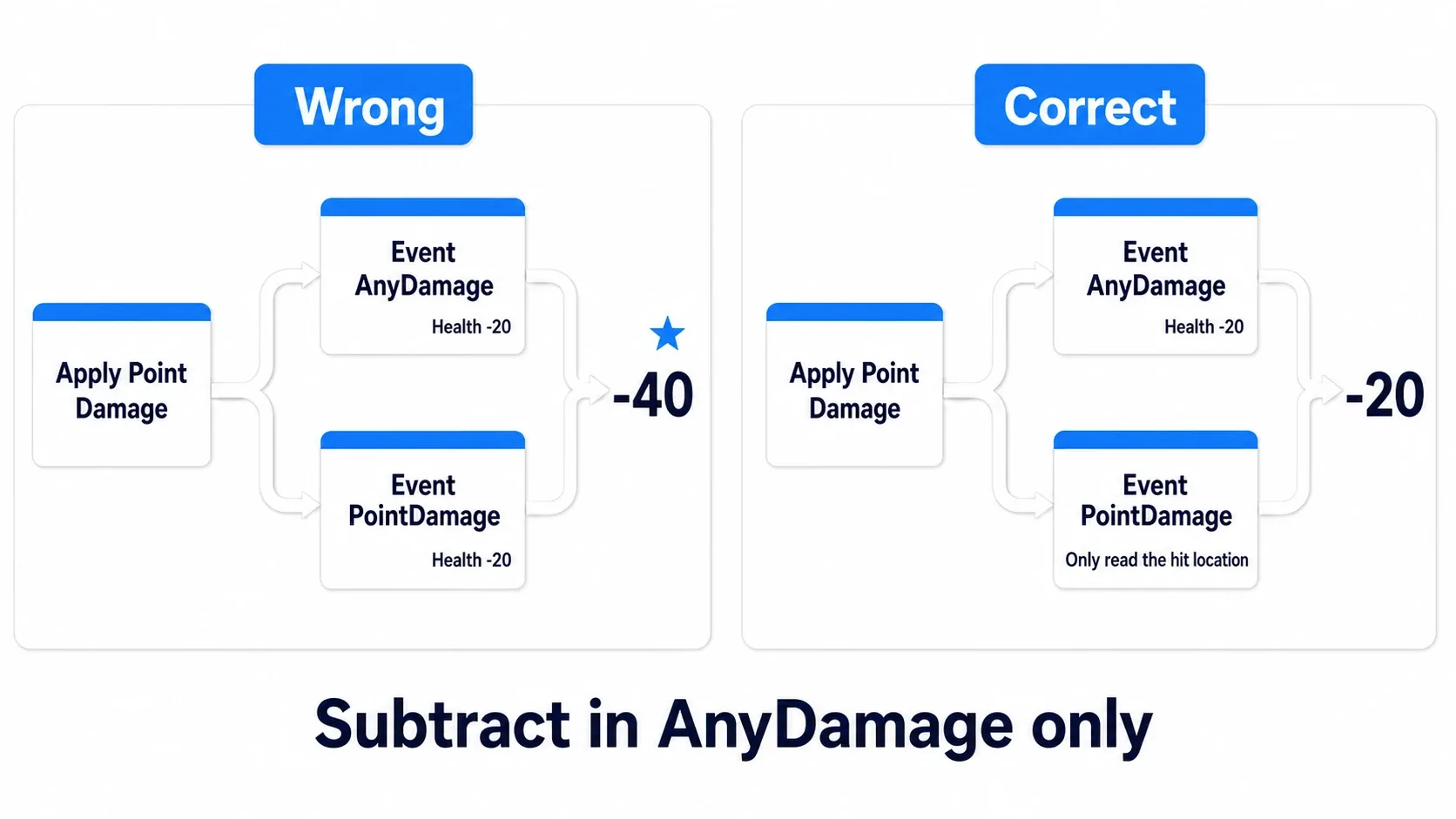
To reuse our HP logic, put the subtraction in AnyDamage and use PointDamage for impact effects. Even when varying damage by body part, structure it so the final HP reduction happens once.
What is the difference between Damage Causer and Instigator?
When a bullet hits an enemy, "which bullet the damage came from" and "who fired it" are different pieces of information. The former is Damage Causer and the latter, represented as a Controller, is Event Instigator .
A Controller is the object controlling a character. Players use a PlayerController and AI uses an AIController.

| Input | Type | Our attack | A bullet attack |
|---|---|---|---|
Event Instigator | Controller | The player character's Get Controller | The firing side's Controller |
Damage Causer | Actor | The player character's Self | The bullet Actor |
Damage Causer does not only mean something that physically collided. For a campfire damaging you when close, you can pass that campfire Actor as the source.
On the receiver's AnyDamage, the Controller comes from Instigated By and the source from the Damage Causer pin. That gives you the handle for logic such as whose score to increase on a kill. Our hands-on stops at passing that information.
Convey the attack kind with Damage Type
20 for a normal attack, but fire halved by fireproof gear. Use Damage Type when the same amount should be handled differently by kind. Think of it as a "fire" or "poison" label attached to the damage.
Create a Blueprint Class BP_DamageType_Fire with DamageType as its parent and specify it in Apply Damage's Damage Type Class . The receiver inspects the kind via AnyDamage's Damage Type and decides multipliers before subtracting HP. The rule "halve it only for fire damage" lives on the receiver.

Passing a kind does not start damage over time or flashing. Build those separately. Damage Type also represents shared settings, not a container holding remaining time per attack. Values varying per target, such as remaining poison seconds, are managed in the receiver's variables.
Reuse health logic with a Component
Once you build the same HP calculation for enemies and boxes, you can gather it into an Actor Component , a reusable part attached to Actors.
The health Component article builds a function ApplyHealthDamage on BP_HealthComponent . To connect it to standard damage, the Actor receives AnyDamage and passes the value to the Component.
- Add the
BP_HealthComponentfrom that article to the Actor taking damage. - Call the added Component's
ApplyHealthDamagefrom that Actor'sEvent AnyDamage. - The call's
Targetis that Component andDamageAmountis AnyDamage'sDamage.

When switching to that approach, leave the HP calculation to the Component. Keeping our subtraction on the Actor as well would manage two separate HP values. To reuse the invincibility we added, gather its check and release Timer into the Component too.
When updating an HP bar, the article's OnHealthChanged tells a Widget that HP changed. Registering to receive that and the initial display are also needed, so proceed together with the Event Dispatcher article.
Bonus: Good to Know Up Front
- "Once per attack" and "invincible for a while after a hit" are different rules : our invincibility also blocks attacks from other enemies. To prevent duplicate hits on the same target only during one sword swing, record "who this swing already hit" on the attacking side.
- Merely touching does not reduce HP every frame : whether it repeats depends on when the attacker calls Apply Damage.
Begin Overlapnotifies at the start of an overlap. If per-frame damage is unintended, check whether Tick is sending it repeatedly. - Make healing a separate entry : our hands-on handles positive damage. If you add healing, prepare a dedicated function increasing HP so it does not mix with the invincibility check.
- Start death presentation before destroying : the hands-on destroys immediately so results are easy to read. To show a death animation, stop actions and collision first, start the presentation, and destroy after it finishes.
- Verify online play at a separate stage : standard damage application and AnyDamage are handled server-side. Extending from our single-player exercise means designing the attack request, HP synchronization, and per-screen presentation.
- Check the receiver's CurrentHealth to see whether HP dropped : do not treat Apply Damage's return value as your own HP reduction. When our invincibility check leaves HP unchanged, confirm that on the receiver.
Summary
The attacker finds the target and delivers an amount with Apply Damage. The receiver uses Event AnyDamage as its entry, reduces HP, and destroys at 0. Inserting an invincibility check there blocks the next damage for a while after a hit.
Confirm five hits at 20 damage and three hits at 40. Changing amounts and invincibility time leaves the attacker and receiver roles the same. From this foundation you can grow the attack kinds into swords, bullets, and explosions.
Reference: Epic's damage explanation, Apply Damage, Event AnyDamage, Apply Radial Damage, Damage Type.
Collapsing when defeated can be built with Physics Assets and ragdolls.