You killed three slimes. Reporting to the client got you 100G. Talk to them again, though, and you get another 100G. A quest needs to remember not only "how many you killed" but also "which stage you are at now".
Here we build one loop of accept → hunt → report → reward . The kill count advances from 0/3, and the third one changes it to "go report". After reporting, repeating the same action does not add more reward.
What You'll Learn
- Separating the quest definition from the player's progress
- Using four states to decide whether accepting, reaching, and reporting are allowed
- Counting only in-progress quests from a target-enemy kill notification
- Confirming early reporting and double rewards with key presses
This exercise is for people who can use Blueprint variables, functions, and Branch. First we stand in for kills with key input and check progress through Print Text . Combat, dialogue, and a corner-of-screen quest display connect once this mechanism works.
- Separate "reached it" from "reported it"
- Preparation: definition, progress, and notifications
- Read current progress and show it as text
- Accepting: only the first time starts from 0
- Counting kills: update one at a time and write back
- Reporting: record completion, then give the reward
- Bind the listeners and hook up key input
- Confirm: from 0/3 to a 100G reward
- Connect to UI and real enemies
- Bonus: extending it to your own game
- Summary
Separate "reached it" from "reported it"
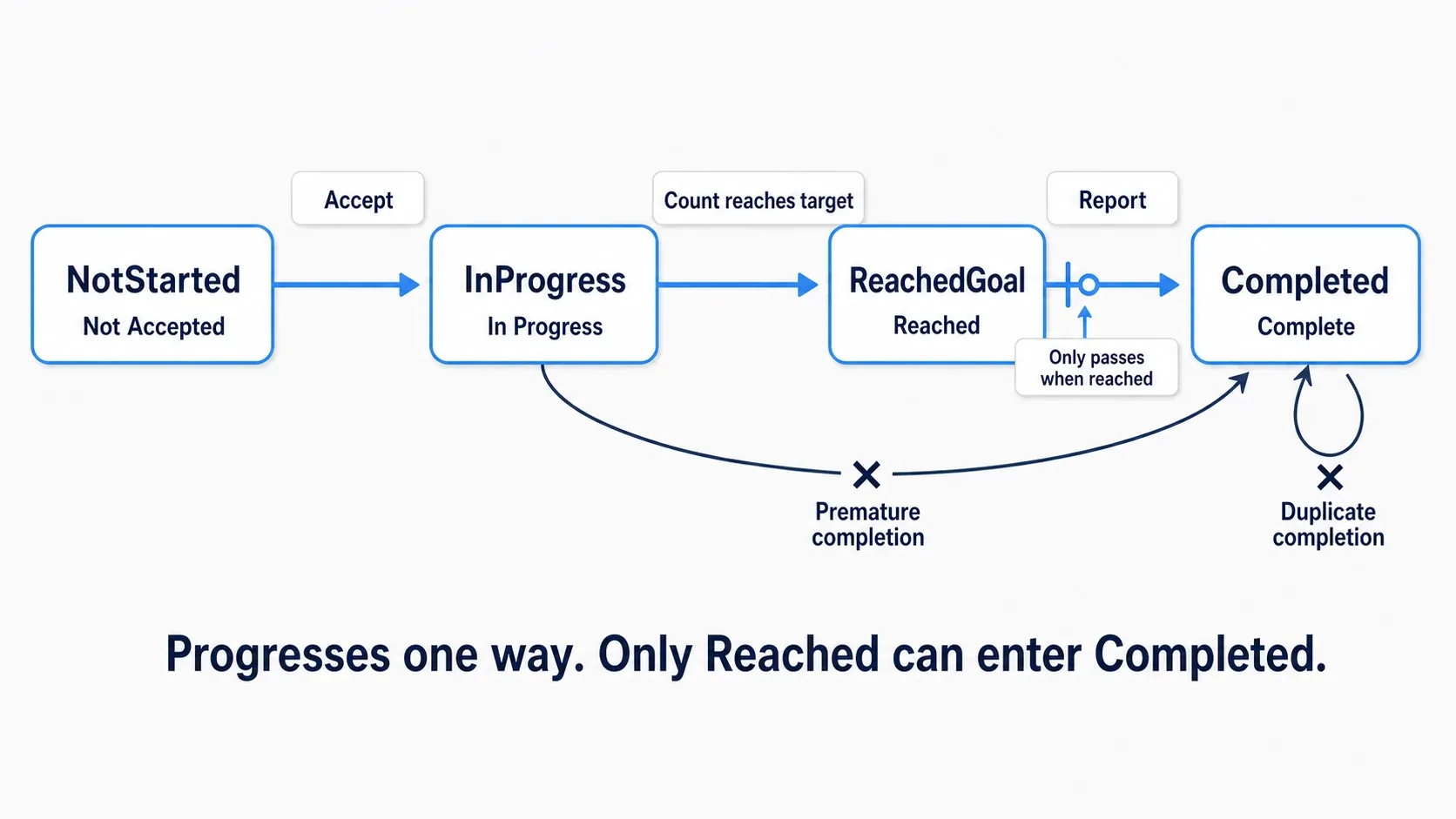
| State | Meaning | What advances it |
|---|---|---|
| NotStarted: not accepted | Not taken on yet | Accept it |
| InProgress: in progress | Accepted and short of three | Kill the third |
| ReachedGoal: reached | Hunting done, reward not received | Report it |
| Completed: completed | Reported and reward received | Ends here for now |
An Enum is a type for choosing one of a set of options. Instead of separate Booleans for "accepted", "reached", and "reward received", it holds one current state. Same idea as the Enum article.
Only ReachedGoal accepts a report. InProgress means "still hunting" and Completed means "already received". That distinction is what prevents double rewards.
Preparation: definition, progress, and notifications
We use a Third Person Blueprint project. Choose None where a Variant is offered, and control the standard BP_ThirdPersonCharacter. Creating assets in this order gives you the types you need by the time you build the struct.
1. The state Enum and the quest definition
Create E_QuestState from "Blueprints → Enumeration" in the Content Browser and add the four items above in the order NotStarted, InProgress, ReachedGoal, Completed.
Next create BPDA_QuestDefinition from "Blueprint Class → All Classes" with Primary Data Asset as the parent. Enable Instance Editable and disable Private on all of these variables.
| Name | Type | Default when creating the type |
|---|---|---|
| QuestID | Name | None |
| Title | Text | empty |
| TargetEnemyID | Name | None |
| RequiredCount | Integer | 1 |
| RewardGold | Integer | 0 |
After compiling and saving, choose this type under "Miscellaneous → Data Asset" and create DA_Quest_SlimeHunt .
| Item | Value to enter |
|---|---|
| QuestID | SlimeHunt |
| Title | Slime Hunt |
| TargetEnemyID | Slime |
| RequiredCount | 3 |
| RewardGold | 100 |
QuestID is the name identifying which quest this is and TargetEnemyID is the name identifying which enemy kind to count . SlimeHunt and Slime play different roles. The on-screen "Slime Hunt" goes in Title.
This asset is the definition . It holds "what to kill, how many, and how much you get". As in the Data Asset article, we separate the type's Blueprint from the asset holding values.
2. A struct for current progress
Create S_QuestProgress from "Blueprints → Structure". A struct is a type that groups related values.
| Name | Type | Default |
|---|---|---|
| Definition | BPDA_QuestDefinition Object Reference | None |
| State | E_QuestState | NotStarted |
| CurrentCount | Integer | 0 |
Definition is a reference pointing at which definition to use. Choose the Object Reference that can point at data such as DA_Quest_SlimeHunt, not a Class Reference.

The goal of three and the current one are different values. Required count and reward are read from the definition, while the per-player current count and state live in the struct. Same structure as the inventory's "separate the definition from the held count".
3. Put progress and notifications on the GameInstance
Create BP_GameInstance with GameInstance as the parent and add the following.
| What to prepare | Name | Settings |
|---|---|---|
| Variable | ActiveQuests | A Map keyed by Name with S_QuestProgress values. Starts empty. Private enabled |
| Variable | TotalGold | Integer, default 0 |
| Event Dispatcher | OnEnemyKilled | Add one Input, EnemyID (Name) |
| Event Dispatcher | OnQuestUpdated | Add one Input, QuestID (Name) |
A Map is a container holding key-value pairs. Keying by SlimeHunt here finds that quest's progress. Quests not yet accepted are not in the Map. Completed entries stay, which also prevents re-accepting. Despite the name ActiveQuests, this list includes completion records here.
An Event Dispatcher is a mechanism for telling registered listeners that something happened. Create them from Event Dispatchers in "My Blueprint" and add arguments under Inputs in the Details panel. OnEnemyKilled conveys "a Slime was killed" and OnQuestUpdated conveys "SlimeHunt's progress changed".
After creating them, set "Project Settings → Maps & Modes → Game Instance Class" to BP_GameInstance and save.

A normal level change rebuilds the Character and the like. So we entrust progress to the GameInstance, which survives within the same game run. Saving that survives quitting is considered separately in the bonus later.
Read current progress and show it as text
So later logic reads the same values, prepare the retrieval and display functions first. From here, functions without a note go inside BP_GameInstance with Pure disabled.
GetQuestProgress: also return whether it was found
Create a function GetQuestProgress with input QuestID (Name) and outputs Progress (S_QuestProgress) and Found (Boolean), enabling Pure for this function only.
Create the Map Find from ActiveQuests' Get. Connect QuestID into Key, the Value into the Return Node's Progress, and the Boolean Return Value into Found. Inside the function, wire the entry's white line straight to the Return Node. Do not wire a white line into Find.

Found means "was that quest in the Map". Not accepted yields false, so you can stop before reading a nonexistent progress's definition. GetQuestProgress and Find are Pure functions that only read values, with no white exec pin on the caller side.
ShowQuestStatus: print text matching the state
Create a function ShowQuestStatus with input QuestID (Name) and no outputs. Add a local variable Progress (S_QuestProgress). A local variable is a working value used only inside this function.
Wire the entry into a Branch with the Condition set to GetQuestProgress's Found (passing QuestID). False prints "Not accepted" and ends. True assigns the retrieved Progress into the local variable with Set Progress.
Creating Break S_QuestProgress from Progress's Get gets you Definition, State, and CurrentCount. Pass Definition into the Is Valid with an exec pin and continue only on the valid side into Switch on E_QuestState. Selection is Progress's State. The invalid side prints "Definition is unset" and ends.
Is Valid checks whether the referenced data is usable. We confirm first so Title and the like are not read while Definition is unset.
Connect Print Text to each state's white output. Build the displayed text with Format Text and pass it into Print Text's In Text by value. Do not wire a white exec line into Format Text.
| State | Text to put in Format Text |
|---|---|
| NotStarted | Not accepted |
| InProgress | {Title}: {Count}/{Required} / Gold: {Gold}G |
| ReachedGoal | {Title}: {Count}/{Required} reached - go report / Gold: {Gold}G |
| Completed | {Title}: completed / Gold: {Gold}G |
Entering the text above in Format Text's Format field makes input pins appear for {Title} and the rest. The values you pass there are embedded into the text when displayed.
Title and Required come from Definition's Title and RequiredCount, Count from Progress's CurrentCount, and Gold from TotalGold. Drag from Definition's blue pin to choose Get Title or Get Required Count.

Set every Print Text in this article to Print to Screen and Print to Log enabled, Duration=8, and Key=None. Changing numbers are visible on screen or in the Output Log.
Accepting: only the first time starts from 0
Create a function AcceptQuest with input Definition (BPDA_QuestDefinition Object Reference) and output Success (Boolean).
Confirm Definition with the Is Valid that has an exec pin. Invalid prints "Quest is unspecified" and sets Success=false at the Return Node. A Return Node ends the function and returns results. From here, failing branches also return false and end.
Continue from the valid side into a Branch checking whether any of the following apply. Combine the comparison results with Boolean OR and pass that into Condition.
- QuestID is None
- TargetEnemyID is None
- RequiredCount is 0 or less
- RewardGold is negative
True prints "Check the quest definition" and returns false. From False, continue into the next Branch whose Condition is ActiveQuests' Contains (Key=Definition's QuestID).
Contains being True means the quest is already taken. Print "Already accepted" and end with false. This check is what keeps pressing accept again from resetting 1/3 to 0/3 .
On the Contains False branch, create Make S_QuestProgress with Definition=the input Definition, State=InProgress, and CurrentCount=0.
Wire the white line as Map Add → Call OnQuestUpdated → Return Node, with the final Success set to true. Add takes Target Map=ActiveQuests, Key=Definition's QuestID, and Value=the Make output. Pass the same QuestID into the notification.

That connects reading the quest definition through saving 0/3 progress. We bind the listener that displays it automatically later.
Counting kills: update one at a time and write back
Killing a slime does not advance every quest. Only quests in progress whose target is Slime increment.
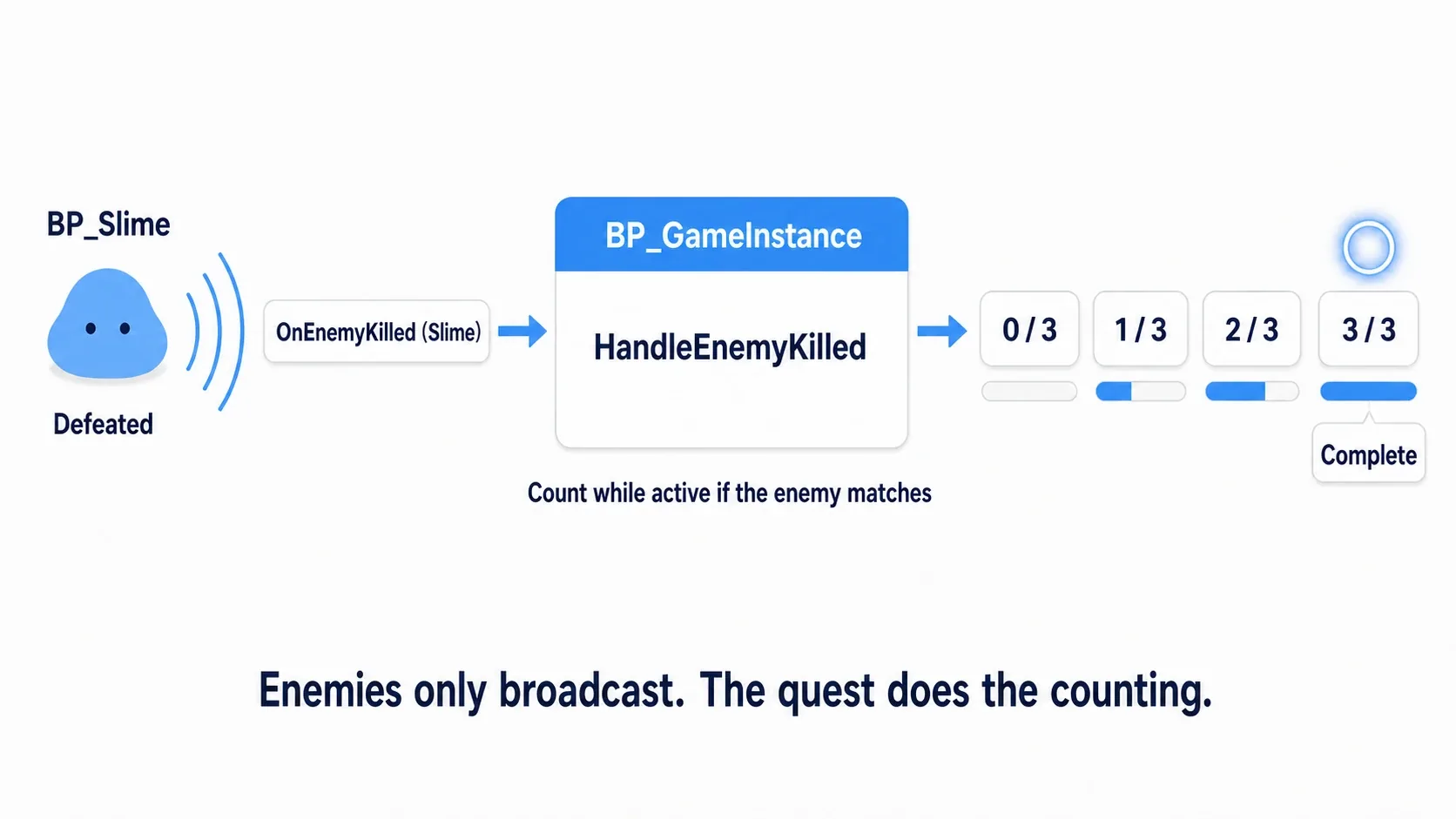
Separate the logic that checks several quests in turn from the logic that updates one progress entry. Building the single-entry version first makes "if the target differs, end just this one" easier to follow.
TryAdvanceQuest: can this one advance?
Create a function TryAdvanceQuest with inputs QuestID (Name) and EnemyID (Name) and no outputs. Add local variables Progress (S_QuestProgress) and NewCount (Integer).
Check the following in order from the entry. "End" here means wiring to this function's Return Node.
| Order | Check or action | When it fails |
|---|---|---|
| 1 | GetQuestProgress's Found into a Branch. On True, Set the output Progress into the local Progress | False ends |
| 2 | The broken-out Definition into Is Valid | Is Not Valid ends |
| 3 | State == InProgress into a Branch | False ends |
| 4 | Definition's TargetEnemyID == the input EnemyID into a Branch | False ends |
| 5 | Definition's RequiredCount > 0 into a Branch | False ends |
Once it passes, feed CurrentCount + 1 and RequiredCount into an integer Min and Set its output into NewCount. Min picks the smaller value, so a goal of 3 keeps the display capped at 3/3.
Next build the progress to write back with Make S_QuestProgress. Definition comes from Progress's Definition and CurrentCount from NewCount. Use a Select for State with these two options.
| Select input | Setting |
|---|---|
| Type | E_QuestState |
| Index | The Boolean NewCount >= RequiredCount |
| False | InProgress |
| True | ReachedGoal |
Creating the Select from Make's State pin and wiring the Boolean comparison into Index lets True and False choose the state. 2/3 is in progress and 3/3 is reached.

Wire the white line after Set NewCount into Map Add → Call OnQuestUpdated. Add takes Target Map=ActiveQuests, Key=the input QuestID, and Value=the Make output. The notification's QuestID is the same input.

Changing the progress pulled out by Map Find does not update the Map's value. Putting a new struct back at the same key with Add is the write-back. This procedure saves the updated count both when reaching the goal and when still partway.
HandleEnemyKilled: check accepted quests in turn
Create a function HandleEnemyKilled with input EnemyID (Name) and no outputs.
Wire the entry into the Map Keys node with ActiveQuests passed into Target Map. Keys extracts the key list as an array and has a white exec pin. Wire its white output into For Each Loop's exec input and the Keys array into Array.

Call TryAdvanceQuest (Target=Self) from Loop Body. Pass Array Element into QuestID and this function's input EnemyID into EnemyID. Completed can simply end.
Even when TryAdvanceQuest returns partway, the caller's loop continues to the next quest. Holding a slime hunt and a goblin hunt at once still judges each by its own definition and state.
Reporting: record completion, then give the reward
Create a function CompleteQuest with input QuestID (Name), output Success (Boolean), and a local variable Progress (S_QuestProgress).
Branch on GetQuestProgress's Found; False ends with Success=false. True Sets Progress into the local variable and confirms Definition with Is Valid. Invalid ends with false.
On the valid side, pass Progress's State == ReachedGoal into a Branch. False is Success=false. Only True continues.
Create Make S_QuestProgress, passing Definition and CurrentCount from Progress and changing only State to Completed. Write this back into ActiveQuests with Map Add. The Key is the input QuestID.
After the Add, pass TotalGold + Definition's RewardGold into Set TotalGold. Then wire Call OnQuestUpdated (the input QuestID) → Return Node (Success=true).

The order is record completion → add reward → notify . On a second report it is already Completed, so it never passes the state check. Not accepted is stopped by Found, and before-reaching and after-completing by the state.
Bind the listeners and hook up key input
1. Bind two listeners when the GameInstance starts
After compiling and saving the functions so far, add Event Init to BP_GameInstance's event graph. Init is the event when the GameInstance is initialized.
Wire the white line as Init → Bind Event to OnEnemyKilled → Bind Event to OnQuestUpdated. Target is Self for both. Self means "this Blueprint itself", here the BP_GameInstance holding the notifications.
Create a Create Event from each red Event pin, set Object=Self, and choose the function to call.
| Notification to bind | Function chosen in Create Event | Input received |
|---|---|---|
| OnEnemyKilled | HandleEnemyKilled | EnemyID (Name) |
| OnQuestUpdated | ShowQuestStatus | QuestID (Name) |

Bind registers and Call broadcasts. Create Event specifies the target and function to register. Both functions here take one Name and return nothing. If one does not appear as a candidate, check the input types and count and compile.
The GameInstance listening to its own notification is because we make it the shared notification desk. Enemies say "a Slime was killed" and quest logic receives it. Adding an achievements listener later needs no achievement logic added to the enemy.
The relationship between enemies and BP_GameInstance remains, though. What we decouple here is calling individual hunt quests and reward logic from the enemy.
2. Get the GameInstance from the Character
Add the keyboard J to BP_ThirdPersonCharacter's event graph. Wire Pressed into Cast To BP_GameInstance's white input and Get Game Instance's Return Value into the Cast's Object.

Get Game Instance has no white exec pin. From the Cast's success white output, call functions with As BP Game Instance as the Target. Connect a Print Text saying "Check Game Instance Class" to Cast Failed.
Using this shape, build the following keys. Choose asset arguments from the field and type text such as Slime for Names.
| Key | Logic called after a successful Cast | Argument |
|---|---|---|
| J | AcceptQuest | Definition=DA_Quest_SlimeHunt |
| K | Call OnEnemyKilled | EnemyID=Slime |
| H | Call OnEnemyKilled | EnemyID=Goblin |
| L | CompleteQuest | QuestID=SlimeHunt |
| P | ShowQuestStatus | QuestID=SlimeHunt |
Target is As BP Game Instance for all of them. J's Success needs no connection. On success the change notification displays the progress, and on failure AcceptQuest itself displays the reason.

L goes from CompleteQuest's white output into a Branch with Success wired into Condition. True ends. Only False prints "Cannot report yet, or already completed". The gold on success is displayed via OnQuestUpdated.
K and H are stand-in actions that broadcast kill notifications. They do not destroy enemy Actors. H exists to confirm that killing a non-target enemy does not advance it .
Confirm: from 0/3 to a 100G reward
Compile and save everything, then Play. Click the game screen so it receives key input, then try this order.
| Action | Expected result |
|---|---|
| P | Not accepted |
| K then P | Still not accepted. Pre-acceptance kills do not count |
| L | Cannot report |
| J | Slime Hunt: 0/3, Gold 0G |
| H then P | Still 0/3. Goblin is not the target |
| K | 1/3, Gold 0G |
| J then P | Already accepted. Stays at 1/3 without resetting |
| L | Cannot report. Progress unchanged |
| K twice more | 2/3 → 3/3. Reached, go report, Gold 0G |
| K then P | Still 3/3. It does not increase after reaching |
| L | Completed, Gold 100G |
| L again, then P | The report is refused and gold stays at 100G |
| J or K then P | Still completed. No re-accepting and no extra counting |

Beyond "I killed three", running through not accepted, not enough yet, and already finished shows why the four states are separated.
Try changing the required count
Stop Play, change DA_Quest_SlimeHunt's RequiredCount to 5, and Play again. Accepting with J starts at 0/5, three K presses still cannot report, and five reaches the goal. The displayed required count is read from the definition too, so no Blueprint numbers need rewriting.
Setting RequiredCount to 0 makes J print "Check the quest definition" without accepting. Return it to 3 after checking. This hunt quest assumes a goal of at least one.
When it does not work
| Symptom | Where to check |
|---|---|
| Cast Failed on every key | Game Instance Class in Project Settings |
| J does not accept | The Definition specification, whether IDs are None, the required count and reward values |
| Nothing displays after J | The Bind to OnQuestUpdated in Init and ShowQuestStatus's argument |
| K does not advance it | The OnEnemyKilled Bind, whether EnemyID matches TargetEnemyID |
| It is 1/3 every time | Whether TryAdvanceQuest ends with a Map Add write-back |
| Cannot report even at 3/3 | Whether the Select's True is ReachedGoal, and whether its output goes into Make's State |
| The second report gives 200G | The ReachedGoal check and writing back Completed before the reward |
| The display vanishes immediately | Print Text's Duration. P can redisplay the current values |
Connect to UI and real enemies
You can connect what you have to a corner-of-screen quest display or real combat. The functions that change progress stay as they are.
Replace text output with quest UI
The "Slime Hunt 1/3" in the screen corner is UI called a tracker that follows progress. The display side reads current values with GetQuestProgress and learns about changes from OnQuestUpdated.

Move the "look at the state and build text" part of ShowQuestStatus into a Widget from the UMG article and pass it into a Text's SetText instead of Print Text. Wire the reference like this.
- In the Widget's Construct, do Get Game Instance → Cast and save As BP Game Instance into GIRef.
- Bind an update function receiving QuestID (Name) to OnQuestUpdated (Target=GIRef) with Create Event.
- In the update function, confirm it is the tracked QuestID and read current values from GIRef's GetQuestProgress. If not found, show the not-accepted display.
- Right after the Bind, call the update function once with the tracked QuestID.
- In Destruct, Unbind Event with the same target and function if GIRef is valid.
Notifications do not resend past acceptances. That is why you read current values on the first pass. Whether to keep showing Completed or hide the tracker is up to the UI. The Event Dispatcher article and the display update in the inventory article are also useful references.
Broadcast the kill notification from the enemy's death logic
To connect real enemies, move K's notification into the enemy's death logic. Give the enemy an EnemyID (Name, such as Slime) and, after confirming death, run Get Game Instance → Cast → Call OnEnemyKilled (Target=As BP Game Instance, EnemyID=its own EnemyID).
Broadcast the notification before destroying the enemy with Destroy Actor. You also need a check for already-dead so the same enemy's death logic does not run twice. The quest state check cannot tell whether separate kill notifications came from the same enemy.
To connect dialogue, call J's AcceptQuest and L's CompleteQuest from dialogue choices. The dialogue side does not need to rewrite kill counts or gold directly.
Bonus: extending it to your own game
Take on a second quest
Duplicate the definition and change QuestID=GoblinHunt, TargetEnemyID=Goblin, and Title=Goblin Hunt to make another hunt quest. Calling AcceptQuest with the new definition has the same loop check both.
Adding assets alone does not accept them, though. You also need an entry point for accepting and the QuestID to pass when reporting. Matching QuestIDs are treated as the same quest, so change the ID after duplicating.
Herb gathering reads "how many you hold now"
Kills are past events, so we added one per notification. "Bring me three herbs", meanwhile, suits reading the current held count. Receive the inventory's change notification and recount with GetCount.
Gathering three and then using one drops you to two. A rule of "you still need three when reporting" requires logic that moves from reached back to in progress, plus a recheck of the held count at report time. When turning items in, also confirm you removed the required count before completing and rewarding.
Keep progress for the next launch
GameInstance is a container for the running game. Saving QuestID, State, CurrentCount, and TotalGold to a Save Game and rebuilding progress by finding the definition from QuestID on load carries it into the next launch. You also need a procedure for the ID-to-definition mapping table.
Enemies and Widgets placed in the map can be rebuilt by a level change. What lives in the GameInstance is quest progress, not logic that assumes those references keep working. UI after resuming builds its display from the restored current values.
The core here is looking at the current state and letting through only the actions that are allowed . When kill counts, report eligibility, and rewards connect to the same progress, adding dialogue and displays keeps the decision point in one place.
Summary
- Hold the quest's "definition" and the player's "progress" separately
- Separating "reached it" from "reported it" prevents double rewards
- Kill notifications are counted only by in-progress quests
- Rewards are given after recording completion
The question to ask while building is "does this state decide what can happen next?" If it does, hold it as a state.
How to hold data is in Data Table and how to distribute notifications is in Event Dispatcher.
Reference: Map Find, Map Keys, Event Dispatchers, GameInstance.