"While patrolling, chase the player on sight. When you lose them, wait a moment, and chase again on spotting them." That is short to write in prose, but adding conditions in Blueprint can obscure which logic is running now.
StateTree is a mechanism for organizing that "current state" and "cue to move on". It works for enemy AI and also for doors and quest progression.

What You'll Learn
- That StateTree and Behavior Tree differ in "where you read"
- Separating a state's contents (Tasks) from the switching cues (Transitions)
- Trying three states — patrol, chase, and search — with key input
- Where data lives and how it reaches conditions
Here we build a guard model where keys toggle "spotted" and "lost". First confirm state changes through on-screen text, then organize how to connect perception and movement.
- What State, Task, and Transition each handle
- How to pass an Actor's value into a state-switching condition
- Building interruption of a five-second wait when re-spotted while searching
- Which of StateTree and Behavior Tree reads better for your spec
You read a different place than in a Behavior Tree
In a Behavior Tree, priorities such as "chase if there is a target, otherwise patrol" are expressed through branch ordering.
In a StateTree, you read the state switching as the center: "spotting while patrolling goes to chasing", "losing them while chasing goes to searching".

| What you want to see | Behavior Tree | StateTree |
|---|---|---|
| Which behavior takes priority | Read the Selector's branches and conditions | Read the state selection conditions and transitions |
| What happens when logic finishes | Read the next Task in the Sequence | Read the on-completion Transition |
| Whether it can switch partway | Set via a Decorator's Observer Aborts | Set via a Transition leaving the state |
UE's Behavior Trees are event-driven , switching logic on cues such as Blackboard changes. It is not a split of "a BT that examines the whole tree every frame" versus "a StateTree that runs only when needed". Focus here on which structure reads better for the same spec.
If you have split states with Enum and Switch state machines, thinking of StateTree as building that per-state logic and switching in a dedicated editor makes it easier to approach.
A state's contents and the switching cues
Start with these four.
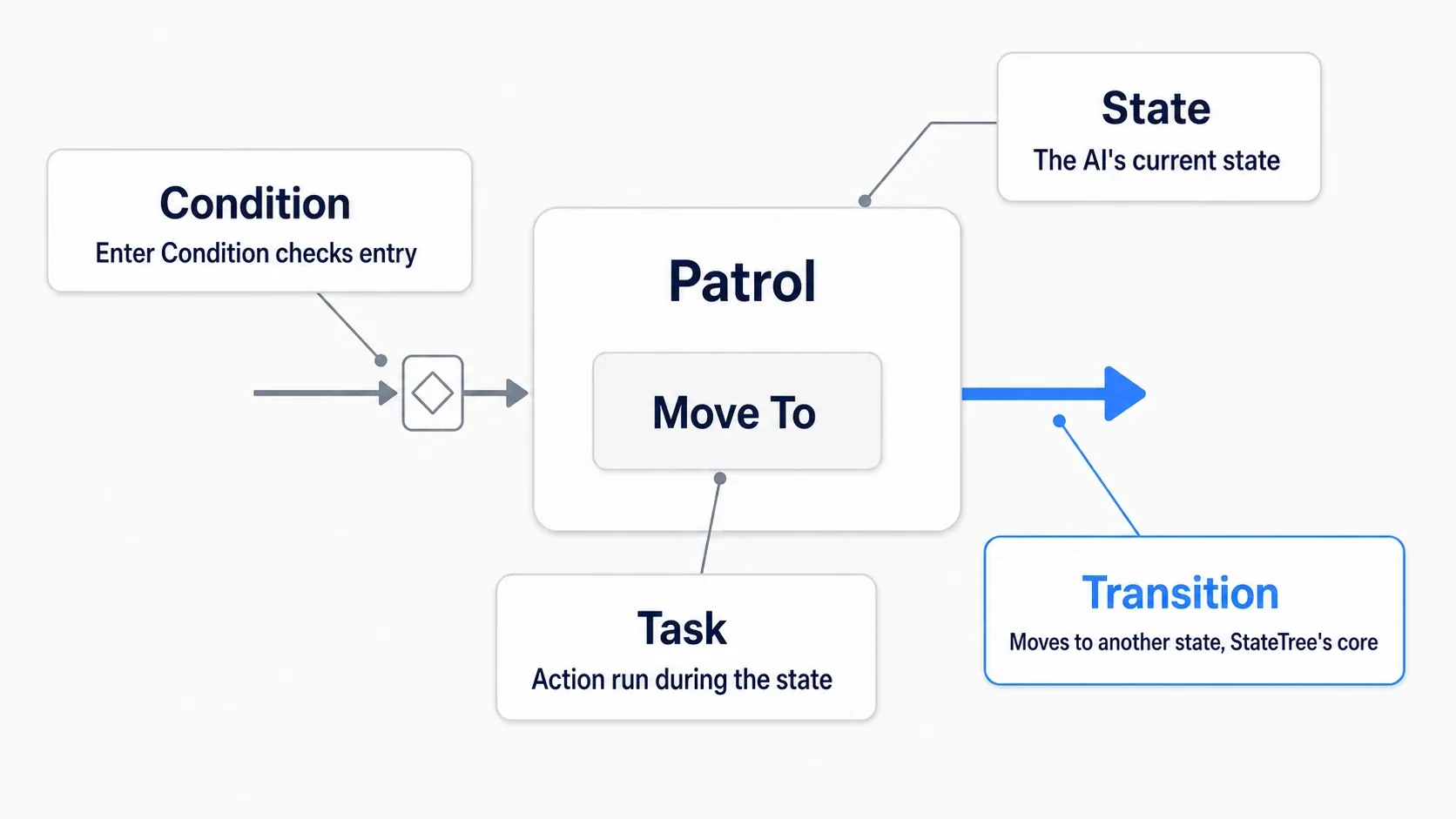
| Element | Meaning | Example here |
|---|---|---|
| State | What it is doing now | Patrol, Chase, Search |
| Task | The logic performed in that state | Display text, wait five seconds |
| Condition | Examines values and decides whether it holds | Whether PlayerVisible is true |
| Transition | When and to which state it moves | Chase to Search on losing the player |
A transition is a state switching. A Transition sets the "Trigger" for when to check, the destination "Transition To", and "Conditions" if needed.
Conditions have placements too. Enter Conditions check whether it can enter that state. A Transition's Conditions check whether it moves to another state. Writing entry conditions does not automatically exit a running state.
Task ordering differs too. Tasks placed in the same State are not a queue. They run in parallel, such as displaying text while counting time. Our Search uses that to combine "searching display" with "a five-second wait".
Start by displaying "Patrol"
Use a project such as Third Person where you can Play and look around the level. Being able to add variables and key input in Blueprint is enough.
1. Prepare the plugins and the Actor that runs it
Search for StateTree in "Edit → Plugins", enable StateTree and GameplayStateTree , and restart.
Next create a Blueprint BP_GuardStateDemo with Actor as the parent. Add one Static Mesh Cube so its position is visible and place it near the player. That is the guard we observe states on.
Add a Boolean variable PlayerVisible with a default of false and Instance Editable on. A Boolean is the two values true and false, representing "is the player visible" here. Compile and save.
2. Match the Schema and Component
Right-click in the Content Browser and create ST_GuardStateDemo via "Artificial Intelligence → StateTree". Choose StateTreeComponentSchema for the Schema.
A Schema decides where that StateTree is used and what data it can receive. We use the combination that runs on a plain Actor.

- Open ST_GuardStateDemo and set the Schema's "Context Actor Class" to BP_GuardStateDemo .
- Add a StateTree Component to BP_GuardStateDemo.
- Specify ST_GuardStateDemo in the component's "State Tree".
- Turn "Start Logic Automatically" on where that version shows it.
Context is the data the StateTree receives as what it runs on. Our Actor is the BP_GuardStateDemo placed in the level. Specifying the Class lets you select that Actor's PlayerVisible from conditions later.
StateTree AI Component is for AI Controllers. It differs from the plain StateTree Component we use here in both Schema and combination.
3. Create one Patrol
Right-click ST_GuardStateDemo's Root and add Patrol via "Add Child State". Root is the tree's entry and Patrol is its child.
Select Patrol and add a Debug Text Task under "Tasks" in the Details panel. Set "Text" to Patrol , Text Color to something readable, and Font Scale to a legible size. That Task exists to confirm the running state as text.
If Patrol's "Transitions" already has entries, delete them at this stage. Leave Enter Conditions empty. We use one state and keep the display running.

Compile and save the StateTree and Blueprint, then Play. Patrol appearing near the Cube confirms not only that the asset exists but that it runs on the placed Actor .
If nothing appears, check the asset assignment, Schema, Context Actor Class, and compile results. If the Debug Text Task has an Actor field, choose the Context Actor. This is a development-time display; a finished game's UI is built separately.
Hands-On: try spotting, losing, and re-spotting
Now we grow to three states. Each press of N toggles PlayerVisible between true and false.
| State | What it displays here | The cue that ends it |
|---|---|---|
| Patrol | Patrol | Spotting goes to Chase |
| Chase | Chase | Losing them goes to Search |
| Search | Search | Five seconds returns to Patrol. Re-spotting goes to Chase |
We confirm the judgment changes of "patrolling" and "chasing" as text. Making the Cube walk is considered later in "Extending to a moving enemy".
1. Toggle "visible" with the N key
Set "Auto Receive Input" to Player 0 in BP_GuardStateDemo's "Class Defaults". That lets this Actor receive key input during Play. Place only one experiment Actor in the level.
Build these connections in the Event Graph.
- Place the N event and wire a white exec line from "Pressed" into Set PlayerVisible .
- Create NOT Boolean from PlayerVisible's Get.
- Connect NOT's output into Set PlayerVisible's value input.
NOT flips true and false. Starting at false, one press makes it true and another makes it false.

What we change here is only the fact of "visible". Rather than specifying Patrol or Chase directly from the N key, we let the StateTree's conditions decide.
2. Add Chase and Search
Add Chase and Search under Root. Line up Patrol, Chase, and Search as children at the same depth. Do not put Chase inside Patrol.
| State | Tasks |
|---|---|
| Patrol | Debug Text Task: Text = Patrol |
| Chase | Debug Text Task: Text = Chase |
| Search | Debug Text Task: Text = Search, Delay Task: Duration = 5.0 |
Search's Delay Task completes after five seconds. Set any time-variance field to 0 and turn off any infinite-wait option. All three States have empty Enter Conditions here.
The diagram below spreads the hierarchy horizontally for readability. In the editor's list, Patrol, Chase, and Search sitting at the same depth under Root is what matters.

3. Bind PlayerVisible into transition conditions
Add one entry to Patrol's "Transitions" and configure it like this.
| Item | Value |
|---|---|
| Trigger | On Tick |
| Transition To | Chase |
| Conditions | Bool Compare |
| Bool Compare's Left | Bind → Actor → PlayerVisible |
| Bool Compare's Right | true (on) |
| Invert | Off |
Binding specifies where a value comes from. It says "read this Actor's PlayerVisible into Left". Typing true into the left side instead compares against true regardless of the player's input, so watch for that.

On Tick is the cue to check conditions on the StateTree's update. Here, becoming true moves from Patrol to Chase. It does not mean unconditionally re-entering Chase on every update.
Build the remaining transitions the same way. Left in every comparison is the Actor's PlayerVisible.
| From | Trigger | Condition | To |
|---|---|---|---|
| Patrol | On Tick | PlayerVisible = true | Chase |
| Chase | On Tick | PlayerVisible = false | Search |
| Search | On Tick | PlayerVisible = true | Chase |
| Search | On State Completed | none | Patrol |
Rows comparing against false have Right off. Invert is off on all of them. Delete any pre-existing transitions such as returning to Root and keep only the four in the table.
Order Search's two with the re-spot transition to Chase above and the completion transition to Patrol below . Where Priority is specifiable, set re-spotting to High and completion to Normal so re-spotting wins when both hold.

4. Spot them again during the five-second wait
Compile, save, Play, click the game screen, and press N.
| Action | Display change |
|---|---|
| Right after Play | Patrol |
| Press N once | Chase |
| Press again | Search |
| Wait five seconds | Patrol |
| Press N during Search | Chase without waiting out the five seconds |
| Press N again to lose them | Enters Search and waits a fresh five seconds |
The five seconds are counted from entering Search . Re-spotting and moving to another State exits Search's Task too. Entering Search next time starts the Delay Task waiting anew.

We put the display and the Delay in the same State to "wait five seconds while displaying Search". It is not serial logic where "the Delay starts after the text display finishes".
When it does not switch properly
| Symptom | Where to check |
|---|---|
| Pressing N changes nothing | Whether input reaches the game screen, Auto Receive Input, the white line from Pressed |
| It is Chase right after Play | PlayerVisible's default, whether Bool Compare's Left became a fixed value |
| You cannot pick the Actor's variable in Bind | Context Actor Class, the variable's exposure settings, recompiling the Blueprint and StateTree |
| It cannot leave Chase | Whether Chase → Search compares against false |
| Search returns immediately | The Delay's Duration, whether unnecessary completion Tasks or transitions were added |
| Search never ends | The Delay's infinite setting, On State Completed's destination |
| It reaches an unexpected state | Whether all three are at the same depth and Patrol comes first in initial selection |
The StateTree Debugger lets you select a running instance and see which State became active and which transitions were taken. Confirm one loop through the text display first, then follow the change history.
Where data lives and how it is passed
Our PlayerVisible is a variable on BP_GuardStateDemo rather than inside the StateTree. The N key changes that value and the StateTree reads it through the Context Actor.
Parameters exist too, but separating by a value's role helps more than thinking of them as the same box as a Blackboard.
| Data | Example use |
|---|---|
| Parameters | Settings passed to this guard, such as wait time and speed |
| Context | The Actor or AI Controller it runs on, and that target's values |
| Task and Evaluator outputs | A destination chosen by logic, gathered surroundings, and so on |
An Evaluator prepares information for conditions and Tasks. The Actor already had the value we needed here, so we bound directly without adding a custom Evaluator.
Parameters in the diagram illustrate passing settings from outside. We type the wait time directly into the Delay Task, so no Parameters are needed.

Creating same-named variables in separate States does not automatically make them the same note. Decide "where the value is changed" and "which source the condition reads" before binding.
Extending to a moving enemy
With state changes understood, you can move the spotting input to AI Perception and the in-state logic to movement and animation.
To drive it from an AI Controller, combine StateTree AI Component with StateTreeAIComponentSchema . It is not a matter of assigning our Actor-oriented asset to a component with a different Schema. Match the AI Context and configure Bindings for perception results and the move target.
| Our model | Extending to a moving guard |
|---|---|
| N flipping PlayerVisible | Update from sight spotting and losing |
| Debug Text of the state name | Prepare Tasks for movement, waiting, animation, and more |
| Waiting five seconds in Search | Create a state that waits five seconds after moving to the investigation point |
| A Cube Actor | Prepare a Character driven by an AI Controller |
Movement also needs NavMesh and AI Controller setup. When trying the Behavior Tree version too, separate the experiment Controllers so Run Behavior Tree and StateTree do not both issue movement orders to the same enemy.
"Move, then wait" means splitting the states
Placing Move To and Delay in one State starts movement and waiting simultaneously. Five seconds finishing while walking to the destination is not an investigation after arriving.
So put "move" and "wait" under a parent State "investigate". Movement success moves to waiting and waiting's completion returns to patrolling. Also decide where movement failure goes.

StateTree has a hierarchy where a parent is active while its child is. A shared transition such as "while investigating, re-spotting returns to chasing whether moving or waiting" can be gathered on the parent.
That is an example structure for extending toward the AI Perception article's "wait five seconds after arriving at the investigation point". Our model's five seconds count from entering Search after losing the player.
Which to choose
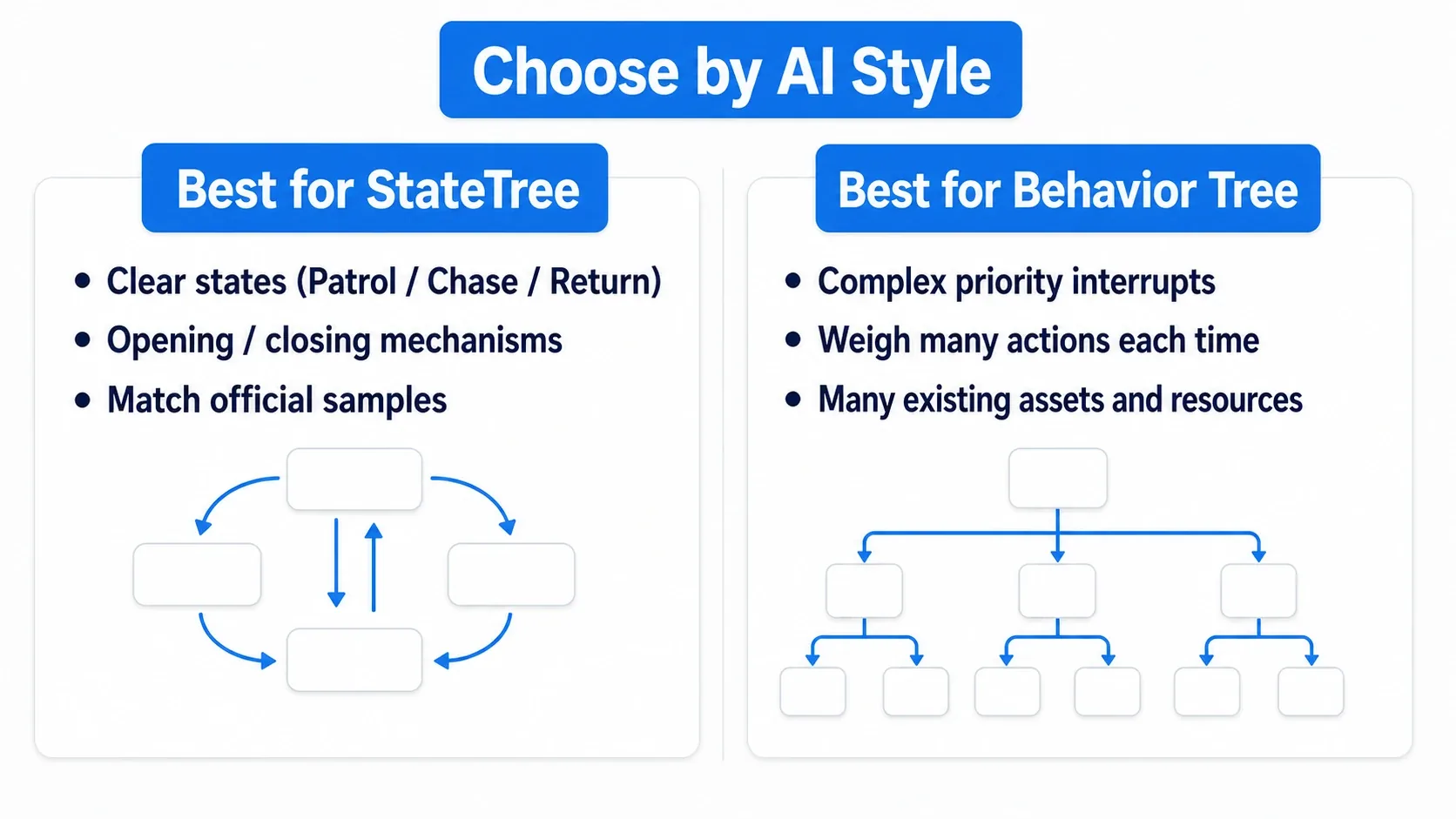
When choosing between StateTree and Behavior Tree, write your enemy's spec out briefly.
| How the spec reads | The easier option to try |
|---|---|
| You want to follow state switching, such as "spotting while idle chases" or "finishing a cast attacks" | StateTree |
| You want to read priorities as branches, such as "healing first, then retreating, then attacking" | Behavior Tree |
| You already have working AI or a project to reference | Build on that structure |
| Few states and a short Blueprint reads fine | Start with Enum and Switch |
Both can express complex behavior. Build a small subject first and judge by whether you can tell where to change something when you add one condition ; that makes it easier to pick the form suiting your game.
Bonus: good to know up front
- Watch where you place transition conditions : StateTree makes "which state you are in" readable, but putting Transitions in the wrong place produces states you cannot leave. Putting shared interruption conditions on the parent keeps it manageable
- Pass data with bindings : use Parameters and Context and connect Tasks with bindings. Routing through Blueprint variables makes it hard to trace which state reads what
- Choose by role against Behavior Trees : enemy AI whose judgment you want as a tree suits Behavior Trees, and long-lived logic with clear state transitions suits StateTree. Rather than forcing a replacement, start from things whose states last a long time
- It is useful beyond AI : it also manages door and gimmick states
Summary
In StateTree, you place Tasks on states and decide the cues to move on with Transitions. Actor information is passed with Bindings, and you separate logic that runs simultaneously from logic that runs in order.
Try changing our guard's Search wait from five seconds to two. It changes how quickly it returns to patrolling while keeping the response to re-spotting. Confirming state changes this way, add movement and perception one at a time.
Further Reading