Pick up herbs and they grow to nine; the tenth will not fit. Even when the bag is full, using a herb makes room for something else. Let's build that inventory.
An inventory manages "what you have and how many". Building item descriptions, quantity changes, and display all at once makes it hard to see where to fix things. Start by separating a herb's properties from how many herbs you hold.
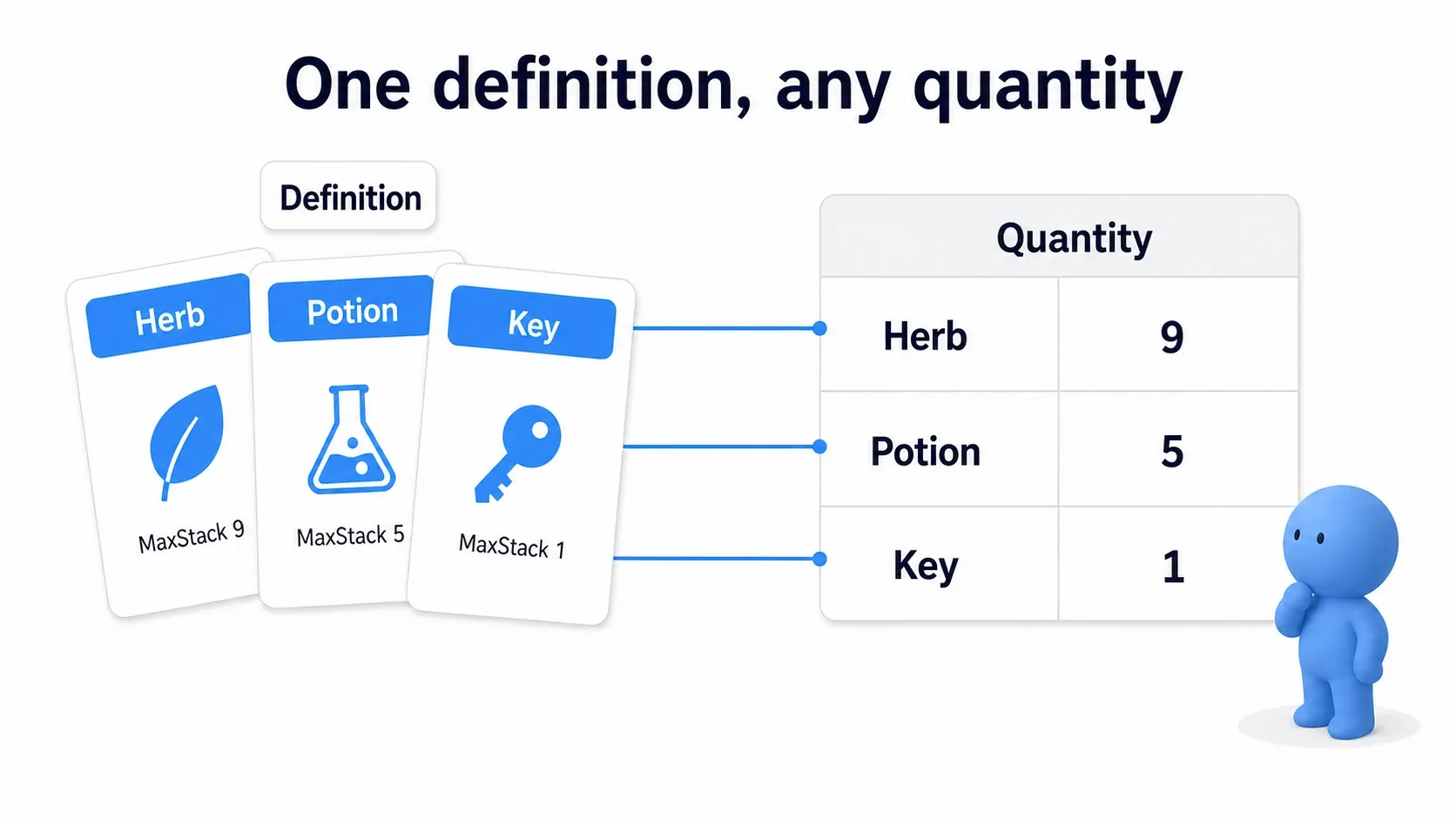
What You'll Learn
- Separating item definitions from per-player quantities
- Respecting per-type stack limits and total bag capacity when changing counts
- Using one herb and healing the Character's HP
- Updating a simple inventory display only when quantities change
This hands-on is for people who can use Blueprint variables, functions, and Branches. It combines Data Asset, Map, and Actor Component. We use single-player in the Third Person template, with key input standing in for "pick up".
- Separate a herb's properties from how many you hold
- Preparation: four definitions and a bag
- Query the current counts
- Adding: confirm it fits before rewriting
- Removing: delete types that reach 0
- Hands-On: pick up and use a herb
- Update the display only on change
- Confirm: a full bag makes room again
- Bonus: extending it to your own game
- Summary
Separate a herb's properties from how many you hold
Whether you hold three herbs or nine, using one heals the same amount. That shared "what a herb is" information is the definition , stored in a Data Asset.
"I currently hold three" is that player's held state . The bag manages that side.
| What is separated | Herb example | Where it lives |
|---|---|---|
| Definition | Display name Herb, heal 20, stack limit 9 | DA_Herb |
| Held state | Holding three DA_Herb | The Inventory Component's Items |
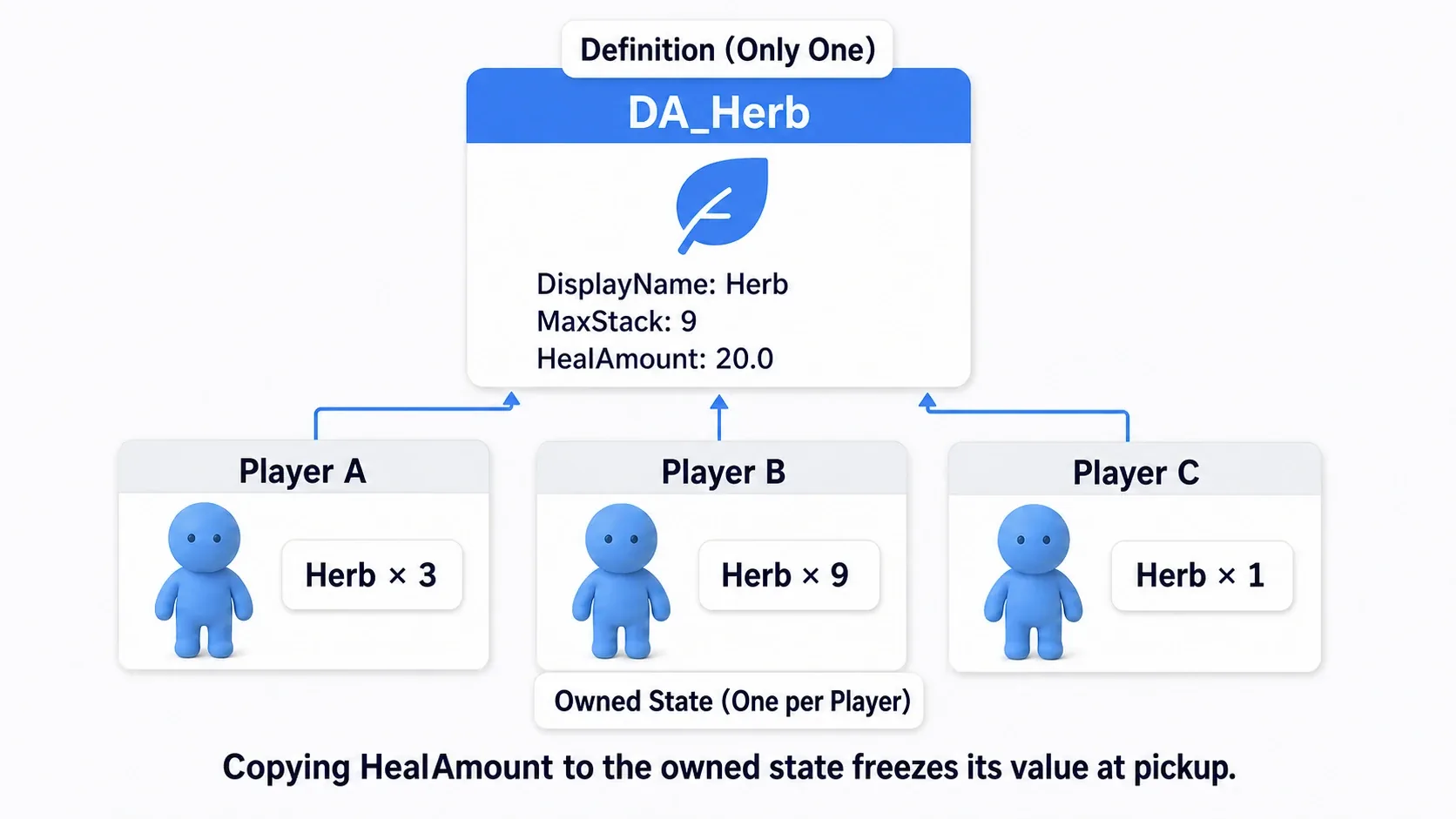
Separating them means adjusting the heal from 20 to 25 is one edit in the definition. Keeping a copy of the heal amount per held item would mean updating those too. Our held data holds a reference to the definition and a count .
Here, one count per type
A Map holds pairs of "a key to look up by" and "the matching value". Here the item definition is the key and the quantity is the value. Pass DA_Herb and you get the herb count.
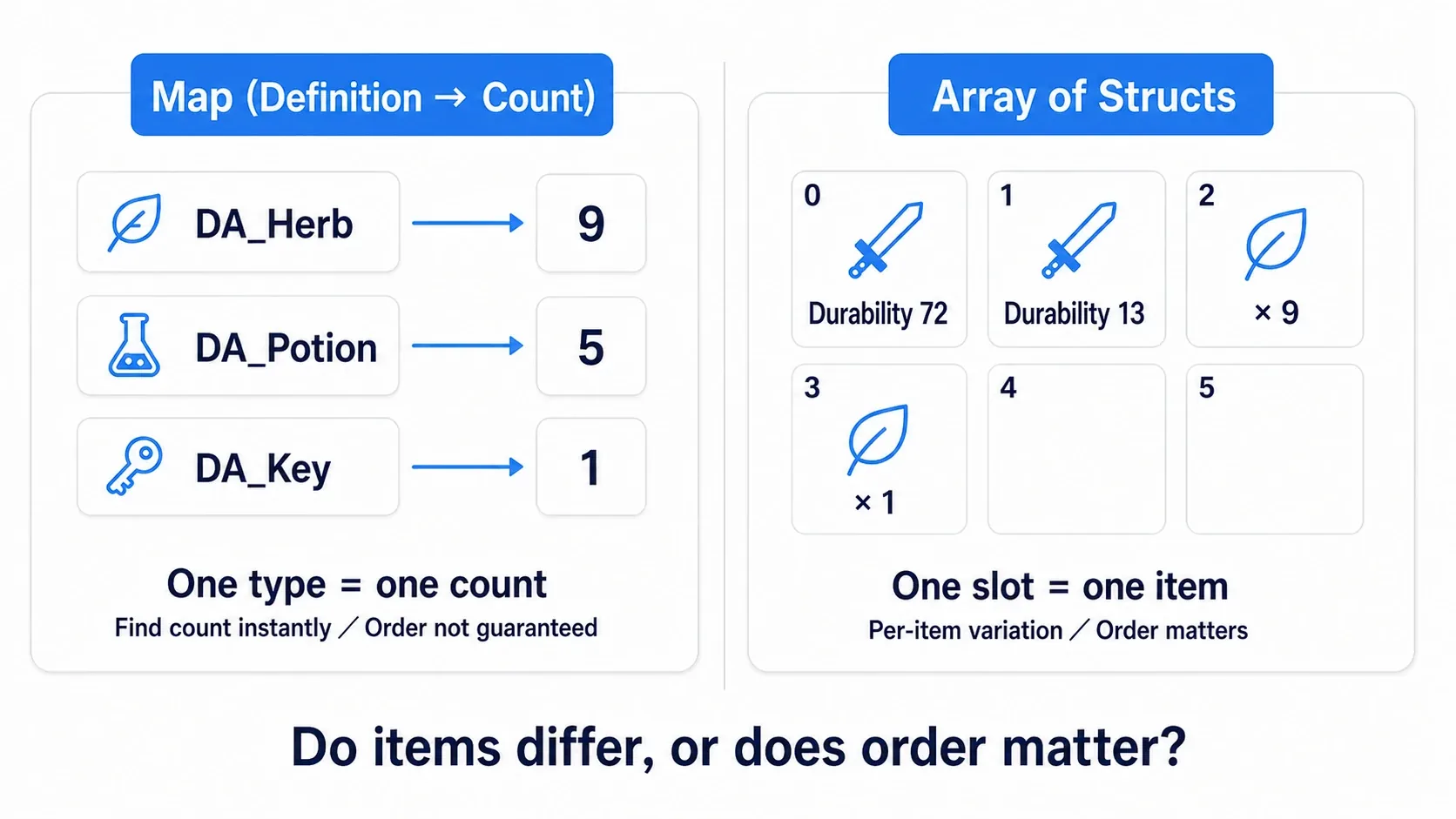
| The bag you want | The easier shape |
|---|---|
| Only per-type totals such as nine herbs and one key | Our Map |
| Herbs split into a "nine" slot and a "one" slot | An array of slots |
| The same sword distinguished at durability 72 and 13 | An array of structs holding per-item data |
A stack holds several of the same type together. With our Map, herbs cap at nine total and the tenth does not go to another slot. And capacity 15 is not "15 types" or "15 slots"; it is 15 items across all types . Decide that rule before building.
Preparation: four definitions and a bag
1. Create the item definition
Use a Third Person Blueprint project. Choose None where a Variant is offered and proceed with the standard BP_ThirdPersonCharacter.
Right-click in the Content Browser and, from "Blueprint Class → All Classes", create BPDA_ItemDefinition with Primary Data Asset as its parent. Add these variables with Instance Editable enabled and Private disabled, then compile and save.
| Variable name | Type | Default |
|---|---|---|
| DisplayName | Text | Empty |
| MaxStack | Integer | 1 |
| HealAmount | Float | 0.0 |
Next, create four assets from "Miscellaneous → Data Asset" choosing BPDA_ItemDefinition. That creates data holding values, not duplicates of the Blueprint class.
| Asset name | DisplayName | MaxStack | HealAmount |
|---|---|---|---|
| DA_Herb | Herb | 9 | 20.0 |
| DA_Potion | Potion | 5 | 50.0 |
| DA_Key | Key | 1 | 0.0 |
| DA_Bomb | Bomb | 3 | 0.0 |

We display names and counts, so no icon images are needed. The difference between a data type and its data is also explained in the Data Asset article.
2. Create the Component managing quantities
Create BP_InventoryComponent with Actor Component as its parent. A Component is a functional part you add to Actors. The bag itself needs no position, so use Actor Component rather than Scene Component.
| What to prepare | Name | Settings |
|---|---|---|
| Variable | Items | A Map with BPDA_ItemDefinition Object Reference keys and Integer values. Empty default. Private on |
| Variable | MaxCapacity | Integer, default 15. Instance Editable on |
| Event Dispatcher | OnInventoryChanged | No inputs |
Set Items' type to a BPDA_ItemDefinition Object Reference , switch the container to Map, and set the value type on the right to Integer. Do not choose Class Reference.
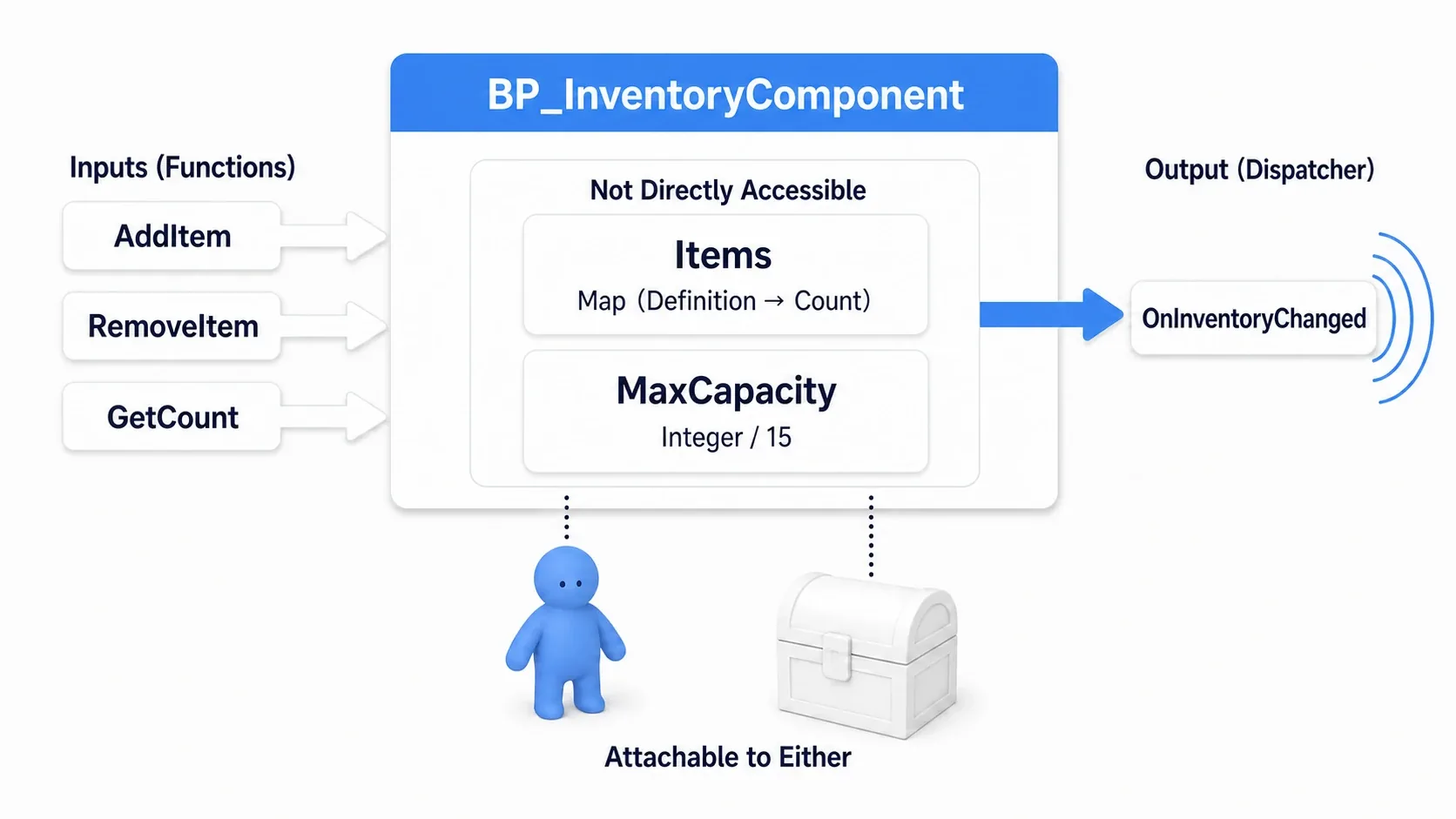
An Event Dispatcher tells registered parties "something changed". Add OnInventoryChanged from Event Dispatchers in "My Blueprint". We build the receiving display later.
Do not rewrite Items from outside; change it through the AddItem and RemoveItem we build next. That gathers limit checks and notifications into those two entry points.
Query the current counts
First create three functions inside the Component. The addition logic and the UI use them to query current values.
GetCount: one type's quantity
Create a function GetCount with an input Item (BPDA_ItemDefinition Object Reference) and output Count (Integer), with Pure enabled.
Create the Map Find from a Get of Items, passing the Item input to Key and Value to the Return Node's Count. We do not use Find's Boolean Return Value here. With no such key, the Integer Value is the default 0.

GetCount is a Pure function that only inspects values, so callers have no white exec pin. Find is the same.
GetKindCount: how many types you hold
Create GetKindCount with no inputs and output Kinds (Integer), with Pure enabled. Create the Map Length from a Get of Items and connect its output to the Return Node's Kinds.
That is not the total quantity. With nine herbs, five potions, and one key, the Map has three entries, so the type count is three.
GetTotalCount: the bag's total quantity
Create GetTotalCount with no inputs and output Total (Integer), with Pure disabled. Create a local variable Sum (Integer) used only inside the function.
Wire white exec from the function entry → Set Sum = 0 → the Map Values → For Each Loop. Values' Target Map is Items and its array output Values goes to For Each Loop's Array.

Wire Loop Body to Set Sum and assign "Get Sum + Array Element". Wire Completed to the Return Node with Sum into Total.
Values extracts a Map's values into an array and has white exec pins . It adds 9, 5, and 1 in turn and returns 15 after the loop finishes. Confirm Sum is reset to 0 each time and that Return is not wired to Loop Body.
Compile and save. The entry points exposing quantities outward are ready.
Adding: confirm it fits before rewriting
Create a function AddItem with inputs Item (BPDA_ItemDefinition Object Reference) and Amount (Integer), and output Success (Boolean). Disable Pure and add a local variable CurrentCount (Integer).
Amount is "how many you want to add now". Our rule is to add only if all of it fits, and add nothing otherwise.
1. Verify the item and the amount
From the function entry, wire to the exec-pin Is Valid with Item into Input Object. Is Not Valid prints "No item specified" with Print Text and continues to a Return Node with Success = false.
From the Is Valid side, go to a Branch with Condition Amount <= 0 . True prints "The amount must be at least 1" and returns Success = false. From False, go to Set CurrentCount, assigning GetCount(Item)'s Count.

Is Valid is the entry checking whether the specified target is usable. Pass through it before reading the definition's MaxStack. Zero and negative values are not accepted as additions or removals and do not change quantities.
Later failure paths also end with Print Text → Return Node (Success = false). A Return Node returns the function's result and ends. Placing one per failure point is fine.
The Print Text nodes in this article all use Print to Screen and Print to Log on, Duration 5, and Key None, so you can check failure reasons on screen and in the log.
2. Check the per-type limit and the total capacity
Place a Branch after Set CurrentCount with Condition Amount > Item's MaxStack - CurrentCount . True prints "Cannot stack any more" and returns false.
Dragging from Item's blue pin and creating Get Max Stack reads that definition's limit. Subtract CurrentCount from it and pass the comparison against Amount to the Branch.
From False, call GetTotalCount (Target = Self) and continue from its white output to the next Branch. This Condition is Amount > MaxCapacity - Total . True prints "The bag is full" and returns false.

"Limit minus current count" gives how many more fit. With eight herbs, the remainder is 9 - 8 = 1 . Adding one passes, but adding two is refused. Total capacity works the same: with 15 held, the remainder is 0.
The comparison is > . Do not use >= , which would also refuse adding one into a remainder of one.
3. Add to the current count and write it back to the Map
From the second Branch's False, wire the Map Add → Call OnInventoryChanged → Return Node with Success true.
Add's inputs are Target Map = Items, Key = Item, and Value = CurrentCount + Amount .

A Map's Add overwrites the value when the key exists. Passing 1 would always leave one. Fetching the current count and writing back the sum lets it grow 1 → 2 → 3.
Removing: delete types that reach 0
Create RemoveItem with the same Item and Amount inputs and Success output, Pure disabled. Create local variables CurrentCount and NewCount as Integers.
The initial Is Valid and Amount <= 0 checks match AddItem, with the same failure messages and false Returns. Once they pass, assign GetCount(Item)'s result to CurrentCount.
The next Branch checks CurrentCount < Amount . True prints "You do not have any" and returns false. From False, Set NewCount = CurrentCount - Amount and check NewCount == 0 in another Branch.

| Branch | Map operation | What follows |
|---|---|---|
| True: it reached 0 | Remove with Target Map = Items and Key = Item | Call OnInventoryChanged → Return (Success = true) |
| False: some remain | Add with Target Map = Items, Key = Item, Value = NewCount | Call OnInventoryChanged → Return (Success = true) |
Placing the notification and Return on each branch is fine. We do not use Remove's Boolean return value.
Deleting keys at 0 lets GetKindCount return "how many types you actually hold". Use up your herbs and three types (herb, potion, key) become two (potion, key).
Hands-On: pick up and use a herb
1. Attach the bag to the Character
Open BP_ThirdPersonCharacter, add BP_InventoryComponent from Components' Add, and name it Inventory . Confirm the selected Component's MaxCapacity is 15.
Add CurrentHealth (Float, default 50.0) and MaxHealth (Float, 100.0) to the Character. Also create HerbDefinition (BPDA_ItemDefinition Object Reference) and, after compiling, set its default to DA_Herb.
2. Pick up with key input
Add a keyboard 1 to the event graph. Drag Inventory from Components into the graph to create a reference and build AddItem from it. Wire Pressed to the white exec input with Item = DA_Herb and Amount = 1.

Build 2, 3, and 4 the same way. In the Item field, choose the target asset rather than typing text. Success needs no connection at this stage; the Component prints the reason on failure.
| Key | Item | Amount |
|---|---|---|
| 1 | DA_Herb | 1 |
| 2 | DA_Potion | 1 |
| 3 | DA_Key | 1 |
| 4 | DA_Bomb | 1 |
Key input is a stand-in for testing pickup. Touching a floor item calls the same AddItem, and you can destroy the floor Actor only when Success is true.
3. Heal only when one was actually removed
Add a keyboard Q to the Character and call the Inventory's RemoveItem from Pressed. Pass a Get of HerbDefinition to Item and 1 to Amount.
Wire the white output to a Branch with Success into Condition. False ends. Only True continues to Set CurrentHealth.

The value to Set is CurrentHealth + HerbDefinition's HealAmount passed through Clamp (Float) with Min 0 and MaxHealth into Max. Clamp keeps a computed result within a range: adding 20 to 90 stops at the maximum 100.

After the Set, build HP: {HP} with Format Text, feeding CurrentHealth into HP, and pass it to Print Text.
Our rule consumes the herb even at full HP , so we can watch it count down to zero. To refuse using at full HP, add a check for CurrentHealth < MaxHealth before RemoveItem.
Putting healing on the Character means the Inventory Component never Casts to a specific Character. Attached to a chest, the same add and remove logic works.
Update the display only on change
Finally, add a small UI showing only names and counts. It displays four types in a fixed order, showing 0 for types you do not hold. Before laying out icons, this screen confirms the quantities and the display agree .
We write the display names directly in the UI here, so changing a definition's DisplayName does not change this screen's names.
1. Prepare the display Widget
Create WBP_InventorySummary with User Widget as its parent. Place a Canvas Panel in the Designer and add a Text child named SummaryText with Is Variable enabled. Aim for a top-left anchor with Position (40,40), Size (600,220), and Font Size 22. Do not set a Bind on the Text.
Create InventoryRef (BP_InventoryComponent Object Reference) on the Widget with Instance Editable and Expose on Spawn enabled. Expose on Spawn adds an input for this value on the node creating the Widget.

2. RefreshInventory displays the current values
Create a function RefreshInventory on the Widget with no inputs or outputs and Pure disabled. From the entry, check InventoryRef with the exec-pin Is Valid and continue only on the valid side to GetTotalCount with Target InventoryRef.
Enter this text into Format Text. Use Shift + Enter for line breaks in the field.
Herb: {Herb} / Potion: {Potion}
Key: {Key} / Bomb: {Bomb}
Total: {Total} / Types: {Kinds}
Connect a GetCount targeting InventoryRef to each of Herb, Potion, Key, and Bomb, specifying DA_Herb and the rest for Item. Total is GetTotalCount's output and Kinds is GetKindCount's (Target = InventoryRef).
Wire GetTotalCount's white output to SetText (Text), with a Get of SummaryText into Target and Format Text's Result into In Text.

3. Receive change notifications and display the first value
After compiling, in the event graph go from Construct to Is Valid (InventoryRef) and, on the valid side, call Bind Event to OnInventoryChanged with Target InventoryRef.
Create a Create Event from the red Event input with Object = Self and RefreshInventory selected in the function picker. That specifies what to call when a notification arrives. From Bind's white output, call RefreshInventory (Target = Self) once.

Bind registers the receiver. Registering does not deliver past changes, so call the initial display yourself. After that, AddItem and RemoveItem update it each time they notify.
From Destruct, also pass through Is Valid (InventoryRef) and, when valid, call Unbind Event from OnInventoryChanged. Pass the same InventoryRef and the same Create Event with Self / RefreshInventory. It ends an unneeded subscription after the display is removed; do not use Unbind All, which would remove other subscriptions.
4. Add it to the screen from the Character
Wire Create Widget to BP_ThirdPersonCharacter's BeginPlay with Class = WBP_InventorySummary, Owning Player = Get Player Controller (Player Index = 0), and the Inventory reference from Components into Inventory Ref. Keep any existing BeginPlay logic and append to it.
Wire Create Widget's white output to Add to Viewport with Return Value into Target. Now the bag the character uses and the bag the screen reads are the same.
There is no UI Tick rebuilding things. Even as you elaborate the display, the Component owns the data and the UI reads current values. The Event Dispatcher article and the UMG article also help.
Confirm: a full bag makes room again
Compile and save everything and Play. Click the screen so key input is received, then try this order.
| Action | What to confirm |
|---|---|
| Right after start | All four at 0, total 0, types 0 |
| 1 nine times | Herb 9, total 9, types 1 |
| 1 once more | "Cannot stack any more". The counts do not change |
| 2 five times, 3 once | Herb 9, potion 5, key 1, total 15, types 3 |
| 4 | "The bag is full". Bomb stays 0 |
| Q | Herb 8, total 14, types 3. HP goes 50 → 70 |
| Q twice more | Herb 6, total 12. HP goes 90 → 100 |
| Q six more times | Herb 0, total 6, types 2. HP stays 100 |
| Q once more | "You do not have any". Neither counts nor HP change |
| 4 | Now you can hold bomb 1. Total 7, types 3 |

A bag that was full makes room again as you use things. Getting this far means the limit checks, removal, and display update all use the same current values.
Try the boundaries a little
Stop Play, change the 1 key's Amount to 2, and restart. Four presses give eight herbs and the fifth is refused, leaving eight. Since there is no partial-add rule, it does not reach nine. Set Amount back to 1 afterwards.
You can also test Amount 0 and -1, which change nothing and print the amount check message. Set it back to 1 at the end.
When it does not work
| Symptom | Where to check |
|---|---|
| Herbs are always 1 | Whether you pass CurrentCount + Amount to Add |
| The ninth will not fit | Whether the remainder comparison uses > |
| The total is wrong | Whether you add each of Values, reset Sum to 0 each time, and return from Completed |
| Types stays 3 after using all herbs | Whether the 0 branch calls the Map's Remove |
| It does not heal | Whether HerbDefinition is DA_Herb, and whether you branch on RemoveItem's Success |
| The UI is empty from the start | Create Widget's Inventory Ref, the initial Refresh after Construct, SummaryText's Is Variable |
| Only the UI shows stale counts | The Call OnInventoryChanged after changes, and Bind's Target and Event |
| Keys do not respond | Whether the standard Character is what you control, and whether the game window has input focus |
Bonus: extending it to your own game
The same name on a different asset is a different type
The Map's key is a reference to the DA_Herb asset, not the display name. A duplicated DA_Herb2 is a different key even though the screen shows the same "Herb". To test, add one of each with an empty bag and the type count becomes 2.
Do not rely on the Map's own ordering as display order either. Our UI states the order explicitly: herb, potion, key, bomb. As types grow, keep a separate array of definitions defining display order.
When you need per-item data or slots
To keep each sword's durability or the slot position an item sits in, expand to an array of slot structs. When modifying a struct retrieved as a copy, you also need to write it back to the original array. See the struct article.
For a weight system, the idea of checking free space before adding is the same. But you add Weight to the definition, compute totals as "count times weight", and align the limit and comparisons to weight units.
Level changes and the next launch
Our Inventory is attached to the Character, so rebuilding the Character resets its contents. To carry it across level changes, deposit the needed held data in GameInstance.
To keep it for the next launch, write item IDs and counts to Save Game and look the definitions up from the IDs when loading. Recording a reference to a Data Asset and copying the asset's contents into the save are different things. Using IDs also requires logic mapping IDs to definitions.
What we built is a bag whose in-and-out rules live in a Component. Even as you change what triggers pickup or how the UI looks, changing quantities through AddItem and RemoveItem keeps the limit checks and change notifications shared.
Summary
- Hold an item's "definition" separately from a player's "quantity"
- Before increasing, check the per-type limit and the bag's capacity
- Delete types that reach 0 from the Map rather than keeping them
- Call the display update only when quantities change
The question when building is "is this the same value for everyone, or only for that person?" Same means Data Asset; only theirs means the Component.
Data shapes are covered in Array, Map, and Set and the definition side in Data Asset.
Reference: Map Find, Map Add, Map Values, Binding and unbinding events.