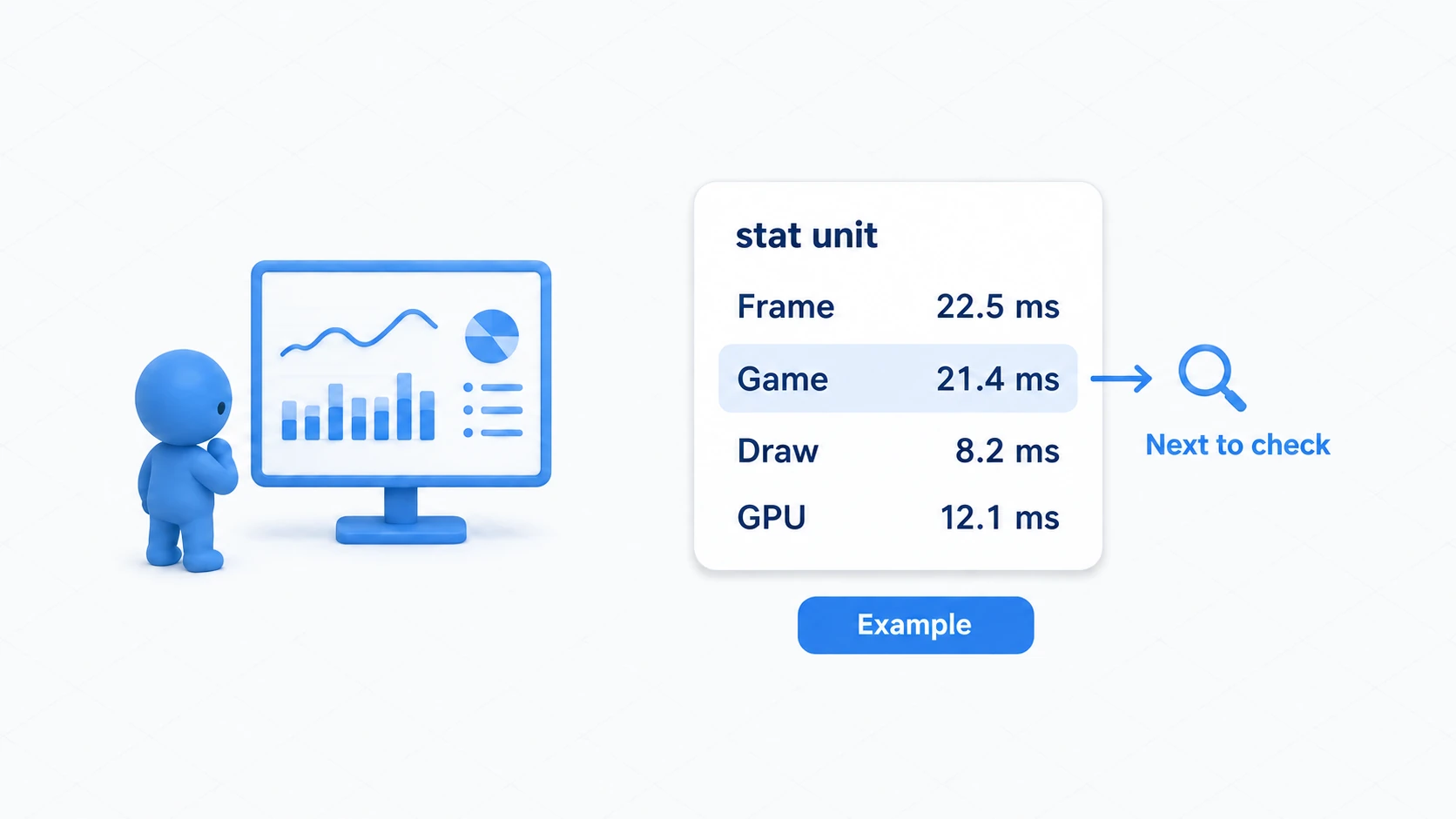
You built MP costs and cooldowns for a fireball and an ice spear. Next you want "unusable while stunned" and "equipment changes the MP cost". Writing the same checks across your abilities means eventually forgetting to fix one of them.
The Gameplay Ability System (GAS) is the mechanism for assembling this kind of shared ability logic. MP changes, how long effects last, and the conditions that permit activation are handled by shared parts.

Adopting GAS does not finish your game's rules automatically, though. This article organizes what you can delegate to it, then tries the activation conditions for a spell costing 20 MP and reusable after 5 seconds . With that, we consider whether adopting it is worth it for your game.
What You'll Learn
- Who manages Ability, Effect, Attribute, and tags
- How MP cost and cooldown are expressed as Gameplay Effects
- How to confirm what can and cannot activate through a small experiment
- The axes for deciding between GAS and your own shared logic
The first half explains the mechanism. Running the second half needs Blueprint variables and node work plus the build environment from the C++ introduction.
- What to delegate to GAS and what you decide
- See five parts through a fireball
- Attribute and Effect: how do numbers change?
- MP cost and wait time are Effects too
- Tags stop new activations
- Preparation: build a foundation for trying GAS
- Hands-On: try 20 MP and a 5-second wait
- Adoption is not decided by ability count alone
- Bonus: good to know up front
- Summary
What to delegate to GAS and what you decide
Abilities have their own behavior, such as "launch a fireball", and shared logic, such as "check whether the required MP is available". GAS provides the foundation handling that shared part.
| Mechanism GAS provides | What you decide |
|---|---|
| Checking whether a cost is payable and applying it | What is consumed, how much, and when it is paid |
| Managing effect durations | How many seconds, and whether overlaps extend it |
| Restricting activation based on tags | Which tags represent stuns and equipment |
| Aggregating effects on Attributes | Damage formulas, HP limits, death handling |
| Supporting Ability execution over the network | Server and client roles and synchronization settings |

Target selection, projectile collision, animation, and UI are built to suit your game. GAS does not decide "where it lands" for you.
You could also gather logic into functions or Components yourself. What you want to compare is not just individually written abilities against GAS but your own shared mechanism against GAS's . Weigh the features your game needs against the learning and maintenance effort.
See five parts through a fireball
Rather than memorizing acronyms, start with "who does what when you cast a spell".

| Part | Its role here |
|---|---|
| Ability System Component (ASC) | The GAS entry point an Actor owns. Manages usable Abilities and applied Effects |
| Gameplay Ability (GA) | The ability logic for "what happens when activated" |
| Gameplay Effect (GE) | Settings for effects such as "reduce MP by 20" or "apply a tag for 5 seconds" |
| Attribute Set | The container defining the values GAS handles, such as MP and HP |
| Gameplay Tag | A hierarchical label representing kinds and states |
For a fireball, input asks the ASC to activate. When conditions are met the GA begins, and committing the cost applies the MP consumption and wait-time GEs. The GA holds the "launch the fireball" logic beyond that.
Separating Ability as steps, Effect as effects, and Attribute as values keeps things from getting lost as names pile up. Our MP is called Mana in code and settings fields. Gameplay Tag hierarchies are also covered in the article on classifying enemies with tags.
Attribute and Effect: how do numbers change?
An Attribute is a value GAS handles, such as MP or attack power. In C++ it uses the type FGameplayAttributeData and holds two values, Base and Current .
- Base : the value that effect calculations are based on. It does not mean a maximum.
- Current : Base with currently active modifiers applied. The value the game uses as the present strength.
With a Base attack power of 10 and a five-second buff of +5, Current becomes 15. When the buff expires, Current returns to 10. A buff raises an ability and a debuff lowers it.

GEs that change numbers have these duration types. This table assumes ordinary value modification without a period.
| Duration Policy | How it works | Example |
|---|---|---|
| Instant | Executes once and changes Base | Spend 20 MP, take 30 HP damage |
| Has Duration | Modifies for a set time and removes the modifier at the end | A 5-second attack power boost |
| Infinite | Keeps modifying until explicitly removed | An attack boost while equipped |
Settings also differ between "damage where HP returns after 5 seconds" and "poison chipping HP for 5 seconds". The latter uses a Period to execute the effect at a fixed interval. In that case the reduced Base does not come back when the poison ends.
Gameplay Effects are built as Blueprints with GameplayEffect as the parent and configured mainly in Class Defaults. Effect here means an effect on the game's values and states , not a visual effect like flames or smoke.
MP cost and wait time are Effects too
Cost is what an ability consumes to be used and Cooldown is the wait before it can be used again. GAS expresses both with GEs.
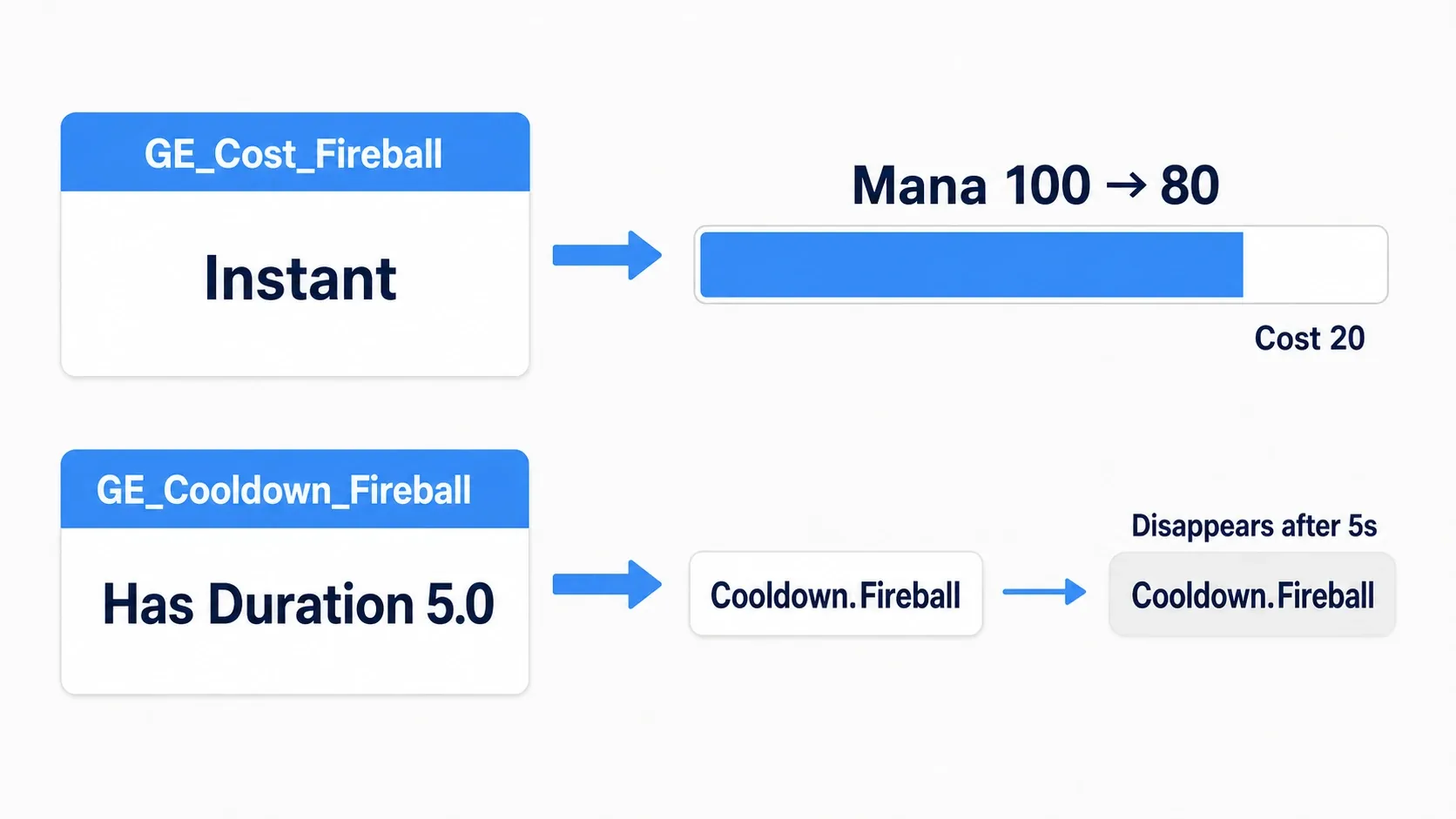
Our Cost is "an Instant GE adding -20 to Mana". The Cooldown is "a GE applying the tag Cooldown.Fireball for 5 seconds". A cooldown GE does not need any value-changing settings.
Specify each GE in the Ability's Cost and Cooldown fields. When activation is attempted, GAS confirms the cost is payable and that it is not on cooldown.
The actual payment happens when Commit Ability is called inside the Ability. Commit rechecks the cost and cooldown and applies both if they pass. Forgetting to call it ends with only the activation check, leaving MP and wait time unchanged.

End Ability , which ends the Ability, and the cooldown ending are separate too. Finishing the spell-casting steps immediately still leaves the 5-second GE in place. Calling End Ability does not make it reusable right after.
Tags stop new activations
A stun temporarily restricts action. In GAS, giving the target's ASC State.Stunned and specifying the same tag in the ability's Activation Blocked Tags blocks activation while it lasts.
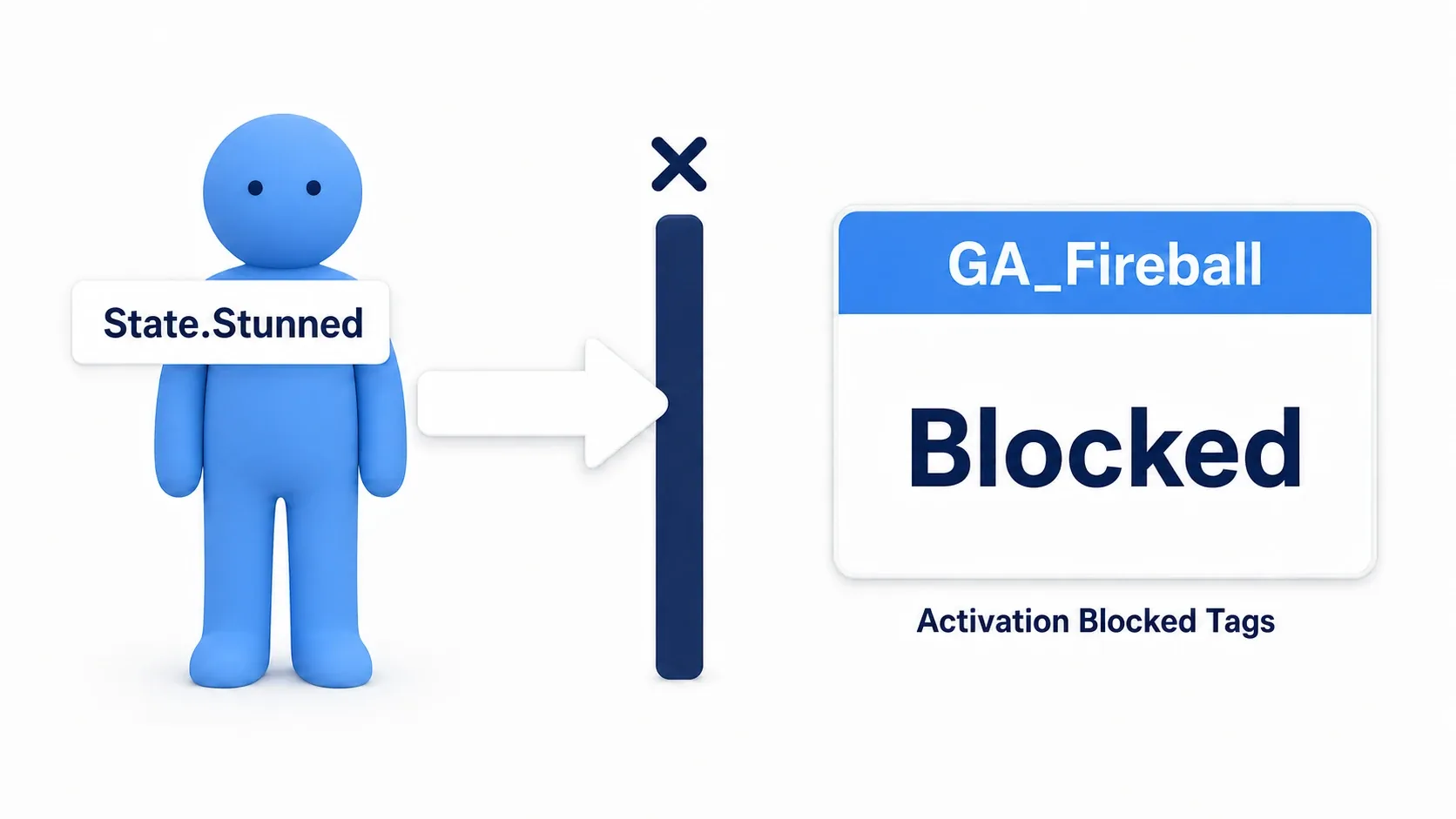
That is a setting that blocks new activations , though. Interrupting an Ability mid-cast needs cancellation logic. It does not automatically stop normal movement or projectiles already in flight.
| Ability tag field | What it represents |
|---|---|
| Asset Tags (formerly Ability Tags) | That Ability's kind. For example, Ability.Fireball |
| Activation Blocked Tags | Tags that block activation when the activating Actor's ASC has them |
| Activation Required Tags | Tags that block activation when the activating Actor's ASC lacks them |
| Activation Owned Tags | Tags applied to the activating Actor's ASC while the Ability runs |
Registering a tag in the tag dictionary does not put it on an ASC. In our hands-on we apply a GE granting State.Stunned for three seconds. Tags placed in your own Gameplay Tag Container variable do not become ASC tags either.
You can group with parent tags, but decide the range concretely. Blocking plain State also catches other states you add later. Start with State.Stunned alone.
Preparation: build a foundation for trying GAS
From here we try the fireball's activation conditions on a small scale. Activating reports through Print String and we watch the MP change. Projectiles and enemy damage are what you combine with the Projectile Movement article and the like once the conditions work.
When finished, pressing F takes Mana from 100 to 80. Pressing again immediately keeps it at 80. Waiting over five seconds and pressing takes it to 60. We also apply a stun from another key and confirm activation stops.

Prepare the project
- Use the same
CppFirstStepThird Person C++ project as the C++ introduction. Creating a new one with that name is fine. - Enable "Gameplay Abilities" in "Edit → Plugins" and restart the editor.
- In
PublicDependencyModuleNames.AddRange(...)inSource/CppFirstStep/CppFirstStep.Build.cs, add these three to the existing list. That lets C++ use GAS parts. Keep Core, Engine, and so on and separate entries with commas.
"GameplayAbilities", "GameplayTags", "GameplayTasks"
- Create
GASPracticewith Actor as the parent from "Tools → New C++ Class". After generation, close the editor and replace the following two files.
We put the MP-owning class and the practice Actor that uses it in the same header. In standard GAS, the Attribute Set corresponding to this MP definition is built in C++. Abilities and GEs on top of it can be configured in Blueprint.
GASPractice.h
The header defines the MP container and three operations callable from Blueprint. CPPFIRSTSTEP_API is a marker derived from the project name. For a differently named project, match the _API name in the generated GASPractice declaration.
#pragma once

#include "CoreMinimal.h"
#include "GameFramework/Actor.h"
#include "AbilitySystemInterface.h"
#include "AbilitySystemComponent.h"
#include "AttributeSet.h"
#include "GASPractice.generated.h"

class UGameplayAbility;
class UGameplayEffect;

// A container holding MP as a GAS value.
UCLASS()
class CPPFIRSTSTEP_API UPracticeManaSet : public UAttributeSet
{
    GENERATED_BODY()

public:
    UPROPERTY(BlueprintReadOnly, Category = "Practice")
    FGameplayAttributeData Mana;

    GAMEPLAYATTRIBUTE_PROPERTY_GETTER(UPracticeManaSet, Mana)
    GAMEPLAYATTRIBUTE_VALUE_GETTER(Mana)
    GAMEPLAYATTRIBUTE_VALUE_INITTER(Mana)
};

// An Actor placed once in the level to try GAS from key input.
UCLASS()
class CPPFIRSTSTEP_API AGASPractice : public AActor, public IAbilitySystemInterface
{
    GENERATED_BODY()

public:
    AGASPractice();
    virtual UAbilitySystemComponent* GetAbilitySystemComponent() const override;

    UFUNCTION(BlueprintCallable, Category = "Practice")
    void TryUseSpell();

    UFUNCTION(BlueprintCallable, Category = "Practice")
    void ApplyTestStun();

    UFUNCTION(BlueprintCallable, Category = "Practice")
    void ShowMana();

protected:
    virtual void BeginPlay() override;

    UPROPERTY(VisibleAnywhere, Category = "Practice")
    TObjectPtr<UAbilitySystemComponent> AbilitySystem;

    UPROPERTY()
    TObjectPtr<UPracticeManaSet> Attributes;

    UPROPERTY(EditDefaultsOnly, Category = "Practice")
    TSubclassOf<UGameplayAbility> SpellAbility;

    UPROPERTY(EditDefaultsOnly, Category = "Practice")
    TSubclassOf<UGameplayEffect> StunEffect;
};
GAMEPLAYATTRIBUTE_... are macros providing the logic that conveys MP to GAS along with value reading and initialization. Rather than tracing each mechanism, you can treat them as the part that makes Mana selectable from a GE and move on.
GASPractice.cpp
The implementation creates the ASC and MP container, initializes them at Play, and registers the Ability. TryUseSpell, used from the F key, asks the ASC to activate and then displays the current MP.
#include "GASPractice.h"
#include "Abilities/GameplayAbility.h"
#include "GameplayAbilitySpec.h"
#include "GameplayEffect.h"
#include "Components/SceneComponent.h"
#include "Kismet/KismetSystemLibrary.h"

AGASPractice::AGASPractice()
{
    PrimaryActorTick.bCanEverTick = false;
    SetRootComponent(CreateDefaultSubobject<USceneComponent>(TEXT("Root")));
    AbilitySystem = CreateDefaultSubobject<UAbilitySystemComponent>(TEXT("AbilitySystem"));
    Attributes = CreateDefaultSubobject<UPracticeManaSet>(TEXT("Attributes"));
}

UAbilitySystemComponent* AGASPractice::GetAbilitySystemComponent() const
{
    return AbilitySystem;
}

void AGASPractice::BeginPlay()
{
    Super::BeginPlay();
    AbilitySystem->InitAbilityActorInfo(this, this);
    Attributes->InitMana(100.0f);

    if (HasAuthority() && SpellAbility)
    {
        AbilitySystem->GiveAbility(FGameplayAbilitySpec(SpellAbility, 1, INDEX_NONE, this));
    }
    else if (!SpellAbility)
    {
        UE_LOG(LogTemp, Warning, TEXT("GASPractice: Set Spell Ability in Class Defaults."));
    }
    ShowMana();
}

void AGASPractice::TryUseSpell()
{
    if (HasAuthority() && SpellAbility)
    {
        AbilitySystem->TryActivateAbilityByClass(SpellAbility, false);
    }
    ShowMana();
}

void AGASPractice::ApplyTestStun()
{
    if (!HasAuthority() || !StunEffect)
    {
        return;
    }
    FGameplayEffectContextHandle Context = AbilitySystem->MakeEffectContext();
    Context.AddSourceObject(this);
    AbilitySystem->ApplyGameplayEffectToSelf(
        StunEffect.GetDefaultObject(), 1.0f, Context);
    UKismetSystemLibrary::PrintString(this, TEXT("Stun: 3 seconds"),
        true, true, FLinearColor::Yellow, 5.0f);
}

void AGASPractice::ShowMana()
{
    UKismetSystemLibrary::PrintString(this,
        FString::Printf(TEXT("Mana: %.0f"), Attributes->GetMana()),
        true, true, FLinearColor::Cyan, 5.0f);
}

InitAbilityActorInfo(this, this) 's two arguments are the Actor owning GAS and the Actor actually using Abilities. Both are GASPractice itself here. An Attribute Set created on the same Actor is discoverable from the ASC.
GiveAbility registers it as "an ability this Actor can use". Registering alone does not activate it; TryActivateAbilityByClass requests activation.
With the editor closed, build the project in Visual Studio with "Development Editor / Win64". Reopen the editor once it succeeds. The C++ so far is the practice foundation; next we configure the effects and ability.
Hands-On: try 20 MP and a 5-second wait
1. Prepare the tags and three Effects
Register Cooldown.Fireball and State.Stunned from "Edit → Project Settings → GameplayTags". The registration steps are the same as in the Gameplay Tag article.
In the Content Browser, choose GameplayEffect from "Blueprint Class → All Classes" and create these three assets. Open each and configure Class Defaults.
| Asset | Duration Policy | Settings |
|---|---|---|
| GE_Cost_Fireball | Instant | One entry in Modifiers. Attribute=PracticeManaSet.Mana, Modifier Op=Add, Magnitude's Scalable Float=-20 |
| GE_Cooldown_Fireball | Has Duration | Duration Magnitude's Scalable Float=5.0. Grants Cooldown.Fireball |
| GE_Stun_Practice | Has Duration | Duration Magnitude's Scalable Float=3.0. Grants State.Stunned |
A Modifier is how the value changes and Magnitude is by how much. We enter fixed values in the Scalable Float field rather than using formulas or tables. Period stays 0.

On the two tag-granting GEs, add Grant Tags to Target Actor under "Components" and specify the tag in the "Add Tags" field. That is the part which "applies a tag to the target's ASC while the effect lasts". "Asset Tags" classifies the GE itself and is not a substitute.
Explanations for UE5.2 and earlier show a screen setting Granted Tags directly. This article assumes the UE5.3-and-later screen using Components.
2. Assign Cost and Cooldown to the Ability
Create a Blueprint with GameplayAbility as the parent and name it GA_Fireball . Configure Class Defaults like this.
| Setting | Value |
|---|---|
| Cost Gameplay Effect Class | GE_Cost_Fireball |
| Cooldown Gameplay Effect Class | GE_Cooldown_Fireball |
| Activation Blocked Tags | State.Stunned |
| Instancing Policy | Instanced Per Actor |
| Net Execution Policy | Server Only |
Instanced Per Actor keeps one Ability instance per using Actor. This exercise reuses it on every activation. Server Only runs our experiment on the side that decides game logic, and we test it in single-player Play below.

We specify the Ability by class here, so the Ability's own Asset Tags can be empty. Cooldown.Fireball is the tag the cooldown GE applies to the target.
3. Display activation only when Commit succeeds
Add Event ActivateAbility in GA_Fireball's Event Graph and wire the white exec line into Commit Ability. Commit's exec output goes into a Branch and its red Return Value into the Branch's Condition. Commit's Target is Self.

Wire the Branch's True side into Print String with In String Fireball! and Duration 5.0. Expand the detail pins and turn on Print to Screen and Print to Log. Then call End Ability. The False side goes to End Ability without displaying anything. End Ability's Target is Self too.

A and B in the diagram continue the True and False exec lines. Connect them in the same Event Graph; there is no need to create nodes named A or B.
Return Value is Commit's result. A bool represents the two options True (success) and False (failure). Commit Ability is not a node with separate success and failure exec outputs. Confirm against the diagram that you branch by passing the bool result into a Branch .
Put End Ability on both paths. Leaving the Ability running under Instanced Per Actor is a cause of the next activation not being accepted.
4. Place the practice Actor and call from keys
Create a child Blueprint BP_GASPractice from the C++ Classes' GASPractice and choose the following under "Practice" in Class Defaults.
| Item | Value |
|---|---|
| Spell Ability | GA_Fireball |
| Stun Effect | GE_Stun_Practice |
Place exactly one BP_GASPractice in the level. It has no visuals, but being selectable in the Outliner is enough. Ability registration and MP initialization in BeginPlay live in C++, so no equivalent logic is needed in the BP.
Select the placed instance in the Outliner and open "Blueprints → Open Level Blueprint". Right-click to create a reference to that instance and build these inputs. Functions can be found by dragging from the reference's output.
- F Pressed → Try Use Spell
- G Pressed → Apply Test Stun
- M Pressed → Show Mana
Connect the same BP_GASPractice reference into each call's Target. We do not use Released.

Wire G and M to the same placed Actor as Target as well.

5. Confirm MP and wait time
Compile and save, then set Play to "Number of Players=1" and "Net Mode=Play Standalone". After Play, click the game screen so it accepts input.
| Action | Expected display |
|---|---|
| Start Play | Mana: 100 |
| Press F once | Fireball! and Mana: 80 |
| Press F again within 5 seconds | No new Fireball!, Mana: 80 |
| Wait over 5 seconds since the last activation and press F | Fireball! and Mana: 60 |
| Waiting over 5 seconds each, activate five times total | Mana: 0 |
| Wait over 5 seconds more and press F | No new Fireball!, Mana: 0 |
When a previous Fireball! is still on screen, watch for a new line appearing. You can also read it in the Output Log. Judge by combining the MP change with the success display.
6. Stop activation with a stun
Stop and Play again to return to MP 100. Press G once first and immediately press F. No Fireball! appears while stunned and Mana stays at 100. Pressing G, waiting over three seconds, and pressing F takes Mana to 80 and activates.

We start the stun experiment in a separate Play so the cause is not mixed with cooldown or insufficient MP. We built no movement-stopping logic here, so the Third Person character still walking is not a contradiction.
| When it does not behave as expected | Where to check |
|---|---|
| Mana: 100 does not appear at the start | BP_GASPractice's placement, the build, the log during Play |
| Pressing F does not even show Mana | The Level BP's Pressed and Target, focus on the game screen |
| Mana appears but Fireball! never does | Spell Ability, GiveAbility, the GA's Cost and tag settings |
| Fireball! appears but MP does not drop | The Cost assignment, Mana's Modifier, the Commit connection |
| Mashing reduces MP | The Cooldown GE assignment, the 5-second Duration, the granted tag setting |
| It works once and then never again | End Ability on both True and False paths, remaining MP |
| It activates even after G | Stun Effect, Grant Tags to Target Actor, the GA's Activation Blocked Tags |
Compare by changing only the numbers
Stop and change the Cost's -20 to -35. Play again and press F waiting over five seconds each time: MP goes 100 → 65 → 30. Next it cannot pay 35 and stays at 30. We added no "is MP at least 35" condition to the GA's graph.
Then return it to -20 and change the Cooldown's 5 seconds to 2. Being able to change effect settings and activation logic separately is material for judging how GAS feels to use.
Adoption is not decided by ability count alone
The same experiment can be built yourself with an MP variable and a Timer. GAS's value lies less in building this one spell than in continuing to handle effects and conditions through a shared mechanism.
| Your situation | Direction of the decision |
|---|---|
| A few abilities run independently with simple conditions | Start from gathering them into your own functions or Components |
| Cost, wait time, and status ailments are shared across many abilities | Build a small GAS prototype and compare configurability and maintenance |
| Effect stacking and networked ability design are central | Treat GAS as a strong candidate and verify the features you need early |
| Your own implementation is already stable | Weigh what migration gains against how much you rebuild |

Many abilities do not make it mandatory and few do not make it unnecessary. Some games have few abilities with complex effect combinations, and others have many that differ only by simple data.
When in doubt, build one or two representative abilities in a small project separate from your main one. Include what is difficult in your game, such as MP costs, state-based restrictions, and stacking effects. Comparing "what changed for the second one" and "could you trace a cause when it broke" gives you a picture of post-adoption work.
You can adopt it later, but migration grows when HP, abilities, saves, and UI connections all change. Prototyping before things get large reduces the odds of rebuilding your main game just to make the decision.
Bonus: good to know up front
HP limits and death handling are yours to build
GAS does not clamp something to 0 through max HP just because it is named Health. Logic for falling when HP reaches 0 is built on the game side. Our Mana is limited to an initial 100 and a payable Cost.
Extending seriously means using an Attribute Set's PreAttributeChange, PostGameplayEffectExecute, and the like to decide which limits apply to which values. Gathering effect-driven value changes into GEs makes them easier to trace, though direct value changes are not uniformly forbidden.
Consider what survives after the Actor is destroyed
Our ASC belongs to the practice Actor, so it ends with that Actor. To keep abilities and states when a character dies and is rebuilt, a design placing the ASC on the PlayerState is an option.
Separating the ASC's owner from the Avatar actually using abilities also requires rebinding to the regenerated character. Decide what you want to keep together with the Game Framework roles.
Extending to networking and presentation
This code is single-player practice. Extending to networking means designing Attribute Replication and Actor Info initialization timing. Replication conveys server-side state to clients. Changing one GAS setting does not complete all synchronization.
For visuals, you can use Gameplay Cue , the mechanism for invoking audio, particles, and other presentation in response to abilities and effects. Ability Task helps advance an Ability's logic while waiting for animation ends and events.
The official Lyra sample is study material for reading real examples. It contains plenty of design beyond the foundation, so looking for where our Cost, Cooldown, and Tags correspond makes it easier to decide where to start reading.
Summary
- Ability is "what to do", Effect is "what changes", Attribute is "the value", and tags are "the current state"
- MP cost and cooldown are both expressible as Gameplay Effects
- Reasons activation fails split into cost, cooldown, or tags
- Ability count alone does not decide whether to adopt it
The question to ask when deciding is "is adding and removing effects likely to grow later?" If it will, GAS; if fixed choices suffice, your own shared logic is enough.
Handling states with tags is in Gameplay Tags and simple damage handling in dealing damage.
Reference: Gameplay Ability System, Gameplay Abilities, Gameplay Effects, Commit Ability.